
DLT error code 633 means the text of your SMS does not match the approved template for the Template ID you sent, so the operator blocked it. Error 630 means the Template ID was not found on DLT at all. Both codes are used this way by Jio and SmartPing. Both are fixed on your side, by sending the exact approved text with the right Template ID.
This page explains 633, 630 and the other template codes next to them, and how to find and fix the cause in Fast2SMS.
Template error codes by operator
Jio and SmartPing use 630 and 633 for these errors. Airtel uses different numbers for the same problems, so check the operator column.
| What went wrong | Jio | SmartPing | Airtel |
|---|---|---|---|
| SMS text does not match the registered template | 633 | 633, 5307 | 666 |
| Template ID not found on DLT | 630 | 630 | – |
| Text not matching, or template not registered | – | 112, 5301, 5401 to 5406 | – |
| Template ID missing or in the wrong format | 637 | 637, 5304 | 613 |
| Template could not be identified | 636 | 636 | 615 |
| Sender ID not linked to this template | 634 | 634, 5303 | 614 |
| A variable value is too long | 635 | 635, 5312 | 635 |
| Template inactive | 631 | 631, 5311 | – |
| Template blacklisted | 632 | 632, 5306 | 805 |
For every other code, see the full lists for Jio, SmartPing and Airtel.
Why error 633 happens
The operator compares your message with the approved template character by character. Only the parts marked {#var#} may change. Common causes:
- a word in the fixed text was changed, added or removed,
- extra spaces, a missing full stop or a different line break,
- curly quotes or other hidden characters copied from Word or WhatsApp,
- a variable value that carries extra text, such as a long address or a link where the template has no link variable,
- the right text sent with the Template ID of a different template.
Why error 630 happens
- One digit of the Template ID is wrong, often from typing it instead of copying it.
- The template is not approved yet on your DLT portal, or was registered under another entity.
- Your software sends an old Template ID after you registered a new version of the template.
How to fix error 633 or 630 in Fast2SMS
-
Open the template in DLT Manager
Go to DLT Manager > Content Template and search by Template ID or a few words of the message. Each card shows the approved text with the variables marked, the Message ID, Sender ID, Template ID and Entity. Compare the text and Template ID with what is approved on your DLT portal.
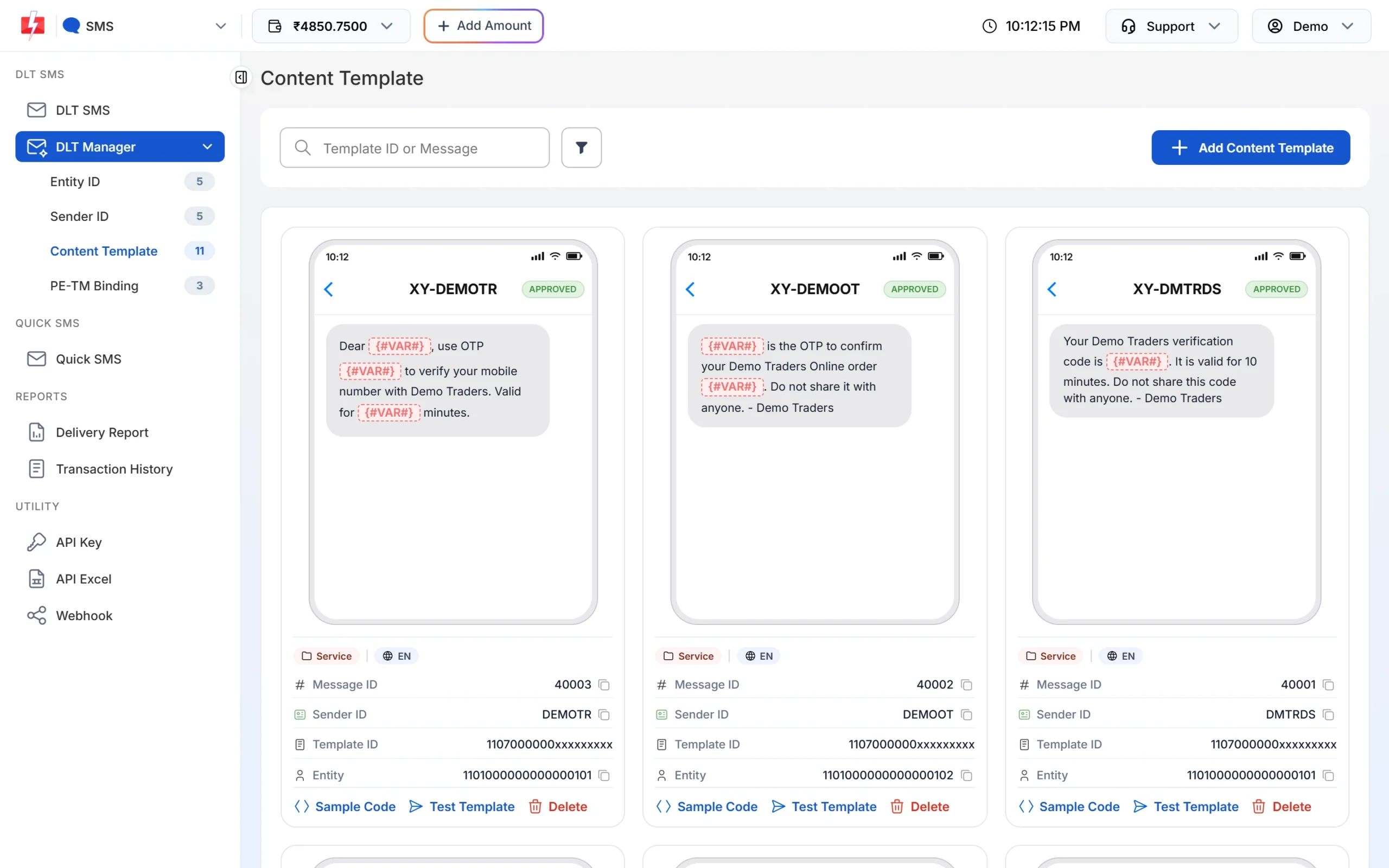
Each template card shows its text, IDs and status. -
Correct the text, the ID or the link
If the text in your software differs, copy the approved text again exactly. If the Template ID was saved wrongly, delete the template and add it again with the ID copied from your DLT portal. If the Sender ID is not linked to the template (error 634), send from the header the template belongs to, or link the header on your DLT portal.
-
Send one test SMS to your own phone
On the approved card, click Test Template. Enter your mobile number, pick the Sender ID, fill each variable with a realistic value and click Send Test SMS. The window then checks the delivery report for you. This is a real SMS from your account, so the normal SMS charge can apply.
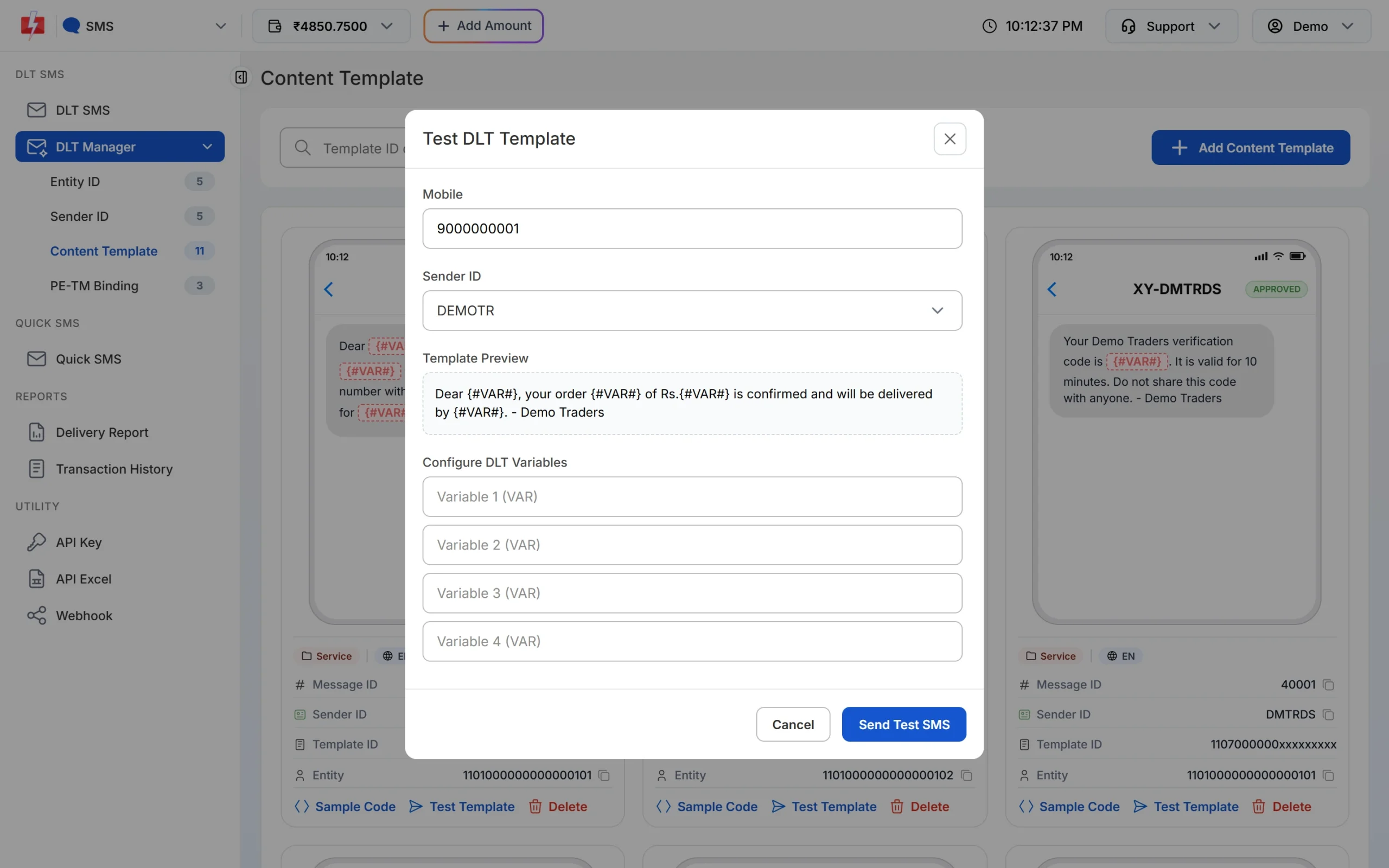
Test a fixed template before you send it to your list.
route=dlt) you pass the Message ID and the variable values, and Fast2SMS fills in the approved text, so the fixed text cannot drift. With the DLT Manual API your software sends the full text and the Template ID, so a changed word or old ID in your code leads straight to 633 or 630.Frequently asked questions
What is DLT error code 633?
At Jio and SmartPing, 633 means the message text did not match the approved template for the Template ID sent, so the SMS was blocked. Airtel reports the same problem as 666.
What is error code 630 in DLT?
At Jio and SmartPing, 630 means DLT has no template with the Template ID that came with your SMS.
My text looks the same. Why do I still get 633?
The check is character by character. A double space, a curly apostrophe or a line break is enough. Paste both texts into a plain text editor and compare them line by line.
Can I edit an approved template to stop the error?
Not the text. Register the new wording as a new template on your DLT portal, add it in DLT Manager, and switch to it once approved.
Are SMS that fail with 633 refunded?
No. DLT SMS are charged when the campaign is created, and numbers that fail at the operator are not refunded automatically. Test before a large send.
Where do I see this error in Fast2SMS?
Open the send in SMS Report and read the Description column in Delivery Details. For the exact operator code, share the Request ID with support.