
Order and delivery SMS templates for an online store are registered on DLT as Service Implicit, with payment confirmations as Transactional. This page gives you 14 ready-to-register e-commerce SMS templates for every step of an order, from “order placed” to “refund processed”, with the right variable tags, a sample message, the character count and the number of SMS parts. It ends with the steps to add them in Fast2SMS and send them.
Which DLT category for each order SMS
| Order event | DLT category | Why |
|---|---|---|
| Payment received | Transactional | Sent right after the customer pays |
| Order confirmed, packed, shipped, out for delivery, delivered | Service Implicit | Updates about something the customer already bought |
| Delivery failed, cancellation, return pickup, invoice | Service Implicit | Service information for an existing order |
| Refund processed | Service Implicit (some portals accept Transactional) | Refund information about an existing order |
| Cart reminder, “use code SAVE10”, new arrivals | Promotional | They try to sell. Promotional SMS go only 10 AM to 9 PM and not to DND numbers. |
Transactional and Service Implicit SMS reach numbers on DND and can go out at any hour, so order updates arrive on time even at night. In every sample, change “Demo Traders” to your own brand. Counts are for the sample message shown.
Before you start
- Your business (entity) and a header such as DEMOTR are approved on a DLT portal.
- The PE-TM chain with Fast2SMS is done. See PE-TM binding in Fast2SMS.
- Your tracking or invoice domain and your support number are whitelisted as CTAs on the DLT portal, if you use
{#url#}or{#cbn#}.
Order placed and payment templates
1. Order confirmed
DLT category: Service Implicit. Variables: {#alphanumeric#}, {#numeric#}.
Dear {#alphanumeric#}, your Demo Traders order {#alphanumeric#} of Rs {#numeric#} is confirmed. We will send you an update when it ships. - Demo TradersSample message (125 characters, English, 1 SMS): Dear Priya, your Demo Traders order DT10458 of Rs 1499 is confirmed. We will send you an update when it ships. – Demo Traders
2. Payment received
DLT category: Transactional. Variables: {#numeric#}, {#alphanumeric#}.
We have received Rs {#numeric#} for your Demo Traders order {#alphanumeric#}. Thank you for your payment. - Demo TradersSample message (104 characters, English, 1 SMS): We have received Rs 1499 for your Demo Traders order DT10458. Thank you for your payment. – Demo Traders
Shipping and delivery templates
3. Order packed
DLT category: Service Implicit. Variables: {#alphanumeric#}.
Your Demo Traders order {#alphanumeric#} is packed and will be handed to our courier partner soon. - Demo TradersSample message (104 characters, English, 1 SMS): Your Demo Traders order DT10458 is packed and will be handed to our courier partner soon. – Demo Traders
4. Order shipped with tracking link
DLT category: Service Implicit. Variables: {#alphanumeric#}, {#url#}.
Your Demo Traders order {#alphanumeric#} is shipped. AWB number {#alphanumeric#}. Track it here: {#url#} - Demo TradersSample message (127 characters, English, 1 SMS): Your Demo Traders order DT10458 is shipped. AWB number 7731845520. Track it here: https://demotraders.in/t/10458 – Demo Traders
The tracking link must start with a domain you whitelisted as a CTA on your DLT portal. A link on any other domain fails, even with an approved template.
5. Out for delivery (with COD amount)
DLT category: Service Implicit. Variables: {#alphanumeric#}, {#numeric#}.
Your Demo Traders order {#alphanumeric#} is out for delivery today. Please keep Rs {#numeric#} ready if you chose cash on delivery. - Demo TradersSample message (130 characters, English, 1 SMS): Your Demo Traders order DT10458 is out for delivery today. Please keep Rs 1499 ready if you chose cash on delivery. – Demo Traders
6. Delivered
DLT category: Service Implicit. Variables: {#alphanumeric#}, {#cbn#}.
Your Demo Traders order {#alphanumeric#} has been delivered. For any help with your order, call us on {#cbn#}. - Demo TradersSample message (119 characters, English, 1 SMS): Your Demo Traders order DT10458 has been delivered. For any help with your order, call us on 9000000001. – Demo Traders
7. Delivery attempt failed
DLT category: Service Implicit. Variables: {#alphanumeric#}, {#cbn#}.
We could not deliver your Demo Traders order {#alphanumeric#} today. We will try again on {#alphanumeric#}. To change the address, call {#cbn#}. - Demo TradersSample message (143 characters, English, 1 SMS): We could not deliver your Demo Traders order DT10458 today. We will try again on 22 Nov. To change the address, call 9000000001. – Demo Traders
Cancellation, return and refund templates
8. Order cancelled
DLT category: Service Implicit. Variables: {#alphanumeric#}, {#numeric#}.
Your Demo Traders order {#alphanumeric#} has been cancelled as requested. If you paid online, the refund will be processed in {#numeric#} working days. - Demo TradersSample message (147 characters, English, 1 SMS): Your Demo Traders order DT10458 has been cancelled as requested. If you paid online, the refund will be processed in 5 working days. – Demo Traders
9. Return pickup scheduled
DLT category: Service Implicit. Variables: {#alphanumeric#}.
Return pickup for your Demo Traders order {#alphanumeric#} is scheduled on {#alphanumeric#}. Please keep the item ready in its original packing. - Demo TradersSample message (140 characters, English, 1 SMS): Return pickup for your Demo Traders order DT10458 is scheduled on 23 Nov. Please keep the item ready in its original packing. – Demo Traders
10. Refund processed
DLT category: Service Implicit. Variables: {#numeric#}, {#alphanumeric#}.
Refund of Rs {#numeric#} for your Demo Traders order {#alphanumeric#} has been processed. It will reach your account in 5-7 working days. - Demo TradersSample message (136 characters, English, 1 SMS): Refund of Rs 1499 for your Demo Traders order DT10458 has been processed. It will reach your account in 5-7 working days. – Demo Traders
11. Invoice ready
DLT category: Service Implicit. Variables: {#alphanumeric#}, {#url#}.
Your invoice for Demo Traders order {#alphanumeric#} is ready. Download it here: {#url#} - Demo TradersSample message (119 characters, English, 1 SMS): Your invoice for Demo Traders order DT10458 is ready. Download it here: https://demotraders.in/inv/10458 – Demo Traders
Cart reminder (promotional)
A message that asks the customer to come back and buy is promotional, even without a discount. Register it under Promotional with your industry category, send it only between 10 AM and 9 PM, and give an opt-out, as TRAI’s 2025 rules require for promotional messages. It will not reach numbers on DND.
12. Items left in the cart
DLT category: Promotional. Variables: {#url#}, {#cbn#}.
Your Demo Traders cart is waiting. Complete your order here: {#url#} To stop offer SMS, call {#cbn#}. - Demo TradersSample message (139 characters, English, 1 SMS): Your Demo Traders cart is waiting. Complete your order here: https://demotraders.in/cart To stop offer SMS, call 9000000001. – Demo Traders
Hindi order SMS templates
Hindi templates are sent as Unicode, where 1 SMS part holds 70 characters. Both samples below are over 70 characters, so each uses 2 parts per customer. Shorten them if cost matters more than detail.
13. Order confirmed (Hindi)
DLT category: Service Implicit. Variables: {#alphanumeric#}.
प्रिय {#alphanumeric#}, आपका Demo Traders ऑर्डर {#alphanumeric#} कन्फर्म हो गया है। धन्यवाद। - Demo TradersSample message (87 characters, Unicode, 2 SMS parts): प्रिय Priya, आपका Demo Traders ऑर्डर DT10458 कन्फर्म हो गया है। धन्यवाद। – Demo Traders
14. Out for delivery (Hindi)
DLT category: Service Implicit. Variables: {#alphanumeric#}, {#numeric#}.
आपका Demo Traders ऑर्डर {#alphanumeric#} आज डिलीवर होगा। COD के लिए Rs {#numeric#} तैयार रखें। - Demo TradersSample message (93 characters, Unicode, 2 SMS parts): आपका Demo Traders ऑर्डर DT10458 आज डिलीवर होगा। COD के लिए Rs 1499 तैयार रखें। – Demo Traders
Tips to get order SMS templates approved
- Keep offers out of order updates. A line like “use code SAVE10 on your next order” makes the whole SMS promotional. It can be rejected, and if approved as promotional it will not reach DND numbers or go out at night. Send the offer as a separate promotional SMS.
- Use
{#alphanumeric#}for order IDs, AWB numbers and dates,{#numeric#}only for amounts and counts, and{#url#}for links. - Put fixed words between variables. Two variables can sit side by side only if both are
{#alphanumeric#}. - Stay at three variables or fewer. More need written reasons and a separate approval.
- Keep each value short. A variable value is limited to 40 characters for
{#alphanumeric#}and 120 for{#url#}. The Fast2SMS API also cuts each value at 40 characters, so keep long links short. - Write Rs, not the rupee symbol. The symbol makes the SMS Unicode and halves the space in each part.
- Brand name in the fixed text, and the same wording in your sample message as in the template.
Using a store plugin? Our libraries for Shopify and WooCommerce map each order event to the plugin’s own fields.
How to add your order templates in Fast2SMS and send them
After your DLT portal approves a template, add it to Fast2SMS once. Then you can send it from the panel, from a CSV file, or from your store through the API.
-
Register the template on your DLT portal
Log in to the DLT portal where your business is registered and add a content template. Pick the category shown with the template, link it to one approved header, paste the text with its variable tags and add a sample message with realistic values. If the text has a
{#url#},{#urlott#}or{#cbn#}variable, whitelist that link or phone number as a CTA on the portal first. Once the portal approves it, note the Content Template ID and take a screenshot of the approved row. -
Add it in DLT Manager
In the Fast2SMS SMS app, open DLT Manager > Content Template and click Add Content Template. Select your entity, tick the Sender ID, enter the Content Template ID, choose Service Implicit as the Template Type (this option covers both Transactional and Service Implicit templates), paste the approved text exactly as the portal shows it in Copy-Paste Approved Message Text, upload the screenshot and click Submit.
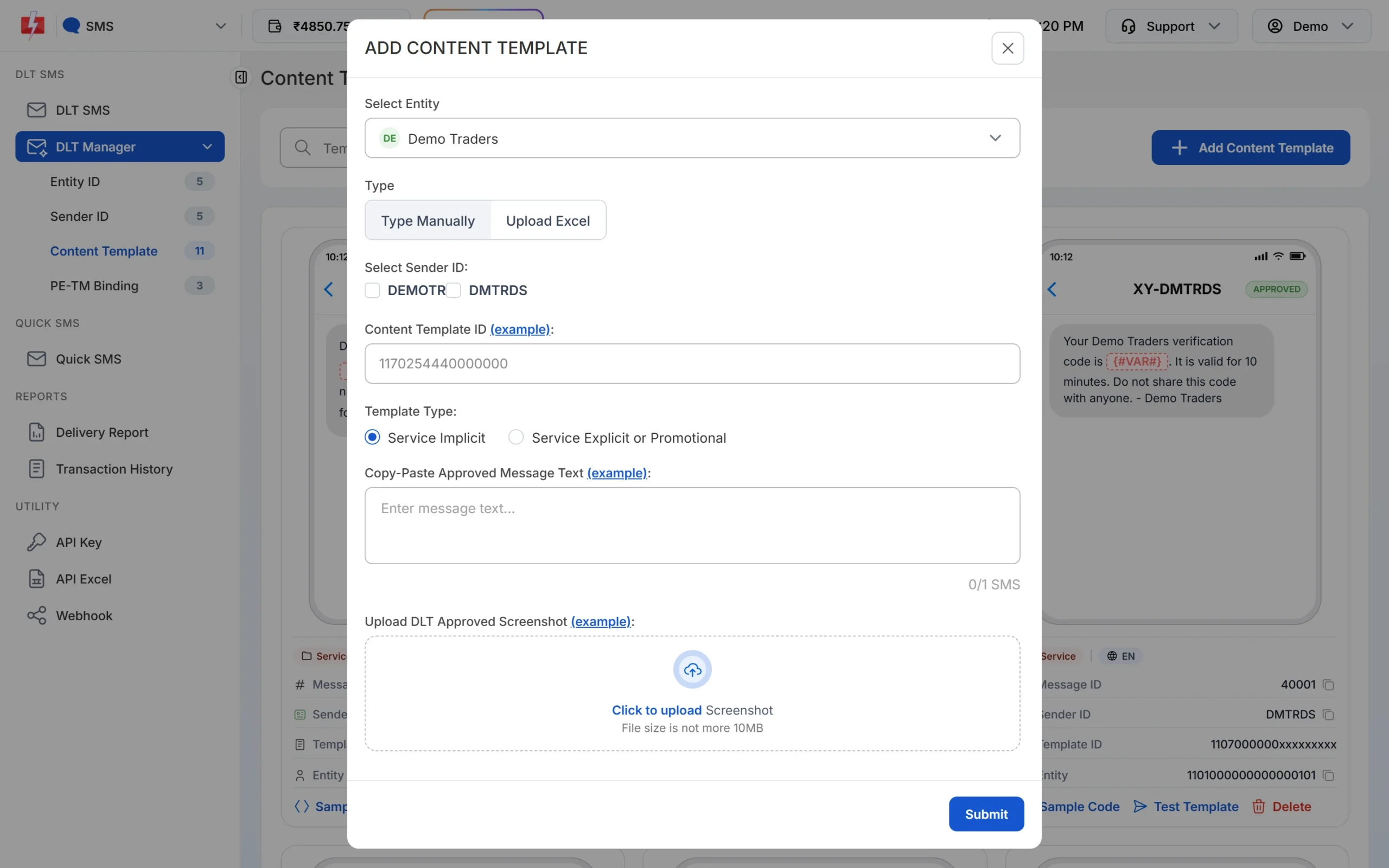
Paste the text exactly as it was approved, including spaces and full stops. -
Wait for Approved and note the Message ID
The template is saved as Pending while Fast2SMS checks it against your screenshot. When the card shows APPROVED, it also shows a Message ID. That short number is what you pass as
messagein the API. The card shows every variable as {#VAR#}, whatever tag you registered. Use Test Template to send one real SMS to your own number before a campaign.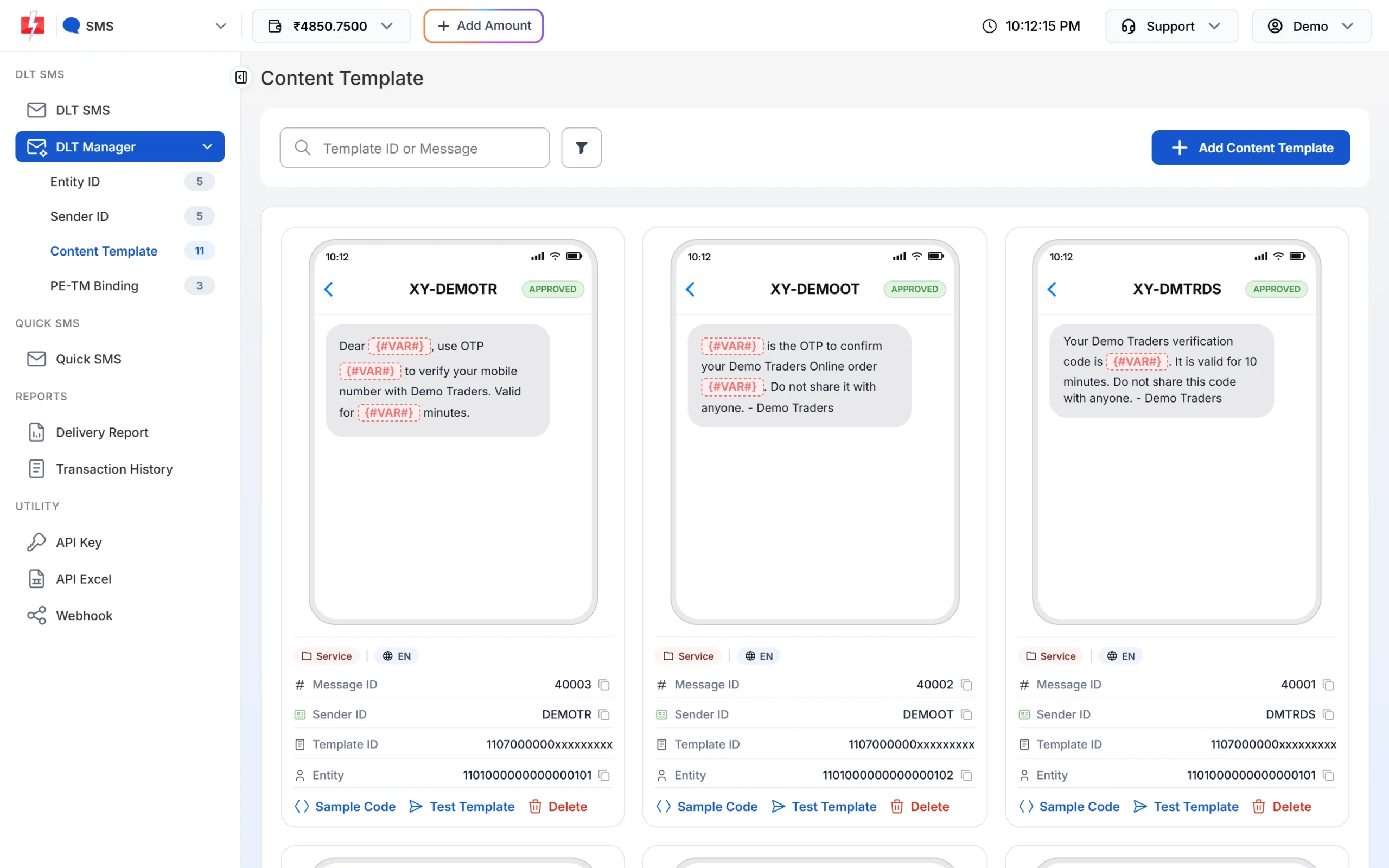
Each approved card shows its Message ID and the Test Template button. -
Pick the template on the DLT SMS page
Open DLT SMS, choose the Sender ID and add numbers under Send To: type them in List, pick contacts from Address Book or upload a CSV File. Then click Select DLT Template. The picker has All, Service Implicit and Service Explicit tabs.
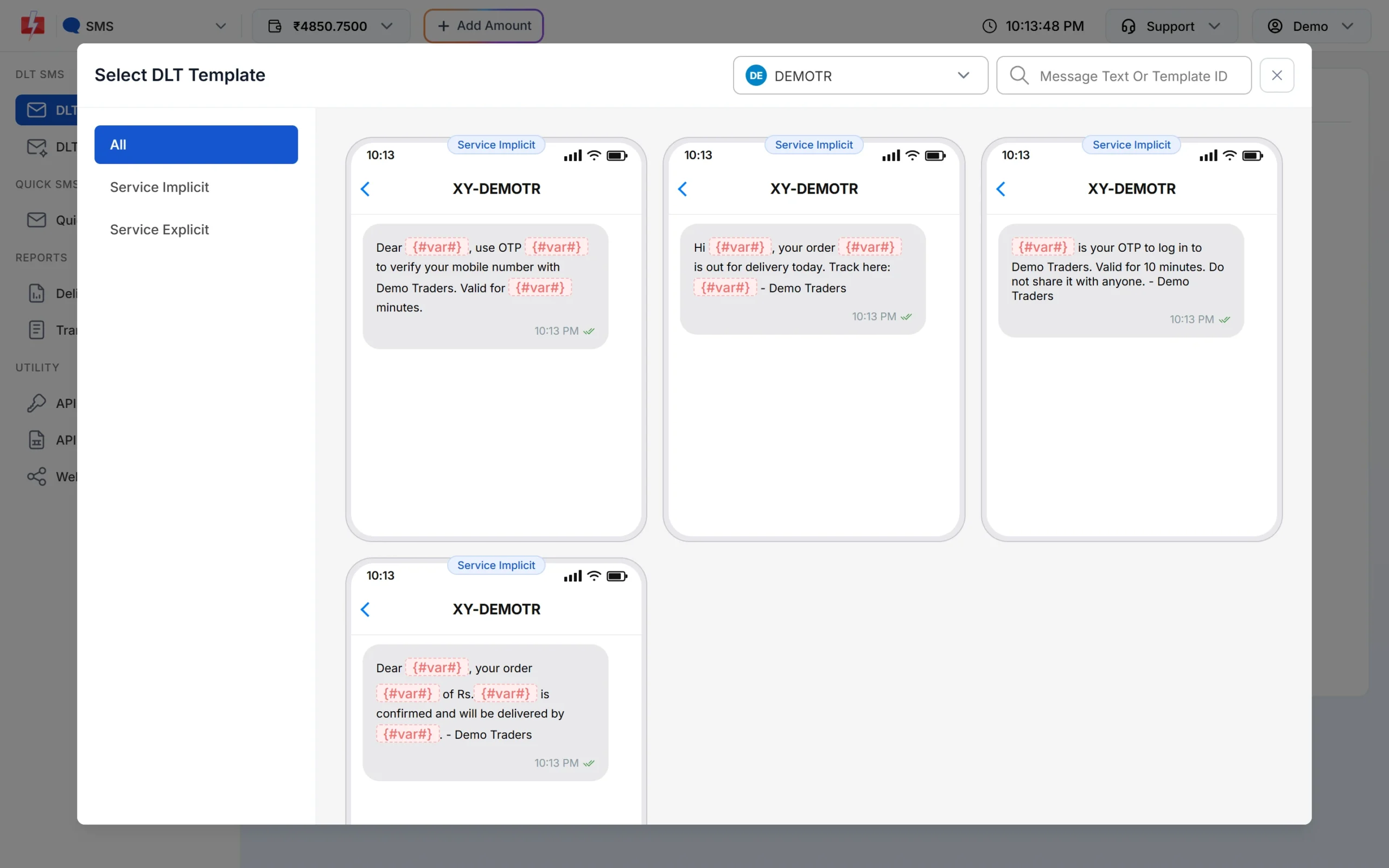
Only approved templates linked to the chosen sender are listed. -
Fill the variables and check the preview
The page shows one box for each variable. As you type, the phone preview shows the final SMS and the counter under it shows characters and SMS parts, such as 107/1 SMS. To send each person their own name, amount or date, use CSV File and map each variable to a column.
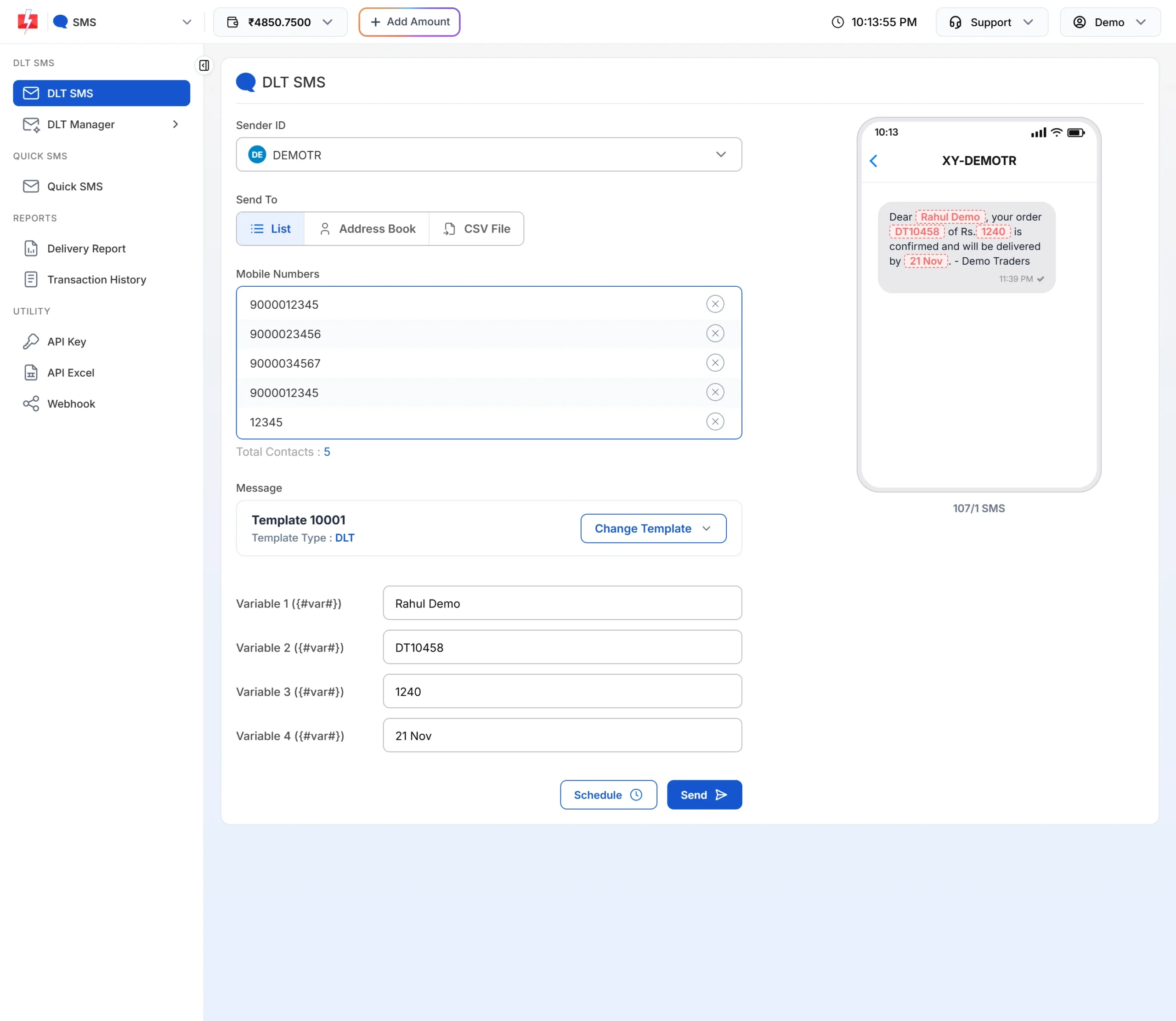
The counter shows how many parts each SMS will use. -
Check the cost, then send or schedule
Click Send. The Message Preview & Confirmation popup shows the cost per SMS, total messages, total, duplicate, valid and invalid numbers, and the total cost. Duplicates and invalid numbers are not charged. Click Confirm & Send, or close it and use Schedule to pick a date and time.
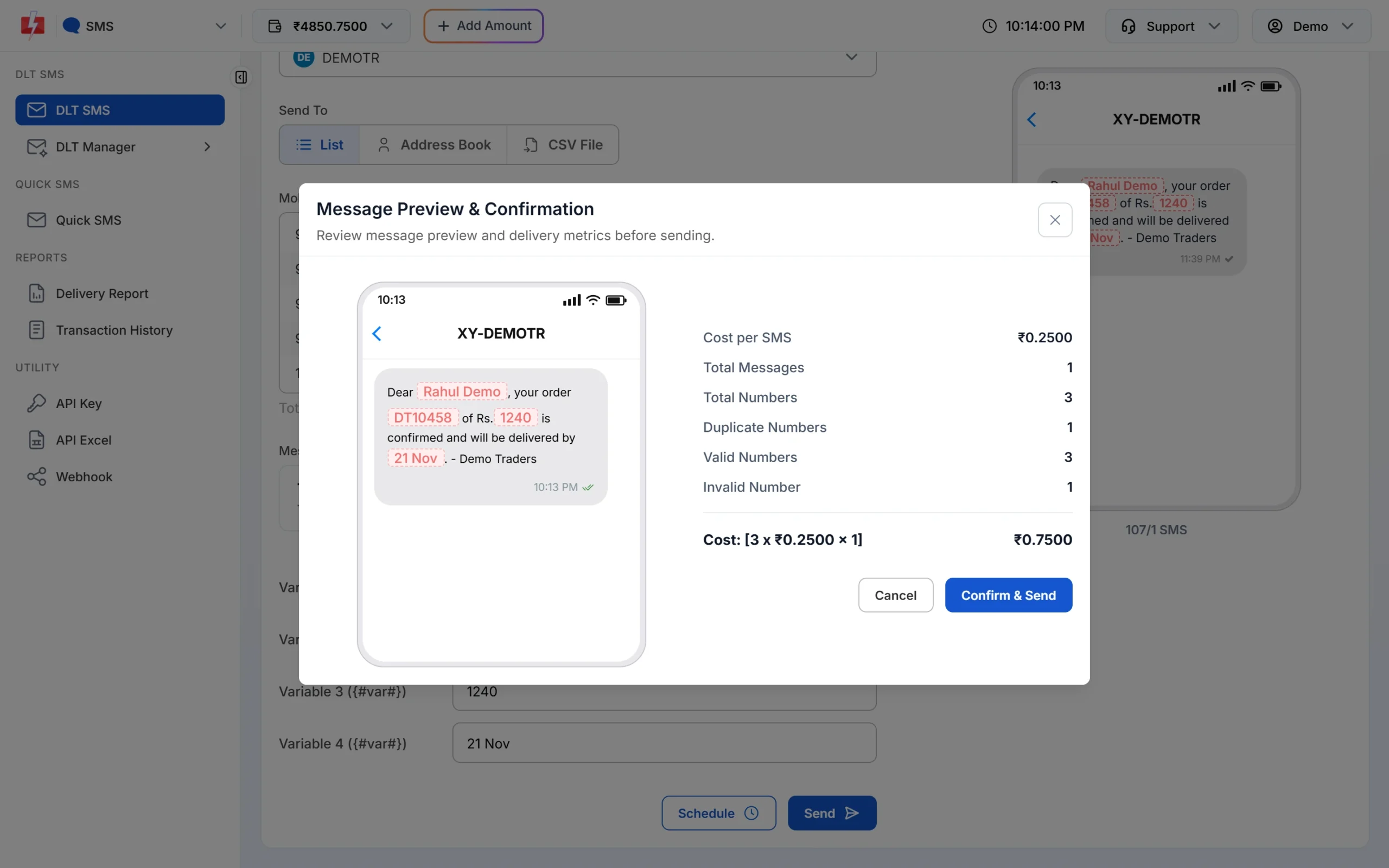
Nothing is sent until you click Confirm & Send.
Each SMS part is charged as one SMS for every valid number, so a template that runs into 2 parts costs twice as much per person as a 1-part template. Keep the text short to save money. See the current rates on the bulk SMS pricing page.
Sending in bulk? For high SMS volumes our team offers discounted rates. Talk to our team or see SMS pricing.
Frequently asked questions
Is an order confirmation SMS transactional or service?
Register it as Service Implicit. TRAI’s rules treat a message that carries service information, such as an order update, as a service message. A plain payment confirmation sent right after payment can be Transactional.
Can order update SMS go to DND numbers?
Yes. Service Implicit and Transactional SMS reach DND numbers and can be sent at any time.
Can I add a tracking link in a DLT template?
Yes. Use a {#url#} variable and whitelist your tracking domain as a CTA on the DLT portal before you send.
Can I add a discount code to a delivery SMS?
No. Any offer line makes the message promotional. Send offers in a separate promotional template.
How many SMS parts does an order SMS use?
An English SMS up to 160 characters is 1 part. A Hindi SMS up to 70 characters is 1 part. The counter on the Fast2SMS send page shows the parts before you send.
Can I send order SMS automatically from my website?
Yes. Call the DLT SMS API with route=dlt, your Sender ID, the template’s Message ID and the values for each variable.
What happens if the text I send does not match the template?
The operator rejects the SMS. Only the variable parts can change. Even an extra space or a changed full stop causes a mismatch.