
This iOS example gives you a ready OTP login screen in Swift and SwiftUI for iOS 15 and later. The user types a mobile number, gets a code by SMS or WhatsApp through Fast2SMS Smart OTP, taps the code iOS shows above the keyboard or types it, and your app gets a signed “verified” token. The app talks only to your own backend, which holds the API key.
Download the iOS (Swift) OTP widget example (zip)Download .zip
Download the complete OTP widget kit (zip)Download .zip
.xcconfig file or the code. App bundles are easy to unpack. The key lives only in the backend’s environment, and the app only knows your backend URL.What is in the iOS example
| File | What it does |
|---|---|
F2sOtp/F2sOtpClient.swift |
send, verify and resend with async/await and URLSession, plus cleanMobile. |
F2sOtp/OtpView.swift |
The SwiftUI screen: phone field with +91, Send, code field with .textContentType(.oneTimeCode) and .keyboardType(.numberPad), resend countdown, errors (also read out by VoiceOver) and onVerified(token, mobile). |
F2sOtp/F2sOtpApp.swift |
A small app that shows the screen and where to send the token. |
The app needs one of the kit’s backends to talk to (see the OTP widget overview).
Before you start
- A Fast2SMS account with wallet balance.
- An approved DLT OTP template, or a WhatsApp Authentication or Utility template.
- Xcode, an iOS 15+ target and a server for one of the backends.
Set up OTP on iOS
-
Create a Smart OTP template and copy its OTP ID
In the Fast2SMS panel, open Smart OTP > OTP Template List and click Add OTP Template. Pick SMS Channel with your approved DLT OTP template, or WhatsApp Channel with an approved Authentication or Utility template. You can add a fallback on the other channel. Then copy the 10-character OTP ID from the card. It decides the channel, the template and the fallback for every code the widget sends.
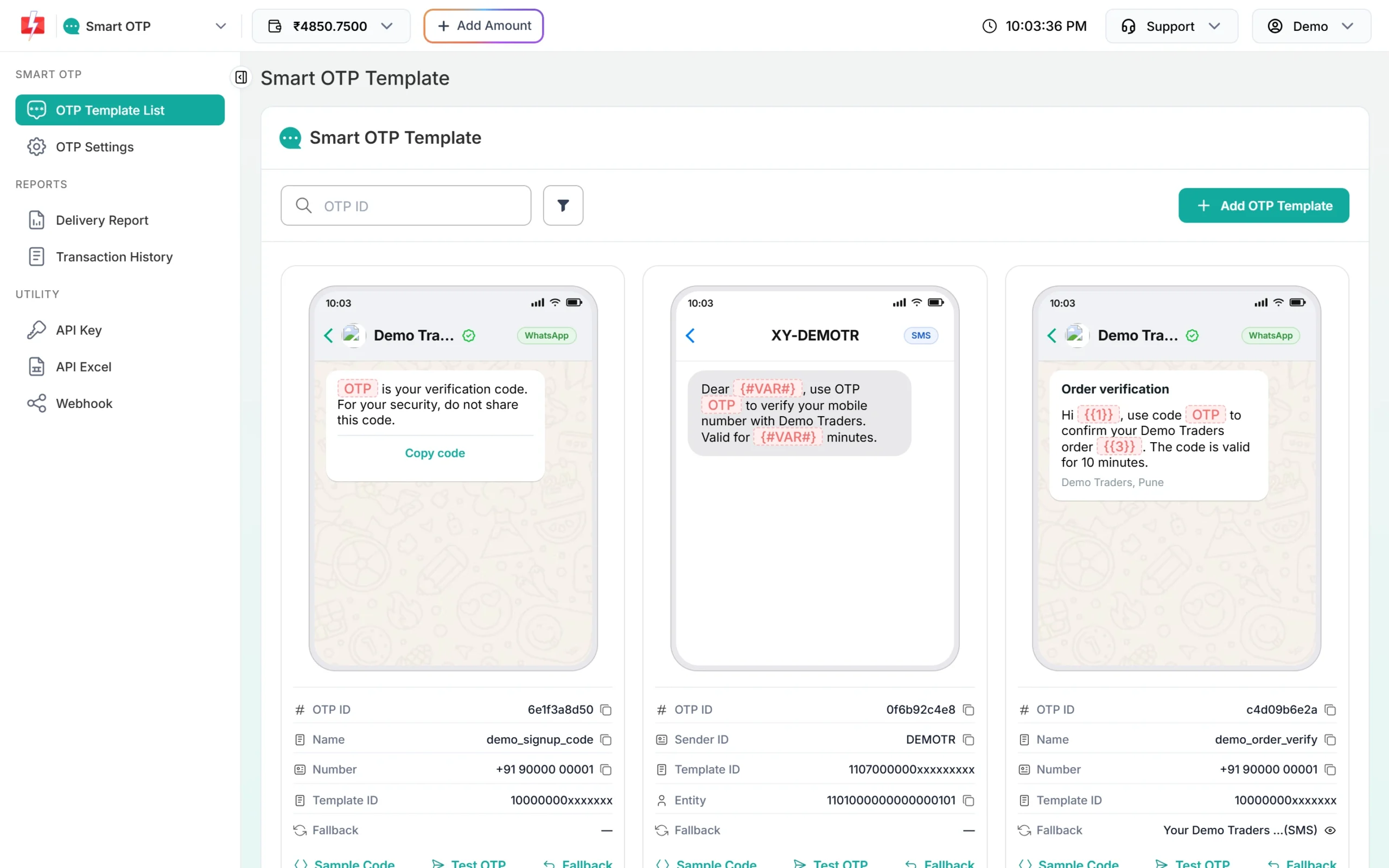
Copy the OTP ID from the template card. -
Run a backend that holds your API key
The widget never calls Fast2SMS. It calls a small backend that you run, and only that backend knows your API key. The full kit has ready backends for PHP hosting (one file), Node.js with Express, Python Flask, Django, Laravel, Cloudflare Workers, Vercel or Netlify functions and Google Apps Script (see the OTP widget overview). Copy the key from API Key under UTILITY in the panel, and give the backend these three settings:
FAST2SMS_API_KEY=YOUR_API_KEY F2S_OTP_ID=YOUR_OTP_ID F2S_TOKEN_SECRET=at-least-32-random-charactersF2S_TOKEN_SECRETis any random text of 32 or more characters. The backend will not start (or, on PHP and serverless hosts, refuses every request) if one of these is missing or wrong. The app talks to this backend over HTTPS; use a URL such ashttps://www.example.com/f2s-otp.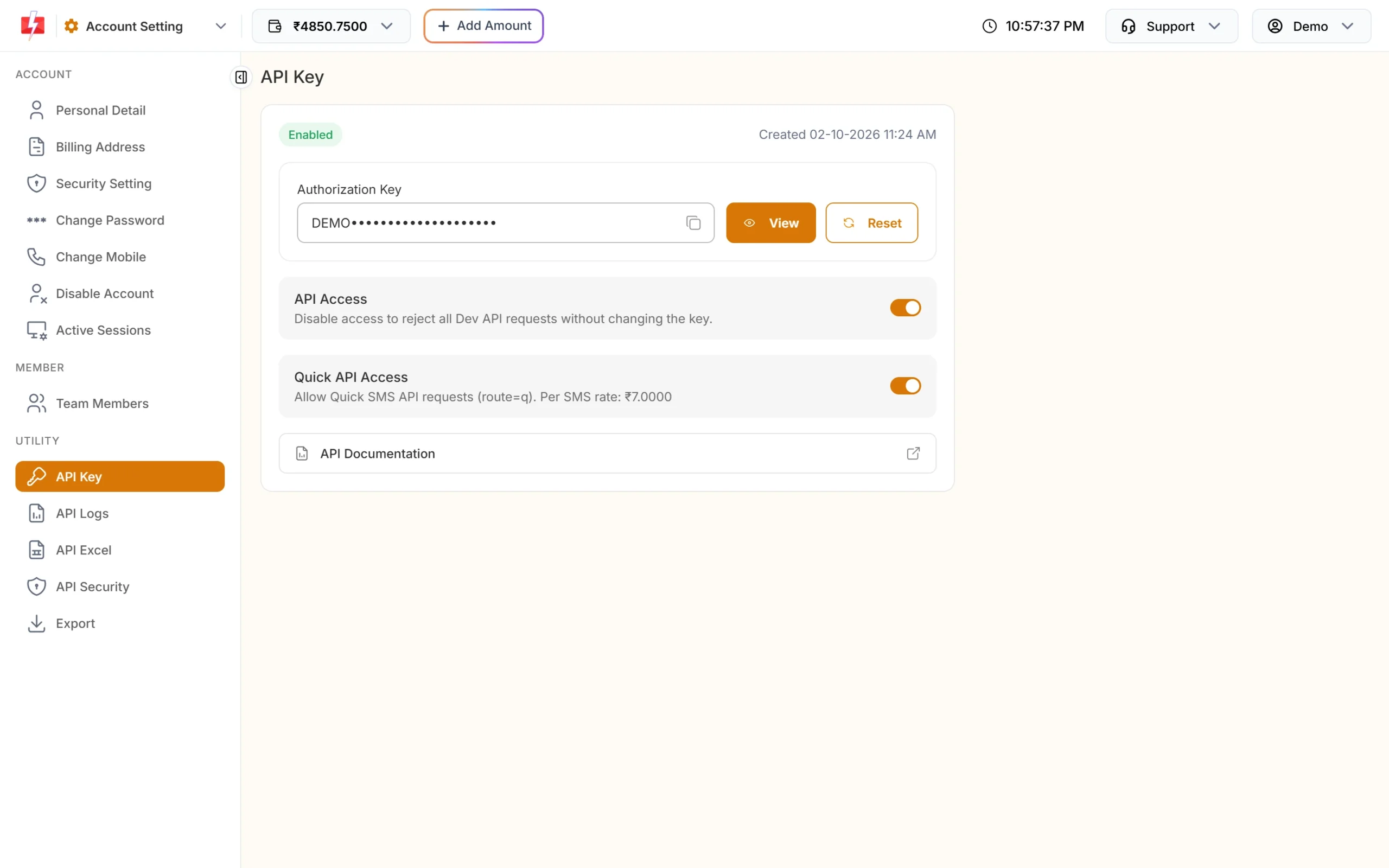
The key goes into your backend settings only. -
Add the files to an Xcode project and set the endpoint
Create a new iOS App project in Xcode with SwiftUI. Add the three files from
F2sOtp/and replace the generated App file withF2sOtpApp.swift. SetotpEndpointto your backend URL and run.To test in the Simulator with a backend on your Mac,
http://localhost:3000/f2s-otpworks only with an App Transport Security exception in Info.plist. Use that for local testing only; the live app should call an HTTPS URL.
Use the screen in your own app
let otpEndpoint = URL(string: "https://www.example.com/f2s-otp")! // your backend, never fast2sms.com

OtpView(client: F2sOtpClient(endpoint: otpEndpoint)) { token, mobile in
    // Send the token to YOUR login API (field name e.g. f2s_token).
    // Your server checks it, then starts the session.
}
For a second OTP ID, create the client as F2sOtpClient(endpoint: otpEndpoint, otpId: "YOUR_OTP_ID"). The backend accepts it only if it is in F2S_OTP_IDS.
The code above the keyboard
The code field uses .textContentType(.oneTimeCode), so iOS can offer the code from an SMS in Messages while the field is focused. iOS does not suggest codes that arrive on WhatsApp; the user types or copies those. The screen still works if no suggestion appears.
What the app sends to your backend
| Request body | Success answer |
|---|---|
{"action":"send","mobile":"9999999999"} |
ok, masked, resend_after, length, expires_in, ticket |
{"action":"verify","mobile":"9999999999","otp":"123456","ticket":"..."} |
ok, masked, token, expires_in (600) |
{"action":"resend","mobile":"9999999999","ticket":"..."} |
same as send |
Every call is a POST to your endpoint with the headers Content-Type: application/json and X-F2S-Widget: 1. Errors come back as {"ok":false,"reason":"...","message":"..."}, and the screen shows message, which is plain English. The ticket from send is kept in memory only; verify and resend need it.
Check the token on your server
The onVerified callback in the app proves nothing to your server on its own. Send the token to your own log-in or sign-up API, check it there with the backend kit’s helper, and only then create the session:
// Node.js / Express backend kit
const v = await otp.verifyToken(req.body.f2s_token, { mobile: req.body.phone });
if (!v) return res.status(403).send('Mobile number not verified.');
// v.mobile is the verified 10-digit number. A token works only once.
<?php
// PHP single-file backend kit
require __DIR__ . '/f2s-otp.php';
$v = \F2sOtp\verify_token($_POST['f2s_token'] ?? '', $_POST['phone'] ?? null);
if ($v === null) { http_response_code(403); exit('Mobile number not verified.'); }
// $v['mobile'] is the verified 10-digit number.The token lasts 10 minutes by default and works once. Use the number the helper returns, not a number the app sends separately.
How the backend protects an app
A browser sends an Origin header, and the backend uses it to block other websites. Mobile apps send no Origin header, so that check does not apply to them. What protects your wallet against app requests is:
- the resend wait (30 seconds by default),
- the per-number and per-IP limits (5 and 20 sends per hour by default),
- the limit on wrong codes (5 by default),
- an optional captcha (Cloudflare Turnstile or reCAPTCHA, off by default).
The example screen does not include a captcha. If you turn F2S_CAPTCHA on, your app must send a captcha token in the captcha field of the send call. For high volume, also check an App Attest (DeviceCheck) assertion on the backend before it sends a code, so only your real app can ask for codes.
Do not set an Origin header in the app. If you do and it is not in the backend’s allowed list, the backend answers “This page is not allowed to use this OTP service.”
Limits and cost
| Backend setting | Default | What it does |
|---|---|---|
F2S_RESEND_WAIT |
30 seconds | Wait between two sends to one number. |
F2S_LIMIT_PER_NUMBER |
5 per hour | Sends to one mobile number. |
F2S_LIMIT_PER_IP |
20 per hour | Sends from one IP address. |
F2S_LIMIT_VERIFY_PER_IP |
60 per hour | Verify calls from one IP address. |
F2S_MAX_VERIFY |
5 | Wrong codes allowed for one code. |
F2S_TOKEN_TTL |
600 seconds | How long the verified token lasts. |
F2S_CAPTCHA |
off | turnstile or recaptcha, with F2S_CAPTCHA_SECRET. |
Fast2SMS also has its own limits in Smart OTP > OTP Settings: Max Verify OTP Limit (Per SMS) and SMS Resend / Time Limit (Seconds). The backend’s own limits apply first.
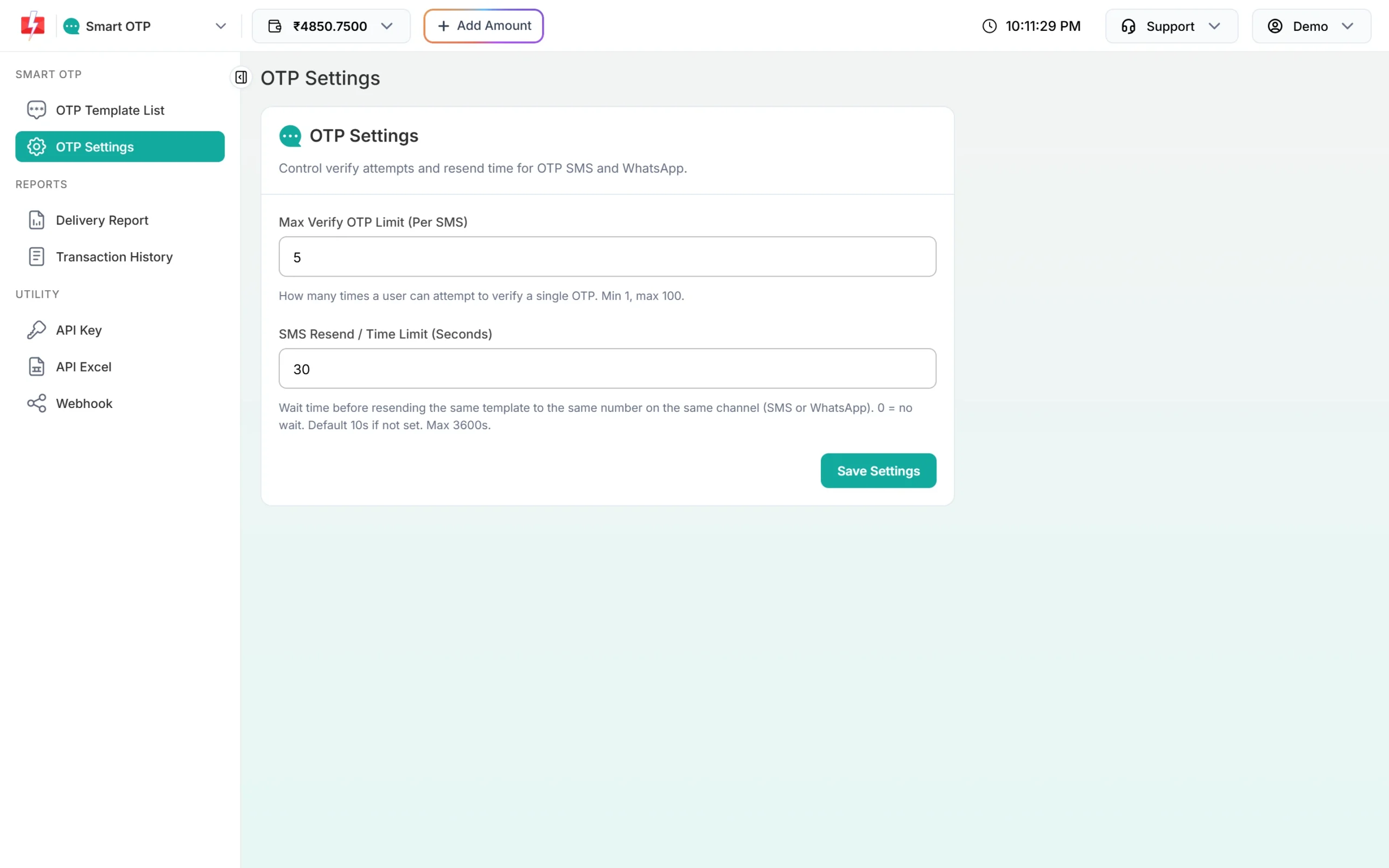
Resend sends the same code again. Fast2SMS allows it within 10 minutes of the first send, up to 5 sends in total. Sending a fresh code for a number cancels the older code. If the template has a fallback and the first channel fails, Fast2SMS sends the same code once on the other channel.
Each send and each resend is charged at your Smart OTP rate. Verify is free. If a fallback message goes out on the second channel, that message is charged too, and so is a Test OTP from the template card, because it is a real send. See the current rates on the Smart OTP page.
Sending in bulk? For high OTP volumes our team offers discounted rates. Talk to our team or see OTP pricing.
Test status
Common problems and fixes
| What you see | Why | Fix |
|---|---|---|
| “Could not reach the server…” | Wrong endpoint, backend not running, or App Transport Security blocked plain http. |
Check otpEndpoint. Use HTTPS, or an ATS exception only while testing. |
| “We could not send the code right now…” | A backend setup problem: wrong OTP ID, low balance, key refused. | Read the backend log. It names the real reason. |
| “Please wait N seconds…” | The resend wait. | Wait for the countdown. |
| Code sent but nothing arrives | Sent means Fast2SMS accepted it, not that the phone got it. | Check Smart OTP > Delivery Report. |
| No code shown above the keyboard | iOS shows it only for SMS in Messages, with the field focused. | The user can type it. WhatsApp codes are not suggested. |
Frequently asked questions
Which iOS version does the example need?
iOS 15 or later. It uses SwiftUI and async/await.
Can I store the Fast2SMS API key in Info.plist?
No. Info.plist and every other file in the app bundle can be read by anyone who has the app. Keep the key on your backend.
Why does iOS not suggest the OTP?
iOS suggests codes from SMS in Messages, and only while the code field is focused. It does not suggest codes from WhatsApp messages.
Does it work with UIKit?
The screen is SwiftUI. F2sOtpClient.swift has no UI code, so you can call it from a UIKit view controller or host OtpView in a UIHostingController.
How do I log the user in after OTP?
Send the token from onVerified to your login API. Your server checks it with the kit’s helper, takes the verified number from it and starts the session.
Does Resend send a new code?
No. Resend sends the same code again, within 10 minutes and up to 5 sends in total. Each resend is charged.
Related guides
- OTP autofill on Android, iPhone and websites: SMS Retriever, app hash and DLT
- OTP for website login vs app login: what changes and what stays the same
- Smart OTP in Fast2SMS: set up OTP on SMS and WhatsApp with fallback
- Send OTP on WhatsApp with Fast2SMS Smart OTP (copy code, one-tap, zero-tap)
- OTP fraud and SMS pumping: how to protect your OTP form and wallet