
Promotional SMS templates for festival offers and sales are registered on DLT under the Promotional category. They must carry your brand name and a way to opt out, and they can be sent only between 10 AM and 9 PM to numbers that are not on DND. Below are 14 ready-to-register promotional SMS templates for Diwali, Holi, New Year, end-of-season sales, flash sales and festival greetings, in English and Hindi, each with its variable tags, a sample message, the character count and SMS parts.
Rules for promotional SMS templates in 2025-26
| Rule | What it means for you |
|---|---|
| Category | Promotional. Service Explicit is being merged into Promotional on the DLT portals, and new promotional templates need an industry category. |
| Template Type in Fast2SMS | Service Explicit or Promotional |
| Opt-out | TRAI’s 2025 amendment requires every promotional message to tell the customer how to opt out. Follow the exact format your DLT portal asks for. |
| Sending hours | 10 AM to 9 PM only. Fast2SMS holds a promotional campaign sent late at night and sends it the next morning. |
| DND numbers | Not delivered to people who blocked promotions, unless they gave you consent |
| Header | Customers see your header with a -P suffix. In Fast2SMS, any template linked to a 6-digit numeric header is treated as promotional. |
| Links and numbers | Whitelist every link domain and phone number as a CTA on your DLT portal |
| Variables | Three or fewer, typed: {#numeric#}, {#alphanumeric#}, {#url#}, {#cbn#} |
The samples below use a callback number as the opt-out. Change “Demo Traders” and the shop details to your own. Counts are for the sample shown.
Reusable festival templates
Register these once and use them for every festival. The festival name goes in a variable, so you do not need a new approval for Navratri, Eid, Christmas or Pongal.
1. Festival sale (any festival)
DLT category: Promotional. Variables: {#alphanumeric#}, {#numeric#}, {#cbn#}.
Demo Traders {#alphanumeric#} Sale: flat {#numeric#}% off on all items. Visit 12 Demo Market, Pune today. T&C apply. To stop offers, call {#cbn#}.Sample message (132 characters, English, 1 SMS): Demo Traders Navratri Sale: flat 20% off on all items. Visit 12 Demo Market, Pune today. T&C apply. To stop offers, call 9000000001.
2. Festival greeting (any festival)
DLT category: Promotional. Variables: {#alphanumeric#}, {#cbn#}.
Wishing you a joyful {#alphanumeric#} from all of us at Demo Traders. Thank you for shopping with us. To stop such SMS, call {#cbn#}.Sample message (123 characters, English, 1 SMS): Wishing you a joyful Eid from all of us at Demo Traders. Thank you for shopping with us. To stop such SMS, call 9000000001.
A greeting is not about a transaction or a service the customer uses, so it does not fit Transactional or Service Implicit. Register it as Promotional.
Diwali SMS templates
3. Diwali sale
DLT category: Promotional. Variables: {#numeric#}, {#alphanumeric#}, {#cbn#}.
Diwali Sale at Demo Traders: flat {#numeric#}% off till {#alphanumeric#}. Visit our store at 12 Demo Market, Pune. T&C apply. To stop offers, call {#cbn#}.Sample message (138 characters, English, 1 SMS): Diwali Sale at Demo Traders: flat 25% off till 2 Nov. Visit our store at 12 Demo Market, Pune. T&C apply. To stop offers, call 9000000001.
4. Diwali online offer with link
DLT category: Promotional. Variables: {#numeric#}, {#url#}, {#cbn#}.
This Diwali, get up to {#numeric#}% off on gifts at Demo Traders. Shop now: {#url#} T&C apply. To stop offers, call {#cbn#}.Sample message (140 characters, English, 1 SMS): This Diwali, get up to 40% off on gifts at Demo Traders. Shop now: https://demotraders.in/diwali T&C apply. To stop offers, call 9000000001.
5. Diwali greeting
DLT category: Promotional. Variables: {#cbn#}.
Wishing you and your family a happy and safe Diwali. Thank you for being with Demo Traders this year. To stop such SMS, call {#cbn#}.Sample message (136 characters, English, 1 SMS): Wishing you and your family a happy and safe Diwali. Thank you for being with Demo Traders this year. To stop such SMS, call 9000000001.
Holi SMS templates
6. Holi offer
DLT category: Promotional. Variables: {#alphanumeric#}, {#url#}, {#cbn#}.
Holi offer at Demo Traders: buy 2, get 1 free on colours and sweets till {#alphanumeric#}. Order here: {#url#} To stop offers, call {#cbn#}.Sample message (153 characters, English, 1 SMS): Holi offer at Demo Traders: buy 2, get 1 free on colours and sweets till 14 Mar. Order here: https://demotraders.in/holi To stop offers, call 9000000001.
7. Holi greeting
DLT category: Promotional. Variables: {#cbn#}.
Happy Holi from Demo Traders. May your day be full of colour and joy. To stop such SMS, call {#cbn#}.Sample message (104 characters, English, 1 SMS): Happy Holi from Demo Traders. May your day be full of colour and joy. To stop such SMS, call 9000000001.
New Year SMS templates
8. New Year sale
DLT category: Promotional. Variables: {#numeric#}, {#url#}, {#cbn#}.
New Year Sale at Demo Traders: up to {#numeric#}% off from 31 Dec to 2 Jan. Shop: {#url#} T&C apply. To stop offers, call {#cbn#}.Sample message (142 characters, English, 1 SMS): New Year Sale at Demo Traders: up to 50% off from 31 Dec to 2 Jan. Shop: https://demotraders.in/ny T&C apply. To stop offers, call 9000000001.
9. New Year greeting
DLT category: Promotional. Variables: {#cbn#}.
Happy New Year from all of us at Demo Traders. Thank you for your trust this year. To stop such SMS, call {#cbn#}.Sample message (117 characters, English, 1 SMS): Happy New Year from all of us at Demo Traders. Thank you for your trust this year. To stop such SMS, call 9000000001.
Sale and offer templates for any time of year
10. End of season sale
DLT category: Promotional. Variables: {#numeric#}, {#url#}, {#cbn#}.
End of Season Sale: {#numeric#}% off on all items at Demo Traders, today and tomorrow only. Visit {#url#} To stop offers, call {#cbn#}.Sample message (149 characters, English, 1 SMS): End of Season Sale: 30% off on all items at Demo Traders, today and tomorrow only. Visit https://demotraders.in/eoss To stop offers, call 9000000001.
11. Flash sale with coupon code
DLT category: Promotional. Variables: {#alphanumeric#}, {#numeric#}, {#cbn#}.
Flash sale at Demo Traders: use code {#alphanumeric#} for Rs {#numeric#} off on orders above Rs 999. Valid till midnight. To stop offers, call {#cbn#}.Sample message (138 characters, English, 1 SMS): Flash sale at Demo Traders: use code FLASH200 for Rs 200 off on orders above Rs 999. Valid till midnight. To stop offers, call 9000000001.
12. New arrivals
DLT category: Promotional. Variables: {#numeric#}, {#url#}, {#cbn#}.
New arrivals at Demo Traders: winter jackets from Rs {#numeric#}. See the full range here: {#url#} To stop offers, call {#cbn#}.Sample message (142 characters, English, 1 SMS): New arrivals at Demo Traders: winter jackets from Rs 899. See the full range here: https://demotraders.in/new To stop offers, call 9000000001.
Hindi festival SMS templates
Hindi promotional SMS are Unicode, so 1 part holds 70 characters. Both samples below use 2 parts, so budget for twice the cost per number compared with a 1-part English SMS.
13. Diwali sale (Hindi)
DLT category: Promotional. Variables: {#numeric#}, {#alphanumeric#}, {#cbn#}.
Demo Traders दिवाली सेल: सभी सामान पर {#numeric#}% तक छूट, {#alphanumeric#} तक। ऑफ़र बंद करने के लिए {#cbn#} पर कॉल करें।Sample message (104 characters, Unicode, 2 SMS parts): Demo Traders दिवाली सेल: सभी सामान पर 25% तक छूट, 2 Nov तक। ऑफ़र बंद करने के लिए 9000000001 पर कॉल करें।
14. Holi greeting (Hindi)
DLT category: Promotional. Variables: {#cbn#}.
Demo Traders की ओर से आपको होली की शुभकामनाएं। SMS बंद करने के लिए {#cbn#} पर कॉल करें।Sample message (90 characters, Unicode, 2 SMS parts): Demo Traders की ओर से आपको होली की शुभकामनाएं। SMS बंद करने के लिए 9000000001 पर कॉल करें।
Tips to get promotional templates approved
- Brand name in fixed text. Customers and reviewers must see who is sending.
- Include the opt-out line in every promotional template, in the format your portal asks for.
- Pick the right industry category when you register a new promotional template.
- Whitelist links and numbers first. The domain in
{#url#}and the number in{#cbn#}must match a CTA on your portal. Keep links short: the Fast2SMS API cuts each variable value at 40 characters. - No misleading claims. “100% free” or “you have won” style text invites rejection and complaints. Keep “T&C apply” where an offer has conditions.
- Register early. DLT approval is not instant, so add festival templates well before the festival week.
- Avoid the rupee symbol and fancy quotes in English templates. They turn the SMS into Unicode and cut 1 part to 70 characters.
When to send festival SMS
Promotional SMS can only go out between 10 AM and 9 PM. Inside that window, send when people can act on the offer: a day or two before a sale starts, and again on the first day. Read the best time to send a promotional SMS for more ideas. Remember that people on DND will not get promotional SMS. To reach your customers who opted in, a WhatsApp marketing message is another option.
How to add your festival templates in Fast2SMS and send them
Add your approved promotional templates to Fast2SMS, pick the numbers or upload a CSV, and send or schedule the campaign for the right day.
-
Register the template on your DLT portal
Log in to the DLT portal where your business is registered and add a content template. Pick the category shown with the template, link it to one approved header, paste the text with its variable tags and add a sample message with realistic values. If the text has a
{#url#},{#urlott#}or{#cbn#}variable, whitelist that link or phone number as a CTA on the portal first. Once the portal approves it, note the Content Template ID and take a screenshot of the approved row. -
Add it in DLT Manager
In the Fast2SMS SMS app, open DLT Manager > Content Template and click Add Content Template. Select your entity, tick the Sender ID, enter the Content Template ID, choose Service Explicit or Promotional as the Template Type, paste the approved text exactly as the portal shows it in Copy-Paste Approved Message Text, upload the screenshot and click Submit.
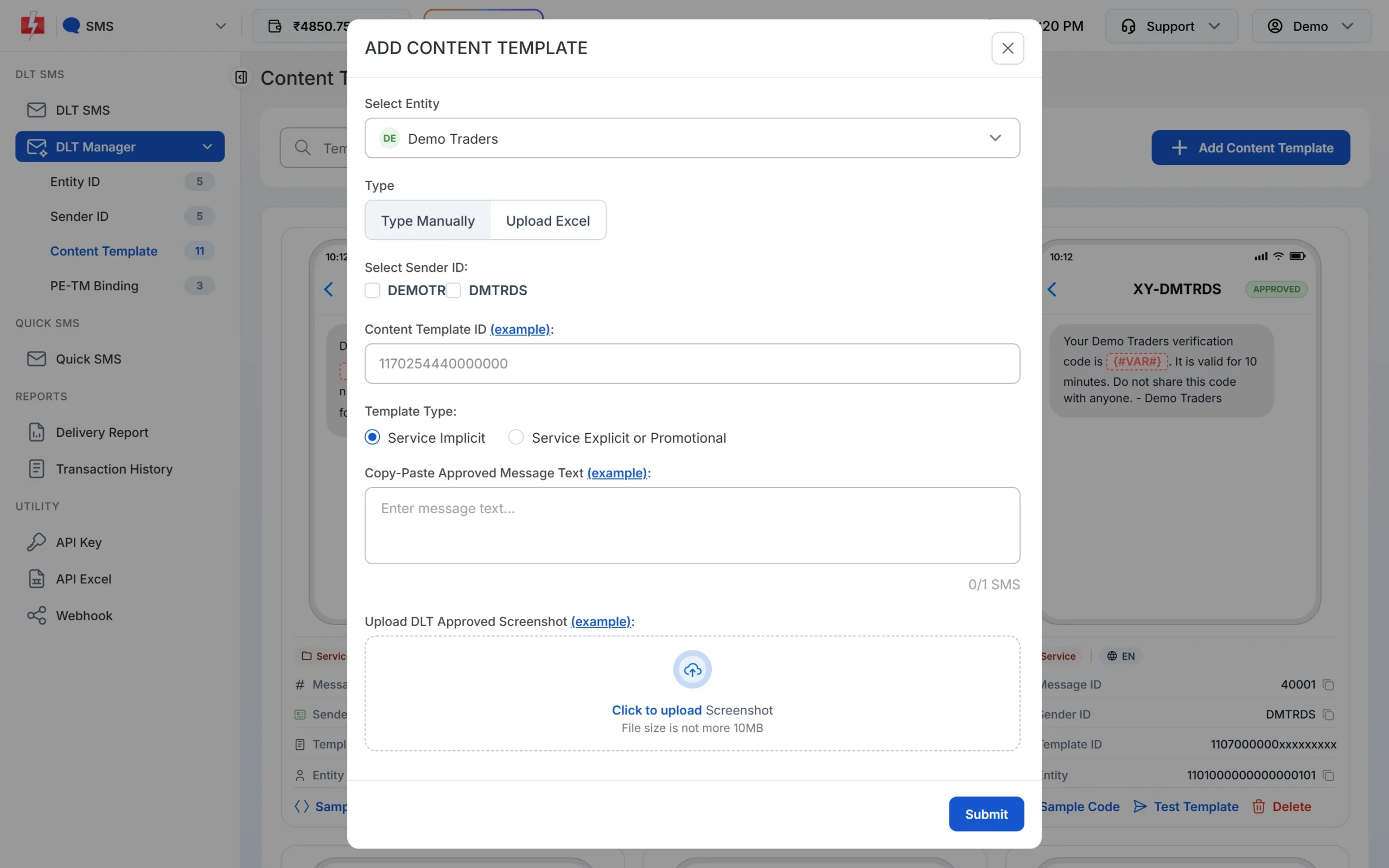
Paste the text exactly as it was approved, including spaces and full stops. -
Wait for Approved and note the Message ID
The template is saved as Pending while Fast2SMS checks it against your screenshot. When the card shows APPROVED, it also shows a Message ID. That short number is what you pass as
messagein the API. The card shows every variable as {#VAR#}, whatever tag you registered. Use Test Template to send one real SMS to your own number before a campaign.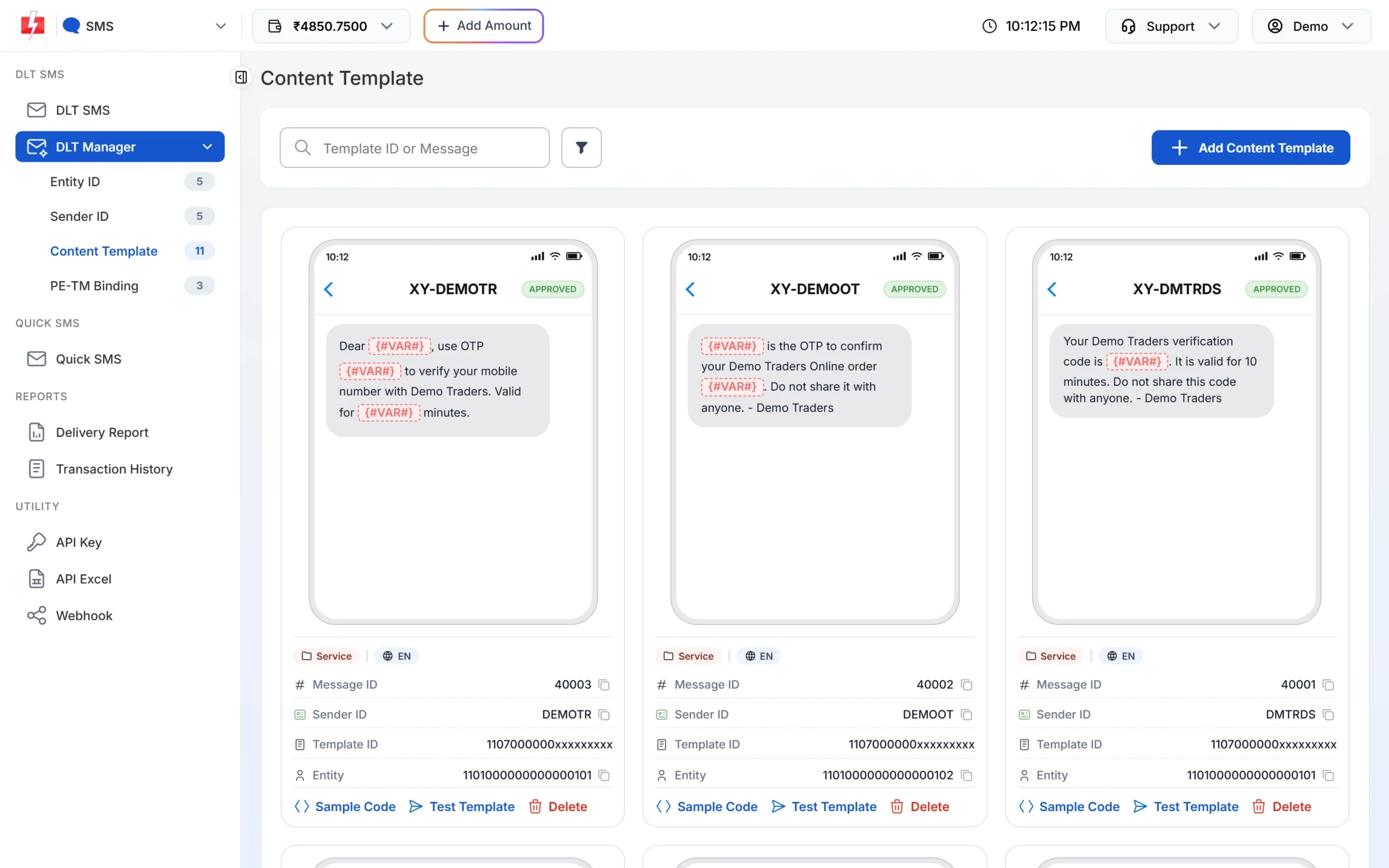
Each approved card shows its Message ID and the Test Template button. -
Pick the template on the DLT SMS page
Open DLT SMS, choose the Sender ID and add numbers under Send To: type them in List, pick contacts from Address Book or upload a CSV File. Then click Select DLT Template. The picker has All, Service Implicit and Service Explicit tabs.
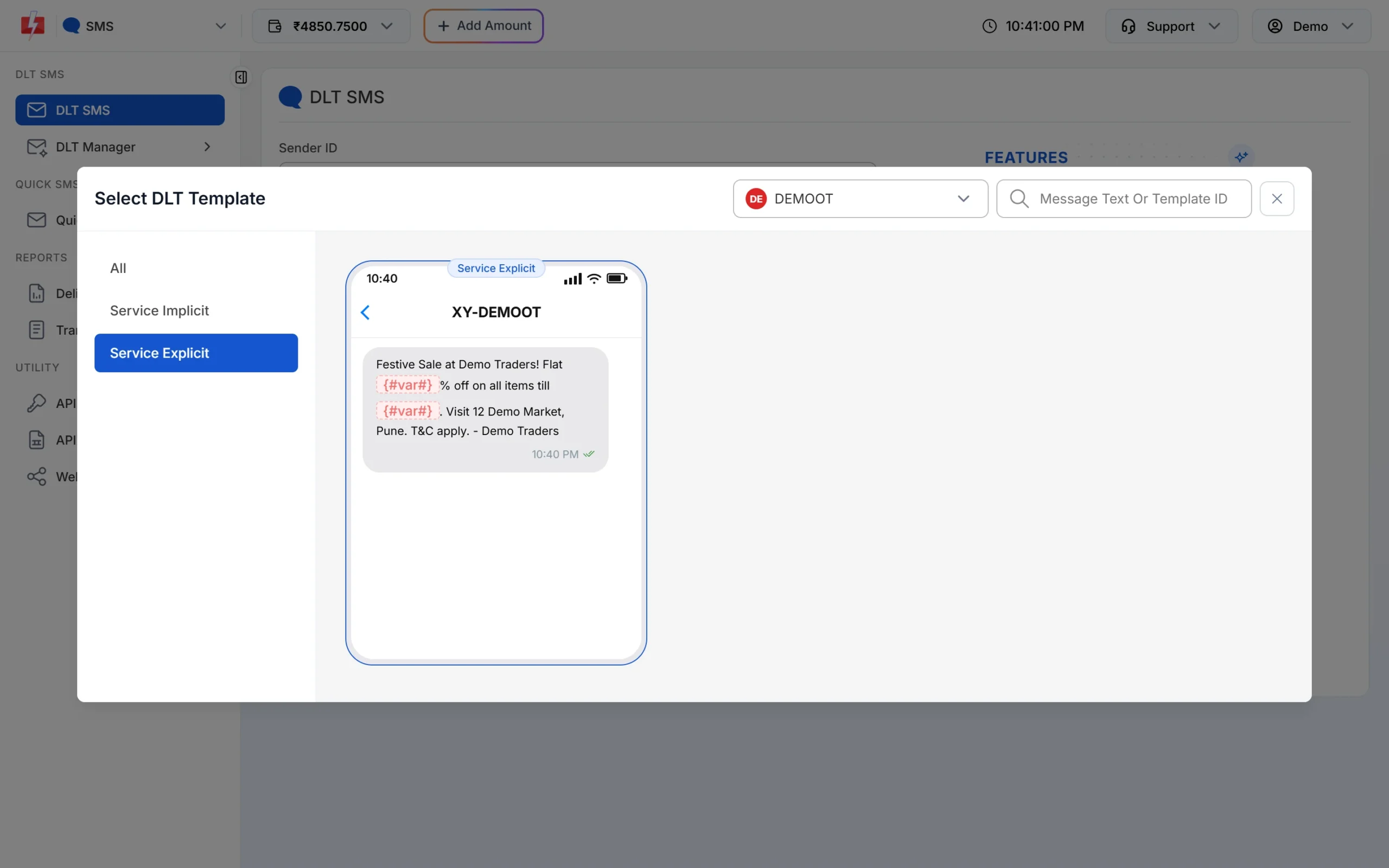
Promotional templates sit under the Service Explicit tab. -
Fill the variables and check the preview
The page shows one box for each variable. As you type, the phone preview shows the final SMS and the counter under it shows characters and SMS parts, such as 107/1 SMS. To send each person their own name, amount or date, use CSV File and map each variable to a column.
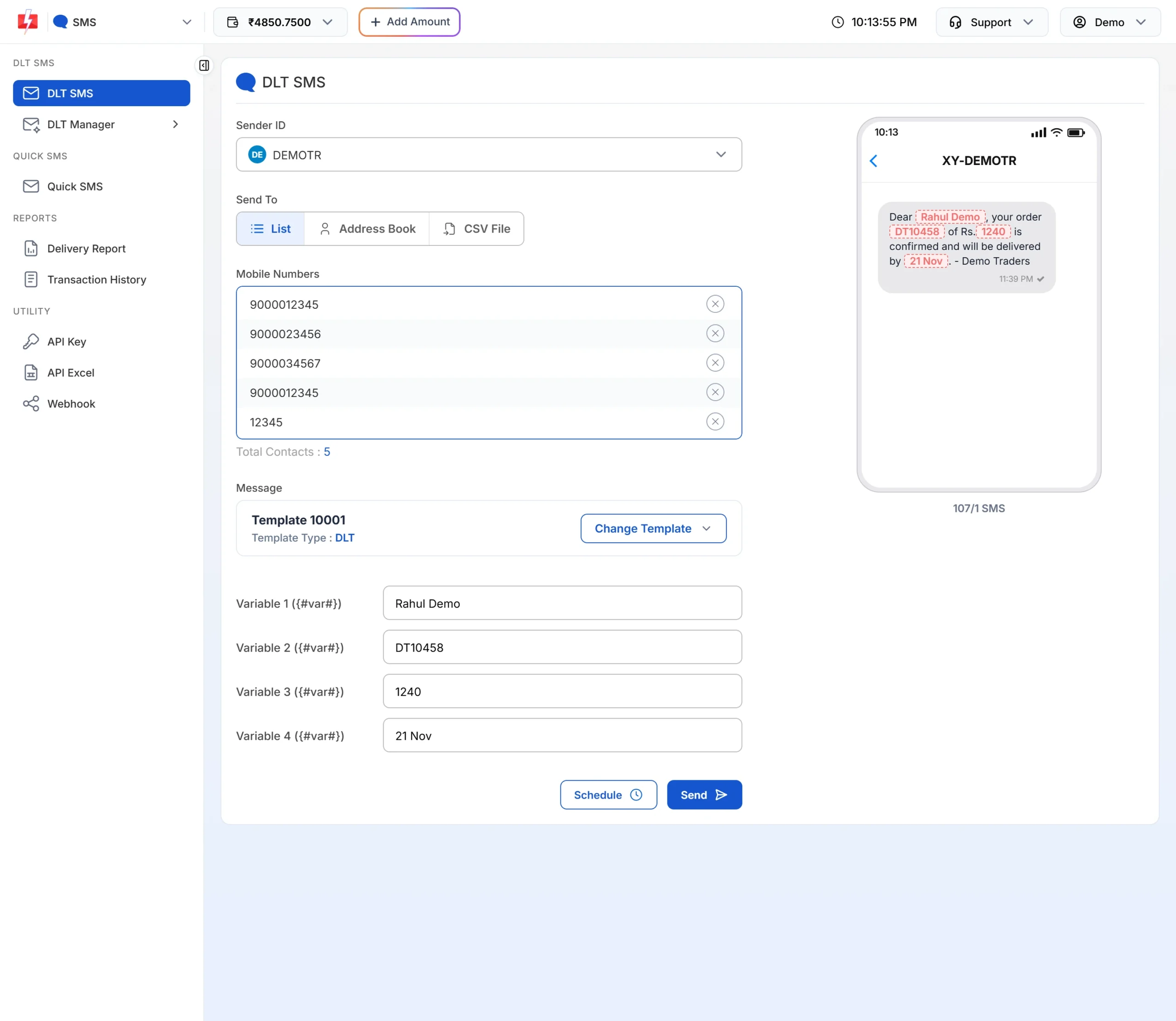
The counter shows how many parts each SMS will use. -
Check the cost, then send or schedule
Click Send. The Message Preview & Confirmation popup shows the cost per SMS, total messages, total, duplicate, valid and invalid numbers, and the total cost. Duplicates and invalid numbers are not charged. Click Confirm & Send, or close it and use Schedule to pick a date and time. Promotional templates go out only between 10 AM and 9 PM. If you send one late at night, Fast2SMS holds it and sends it the next morning.
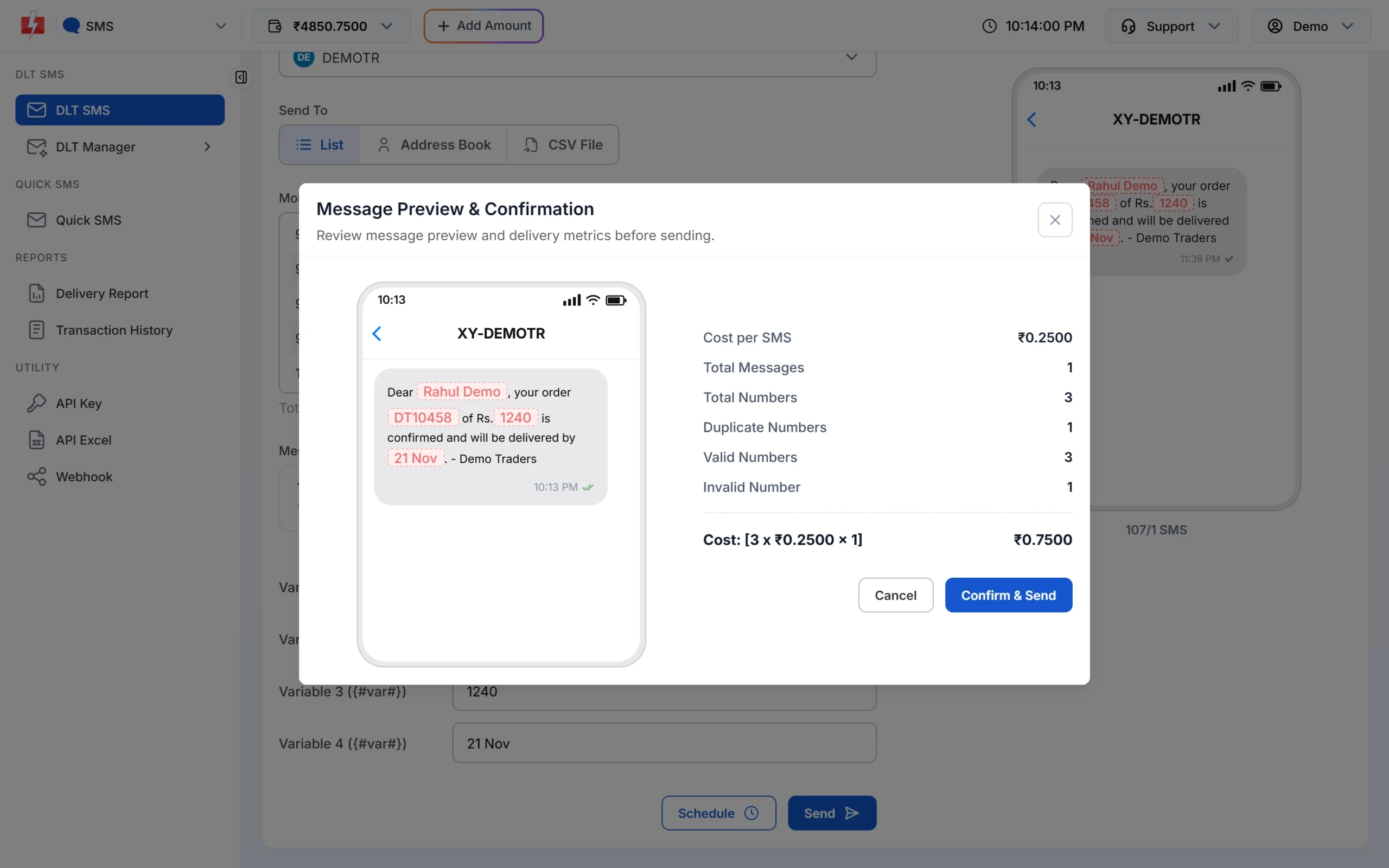
Nothing is sent until you click Confirm & Send.
Each SMS part is charged as one SMS for every valid number, so a template that runs into 2 parts costs twice as much per person as a 1-part template. Keep the text short to save money. See the current rates on the bulk SMS pricing page.
Sending in bulk? For high SMS volumes our team offers discounted rates. Talk to our team or see SMS pricing.
Frequently asked questions
Which DLT category is used for festival offer SMS?
Promotional. Any message that advertises a product, sale or discount is promotional, even if it starts with a greeting.
Is a Diwali greeting SMS without any offer promotional?
Register it as Promotional. It is not about a transaction or a service the customer uses, so it does not fit the other categories.
Can I send promotional SMS after 9 PM?
No. Promotional SMS can go out only from 10 AM to 9 PM. If you send one late at night from Fast2SMS, it is held and sent the next morning.
Why did my festival SMS not reach some customers?
People who blocked promotional messages on DND do not receive them. The delivery report shows those numbers with the DND status.
Do I need a new template for every festival?
Not if you register a reusable template with the festival name in an {#alphanumeric#} variable, like template 1 above.
What opt-out text should a promotional SMS have?
TRAI’s 2025 rules require a way to opt out in every promotional message. Use the format your DLT portal asks for, such as a number to call or a link.
Can I use my brand name as the header for promotional SMS?
Alphanumeric headers are being allowed for promotional templates on the DLT portals. Check what your portal offers when you register the header.