
A promotional SMS that people read and act on is short, specific and easy to act on. Start with your brand name, put one clear offer in the first line, add a real deadline and one simple action (visit, call or open a link), and keep it to one SMS of 160 characters. In India it must also pass DLT: the text has to match your approved template, links and call-back numbers must be whitelisted, and every promotional SMS needs an opt-out.
This guide gives you the rules that matter, a before-and-after rewrite, and five DLT-safe sample texts you can adapt.
12 rules for promotional SMS that get read
1. Start with your brand name
Your header shows only a short code such as XY-DEMOTR-P, so the customer may not know who is writing. Put the brand name in the first words. Operators also expect it: Airtel’s DLT template guidelines say the organisation or brand name must appear in the template.
2. Put the offer in the first line
The first words are what shows in the phone’s notification. “Demo Traders Weekend Sale: flat 20% off” works there. “Dear valued customer, we are happy to inform you” does not.
3. One message, one offer, one action
Do not list five products and three ways to buy. Pick the one offer that matters most and the one thing you want people to do.
4. Be specific
“Flat 20% off on shoes” beats “amazing discounts”. “12 Demo Market, Pune” beats “visit us”. Numbers, places and dates make the offer real.
5. Give a deadline, and make it true
“Till Sunday 8 PM” tells people when to act. If the offer runs all month, say so. A fake deadline used every week stops working.
6. Tell people exactly what to do
Write the action as a short instruction: “Show this SMS at the counter”, “Call 9000000002 to book” or “Shop at yourshop.in/winter”. Every link and phone number in a DLT SMS must be whitelisted on your DLT portal. Use your own domain rather than a public link shortener. See links in DLT SMS for why.
7. Keep it to one SMS
One English SMS holds 160 characters. One emoji, curly quote or ₹ sign makes the whole message Unicode, which holds only 70 per SMS and can double the cost. Write “Rs.” instead of ₹ and leave emojis out. Our SMS character limit guide explains the counting.
8. Personalise lightly
A name, an amount or a date in a variable can make the SMS feel personal. Do not overdo it. Airtel’s guidelines suggest 2 to 3 variables in promotional templates, and a template made only of variables is not allowed. Keep variable values short so the SMS stays in one part.
9. Write like a person, not a poster
Avoid ALL CAPITALS, rows of exclamation marks and words like “HURRY”. They look like spam and make the SMS harder to read.
10. Always include the opt-out
TRAI’s 2025 amendment made an opt-out option mandatory in promotional messages. A simple line such as “To stop offers, call {#cbn#}” works, but follow the exact format your DLT portal asks for. An easy opt-out also means fewer spam complaints.
11. Send the same words you registered
The fixed part of your SMS must match the approved DLT template exactly, down to spaces and full stops. Only the variable parts can change. A small change gets the SMS blocked as “template not matched”.
12. Test before you send
Send the SMS to your own phone first and read it as a customer would. Check the link opens and the numbers are right.
Before and after: one rewrite
Before (89 characters, but 2 SMS because of the emoji):
DEAR CUSTOMER HUGE SALE GOING ON 🎉 VISIT US NOW FOR AMAZING DISCOUNTS ON EVERYTHING HURRYNo brand name, no real offer, no place, no deadline, no opt-out, all capitals, and an emoji that doubles the cost.
After (136 characters, English, 1 SMS):
Demo Traders Weekend Sale: flat 20% off on all shoes till Sunday 8 PM. 12 Demo Market, Pune. T&C apply. To stop offers, call 9000000001.Brand first, a clear offer, a deadline, a place, an opt-out, and it fits in one SMS.
5 DLT-safe sample texts (Demo Traders)
Register each one as a Promotional template on your DLT portal with your own brand, address and numbers. Whitelist the link domain and phone numbers first. Character counts are for the sample message shown, in English.
1. Weekend sale with a deadline
Variables: {#numeric#}, {#alphanumeric#}, {#cbn#}.
Demo Traders Weekend Sale: flat {#numeric#}% off on all shoes till {#alphanumeric#}. 12 Demo Market, Pune. T&C apply. To stop offers, call {#cbn#}.Sample (136 characters, 1 SMS): Demo Traders Weekend Sale: flat 20% off on all shoes till Sunday 8 PM. 12 Demo Market, Pune. T&C apply. To stop offers, call 9000000001.
2. New stock with a link
Variables: {#numeric#}, {#url#}, {#cbn#}.
Demo Traders: new winter jackets are in, from Rs.{#numeric#}. Shop at {#url#} or visit 12 Demo Market, Pune. T&C apply. To stop offers, call {#cbn#}.Sample (155 characters, 1 SMS): Demo Traders: new winter jackets are in, from Rs.999. Shop at yourshop.in/winter or visit 12 Demo Market, Pune. T&C apply. To stop offers, call 9000000001.
3. Win-back offer
Variables: {#numeric#}, {#alphanumeric#}, {#cbn#}.
Demo Traders misses you. Show this SMS for Rs.{#numeric#} off on your next bill above Rs.1000, valid till {#alphanumeric#}. To stop offers, call {#cbn#}.Sample (138 characters, 1 SMS): Demo Traders misses you. Show this SMS for Rs.200 off on your next bill above Rs.1000, valid till 30 Nov. To stop offers, call 9000000001.
4. Early access for regular customers
Variables: {#alphanumeric#}, {#cbn#}.
Demo Traders members get early entry to our Season Sale on {#alphanumeric#}, 10 AM to 1 PM. Show this SMS at the counter. To stop offers, call {#cbn#}.Sample (143 characters, 1 SMS): Demo Traders members get early entry to our Season Sale on 6 Dec, 10 AM to 1 PM. Show this SMS at the counter. To stop offers, call 9000000001.
5. Event invitation
Variables: {#alphanumeric#}, {#cbn#}. The booking number is fixed text, so whitelist it too.
Demo Traders invites you to a free cooking demo on {#alphanumeric#} at 12 Demo Market, Pune. Call 9000000002 to book a seat. To stop offers, call {#cbn#}.Sample (156 characters, 1 SMS): Demo Traders invites you to a free cooking demo on Sat 7 Dec, 4 PM at 12 Demo Market, Pune. Call 9000000002 to book a seat. To stop offers, call 9000000001.
Need more ideas? See SMS marketing ideas for small businesses and festival offer templates.
How to test your SMS in Fast2SMS before a campaign
-
Add the approved template
After your DLT portal approves the template, open DLT Manager > Content Template and click Add Content Template. Choose the entity and sender ID, enter the Template ID, select Service Explicit or Promotional and paste the approved text exactly as it was approved.
-
Send a test SMS to your own phone
Once the template shows APPROVED, click Test Template on its card. Enter your mobile number, pick the sender ID, fill each variable with real values (the full link, the real date) and click Send Test SMS. A test SMS is a real SMS from your account.
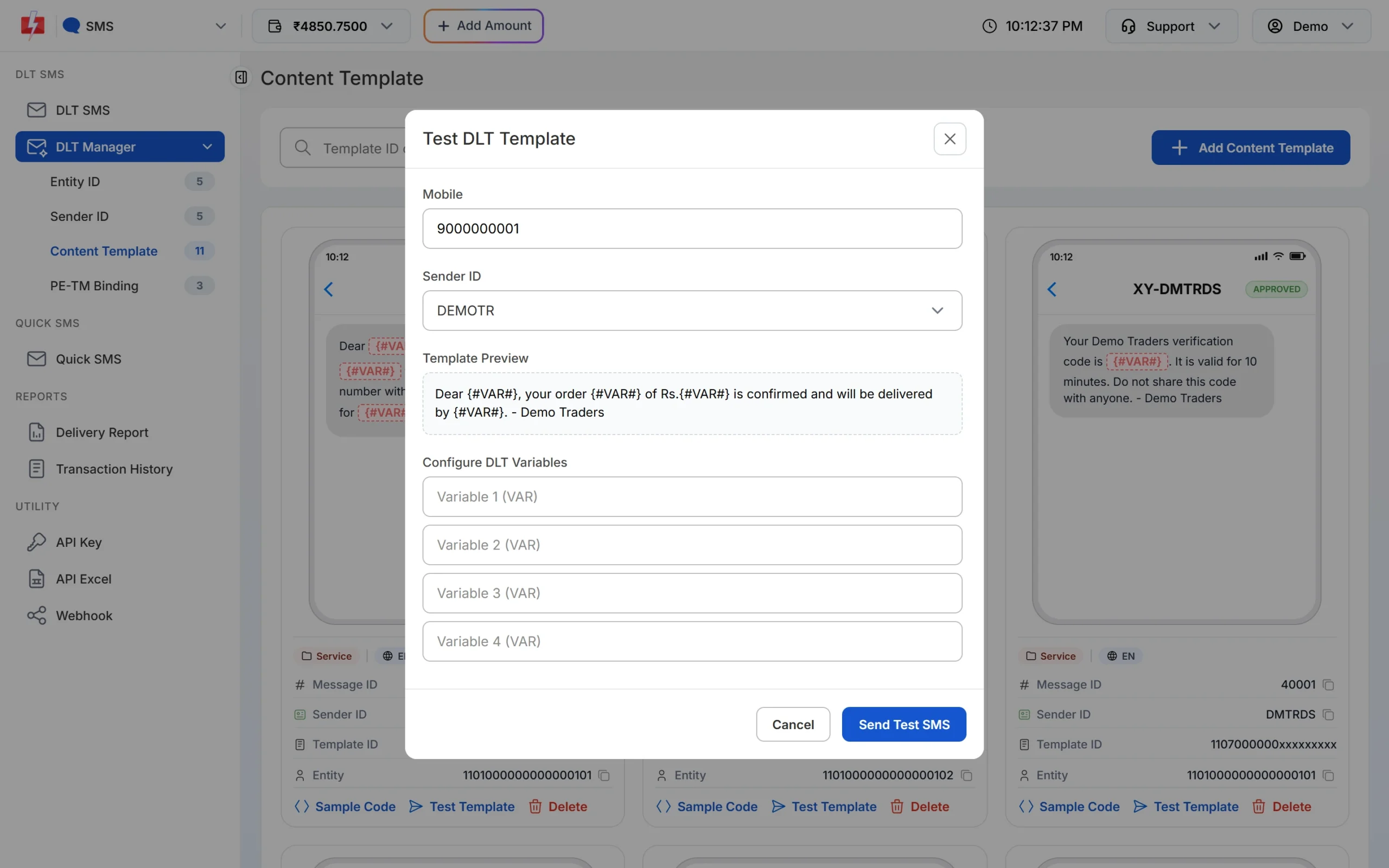
Test DLT Template: fill the variables as you will in the campaign. -
Check the preview and the SMS count when you send
On the DLT SMS page, the phone preview shows the final message with your values, and the counter under it shows characters and parts. Aim for /1 SMS. If it shows 2, shorten a variable value or remove a special character.
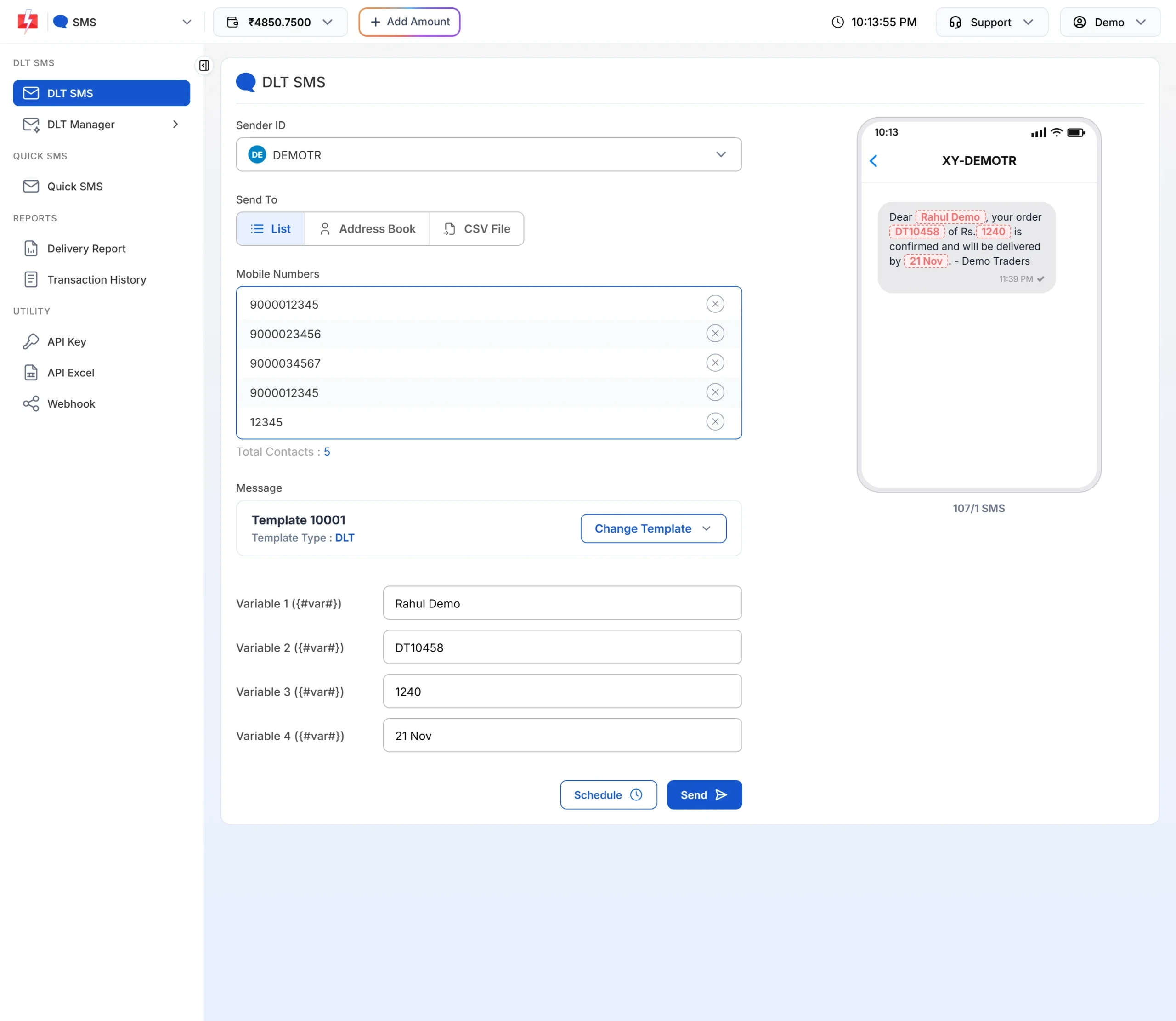
The preview and counter show exactly what customers will get.
Frequently asked questions
How long should a promotional SMS be?
Aim for one SMS: up to 160 characters in English, or 70 in Hindi. Longer messages are split into parts and each part is charged.
Can I use emojis in promotional SMS?
You can, but one emoji turns the whole SMS into Unicode, so it holds only 70 characters per SMS. For most offers, words do the job at half the cost.
Do I have to add an opt-out to every promotional SMS?
Yes. TRAI’s 2025 amendment requires an opt-out option in promotional messages. Use the format your DLT portal asks for, for example a call-back number.
Can I add a link to a promotional SMS?
Yes, if the link’s domain is whitelisted on your DLT portal. Links on public shorteners that are not whitelisted under your entity get the SMS blocked.
Why was my SMS blocked even though the template is approved?
Usually the text you sent does not match the approved template exactly, or a link or number in it is not whitelisted. Compare the fixed text word by word with your DLT template.
Should I write my SMS in English or Hindi?
Write in the language your customers read most comfortably. Hindi SMS hold fewer characters per SMS, so keep them short, and register each language as its own template.
How many variables can a promotional template have?
Airtel’s guidelines suggest 2 to 3 for promotional templates, and the template cannot be only variables. See DLT template variable limits.