
An SMS delivery report comes from the mobile operator, not from Fast2SMS. When it arrives late, the number shows Sent with the description “Report pending” until the operator replies. The usual reasons are a phone that is switched off or out of network, a slow report from the operator, or busy periods. A late report does not mean the SMS failed.
Sometimes the report is not late at all. The SMS itself has not gone out yet because it is scheduled, held for the morning or waiting for a check. This page helps you tell these cases apart and shows what you can do.
Why SMS delivery reports arrive late: quick check
| What you see | Likely reason | What to do |
|---|---|---|
| Sent, “Report pending” | The operator has the SMS but has not confirmed delivery yet. Often the phone is off or out of network. | Wait and click Refresh. It changes to Delivered or Failed. |
| Pending, “Message pending” | The SMS is still being processed. A promotional SMS sent late in the evening is held until the next morning. | Wait. Check the send time and template type. |
| Campaign not in SMS Report at all | It is scheduled for later, it is a Quick SMS waiting for a manual check, or it is a Smart OTP message. | Look under Schedule, Pending SMS or the OTP Report. |
| Webhook did not arrive | The SMS was sent from the panel, the report came after 24 hours, or the DLR was already pulled by API. | See the webhook section below. |
| Finally Failed with a reason like “Message waiting for report expired” | The operator stopped trying and closed the message. | Treat it as not delivered. Check the number later. |
How a delivery report reaches you
When you send, Fast2SMS passes the SMS to the operator. The operator tries to deliver it to the phone, then sends back a delivery report. Fast2SMS updates the number’s status when that report arrives. Until then, the number stays in Sent.
So any delay on the operator’s side, or with the customer’s phone, shows up as a late report. Fast2SMS cannot see whether the SMS reached the phone until the operator says so.
Common reasons for a late report
- Phone switched off or out of network. The operator keeps trying for a while. If the phone comes back, the SMS is delivered and the report follows. If not, it later changes to Failed.
- The operator’s report is slow. The SMS may already be on the phone while the report comes back later.
- Busy periods. Large sale days and festivals put more load on operators. Failure reasons such as “Operator congestion” or “Operator time out” point to this.
How to check the latest status
-
Refresh the SMS Report
Open Delivery Report in the SMS menu and click the round arrow next to the filter button. The Sent card counts numbers still waiting for the operator’s report.
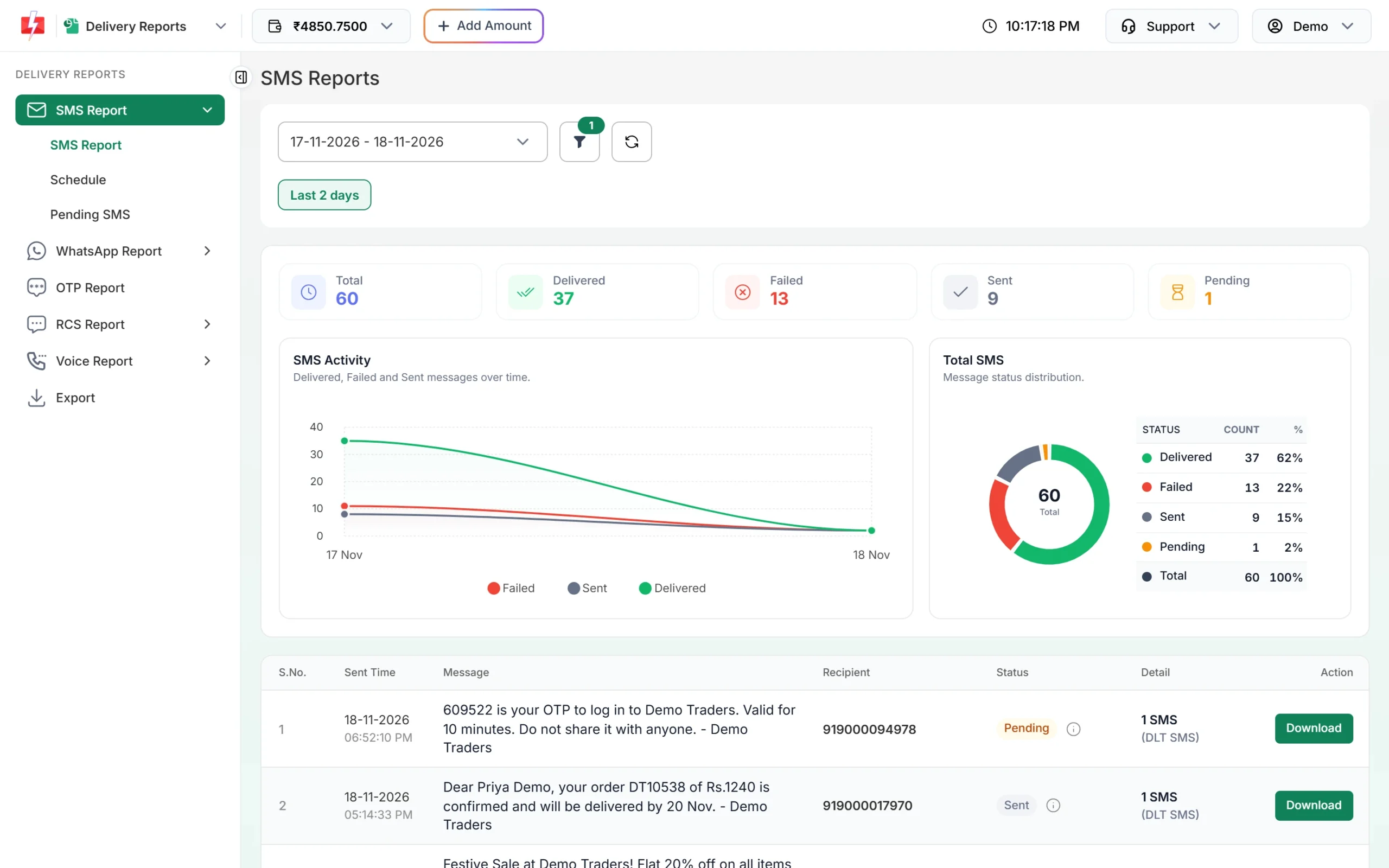
The Sent card shows numbers whose operator report has not come back yet. -
Open Delivery Details
Click the message text of the campaign. In Receivers, a number waiting for its report shows Sent, “Report pending”, and no Delivery Time. Click Refresh at the top of the window to load new reports.
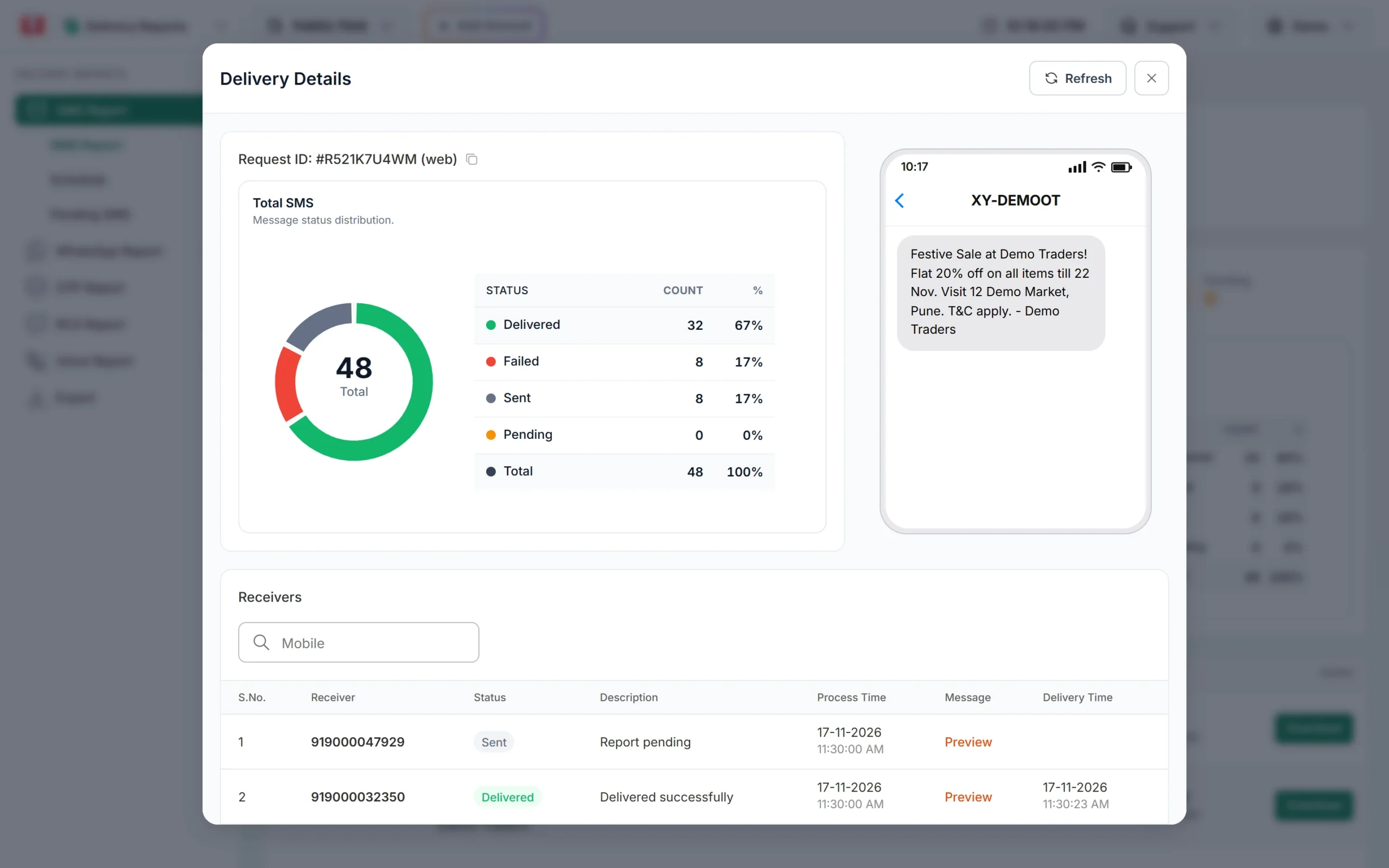
A Sent number has no Delivery Time yet.
When the SMS itself has not gone out yet
- Scheduled SMS appear in SMS Report only when their time comes. Before that, find them under Delivery Report > Schedule.
- Promotional SMS after hours. Promotional SMS can be sent only from 10 AM to 9 PM. One sent later is held and goes out after 10 AM the next morning. See promotional SMS timing in India.
- Quick SMS can be held for a manual check before sending. They show on the Pending SMS page until approved. See why Quick SMS shows Pending or Rejected.
- Smart OTP messages are not listed in the SMS Report. Check the OTP Report.
Late or missing reports in webhooks and the API
- Webhooks fire only for SMS sent through the API, not for panel campaigns.
- Only delivery reports that arrive within 24 hours fire a webhook. A report that comes later is still updated in the panel but is not pushed to your URL.
- If your URL is down or slow, Fast2SMS retries a few times. Every attempt is in Webhook Logs for 7 days, where you can resend once.
- Do not poll the DLR API and use webhooks for the same messages. Pulling a DLR first can stop the webhook for those numbers.
- Status
Sentin the DLR API means the operator report is still pending, just like in the panel.
More checks are in Fast2SMS webhook not working?
When to contact support
A few numbers in Sent is normal in any campaign. Contact support if most numbers of a campaign stay in Sent for many hours while your earlier campaigns updated normally, or if a whole campaign stays in Pending. Share the Request ID from the top of Delivery Details.
For OTPs, a late report and a late SMS both hurt. Use Smart OTP, which is sent on a priority route. See why OTP SMS are delayed.
Frequently asked questions
Does a late delivery report mean my SMS failed?
No. It means the operator has not confirmed delivery yet. The number shows Sent until the report arrives, then it changes to Delivered or Failed.
Can the customer have the SMS while the report says Sent?
Yes. The SMS can reach the phone before the operator’s report reaches Fast2SMS.
How long can a delivery report take?
There is no fixed time. For a phone that is on and in network it usually comes back quickly. For a phone that is off, the number can stay in Sent while the operator keeps trying.
Why did my webhook not fire for some numbers?
Their reports came after 24 hours, the SMS was sent from the panel, or the DLR was pulled by API first. The panel still shows the final status.
Can Fast2SMS make the operator send reports faster?
No. The report timing is on the operator’s side. Fast2SMS updates the status as soon as the report arrives.
Why does my promotional SMS show no report until the morning?
Promotional SMS sent after 9 PM are held and sent after 10 AM the next morning, so the report also comes then.