
To get the delivery report of an SMS sent with the Fast2SMS API, call GET https://www.fast2sms.com/dev/dlr/{request_id} with the request_id from the send reply. You get one row per number with the status (Delivered, Failed or Sent), the reason, the SMS count, the amount and the delivery time. For many messages at once there are two more APIs: SMS logs for up to 3 days per call, and an SMS summary for up to 30 days. This guide covers all three with code in cURL, PHP, Python, Node.js, Java and Go.
Which API to use
| API | Use it for | Limits |
|---|---|---|
GET /dev/dlr/{request_id} |
Status of each number in one send | Sends from the last 7 days |
GET /dev/sms_logs?from=&to= |
All SMS rows in a date range, page by page | Up to 3 days per call, starting within the last year; 1 to 1,000 rows per page |
GET /dev/sms_summary?from=&to= |
Counts per status for a report | Up to 30 days per call |
These cover SMS sent with /dev/bulkV2 and /dev/custom (DLT, DLT Manual and Quick SMS). For Smart OTP see OTP delivery status, and for WhatsApp see WhatsApp delivery report API.
Get the delivery report by request ID
-
Keep the request_id from the send
A successful send returns
{"return":true,"request_id":"Sa1B2c3D4e5F6g7","message":["SMS sent successfully."]}. Save the ID with your order or user record. You can also find it in the panel; see find an SMS by request ID. -
Call the DLR API
curl "https://www.fast2sms.com/dev/dlr/Sa1B2c3D4e5F6g7" \ -H "authorization: YOUR_API_KEY" -
Read the reply
{"success":true,"message":"DLR found successfully.","data":[{
  "request_id":"Sa1B2c3D4e5F6g7","route":"dlt",
  "delivery_status":[{
    "sender_id":"DEMOTR","mobile":9999999999,
    "status":"Delivered","status_description":"Delivered successfully",
    "dlr_attempt":1,"sms_language":"english","character_count":120,"sms_count":1,
    "amount_debited":"0.25",
    "sent_timestamp":1763450000,"sent_time":"18-11-2026 10:30:00 AM",
    "delivery_timestamp":1763450004,"delivery_time":"18-11-2026 10:30:04 AM"}]}]}
There is one
delivery_statusrow per valid number. The delivery time fields are present only for Delivered rows. -
Match it with the panel
The same send is in Delivery Report, SMS Report. Click the message to open Delivery Details with each receiver’s status and description.
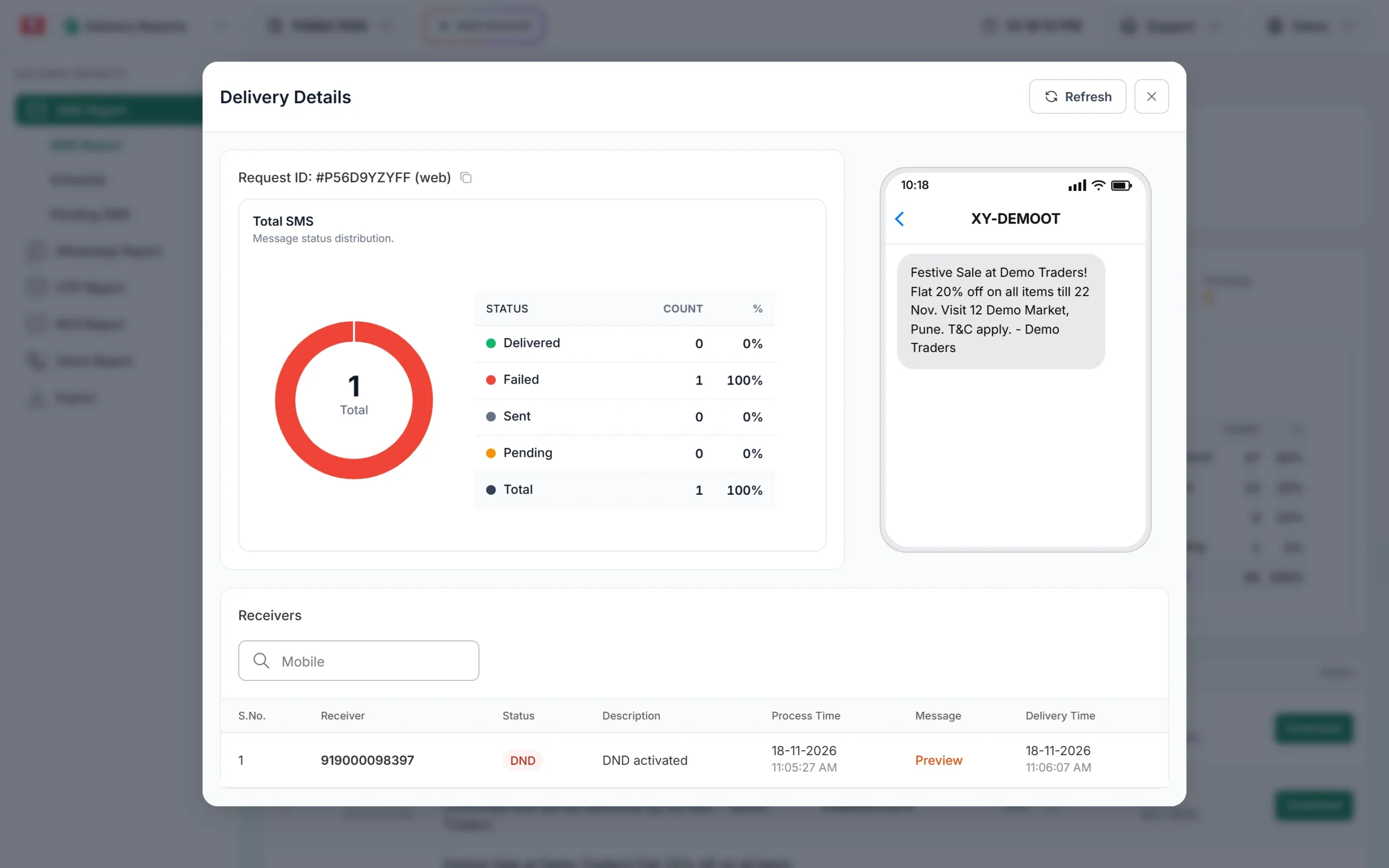
Delivery Details in the panel shows the same status and reason.
Fields and statuses
| Field | Meaning |
|---|---|
route |
dlt, dlt_manual or q (Quick SMS) |
status |
Delivered, Failed, or Sent (the operator report has not arrived yet) |
status_description |
The reason, for example “Delivered successfully” or the failure reason |
dlr_attempt |
Delivery attempt number |
character_count, sms_count, sms_language |
Length, number of SMS parts and English or Unicode |
amount_debited |
What this number cost |
sent_time, delivery_time |
Readable times in IST, with Unix timestamps next to them |
Failed SMS on DLT routes are not refunded automatically. For what each failure reason means, see SMS delivery report status meaning and why SMS fail.
Pick one method per message. Fetching a report with the DLR or logs API can stop the SMS webhook from firing for those same rows. If you use webhooks, use the DLR API only to check a single message now and then.
Code examples for the DLR API
PHP
<?php
$requestId = "Sa1B2c3D4e5F6g7";
$ch = curl_init("https://www.fast2sms.com/dev/dlr/" . urlencode($requestId));
curl_setopt_array($ch, [
    CURLOPT_RETURNTRANSFER => true,
    CURLOPT_HTTPHEADER     => ["authorization: YOUR_API_KEY"],
    CURLOPT_TIMEOUT        => 30,
]);
$data = json_decode(curl_exec($ch), true);
curl_close($ch);

if (($data["success"] ?? false) === true) {
    foreach ($data["data"][0]["delivery_status"] as $row) {
        echo $row["mobile"] . " " . $row["status"] . " " . $row["status_description"] . PHP_EOL;
    }
} else {
    echo $data["message"] ?? "Error";
}
Python
import requests

request_id = "Sa1B2c3D4e5F6g7"
r = requests.get(f"https://www.fast2sms.com/dev/dlr/{request_id}",
                 headers={"authorization": "YOUR_API_KEY"}, timeout=30)
data = r.json()
if data.get("success"):
    for send in data["data"]:
        for row in send["delivery_status"]:
            print(row["mobile"], row["status"], row["status_description"])
else:
    print(data.get("message"))
Node.js
const requestId = "Sa1B2c3D4e5F6g7";
const res = await fetch(`https://www.fast2sms.com/dev/dlr/${requestId}`, {
  headers: { authorization: process.env.FAST2SMS_API_KEY },
});
const data = await res.json();
if (data.success === true) {
  for (const row of data.data[0].delivery_status) {
    console.log(row.mobile, row.status, row.status_description);
  }
} else {
  console.log(data.message);
}
Java (11 or later)
import java.net.URI;
import java.net.http.*;

public class SmsDlr {
    public static void main(String[] args) throws Exception {
        HttpRequest req = HttpRequest.newBuilder(URI.create("https://www.fast2sms.com/dev/dlr/Sa1B2c3D4e5F6g7"))
                .header("authorization", "YOUR_API_KEY")
                .GET()
                .build();
        HttpResponse<String> res = HttpClient.newHttpClient().send(req, HttpResponse.BodyHandlers.ofString());
        System.out.println(res.statusCode() + " " + res.body());
    }
}
Go
package main

import (
	"fmt"
	"io"
	"log"
	"net/http"
)

func main() {
	req, _ := http.NewRequest("GET", "https://www.fast2sms.com/dev/dlr/Sa1B2c3D4e5F6g7", nil)
	req.Header.Set("authorization", "YOUR_API_KEY")
	res, err := http.DefaultClient.Do(req)
	if err == nil {
		defer res.Body.Close()
		body, _ := io.ReadAll(res.Body)
		fmt.Println(res.StatusCode, string(body))
		return
	}
	log.Fatal(err)
}Get SMS logs for a date range
Dates are YYYY-MM-DD. The range can be up to 3 days, the start must be within the last year, and to must not be before from. Use limit (1 to 1,000) and page to page through large days.
curl -G "https://www.fast2sms.com/dev/sms_logs" \
  -H "authorization: YOUR_API_KEY" \
  --data-urlencode "from=2026-11-16" --data-urlencode "to=2026-11-18" \
  --data-urlencode "limit=1000" --data-urlencode "page=1"
The reply has "success":true, the message “SMS Logs generated successfully.”, a data list in the same shape as the DLR API, and a pagination object. Keep asking for the next page until there are no more rows. For a week or a month, call it once per 3-day block.
Python: fetch all pages
import requests

def sms_logs(day_from, day_to):
    page = 1
    while True:
        r = requests.get("https://www.fast2sms.com/dev/sms_logs",
                         headers={"authorization": "YOUR_API_KEY"},
                         params={"from": day_from, "to": day_to, "limit": 1000, "page": page},
                         timeout=60)
        data = r.json()
        rows = data.get("data") or []
        if not data.get("success") or not rows:
            break
        yield from rows
        page += 1

for send in sms_logs("2026-11-16", "2026-11-18"):
    for row in send.get("delivery_status", []):
        print(send["request_id"], row["mobile"], row["status"])
Get an SMS summary for up to 30 days
curl -G "https://www.fast2sms.com/dev/sms_summary" \
  -H "authorization: YOUR_API_KEY" \
  --data-urlencode "from=2026-11-01" --data-urlencode "to=2026-11-18"
{"success":true,"message":"SMS Summary fetched successfully.",
"data":{"sent":420,"delivered":18250,"pending":35,"failed":610,"blocked":12,"error":3}}Common problems and fixes
“No DLR found for the given request_id or only invalid numbers were present.” (HTTP 404)
The ID is wrong, is from another account, is older than 7 days, or every number in that send was invalid so nothing went out. Check the ID and the API key. For older sends, use sms_logs or the export in the panel.
Status stays at Sent
The operator has not sent the delivery report yet. Phones that are off or out of coverage can take hours. See SMS status Sent and Pending meaning.
“You can fetch only 3 days of analytics at a time.” (HTTP 422)
Shorten the sms_logs range to 3 days.
“Start date must be within the last 1 year.” (HTTP 422)
Data older than one year is not available by API.
My webhook stopped sending some reports
You probably fetched those same messages with the DLR or logs API first. Use webhooks for real-time updates and the DLR API only for spot checks.
Error 412, 413 or 414 (HTTP 401)
Wrong key, API Access off, or your server IP is not whitelisted in API Security. See Fast2SMS API error codes.
Frequently asked questions
How long can I fetch an SMS delivery report by request ID?
For 7 days after the send. For older data use the logs API (within the last year) or the panel export.
Does checking the delivery report cost anything?
No. The DLR, logs and summary APIs only read data.
What does Sent mean in the DLR?
The SMS went to the operator but the final delivery report has not come back yet.
Can I get delivery reports pushed to my server instead?
Yes. Create an SMS webhook. It fires for SMS sent by API when the report arrives within 24 hours. See webhooks in Fast2SMS.
Can I download the delivery report as Excel?
Yes, from the panel. See download the SMS delivery report in Excel.