
A transactional SMS is a message a customer expects because of something they did: an OTP when they log in, a confirmation when they order, a receipt when they pay, a reminder before an appointment. This page lists 15 common uses of transactional SMS in India, with a sample DLT-style template for each one, the rules these messages must follow, and how to send them from the Fast2SMS panel or API.
What makes an SMS “transactional”?
On the DLT portals, business SMS fall into two groups for this purpose:
- Transactional and service messages carry information the customer needs: OTPs, order and delivery updates, payment receipts, reminders, account alerts. In the Fast2SMS panel these templates are added as Service Implicit.
- Promotional messages try to sell: offers, discounts, sales, invitations.
The difference matters because transactional and service SMS are delivered to all numbers, including DND numbers, and at any hour. Promotional SMS do not reach DND numbers and are delivered only in the daytime. A simple test: if the customer would complain about not getting the message, it is transactional. If it asks them to buy something new, it is promotional.
Keep offers out. If you add “Get 10% off your next order” to a delivery update, it is no longer a service message. The DLT portal can reject the template, or the operator can block it during scrubbing.
Rules every transactional SMS must follow
- The exact text must match a template approved on your DLT portal. Only the variable parts can change.
- It goes from your 6-character alphabetic sender ID (header), for example DEMOTR.
- Variables are written as {#var#} on most portals. Some portals also offer typed variables such as {#numeric#}, {#alphanumeric#}, {#url#} and {#cbn#} (call-back number).
- Every link and call-back number in the SMS must be whitelisted on your DLT portal.
- Keep the brand name in the text, so the customer knows who sent it.
15 uses of transactional SMS with examples
The samples use the dummy business “Demo Traders”. Change the wording to your own business and register it on your DLT portal as a service or transactional template before sending.
1. Login and sign-up OTP
The most common transactional SMS. It proves the person owns the mobile number. For OTPs, we recommend Smart OTP, which creates and verifies the code for you and can fall back from SMS to WhatsApp (or the other way) if the first message fails.
{#var#} is your OTP to log in to Demo Traders. Valid for 10 minutes. Do not share it with anyone. - Demo Traders2. Payment or transaction OTP
Used before a payment, a wallet transfer, a high-value change or a cash-on-delivery order. Name the action and the amount, so a fraud attempt is easy to spot.
{#var#} is the OTP to confirm your payment of Rs {#var#} at Demo Traders. Do not share it with anyone. - Demo Traders3. Order confirmation
Sent the moment an order is placed. It reassures the customer and cuts “did my order go through?” calls.
Dear {#var#}, your order {#var#} of Rs.{#var#} is confirmed and will be delivered by {#var#}. - Demo Traders4. Shipping and out-for-delivery updates
A tracking link keeps customers from calling your store. Whitelist the tracking domain on DLT first.
Hi {#var#}, your order {#var#} is out for delivery today. Track here: {#var#} - Demo Traders5. Delivery OTP and COD confirmation
A delivery OTP proves the right person received the parcel. A COD confirmation asks the buyer to confirm before you ship, which cuts fake orders.
Share OTP {#var#} with the delivery agent to receive your Demo Traders order {#var#}. - Demo Traders6. Payment received and refund processed
A receipt by SMS is proof for the customer and fewer disputes for you. Use the same style for refunds.
Payment of Rs.{#var#} received for invoice {#var#}. Thank you for shopping at Demo Traders, {#var#}.Dear {#var#}, refund of Rs.{#var#} for order {#var#} has been processed. It will reach your account in {#var#} working days. - Demo Traders7. Payment due and EMI reminders
Lenders, schools, housing societies and wholesalers send these a few days before the due date. Keep the tone polite and factual.
Dear {#var#}, your payment of Rs.{#var#} for account {#var#} is due on {#var#}. Please pay on time to avoid late charges. - Demo Traders8. Appointment confirmation and reminder
Clinics, labs, salons and service centres use a confirmation at booking and a reminder a day before. It reduces no-shows.
Dear {#var#}, your appointment at Demo Clinic is on {#var#} at {#var#}. Call {#var#} to reschedule. - Demo Traders9. Booking and ticket confirmation
Hotels, travel agents, bus operators and event organisers send the booking ID, date and a short instruction.
Booking {#var#} confirmed for {#var#} on {#var#}. Show this SMS at check-in. - Demo Traders10. Account and security alerts
New login, password change, new device or mobile number change. These alerts warn a customer early if someone else is using their account.
Your Demo Traders password was changed on {#var#} at {#var#}. If this was not you, call {#var#} now. - Demo Traders11. Service request and complaint updates
Repair centres, internet providers and support teams send the ticket number and each status change.
Your service request {#var#} is registered. Our engineer will visit on {#var#}. - Demo Traders12. Plan expiry and renewal due
A plain reminder that a subscription, warranty or plan ends on a date. Do not add a discount, or it becomes promotional.
Dear {#var#}, your Demo Traders plan {#var#} expires on {#var#}. Renew before this date to continue the service. - Demo Traders13. School and coaching alerts
Attendance, fee due dates, exam schedules, results and holiday notices for parents and students.
Dear Parent, {#var#} was absent from school today, {#var#}. - Demo Public School14. Lab report ready and medicine refill
Diagnostic labs and pharmacies tell patients when reports are ready or a refill is due. Do not put test results or medical details in the SMS.
Dear {#var#}, your report for sample ID {#var#} is ready. Download it here: {#var#} - Demo Labs15. Employee alerts: salary, shifts and notices
HR teams send salary credit notices, shift changes and urgent instructions to staff. These reach staff without a smartphone too.
Dear {#var#}, your salary for {#var#} has been credited to your bank account. - Demo Traders HRHow to send transactional SMS with Fast2SMS
-
Add the approved template as Service Implicit
After your DLT portal approves the template, go to DLT Manager > Content Template and click Add Content Template. Select the entity and sender ID, enter the Content Template ID, choose Service Implicit under Template Type, paste the approved text and upload the DLT approval screenshot. You can also upload many templates at once from your DLT portal’s Excel file.
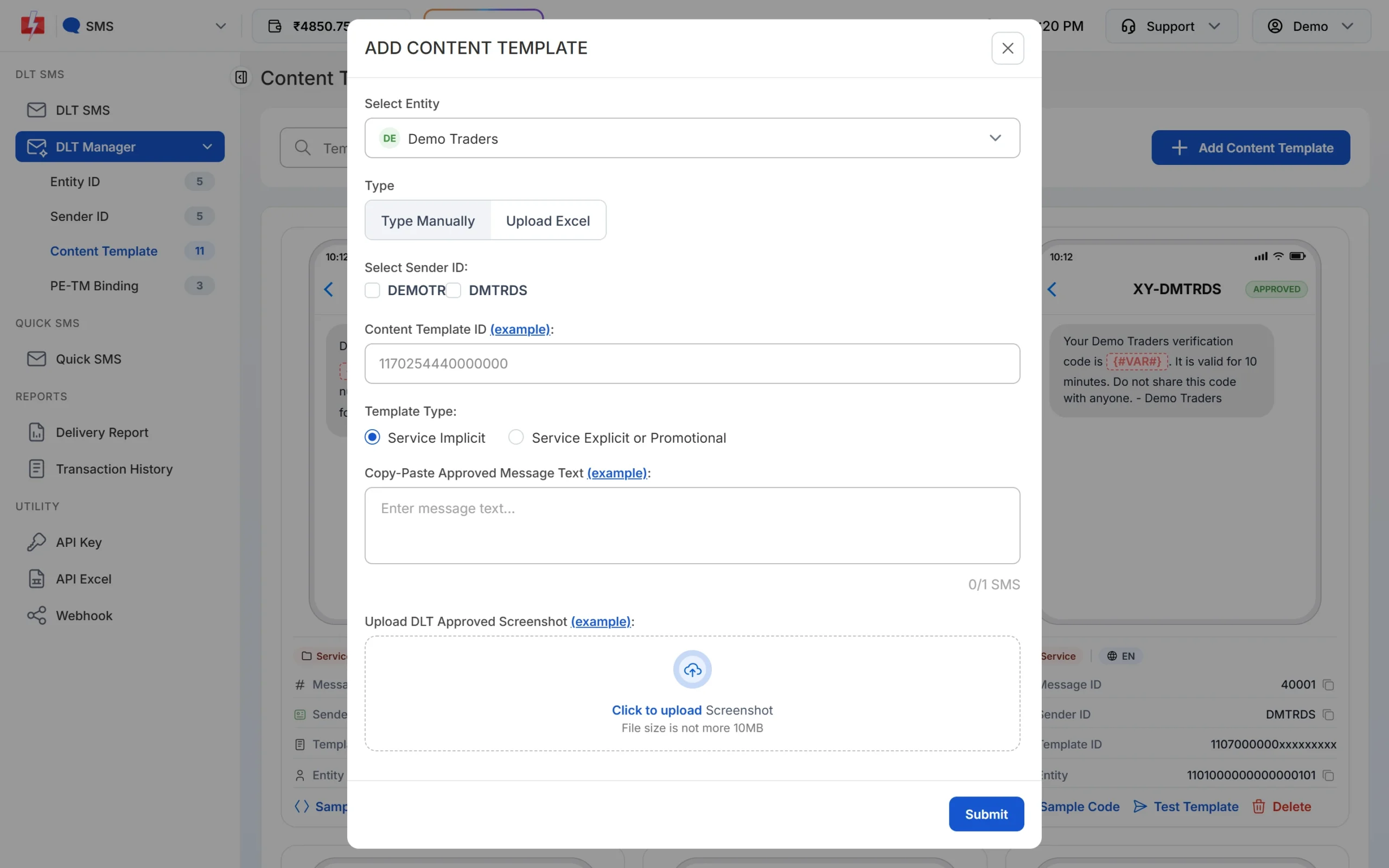
Choose Service Implicit for transactional and service templates. -
Send from the panel
Open DLT SMS, choose the Sender ID, and add numbers as a list, from your Address Book or from a CSV file. Click Select DLT Template. The Service Implicit tab shows only your transactional and service templates. Fill the variables, or map them to CSV columns so each customer gets their own order number and amount.
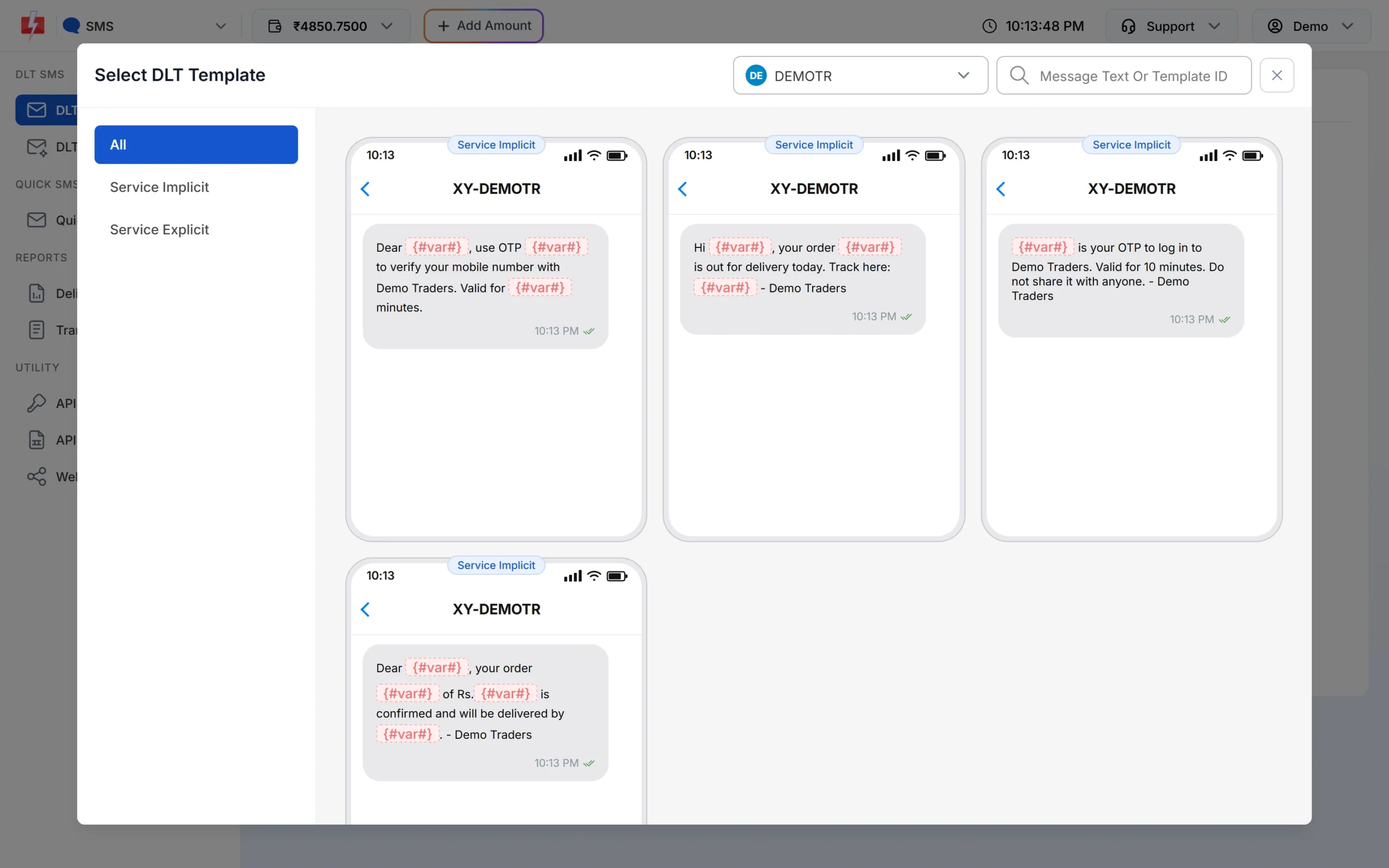
Transactional templates are labelled Service Implicit in the picker. -
Or send automatically by API
Most transactional SMS are triggered by your software: the order system, the billing tool or the app. On the template card, click Sample Code to get a ready request in cURL, PHP, Node.js or Python. The
messagevalue is the template’s Message ID shown on the card, andvariables_valuescarries the values separated by a pipe.curl -X POST "https://www.fast2sms.com/dev/bulkV2" \ -H "authorization: YOUR_API_KEY" \ -d "route=dlt" \ -d "sender_id=DEMOTR" \ -d "message=10001" \ -d "variables_values=Rahul|DT10458|1240|21 Nov" \ -d "numbers=9999999999"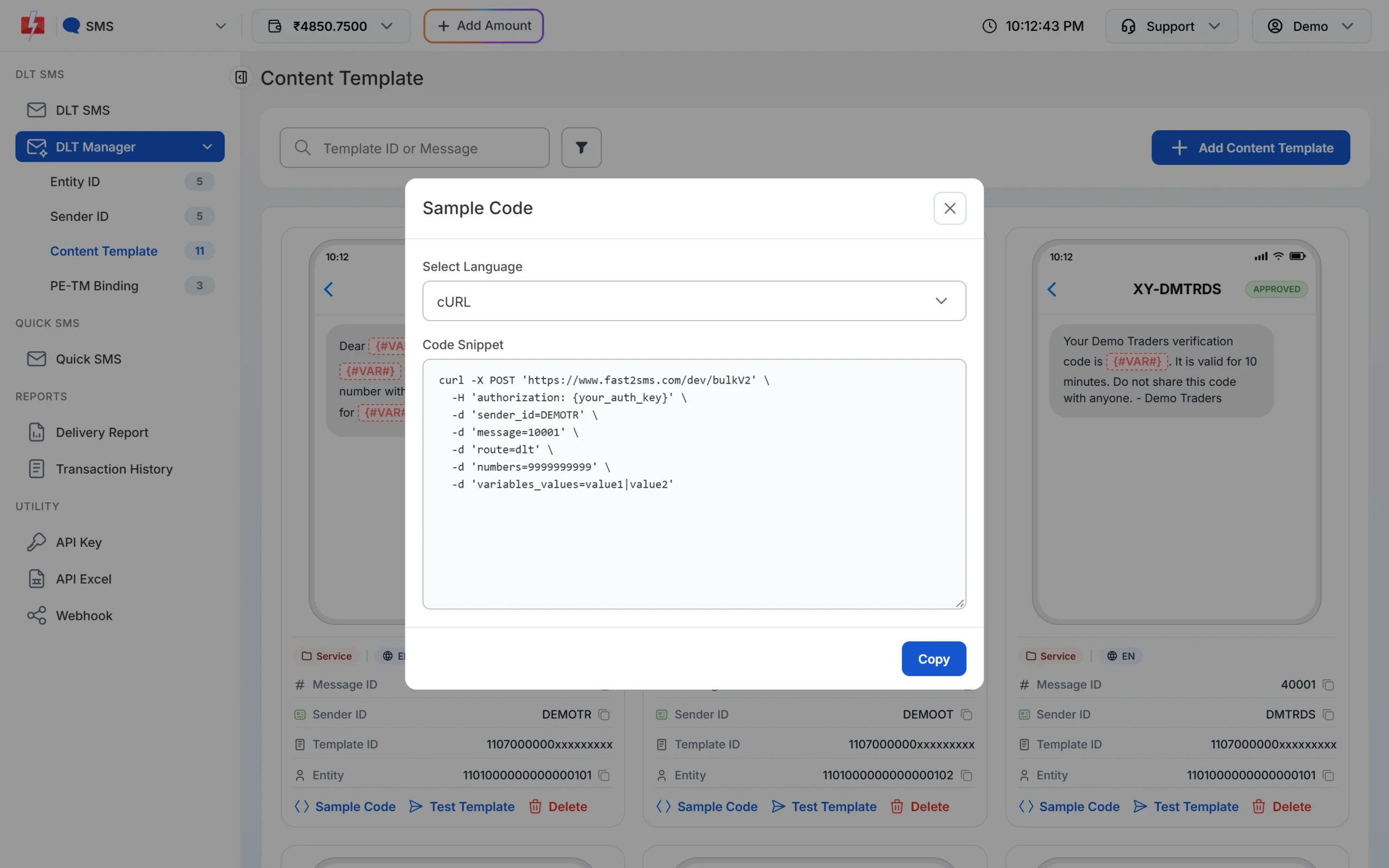
Sample Code on each template card. -
Track delivery and connect your system
Check each message in Delivery Reports. Add an SMS webhook to send each delivery status to your own system, so your order screen can show “SMS delivered” next to each order. If you sell on Shopify or WooCommerce, the ready Fast2SMS app and plugin can send order SMS without code.
Tips for better transactional SMS
- Put the important part first. The OTP, order number or amount should be in the first line.
- Stay within one SMS part. English SMS hold 160 characters per part. Hindi and other Unicode text hold 70. Longer text costs more per number.
- Use one template for many messages. A template with variables for name, order number and date covers every order.
- Send in the customer’s language. Register Hindi or regional templates separately if your customers prefer them.
- Do not send sensitive data. No full card numbers, passwords or medical details in an SMS.
- Add WhatsApp where it helps. Invoices as PDF and order updates with a “Track order” button work well on WhatsApp utility templates, with SMS for customers who are not on WhatsApp.
At the time of writing, the Fast2SMS DLT SMS rate is the same for transactional, promotional and OTP SMS, starting at ₹0.25 per SMS part on small recharges and lower on larger ones. See the bulk SMS pricing page.
Sending in bulk? For high SMS volumes our team offers discounted rates. Talk to our team or see SMS pricing.
Frequently asked questions
What is an example of a transactional SMS?
“609522 is your OTP to log in to Demo Traders. Valid for 10 minutes.” Order confirmations, payment receipts and appointment reminders are other common examples.
Can transactional SMS be sent to DND numbers?
Yes. Transactional and service SMS reach DND numbers, as long as the content has no offer or promotion.
Can I send transactional SMS at night?
Yes. Service Implicit templates are not limited to daytime. An OTP or order update at 11 PM goes out straight away.
Can I add an offer to an order confirmation SMS?
No. Any offer makes it promotional. Send the offer as a separate promotional SMS in the daytime window.
Do transactional SMS cost more than promotional SMS?
At the time of writing, Fast2SMS charges the same DLT SMS rate for transactional, promotional and OTP SMS. See the pricing page for current rates.
Do I need a separate sender ID for transactional SMS?
You need an approved alphabetic sender ID linked to the template on DLT. Many businesses keep one header for service messages and a separate one for promotions.
Should I send OTPs as DLT SMS or with Smart OTP?
Both work. Smart OTP is our recommended way because it generates and verifies the code and can fall back between SMS and WhatsApp. With the DLT SMS API, your own app creates and checks the OTP.