
To send a bulk voice call with the Fast2SMS API, POST your numbers and an approved voice file’s file_id to https://www.fast2sms.com/dev/voice/bulk. Every number gets a call that plays your recording, and you pay only for answered calls. This guide shows how to find the file_id, the full request, the reply, calling hours, how the money is held and refunded, and ready code for cURL, PHP, Python and Node.js.
Before you start
- A Fast2SMS account with paid recharges of ₹100 or more in total. Without it the API answers “You need to complete one transaction of ₹100.00 or more before sending voice calls.”
- An Approved voice file. Upload it in Voice Files; the operator approves it, usually within a few hours. Every account also gets free, pre-approved sample files. See voice file upload format and approval.
- Your API key from API Key.
- Wallet balance for the amount that will be held (explained below).
Send a simple voice call by API
-
Find the File ID of an approved voice file
Open Voice Files under VOICE CALL (OBD). Each card shows the status, what the file is Used As, its length and its File ID with a copy button. Only files with the status Approved can be used.
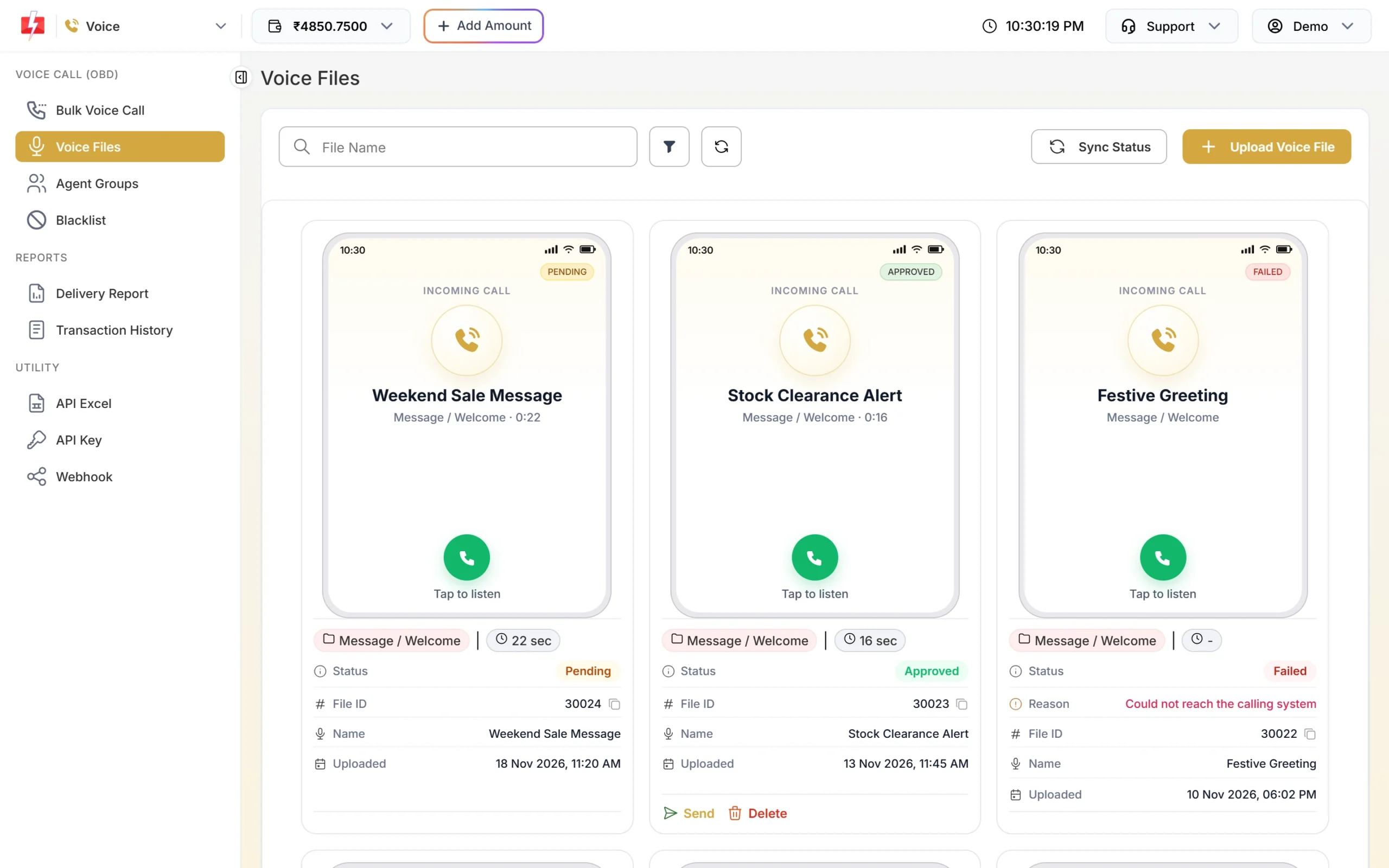
Use the File ID of an Approved file, here 30023. You can also list your files by API:
curl "https://www.fast2sms.com/dev/voice/files" -H "authorization: YOUR_API_KEY"{"return":true,"files":[ {"file_id":30023,"name":"Stock Clearance Alert","used_as":"welcome","duration":16,"status":"approved","remarks":null}, {"file_id":30024,"name":"Weekend Sale Message","used_as":"welcome","duration":22,"status":"pending","remarks":null}]}statusispending,approvedorrejected, andused_astells you the file’s role: welcome, menu, thanks, noinput, wronginput or noagent. -
Send the campaign
curl -X POST "https://www.fast2sms.com/dev/voice/bulk" \ -H "authorization: YOUR_API_KEY" \ -H "Content-Type: application/json" \ -d '{"file_id":"30023","numbers":"9999999999,8888888888","campaign_name":"Stock clearance Nov"}' -
Read the reply
{"return":true,"request_id":"VdQkbYrvgtOo2nG", "message":["Voice campaign accepted. Calls start within a minute."], "numbers":2,"removed":0,"dnd":0,"amount_held":1}numbersis how many numbers will be called,removedcounts invalid, duplicate, blacklisted and DND numbers taken out, andamount_heldis the rupees held from your wallet. Save therequest_id(it starts with V) to fetch the result. -
Check the result
Call
GET /dev/voice/report?request_id=V..., or open Delivery Report, Voice Report. See voice call report and refunds by API.
Request fields
| Field | Required | Rules |
|---|---|---|
numbers |
Yes | Indian mobile numbers separated by commas, spaces or semicolons. Up to 1,00,000 per request. 91 or 0 in front is trimmed; invalid and duplicate numbers are removed |
file_id |
Yes | The File ID of an approved voice file |
campaign_name |
No | A name you will see in the report. If empty, the name is “API” with the date and time |
schedule_time |
No | YYYY-MM-DD HH:MM:SS in IST, inside calling hours |
idempotency_key |
No | Any unique string per campaign. If your request times out and you send it again with the same key, you get the first campaign back instead of a second one |
dtmf_keys, agent_groups |
No | Turn the call into a Key Press or Call Patch campaign. See IVR key press and call patch by API |
Each field must be a single value, not a list. A list in, for example, file_id gets “file_id must be a single value.”
Calling hours and scheduling
- Calls go out only between 10:00 AM and 9:00 PM IST.
- If you send without
schedule_timeafter 8:50 PM or before 10 AM, the campaign is scheduled for 10:00 AM. The reply then says “Calling hours are over for today, so the campaign is scheduled for …” with the date and time. - A
schedule_timeoutside calling hours is refused: “Voice calls can only be sent between 10:00 AM and 9:00 PM (TRAI). Please schedule the campaign inside this time.” - At 9 PM a running campaign is paused and the rest of the numbers wait.
Read more in TRAI rules for voice calls.
Code examples
PHP
<?php
$payload = [
    "file_id"         => "30023",
    "numbers"         => "9999999999,8888888888",
    "campaign_name"   => "Stock clearance Nov",
    "idempotency_key" => "stock-clearance-2026-11-18",
];
$ch = curl_init("https://www.fast2sms.com/dev/voice/bulk");
curl_setopt_array($ch, [
    CURLOPT_POST           => true,
    CURLOPT_RETURNTRANSFER => true,
    CURLOPT_HTTPHEADER     => ["authorization: YOUR_API_KEY", "Content-Type: application/json"],
    CURLOPT_POSTFIELDS     => json_encode($payload),
    CURLOPT_TIMEOUT        => 60,
]);
$data = json_decode(curl_exec($ch), true);
curl_close($ch);

if (($data["return"] ?? false) === true) {
    echo $data["request_id"] . " held Rs " . $data["amount_held"];
} else {
    echo "Error " . ($data["status_code"] ?? "") . ": " . ($data["message"] ?? "");
}
Python
import requests

payload = {
    "file_id": "30023",
    "numbers": "9999999999,8888888888",
    "campaign_name": "Stock clearance Nov",
    "idempotency_key": "stock-clearance-2026-11-18",
}
r = requests.post("https://www.fast2sms.com/dev/voice/bulk",
                  headers={"authorization": "YOUR_API_KEY"}, json=payload, timeout=60)
data = r.json()
if data.get("return"):
    print(data["request_id"], data["message"][0], "held:", data["amount_held"])
else:
    print("Error", data.get("status_code"), data.get("message"))
Node.js
const res = await fetch("https://www.fast2sms.com/dev/voice/bulk", {
  method: "POST",
  headers: { authorization: process.env.FAST2SMS_API_KEY, "Content-Type": "application/json" },
  body: JSON.stringify({
    file_id: "30023",
    numbers: "9999999999,8888888888",
    campaign_name: "Stock clearance Nov",
    idempotency_key: "stock-clearance-2026-11-18",
  }),
});
const data = await res.json();
if (data.return === true) {
  console.log(data.request_id, data.message[0], "held:", data.amount_held);
} else {
  console.log("Error", data.status_code, data.message);
}
How the money works
- Per pulse: calls are charged by the pulse. At the time of writing the panel shows ₹0.25 per 15-second pulse; your account rate may differ.
- Hold at send: the estimated cost is taken from your wallet when the campaign is accepted. The estimate per number is based on the file’s length, rounded up to whole pulses.
- Only answered calls are charged. No answer, busy, failed, DND and blacklisted numbers cost nothing.
- Refund: when the campaign’s report is in, the unused amount is credited back as “Unanswered Voice Call Refund”, normally about an hour later. If the operator report never arrives, the campaign is closed after 48 hours and the unknown numbers are not charged.
Sending in bulk? For high voice call volumes our team offers discounted rates. Talk to our team or see voice call pricing.
The voice file itself is uploaded in the panel. Each upload has a fee, refunded if the operator rejects the file.
Common problems and fixes
“A chosen voice file was not found or is not approved yet. Please choose it again.”
The file_id is wrong or the file is still Pending or was Rejected. Check with GET /dev/voice/files and use an approved file.
“Maximum 100000 numbers per request.”
Split the list into several requests.
“Too many requests. Try again in N seconds.” (HTTP 429)
The API takes up to 20 campaign requests a minute per account. Put many numbers in one request instead of one request per number.
“Insufficient wallet balance. This campaign needs Rs X.”
The hold for all numbers is more than your balance. Recharge or send fewer numbers.
“You already have 50 voice campaigns scheduled or running.”
Wait for some campaigns to finish, or cancel scheduled ones in Voice Schedule.
“All numbers are in your voice blacklist.”
Every number is on your voice blacklist. Remove the ones you want to call from Blacklist.
Error 412 or 414 (HTTP 401)
The API key is wrong, or API Security is on and the server IP is not whitelisted. See API Security.
Frequently asked questions
Can I upload a voice file by API?
No. Upload and approval happen in Voice Files in the panel. The API lists your files and uses their File IDs.
Are DND numbers called?
The operator does not call DND numbers. They show as DND in the report and are not charged.
Can I send a voice call at night?
No. Calls go out between 10 AM and 9 PM. A send outside these hours is scheduled for 10 AM.
Do unanswered calls get retried?
Not at the time of writing. The operator does not allow retries of unanswered calls.
Can I cancel a scheduled voice campaign?
Yes, from Delivery Report, Voice Report, Schedule with Cancel. The held amount is credited back.
Can I get each call’s result on my server?
Yes. Create a Voice webhook. It sends one request per number after the campaign’s report is in, with status, duration, pulses and charge.