
Welcome and thank-you SMS templates are registered on DLT as Service Implicit when they only welcome or thank an existing customer, as Transactional when they confirm a payment the customer just made, and as Promotional the moment they carry a coupon or offer. This page has 14 ready-to-register welcome and thank-you SMS templates for shops, online stores, gyms, service businesses and NGOs, in English and Hindi, with typed variables, sample messages, character counts and SMS parts.
Which DLT category for welcome and thank-you SMS
| Message | DLT category | Why |
|---|---|---|
| Welcome after sign-up, account or membership details | Service Implicit | Information about a service the customer just joined |
| Thank you for your purchase, visit, enquiry or attendance | Service Implicit | Follows a relationship the customer started |
| Thank you for your payment or donation, with a reference | Transactional | Confirms a transaction the customer made just now |
| Welcome offer, “thank you, here is 10% off” | Promotional | Any offer makes the whole message promotional |
Keep the thank-you plain if you want it to reach DND numbers and go out at any hour. Change the brand names in the samples (Demo Traders, Demo Fitness, Demo Foundation) to your own. Counts are for the sample shown.
Welcome SMS templates
1. Welcome after sign-up
DLT category: Service Implicit. Variables: {#alphanumeric#}, {#url#}.
Welcome to Demo Traders, {#alphanumeric#}. Your account is ready. Log in any time at {#url#} - Demo TradersSample message (117 characters, English, 1 SMS): Welcome to Demo Traders, Priya. Your account is ready. Log in any time at https://demotraders.in/login – Demo Traders
Whitelist your login domain as a CTA on the DLT portal before you send.
2. Welcome with customer ID
DLT category: Service Implicit. Variables: {#alphanumeric#}.
Dear {#alphanumeric#}, welcome to Demo Traders. Your customer ID is {#alphanumeric#}. Please quote it when you contact us. - Demo TradersSample message (118 characters, English, 1 SMS): Dear Priya, welcome to Demo Traders. Your customer ID is DTC50213. Please quote it when you contact us. – Demo Traders
3. Welcome to a membership
DLT category: Service Implicit. Variables: {#alphanumeric#}.
Hi {#alphanumeric#}, welcome to Demo Fitness. Your {#alphanumeric#} membership is active till {#alphanumeric#}. See you at the gym. - Demo FitnessSample message (118 characters, English, 1 SMS): Hi Karan, welcome to Demo Fitness. Your Quarterly membership is active till 18 Feb. See you at the gym. – Demo Fitness
Thank-you SMS templates
4. Thank you for your purchase
DLT category: Service Implicit. Variables: {#alphanumeric#}, {#numeric#}.
Thank you for shopping at Demo Traders, {#alphanumeric#}. Your bill no {#alphanumeric#} for Rs {#numeric#} is saved with us. - Demo TradersSample message (111 characters, English, 1 SMS): Thank you for shopping at Demo Traders, Priya. Your bill no B88213 for Rs 2340 is saved with us. – Demo Traders
5. Thank you for your payment
DLT category: Transactional. Variables: {#numeric#}, {#alphanumeric#}.
Thank you for your payment of Rs {#numeric#} to Demo Traders. Reference no {#alphanumeric#}. - Demo TradersSample message (92 characters, English, 1 SMS): Thank you for your payment of Rs 2340 to Demo Traders. Reference no PAY77120. – Demo Traders
6. Thank you for visiting
DLT category: Service Implicit. Variables: {#alphanumeric#}.
Thank you for visiting Demo Traders today, {#alphanumeric#}. We hope you liked our service. - Demo TradersSample message (95 characters, English, 1 SMS): Thank you for visiting Demo Traders today, Priya. We hope you liked our service. – Demo Traders
7. Thank you plus feedback request
DLT category: Service Implicit. Variables: {#alphanumeric#}, {#url#}.
Thank you for your order {#alphanumeric#} from Demo Traders. Tell us how we did, it takes one minute: {#url#} - Demo TradersSample message (133 characters, English, 1 SMS): Thank you for your order DT10458 from Demo Traders. Tell us how we did, it takes one minute: https://demotraders.in/fb – Demo Traders
8. Thank you for your enquiry
DLT category: Service Implicit. Variables: {#alphanumeric#}.
Thank you for contacting Demo Traders. Your enquiry number is {#alphanumeric#}. Our team will call you within 24 hours. - Demo TradersSample message (124 characters, English, 1 SMS): Thank you for contacting Demo Traders. Your enquiry number is EQ3391. Our team will call you within 24 hours. – Demo Traders
9. Thank you for attending
DLT category: Service Implicit. Variables: {#alphanumeric#}, {#url#}.
Thank you for attending the {#alphanumeric#} with Demo Traders. The slides and recording are here: {#url#} - Demo TradersSample message (142 characters, English, 1 SMS): Thank you for attending the GST Basics webinar with Demo Traders. The slides and recording are here: https://demotraders.in/w12 – Demo Traders
10. Thank you for your donation
DLT category: Transactional. Variables: {#numeric#}, {#alphanumeric#}.
Thank you for your donation of Rs {#numeric#} to Demo Foundation. Receipt no {#alphanumeric#}. Your support means a lot. - Demo FoundationSample message (124 characters, English, 1 SMS): Thank you for your donation of Rs 1100 to Demo Foundation. Receipt no DF2026441. Your support means a lot. – Demo Foundation
Welcome and thank-you templates with an offer (promotional)
A coupon turns a friendly message into a promotional one. Register these under Promotional with your industry category and an opt-out line. They go out only between 10 AM and 9 PM and do not reach numbers on DND.
11. Welcome offer
DLT category: Promotional. Variables: {#numeric#}, {#alphanumeric#}, {#cbn#}.
Welcome to Demo Traders. Enjoy Rs {#numeric#} off on your first order with code {#alphanumeric#}. T&C apply. To stop offers, call {#cbn#}.Sample message (125 characters, English, 1 SMS): Welcome to Demo Traders. Enjoy Rs 150 off on your first order with code HELLO150. T&C apply. To stop offers, call 9000000001.
12. Thank you with a coupon
DLT category: Promotional. Variables: {#alphanumeric#}, {#numeric#}, {#cbn#}.
Thank you for shopping with Demo Traders. Use code {#alphanumeric#} for {#numeric#}% off on your next visit. To stop offers, call {#cbn#}.Sample message (124 characters, English, 1 SMS): Thank you for shopping with Demo Traders. Use code THANKS10 for 10% off on your next visit. To stop offers, call 9000000001.
Hindi welcome and thank-you templates
Hindi SMS are Unicode, so 1 part holds 70 characters. Both samples fit in 1 part with a short name.
13. Welcome (Hindi)
DLT category: Service Implicit. Variables: {#alphanumeric#}.
Demo Traders में आपका स्वागत है, {#alphanumeric#}। आपका खाता तैयार है।Sample message (59 characters, Unicode, 1 SMS): Demo Traders में आपका स्वागत है, Priya। आपका खाता तैयार है।
14. Thank you for shopping (Hindi)
DLT category: Service Implicit. Variables: {#alphanumeric#}.
Demo Traders से खरीदारी के लिए धन्यवाद, {#alphanumeric#}। - Demo TradersSample message (61 characters, Unicode, 1 SMS): Demo Traders से खरीदारी के लिए धन्यवाद, Priya। – Demo Traders
Tips to get welcome and thank-you templates approved
- Decide first: plain or offer. “Thank you for shopping with us” is service. “Thank you, here is 10% off” is promotional. Do not mix the two and register them as service.
- Avoid sales nudges in service templates. Lines like “visit again for great deals” or “check our new collection” read as promotion to reviewers.
- Brand name in the fixed text. It is how the customer knows who is thanking them.
- Use a fallback for names. If a name is missing, send “Customer” so the SMS still reads well.
- Tag carefully. Names, IDs, bill and receipt numbers in
{#alphanumeric#}, amounts in{#numeric#}, links in{#url#}, phone numbers in{#cbn#}. - Send it at the right moment. A thank-you works best within minutes of the purchase or visit. Use the API to send it from your billing or booking software.
How to add your welcome and thank-you templates in Fast2SMS and send them
Add each approved template to Fast2SMS once. Welcome and thank-you messages usually go one at a time from your software through the API, but you can also send them to a list from the panel.
-
Register the template on your DLT portal
Log in to the DLT portal where your business is registered and add a content template. Pick the category shown with the template, link it to one approved header, paste the text with its variable tags and add a sample message with realistic values. If the text has a
{#url#},{#urlott#}or{#cbn#}variable, whitelist that link or phone number as a CTA on the portal first. Once the portal approves it, note the Content Template ID and take a screenshot of the approved row. -
Add it in DLT Manager
In the Fast2SMS SMS app, open DLT Manager > Content Template and click Add Content Template. Select your entity, tick the Sender ID, enter the Content Template ID, choose the Template Type that matches the portal: Service Implicit for Transactional and Service Implicit templates, Service Explicit or Promotional for promotional ones, paste the approved text exactly as the portal shows it in Copy-Paste Approved Message Text, upload the screenshot and click Submit.
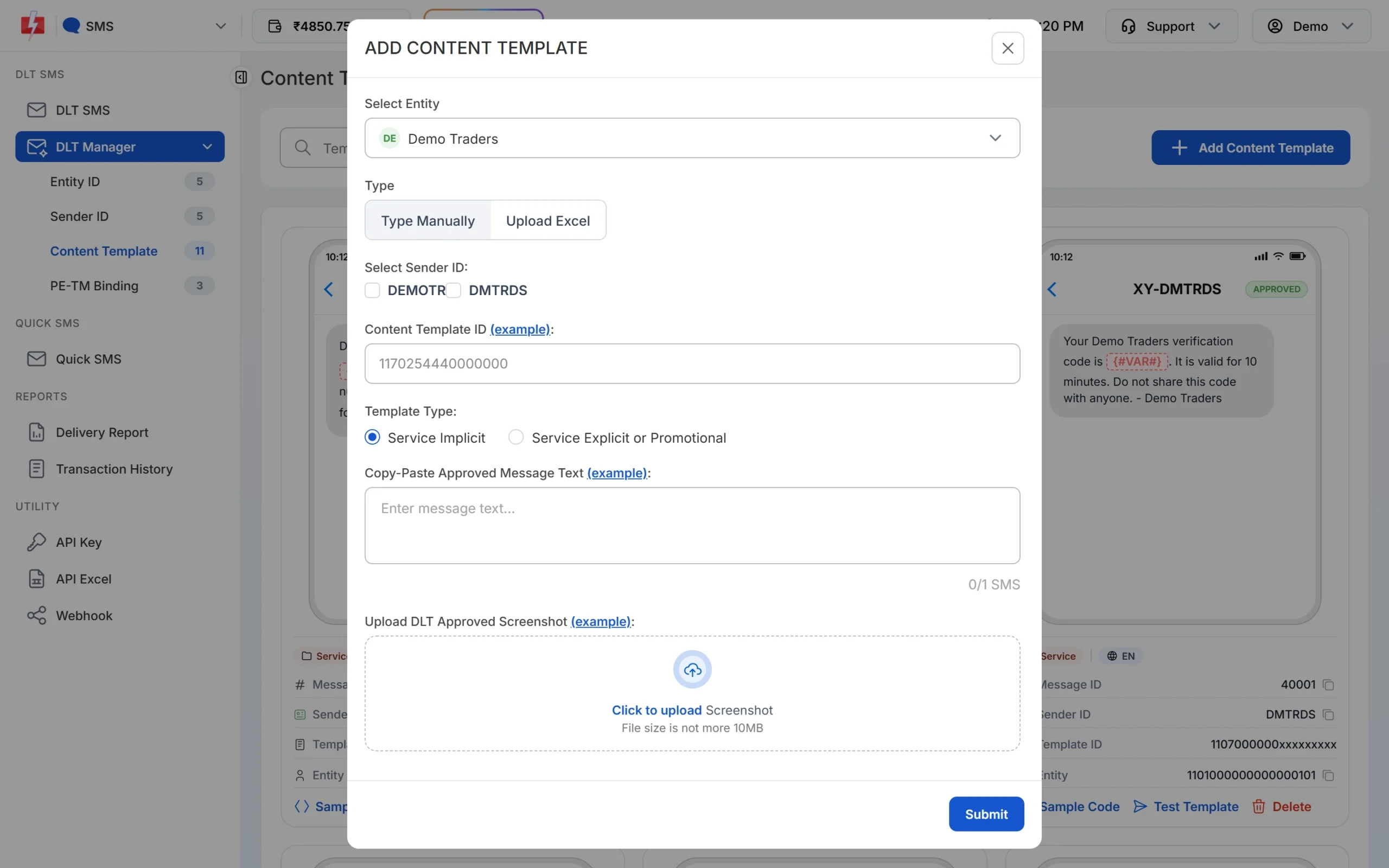
Paste the text exactly as it was approved, including spaces and full stops. -
Wait for Approved and note the Message ID
The template is saved as Pending while Fast2SMS checks it against your screenshot. When the card shows APPROVED, it also shows a Message ID. That short number is what you pass as
messagein the API. The card shows every variable as {#VAR#}, whatever tag you registered. Use Test Template to send one real SMS to your own number before a campaign.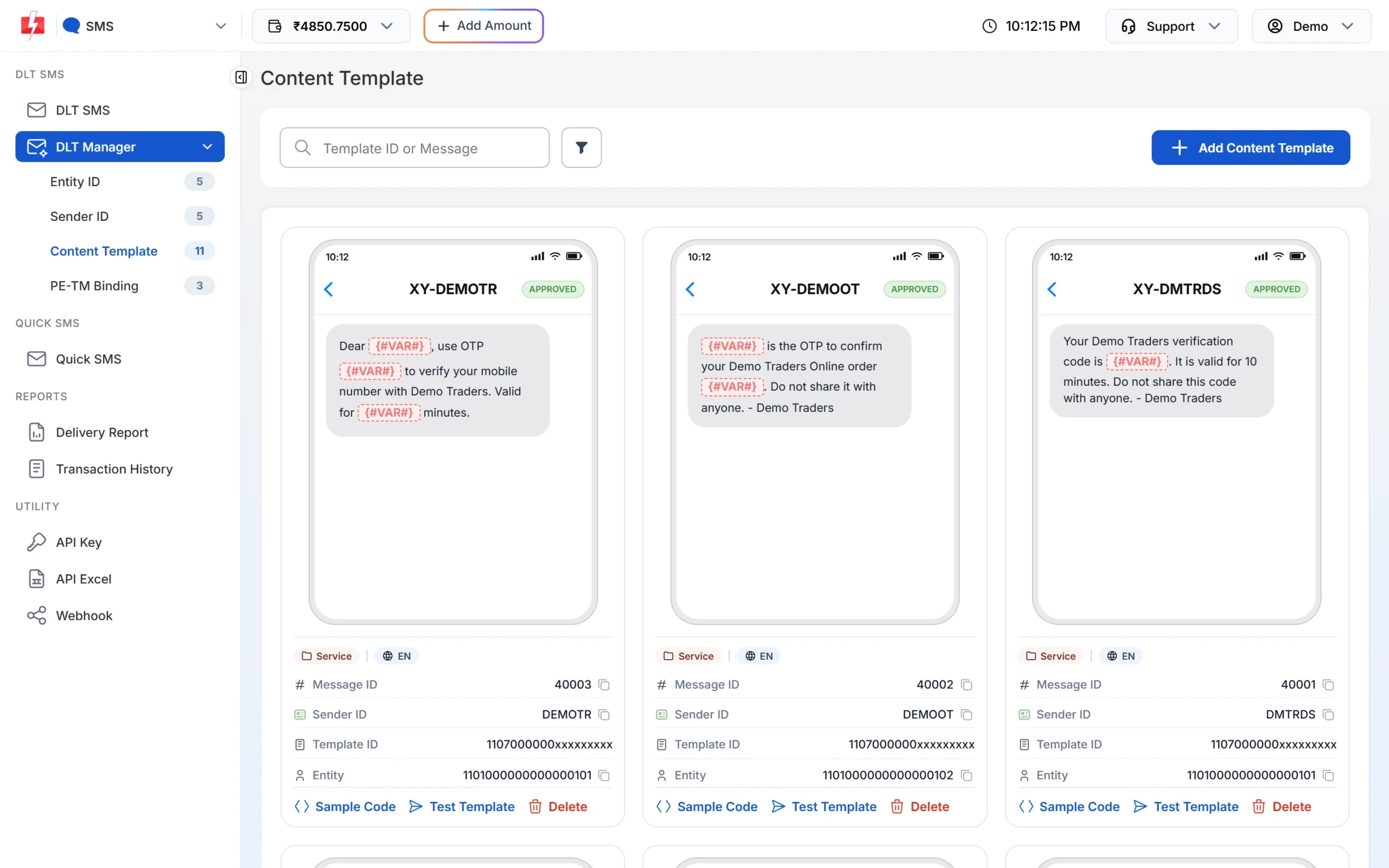
Each approved card shows its Message ID and the Test Template button. -
Pick the template on the DLT SMS page
Open DLT SMS, choose the Sender ID and add numbers under Send To: type them in List, pick contacts from Address Book or upload a CSV File. Then click Select DLT Template. The picker has All, Service Implicit and Service Explicit tabs.
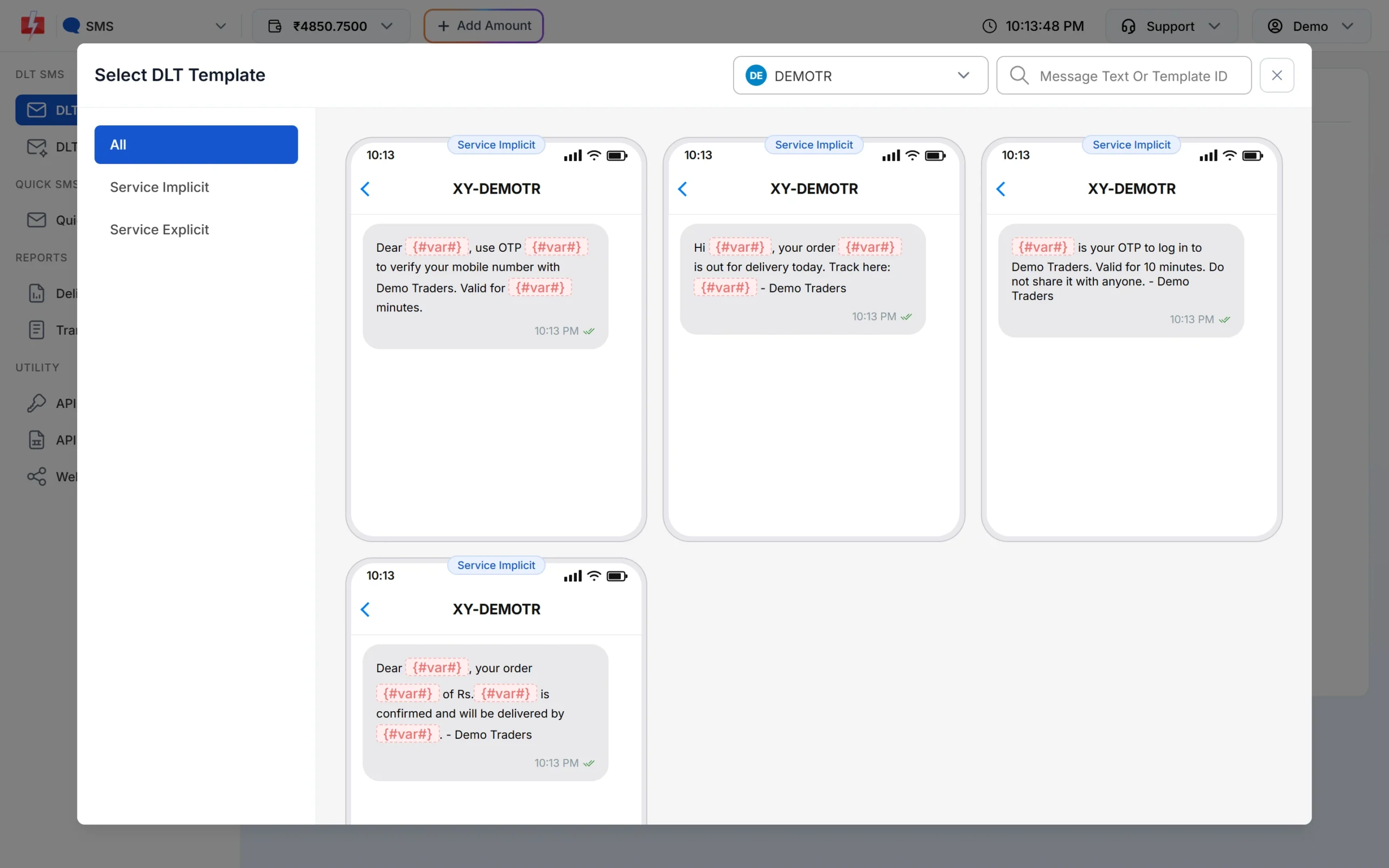
Only approved templates linked to the chosen sender are listed. -
Fill the variables and check the preview
The page shows one box for each variable. As you type, the phone preview shows the final SMS and the counter under it shows characters and SMS parts, such as 107/1 SMS. To send each person their own name, amount or date, use CSV File and map each variable to a column.
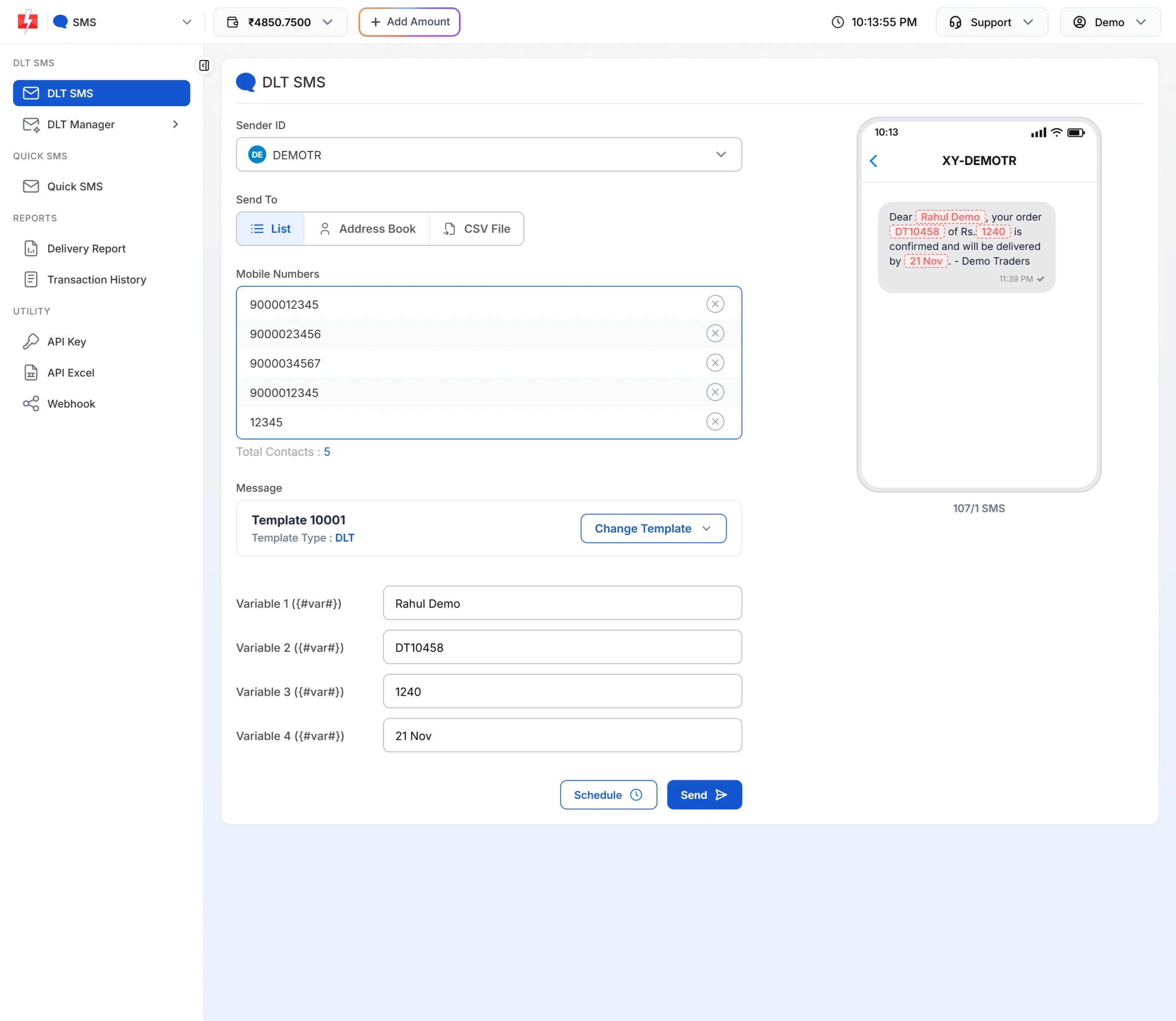
The counter shows how many parts each SMS will use. -
Check the cost, then send or schedule
Click Send. The Message Preview & Confirmation popup shows the cost per SMS, total messages, total, duplicate, valid and invalid numbers, and the total cost. Duplicates and invalid numbers are not charged. Click Confirm & Send, or close it and use Schedule to pick a date and time. Promotional templates go out only between 10 AM and 9 PM. If you send one late at night, Fast2SMS holds it and sends it the next morning.
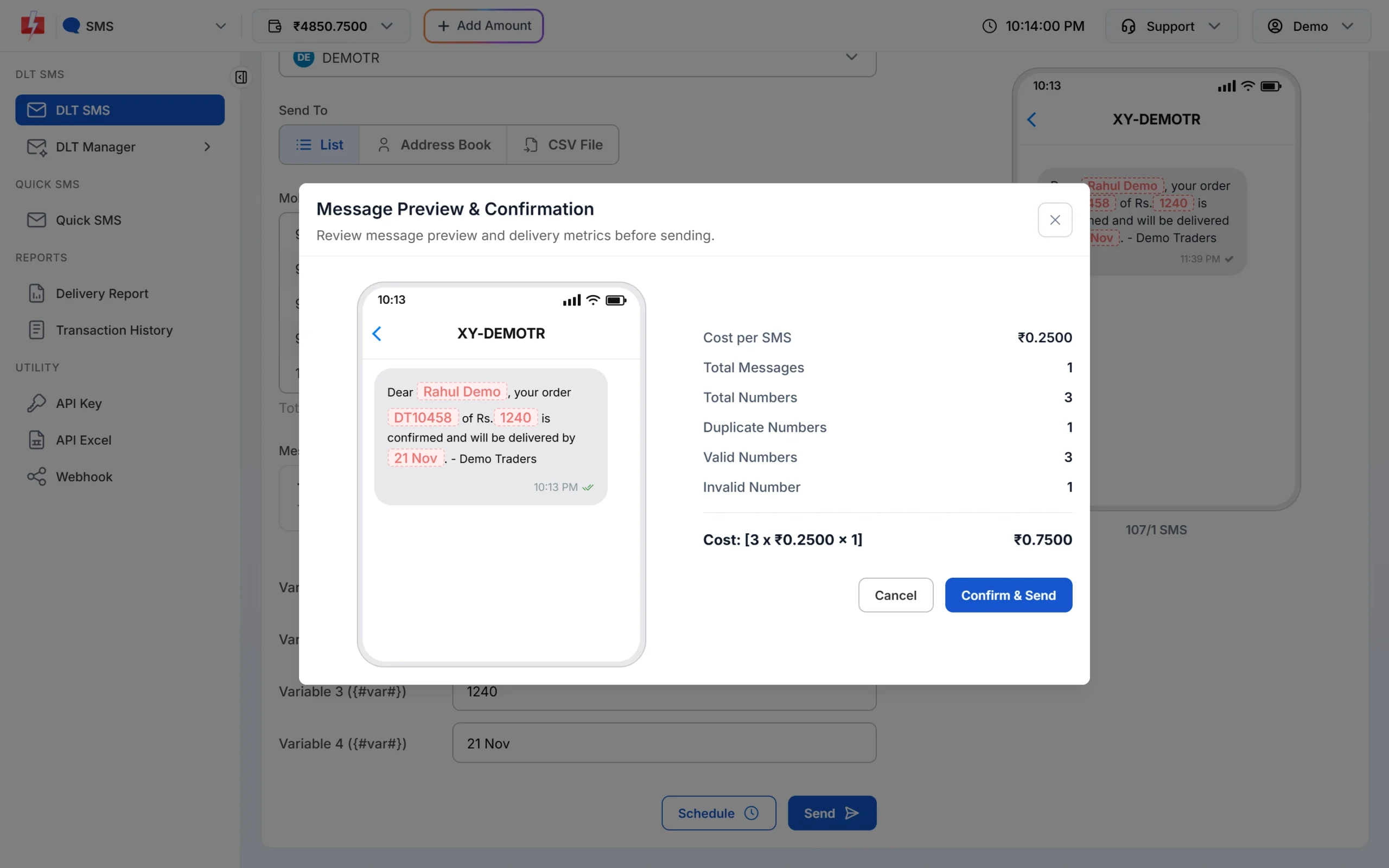
Nothing is sent until you click Confirm & Send.
Each SMS part is charged as one SMS for every valid number, so a template that runs into 2 parts costs twice as much per person as a 1-part template. Keep the text short to save money. See the current rates on the bulk SMS pricing page.
Sending in bulk? For high SMS volumes our team offers discounted rates. Talk to our team or see SMS pricing.
Frequently asked questions
Is a welcome SMS transactional or promotional?
A plain welcome with account or membership details is Service Implicit. It becomes promotional if you add an offer or coupon.
Is a thank-you SMS promotional?
Not if it only thanks the customer for a purchase, visit or payment. A thank-you with a discount code is promotional.
Can a thank-you SMS reach DND numbers?
Yes, when it is registered as Service Implicit or Transactional. Promotional thank-you messages with offers do not reach DND numbers.
Can I send a welcome SMS automatically when someone signs up?
Yes. Call the DLT SMS API from your website or app with route=dlt, your Sender ID, the template’s Message ID and the customer’s name in variables_values.
Can I ask for a review in a thank-you SMS?
Yes. A feedback link about the order is service information. Whitelist the review link’s domain as a CTA on your DLT portal.
Should a donation thank-you include a receipt number?
Yes. It confirms the transaction, which is why it fits the Transactional category.