
The fastest ways to reduce your WhatsApp API bill are to send real order and payment updates as utility templates instead of marketing, answer customers inside the 24-hour window with session replies, and stop sending to people who will not receive or read your messages. None of this needs tricks. This guide lists 10 practical ways to lower your WhatsApp Business API cost, based on Meta’s own pricing rules and on how Fast2SMS charges your wallet.
What you pay for on WhatsApp Business API
Meta charges per delivered message, by message category and by the country code of the customer’s number (Meta: pricing on the WhatsApp Business Platform). Messages customers send you are free. On Fast2SMS you pay a fixed rate per message from your wallet, with no setup or monthly fee. At the time of writing the rates are:
| Message type | Used for | Price per message |
|---|---|---|
| Marketing template | Offers, launches, festival campaigns, re-engagement | ₹0.95 |
| Utility template | Order, payment, delivery and appointment updates | ₹0.25 |
| Authentication template | OTP and login codes | ₹0.25 |
| Session message | Your replies in Live Chat within 24 hours of the customer’s last message | ₹0.13 |
| Incoming message | Messages customers send you | Free |
Your account may have its own rates, and the panel always shows them. See the WhatsApp pricing page for current numbers.
Sending in bulk? For high WhatsApp volumes our team offers discounted rates. Talk to our team or see WhatsApp pricing.
So the bill comes down to two things: how many messages you send, and which category each one is in. Every tip below works on one of those.
10 ways to reduce your WhatsApp API bill
1. Send real transaction updates as utility, not marketing
A marketing template costs almost four times a utility template at the rates above. Many businesses pay the marketing rate for plain order confirmations because one line such as “Shop again and get 10% off” sits in the template. Meta’s rules say a template that mixes utility and marketing content is marketing. Remove the offer line and the update can qualify as utility. Our guide on writing utility templates instead of marketing ones has 15 before and after examples.
2. Reply inside the 24-hour window with session messages
When a customer writes to you, Meta opens a 24-hour customer service window, and every new message from them resets it. Inside that window your team can reply free-form from Live Chat (Inbox) at the session rate (₹0.13 at the time of writing) instead of sending a template. Answer quickly. After 24 hours without a customer message, Live Chat only allows approved templates, which cost more.
3. Answer in one complete reply
Each reply you send is one session message. “Yes”, then “It is ₹499”, then “Delivery in 3 days” is three messages. One reply with all three answers is one. Save your common full answers as predefined messages so agents can send them in one go.
4. Keep automatic replies to one per trigger
Welcome messages, keyword auto replies, out-of-office and delayed responses are charged at the session rate like any reply. In Fast2SMS only the first rule that sends a message runs for each incoming message, in the order set in Rule Sequence Settings. Check that order, and switch off rules you no longer need, so customers do not get extra automatic messages.
5. Let customers message you first
A WhatsApp link or QR code on your website, bills and shop counter brings customers into the chat. You then answer at the session rate, and the customer has already shown interest, so your later messages are more welcome. Our guide on WhatsApp links, QR codes and chat buttons shows how to create them.
Meta also has a free entry point: when a customer messages you from a Click-to-WhatsApp ad on the WhatsApp Android or iOS app and you reply within the window, Meta does not charge messages in a window that can stay open for up to 7 days. If you plan to run these ads, ask our team how they are billed on your account before you start.
6. Send only to opted-in, active customers
Messages to people who never agreed to hear from you get blocked and reported. That lowers your quality rating and makes every later campaign less effective. Meta also limits how many marketing templates a person receives from businesses when they are less likely to engage, and those messages fail with error 131049 (Meta: per-user marketing limits). Send offers to customers who bought or chatted recently, not to your whole database every time.
7. Do not resend failed marketing messages too soon
If a marketing message failed with error 131049, Meta asks you to wait at least 24 hours before trying that person again. Repeated retries within 24 hours can block further delivery attempts to them for up to 24 hours. If the error is 131050, the customer has stopped your marketing messages, so take them off marketing lists for good.
8. Combine messages and use media headers
Instead of an order confirmation followed by a separate invoice, send one utility template with the invoice PDF as a document header and the key details in the body. One message, one charge. The same works for a festival offer with an image header instead of a text message plus a picture.
9. Check the cost before you confirm, and test on a small group
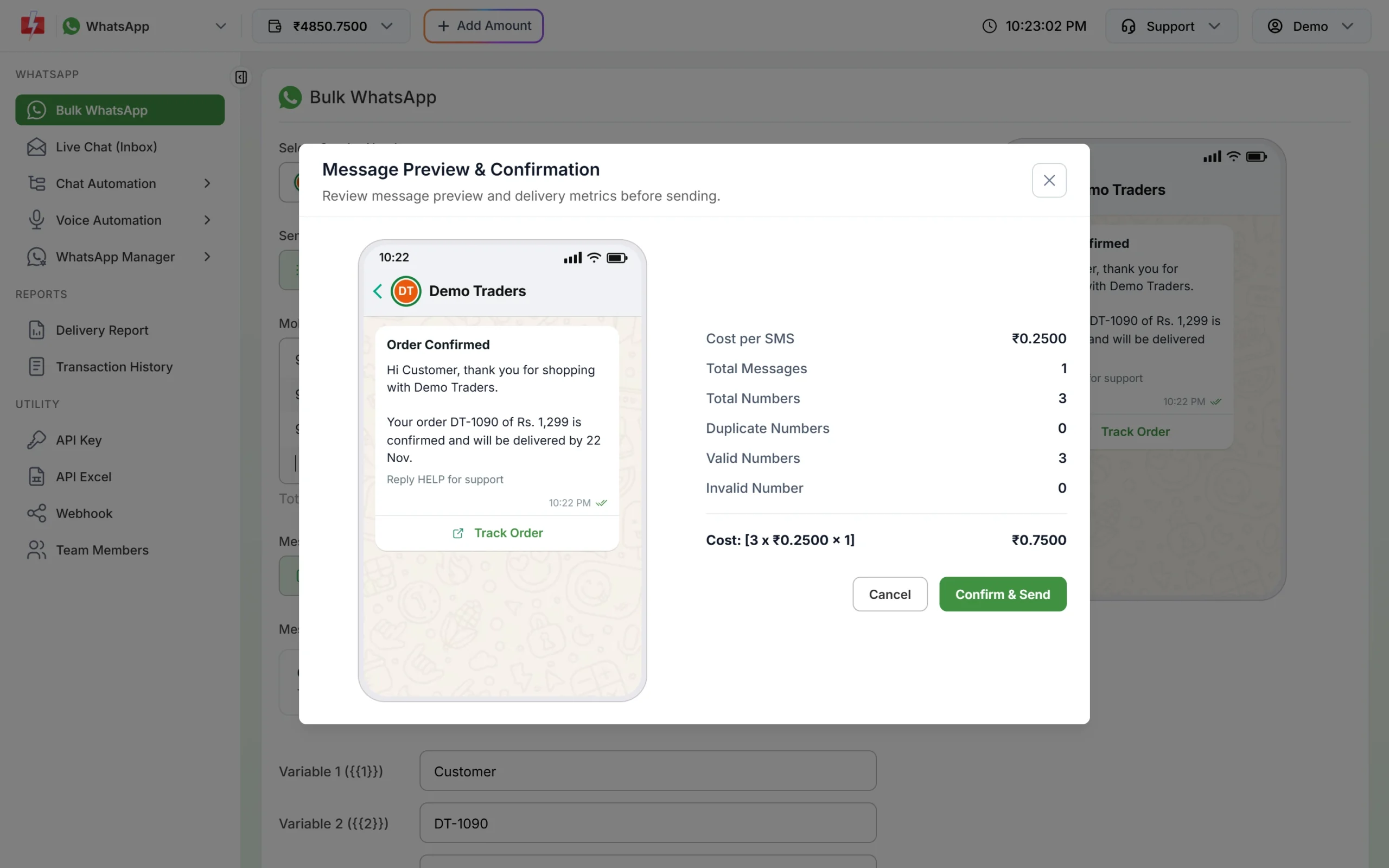
When you click Send on Bulk WhatsApp, the Message Preview & Confirmation window shows the cost per message, total numbers, duplicate and invalid numbers, and the total cost. Duplicates are sent once and invalid numbers are dropped before the cost is worked out. If the template category or the total looks wrong, click Cancel. For a new offer, send to a small segment first and check the read rate in the Delivery Report before you send to everyone.
10. Check refunds and cancel campaigns you no longer need
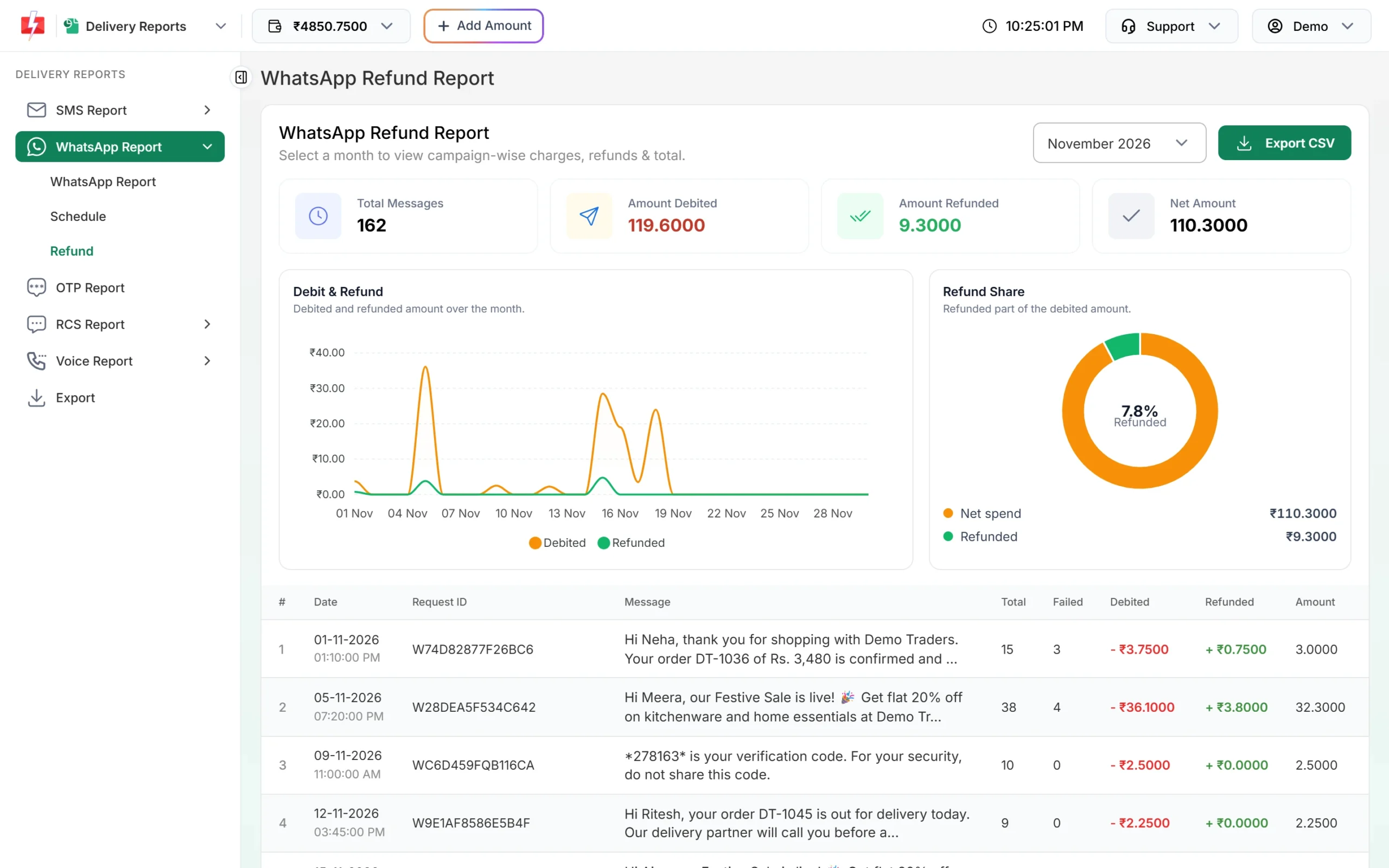
The campaign amount is taken from your wallet when the campaign is queued. Messages that fail or never get a delivery report are refunded to your wallet automatically, whatever the reason. If plans change, cancel a scheduled campaign from the Schedule tab of the Delivery Report and the amount is credited back to your wallet. The Refund tab shows, month by month, what was debited, what came back and your net spend.
Quick cost check: one month for a small shop
An example at the rates above, to show where the money goes:
| What | Before | After |
|---|---|---|
| 2,000 order updates | Sent as marketing (with an offer line): ₹1,900 | Sent as utility (offer line removed): ₹500 |
| Customer questions | 900 short replies: ₹117 | 400 complete replies: ₹52 |
| Festival offer | To all 5,000 contacts: ₹4,750 | To 2,000 recent, opted-in buyers: ₹1,900 |
| Total | ₹6,767 | ₹2,452 |
The numbers are only an illustration. Your own totals depend on your rates and how many messages are delivered. For your own estimate, see how to estimate the cost of a WhatsApp campaign.
What does not reduce your bill
- Shorter messages. WhatsApp is charged per message, not by length, so cutting words does not save money.
- Removing formatting or emojis. They do not change the price.
- Sending from the normal WhatsApp app with bulk tools. It looks free, but it breaks WhatsApp’s terms and can get your number banned.
Frequently asked questions
Why is my WhatsApp API bill so high?
Usually because many messages go out as marketing templates, or campaigns go to large lists with low engagement. Check the category of your most-used templates and who you send them to.
Is a utility message cheaper than a marketing message?
Yes. At the time of writing a utility template costs ₹0.25 and a marketing template ₹0.95 on Fast2SMS. Only real transaction updates qualify as utility.
Are replies to customers cheaper than templates?
Yes. A free-form reply within 24 hours of the customer’s last message is a session message, ₹0.13 at the time of writing.
Do I pay for messages that fail?
No. Failed and undelivered WhatsApp messages are refunded to your Fast2SMS wallet automatically.
Does Meta’s 1,000 free service messages per month apply on Fast2SMS?
Meta gives each business number 1,000 free service messages a month from 1 October 2026. On Fast2SMS you pay the session rate shown in your panel for each reply. If you send a lot of replies, talk to our team about your rates.
Can I get a lower rate for high volume?
Yes. For large monthly volumes our team can offer discounted rates. Talk to us before a big campaign.