
To add OTP login to an Android app with Fast2SMS, your app talks to your own server, and only your server calls the Fast2SMS API. This guide shows the full setup in Kotlin: a small backend with send, verify and resend endpoints, the Android code that calls it with OkHttp and coroutines, OTP autofill, sending DLT SMS alerts, delivery reports and error handling. The same pattern works for Java Android apps.
Why the API key must not be in the app
Anything inside an APK or AAB can be read by decompiling it, including keys in BuildConfig, strings.xml or native code. Anyone who gets your Fast2SMS key can send messages from your wallet. So the flow is:
- The app sends the mobile number to your server.
- Your server calls Fast2SMS
/dev/otp/sendwith the key and your OTP ID. - The user types (or autofills) the code. The app sends it to your server.
- Your server calls
/dev/otp/verifyand, if it passes, creates the user’s session or token.
Your server also decides who may ask for an OTP, which protects you from bots that request thousands of OTPs.
Before you start
- A backend you control (any language). The example below uses Kotlin with Spring Boot.
- API key from API Key under UTILITY, with API Access on.
- Smart OTP template and its OTP ID. For autofill, the DLT template behind it should include your app hash (see below).
- Wallet balance. Every OTP send and resend is charged.
- Android: minSdk 21 or later, Kotlin coroutines and OkHttp.
Set up in the Fast2SMS panel
-
Copy the OTP ID
Open Smart OTP, OTP Template List. Copy the OTP ID of your login template. If you have none, click Add OTP Template, choose SMS or WhatsApp and link your approved template.
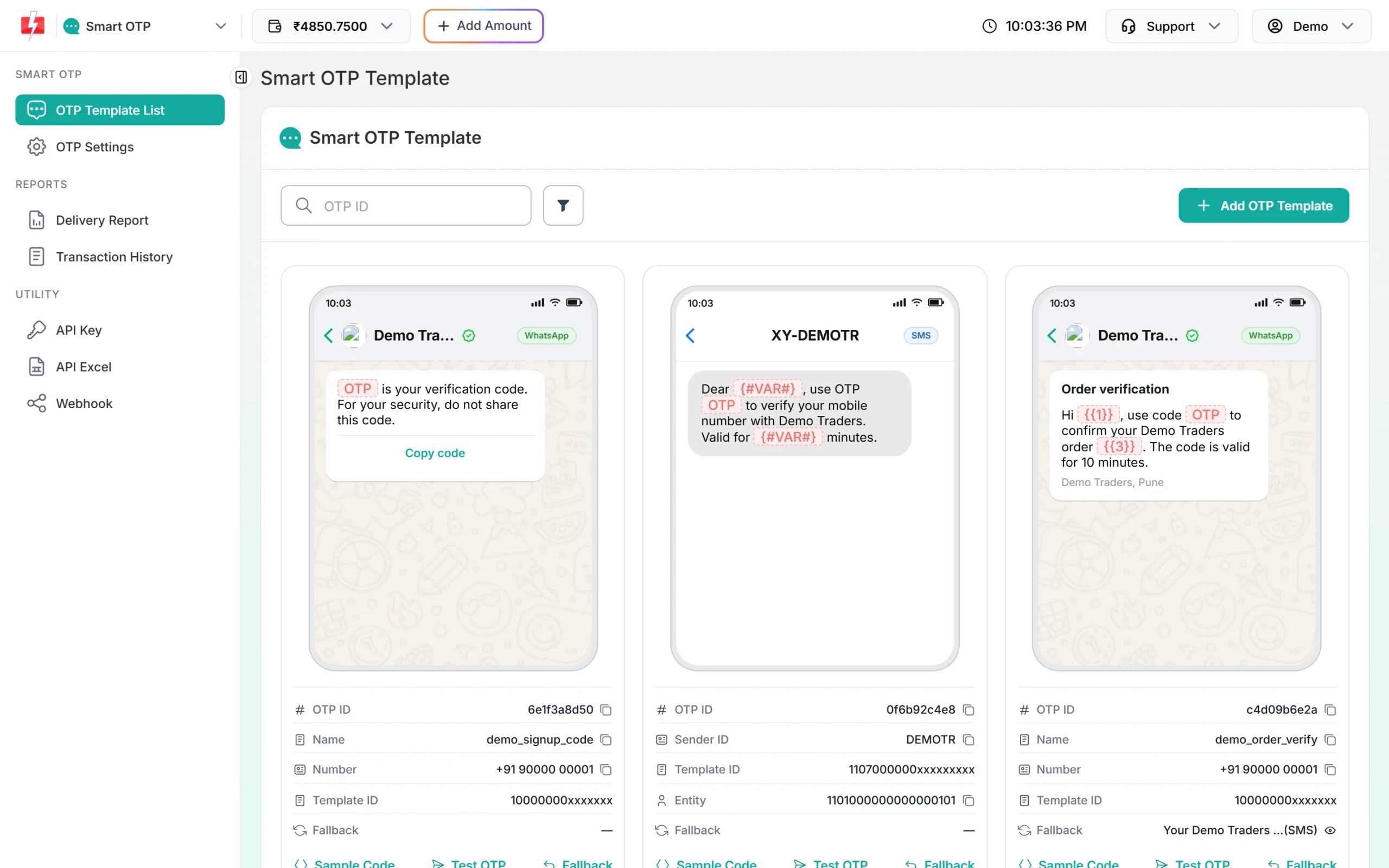
The OTP ID goes in your server config, not in the app. -
Set the resend wait and verify attempts
Open OTP Settings. Max Verify OTP Limit is how many wrong codes are allowed. SMS Resend / Time Limit is the wait, in seconds, before the same number can get another OTP. Use the same wait for the countdown on your Resend button.
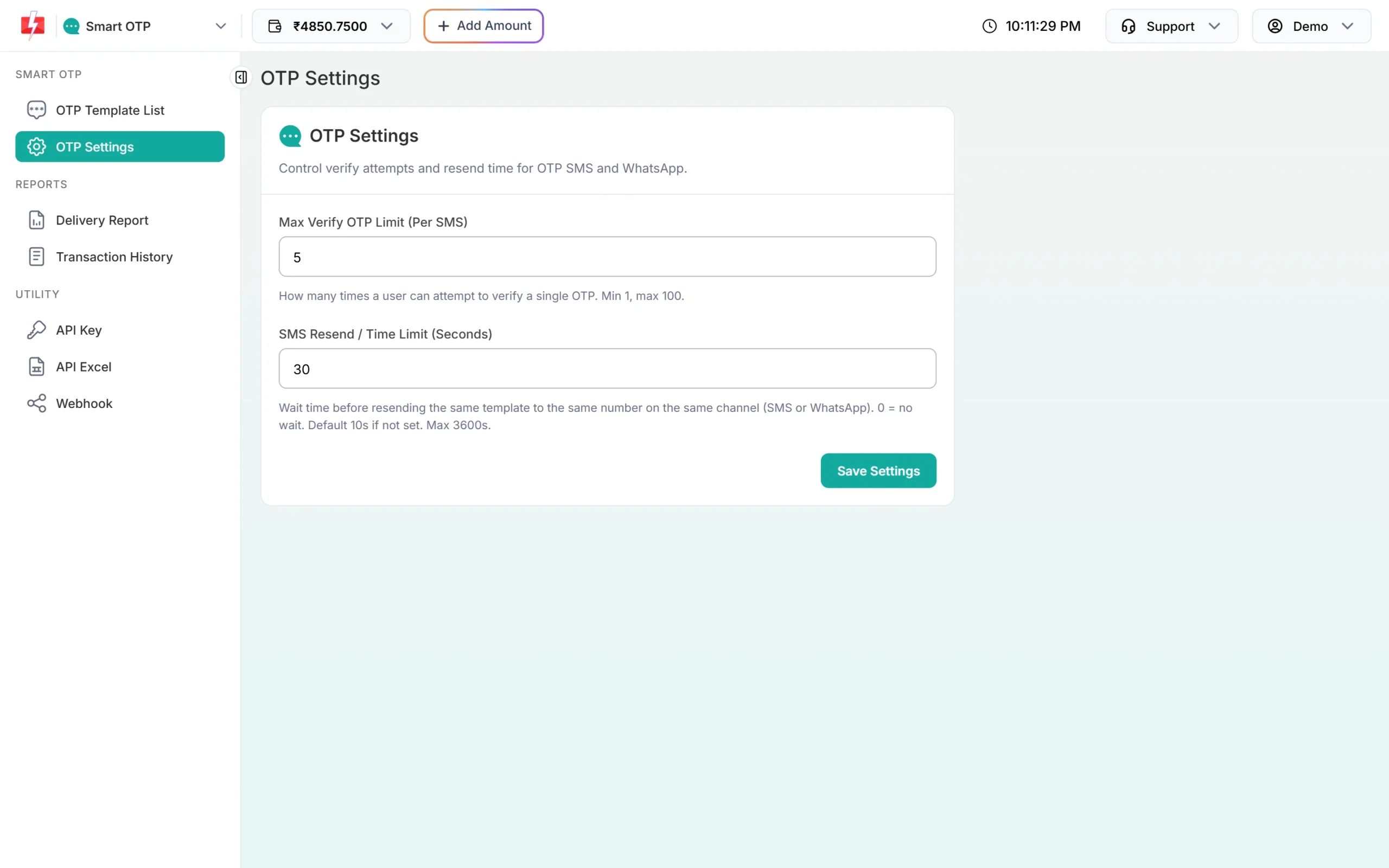
Match your app’s resend timer to this value. -
Copy the API key to your server
In Account Setting, API Key, click View, enter the OTP sent to your account mobile and copy the key into your server’s environment, for example
FAST2SMS_API_KEY.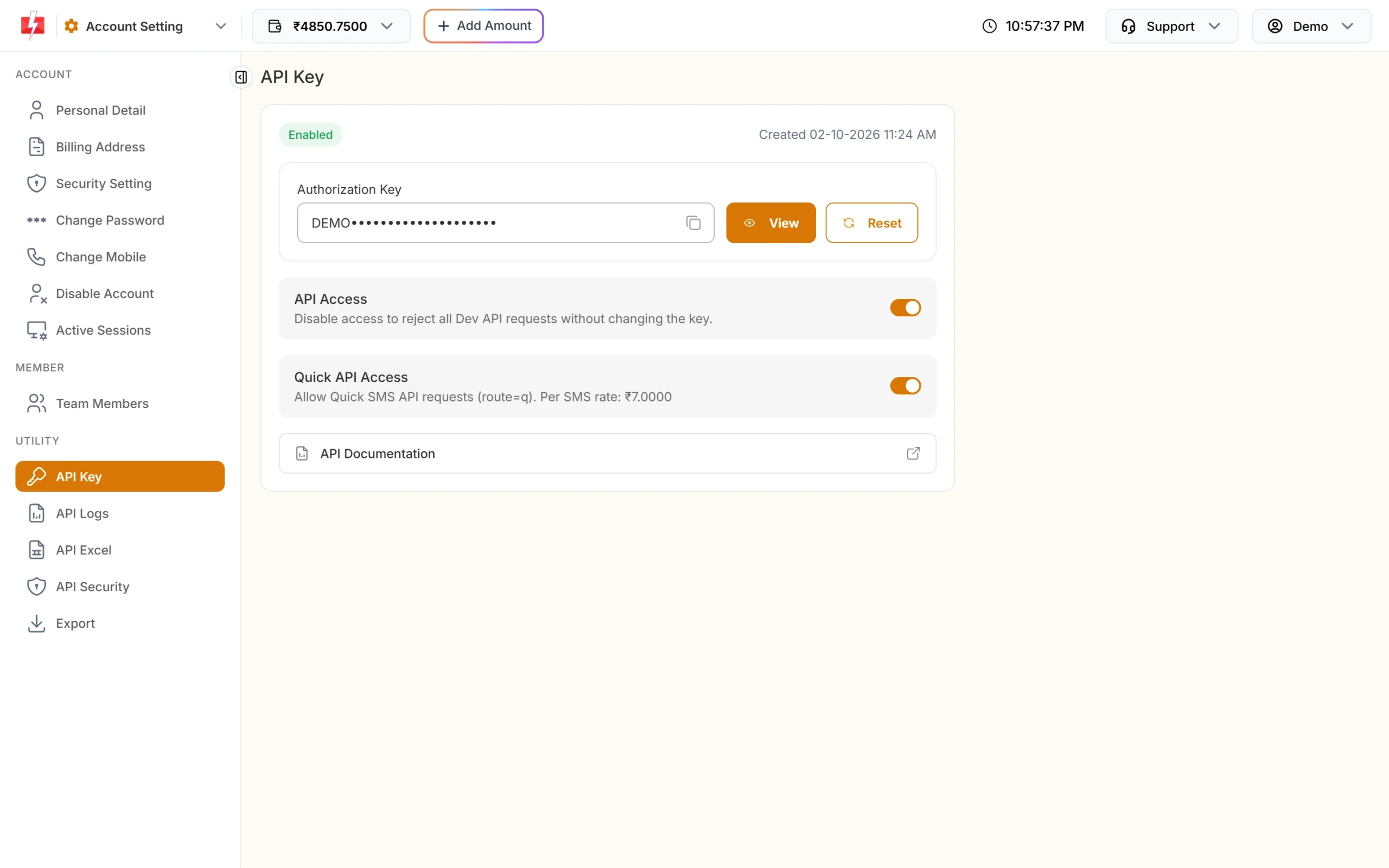
Only your backend reads this key.
Backend: three endpoints for the app
Here is a small Spring Boot controller in Kotlin. It calls Fast2SMS and returns simple JSON to the app. If your backend is in PHP, Python, Node.js or C#, see the language guides linked at the end; the calls are the same.
import com.fasterxml.jackson.databind.ObjectMapper
import org.springframework.http.ResponseEntity
import org.springframework.web.bind.annotation.*
import java.net.URI
import java.net.http.HttpClient
import java.net.http.HttpRequest
import java.net.http.HttpResponse
import java.time.Duration

data class SendReq(val mobile: String)
data class VerifyReq(val mobile: String, val otp: String)

@RestController
@RequestMapping("/api/otp")
class OtpController {
    private val http = HttpClient.newBuilder().connectTimeout(Duration.ofSeconds(5)).build()
    private val json = ObjectMapper()
    private val apiKey = System.getenv("FAST2SMS_API_KEY")
    private val otpId = System.getenv("FAST2SMS_OTP_ID")

    private fun fast2sms(path: String, body: Map<String, Any>): Pair<Boolean, String> {
        val req = HttpRequest.newBuilder(URI.create("https://www.fast2sms.com$path"))
            .timeout(Duration.ofSeconds(15))
            .header("authorization", apiKey)              // bare key, no "Bearer "
            .header("Content-Type", "application/json")
            .POST(HttpRequest.BodyPublishers.ofString(json.writeValueAsString(body)))
            .build()
        val res = http.send(req, HttpResponse.BodyHandlers.ofString())
        val node = json.readTree(res.body())
        val ok = res.statusCode() in 200..299 && node.path("return").asBoolean(false)
        return ok to node.path("message").asText("")
    }

    private fun clean(m: String) = m.filter { it.isDigit() }.takeLast(10)

    @PostMapping("/send")
    fun send(@RequestBody r: SendReq): ResponseEntity<Map<String, Any>> {
        val mobile = clean(r.mobile)
        if (!Regex("^[6-9]\\d{9}$").matches(mobile)) return ResponseEntity.badRequest().body(mapOf("error" to "Enter a valid mobile number"))
        // Add your own limits here: per IP, per device and per mobile per hour
        val (ok, msg) = fast2sms("/dev/otp/send", mapOf("mobile" to mobile, "otp_id" to otpId, "otp_expiry" to 5))
        return if (ok) ResponseEntity.ok(mapOf("sent" to true)) else ResponseEntity.status(400).body(mapOf("error" to msg))
    }

    @PostMapping("/verify")
    fun verify(@RequestBody r: VerifyReq): ResponseEntity<Map<String, Any>> {
        val (ok, msg) = fast2sms("/dev/otp/verify", mapOf("mobile" to clean(r.mobile), "otp" to r.otp.trim()))
        if (!ok) return ResponseEntity.status(400).body(mapOf("error" to msg))
        val token = "..." // create your session or JWT for this mobile here
        return ResponseEntity.ok(mapOf("verified" to true, "token" to token))
    }

    @PostMapping("/resend")
    fun resend(@RequestBody r: SendReq): ResponseEntity<Map<String, Any>> {
        val (ok, msg) = fast2sms("/dev/otp/resend", mapOf("mobile" to clean(r.mobile)))
        return if (ok) ResponseEntity.ok(mapOf("sent" to true)) else ResponseEntity.status(400).body(mapOf("error" to msg))
    }
}
Facts your backend should know:
- Verify needs only the mobile and the code. It checks the latest unverified OTP for that number, and a new send cancels older ones.
- Resend sends the same code again and is charged. It works within 10 minutes of the first send and up to 5 sends in total, counting the first.
- A send inside the wait time returns “Please wait N seconds before requesting a new OTP”. Pass the message to the app.
- The default expiry is 15 minutes; the example sets 5 with
otp_expiry.
Android: call your backend from Kotlin
Add OkHttp and coroutines to app/build.gradle.kts:
dependencies {
    implementation("com.squareup.okhttp3:okhttp:4.12.0")
    implementation("org.jetbrains.kotlinx:kotlinx-coroutines-android:1.8.1")
    implementation("androidx.lifecycle:lifecycle-viewmodel-ktx:2.8.4")
}
And the internet permission in AndroidManifest.xml: <uses-permission android:name="android.permission.INTERNET" />. The app only knows your server’s URL, never the Fast2SMS key.
import kotlinx.coroutines.Dispatchers
import kotlinx.coroutines.withContext
import okhttp3.MediaType.Companion.toMediaType
import okhttp3.OkHttpClient
import okhttp3.Request
import okhttp3.RequestBody.Companion.toRequestBody
import org.json.JSONObject
import java.util.concurrent.TimeUnit

class OtpApi(private val baseUrl: String = "https://api.yourapp.com") {
    private val client = OkHttpClient.Builder()
        .connectTimeout(5, TimeUnit.SECONDS)
        .readTimeout(20, TimeUnit.SECONDS)
        .build()

    sealed class Result {
        data class Ok(val body: JSONObject) : Result()
        data class Error(val message: String) : Result()
    }

    private suspend fun post(path: String, body: JSONObject): Result = withContext(Dispatchers.IO) {
        try {
            val req = Request.Builder()
                .url(baseUrl + path)
                .post(body.toString().toRequestBody("application/json".toMediaType()))
                .build()
            client.newCall(req).execute().use { res ->
                val json = JSONObject(res.body?.string().orEmpty().ifBlank { "{}" })
                if (res.isSuccessful) Result.Ok(json)
                else Result.Error(json.optString("error", "Something went wrong. Try again."))
            }
        } catch (e: java.io.IOException) {
            Result.Error("No internet connection. Try again.")
        }
    }

    suspend fun sendOtp(mobile: String) = post("/api/otp/send", JSONObject().put("mobile", mobile))
    suspend fun resendOtp(mobile: String) = post("/api/otp/resend", JSONObject().put("mobile", mobile))
    suspend fun verifyOtp(mobile: String, otp: String) =
        post("/api/otp/verify", JSONObject().put("mobile", mobile).put("otp", otp))
}
OTP autofill on Android
Two Google APIs can read the OTP for the user:
- SMS Retriever API: no permission prompt. The SMS must contain your app’s 11-character hash. In India the SMS text must match your DLT template, so the hash has to be part of the approved template as fixed text.
- SMS User Consent API: no hash needed. Android shows the SMS and the user taps Allow. Fast2SMS messages come from a sender ID header, so start it without a sender filter.
Start the listener just before you call your send endpoint, then pass the code you read to the verify endpoint. Never mark the user as verified inside the app. The full setup is in the OTP autofill guide linked below.
Full copy-paste example: a login ViewModel
import androidx.lifecycle.ViewModel
import androidx.lifecycle.viewModelScope
import kotlinx.coroutines.delay
import kotlinx.coroutines.flow.MutableStateFlow
import kotlinx.coroutines.flow.StateFlow
import kotlinx.coroutines.launch

data class OtpUiState(
    val mobile: String = "",
    val codeSent: Boolean = false,
    val loading: Boolean = false,
    val resendIn: Int = 0,          // seconds left before Resend is enabled
    val error: String? = null,
    val token: String? = null,      // set when verified
)

class LoginViewModel(
    private val api: OtpApi = OtpApi(),
    private val resendWaitSeconds: Int = 30,   // same as SMS Resend / Time Limit in OTP Settings
) : ViewModel() {

    private val _state = MutableStateFlow(OtpUiState())
    val state: StateFlow<OtpUiState> = _state

    fun sendOtp(mobile: String) = viewModelScope.launch {
        val digits = mobile.filter { it.isDigit() }.takeLast(10)
        if (!Regex("^[6-9]\\d{9}$").matches(digits)) {
            _state.value = _state.value.copy(error = "Enter a valid 10-digit mobile number")
            return@launch
        }
        _state.value = _state.value.copy(mobile = digits, loading = true, error = null)
        when (val r = api.sendOtp(digits)) {
            is OtpApi.Result.Ok -> { _state.value = _state.value.copy(loading = false, codeSent = true); startTimer() }
            is OtpApi.Result.Error -> _state.value = _state.value.copy(loading = false, error = r.message)
        }
    }

    fun resendOtp() = viewModelScope.launch {
        if (_state.value.resendIn > 0) return@launch
        _state.value = _state.value.copy(loading = true, error = null)
        when (val r = api.resendOtp(_state.value.mobile)) {
            is OtpApi.Result.Ok -> { _state.value = _state.value.copy(loading = false); startTimer() }
            is OtpApi.Result.Error -> _state.value = _state.value.copy(loading = false, error = r.message)
        }
    }

    fun verifyOtp(code: String) = viewModelScope.launch {
        if (code.length < 4) return@launch
        _state.value = _state.value.copy(loading = true, error = null)
        when (val r = api.verifyOtp(_state.value.mobile, code.trim())) {
            is OtpApi.Result.Ok -> _state.value = _state.value.copy(loading = false, token = r.body.optString("token"))
            is OtpApi.Result.Error -> _state.value = _state.value.copy(loading = false, error = r.message)
        }
    }

    private fun startTimer() = viewModelScope.launch {
        for (s in resendWaitSeconds downTo 0) {
            _state.value = _state.value.copy(resendIn = s)
            delay(1000)
        }
    }
}
Bind state to your Compose screen or Activity: show the mobile field, then the code field after codeSent, disable Resend while resendIn > 0, and store token securely (for example with EncryptedSharedPreferences or DataStore) once verified.
Sending DLT SMS alerts from an Android app
For order updates, booking alerts or payment receipts, the rule is the same: the app tells your server what happened, and your server calls /dev/bulkV2 with route=dlt, your sender ID, the template’s Message ID and the variable values. Usually it is better to send these from the server when the order or booking changes, not from the app at all.
curl -X POST "https://www.fast2sms.com/dev/bulkV2" \
  -H "authorization: YOUR_API_KEY" \
  -H "Content-Type: application/json" \
  -d '{"route":"dlt","sender_id":"DEMOTR","message":"10001","variables_values":"Rahul|DT10458|1240|21 Nov","numbers":"9999999999"}'
Delivery reports
The app does not need to talk to Fast2SMS for delivery status either. Set up an OTP or SMS webhook under Webhook in the panel so Fast2SMS posts delivered or failed to your server, or call GET /dev/dlr/{request_id} from the server for SMS. If the app needs to show “SMS not delivered, try WhatsApp”, have it ask your server. Smart OTP can also re-send a failed SMS OTP on WhatsApp automatically when the template has a fallback.
Error handling
| Message from Fast2SMS | What the app should show |
|---|---|
| Please wait N seconds before requesting a new OTP | The countdown. Keep Resend disabled. |
| Invalid OTP | “Wrong code, please check and try again.” |
| OTP expired | “Code expired. Tap Resend to get a new one.” |
| Maximum verification attempts reached. OTP is no longer valid. | “Too many wrong tries. Request a new code.” |
| OTP not found or already verified | “Please request a new code.” |
| OTP resend window (10 minutes) has expired / Maximum resend limit (5 times) reached | Restart the flow with a fresh send, or ask the user to try later. |
| Invalid authorization key, Invalid OTP ID, 413, 414, insufficient balance | A general “Something went wrong” to the user. These are setup problems for you to fix on the server. |
On the server, do not retry a send after a timeout: it can send and charge twice. Verify can be retried once.
Common problems and fixes
- NetworkOnMainThreadException: run network calls in
Dispatchers.IO, as inOtpApi. - CLEARTEXT communication not permitted: use HTTPS for your backend URL.
- Autofill does not work: the hash in the SMS does not match the app signing key, or the SMS text is not exactly your DLT template.
- Users get many OTPs: the app calls send again on screen rotation. Keep state in the ViewModel and send only on button tap.
- Bots draining the wallet: add per-IP and per-mobile limits on your send endpoint, and consider Play Integrity or a captcha on the send screen.
Frequently asked questions
Can I call the Fast2SMS API directly from Android?
Technically yes, but you should not. The key can be pulled out of the app and used to send messages from your wallet. Always go through your server.
Is there a Fast2SMS Android SDK?
No SDK is needed. The app calls your backend, and your backend calls the Fast2SMS HTTP API.
Can I send the OTP on WhatsApp instead of SMS?
Yes. Create a WhatsApp Smart OTP template and use its OTP ID on the server. Your Android code does not change.
How long should the OTP be valid?
Set otp_expiry in minutes on your server, from 1 to 10080. For app login, 5 to 10 minutes is common.
Does resend send a new code?
No. Resend sends the same code again. To get a new code, call send again, which cancels the old one.
Is verify charged?
No. Only sends and resends are charged.