
This guide shows how to send SMS and OTP from Java with the Fast2SMS API using the java.net.http.HttpClient that ships with Java 11 and later. You will send a DLT SMS, send and verify a Smart OTP, read the delivery report, receive webhooks in Spring Boot and handle errors. The last section has one class you can copy into any Java or Spring project.
Before you start
- Java 11 or later. The examples use Jackson for JSON, which Spring Boot already includes.
- API key from API Key under UTILITY, with API Access on.
- DLT SMS: an approved sender ID and content template in DLT Manager, and its Message ID.
- OTP: a Smart OTP template and its OTP ID.
- Wallet balance. SMS, OTP sends and resends are charged.
- Server only. Keep the key in your backend. An Android app must call your server, not Fast2SMS.
Get the key and IDs
-
API key
In Account Setting open API Key, click View, enter the OTP sent to your account mobile and copy the Authorization Key.
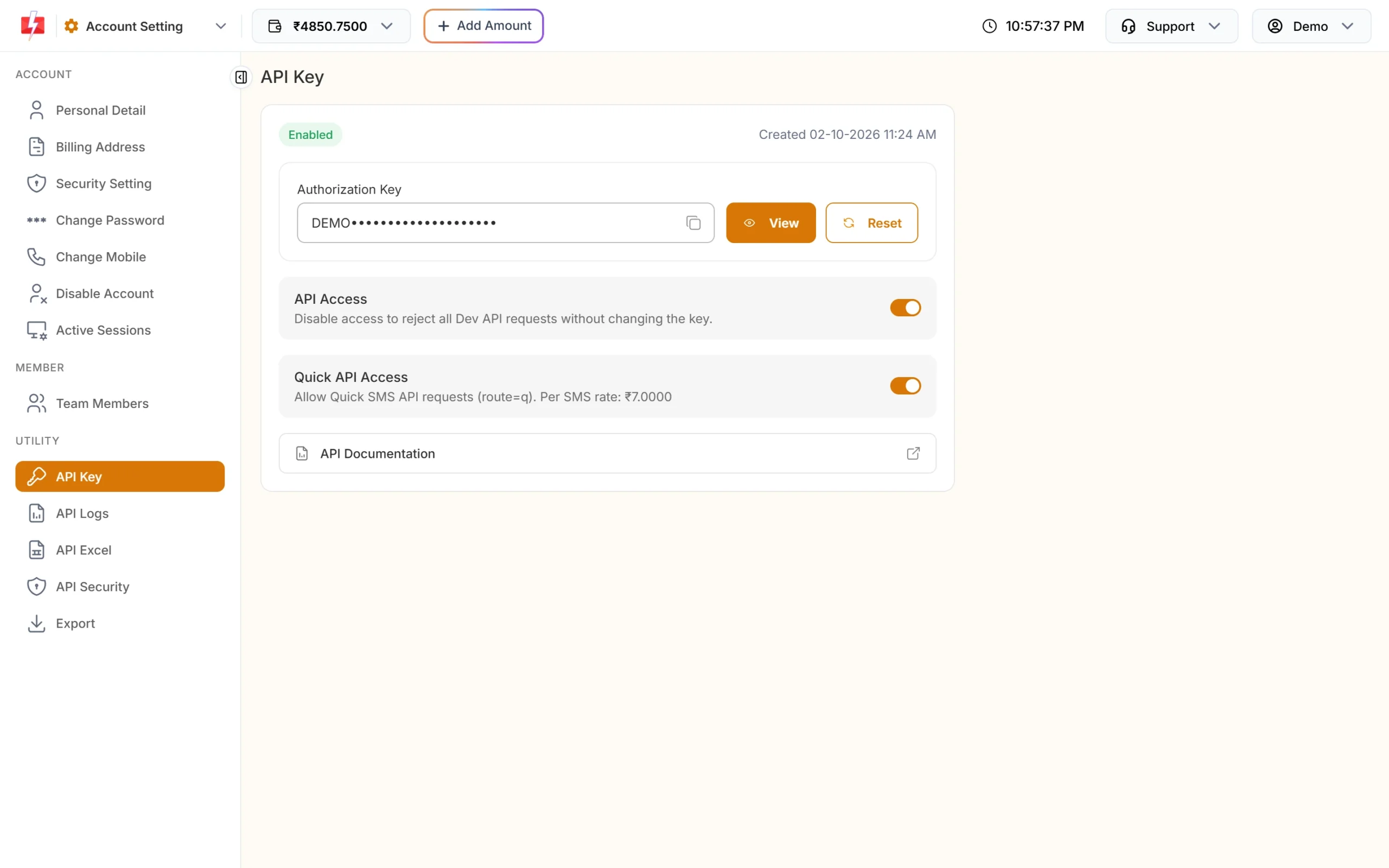
Put this in an environment variable or a secret store. -
Message ID and sender ID
In DLT Manager, Content Template, copy the Message ID and Sender ID of an approved template.
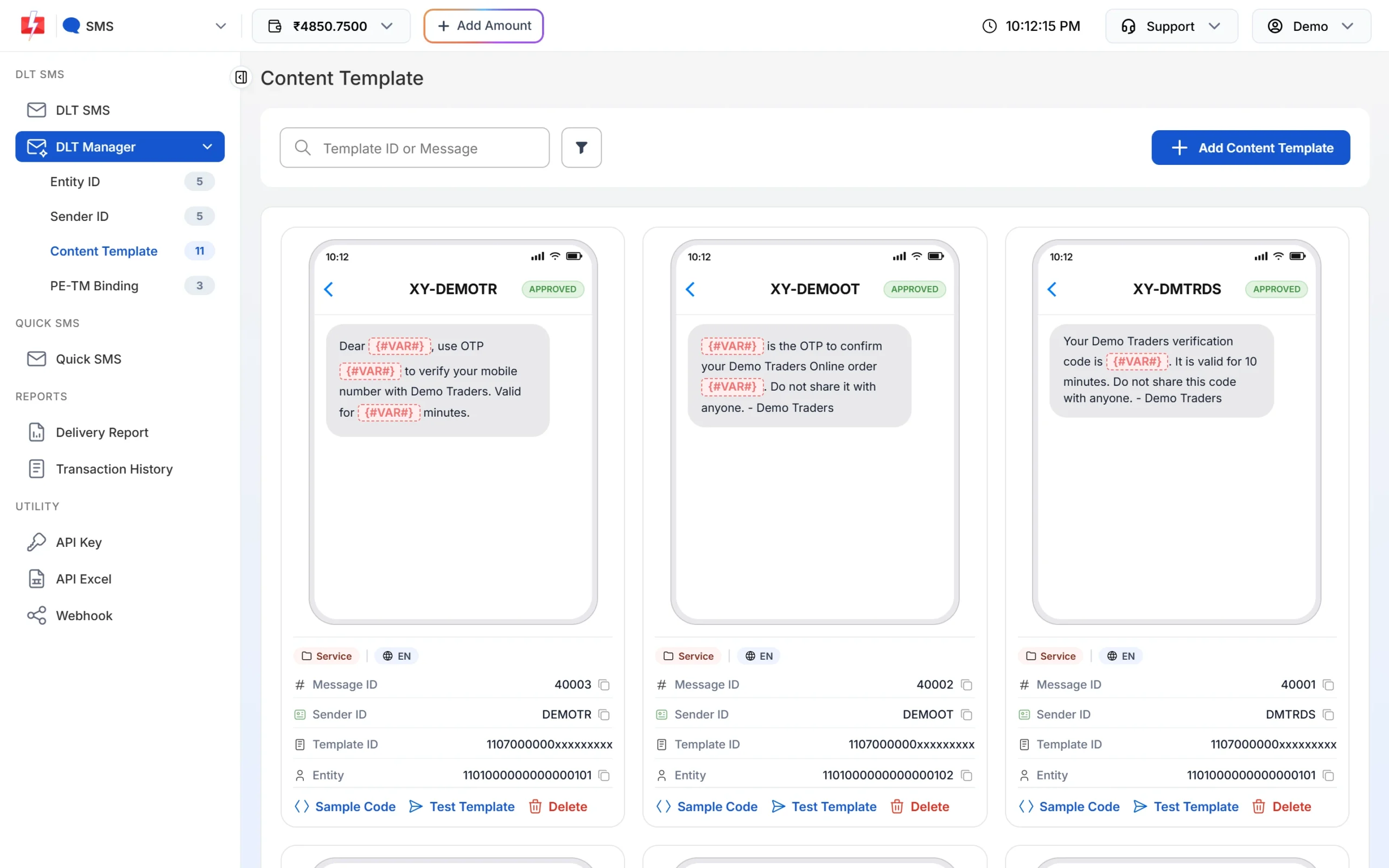
Both values come from the same card. -
OTP ID
In Smart OTP, OTP Template List, copy the OTP ID of your login template.
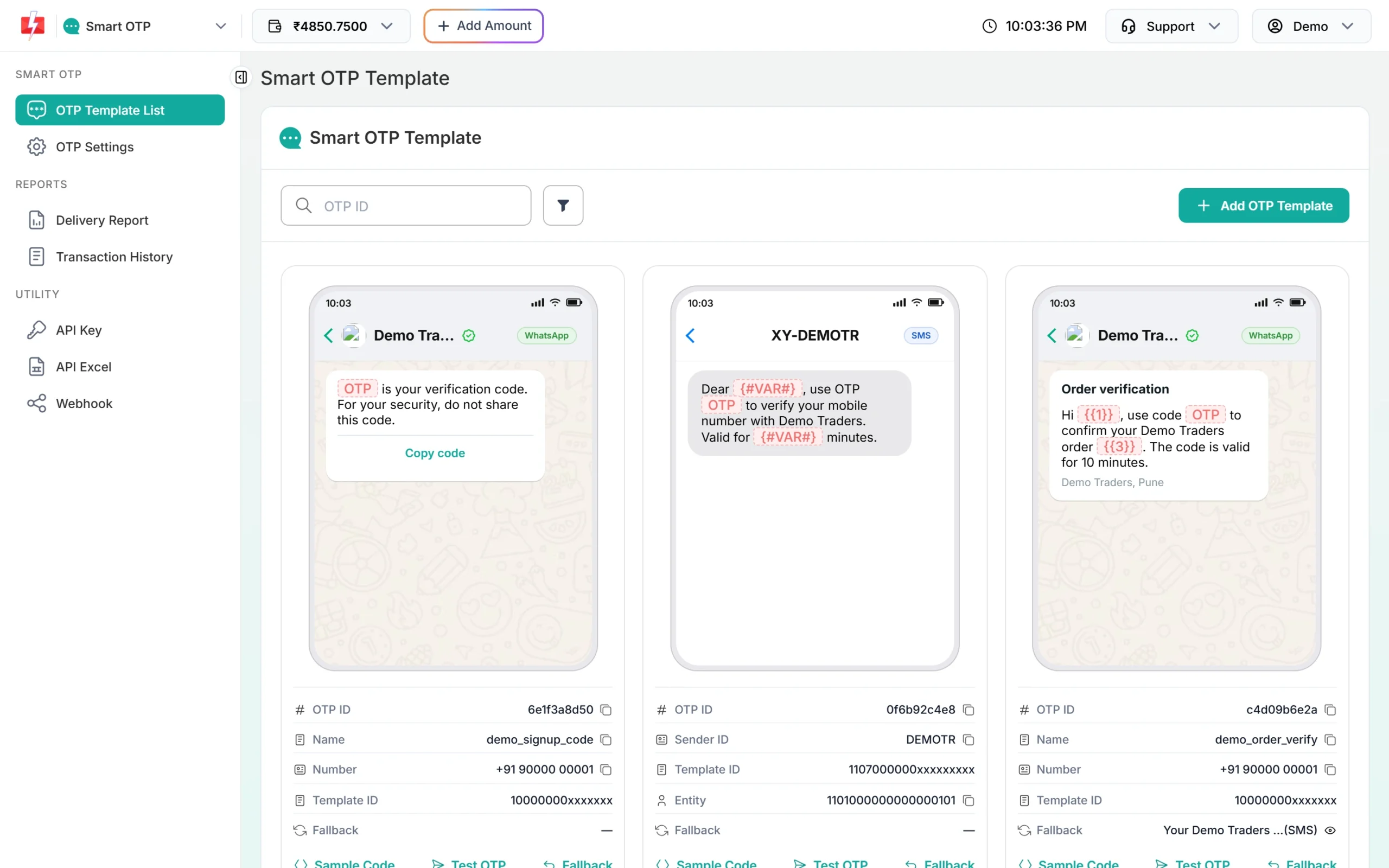
The OTP ID is 10 characters long.
Set up
Maven dependency for JSON (skip it in Spring Boot, which has Jackson already):
<dependency>
  <groupId>com.fasterxml.jackson.core</groupId>
  <artifactId>jackson-databind</artifactId>
  <version>2.17.2</version>
</dependency>
Gradle: implementation 'com.fasterxml.jackson.core:jackson-databind:2.17.2'. Set the key as an environment variable:
export FAST2SMS_API_KEY="YOUR_API_KEY"A shared helper that posts JSON and reads the reply:
import com.fasterxml.jackson.databind.JsonNode;
import com.fasterxml.jackson.databind.ObjectMapper;
import java.net.URI;
import java.net.http.*;
import java.time.Duration;
import java.util.Map;

public class F2s {
    static final HttpClient HTTP = HttpClient.newBuilder()
            .connectTimeout(Duration.ofSeconds(5)).build();
    static final ObjectMapper JSON = new ObjectMapper();
    static final String KEY = System.getenv("FAST2SMS_API_KEY");

    static JsonNode post(String path, Map<String, Object> body) throws Exception {
        HttpRequest req = HttpRequest.newBuilder()
                .uri(URI.create("https://www.fast2sms.com" + path))
                .timeout(Duration.ofSeconds(15))
                .header("authorization", KEY)
                .header("Content-Type", "application/json")
                .header("Accept", "application/json")
                .POST(HttpRequest.BodyPublishers.ofString(JSON.writeValueAsString(body)))
                .build();
        HttpResponse<String> res = HTTP.send(req, HttpResponse.BodyHandlers.ofString());
        return JSON.readTree(res.body());
    }
}authorization header. Do not prefix “Bearer “. The OTP endpoints keep the prefix as part of the key and fail with “Invalid authorization key”.Send a DLT SMS in Java
Call /dev/bulkV2 with route=dlt, your sender ID, the template’s Message ID, the variable values and the numbers. The example template is Message ID 10001 on DEMOTR with four variables.
JsonNode r = F2s.post("/dev/bulkV2", Map.of(
        "route", "dlt",
        "sender_id", "DEMOTR",                       // exact case
        "message", "10001",                          // Message ID, not the Template ID
        "variables_values", String.join("|", "Rahul", "DT10458", "1240", "21 Nov"),
        "numbers", String.join(",", "9999999999", "8888888888"),
        "udf1", "order-DT10458"));

if (r.path("return").asBoolean(false)) {
    System.out.println("Queued: " + r.path("request_id").asText());   // S...
} else {
    System.out.println("Not sent: " + r.path("status_code").asText() + " " + r.path("message"));
}- Variable values go in template order, joined with
|, and each is cut to 40 characters. - The sender ID is case-sensitive.
- Success:
"message": ["SMS sent successfully."], an array. It means queued. - Schedule with
"schedule_time", "25-11-2026-10-30"(DD-MM-YYYY-HH-MM, IST).Map.oftakes up to 10 pairs; use aHashMapfor more.
Send and verify an OTP
// Send
JsonNode sent = F2s.post("/dev/otp/send", Map.of(
        "mobile", "9999999999",
        "otp_id", "YOUR_OTP_ID",
        "otp_expiry", 5,        // minutes, 1 to 10080, default 15
        "otp_length", 6));      // 4 to 10, default 6
System.out.println(sent.path("return").asBoolean() ? "OTP sent" : sent.path("message").asText());

// Verify
JsonNode check = F2s.post("/dev/otp/verify", Map.of("mobile", "9999999999", "otp", "482913"));
if (check.path("return").asBoolean()) {
    System.out.println("Verified");
} else {
    System.out.println(check.path("message").asText());  // Invalid OTP, OTP expired, ...
}

// Resend the same OTP (charged again)
JsonNode again = F2s.post("/dev/otp/resend", Map.of("mobile", "9999999999"));- Verify uses only mobile and code. It checks the newest unverified OTP for that number.
- Sending a new OTP to a number cancels its older OTPs.
- Resend repeats the same code, within 10 minutes of the first send and up to 5 sends in total (the first one counts).
- Sends that come too fast get “Please wait N seconds before requesting a new OTP”. The wait is set in OTP Settings, default 10 seconds.
Get delivery reports
Choose either the DLR API or a webhook. Do not use both for the same messages: reading a DLR by API can stop the webhook for those rows.
DLR API
HttpRequest req = HttpRequest.newBuilder()
        .uri(URI.create("https://www.fast2sms.com/dev/dlr/Sa1B2c3D4e5F6g7"))
        .timeout(Duration.ofSeconds(15))
        .header("authorization", F2s.KEY)
        .GET().build();
JsonNode dlr = F2s.JSON.readTree(F2s.HTTP.send(req, HttpResponse.BodyHandlers.ofString()).body());

if (dlr.path("success").asBoolean()) {
    for (JsonNode row : dlr.path("data").get(0).path("delivery_status")) {
        System.out.println(row.path("mobile").asText() + " " + row.path("status").asText());
    }
}
Status is Delivered, Failed or Sent (operator report pending). The API looks back 7 days.
Spring Boot webhook receiver
In the panel, open Webhook, then SMS or OTP, and add a webhook with format Standard Webhook, method POST, content type JSON and your public URL.
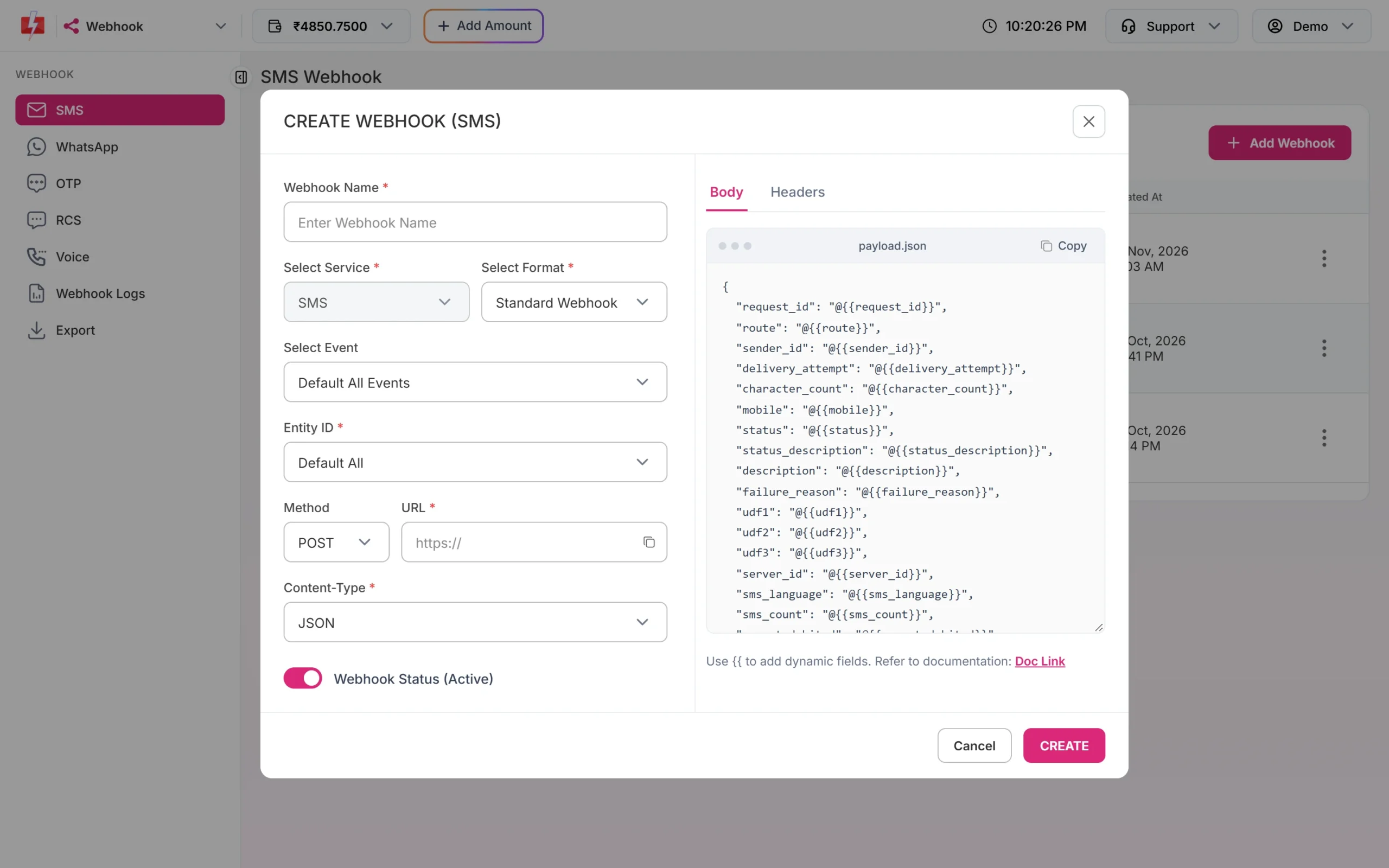
import org.springframework.http.ResponseEntity;
import org.springframework.web.bind.annotation.*;
import java.util.Map;

@RestController
public class Fast2smsWebhookController {

    @PostMapping("/fast2sms/webhook")
    public ResponseEntity<String> receive(
            @RequestHeader(value = "X-Webhook-Token", required = false) String token,
            @RequestBody Map<String, Object> body) {

        // Optional: a header you added in the webhook's Headers tab
        if (token == null || !token.equals(System.getenv("MY_WEBHOOK_TOKEN"))) {
            return ResponseEntity.status(401).build();
        }
        String requestId = String.valueOf(body.get("request_id"));
        String mobile    = String.valueOf(body.get("mobile"));
        String status    = String.valueOf(body.get("status"));   // delivered or failed
        // save the status, then reply fast
        return ResponseEntity.ok("OK");
    }
}
Reply with 2xx within 10 seconds. On timeouts, 408, 429 or 5xx, Fast2SMS retries up to 3 times, 60 seconds apart. Webhooks fire for messages sent through the API, when the report arrives within 24 hours. See each attempt in Webhook Logs.
Error handling
- Read
returnin the JSON, not only the HTTP status. Low balance can come with HTTP 200 and"return": false(status_code 416). - Do not retry sends automatically. An
HttpTimeoutExceptionafter the request reached Fast2SMS may still mean the SMS goes out. A retry can send and charge twice. Retry once only onConnectException. Verify can be retried once. - Use the panel’s API Logs to compare what you sent with what came back.
| Reply | Fix |
|---|---|
| 412 Invalid Authentication, Check Authorization Key (HTTP 401) | The key is wrong, reset or null because the env variable is missing. |
| Invalid authorization key (OTP, HTTP 401) | Wrong key or a “Bearer ” prefix. |
| 413 Authorization Key Disabled | Turn API Access on. |
| 414 IP is blacklisted from Dev API section | Whitelist the server IP in API Security. |
| 406 Invalid Sender ID | Use the approved sender, same case. |
| 424 Invalid Message ID | Use the Message ID linked to that sender. |
| 411 Invalid Numbers | Every number was invalid. |
| 416 You don’t have sufficient wallet balance | Recharge. |
| Invalid OTP ID | OTP ID wrong, deleted or from another account. |
| Please wait N seconds before requesting a new OTP | Wait; show a timer. |
| Invalid OTP / OTP expired / Maximum verification attempts reached | Retry, or send a new OTP. |
| OTP not found or already verified (HTTP 404) | Send a new OTP. |
Full copy-paste example: Fast2SMS.java
import com.fasterxml.jackson.databind.JsonNode;
import com.fasterxml.jackson.databind.ObjectMapper;
import java.net.ConnectException;
import java.net.URI;
import java.net.URLEncoder;
import java.net.http.*;
import java.nio.charset.StandardCharsets;
import java.time.Duration;
import java.util.*;

public final class Fast2SMS {

    public record Result(boolean ok, int http, String statusCode, String requestId, String message, JsonNode raw) {}

    private static final String BASE = "https://www.fast2sms.com";
    private final HttpClient http = HttpClient.newBuilder().connectTimeout(Duration.ofSeconds(5)).build();
    private final ObjectMapper json = new ObjectMapper();
    private final String apiKey;

    public Fast2SMS(String apiKey) {
        this.apiKey = Objects.requireNonNull(apiKey, "FAST2SMS_API_KEY is not set");
    }

    public Fast2SMS() {
        this(System.getenv("FAST2SMS_API_KEY"));
    }

    public Result sendDlt(String senderId, String messageId, List<String> vars, List<String> numbers) {
        Map<String, Object> b = new HashMap<>();
        b.put("route", "dlt");
        b.put("sender_id", senderId);
        b.put("message", messageId);
        b.put("variables_values", String.join("|", vars));
        b.put("numbers", String.join(",", numbers));
        return call("POST", "/dev/bulkV2", b);
    }

    public Result sendOtp(String mobile, String otpId, int expiryMinutes) {
        return call("POST", "/dev/otp/send", Map.of("mobile", mobile, "otp_id", otpId, "otp_expiry", expiryMinutes));
    }

    public Result verifyOtp(String mobile, String otp) {
        return call("POST", "/dev/otp/verify", Map.of("mobile", mobile, "otp", otp));
    }

    public Result resendOtp(String mobile) {
        return call("POST", "/dev/otp/resend", Map.of("mobile", mobile));
    }

    public Result deliveryReport(String requestId) {
        return call("GET", "/dev/dlr/" + URLEncoder.encode(requestId, StandardCharsets.UTF_8), null);
    }

    private Result call(String method, String path, Map<String, Object> body) {
        try {
            HttpRequest.Builder rb = HttpRequest.newBuilder(URI.create(BASE + path))
                    .timeout(Duration.ofSeconds(15))
                    .header("authorization", apiKey)
                    .header("Accept", "application/json");
            if ("POST".equals(method)) {
                rb.header("Content-Type", "application/json")
                  .POST(HttpRequest.BodyPublishers.ofString(json.writeValueAsString(body)));
            } else {
                rb.GET();
            }
            HttpResponse<String> res = http.send(rb.build(), HttpResponse.BodyHandlers.ofString());
            JsonNode n;
            try {
                n = json.readTree(res.body());
            } catch (Exception e) {
                return new Result(false, res.statusCode(), null, null, "Non-JSON response", null);
            }
            boolean ok = res.statusCode() / 100 == 2
                    && (n.path("return").asBoolean(false) || n.path("success").asBoolean(false));
            JsonNode m = n.path("message");
            String msg = m.isArray() ? String.join(" ", json.convertValue(m, String[].class)) : m.asText("");
            return new Result(ok, res.statusCode(), n.path("status_code").asText(null),
                    n.path("request_id").asText(null), msg, n);
        } catch (ConnectException e) {
            return new Result(false, 0, null, null, "Could not connect: " + e.getMessage(), null);
        } catch (Exception e) {
            return new Result(false, 0, null, null, "Request failed: " + e.getMessage(), null);
        }
    }

    public static void main(String[] args) {
        Fast2SMS f2s = new Fast2SMS();

        Result sms = f2s.sendDlt("DEMOTR", "10001", List.of("Rahul", "DT10458", "1240", "21 Nov"), List.of("9999999999"));
        System.out.println(sms.ok() ? "SMS queued: " + sms.requestId() : "SMS error: " + sms.message());

        Result otp = f2s.sendOtp("9999999999", "YOUR_OTP_ID", 5);
        System.out.println(otp.ok() ? "OTP sent" : "OTP error: " + otp.message());

        Result v = f2s.verifyOtp("9999999999", "482913");
        System.out.println(v.ok() ? "Verified" : "Not verified: " + v.message());
    }
}
The record type needs Java 16 or later; on Java 11, turn Result into a small class. The DLR API answers with success instead of return, so call checks both. For a ready project, the Fast2SMS starter kit for Spring Boot has this client with send, verify and resend endpoints, a mock server and tests.
Common problems and fixes
- NullPointerException on the key:
System.getenvreturned null. Set the variable for the user that runs the JVM, or load it from Spring’sapplication.propertiesthrough an environment placeholder. - Error 414 on the production server: whitelist that server’s public IP in API Security.
- PKIX path building failed: the JVM’s trust store is old. Update the JDK. Do not disable certificate checks.
- Hindi text breaks: keep source files and the database in UTF-8.
BodyPublishers.ofStringsends UTF-8 by default. - Duplicate SMS: a Spring Retry or Resilience4j retry resent after a timeout. Exclude send calls from retries.
Frequently asked questions
Is there a Fast2SMS Java SDK?
You do not need one. The API is HTTPS with JSON, and the class above uses the HttpClient built into Java.
Can I use OkHttp, RestTemplate or WebClient?
Yes. Send the same JSON body with the authorization header. Any HTTP client works.
Can my Android app call Fast2SMS directly?
No. The key would be inside the APK. The app should call your server, and your server calls Fast2SMS.
How do I send the same SMS to many numbers?
Put them comma-separated in numbers. Invalid numbers are skipped and not charged.
Is the verify call charged?
No. Send and resend are charged; verify is free.
Can I use my own OTP value?
Yes. Add otp (up to 10 characters) to the send call. Fast2SMS still checks it on verify.