
Bulk SMS and WhatsApp for events and weddings help you send invitations, RSVP requests, venue details and last-minute changes to hundreds of guests at once. Use WhatsApp for invitations with photos and RSVP buttons, DLT SMS for ticket and venue alerts that must reach every phone, and a recorded voice call for older guests. This guide maps each event message to a channel, gives sample templates and shows the setup in Fast2SMS.
It is written for wedding planners, event management companies, banquet halls and venues, conference and exhibition organisers, and ticketed event businesses. A family planning a wedding can send through its planner or venue, because DLT SMS and the WhatsApp Business API are meant for registered businesses.
Which channel for which event message
Messages to people who bought a ticket or registered are service messages. Invitations sent to a guest list that did not ask for them are treated as promotional on SMS and as marketing on WhatsApp. Plan both.
| Message | Best channel | Why |
|---|---|---|
| Wedding or event invitation | WhatsApp marketing with an image or video header | The card design shows in full, and guests can tap a button to reply. |
| RSVP request | WhatsApp with reply buttons, or a Key Press voice call | Guests answer with one tap or one key, and you get a clean head count. |
| Registration or ticket confirmed | WhatsApp utility with a PDF ticket, SMS backup | The ticket travels with the message. SMS reaches guests without data. |
| Function schedule (mehendi, sangeet, reception) | WhatsApp utility to confirmed guests | A long schedule reads better on WhatsApp than in an SMS. |
| Venue change, delay or gate timing | SMS (Service Implicit) | Urgent and short. It reaches every registered attendee, DND included. |
| Invitation for elderly relatives | Simple voice call | A recorded message is easier for people who do not read texts. |
| Entry check or registration verification | Smart OTP | Confirms the attendee owns the number they registered with. |
| Event line-up or venue photos | RCS carousel or WhatsApp marketing | Several images in one message. |
| Thank-you with photo album link | WhatsApp utility to attendees | Linked to the event they attended. |
Sample DLT SMS templates for events
Register these examples under your company name. The text must match the approved template exactly, with no more than three variables, each tagged for its type. Whitelist your ticket and map links on your DLT portal before sending.
| Use | Example template to register | Category |
|---|---|---|
| Registration confirmed | Your registration for {#alphanumeric#} by YourEvents is confirmed. Your entry pass: {#url#} | Service Implicit |
| Payment received | YourEvents has received Rs {#numeric#} for booking {#alphanumeric#}. Thank you. | Service Implicit |
| Event reminder | Reminder from YourEvents: {#alphanumeric#} starts tomorrow at {#alphanumeric#}. Venue map: {#url#} | Service Implicit |
| Venue or time change | Important update from YourEvents: {#alphanumeric#} is now at {#alphanumeric#}. Details: {#url#} | Service Implicit |
| Entry OTP | {#numeric#} is your YourEvents entry code. Show it at the registration desk only. | Service Implicit |
| Invitation | You are invited to {#alphanumeric#} on {#alphanumeric#}. Invitation and venue details from YourEvents: {#url#} | Promotional |
| Ticket sale | Tickets for {#alphanumeric#} are now open at YourEvents. Book early: {#url#} | Promotional |
WhatsApp templates for events: utility vs marketing
An invitation or a ticket sale is Marketing. A confirmation, schedule or update for someone who already registered or confirmed is Utility. Templates can be written in English, Hindi or Gujarati in the template form, and a marketing template can carry an image or a short video of the invitation card.
| Template | Category | Example body | Header / button |
|---|---|---|---|
| wedding_invite | Marketing | Namaste {{1}}, the families request the pleasure of your company at the wedding of {{2}} on {{3}}. | Image or video header, Custom: Attending, Not attending |
| event_invite | Marketing | Hi {{1}}, join us at {{2}} on {{3}}. Seats are limited. | Image header, Visit website: Register |
| ticket_confirmed | Utility | Hi {{1}}, your booking {{2}} for {{3}} is confirmed. Your entry pass is attached. | Document header (PDF) |
| function_schedule | Utility | Hi {{1}}, thank you for confirming. Mehendi: {{2}}. Sangeet: {{3}}. Reception: {{4}}. | Visit website: Venue map |
| event_update | Utility | Hi {{1}}, {{2}} now starts at {{3}}. We are sorry for the change. | Call Phone Number: Help desk |
Send invitations only to people whose numbers you got with their agreement, for example from the hosts or a registration form. If many guests block or report the message, your number’s quality rating drops. Limits start at the tier Meta gives your business: often 250 unique people per 24 hours for a new, unverified business and 2,000 (2K) once the business is verified (at the time of writing). 2,000 is enough for most weddings. The limit grows to 10K, 100K and Unlimited over time.
Voice calls for invitations and RSVPs
A Simple call plays one recorded invitation to every guest. A Key Press call asks guests to press a key, and the key is saved in the report, which gives you an RSVP list.
Sample script (Key Press): “Namaste, this is YourEvents calling on behalf of the Sharma family. You are warmly invited to the wedding reception on 12 December at Green Lawns. If you will attend, press 1. If you cannot attend, press 2. Thank you.”
- Every voice file must say your company or brand name clearly. The operator rejects files without it.
- Dating and matchmaking services cannot use voice calls. Lucky draw and prize announcements are not allowed in voice files either.
- Calls reach non-DND numbers only, between 10 AM and 9 PM, and only answered calls are charged.
Smart OTP for registrations and entry
Smart OTP is our recommended way to send OTPs. Your registration form or ticketing app calls the send and verify API with an OTP ID linked to your DLT OTP template or WhatsApp authentication template. If one channel fails, the same code is re-sent on the other within 120 seconds. Event businesses use it to verify numbers at registration, to let attendees log in to view their tickets, and to check entry at the gate.
RCS for event line-ups
RCS shows your brand name and logo in the phone’s messages app. A carousel of 2 to 10 cards can show speakers, artists or venue photos, and a button can open a map with View Location. Promotional RCS can go to a number at most 4 times a month, between 7 AM and 10 PM.
How to get started on Fast2SMS (step by step)
-
Prepare the guest list as a CSV
Put one guest per row with columns such as name, number and function. Open Bulk WhatsApp, choose your sender number, click CSV File and upload the file. Then pick the column that holds the mobile numbers and map the other columns to template variables.
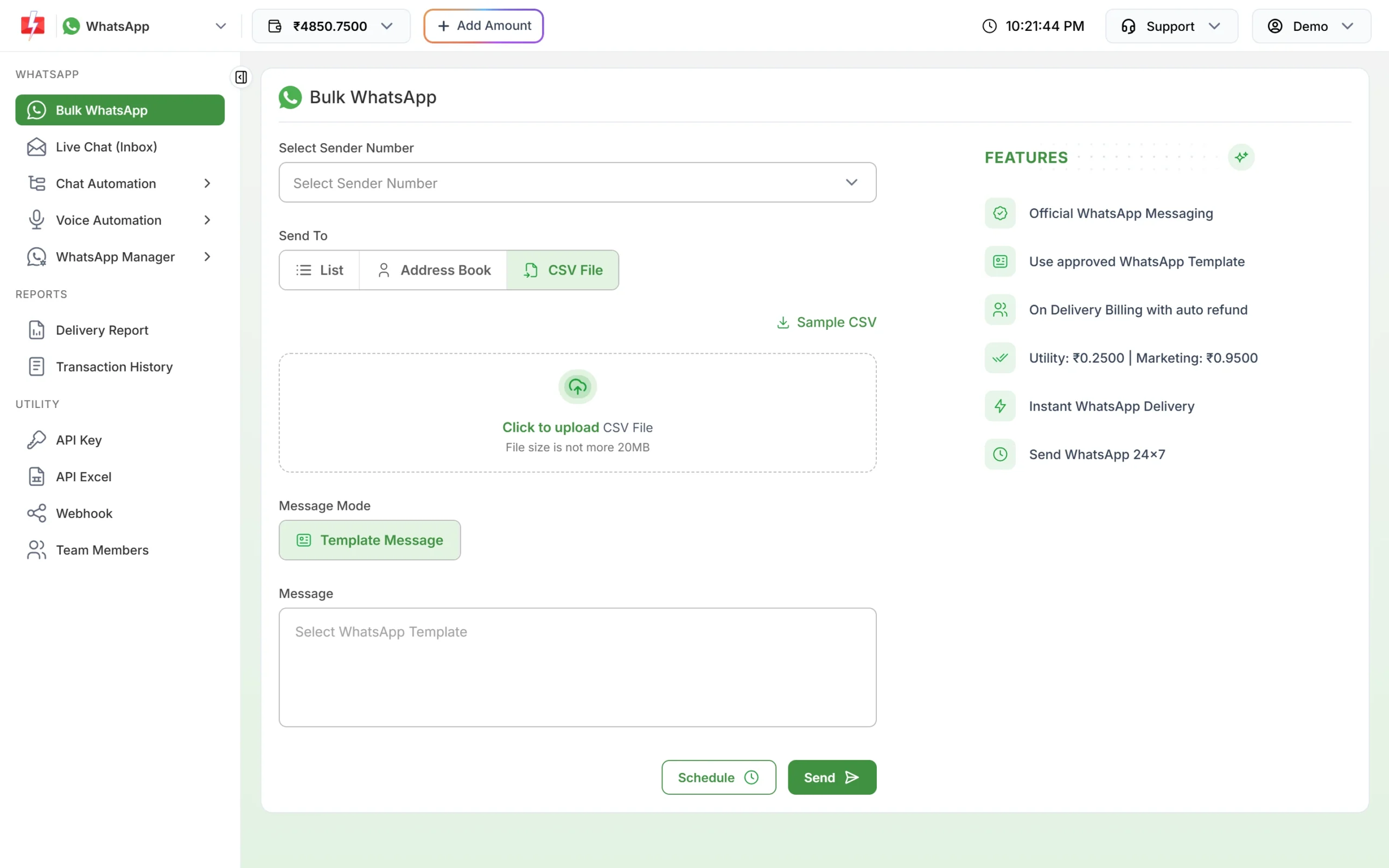
Upload the guest list and map each column to a variable. -
Create the invitation and update templates
In WhatsApp Manager > Templates, add a marketing template with an image header for the invitation and utility templates for the schedule and updates. You can write them in Hindi or Gujarati. Approved templates show a green APPROVED badge and a Message ID.
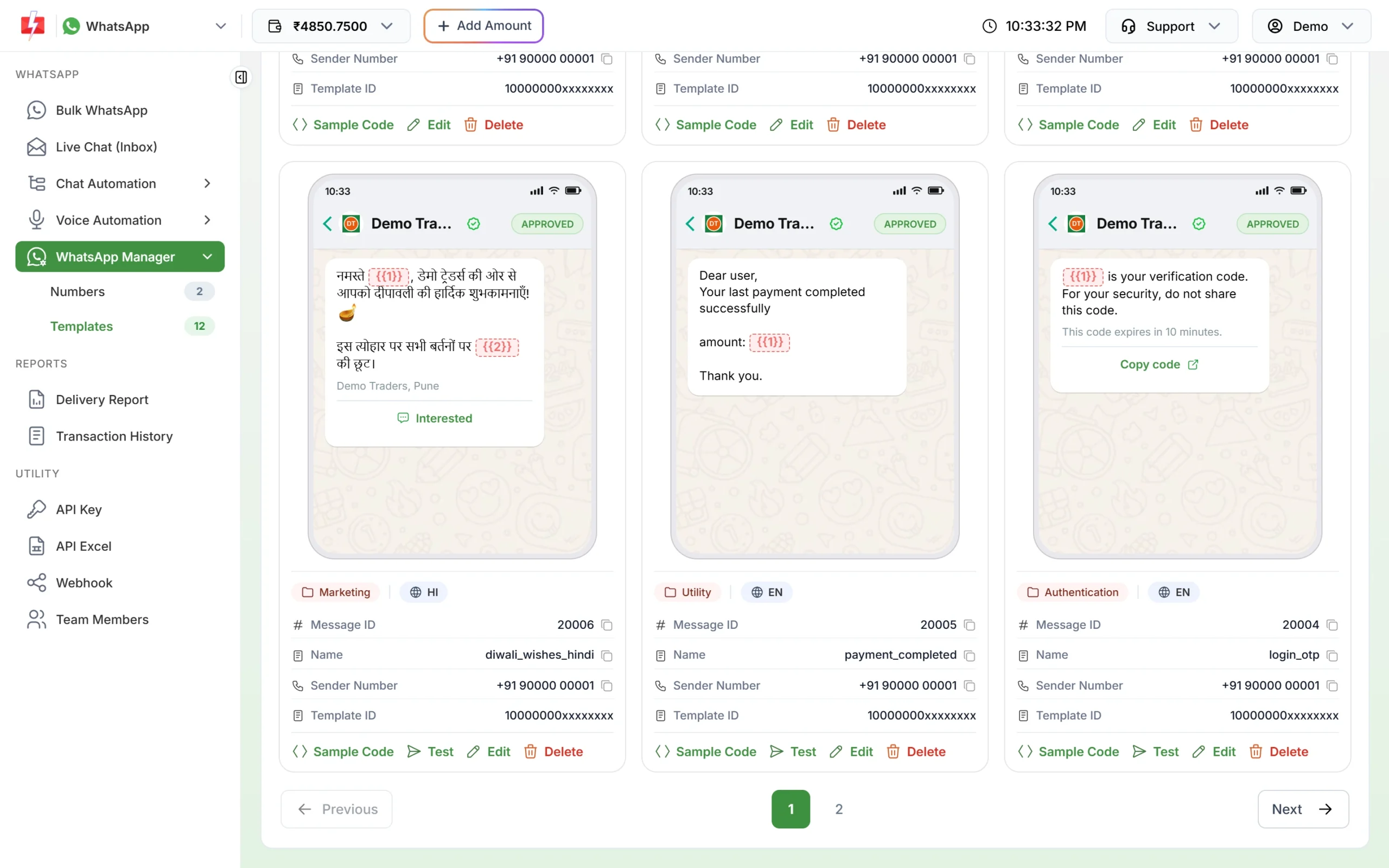
A Hindi marketing template next to utility and authentication templates. -
Schedule SMS reminders
Open DLT SMS, pick your sender ID and reminder template and add the registered attendees. Click Schedule, choose the date and time and confirm. To send the same reminder every day of a three-day event, choose a date range. Each day is charged when it is scheduled, and a cancelled schedule is credited back to your wallet.
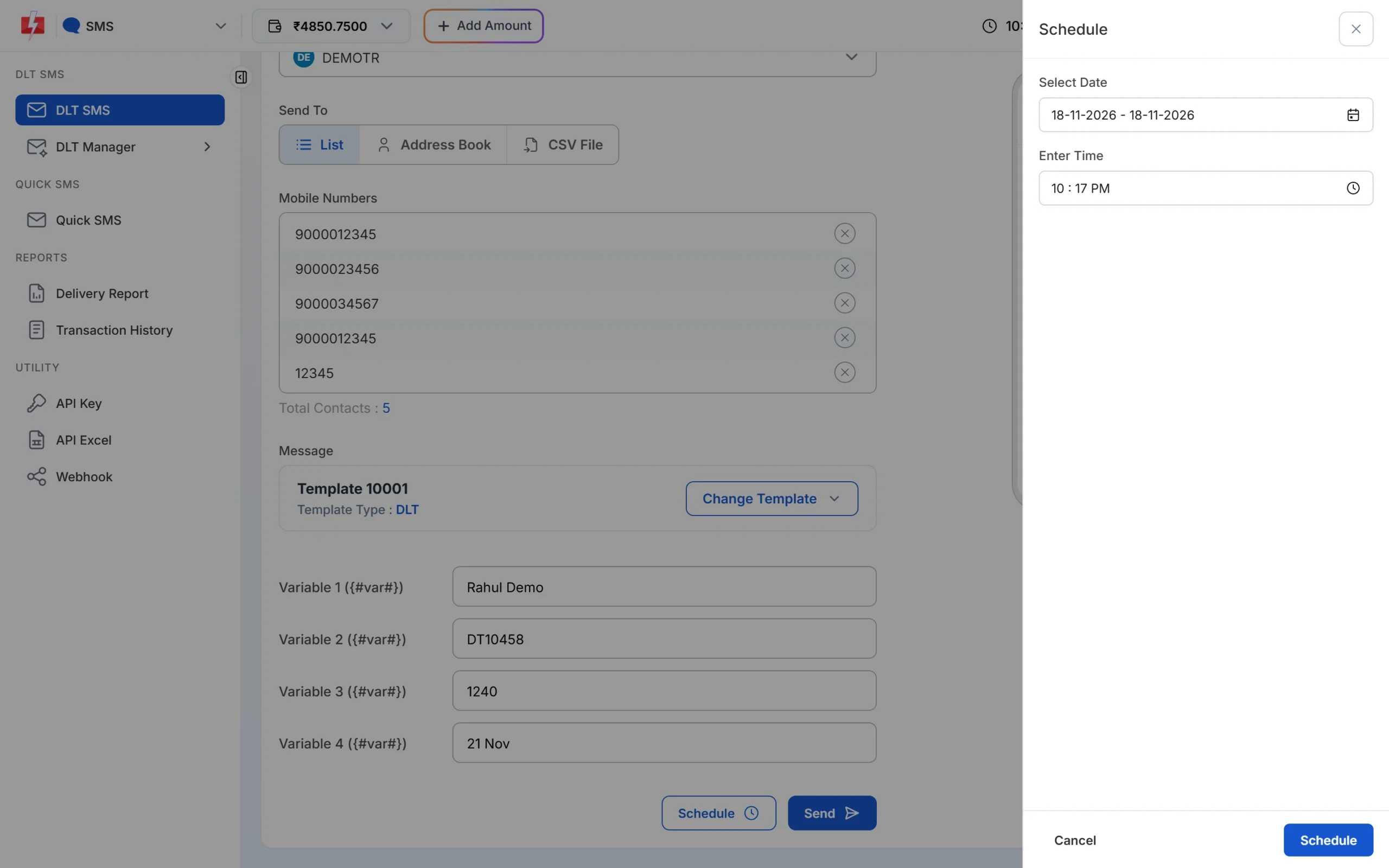
One date sends once. A date range sends once a day at the same time. -
Send a voice invitation
Upload your recording under Voice Files and wait for approval. Open Bulk Voice Call, enter a campaign name, choose Simple or Key Press (DTMF), add the numbers and pick the voice file. Click Send or Schedule.
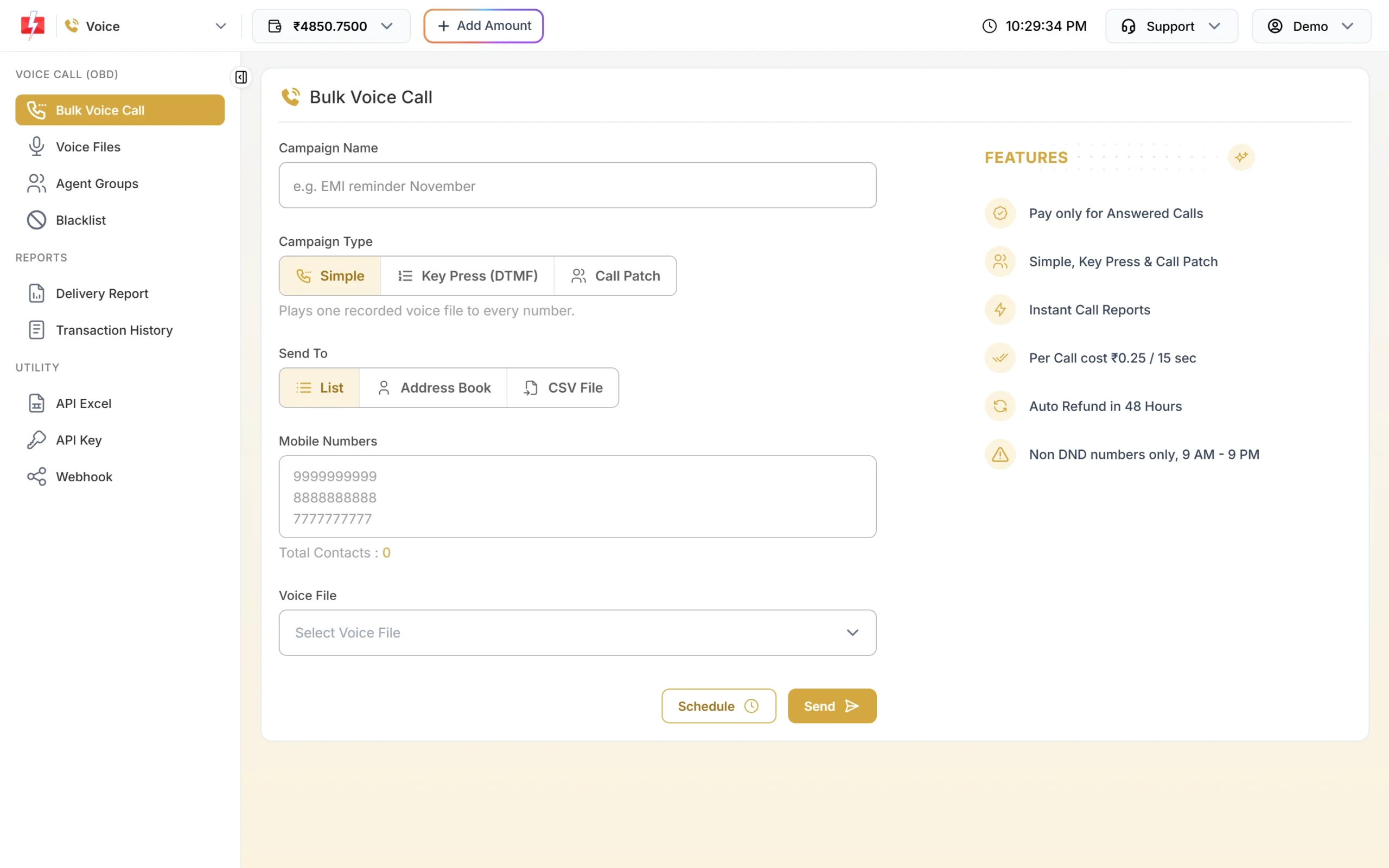
A Simple call plays your recorded invitation. -
Send the line-up on RCS
After your brand is approved, open Bulk RCS, pick your RCS bot, add numbers and choose Carousel. Add a title, description, image and buttons for each card, then send.
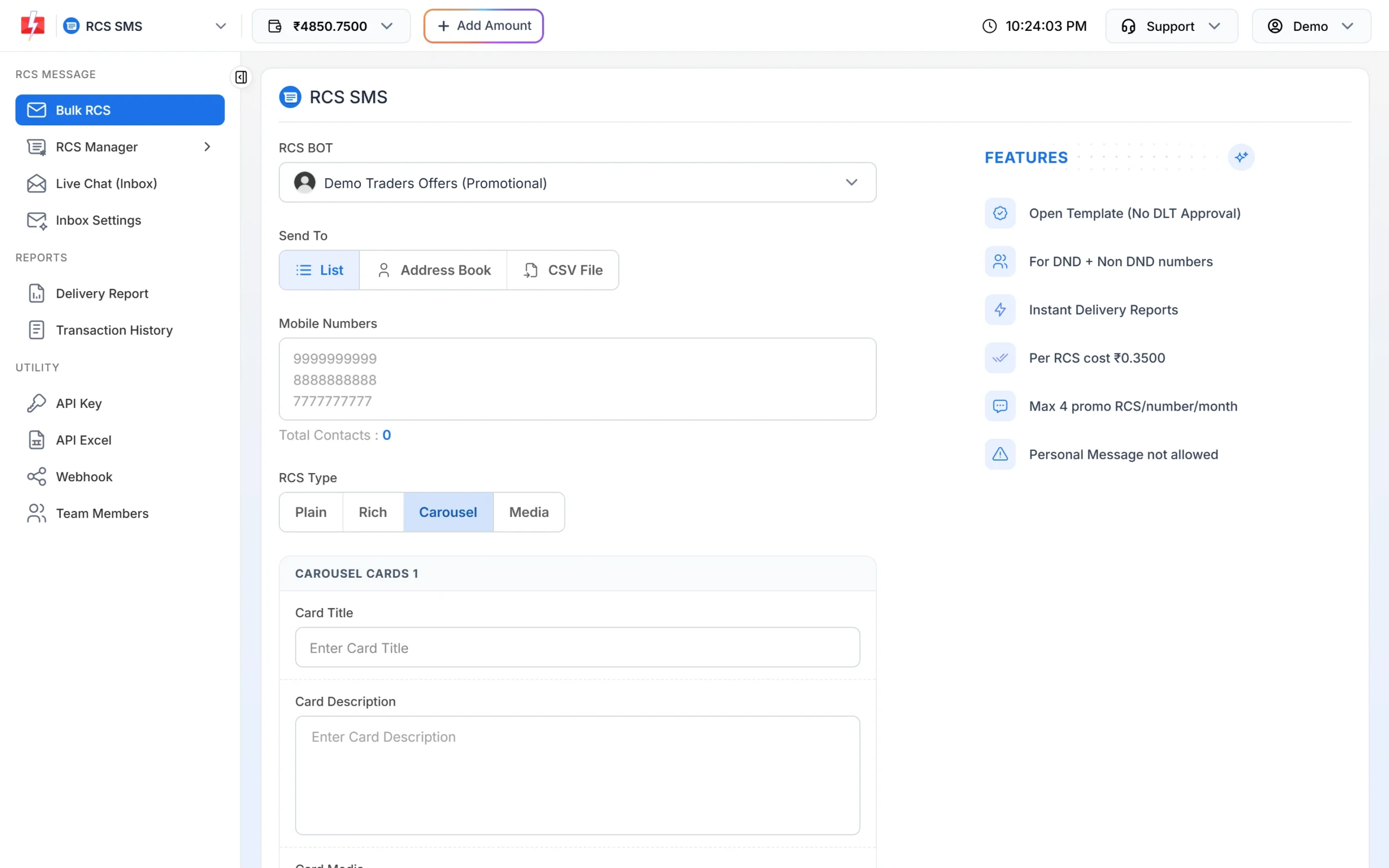
Each carousel card has its own image, text and buttons. -
Answer guest questions with a bot
Go to Chat Automation > Flow Builder (Chatbot) and create a workflow. Add keywords such as “hi” or “rsvp”, then a menu with options like “Venue”, “Schedule” and “Talk to us”. The last option can hand the chat to your team.
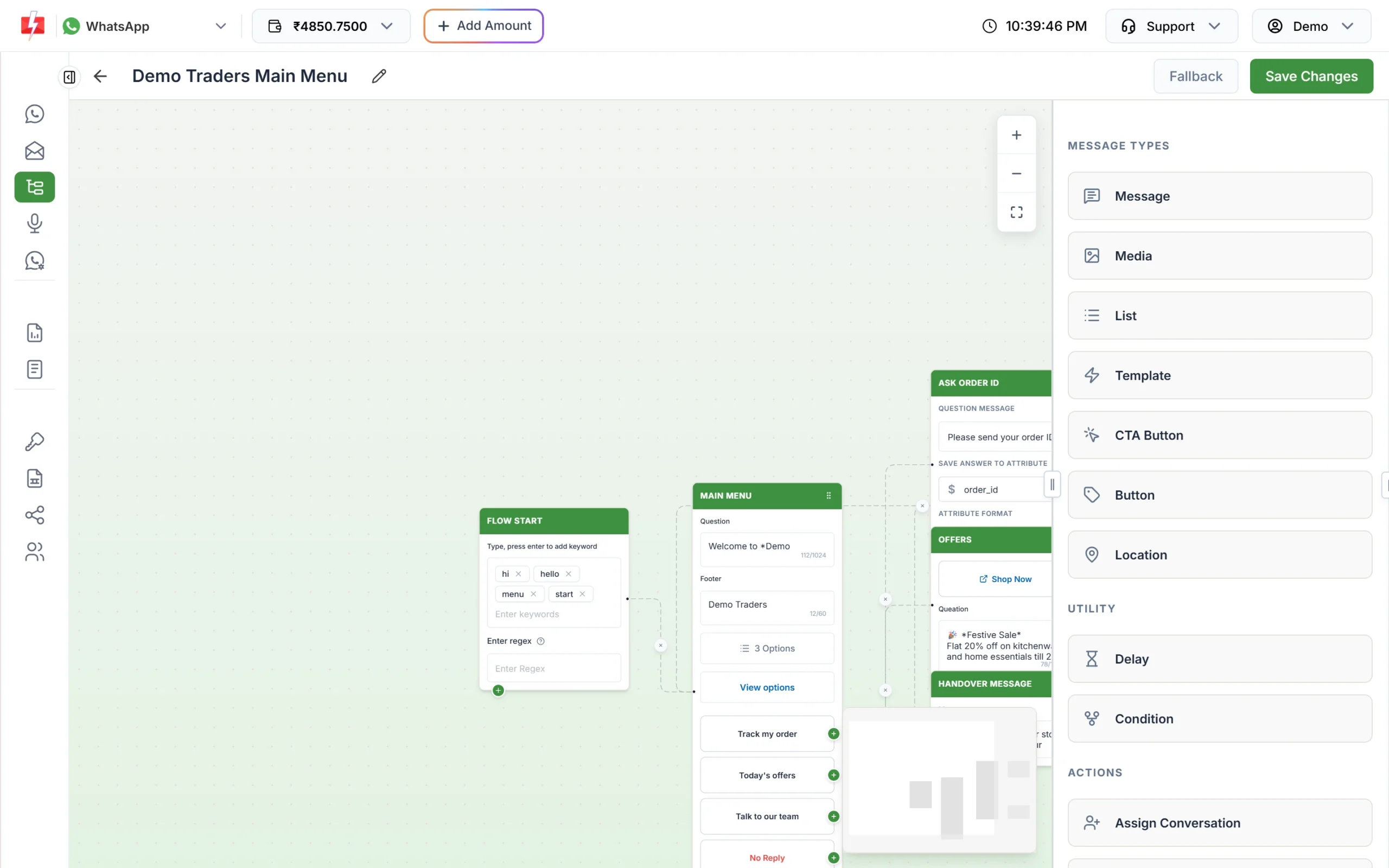
A keyword-triggered menu bot in Flow Builder.
Automation that already exists
- Personalised bulk sends: one CSV with names and function details, mapped to template variables.
- Scheduling and daily repeats: schedule reminders days in advance and cancel them for a refund if plans change.
- Flow Builder and auto replies: menus, keyword answers for “venue” or “dress code”, and a welcome message.
- Live Chat: your team replies to guests from one WhatsApp number, with labels and notes per chat.
- Webhooks and API: a ticketing website can send confirmations by API and receive delivery reports and button replies on its own URL.
Compliance notes
- Consent: use guest numbers that the hosts or attendees gave you for this event, and stop messaging anyone who asks.
- Sending hours: promotional SMS go out between 10 AM and 9 PM, and voice calls between 10 AM and 9 PM. Plan invitations inside these hours.
- DLT match: the SMS must match the approved template exactly. Changing a venue name inside fixed text needs a new template, so keep venue and time as variables.
- Links: whitelist your ticket, map and album links on your DLT portal.
How to estimate the cost
WhatsApp is charged per message by category: marketing invitations cost more than utility updates. Failed and pending WhatsApp messages are refunded automatically about two days later. DLT SMS are charged per number and per SMS part, and a Hindi SMS fits 70 characters per part instead of 160. Voice is charged per 15-second pulse for answered calls only. RCS is charged when sent, and numbers that fail or cannot receive RCS are refunded within 48 hours. If you send SMS, DLT entity registration costs ₹5,900 per year including GST (at the time of writing).
See the current rates on the WhatsApp pricing, SMS pricing, voice call pricing and RCS pricing pages.
Sending in bulk? For high WhatsApp volumes our team offers discounted rates. Talk to our team or see WhatsApp pricing.
Frequently asked questions
Can I send wedding invitations on WhatsApp in bulk?
Yes, with an approved marketing template from a business WhatsApp number. Upload the guest list as a CSV and add the invitation card as an image or video header.
Is a wedding invitation SMS promotional?
Yes, an invitation to a list that did not register is treated as promotional, so it does not reach DND numbers. Messages to confirmed guests about timings or venue can use Service Implicit templates.
How do I collect RSVPs?
Add Custom reply buttons such as “Attending” and “Not attending” to a WhatsApp template, or run a Key Press voice call where guests press 1 or 2. Both answers show in your reports.
Can I send the invitation in Hindi?
Yes. WhatsApp templates can be written in Hindi or Gujarati, DLT SMS templates can be in any Indian language, and voice files can be recorded in the language your guests speak.
Can I cancel scheduled reminders if the event is postponed?
Yes. Open the Schedule tab of the delivery report and click Cancel. The amount goes back to your wallet.
Do I need DLT registration for WhatsApp invitations?
No. DLT is needed only for SMS. WhatsApp needs a connected business number and approved templates.