
Bulk SMS for logistics and courier companies is event-driven: every scan of a parcel can trigger a message, from “picked up” to “delivered”. DLT SMS sends the tracking alerts that must reach every receiver, WhatsApp lets receivers reschedule a failed delivery with one tap, Smart OTP gives you a delivery code as proof of delivery, and Key Press calls confirm availability before an expensive delivery attempt. This guide covers the messages, sample templates and the API and webhook setup in Fast2SMS.
It is written for courier and express companies, 3PL and last-mile delivery firms, packers and movers, and in-house logistics teams of brands that run their own fleet.
Which channel for which shipment message
Almost every logistics message is about the receiver’s own parcel, so it is a service message. It goes out 24×7 and reaches DND numbers. The few promotional messages, such as rate offers to sellers, follow the promotional rules.
| Message | Best channel | Why |
|---|---|---|
| Shipment booked with tracking ID | SMS (Service Implicit) | Short and needed by every receiver, including basic phones. |
| Picked up / in transit / reached hub | WhatsApp utility or SMS, only at key scans | Too many scan alerts annoy people. Send the ones that change what the receiver does. |
| Out for delivery with delivery code | Smart OTP (SMS with WhatsApp fallback) | The receiver tells the code to the rider at the door. It proves the right person got the parcel. |
| Will you be home tomorrow? | Key Press voice call or WhatsApp utility with buttons | One key press or one tap saves a wasted trip. |
| Delivery attempt failed | WhatsApp utility with reply buttons, SMS backup | “Deliver tomorrow” or “Change address” buttons start a reschedule in your system. |
| Delivered (proof of delivery) | SMS (Service Implicit) | A delivery report per number gives you a record. |
| COD amount due / pay online link | SMS and WhatsApp utility | The receiver keeps cash ready or pays before the rider arrives. |
| Pickup scheduled for sellers, COD remitted | WhatsApp utility | Sellers want details and a link to their dashboard. |
| New rates or services for sellers | WhatsApp marketing or promotional SMS | Promotional rules apply. |
Sample DLT SMS templates for couriers
These are examples to adapt and register on your DLT portal under your own company. They are not pre-approved. Keep the company name fixed, use typed variables, keep to three or fewer, and whitelist your tracking domain and helpline number. When you send through the API, each variable value is cut to 40 characters, so keep tracking IDs and names short.
| Use | Example template to register | Category |
|---|---|---|
| Booked | Your shipment from {#alphanumeric#} is booked with YourCourier. Tracking ID {#alphanumeric#}. Track at {#url#} | Service Implicit |
| Out for delivery | Your YourCourier parcel {#alphanumeric#} is out for delivery today. Delivery code: {#numeric#}. Share it only with the delivery person at your door. | Service Implicit |
| COD due | Please keep Rs {#numeric#} ready for your YourCourier parcel {#alphanumeric#}, or pay online here: {#url#} | Service Implicit |
| Attempt failed | We could not deliver your YourCourier parcel {#alphanumeric#} today. Choose a new delivery date at {#url#} | Service Implicit |
| Address help | Our rider could not find your address for parcel {#alphanumeric#}. Please call YourCourier on {#cbn#}. | Service Implicit |
| Delivered | Your YourCourier parcel {#alphanumeric#} was delivered on {#alphanumeric#}. Not received it? Call {#cbn#} | Service Implicit |
| Seller pickup | YourCourier pickup for {#numeric#} parcels is scheduled for {#alphanumeric#}. Please keep them packed and labelled. | Service Implicit |
| COD remitted | Rs {#numeric#} COD for {#alphanumeric#} has been sent to your bank account by YourCourier. | Service Implicit |
| Seller offer | Ship more with YourCourier: rates from Rs {#numeric#} per parcel this month. Sign up at {#url#} | Promotional |
WhatsApp templates for delivery updates
Shipment updates are Utility templates. Rate offers to sellers are Marketing. Use reply buttons where you want the receiver to choose, because each tap arrives in your inbox and on your webhook as an incoming message.
| Template | Category | Example body | Extras |
|---|---|---|---|
| out_for_delivery | Utility | Hi {{1}}, your parcel {{2}} is out for delivery today. Our rider will call you before arriving. | Visit website (dynamic URL): Track live |
| attempt_failed | Utility | Hi {{1}}, we could not deliver parcel {{2}} today. What should we do next? | Custom buttons: Deliver tomorrow, Change address, Talk to us |
| availability_check | Utility | Hi {{1}}, your parcel {{2}} will be delivered tomorrow. Will someone be available to receive it? | Custom buttons: Yes, No |
| pod_delivered | Utility | Your parcel {{1}} was delivered on {{2}} and received by {{3}}. | Call Phone Number: Report a problem |
| seller_rates | Marketing | Hi {{1}}, ship your orders with us this month at rates from Rs {{2}} per parcel. | Visit website: Get started |
Meta sets a messaging limit on how many people you can start conversations with in 24 hours. It starts low and rises as you send good-quality messages. You can see your limit and quality rating in WhatsApp Manager > Numbers. Plan your rollout so peak days do not hit the limit, and keep SMS as the fallback.
Voice calls for availability checks
A failed delivery attempt costs fuel and rider time. A Key Press call the evening before (calls run until 9 PM) asks the receiver to confirm, and the key each person presses is saved in the report.
Sample script (Key Press): “Namaste, this is YourCourier. A parcel for you is scheduled for delivery tomorrow. If you will be available to receive it, press 1. If you want a different day, press 2. Thank you.”
Download the report, then reschedule everyone who pressed 2. The voice file is one recording for all receivers, so put tracking IDs and amounts in the SMS, not in the call. Calls go to non-DND Indian mobiles only, and you pay only for answered calls.
Smart OTP as a delivery code
Smart OTP fits proof of delivery well. Your rider app calls the send API when the parcel goes out, the receiver gets the code on SMS or WhatsApp, and the rider app calls verify with the code the receiver tells them. Points to plan for:
- Expiry: the send API takes
otp_expiryin minutes, up to 10,080 (7 days), so a code can stay valid for the whole delivery day. - One code per number: a new send to the same mobile cancels any older unverified code, and verify always checks the latest one. If a receiver has two parcels on the same day, use one code for both or send the second code only after the first parcel is verified.
- Fallback: if the SMS fails, the same code is re-sent on WhatsApp within 120 seconds.
- Wrong tries: set Max Verify OTP Limit in OTP Settings so a code locks after too many wrong entries.
curl -X POST "https://www.fast2sms.com/dev/otp/send" \
  -H "authorization: YOUR_API_KEY" -H "Content-Type: application/json" \
  -d '{"mobile":"9999999999","otp_id":"YOUR_OTP_ID","otp_expiry":720,"otp_length":4}'
How to get started on Fast2SMS (step by step)
-
Get your API key
Register your DLT entity, sender ID and templates first and add them in DLT Manager. Then open Account Setting > API Key. Click View to see the Authorization Key (it asks for an OTP) and keep API Access switched on. Store the key on your server only, never in a rider app.
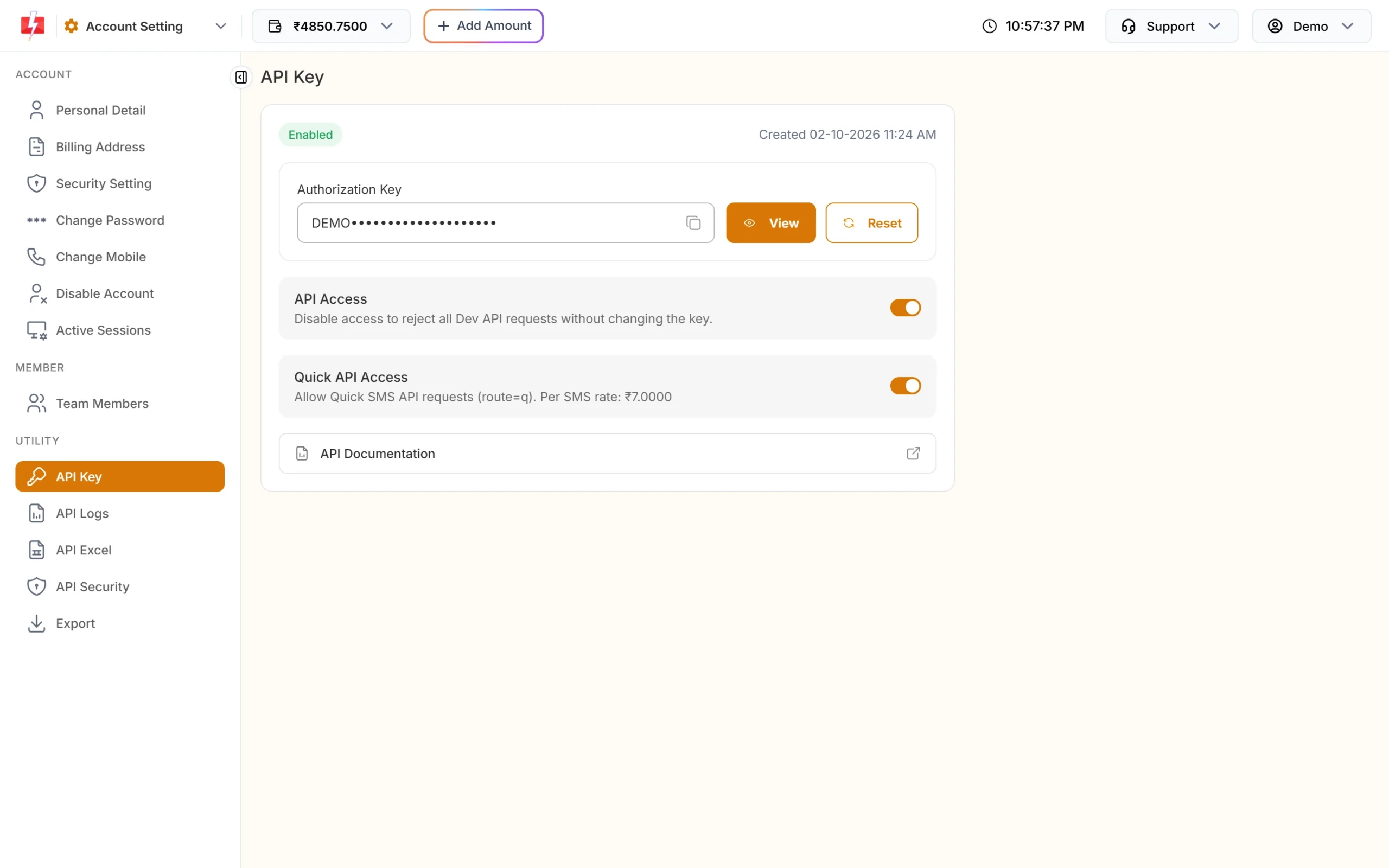
One key for SMS, WhatsApp, OTP, RCS and voice APIs. -
Download your templates as an API sheet
Open API Excel, choose SMS and click Download Excel. The file lists your approved DLT templates with sender IDs and sample API URLs, so your developers can map each scan event to a template. In the API,
messageis the template’s Message ID, not the 19-digit DLT template ID.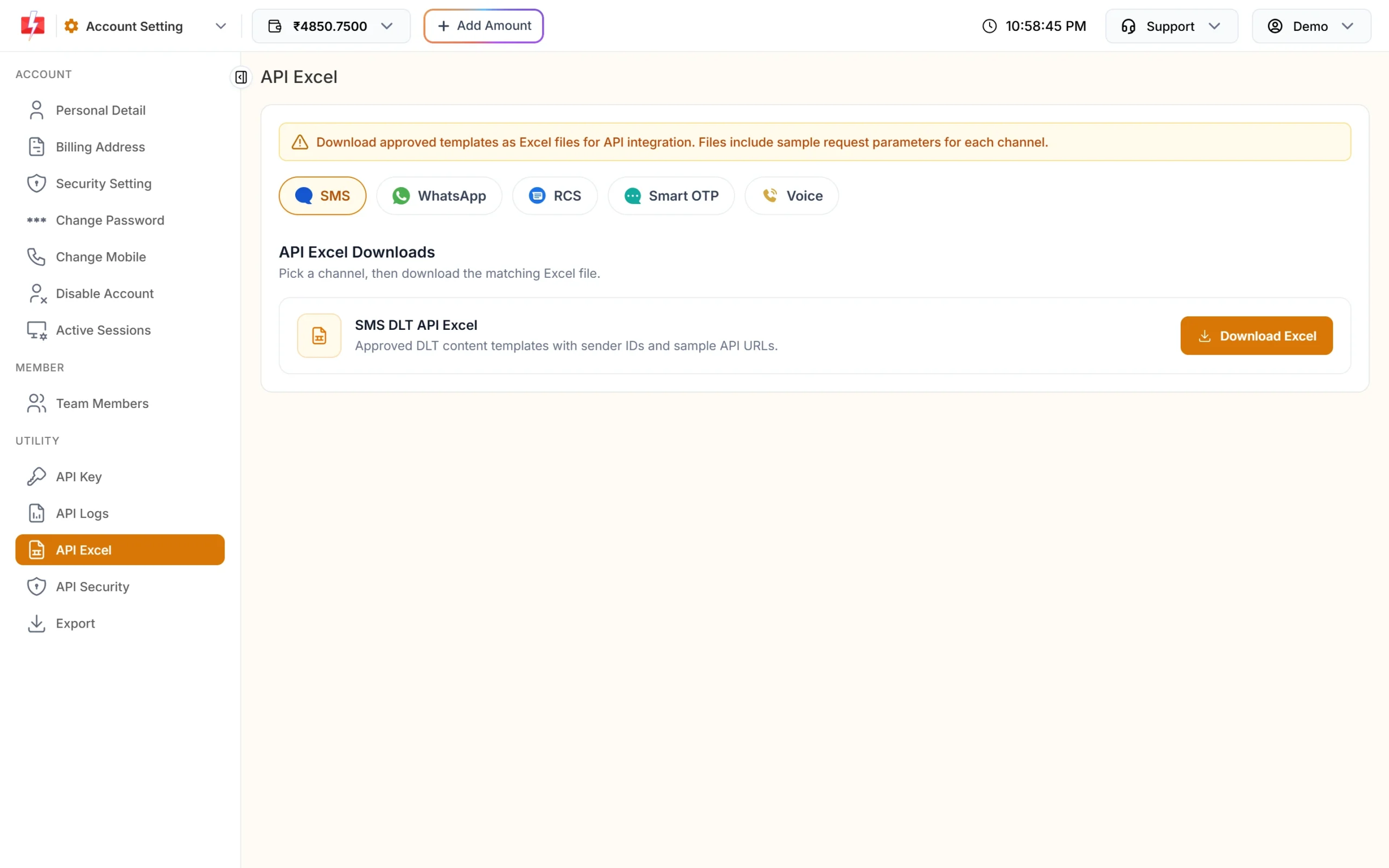
One Excel per channel with ready request samples. curl -X POST "https://www.fast2sms.com/dev/bulkV2" \ -H "authorization: YOUR_API_KEY" -H "Content-Type: application/json" \ -d '{"route":"dlt","sender_id":"YOURID","message":"YOUR_MESSAGE_ID","variables_values":"AWB1042|4821","numbers":"9999999999"}' -
Create a Smart OTP template and test it
Open Smart OTP > Add OTP Template, pick your delivery-code template, mark the code variable and add a WhatsApp fallback. Use Test OTP on the card to send one to your own phone. A test is a real, charged send.
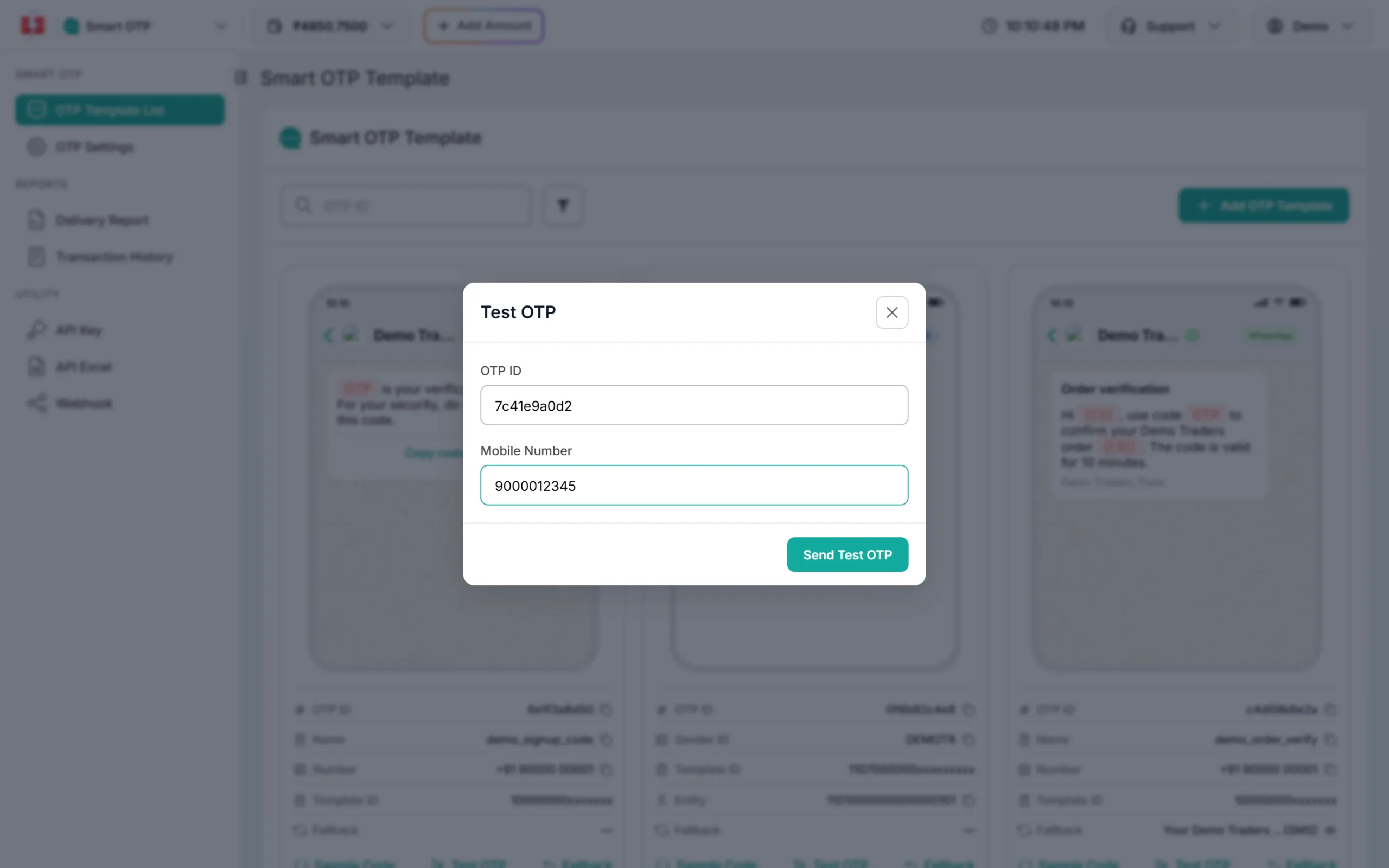
Test with your own number before the rider app goes live. -
Create webhooks for delivery reports and replies
Open Webhook, choose the service (SMS, WhatsApp, OTP, RCS or Voice) and click Add Webhook. Enter your URL, pick the events (On Sent, On Delivered, On Read, On Failed, Incoming Messages for WhatsApp) and adjust the JSON body. Delivery webhooks fire for messages sent through the API.
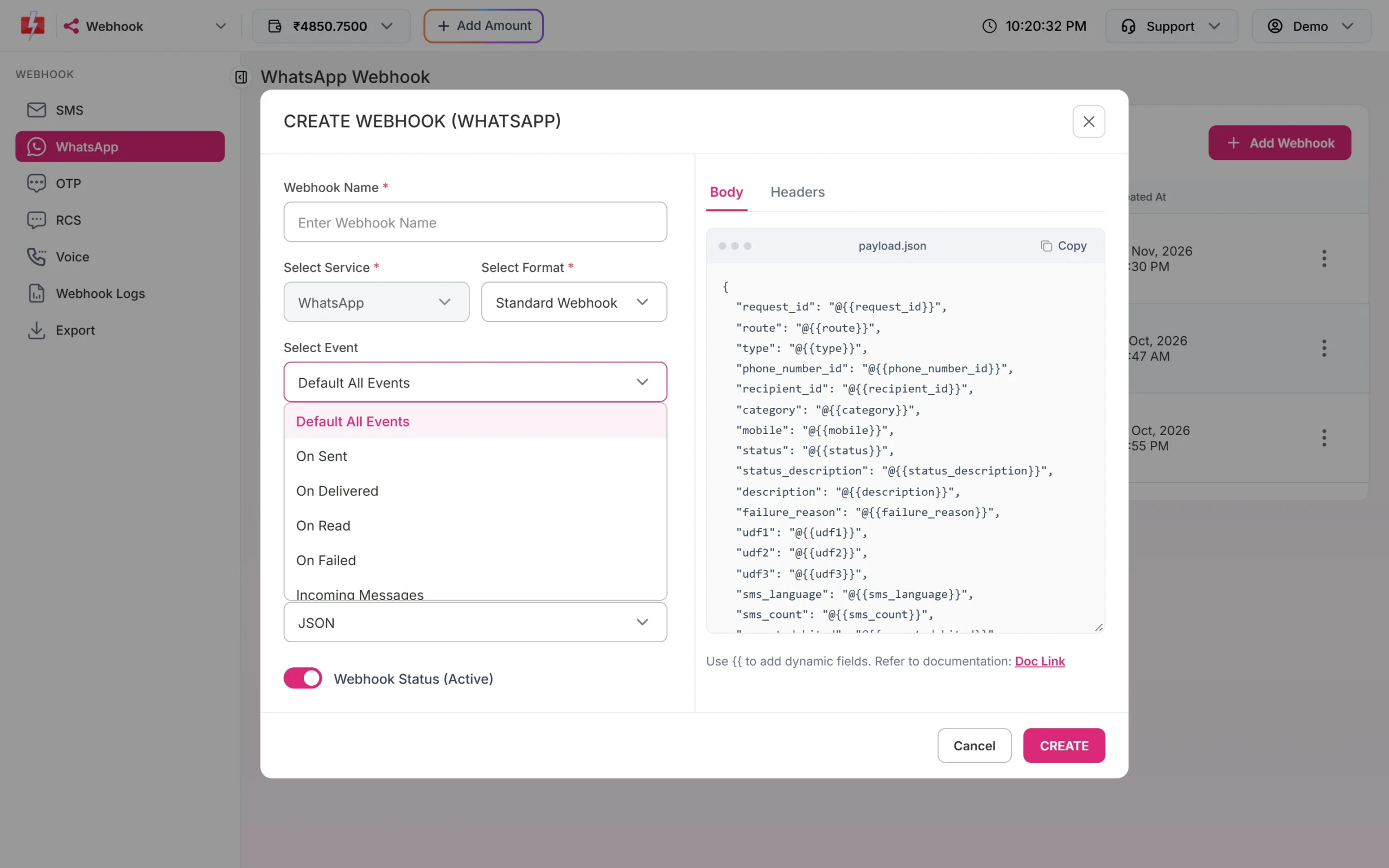
Choose only the events your system needs. -
Watch webhook logs
Webhook Logs shows every call to your URL with the event, HTTP code and time. If your server was down, open the row menu to resend a logged event once. Logs are kept for 7 days.
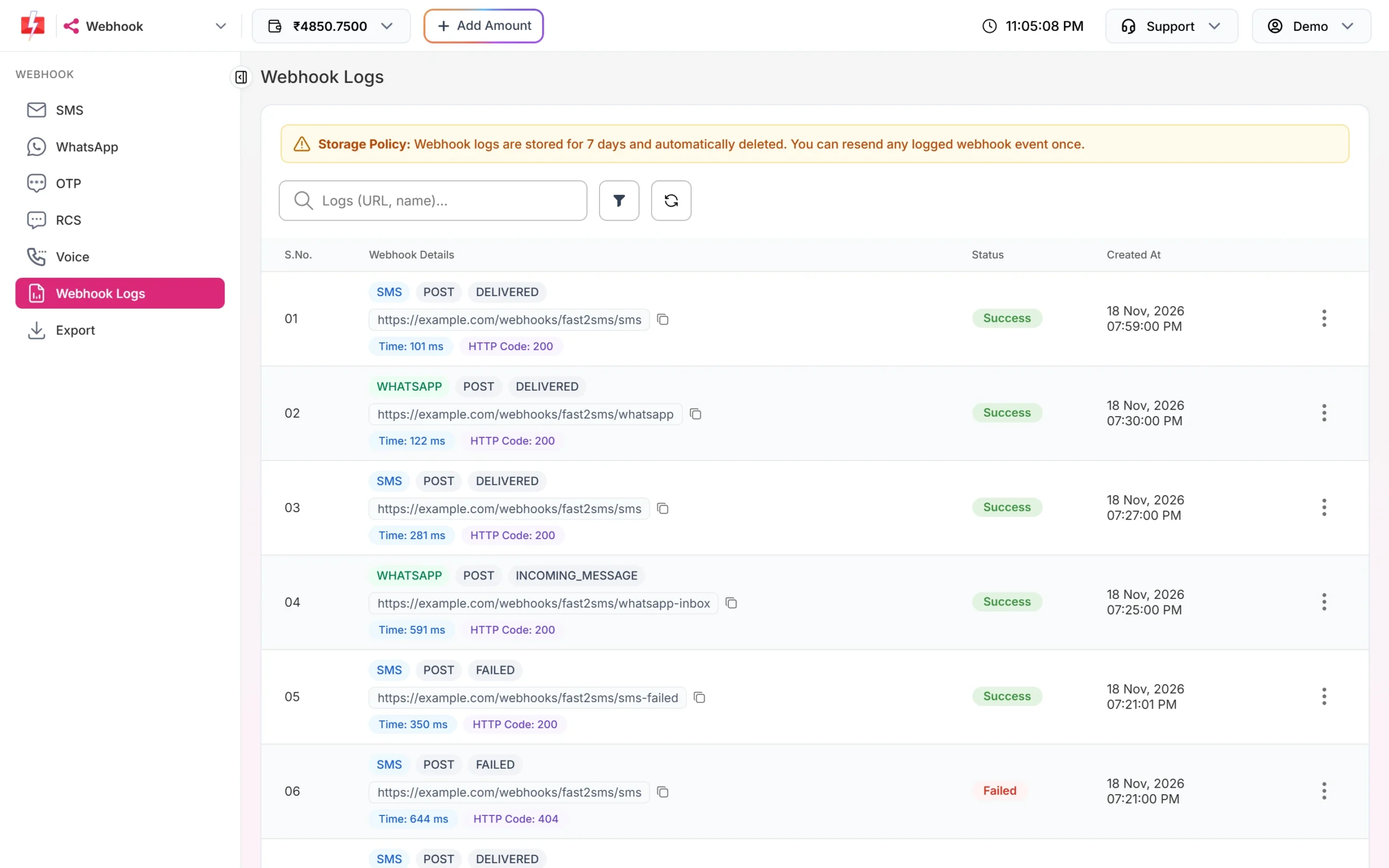
A 404 or 5xx here means your endpoint needs attention. -
Check delivery-code reports
Open Delivery Report > OTP Report and click a request. If the SMS failed and the code went out again on WhatsApp, both rows show under the same request ID with their channel.
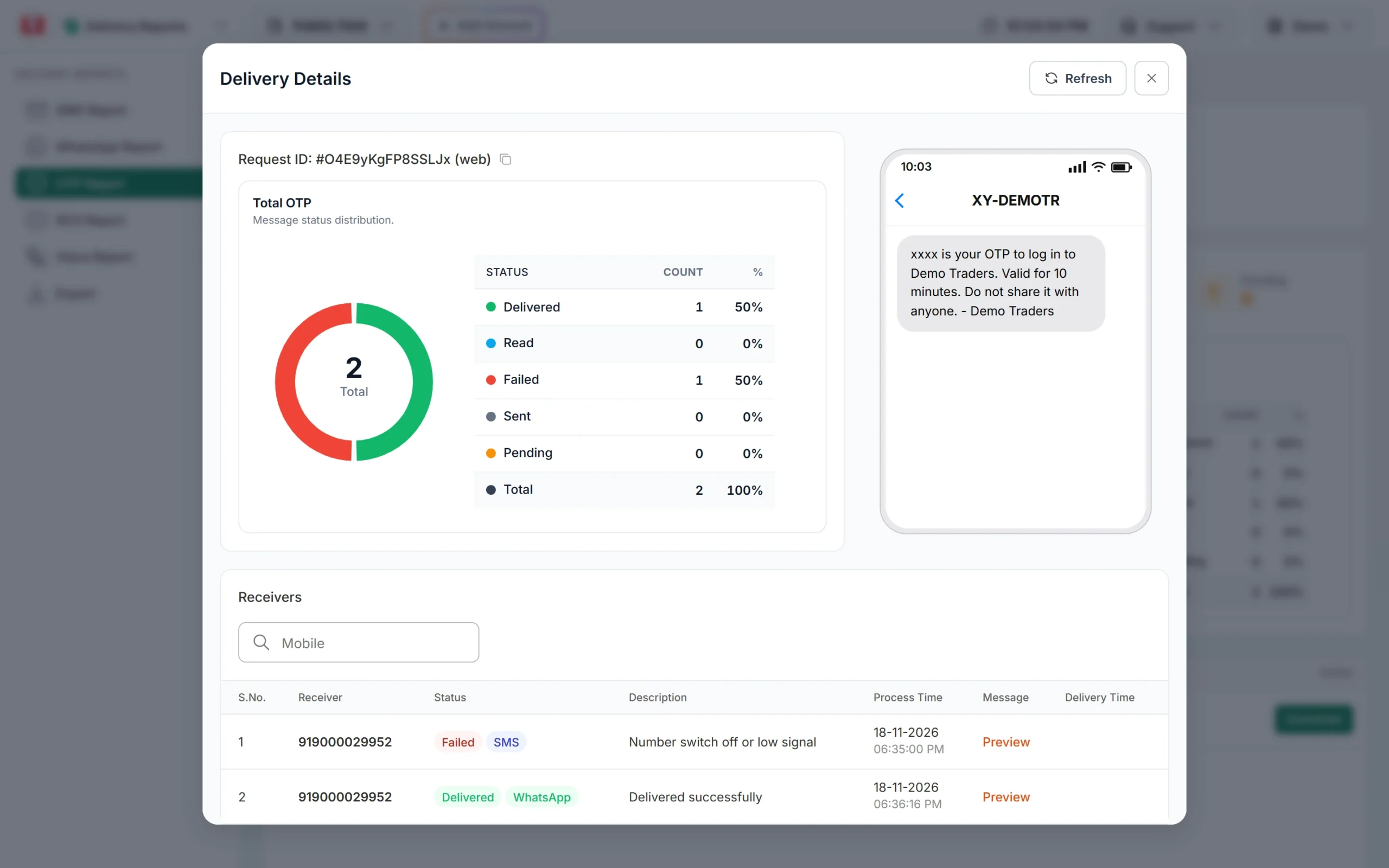
The fallback saved this delivery code.
Automation options
- DLT SMS API with the Message ID and pipe-separated variable values, one call per scan event.
- WhatsApp API for template messages, and session messages when the receiver has written in the last 24 hours.
- Smart OTP API for send, verify and resend from the rider app’s backend.
- Voice API to start Key Press campaigns from your dispatch system and read the keys from the report API or the voice webhook.
- API Security to allow calls only from your server IPs, and API Logs to debug failed requests.
- CSV uploads in the panel for one-off sends, such as a hub closure notice to all receivers due that day.
Compliance notes for logistics
- Service only: keep seller offers out of tracking templates. A wrongly categorised template can be blacklisted.
- Delivery codes: tell the receiver to share the code only with the person at the door, and never ask for any other OTP or bank detail.
- Links: whitelist your tracking and payment domains on your DLT portal before using them in {#url#} variables.
- Calls: 10 AM to 9 PM, non-DND numbers only, and the voice file must say your company name.
How to estimate the cost
Logistics volumes are high, so small choices add up. Send only the scans that matter, keep SMS within one part (160 English characters), and use WhatsApp utility where receivers are active on it. Smart OTP charges each send, fallback and resend. Voice is charged per 15-second pulse for answered calls only. See current rates on the SMS pricing, WhatsApp pricing and voice call pricing pages. A larger recharge moves your account to a cheaper SMS plan.
Frequently asked questions
Which DLT category is used for courier tracking SMS?
Service Implicit. Tracking, delivery and COD messages are about the receiver’s own parcel.
Can the delivery OTP stay valid for the whole day?
Yes. Set otp_expiry in minutes on the send request, up to 10,080 minutes.
Why did a receiver’s first delivery code stop working?
A new OTP to the same mobile cancels older unverified codes. Verify always checks the latest code.
Do webhooks fire for SMS sent from the panel?
No. Delivery webhooks fire for messages sent through the API. Use the Delivery Report for panel campaigns.
Can receivers reply on WhatsApp to reschedule?
Yes. Reply buttons and text replies arrive in Live Chat and, if you set it up, on your Incoming Messages webhook.
Is there a limit on WhatsApp messages per day?
Meta sets a messaging limit per business that grows with quality. Check it in WhatsApp Manager and keep SMS as backup.