
Bulk SMS and WhatsApp for manufacturers and B2B distributors keep dealers, retailers and field staff updated on orders, dispatches, payments and new schemes without a phone call for each one. DLT SMS carries short order and payment alerts, WhatsApp carries invoices, price lists and dealer conversations, and a Call Patch voice call connects dealers straight to your sales team. This guide maps each message to a channel, gives templates and shows the setup in Fast2SMS.
It is written for manufacturers, brand owners, C&F agents, distributors and wholesalers who sell through a dealer network, and for the sales and accounts teams that support them.
Which channel for which dealer message
Order, dispatch and payment messages are about a dealer’s own account, so they are service messages. Scheme launches and new product announcements try to sell, so they are promotional. Keep the two separate in both DLT and WhatsApp.
| Message | Best channel | Why |
|---|---|---|
| Order received or confirmed | SMS (Service Implicit) and WhatsApp utility | The dealer knows the order is booked, with order number and value. |
| Dispatch with invoice, vehicle or LR number | WhatsApp utility with a PDF invoice, SMS backup | The invoice travels with the message for the dealer’s accounts. |
| Payment received | SMS (Service Implicit) | Short proof that settles disputes quickly. |
| Outstanding balance or ledger statement | WhatsApp utility with a PDF, SMS backup | Account related. Not allowed as a voice reminder. |
| New scheme or product launch | WhatsApp marketing, promotional SMS or RCS | Images and brochures sell better. Promotional rules apply. |
| Price revision notice | WhatsApp and SMS | Dealers need the date and the new list before they quote customers. |
| Dealer wants to talk to sales | Call Patch voice call | The dealer presses a key and is connected to your regional team. |
| Dealer portal or warranty registration | Smart OTP | Verifies the dealer or end customer’s number. |
Sample DLT SMS templates
Register these examples under your company name. Keep the company name as fixed text, use three variables or fewer, each tagged for its type, and whitelist your portal and invoice links on your DLT portal.
| Use | Example template to register | Category |
|---|---|---|
| Order confirmed | YourBrand has confirmed your order {#alphanumeric#} of Rs {#numeric#}. Expected dispatch: {#alphanumeric#}. | Service Implicit |
| Dispatched | Your YourBrand order {#alphanumeric#} has been dispatched. Vehicle / LR no {#alphanumeric#}. Invoice: {#url#} | Service Implicit |
| Payment received | YourBrand has received Rs {#numeric#} from your firm on {#alphanumeric#}. Thank you. | Service Implicit |
| Outstanding balance | Your YourBrand account balance as on {#alphanumeric#} is Rs {#numeric#}. Statement: {#url#} | Service Implicit |
| Price revision | YourBrand price list for {#alphanumeric#} is revised from {#alphanumeric#}. New list: {#url#} | Service Explicit |
| Portal OTP | {#numeric#} is your OTP to log in to the YourBrand dealer portal. Do not share it with anyone. | Service Implicit |
| Scheme launch | New YourBrand scheme on {#alphanumeric#} for dealers till {#alphanumeric#}. Details: {#url#} | Promotional |
| Dealer meet | YourBrand invites you to our dealer meet at {#alphanumeric#} on {#alphanumeric#}. Register: {#url#} | Promotional |
WhatsApp templates: utility vs marketing
A message about one dealer’s order, invoice or balance is Utility. A scheme, a new product or a general price list sent to all dealers is usually Marketing. Meta decides the final category, so write utility templates about a specific order or account only.
| Template | Category | Example body | Header / button |
|---|---|---|---|
| order_confirmed | Utility | Dear {{1}}, your order {{2}} for Rs {{3}} is confirmed. Expected dispatch: {{4}}. | None |
| dispatch_invoice | Utility | Dear {{1}}, order {{2}} has left our warehouse in vehicle {{3}}. The invoice is attached. | Document header (PDF) |
| payment_completed | Utility | Dear {{1}}, we received your payment of Rs {{2}}. Thank you. | None |
| ledger_statement | Utility | Dear {{1}}, your account statement till {{2}} is attached. Balance: Rs {{3}}. | Document header (PDF) |
| scheme_launch | Marketing | Dear {{1}}, our {{2}} scheme is live till {{3}}. See the slabs and terms in the brochure. | Image or document header, Visit website: Place order |
In the panel you upload one header file per send. To send each dealer their own invoice or ledger PDF, use the API, where every message can carry its own PDF link. For hazardous chemicals, medicines or other goods that Meta’s Commerce Policy restricts, do not sell or take orders over WhatsApp.
Voice calls for dealer networks
A Call Patch call plays a short message and connects the dealer to a person when they press a key. Create one Agent Group per region or product line, and map a key to each group. A Simple call suits short notices such as “our depot is closed on Monday”.
Sample script (Call Patch): “Namaste, this is YourBrand. Our new range of fittings is now available at your depot. To place an order or ask about prices, press 1 to talk to our sales team. Thank you.”
- Say your brand name clearly in every voice file. The operator checks each one.
- Payment and outstanding reminders are not allowed on voice; they are allowed only for banks, NBFCs and their collection partners. Cashback, prize and reward claims are not allowed either, so describe schemes on WhatsApp or SMS.
- Calls reach non-DND numbers only, between 10 AM and 9 PM. Call Patch calls hold a fixed amount per number until the call ends, then the unused part is refunded.
Smart OTP for dealer portals and warranty
Smart OTP is our recommended way to send OTPs. Your dealer app or warranty site calls the send and verify API with an OTP ID made from a DLT OTP template or WhatsApp authentication template. If one channel fails, the same code goes on the other within 120 seconds. Manufacturers use it for dealer portal logins, warranty registration by end customers, and confirming orders placed by phone.
How to get started on Fast2SMS (step by step)
-
Set up DLT and group your dealers
Register on a DLT portal and add your entity, sender IDs and templates under SMS > DLT Manager, then finish PE-TM Binding. Open Address Book > Groups and create groups such as wholesale dealers, retailers and field staff, or one per region.
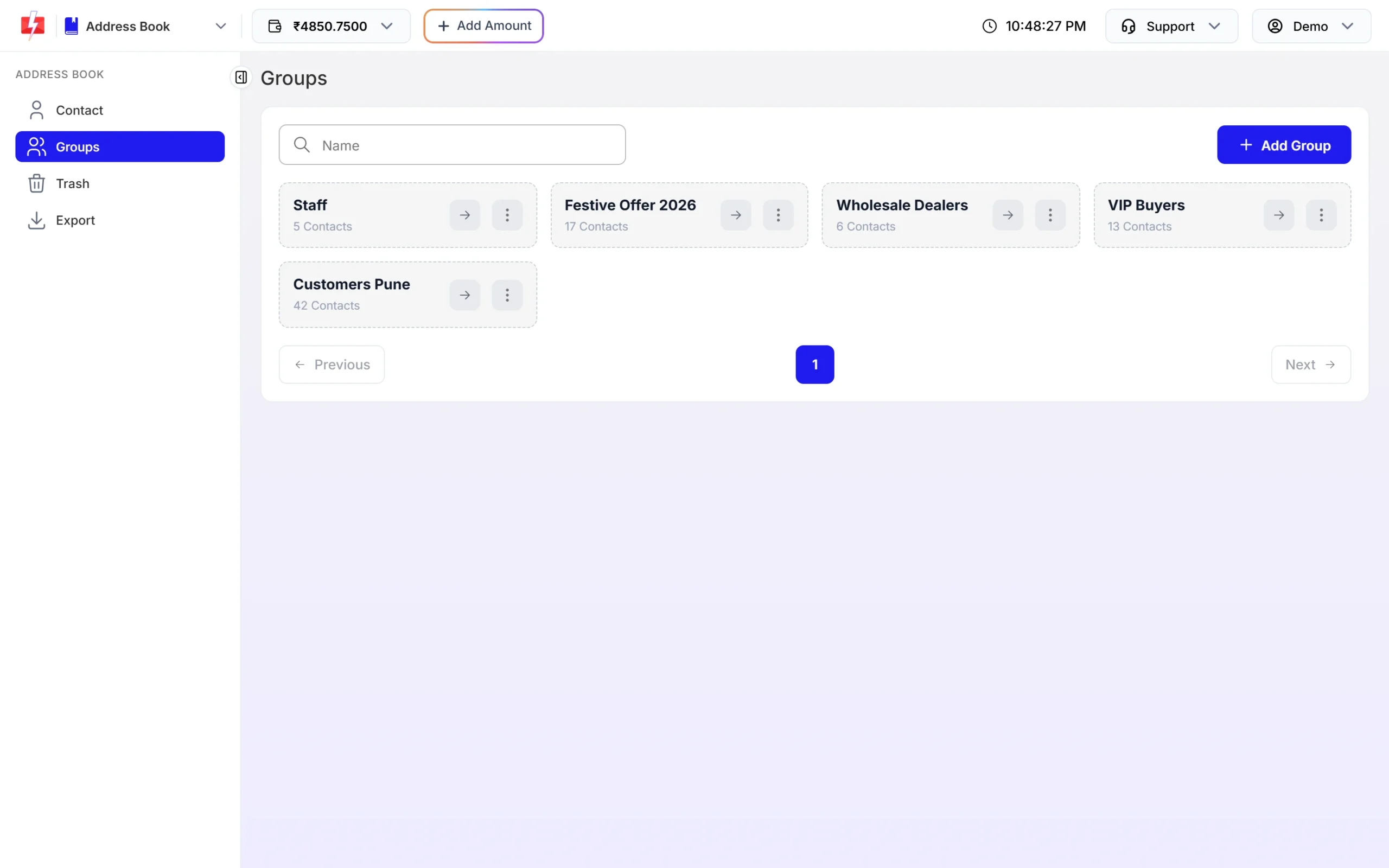
A Wholesale Dealers group next to staff and customer groups. -
Send order and dispatch SMS
Open DLT SMS, choose your sender ID, add the dealer numbers and pick the order or dispatch template. Fill the order number, value and date, check the preview and click Send. For many dealers with different values, upload a CSV and map each column to a variable.
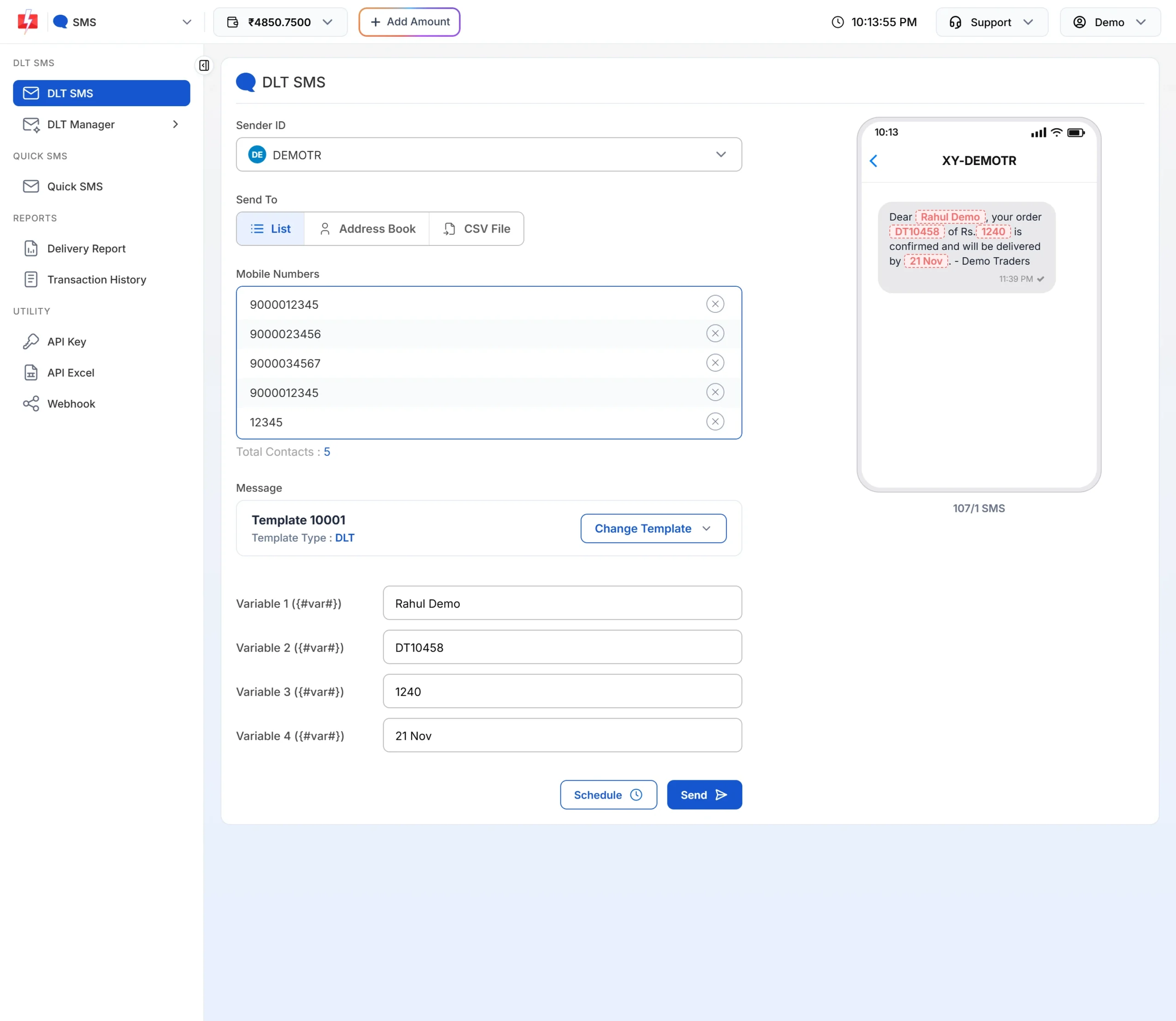
Fill the variables and check the preview before sending. -
Create WhatsApp utility templates
Connect your WhatsApp number, then add templates in WhatsApp Manager > Templates: order confirmation, dispatch with invoice and payment received as Utility, schemes as Marketing. Each approved card shows its Message ID for API use.
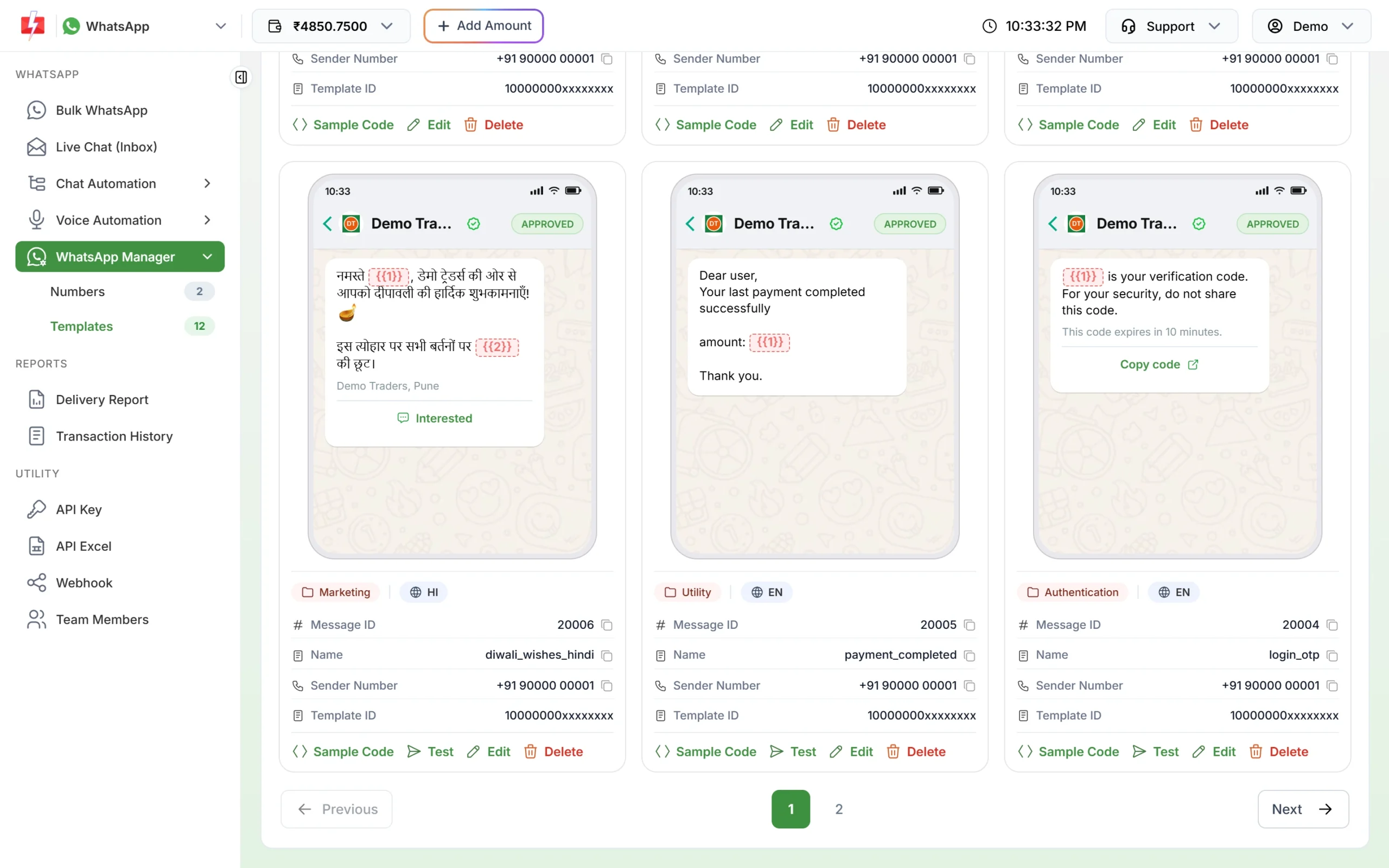
A payment completed utility template, approved and ready for the API. -
Create agent groups for your sales team
Open Voice > Agent Groups and click Create Group. Add a group name and up to 50 agents with their 10-digit numbers. The operator sees only a code and “Agent 1, 2”, not your team’s names.
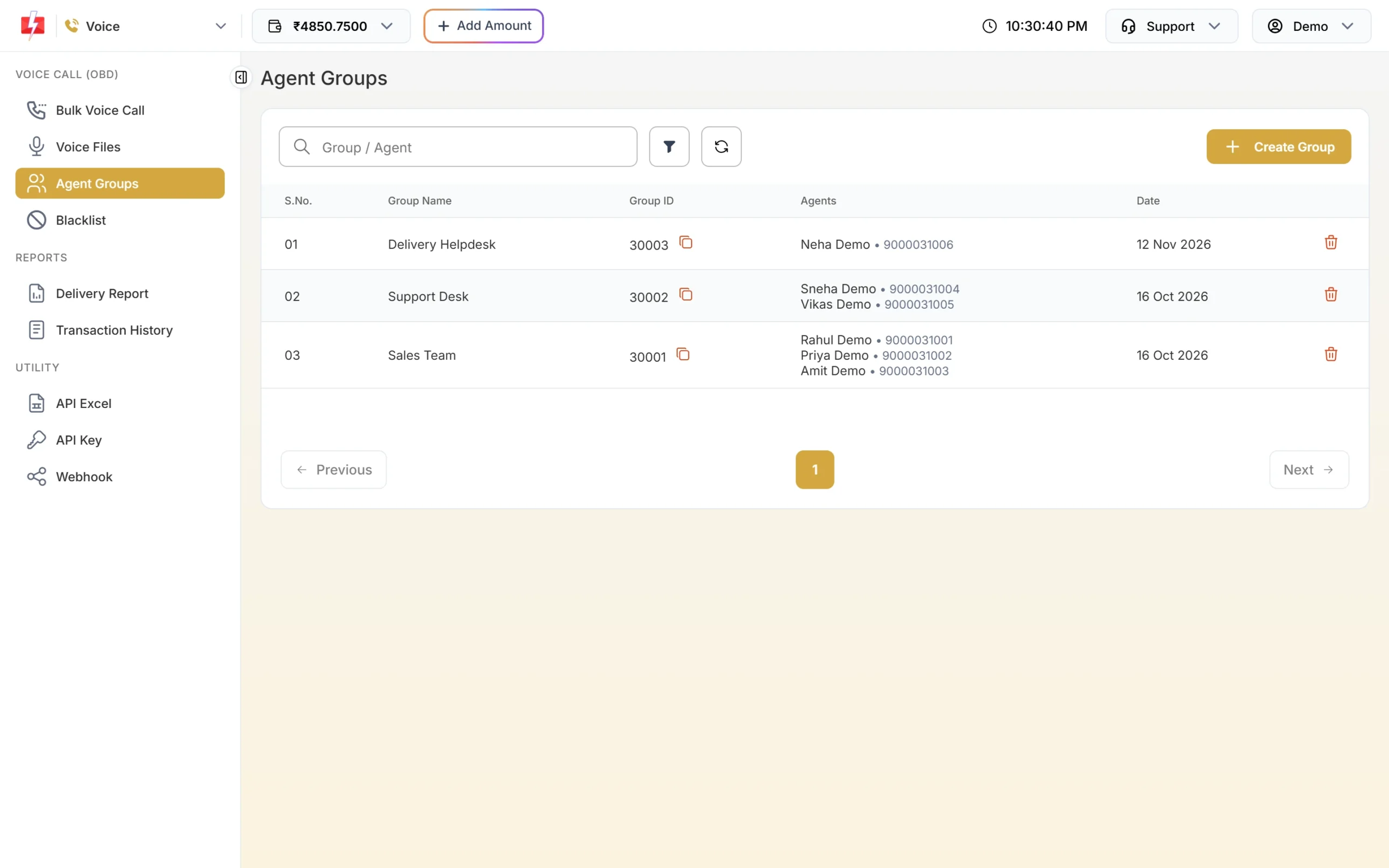
One group per team or region. -
Send a Call Patch campaign
Upload your voice files and wait for approval. Open Bulk Voice Call, choose Call Patch, add the dealer numbers, pick the file the dealer hears first, set “Press 1 connect to” your sales group, and choose the file that plays if no agent picks up. Click Send.
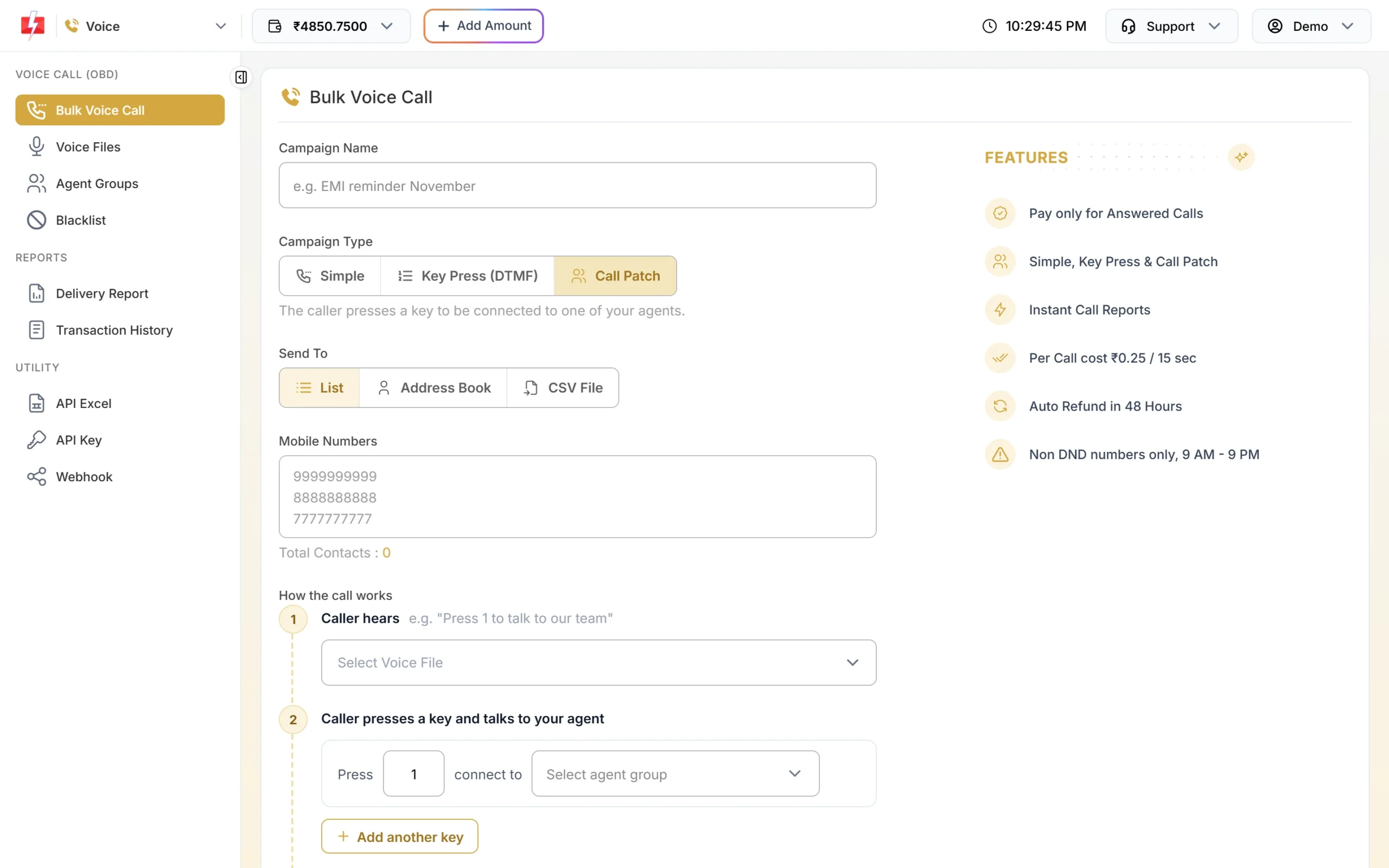
Each key connects the dealer to a different agent group. -
Check your balance and rates
Click the wallet amount at the top of the panel. It shows your balance, the rate for each channel and roughly how many messages or pulses the balance covers. Use Add Amount to recharge before a large campaign.
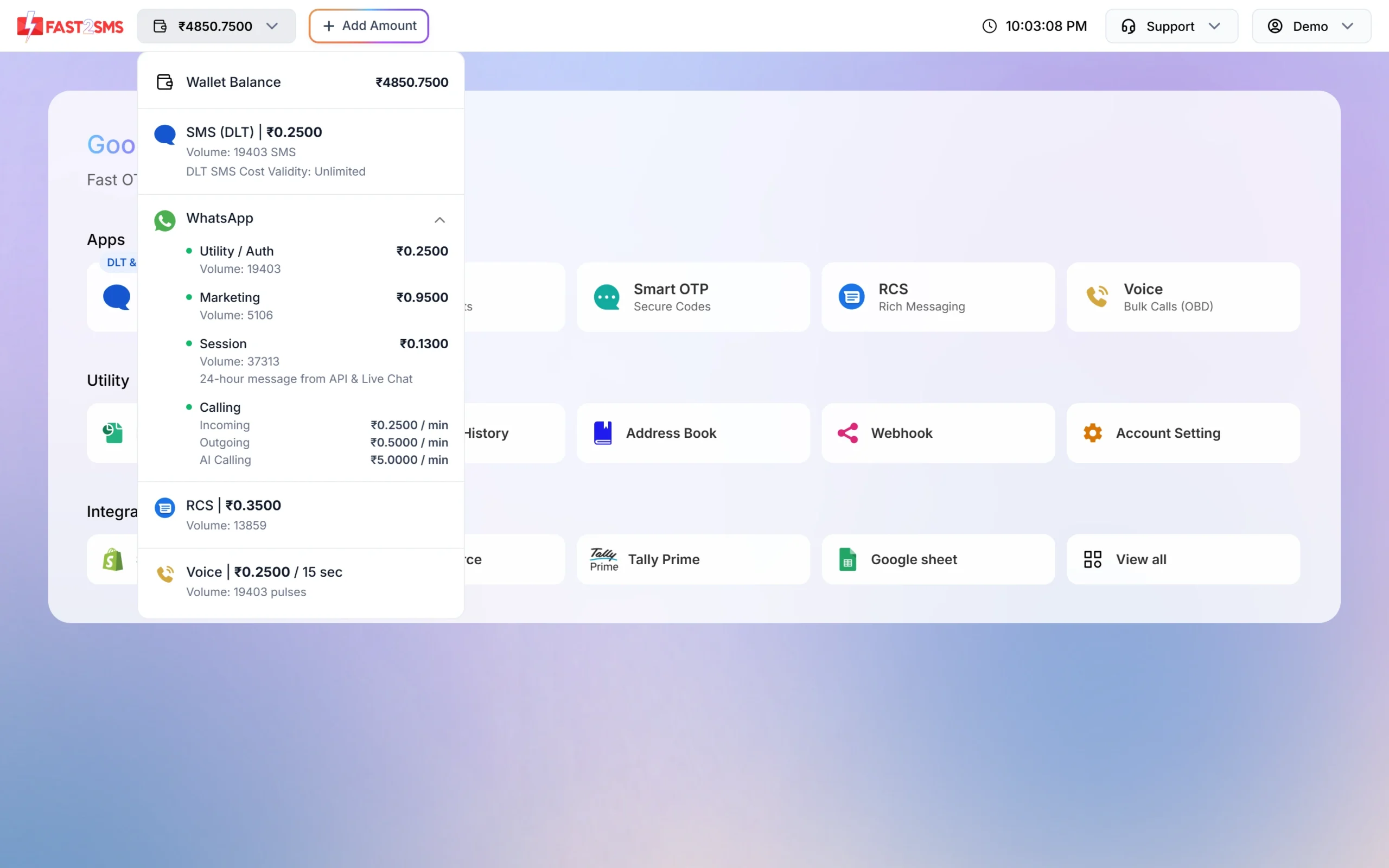
Balance, per-channel rates and volume in one place.
Automation that already exists
- Tally Prime: send SMS and WhatsApp messages to your parties from Tally. See the Tally WhatsApp and SMS plugin guide.
- Dev API: your ERP or DMS can send DLT SMS and WhatsApp templates by Message ID, with a separate PDF link per WhatsApp message. API Excel lists your templates with sample requests.
- Webhooks: get delivery reports and dealer replies on WhatsApp in your own system.
- Live Chat and Team Members: sales and accounts staff answer dealer chats from one number, each seeing their assigned chats.
- Flow Builder: a menu with “Place order”, “My balance” and “Talk to sales”. An API Request step can fetch details from your system.
- Integrations: HubSpot, Zoho, Pipedrive, Google Sheets and Pabbly Connect are on the integrations page.
Compliance notes
- Consent: send schemes and launches only to dealers who agreed, and stop when they ask.
- Sending hours: promotional SMS go out between 10 AM and 9 PM. Order and payment alerts on Service Implicit templates go out at any hour.
- No dues on voice: send outstanding reminders by SMS or WhatsApp only.
- Restricted goods: check Meta’s Commerce Policy before promoting chemicals, medicines or other regulated products on WhatsApp.
How to estimate the cost
DLT SMS are charged per number and per SMS part (160 English characters or 70 Hindi characters per part). WhatsApp is charged per message by category, and utility costs less than marketing. Failed and pending WhatsApp messages are refunded automatically about two days later. Voice is charged per 15-second pulse for answered calls; for Call Patch both the dealer’s and the agent’s legs are charged, and unanswered calls are refunded about an hour after the campaign ends. DLT entity registration costs ₹5,900 per year including GST (at the time of writing).
See current rates on the SMS pricing, WhatsApp pricing and voice call pricing pages. A bigger recharge moves your account to a lower SMS rate.
Sending in bulk? For high SMS volumes our team offers discounted rates. Talk to our team or see SMS pricing.
Frequently asked questions
Which DLT category should dispatch and invoice SMS use?
Service Implicit. They are about a dealer’s own order, so they reach DND numbers at any hour.
Can I send each dealer their own invoice PDF on WhatsApp?
Yes, through the API, where each message carries its own PDF link. In the panel, one header file is used for the whole send.
Can I remind dealers about outstanding payments with a voice call?
No. Payment reminders on voice are allowed only for banks, NBFCs and their collection partners. Use SMS or WhatsApp.
How do dealers reach my sales team from a call?
Use a Call Patch campaign. The dealer presses a key and is connected to an agent in the group mapped to that key. Call recordings are shown in the report for 30 days.
Is a price revision message promotional?
On WhatsApp, a general price list is usually Marketing. On DLT, register it as Service Explicit if dealers gave consent, otherwise Promotional.
Can I send messages from Tally?
Yes. The Tally Prime plugin uses your Fast2SMS API key to send SMS and WhatsApp messages at the normal per-message price.