
A COD order confirmation OTP asks the buyer to enter a code sent to their mobile before a cash-on-delivery order is placed. It stops orders with wrong or fake numbers and orders placed by mistake, which are the ones most likely to be refused at the door. This guide shows how to add it to your checkout with Fast2SMS Smart OTP, including the order number in the OTP message, WhatsApp fallback, and what to do when the buyer does not verify.
How COD OTP works
- The buyer chooses Cash on Delivery and taps Place order.
- Your server saves the order as “pending COD verification” and calls Fast2SMS Send OTP with the buyer’s mobile and the order number.
- The buyer enters the code. Your server calls Verify OTP.
- On success the order becomes “confirmed” and goes to packing. If it is not verified in time, you cancel it or ask the buyer to pay online.
Fast2SMS creates and checks the code, so you do not store OTPs. Prepaid orders skip this step.
Before you start
- An approved OTP template that mentions the order, for example “{#var#} is the OTP to confirm your Demo Traders Online order {#var#}. Do not share it with anyone. – Demo Traders”. Add it in DLT Manager.
- Optional WhatsApp template: an approved WhatsApp utility or authentication template for the same purpose, for fallback.
- A Smart OTP template and its OTP ID.
- API key with API Access on, used only on your server.
- Wallet balance. Each send and resend is charged.
Set up Smart OTP for COD
-
Create the COD OTP template
Open Smart OTP, OTP Template List, Add OTP Template. Pick your entity, sender and the COD template, and choose which variable is the OTP. The other variable (the order number) is filled from your API call. To add a backup channel, tick SET FALLBACK TEMPLATE.
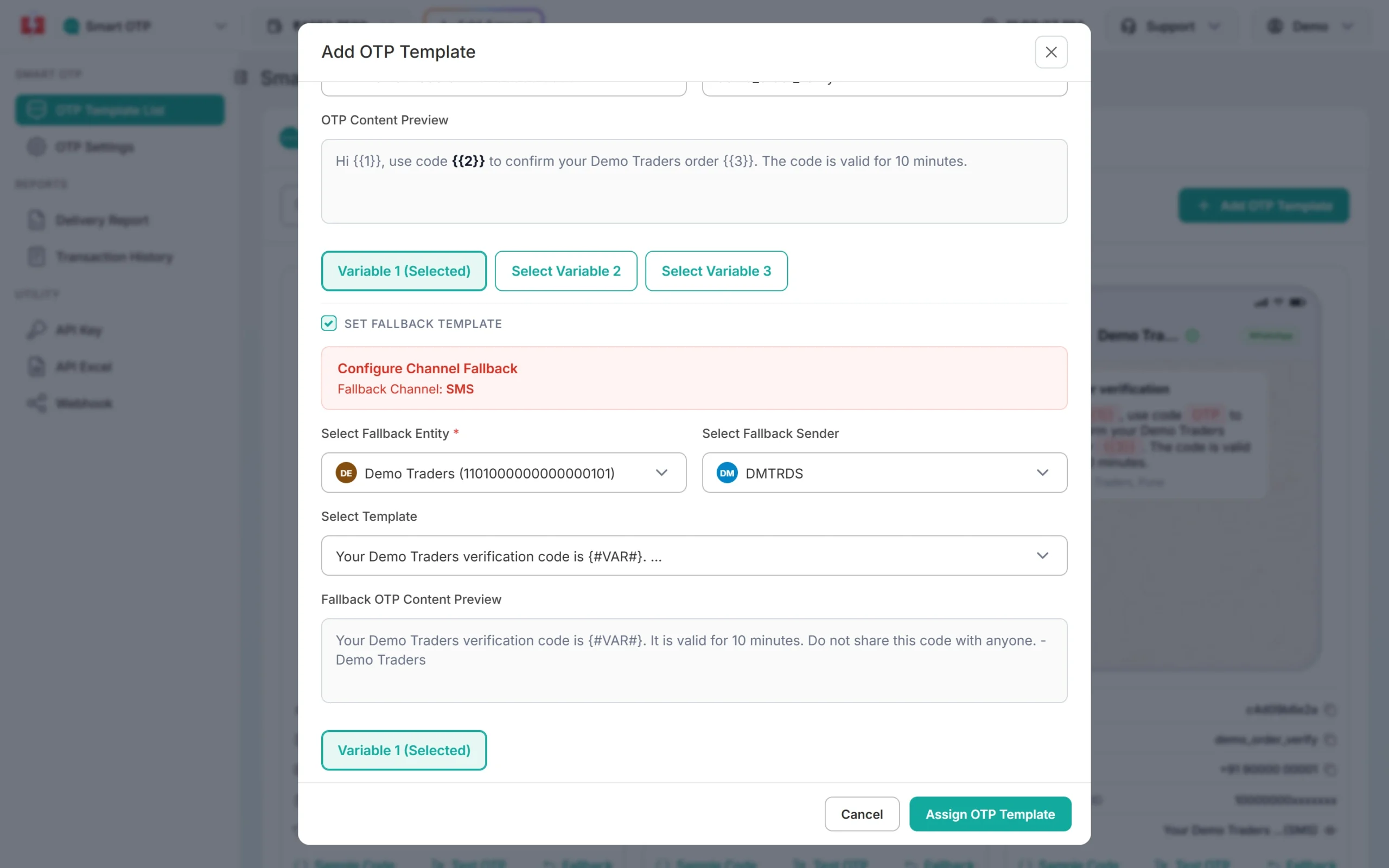
A WhatsApp OTP template with an SMS fallback. -
Copy the OTP ID
Copy the OTP ID from the new card in OTP Template List and save it in your server settings.
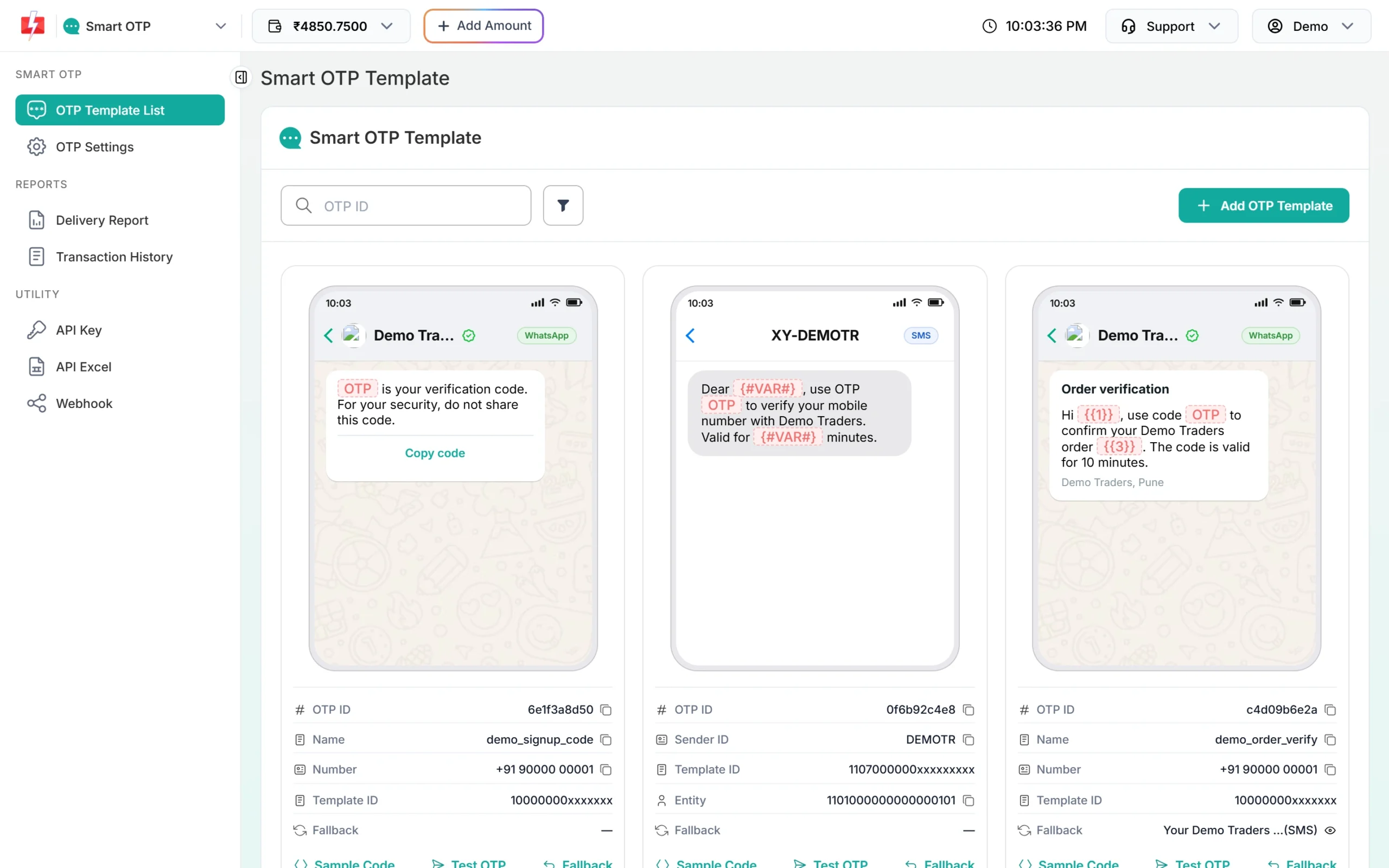
Use a separate OTP ID for COD so reports are easy to read.
Send the OTP with the order number
Pass the order number in variables_values. Fast2SMS fills the OTP variable on its own, so you list only the other variables, in template order.
curl -X POST "https://www.fast2sms.com/dev/otp/send" \
  -H "authorization: YOUR_API_KEY" \
  -H "Content-Type: application/json" \
  -d '{"mobile":"9999999999","otp_id":"YOUR_OTP_ID","otp_expiry":15,"variables_values":"DT10458","udf1":"DT10458"}'
Checkout code (PHP example)
<?php
function f2s(string $path, array $body): array
{
    $ch = curl_init('https://www.fast2sms.com' . $path);
    curl_setopt_array($ch, [
        CURLOPT_POST           => true,
        CURLOPT_RETURNTRANSFER => true,
        CURLOPT_TIMEOUT        => 15,
        CURLOPT_HTTPHEADER     => ['authorization: ' . getenv('FAST2SMS_API_KEY'), 'Content-Type: application/json'],
        CURLOPT_POSTFIELDS     => json_encode($body),
    ]);
    $res  = json_decode((string) curl_exec($ch), true) ?: [];
    $http = curl_getinfo($ch, CURLINFO_HTTP_CODE);
    curl_close($ch);
    return ['ok' => $http === 200 && ($res['return'] ?? false) === true, 'message' => $res['message'] ?? 'Error'];
}

// 1. Buyer taps "Place order" with COD
function startCodVerification(array $order): array
{
    // $order saved with status 'pending_cod_otp'
    return f2s('/dev/otp/send', [
        'mobile'           => $order['phone'],
        'otp_id'           => getenv('FAST2SMS_COD_OTP_ID'),
        'otp_expiry'       => 15,
        'variables_values' => mb_substr($order['number'], 0, 40),
        'udf1'             => $order['number'],
    ]);
}

// 2. Buyer enters the code
function confirmCodOrder(array $order, string $code): array
{
    $r = f2s('/dev/otp/verify', ['mobile' => $order['phone'], 'otp' => trim($code)]);
    if ($r['ok']) {
        // update order status to 'confirmed' and send it to packing
    }
    return $r;   // on failure show $r['message']: Invalid OTP, OTP expired, ...
}

// 3. Buyer taps "Resend code" (same code, charged again)
function resendCodOtp(array $order): array
{
    return f2s('/dev/otp/resend', ['mobile' => $order['phone']]);
}- Verify needs only the mobile and the code. It checks the latest unverified OTP for that number.
- A new send to the same number cancels older OTPs. If a buyer places two COD orders in a row, verify each one before starting the next.
- Resend repeats the same code, within 10 minutes of the first send and up to 5 sends in total, counting the first.
- Calls inside the wait time from OTP Settings get “Please wait N seconds before requesting a new OTP”. Show a timer on the Resend link.
What to do when the buyer does not verify
- Offer prepaid: show “Pay online instead” next to the OTP box. Many buyers who cannot get the SMS can still pay.
- Allow a change of number: a wrong number is the most common reason. Let the buyer fix it and send again.
- Time limit: keep unverified COD orders for a short time (for example the OTP expiry), then cancel them or move them to a manual call list.
- Fallback: with a fallback template, a failed SMS is sent again on WhatsApp with the same code within about 2 minutes. The fallback message is charged.
See what happened to each OTP
Open the OTP Delivery Report. Click a request to see its receivers. When fallback was used, you see two rows under the same request ID: the failed SMS and the WhatsApp message.
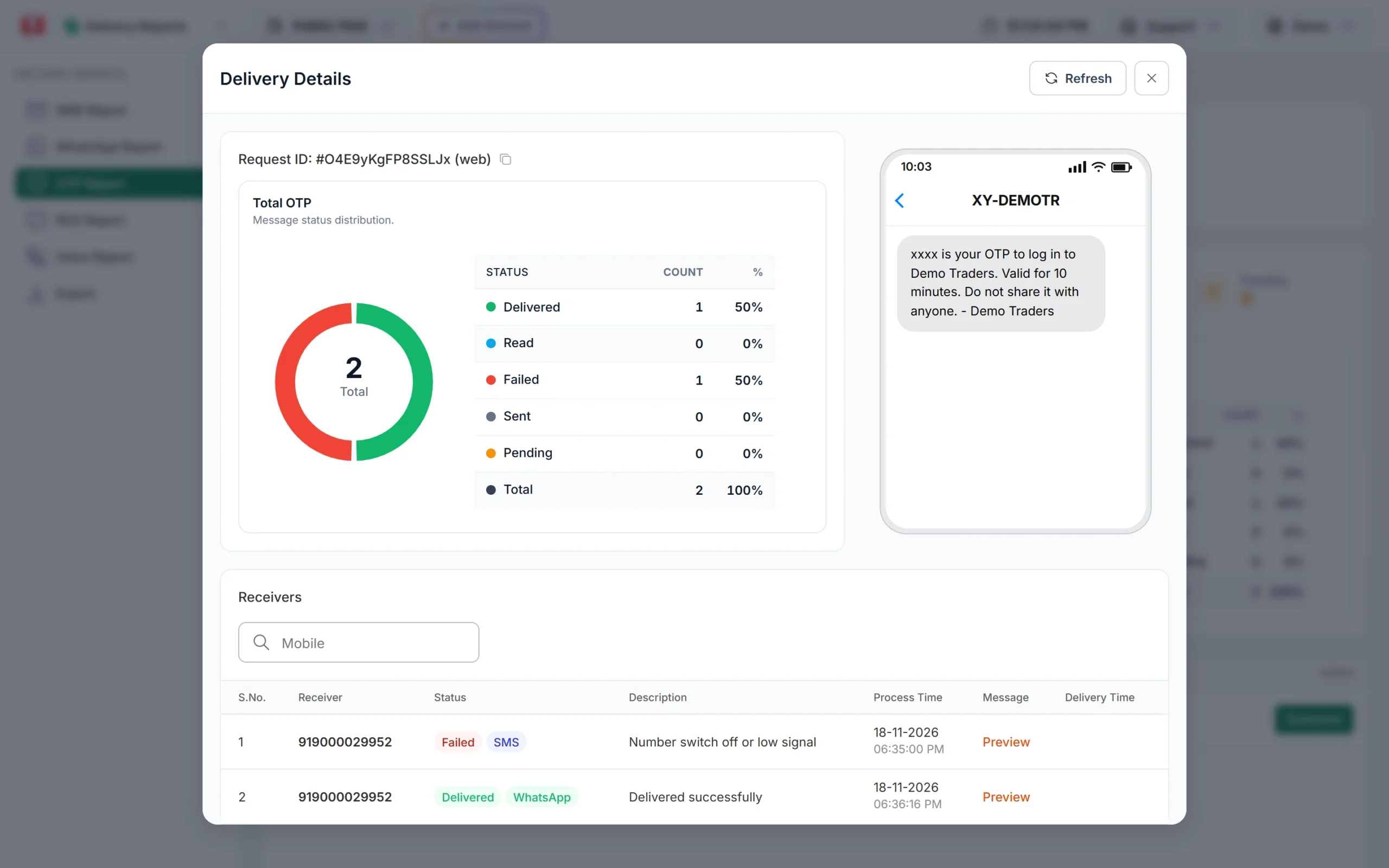
To see which COD buyers verified, export the OTP report. The file has Verified and Verified At columns. For live status in your store, add an OTP webhook under Webhook, OTP; your udf1 order number comes back with it.
Common problems and fixes
- Order number missing in the SMS:
variables_valueswas empty or in the wrong order. List the non-OTP variables only, in template order. - “OTP not found or already verified”: a second send (for another order or a double tap) replaced the first code.
- “Invalid OTP ID”: the OTP ID belongs to another account or was deleted.
- Buyers complain of no SMS: check the request in the OTP report and add a WhatsApp fallback.
- Bots placing COD orders: limit OTP sends per IP and per mobile per hour on your server, and add a captcha at checkout if needed.
Frequently asked questions
Does COD OTP reduce RTO?
It removes orders with wrong or unreachable numbers and accidental orders, which are a common cause of returned parcels. Results depend on your store.
Should I ask for OTP on prepaid orders?
Usually not. Payment already confirms the buyer. Keep the step for COD.
Can the COD OTP go on WhatsApp?
Yes. Use a WhatsApp template in Smart OTP, or add WhatsApp as the fallback for your SMS template.
How much does each COD OTP cost?
An SMS OTP costs your plan rate per SMS part; a WhatsApp OTP costs the WhatsApp rate. Resends and fallbacks are charged too. Verify is free. See the pricing pages for current rates.
Is there a plugin for WooCommerce or Shopify?
Fast2SMS has plugins for these platforms. Use the API as shown here for a custom checkout.
How long should the COD OTP be valid?
10 to 15 minutes works for most checkouts. Set it with otp_expiry in minutes.