
This guide shows how to send SMS and OTP from C# and .NET with the Fast2SMS API, using HttpClient and System.Text.Json that come with .NET. You will send a DLT SMS, send and verify a Smart OTP, read delivery reports, receive webhooks in ASP.NET Core and handle errors. A complete client class is at the end for ASP.NET Core, a Windows service or a console app.
Before you start
- .NET 6 or later (the examples use top-level statements and minimal APIs). No NuGet package is needed.
- API key from API Key under UTILITY, with API Access on.
- DLT SMS: an approved sender ID and template in DLT Manager, and the template’s Message ID.
- OTP: a Smart OTP template and its OTP ID.
- Wallet balance for SMS, OTP sends and resends, which are all charged.
- Server side only. Do not put the key in a WinForms, WPF, MAUI or Blazor WebAssembly app that you give to users. They can read it.
Get the key and IDs from the panel
-
API key
Go to Account Setting, API Key, click View, enter the OTP sent to your account mobile and copy the Authorization Key.
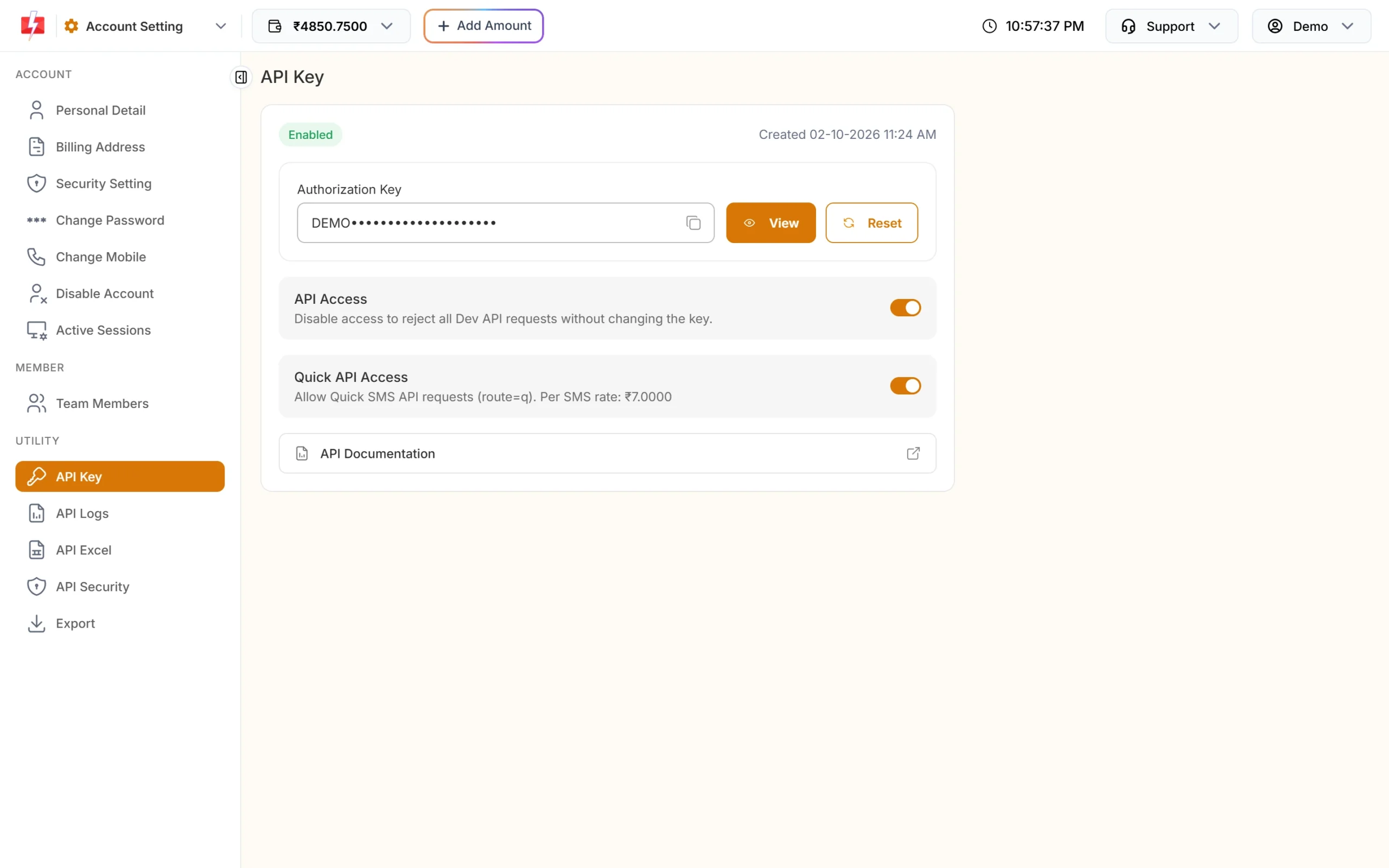
Keep it in user secrets, environment variables or a vault. -
Message ID and sender ID
Open DLT Manager, Content Template, and copy the Message ID and Sender ID from an approved template card.
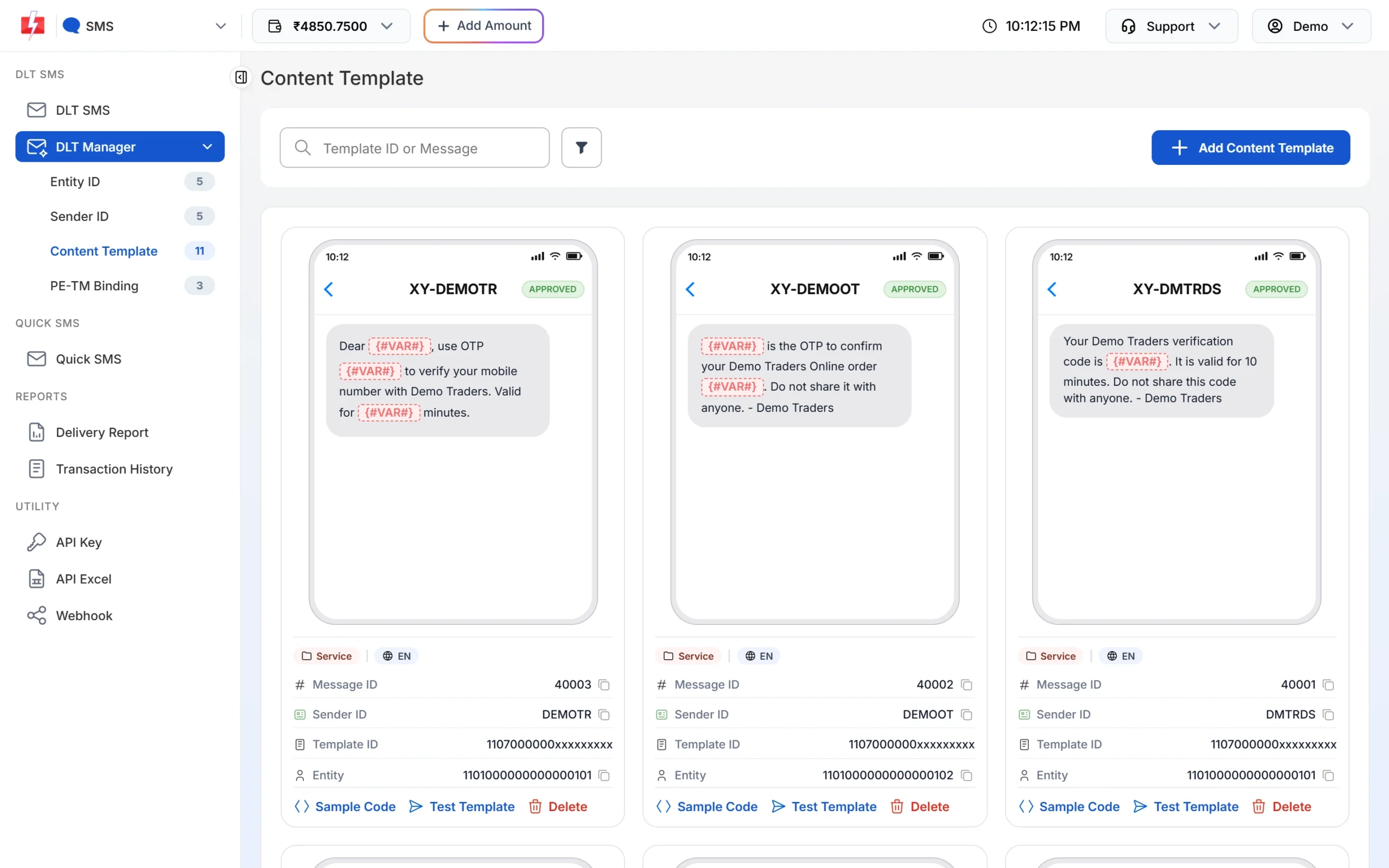
The Message ID is not the 19-digit Template ID. -
OTP ID
Open Smart OTP, OTP Template List, and copy the OTP ID of the template you will use.
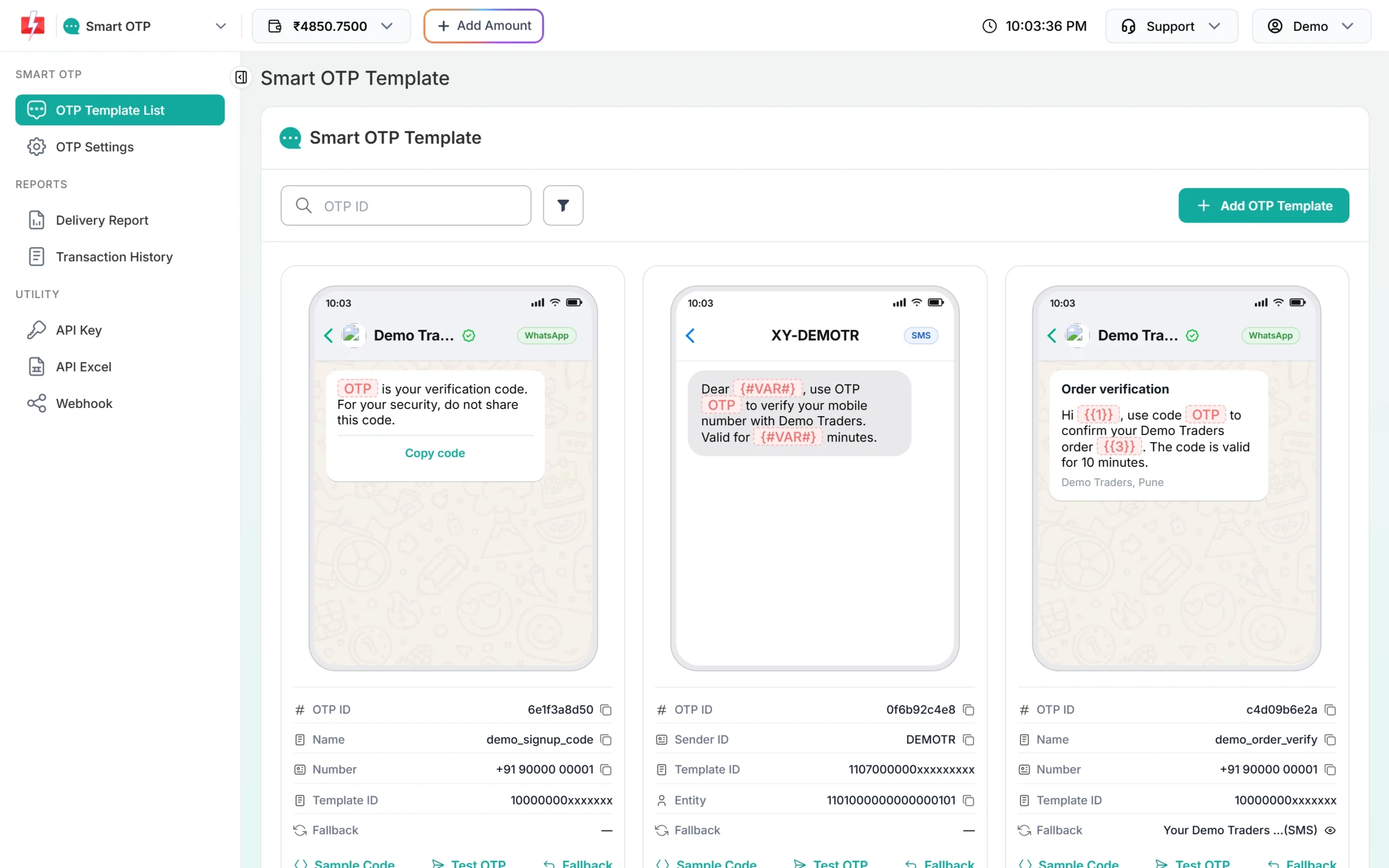
Each OTP template has its own OTP ID.
Set up the project
dotnet new console -n SmsDemo
cd SmsDemo
# keep the key out of source control
setx FAST2SMS_API_KEY "YOUR_API_KEY"          # Windows (open a new terminal after this)
export FAST2SMS_API_KEY="YOUR_API_KEY"        # Linux / macOS
In ASP.NET Core you can also use dotnet user-secrets set "Fast2SMS:ApiKey" "YOUR_API_KEY" for development and an environment variable in production.
One shared HttpClient and a helper:
using System.Net.Http.Json;
using System.Text.Json;

var http = new HttpClient { BaseAddress = new Uri("https://www.fast2sms.com"), Timeout = TimeSpan.FromSeconds(15) };
http.DefaultRequestHeaders.TryAddWithoutValidation("authorization", Environment.GetEnvironmentVariable("FAST2SMS_API_KEY"));

async Task<(bool ok, JsonElement json)> PostAsync(string path, object body)
{
    var res = await http.PostAsJsonAsync(path, body);
    var json = await res.Content.ReadFromJsonAsync<JsonElement>();
    var ok = res.IsSuccessStatusCode
             && json.TryGetProperty("return", out var r) && r.ValueKind == JsonValueKind.True;
    return (ok, json);
}TryAddWithoutValidation("authorization", key) with the bare key. Do not use AuthenticationHeaderValue("Bearer", key). The OTP endpoints do not strip “Bearer ” and reply “Invalid authorization key”.Send a DLT SMS in C#
Post to /dev/bulkV2 with route = "dlt". The example template is Message ID 10001 on DEMOTR with four variables (name, order, amount, date).
var (ok, json) = await PostAsync("/dev/bulkV2", new Dictionary<string, string>
{
    ["route"] = "dlt",
    ["sender_id"] = "DEMOTR",                                   // exact case
    ["message"] = "10001",                                      // Message ID
    ["variables_values"] = string.Join("|", "Rahul", "DT10458", "1240", "21 Nov"),
    ["numbers"] = string.Join(",", "9999999999", "8888888888"),
    ["udf1"] = "order-DT10458",                                 // optional
});

if (ok)
    Console.WriteLine($"Queued: {json.GetProperty("request_id").GetString()}");   // S...
else
Console.WriteLine($"Not sent: {json}");- Values follow the order of
{#var#}in the template. Each is cut to 40 characters. - The sender ID is case-sensitive.
- The success reply’s
messageis an array,["SMS sent successfully."]. Queued, not yet delivered. - Send later with
["schedule_time"] = "25-11-2026-10-30"(DD-MM-YYYY-HH-MM, IST).
Send and verify a Smart OTP
// Send
var (sent, sendJson) = await PostAsync("/dev/otp/send", new
{
    mobile = "9999999999",
    otp_id = "YOUR_OTP_ID",
    otp_expiry = 5,     // minutes, 1 to 10080, default 15
    otp_length = 6      // 4 to 10, default 6
});
Console.WriteLine(sent ? "OTP sent" : sendJson.GetProperty("message").ToString());

// Verify the code the user typed
var (verified, verifyJson) = await PostAsync("/dev/otp/verify", new { mobile = "9999999999", otp = "482913" });
Console.WriteLine(verified ? "Verified" : verifyJson.GetProperty("message").ToString());

// Resend the same OTP (charged again)
var (resent, resendJson) = await PostAsync("/dev/otp/resend", new { mobile = "9999999999" });- Verify takes only the mobile and the code, and checks the latest unverified OTP for that number.
- Each new send to a number cancels its older OTPs.
- Resend sends the same code again. It works within 10 minutes of the first send, with at most 5 sends in all (the first counts).
- Calls inside the wait time get “Please wait N seconds before requesting a new OTP”. Change the wait in OTP Settings (default 10 seconds).
Delivery reports
Use the DLR API or a webhook, not both for the same messages. Reading the DLR by API can stop the webhook for those rows.
DLR API
var dlr = await http.GetFromJsonAsync<JsonElement>("/dev/dlr/Sa1B2c3D4e5F6g7");
if (dlr.TryGetProperty("success", out var s) && s.GetBoolean())
{
    foreach (var row in dlr.GetProperty("data")[0].GetProperty("delivery_status").EnumerateArray())
        Console.WriteLine($"{row.GetProperty("mobile")} {row.GetProperty("status").GetString()}");
}
GetFromJsonAsync throws on a 404 (“No DLR found…”), so wrap it in try/catch (HttpRequestException). Status is Delivered, Failed or Sent (report pending). It looks back 7 days.
ASP.NET Core webhook receiver
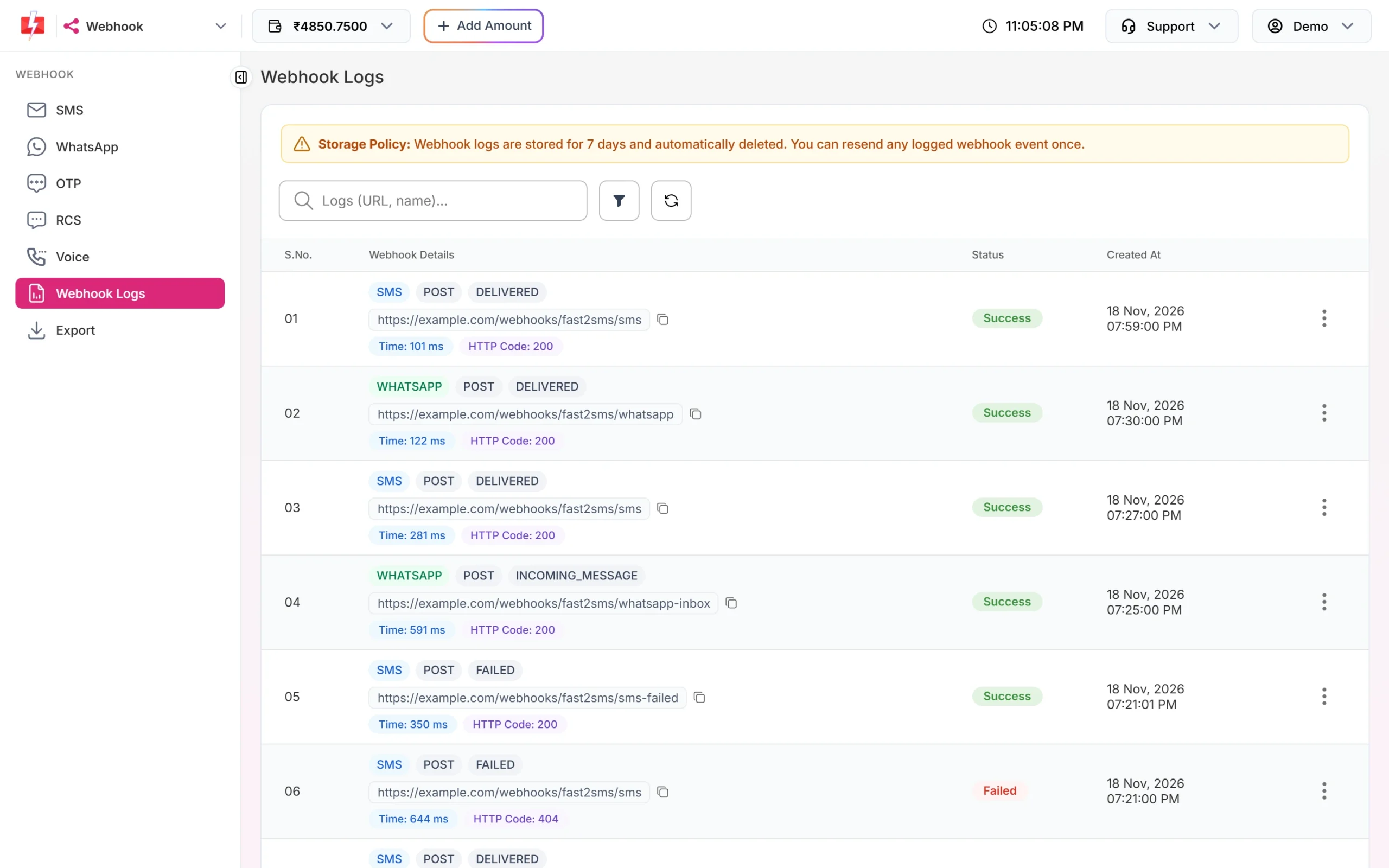
In the panel, open Webhook, SMS or OTP, and add a webhook: format Standard Webhook, method POST, content type JSON, your public URL. Each call appears in Webhook Logs.
var builder = WebApplication.CreateBuilder(args);
var app = builder.Build();

app.MapPost("/fast2sms/webhook", (HttpRequest req, Dictionary<string, object?> body) =>
{
    // Optional: a header you added in the webhook's Headers tab
    if (req.Headers["X-Webhook-Token"] != Environment.GetEnvironmentVariable("MY_WEBHOOK_TOKEN"))
        return Results.Unauthorized();

    var requestId = body.GetValueOrDefault("request_id")?.ToString();
    var mobile    = body.GetValueOrDefault("mobile")?.ToString();
    var status    = body.GetValueOrDefault("status")?.ToString();   // delivered or failed
    // save the status, then return quickly
    return Results.Ok("OK");
});

app.Run();
Return 2xx within 10 seconds. On a timeout, 408, 429 or 5xx, Fast2SMS tries again up to 3 times, 60 seconds apart. Webhooks are sent only for API messages whose report arrives within 24 hours.
Error handling
- Check the
returnfield. Low balance can come back as HTTP 200 with"return": false(status_code 416), soIsSuccessStatusCodealone is not enough. - Do not add Polly retries to send calls. A
TaskCanceledException(timeout) does not prove the SMS failed. A retry can send and charge twice. Retry once only when the connection could not be made. Verify can be retried once. - Reuse one HttpClient (or
IHttpClientFactory) instead of creating one per message. - Use API Logs in the panel to see each request and response from the last 7 days.
| Reply | Fix |
|---|---|
| 412 Invalid Authentication, Check Authorization Key (HTTP 401) | Key wrong, reset, or the environment variable is empty. |
| Invalid authorization key (OTP, HTTP 401) | Remove the “Bearer ” prefix. |
| 413 Authorization Key Disabled | Turn API Access on. |
| 414 IP is blacklisted from Dev API section | Whitelist the server IP in API Security. |
| 406 Invalid Sender ID | Use the approved sender, same case. |
| 424 Invalid Message ID | Use the Message ID linked to that sender. |
| 411 Invalid Numbers | No valid 10-digit Indian mobile in the list. |
| 416 You don’t have sufficient wallet balance | Recharge. |
| Invalid OTP ID | Copy the OTP ID again; check the account. |
| Please wait N seconds before requesting a new OTP | Wait and show a timer. |
| Invalid OTP / OTP expired / Maximum verification attempts reached | Let the user retry, or send a new OTP. |
| OTP not found or already verified (HTTP 404) | Send a new OTP. |
Full copy-paste example: Fast2SmsClient.cs
using System.Net.Http.Json;
using System.Text.Json;

public sealed record Fast2SmsResult(bool Ok, int Http, string? StatusCode, string? RequestId, string Message, JsonElement? Raw);

public sealed class Fast2SmsClient
{
    private readonly HttpClient _http;

    public Fast2SmsClient(HttpClient http, string apiKey)
    {
        _http = http;
        _http.BaseAddress ??= new Uri("https://www.fast2sms.com");
        _http.Timeout = TimeSpan.FromSeconds(15);
        _http.DefaultRequestHeaders.Remove("authorization");
        _http.DefaultRequestHeaders.TryAddWithoutValidation("authorization", apiKey);
    }

    public Task<Fast2SmsResult> SendDltAsync(string senderId, string messageId, IEnumerable<string> vars, IEnumerable<string> numbers) =>
        CallAsync(HttpMethod.Post, "/dev/bulkV2", new Dictionary<string, string>
        {
            ["route"] = "dlt",
            ["sender_id"] = senderId,
            ["message"] = messageId,
            ["variables_values"] = string.Join("|", vars),
            ["numbers"] = string.Join(",", numbers),
        });

    public Task<Fast2SmsResult> SendOtpAsync(string mobile, string otpId, int expiryMinutes = 5) =>
        CallAsync(HttpMethod.Post, "/dev/otp/send", new { mobile, otp_id = otpId, otp_expiry = expiryMinutes });

    public Task<Fast2SmsResult> VerifyOtpAsync(string mobile, string otp) =>
        CallAsync(HttpMethod.Post, "/dev/otp/verify", new { mobile, otp });

    public Task<Fast2SmsResult> ResendOtpAsync(string mobile) =>
        CallAsync(HttpMethod.Post, "/dev/otp/resend", new { mobile });

    public Task<Fast2SmsResult> DeliveryReportAsync(string requestId) =>
        CallAsync(HttpMethod.Get, "/dev/dlr/" + Uri.EscapeDataString(requestId), null);

    private async Task<Fast2SmsResult> CallAsync(HttpMethod method, string path, object? body)
    {
        HttpResponseMessage res;
        try
        {
            var req = new HttpRequestMessage(method, path);
            if (body != null) req.Content = JsonContent.Create(body);
            res = await _http.SendAsync(req);
        }
        catch (HttpRequestException ex)
        {
            return new Fast2SmsResult(false, 0, null, null, "Network error: " + ex.Message, null);
        }
        catch (TaskCanceledException)
        {
            // Timed out: the message may still go out. Do not resend automatically.
            return new Fast2SmsResult(false, 0, null, null, "Timeout, check API Logs before resending", null);
        }

        JsonElement json;
        try { json = await res.Content.ReadFromJsonAsync<JsonElement>(); }
        catch (JsonException) { return new Fast2SmsResult(false, (int)res.StatusCode, null, null, "Non-JSON response", null); }

        bool Flag(string name) => json.TryGetProperty(name, out var v) && v.ValueKind == JsonValueKind.True;
        string? Str(string name) => json.TryGetProperty(name, out var v) ? v.ToString() : null;

        var message = json.TryGetProperty("message", out var m)
            ? (m.ValueKind == JsonValueKind.Array ? string.Join(" ", m.EnumerateArray().Select(x => x.GetString())) : m.ToString())
            : "";

        var ok = res.IsSuccessStatusCode && (Flag("return") || Flag("success"));
        return new Fast2SmsResult(ok, (int)res.StatusCode, Str("status_code"), Str("request_id"), message, json);
    }
}

// Usage (console app, top-level statements):
// var f2s = new Fast2SmsClient(new HttpClient(), Environment.GetEnvironmentVariable("FAST2SMS_API_KEY")!);
// var sms = await f2s.SendDltAsync("DEMOTR", "10001", new[] { "Rahul", "DT10458", "1240", "21 Nov" }, new[] { "9999999999" });
// Console.WriteLine(sms.Ok ? $"SMS queued: {sms.RequestId}" : $"SMS error: {sms.Message}");
// var otp = await f2s.SendOtpAsync("9999999999", "YOUR_OTP_ID");
// var check = await f2s.VerifyOtpAsync("9999999999", "482913");
// Console.WriteLine(check.Ok ? "Verified" : check.Message);
In ASP.NET Core, register it with builder.Services.AddHttpClient<Fast2SmsClient>() and pass the key from configuration in a factory. The DLR API replies with success instead of return, so the client checks both. Fast2SMS also has an ASP.NET Core starter kit with this client, OTP endpoints, a mock server and tests.
Common problems and fixes
- “The format of value … is invalid” when adding the header: use
TryAddWithoutValidation, notAdd. - Key works locally but not on IIS: the app pool does not see your user’s environment variable. Set it in the app pool,
web.configenvironment variables or your hosting panel. - Error 414 on Azure or a VPS: whitelist the outbound IP in API Security, or turn API Security off.
- Socket exhaustion under load: you are creating a new
HttpClientper call. Reuse one, or useIHttpClientFactory. - Hindi text looks wrong:
JsonContentsends UTF-8. Check that your database columns store Unicode (nvarchar).
Frequently asked questions
Is there a Fast2SMS NuGet package?
You do not need one. The API is HTTPS with JSON, and the class above uses only .NET’s own libraries.
Does this work with .NET Framework 4.x?
The API works with any HTTP client. On .NET Framework, use HttpClient with StringContent and Newtonsoft.Json, and make sure TLS 1.2 is enabled.
Can a desktop app call the API directly?
Only if the key stays on machines you control. For apps you give to customers, put the key on your server and let the app call your server.
How do I send the same SMS to many numbers?
Put them comma-separated in numbers. Invalid numbers are skipped and not charged.
Is OTP verify charged?
No. Send and resend are charged; verify is free.
Can I set my own OTP?
Yes. Add otp (up to 10 characters) to the send call. Fast2SMS still verifies it for you.