
Event and wedding SMS templates fall into two DLT categories. Invitations sent to a guest list are Promotional, because the guests did not ask for messages from the sender. Updates to people who registered, bought a ticket or confirmed their RSVP, such as venue details, reminders, timing changes and thank-you notes, are Service Implicit, and a ticket payment receipt is Transactional. Below are 17 copy-paste templates for wedding planners, event managers and organisers, in English and Hindi, each with variable tags, the DLT category, a filled sample, the character count and SMS parts.
Which DLT category for event and wedding SMS
| Message | DLT category | DND numbers and timing |
|---|---|---|
| Wedding invitation, save the date, event invitation to a guest list | Promotional | Not to DND numbers, 10 AM to 9 PM only |
| RSVP confirmed, venue and map, cab, hotel room, reminder, timing change | Service Implicit | Reaches DND numbers, any hour |
| Registration confirmed, entry pass, gate timing, postponed, thank you, photos | Service Implicit | Reaches DND numbers, any hour |
| Ticket payment received, sent right after payment | Transactional | Reaches DND numbers, any hour |
DLT registration is done by a business, so these templates are written for a wedding planner or event company, “Demo Events” in the samples. Replace it with your brand as registered on DLT and keep it as fixed text. Counts are for the sample shown. Links such as https://demo.example/map are placeholders: any link or callback number in a template must be whitelisted as a CTA on your DLT portal first, or the SMS fails. These templates follow the usual DLT rules, but approval is always the operator’s decision.
Invitation templates (promotional)
Invitations need an opt-out line in the fixed text, go out only between 10 AM and 9 PM and do not reach guests on DND. For a wedding, send the invitation on WhatsApp or by voice as well, so guests on DND still get it.
1. Wedding invitation
DLT category: Promotional. Variables: {#alphanumeric#}, {#cbn#}. Whitelist first: your callback number as a CTA on your DLT portal.
You are invited to the wedding of {#alphanumeric#} on {#alphanumeric#}. Sent by Demo Events for the family. To stop such SMS, call {#cbn#}.Sample message (149 characters, English, 1 SMS): You are invited to the wedding of Riya and Arjun on 12 Dec at Demo Lawns Pune. Sent by Demo Events for the family. To stop such SMS, call 9000000001.
2. Save the date
DLT category: Promotional. Variables: {#alphanumeric#}, {#cbn#}. Whitelist first: your callback number as a CTA on your DLT portal.
Save the date: {#alphanumeric#} on {#alphanumeric#}. The invitation will follow. Sent by Demo Events. To stop such SMS, call {#cbn#}.Sample message (130 characters, English, 1 SMS): Save the date: Riya weds Arjun on 12 Dec 2026. The invitation will follow. Sent by Demo Events. To stop such SMS, call 9000000001.
3. Conference or event invitation
DLT category: Promotional. Variables: {#alphanumeric#}, {#url#}, {#cbn#}. Whitelist first: your link domain and your callback number as a CTA on your DLT portal.
Demo Events invites you to {#alphanumeric#}. Register here: {#url#} To stop such SMS, call {#cbn#}.Sample message (130 characters, English, 1 SMS): Demo Events invites you to Pune Startup Meet on 14 Dec. Register here: https://demo.example/reg To stop such SMS, call 9000000001.
Guest templates after RSVP
Once a guest confirms, updates about the event they are coming to are service messages.
4. RSVP confirmed
DLT category: Service Implicit. Variables: {#alphanumeric#}.
Thank you {#alphanumeric#}. Your RSVP for {#alphanumeric#} on {#alphanumeric#} is confirmed. - Demo EventsSample message (86 characters, English, 1 SMS): Thank you Neha. Your RSVP for the Sharma wedding on 12 Dec is confirmed. – Demo Events
5. Venue and map
DLT category: Service Implicit. Variables: {#alphanumeric#}, {#url#}. Whitelist first: your link domain as a CTA on your DLT portal.
Dear Guest, the venue for {#alphanumeric#} is {#alphanumeric#}. See the map here: {#url#} - Demo EventsSample message (127 characters, English, 1 SMS): Dear Guest, the venue for the Sharma wedding is Demo Lawns Baner Pune. See the map here: https://demo.example/map – Demo Events
6. Cab pickup
DLT category: Service Implicit. Variables: {#alphanumeric#}, {#cbn#}. Whitelist first: your callback number as a CTA on your DLT portal.
Your cab for {#alphanumeric#} leaves at {#alphanumeric#}. For help call {#cbn#}. - Demo EventsSample message (108 characters, English, 1 SMS): Your cab for the Sharma wedding leaves at 6 PM from Hotel Demo Stay. For help call 9000000001. – Demo Events
7. Hotel room details
DLT category: Service Implicit. Variables: {#alphanumeric#}.
Dear {#alphanumeric#}, your room at {#alphanumeric#} is booked from {#alphanumeric#}. Show this SMS at check-in. - Demo EventsSample message (113 characters, English, 1 SMS): Dear Neha, your room at Hotel Demo Stay is booked from 11 Dec to 13 Dec. Show this SMS at check-in. – Demo Events
8. Day-before reminder
DLT category: Service Implicit. Variables: {#alphanumeric#}.
Reminder: {#alphanumeric#} is tomorrow from {#alphanumeric#} at {#alphanumeric#}. We look forward to seeing you. - Demo EventsSample message (108 characters, English, 1 SMS): Reminder: the Sangeet is tomorrow from 7 PM at Demo Lawns Pune. We look forward to seeing you. – Demo Events
9. Timing or venue change
DLT category: Service Implicit. Variables: {#alphanumeric#}.
Update for {#alphanumeric#}: it will now be held {#alphanumeric#}. Sorry for the change. - Demo EventsSample message (98 characters, English, 1 SMS): Update for the Sangeet: it will now be held at 8 PM in Hall B. Sorry for the change. – Demo Events
Ticketed and registered event templates
10. Registration confirmed with entry pass
DLT category: Service Implicit. Variables: {#alphanumeric#}, {#url#}. Whitelist first: your link domain as a CTA on your DLT portal.
Your registration for {#alphanumeric#} is confirmed. Your entry pass: {#url#} - Demo EventsSample message (115 characters, English, 1 SMS): Your registration for Pune Startup Meet is confirmed. Your entry pass: https://demo.example/pass/7781 – Demo Events
11. Ticket payment received
DLT category: Transactional. Variables: {#numeric#}, {#alphanumeric#}.
Payment of Rs {#numeric#} received for booking {#alphanumeric#}. Your tickets are confirmed. - Demo EventsSample message (90 characters, English, 1 SMS): Payment of Rs 1500 received for booking EV40217. Your tickets are confirmed. – Demo Events
12. Gates open
DLT category: Service Implicit. Variables: {#alphanumeric#}.
Gates for {#alphanumeric#} open at {#alphanumeric#} today. Please carry your entry pass and a photo ID. - Demo EventsSample message (106 characters, English, 1 SMS): Gates for Pune Startup Meet open at 9 AM today. Please carry your entry pass and a photo ID. – Demo Events
13. Event postponed
DLT category: Service Implicit. Variables: {#alphanumeric#}, {#cbn#}. Whitelist first: your callback number as a CTA on your DLT portal.
{#alphanumeric#} is postponed to {#alphanumeric#}. Your pass stays valid. For help call {#cbn#}. - Demo EventsSample message (104 characters, English, 1 SMS): Pune Startup Meet is postponed to 21 Dec. Your pass stays valid. For help call 9000000001. – Demo Events
14. Thank you for attending
DLT category: Service Implicit. Variables: {#alphanumeric#}, {#url#}. Whitelist first: your link domain as a CTA on your DLT portal.
Thank you for attending {#alphanumeric#}. Please share your feedback here: {#url#} - Demo EventsSample message (113 characters, English, 1 SMS): Thank you for attending Pune Startup Meet. Please share your feedback here: https://demo.example/fb – Demo Events
15. Photos ready
DLT category: Service Implicit. Variables: {#alphanumeric#}, {#url#}. Whitelist first: your link domain as a CTA on your DLT portal.
Photos from {#alphanumeric#} are ready. View and download them here: {#url#} - Demo EventsSample message (112 characters, English, 1 SMS): Photos from the Sharma wedding are ready. View and download them here: https://demo.example/photos – Demo Events
Hindi event SMS templates
Hindi SMS are Unicode: 1 part holds 70 characters and 2 parts hold 133.
16. Wedding invitation (Hindi)
DLT category: Promotional. Variables: {#alphanumeric#}, {#cbn#}. Whitelist first: your callback number as a CTA on your DLT portal.
आप {#alphanumeric#} के विवाह में {#alphanumeric#} को सादर आमंत्रित हैं। - Demo Events. SMS बंद करने के लिए {#cbn#} पर कॉल करें।Sample message (118 characters, Unicode, 2 SMS parts): आप Riya and Arjun के विवाह में 12 Dec को सादर आमंत्रित हैं। – Demo Events. SMS बंद करने के लिए 9000000001 पर कॉल करें।
17. Reminder (Hindi)
DLT category: Service Implicit. Variables: {#alphanumeric#}.
रिमाइंडर: समारोह कल शाम {#alphanumeric#} बजे से {#alphanumeric#} में है। - Demo EventsSample message (70 characters, Unicode, 1 SMS): रिमाइंडर: समारोह कल शाम 7 बजे से Demo Lawns Pune में है। – Demo Events
Category mistakes to avoid
Most event rejections come from treating an invitation like a service update.
| Mistake | What happens | Do this instead |
|---|---|---|
| Wedding or event invitation registered as Service Implicit | Likely rejection, since guests did not ask for it | Register invitations as Promotional with an opt-out line, or send them on WhatsApp. |
| Reminder with “book tickets for our next show” | The whole SMS becomes promotional | Keep reminders plain. Promote the next show on a separate template. |
| Invitation scheduled for 9.30 PM | Held and sent after 10 AM the next day | Schedule promotional invitations between 10 AM and 9 PM. |
| Driver’s personal number in a {#cbn#} variable | The SMS fails because the number is not whitelisted | Use one whitelisted help desk number for all cab messages. |
Tips for event templates
- No commas in variable values. Write “12 Dec at Demo Lawns Pune” rather than a full postal address, and keep each value within 40 characters.
- Schedule the reminders. Use Schedule on the DLT SMS page to send venue details a week before and reminders the day before.
- Expect some invitations not to arrive. Promotional SMS do not reach DND numbers. Use WhatsApp or a voice call for guests who must not miss it.
How to add these templates in Fast2SMS DLT Manager
A template from this page works only after the operator approves it on your DLT portal. Then you add it to Fast2SMS once and send it as often as you need. The full steps are in how to register a DLT content template and DLT Manager in Fast2SMS.
-
Register the template on your DLT portal
Log in to the DLT portal where your business is registered and add a content template. Pick the category shown with the template, link it to one approved header, paste the text with its variable tags and add a sample message with real-looking values. Whitelist any link or callback number as a CTA before you submit. The operator’s reviewer decides whether it is approved. When it is, note the Content Template ID and take a screenshot of the approved row.
-
Add it in DLT Manager
In the Fast2SMS SMS app, open DLT Manager > Content Template and click Add Content Template. Select your entity, tick the Sender ID, enter the Content Template ID and choose Service Implicit for Transactional and Service Implicit templates, or Service Explicit or Promotional for promotional ones under Template Type. Paste the approved text exactly as the portal shows it in Copy-Paste Approved Message Text, upload the screenshot and click Submit. Have many templates? Use Upload Excel with the template file exported from your DLT portal.
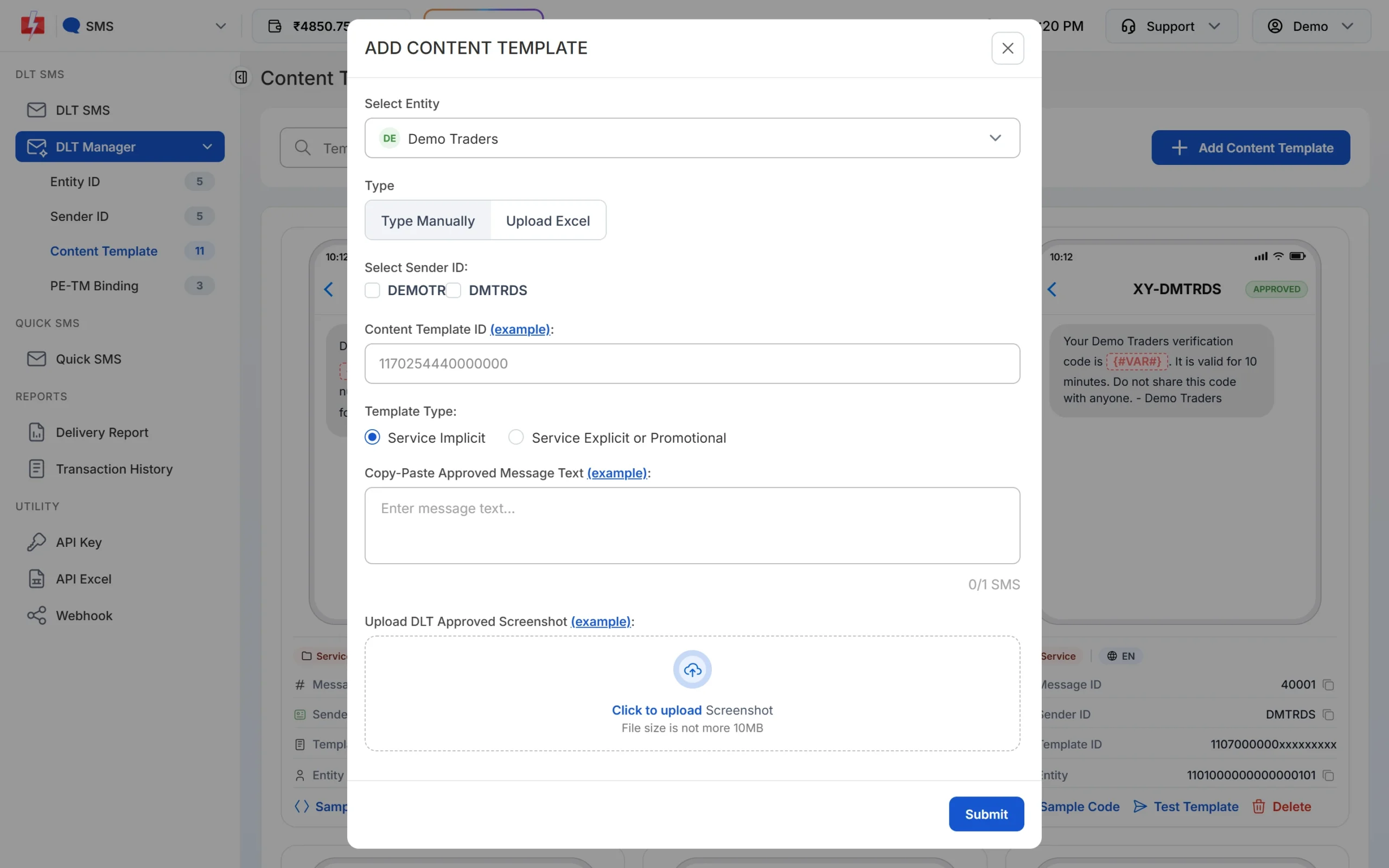
Pick the Template Type that matches the category on your DLT portal. -
Wait for Approved, then test
The template is saved as Pending while Fast2SMS checks it against your screenshot. When the card shows APPROVED, it also shows a Message ID, which is the value you pass as
messagein the API. Click Test Template to send one SMS to your own number and check the text and any link. -
Send or schedule from DLT SMS
Open DLT SMS, choose the Sender ID, add numbers under Send To (List, Address Book or CSV File) and click Select DLT Template. Fill each variable, or map the variables to columns of your CSV so each person gets their own values. The counter under the preview shows characters and SMS parts. Click Send, check the Message Preview & Confirmation popup, then click Confirm & Send, or use Schedule to pick a date and time. Promotional templates go out only between 10 AM and 9 PM. If you send one late in the evening, Fast2SMS holds it and sends it the next morning.
Each SMS part is charged as one SMS for every valid number, so a template that runs into 2 parts costs twice as much per person as a 1-part template. Duplicate and invalid numbers are not charged. See the current rates on the bulk SMS pricing page.
Sending in bulk? For high SMS volumes our team offers discounted rates. Talk to our team or see SMS pricing.
Frequently asked questions
Can I send wedding invitations by SMS?
Yes, through a business that has DLT registration, on a Promotional template with an opt-out line, between 10 AM and 9 PM. Guests on DND will not get it.
Can a family send wedding SMS without DLT?
Bulk SMS with your own sender name needs DLT registration by an entity. Families usually send through their wedding planner. Proprietors can see DLT registration without GST.
Which category is used for event reminders?
Service Implicit, when the reminder goes to people who registered, bought a ticket or confirmed their RSVP.
Can I send the venue location link by SMS?
Yes, in a {#url#} variable. Whitelist the link’s domain as a CTA on your DLT portal before you send.
Can I schedule invitation SMS?
Yes. Use Schedule on the DLT SMS page. Promotional SMS scheduled outside 10 AM to 9 PM are held until 10 AM.
Can I send the invitation in Hindi?
Yes. Register a Hindi template as Unicode on your DLT portal. One Unicode part holds 70 characters, so keep it short.
Will my invitation template be approved?
The operator’s reviewer decides. Clear wording, your brand name and the right category help. If it is rejected, read the remark and fix that point.