
Fast2SMS gives you three ways to send an OTP by API: Smart OTP, the DLT SMS API and the DLT Manual API. Smart OTP is the one we recommend. It sends the OTP on SMS or WhatsApp on a priority route, can fall back to the other channel, and checks the code for you. This guide explains how each OTP API works, what you need before you start, and which one fits your website or app.
यह गाइड हिंदी में पढ़ें: OTP SMS service क्या है (OTP SMS service kya hai) और website या app से OTP कैसे भेजें
Short answer: which OTP API should I use?
- Use Smart OTP if you want login, signup or checkout OTPs with the least code. Fast2SMS makes the code, sends it, lets the user resend it, and tells you if the code typed is right. It works on SMS and WhatsApp, with automatic fallback.
- Use the DLT SMS API if you already create and check OTPs in your own app and only need Fast2SMS to deliver the SMS through your DLT template saved in DLT Manager.
- Use the DLT Manual API if you want to send the full approved DLT text with your Entity ID and Template ID in each request, without adding the template to Fast2SMS first.
All three need DLT for SMS, because every business SMS in India must use a DLT-approved sender and template. Smart OTP on WhatsApp needs a connected WhatsApp Business number instead.
Smart OTP vs DLT SMS vs DLT Manual compared
| Smart OTP | DLT SMS API | DLT Manual API | |
|---|---|---|---|
| Endpoint | /dev/otp/send, /dev/otp/verify, /dev/otp/resend |
/dev/bulkV2 with route=dlt |
/dev/bulkV2 with route=dlt_manual |
| Channels | SMS and WhatsApp, with fallback to the other channel | SMS only | SMS only |
| Who makes the OTP | Fast2SMS (or you, with the otp field) |
Your app | Your app |
| Who checks the OTP | Fast2SMS, with the Verify OTP call | Your app | Your app |
| Resend | Built in, sends the same code | You send a new SMS yourself | You send a new SMS yourself |
| What you pass | mobile and otp_id |
sender_id, message (the Message ID), variables_values, numbers |
sender_id, full message text, entity_id, template_id, numbers |
| Setup in the panel | Create an OTP template in Smart OTP to get an OTP ID | Add entity, sender and template in DLT Manager | Nothing if you send both IDs |
| Attempt and resend limits | Yes, in OTP Settings | Build your own | Build your own |
Option 1: Smart OTP (recommended)
Smart OTP is Fast2SMS’s multi-channel OTP. You create an OTP template in the panel. It links a 10-character OTP ID to an approved DLT OTP template (for SMS) or an approved WhatsApp Authentication or Utility template (for WhatsApp). You can add a fallback on the other channel. If the first message is reported as failed within 120 seconds, the same OTP goes out once on the fallback channel.
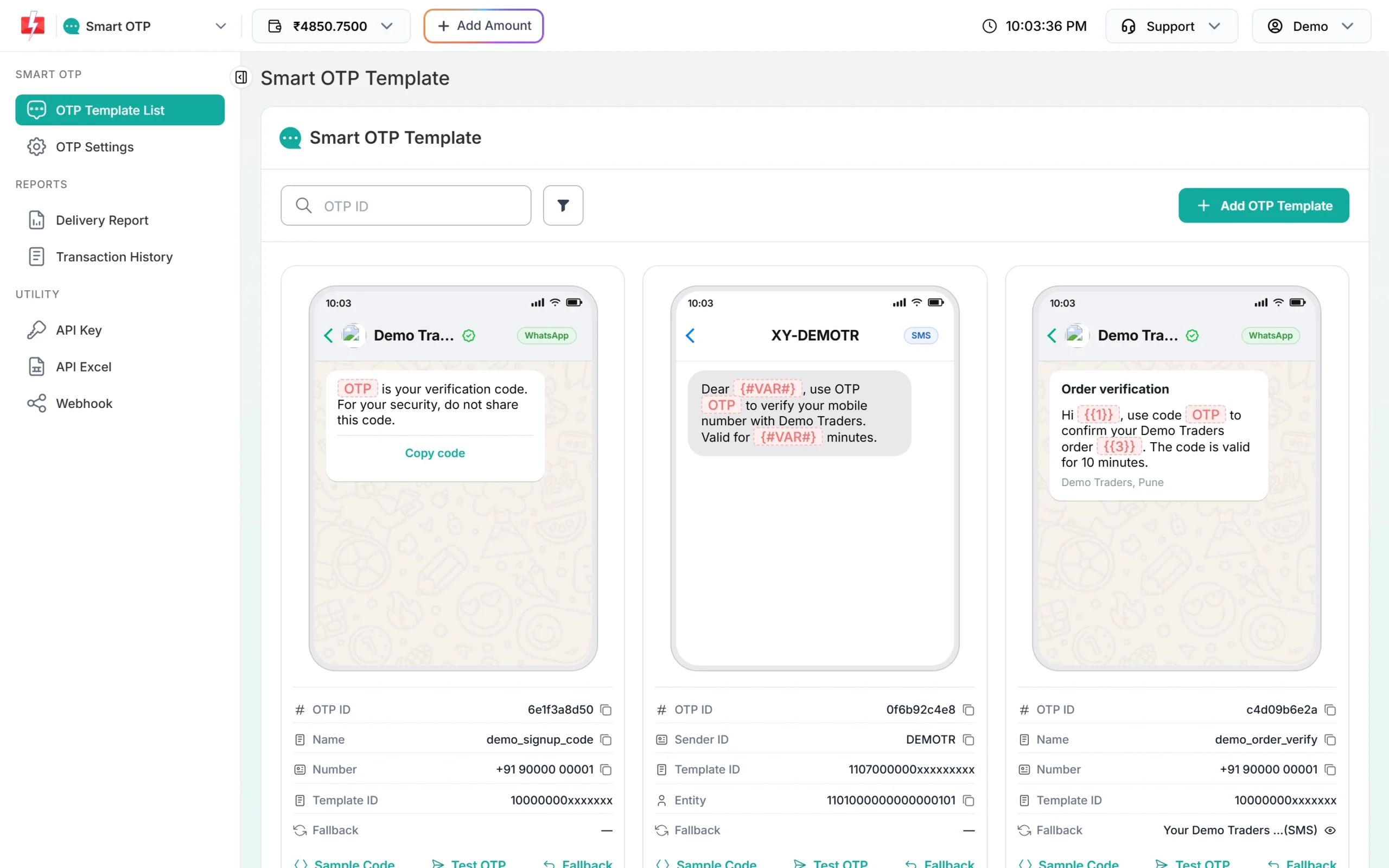
Your server sends the OTP with one call:
curl -X POST "https://www.fast2sms.com/dev/otp/send" \
  -H "authorization: YOUR_API_KEY" \
  -H "Content-Type: application/json" \
  -d '{"mobile":"9999999999","otp_id":"YOUR_OTP_ID","otp_expiry":5,"otp_length":6}'
When the user types the code, your server checks it:
curl -X POST "https://www.fast2sms.com/dev/otp/verify" \
  -H "authorization: YOUR_API_KEY" \
  -H "Content-Type: application/json" \
  -d '{"mobile":"9999999999","otp":"482913"}'
Log the user in only when the answer is “OTP verified successfully”. To send the same code again, call /dev/otp/resend with the mobile number. Resend works for 10 minutes after the first send and allows 5 sends in total, counting the first one.
authorization header exactly as it is. Do not put “Bearer” in front of it for the OTP API, or you get “Invalid authorization key”.Why we recommend it:
- You do not store or compare OTPs in your database.
- Expiry (1 to 10080 minutes, default 15), verify attempts and resend wait are handled for you.
- Sending a new OTP to a number cancels the older ones, so an old code cannot be used later.
- SMS and WhatsApp share one OTP ID, so a failed SMS can still reach the user on WhatsApp, or the other way round.
- Delivery shows in the OTP Report and can be pushed to your server with an OTP webhook.
Option 2: DLT SMS API with your own OTP template
Here your app creates the OTP, saves it with an expiry time, and sends it inside your DLT OTP template. Fast2SMS only delivers the SMS. You pass the template’s Message ID from DLT Manager, not the 19-digit DLT Template ID.
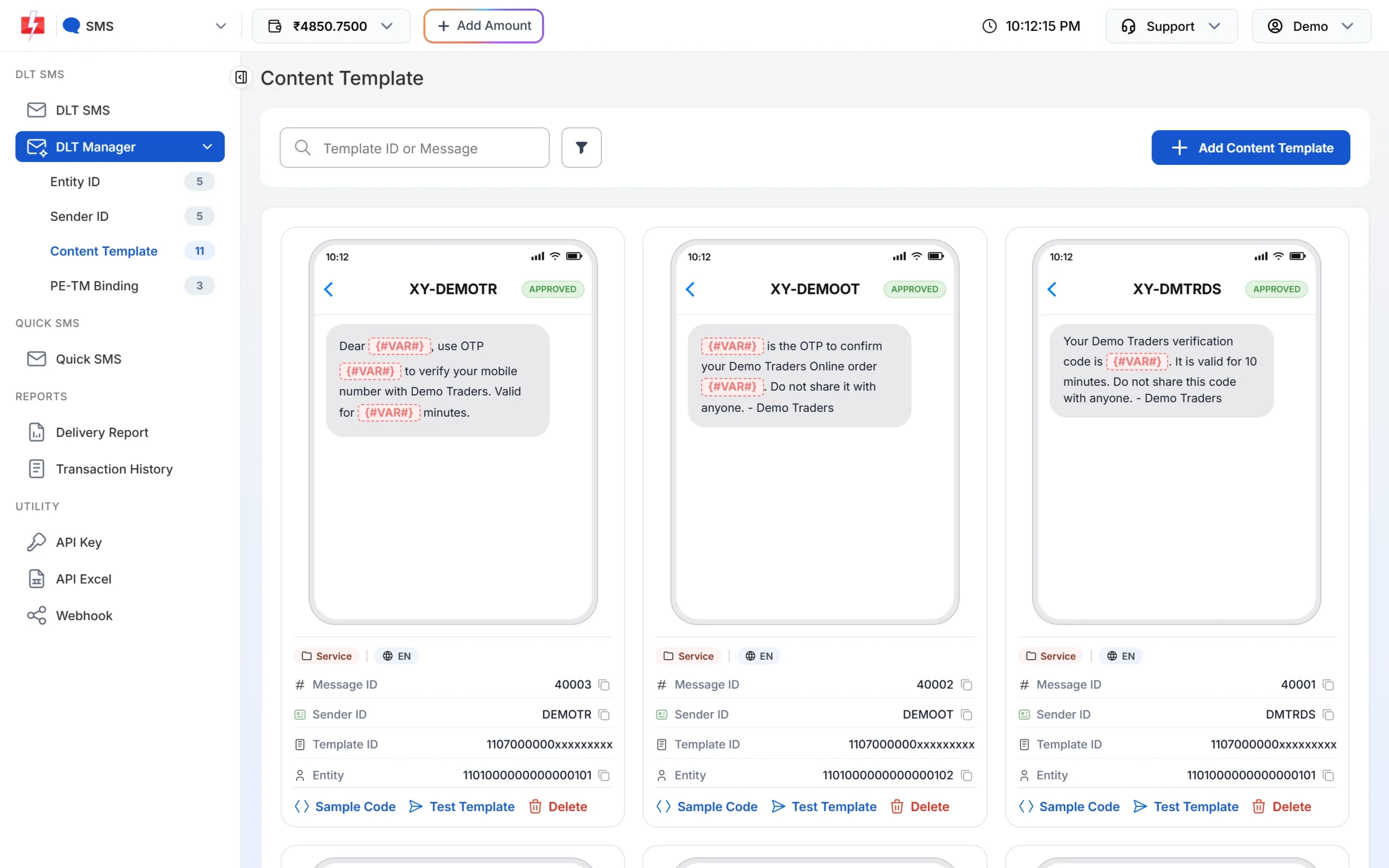
message in the API.curl -X POST "https://www.fast2sms.com/dev/bulkV2" \
-H "authorization: YOUR_API_KEY" \
-H "Content-Type: application/json" \
-d '{"route":"dlt","sender_id":"YOURID","message":"YOUR_MESSAGE_ID","variables_values":"482913","numbers":"9999999999"}'The values in variables_values fill the {#var#} spots of the template in order, separated by |. Each value is cut to 40 characters. The sender ID must match the approved sender exactly, including capital letters. A success looks like {"return":true,"request_id":"S...","message":["SMS sent successfully."]}. This only means the SMS was accepted. Always check return in the reply, not only the HTTP code.
Choose this route when you already have OTP logic, for example from a framework or an older provider, and you only want to change who sends the SMS.
Option 3: DLT Manual API
With DLT Manual you send the final SMS text, with the OTP already filled in, plus your DLT Entity ID and Template ID:
curl -X POST "https://www.fast2sms.com/dev/bulkV2" \
  -H "authorization: YOUR_API_KEY" \
  -H "Content-Type: application/json" \
  -d '{"route":"dlt_manual","sender_id":"YOURID","message":"Your OTP is 482913 for login.","entity_id":"YOUR_ENTITY_ID","template_id":"YOUR_TEMPLATE_ID","numbers":"9999999999"}'
Fast2SMS does not check your text against the DLT template. If the text, entity or template does not match what is approved at DLT, the operator rejects the SMS, and such failures are not refunded. If you leave out the IDs, Fast2SMS tries to match the text with templates saved in your DLT Manager. When nothing matches you get “Add template in panel before using this api without template_id”.
How to start with Smart OTP
-
Get your SMS or WhatsApp template approved
For SMS, add your Entity ID, Sender ID and an OTP content template with at least one variable in DLT Manager. For WhatsApp, connect your number in WhatsApp Manager and get an Authentication or Utility template approved.
-
Create a Smart OTP template
Open Smart OTP, click OTP Template List, then Add OTP Template. Pick the channel, the template and the variable that carries the OTP, and click Assign OTP Template. Copy the OTP ID from the new card. Step-by-step help is in the Smart OTP setup guide.
-
Copy your API key
Go to API Key under UTILITY. Click View to see the key. An OTP is sent to your account mobile to confirm it is you. Keep API Access switched on.
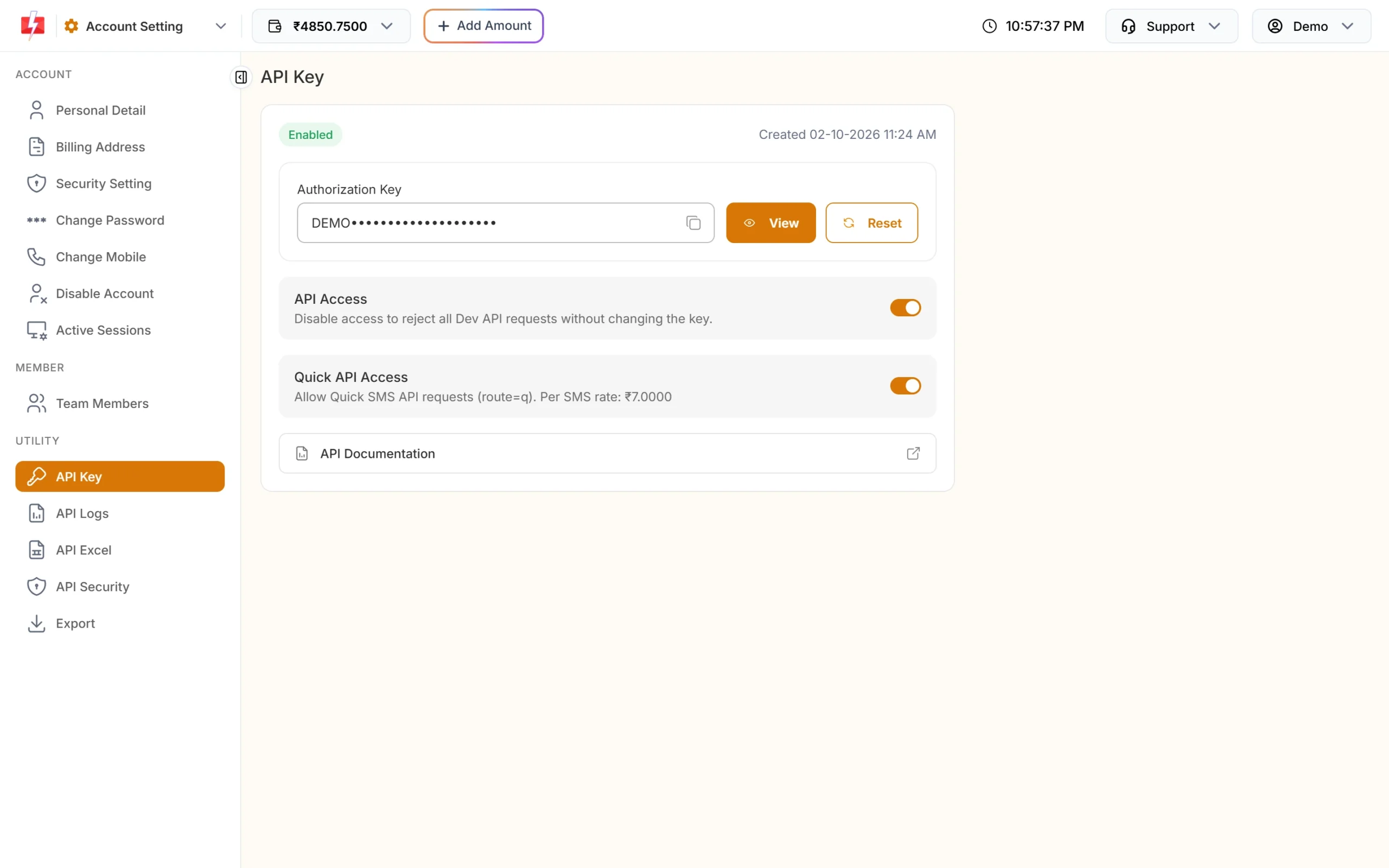
Your Authorization Key works for Smart OTP, DLT SMS and DLT Manual. -
Call Send OTP and Verify OTP from your server
Use the examples above, or click Sample Code on the template card for ready code in cURL, PHP, Node.js or Python. Keep the API key on your server. Never put it inside a mobile app or website JavaScript.
What OTPs cost
Every OTP is charged from your wallet. A Smart OTP on SMS costs your plan’s SMS rate times the number of SMS parts. A Smart OTP on WhatsApp costs the WhatsApp Authentication or Utility rate, depending on the template. Resends, fallback messages and test OTPs from the panel are charged as separate messages. DLT SMS and DLT Manual OTPs cost the same as any other DLT SMS on your plan. See the current rates on the SMS pricing page and the WhatsApp pricing page.
Common problems and fixes
“Invalid authorization key” on the OTP API
The key is wrong, was reset, or has “Bearer” or extra spaces in front of it. Copy it again from API Key and send it as the authorization header.
“Invalid OTP ID”
The OTP ID is not in the account that owns the API key, or the template was deleted. Copy the ID from OTP Template List and use the same account’s key.
“Invalid Message ID” or “Invalid Sender ID” on the DLT SMS API
You sent the 19-digit DLT Template ID instead of the Message ID, the template is not linked to that sender, or the sender ID case does not match. Check the card in DLT Manager.
The API said “sent” but the user got nothing
A success reply means the request was accepted, not delivered. Check the request ID in the delivery report. For Smart OTP, add a fallback on the other channel so a failed SMS can still reach the user on WhatsApp.
Verify says “OTP not found or already verified”
Verify checks only the newest unverified OTP for that number. If the user asked for a new OTP and typed the old one, it fails. Use Resend, which repeats the same code, instead of sending a fresh OTP each time.
Frequently asked questions
Does Fast2SMS have an OTP verify API?
Yes. Smart OTP has a Verify OTP call. You send the mobile number and the code the user typed, and Fast2SMS answers “OTP verified successfully” or the reason it failed. No OTP ID is needed for verify.
Can I send OTP SMS without DLT registration?
For SMS, no. Every OTP SMS in India must go through a DLT-approved sender and template. If you do not have DLT yet, you can send OTPs on WhatsApp through Smart OTP with an approved Authentication or Utility template.
Can I use my own OTP value with Smart OTP?
Yes. Pass it in the otp field, up to 10 characters. Fast2SMS still sends it and checks it on verify.
Can I send OTP on WhatsApp and SMS with one API?
Yes. A Smart OTP template can be SMS or WhatsApp, with an optional fallback on the other channel. Your code calls the same Send OTP endpoint either way.
Which OTP API is fastest?
Smart OTP is sent on a priority route, which is why we recommend it for login and signup OTPs. Actual delivery time also depends on the operator and the user’s phone.
Can I call the OTP API from my Android app or website JavaScript?
Do not do that. Anyone could read your API key from the app or the page. Call Fast2SMS from your own server, and let your app talk to your server.
Do OTP sends show in API Logs?
Yes. Every call made with your key appears in API Logs under Account Settings for 7 days, with the request, the response and any error.