
Fast2SMS sends to Indian mobile numbers, and the safest format everywhere is the plain 10-digit number, for example 9999999999. A +91 or 91 in front is accepted in most places, but a leading 0, Excel’s number formatting or a missing digit can make a number invalid. This guide lists the exact number rules for the panel, the address book and each API, so your lists and code send to every customer.
The short answer
- A valid number is a 10-digit Indian mobile that starts with 6, 7, 8 or 9.
- Spaces, dashes, brackets and the
+sign are removed for you in most places. - A leading
91or+91is removed when the number is longer than 10 digits. - A leading
0is not removed by the SMS, Smart OTP and WhatsApp template APIs. Send9999999999, not09999999999. - Landline numbers and numbers from other countries are invalid for SMS.
Rules by product
| Where | Format accepted | What happens to a bad number |
|---|---|---|
DLT SMS and Quick SMS API (/dev/bulkV2, /dev/custom) |
Comma-separated. Non-digits removed, then one leading 91 removed if longer than 10 digits. | Dropped without an error and not charged. If every number is invalid: error 411 “Invalid Numbers”. |
Smart OTP API (/dev/otp/send, verify, resend) |
One number. Same cleaning, then it must be exactly 10 digits. | The request fails. Nothing is sent. |
WhatsApp template API (/dev/whatsapp) |
Comma-separated Indian mobiles, with or without 91 or +91. | The whole request fails with “Mobile Number format is invalid:” followed by the bad numbers. |
WhatsApp session API (/dev/whatsapp-session) |
to: 10 to 15 digits, an optional + in front, no spaces or dashes. Include the country code, for example 919999999999. |
“Invalid mobile number format.” |
RCS API (/dev/rcs) |
One Indian mobile in to. +91 and 91 accepted. |
“Mobile Number format is invalid.” |
Voice API (/dev/voice/bulk) |
10-digit numbers separated by commas, spaces or semicolons, up to 1,00,000 per request. | Invalid and duplicate numbers are removed. If nothing valid is left, the request fails. |
| Panel: DLT SMS, Quick SMS, Bulk WhatsApp, RCS | 10-digit Indian mobiles starting with 6 to 9. Use the plain 10-digit number. | Counted under Invalid Number in the confirmation popup. Not sent, not charged. |
| Panel: Bulk voice calls | 10 digits. 12-digit numbers starting 91 and 11-digit numbers starting 0 are trimmed to 10. | Marked invalid, not called, not charged. |
| Address Book: add one contact | Exactly 10 digits starting with 6, 7, 8 or 9. | “Enter a valid 10-digit Indian mobile number starting with 6, 7, 8 or 9.” |
| Address Book: import from Excel or CSV | Non-digits removed and the last 10 digits kept, so 91 and 0 in front are fine. | Counted in “invalid numbers ignored”. |
See invalid numbers before you send from the panel
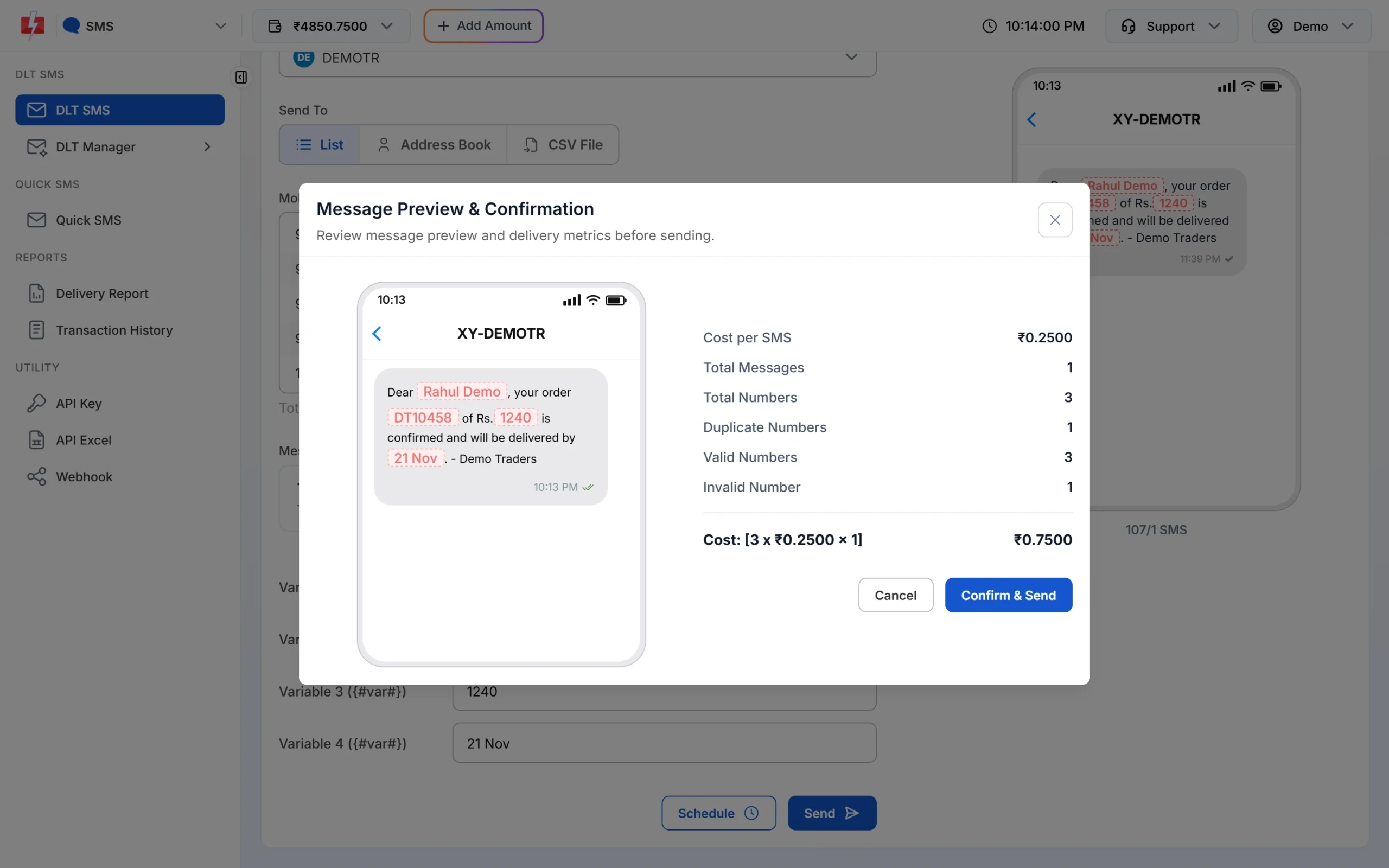
When you click Send on the DLT SMS page, the Message Preview & Confirmation popup shows Total Numbers, Duplicate Numbers, Invalid Number and Valid Numbers before anything is sent. Only valid numbers are charged. If the invalid count is higher than you expect, cancel and clean your list first.
Numbers in the Address Book
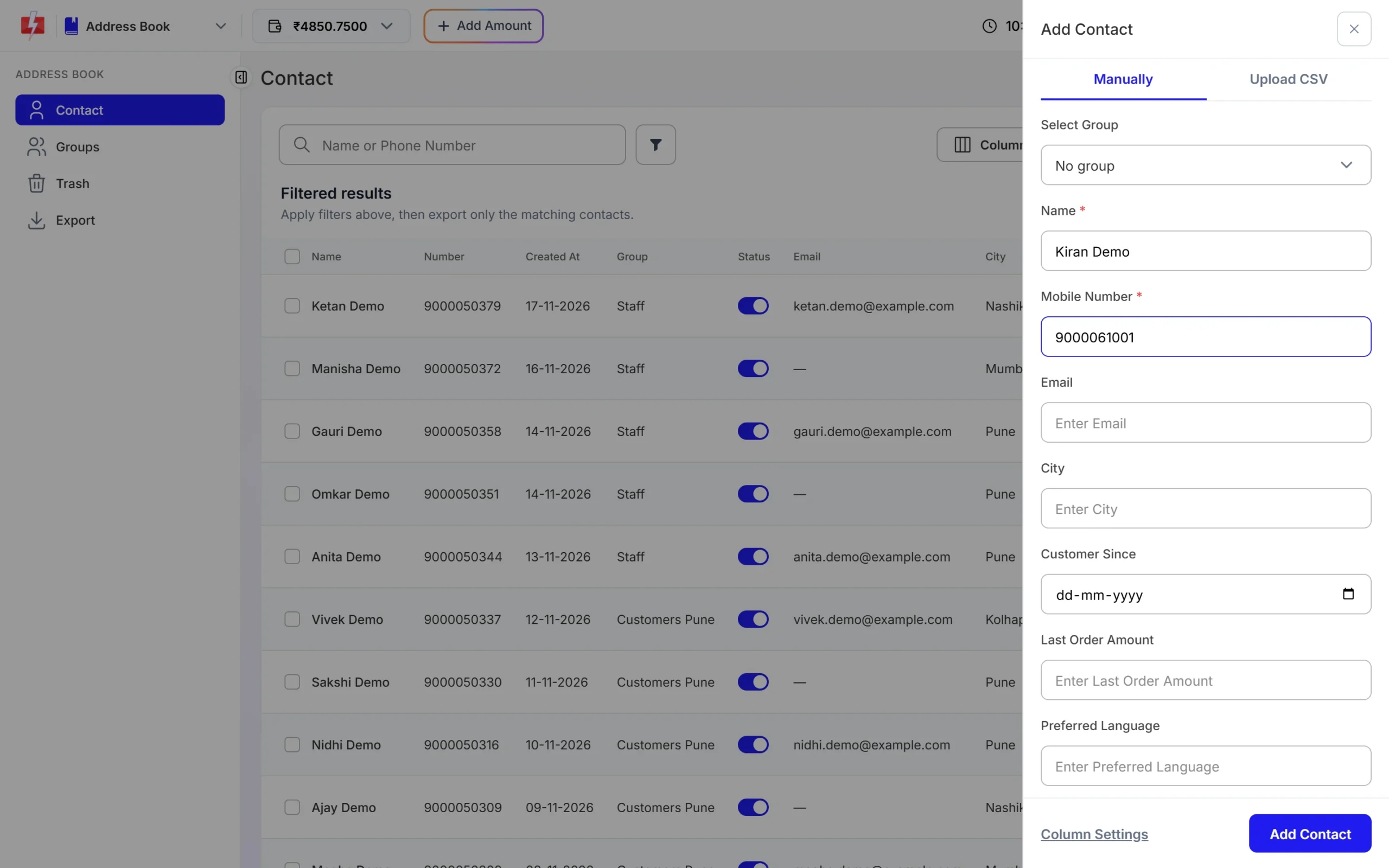
When you add a contact by hand in Address Book, type the 10-digit number only. The form does not accept +91 or a leading 0.
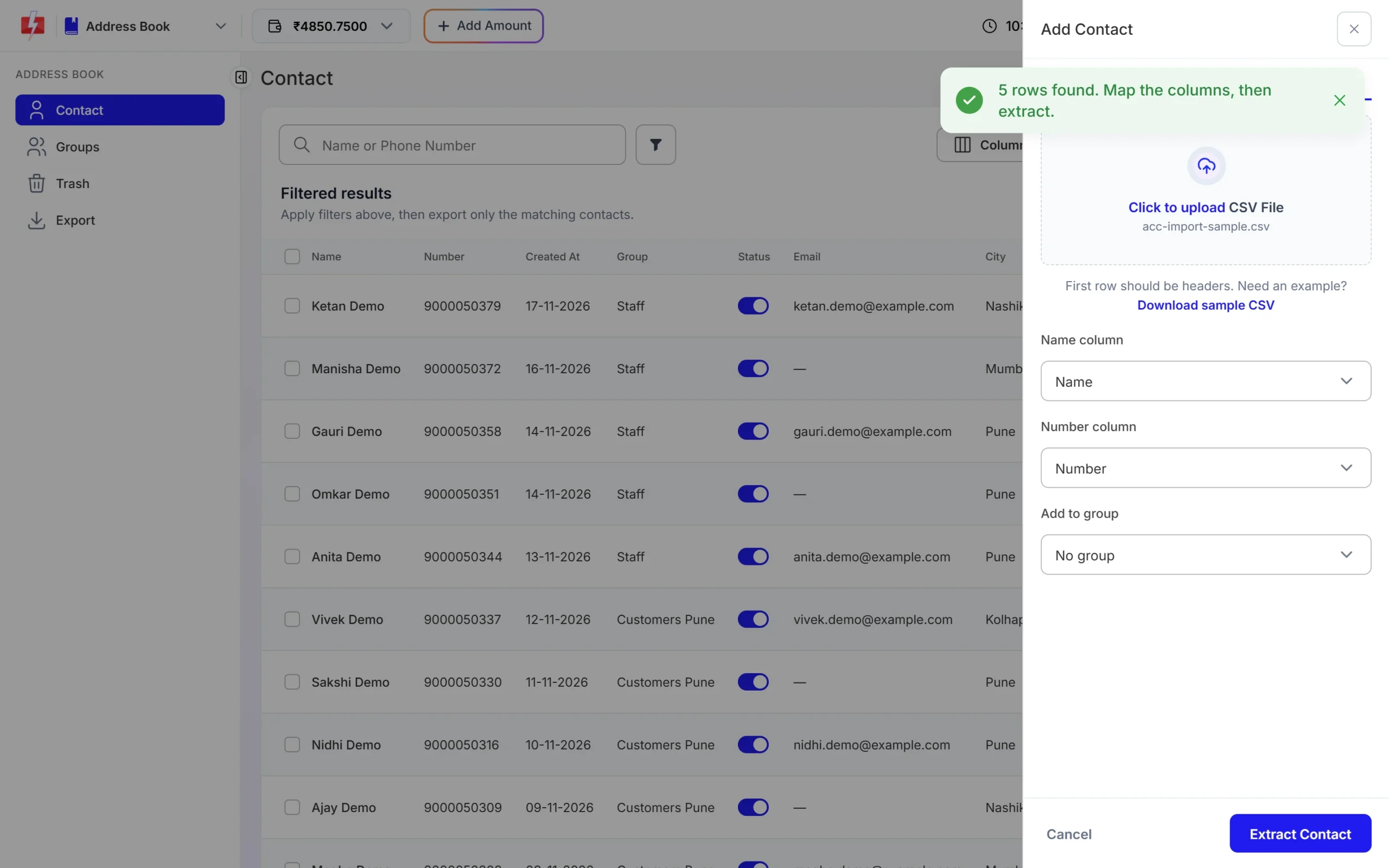
When you import a file, the import is more forgiving: it removes spaces and symbols and keeps the last 10 digits. After you pick the Name and Number columns and click Extract Contact, the result tells you how many numbers were imported, how many were invalid and how many were duplicates in the file.
When you export contacts, numbers that are not valid 10-digit Indian mobiles are left out of the file.
Excel mistakes that break numbers
| What you see in Excel | Why it is a problem | Fix |
|---|---|---|
| 9.99999E+09 | Excel shows long numbers in scientific format. If the file is saved like this, digits can be lost. | Select the column, set the format to Number with 0 decimal places or to Text, then save again. |
| 099999 99999 | A leading 0 makes 11 digits. The SMS and OTP APIs do not remove it. | Remove the 0. In the Address Book import it is fine, as the last 10 digits are kept. |
| Two numbers in one cell, like “99999 99999 / 88888 88888” | The digits run together into one long, invalid number. | Put one number per row. |
| Landline with STD code | Only mobile numbers starting 6 to 9 are valid. | Remove landlines from SMS and WhatsApp lists. |
| Fewer than 10 digits | A typing mistake or a lost leading digit. | Check the source data. These numbers cannot be fixed automatically. |
Clean numbers in your code
If you send by API, clean numbers once before you call Fast2SMS. This keeps the WhatsApp API from failing a whole request because of one bad number.
import re

def clean_indian_mobile(raw):
    digits = re.sub(r"\D", "", str(raw))
    if len(digits) == 12 and digits.startswith("91"):
        digits = digits[2:]
    elif len(digits) == 11 and digits.startswith("0"):
        digits = digits[1:]
    return digits if re.fullmatch(r"[6-9]\d{9}", digits) else None

print(clean_indian_mobile("+91 99999-99999"))  # 9999999999
print(clean_indian_mobile("09999999999"))      # 9999999999
print(clean_indian_mobile("12345"))            # None
<?php
function cleanIndianMobile($raw) {
$d = preg_replace('/\D/', '', (string) $raw);
if (strlen($d) === 12 && strpos($d, '91') === 0) $d = substr($d, 2);
elseif (strlen($d) === 11 && $d[0] === '0') $d = substr($d, 1);
return preg_match('/^[6-9]\d{9}$/', $d) ? $d : null;
}Keep the invalid numbers in a separate list so you can fix them at the source, instead of losing them quietly.
Common problems and fixes
Error 411 “Invalid Numbers”
Every number in your SMS API request was invalid. Check that you send 10-digit mobiles separated by commas, without a leading 0.
Fewer SMS were sent than numbers in my request
The SMS API drops invalid numbers without an error and sends the rest. Add sms_details=1 to see valid_numbers and invalid_numbers in the response.
The WhatsApp API rejects my whole request
One number in numbers is invalid. The error lists it. Remove or fix it and send again.
Smart OTP says the mobile number is invalid
Send one number per request as a string, not an array. After removing symbols and a leading 91 it must be exactly 10 digits.
“Contact already exists.” in the Address Book
The same 10-digit number is already saved. Imports also match on the last 10 digits, so a number written with +91 in your file is the same contact as the 10-digit one.
Frequently asked questions
Should I add +91 before mobile numbers in Fast2SMS?
You do not need to. A plain 10-digit number works everywhere. +91 and 91 are accepted and removed in most places, but the Address Book’s single-contact form needs exactly 10 digits.
Does Fast2SMS accept numbers starting with 0?
The Address Book import and the voice call panel remove a leading 0. The SMS, Smart OTP and WhatsApp template APIs do not, so remove it before sending.
Can I send SMS to landline numbers?
No. Only Indian mobile numbers starting with 6, 7, 8 or 9 are valid.
Can I send SMS to numbers outside India?
No. SMS go to Indian mobile numbers only. Numbers from other countries are treated as invalid and are not charged.
Am I charged for invalid numbers?
No. Invalid numbers are removed before sending and are not counted in the cost.
How do I separate many numbers in one API request?
Use commas, for example 9999999999,8888888888. The voice API also accepts spaces and semicolons.
What number format does the WhatsApp session API need?
The to field takes 10 to 15 digits with an optional + in front. Send the full number with country code and no spaces.