
Bulk SMS for gyms, salons and spas does two jobs: it fills the appointment book and it keeps members coming back. Appointment reminders cut no-shows, renewal reminders stop memberships from lapsing quietly, and well-timed offers bring back clients who have not visited for a while. This guide shows which message works best on SMS, WhatsApp, voice or RCS, gives sample templates for fitness and beauty businesses, and walks you through the setup in Fast2SMS.
It is for gyms, fitness studios, yoga and dance classes, salons, beauty parlours, spas and wellness centres, whether you run one outlet or a few branches.
Which channel for which message
Messages about a client’s own booking or membership are service messages, so they go out at any hour and reach DND numbers. Packages, festive offers and “we miss you” messages are promotional.
| Message | Best channel | Why |
|---|---|---|
| Appointment booked | WhatsApp utility, SMS backup | Shows service, stylist or trainer, time and a button to reschedule. |
| Reminder the day before / 2 hours before | SMS (Service Implicit) and WhatsApp utility | The single biggest fix for no-shows. |
| Class cancelled or trainer changed | SMS (Service Implicit) | Urgent and short. Members may be on the way. |
| Membership expiring in 7 days | WhatsApp utility with a pay button, plus SMS | Renewing from the message is easier than at the front desk. |
| Payment received / package balance | SMS (Service Implicit) | A record of payment and sessions left. |
| Feedback after the visit | WhatsApp utility with reply buttons | One-tap rating about that visit. Unhappy clients reach you directly. |
| Member app or booking site login | Smart OTP | Priority route and automatic fallback. |
| Bridal packages, festive offers, new services | WhatsApp marketing with photos, RCS, promotional SMS | Beauty and fitness sell on pictures. Promotional rules apply. |
| Win-back of lapsed members | WhatsApp marketing or promotional SMS | Only to people who agreed to hear from you. |
Sample DLT SMS templates for gyms, salons and spas
These are examples to adapt and register on your DLT portal under your business name. They are not pre-approved. Keep the business name fixed, use typed variables, keep to three variables or fewer and whitelist your links and callback numbers.
| Use | Example template to register | Category |
|---|---|---|
| Appointment booked | Your {#alphanumeric#} appointment at YourSalon is booked for {#alphanumeric#}. To change it, call {#cbn#}. | Service Implicit |
| Reminder | Reminder from YourSalon: your appointment is today at {#alphanumeric#}. Please arrive 10 minutes early. | Service Implicit |
| Class change | YourGym update: the {#alphanumeric#} class today is moved to {#alphanumeric#}. Sorry for the change. | Service Implicit |
| Membership expiry | Your YourGym membership ends on {#alphanumeric#}. Renew online at {#url#} to keep training without a break. | Service Implicit |
| Payment received | Payment of Rs {#numeric#} received by YourGym. Your membership is valid till {#alphanumeric#}. | Service Implicit |
| Package balance | You have {#numeric#} sessions left in your YourSpa package, valid till {#alphanumeric#}. | Service Implicit |
| Login OTP | {#numeric#} is your OTP to log in to the YourGym app. Do not share it with anyone. | Service Implicit |
| Festive offer | This festive season at YourSalon: {#alphanumeric#} at flat {#numeric#}% off. Book now: {#url#} | Promotional |
| Win-back | We miss you at YourGym. Come back this month and get {#alphanumeric#}. Details: {#url#} | Promotional |
WhatsApp templates: utility vs marketing
A reminder about a booked appointment is Utility. A package offer is Marketing. Do not add “also try our new facial” to a reminder, or Meta moves it to marketing and the reminder costs more.
| Template | Category | Example body | Extras |
|---|---|---|---|
| appointment_reminder | Utility | Hi {{1}}, this is a reminder of your {{2}} appointment at YourSalon on {{3}}. | Custom buttons: Confirm, Reschedule |
| membership_renewal | Utility | Hi {{1}}, your membership ends on {{2}}. Renew now to keep your slot. | Visit website (dynamic URL): Renew |
| class_update | Utility | Hi {{1}}, your {{2}} class on {{3}} has a new timing: {{4}}. | None needed |
| visit_feedback | Utility | Hi {{1}}, how was your {{2}} with us today? | Custom buttons: Loved it, Okay, Not happy |
| bridal_package | Marketing | Hi {{1}}, our bridal packages for the wedding season are now open for booking. | Image header, Call Phone Number |
| birthday_offer | Marketing | Happy birthday {{1}}. Enjoy {{2}} off on any service this month. | Copy offer code button |
When a client taps “Reschedule” or replies with a question, the chat lands in Live Chat (Inbox) and your front desk can reply freely for 24 hours. Add keyword auto replies such as “price” with your rate card image, so common questions are answered at once.
Voice calls for gyms and salons
A short recorded call works for members who ignore texts, for example a renewal reminder in Hindi or your local language. Use Simple for a plain message, or Call Patch so interested members can press a key and talk to your front desk.
Sample script (Call Patch): “Namaste, this is YourGym. Your membership ends this week. Renew now to keep your batch and trainer. To talk to our front desk, press 1. Thank you.”
- Voice files must not contain medical advice, treatments or health claims. Do not promise weight loss in a set time or claim skin or hair results in a call.
- Every file must say your business name clearly and is approved by the operator first.
- Calls go to non-DND numbers only, between 10 AM and 9 PM, and you pay only for answered calls.
Smart OTP for member apps and booking sites
If members book classes or slots on your app or website, verify their number with Smart OTP at sign-up and log them in without a password. The code goes on SMS or WhatsApp, and a failed send is re-sent on the other channel within 120 seconds. Set how many wrong tries and how much wait between resends you allow in OTP Settings.
RCS for packages and launches
RCS shows your brand name and logo in the client’s normal messages app. A Rich message with a photo of your new studio or a Carousel of packages, with buttons such as “Book now” or “Call”, works well for launches. Promotional RCS can reach a number at most 4 times a month, between 7 AM and 10 PM.
How to get started on Fast2SMS (step by step)
-
Import your members and clients
Export your client list from your billing or membership software as a CSV. Open Address Book > Contact, click Add Contact and choose the Upload CSV tab. Map the Name column and Number column, choose a group and click Extract Contact. Only 10-digit Indian mobile numbers are kept and duplicates are skipped.
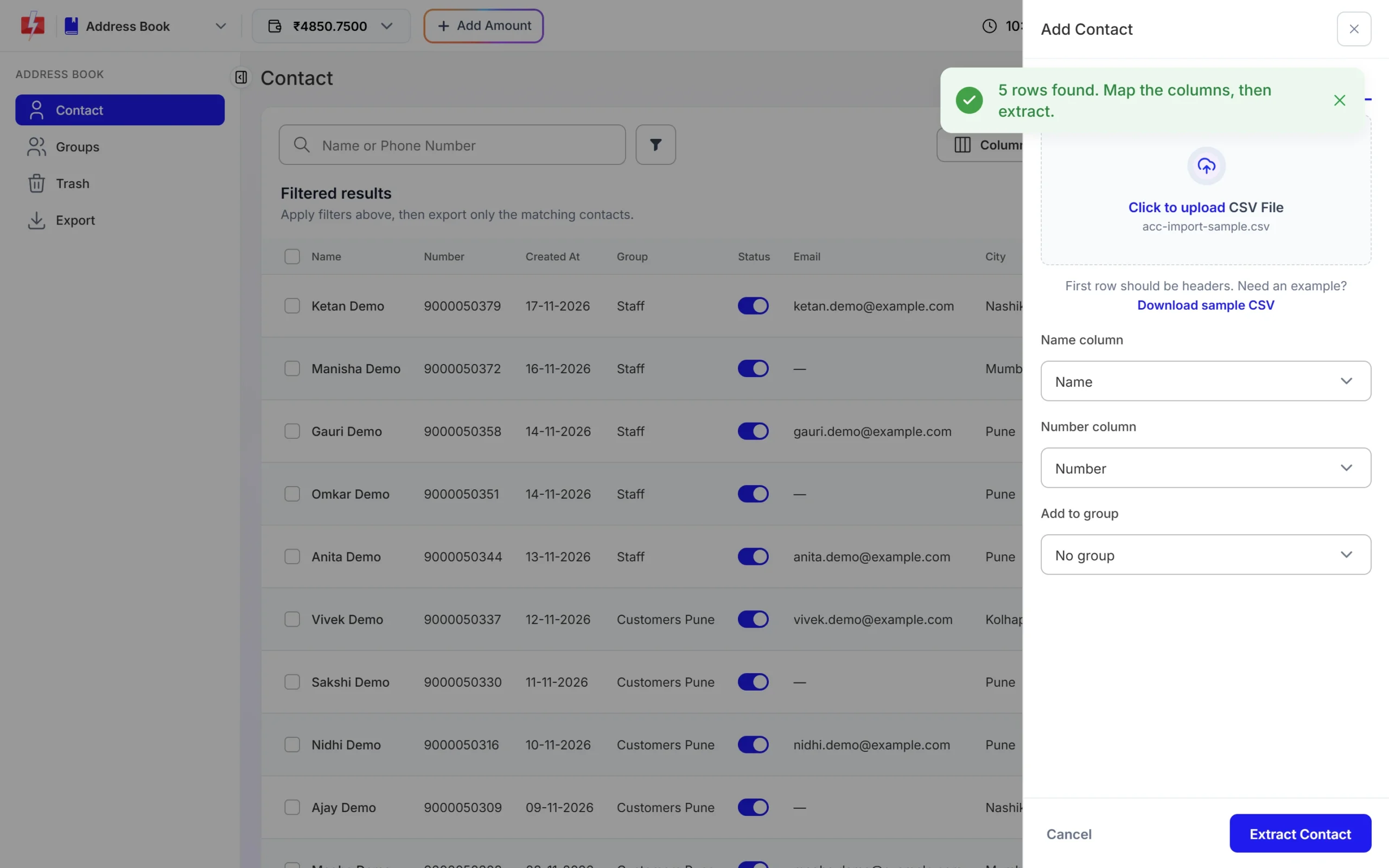
Map the columns, pick a group and extract. -
Sort clients into groups
Use groups such as “Active members”, “Expiring this month”, “Bridal enquiries” and “Lapsed 90 days”. Open a group to see its contacts. When someone asks you to stop messages, remove them from your marketing groups.
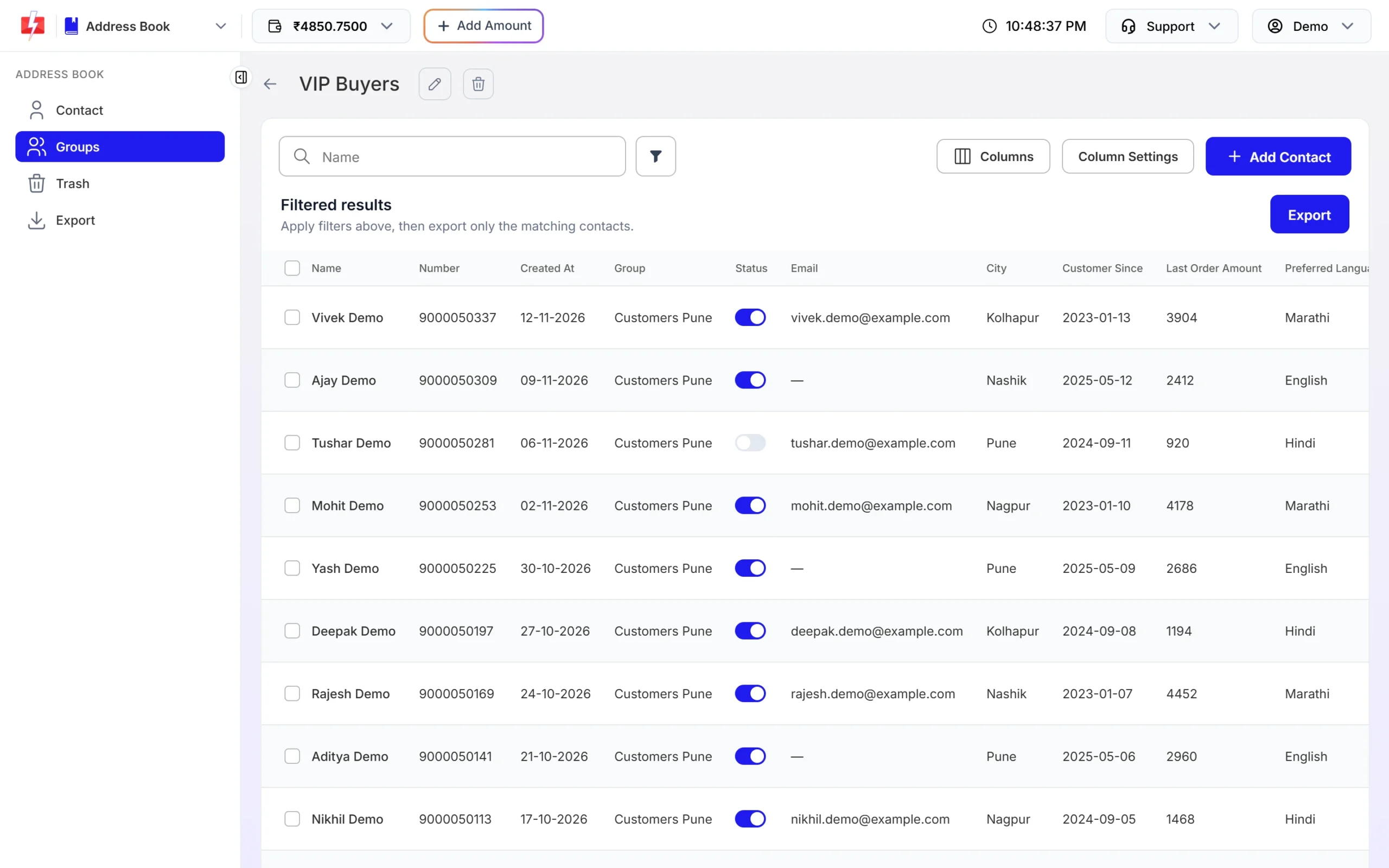
Each group becomes a target list for your campaigns. -
Send reminders with your DLT template
After your DLT templates are approved and added in DLT Manager, open DLT SMS, choose the sender ID, add numbers or a group, pick the reminder template and fill the variables. Click Send. The confirmation popup shows cost per SMS, duplicate and invalid numbers and the total before anything goes out.
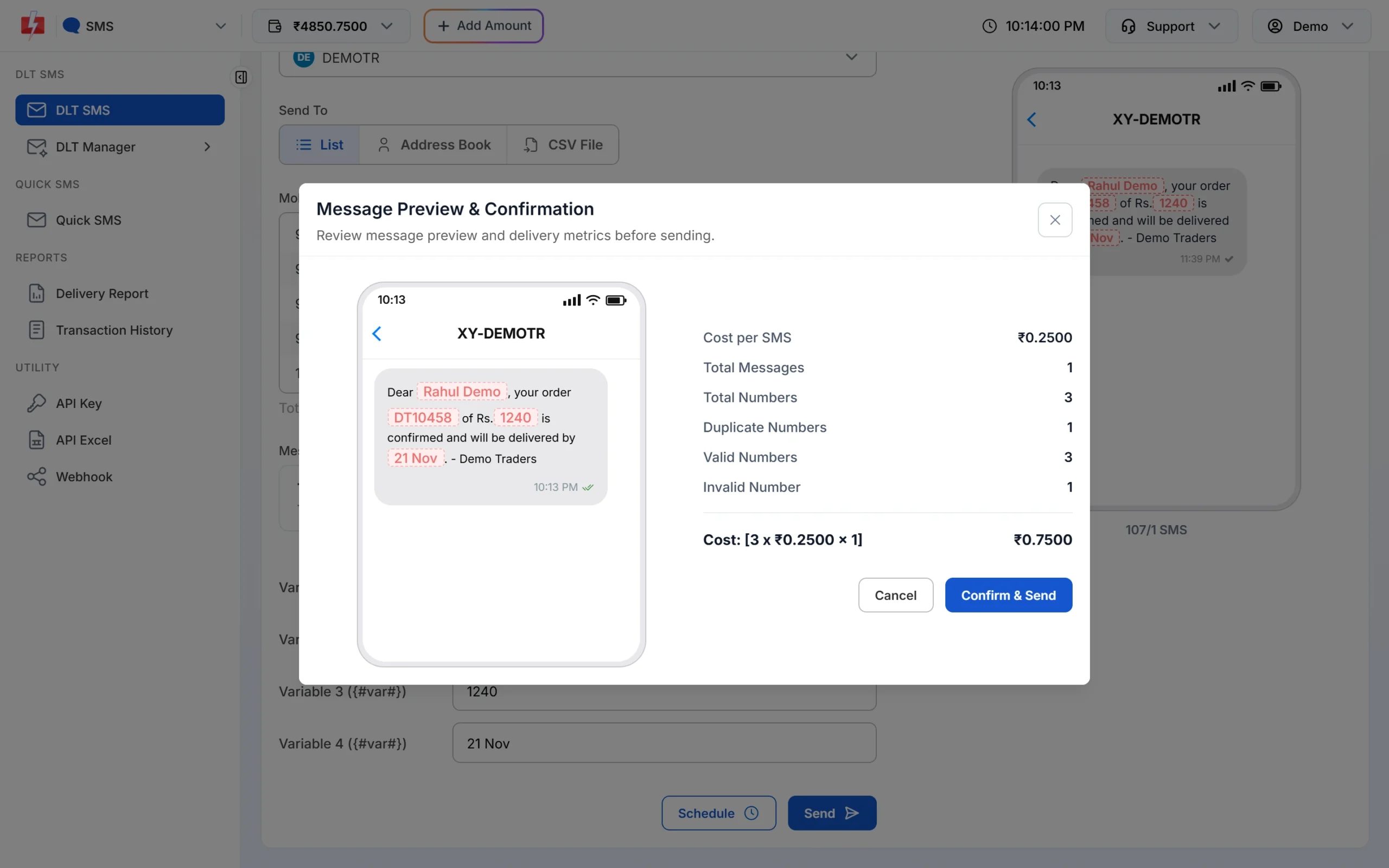
Duplicates and invalid numbers are not charged. -
Pick a WhatsApp template for renewals and offers
In Bulk WhatsApp, choose your number and click the template box. The picker has tabs for Authentication, Marketing and Utility, and shows only approved templates as phone previews. Choose the group under Address Book and schedule it.
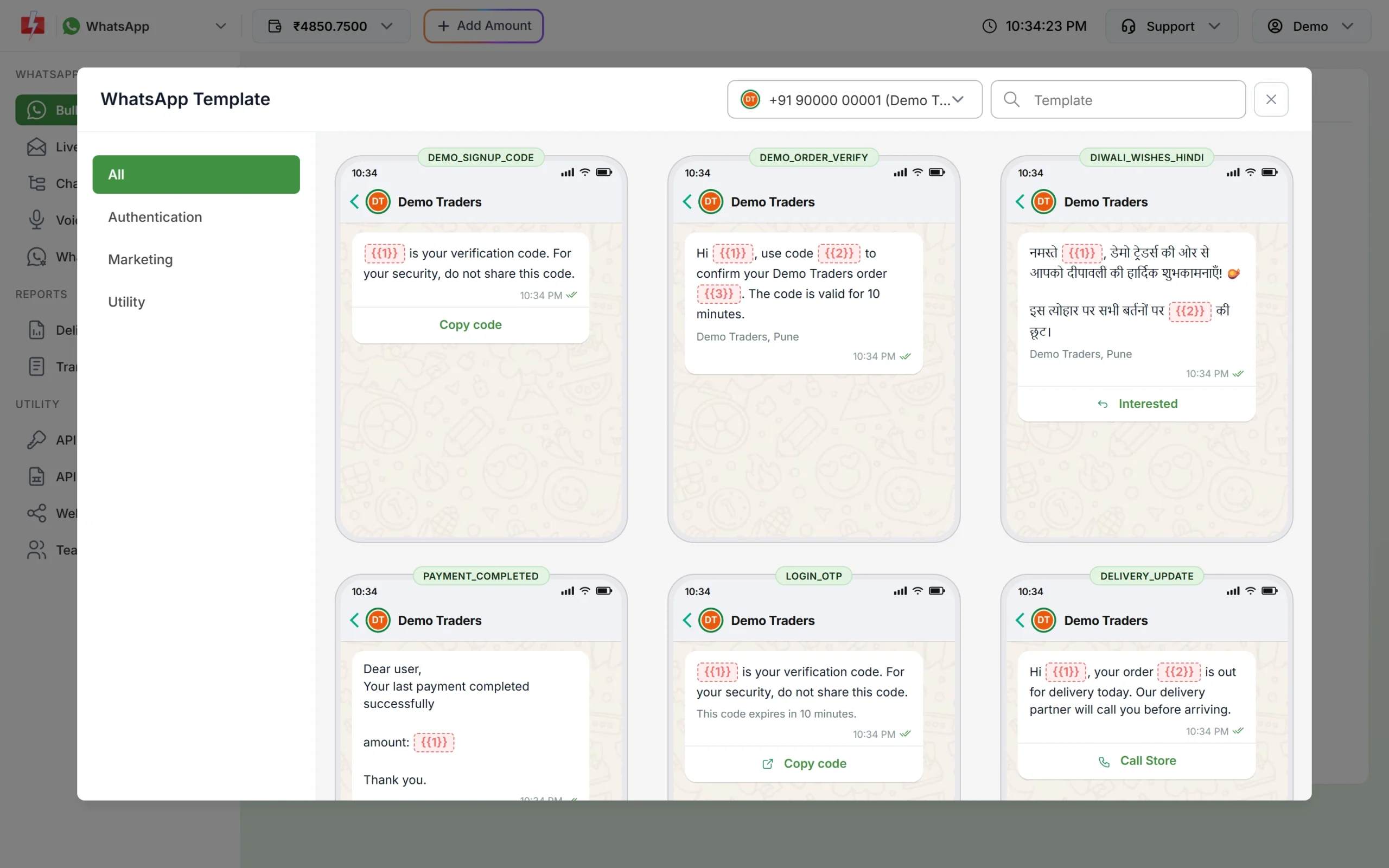
Utility for renewals, Marketing for offers. -
Record a voice file that follows the rules
Open Voice > Voice Files > Upload Voice File. Read the Voice File Rules, click I Accept, then upload an MP3 or WAV up to 5 MB or record in the browser. The operator approves it, usually within a few hours. Free sample files are there to test with.
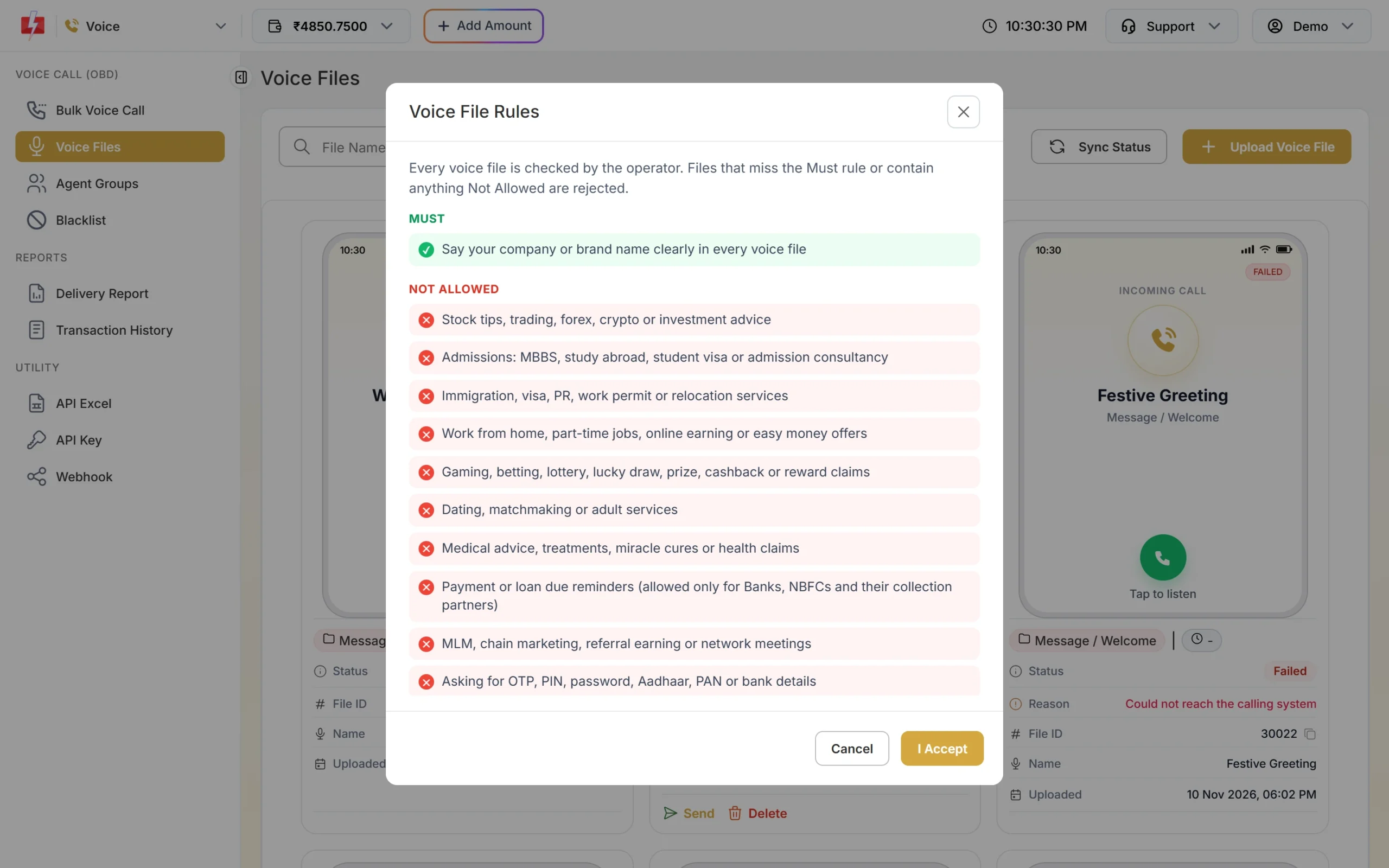
Health claims and lucky draws are not allowed. -
Keep a do-not-call list
When a member asks you to stop calling, add the number under Voice > Blacklist > Add Numbers. Blacklisted numbers are skipped in every campaign and never charged.
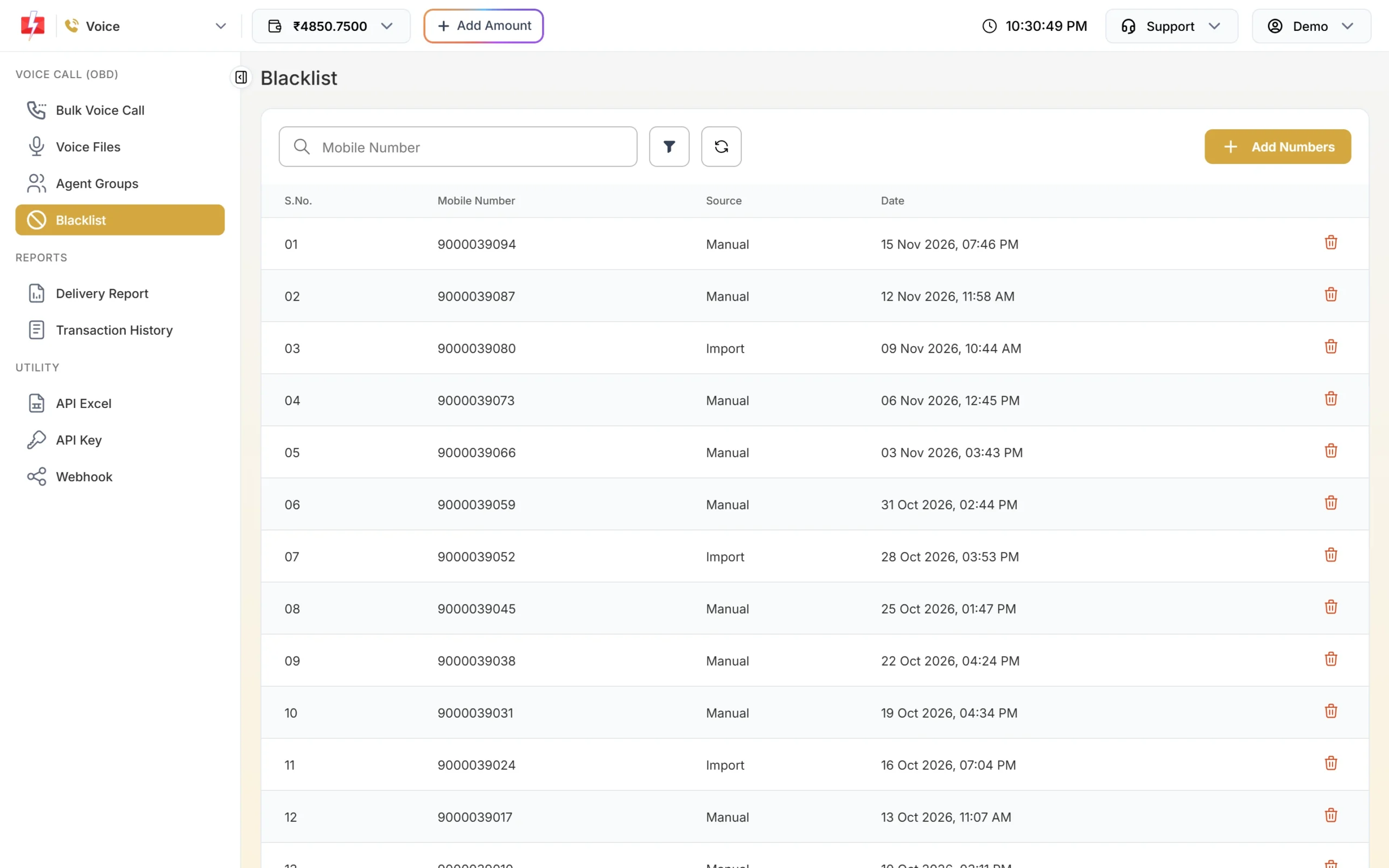
One list for all your voice campaigns.
Automation options
- API from your booking or membership software: send the booking confirmation and the day-before reminder automatically for every appointment.
- Scheduling: schedule tomorrow’s reminders tonight, or pick a date range to repeat a daily class notice at the same time each day.
- CSV with variables: upload a file with name, service and time columns to send each client their own reminder.
- WhatsApp auto replies and Flow Builder: answer “price”, “timing” and “location” automatically, and hand the chat to your staff with Assign Conversation.
- Google Sheets: the add-on is on your dashboard if you keep bookings in a sheet.
Compliance notes
- Consent: take consent for WhatsApp and offers on your joining or booking form, and stop messaging anyone who opts out.
- Sending hours: Fast2SMS sends promotional SMS between 10 AM and 9 PM and holds them at night. Reminders on Service Implicit templates go any time, but early-morning reminders are kinder sent the evening before.
- No health claims: in voice files they are rejected, and in any channel they can mislead clients.
- Personal data: never send body measurements, medical history or payment card details by SMS or WhatsApp.
How to estimate the cost
SMS are charged per number and per part (160 English or 70 Hindi characters), and duplicates and invalid numbers are removed before you pay. WhatsApp is charged by template category, with utility cheaper than marketing, and replies inside the 24-hour window at the session rate. Voice is charged per 15-second pulse for answered calls only. See the current rates on the SMS pricing, WhatsApp pricing and voice call pricing pages. The wallet menu at the top of the panel shows your current rate for each channel.
Frequently asked questions
Which DLT category is used for appointment reminders?
Service Implicit. Booking confirmations, reminders and membership expiry notices are expected by the client. Offers are promotional.
Can I send a different time to each client in one campaign?
Yes. Upload a CSV with a column for the time and map it to the template variable.
Can clients confirm or reschedule from WhatsApp?
Yes. Add Custom buttons such as Confirm and Reschedule to a Utility template. Replies land in Live Chat.
Can I send a voice call about a weight-loss programme?
You can announce the programme, but health claims and promised results are not allowed in voice files and will be rejected.
Will my offers reach clients on DND?
No. Promotional SMS do not reach DND numbers. WhatsApp marketing goes only to clients who opted in.
Can my front desk staff use the panel?
Yes. Add them under Team Members with WhatsApp access. They see Live Chat, not your wallet or settings.