
An OTP SMS template in India is registered on DLT as Transactional. All of the text is fixed except one {#numeric#} variable for the code, and your brand name is written into the fixed text. Below are 14 OTP SMS templates you can copy, change to your brand and register: login, sign-up, payment, cash on delivery, password reset, app autofill and Hindi. Each one shows its variable tags, a sample message, the character count and how many SMS parts it uses.
OTP SMS template rules in short
| Rule | What to do |
|---|---|
| DLT category | Transactional. Since TRAI’s 2025 amendment, OTPs from shops, apps, schools and other non-bank businesses also go here. |
| Template Type in Fast2SMS | Service Implicit (the option used for both Transactional and Service Implicit templates) |
| Code variable | {#numeric#} for a number-only code. {#alphanumeric#} if your codes have letters. |
| Brand name | In the fixed text, never inside a variable |
| What the text should say | What the code is for, how long it is valid, and that it must not be shared |
| Length | Up to 160 characters in English (1 SMS). In Hindi, 70 characters is 1 SMS. |
| Never add | Offers, discount lines or “shop now” links. They make the message promotional. |
You can rename “Demo Traders” in every sample to your own brand. The character counts below are for the sample message with that name, so a longer brand name adds a few characters.
Login and sign-up OTP templates
1. Login OTP
DLT category: Transactional. Variables: {#numeric#}.
{#numeric#} is your OTP to log in to Demo Traders. It is valid for 10 minutes. Do not share it with anyone. - Demo TradersSample message (117 characters, English, 1 SMS): 482917 is your OTP to log in to Demo Traders. It is valid for 10 minutes. Do not share it with anyone. – Demo Traders
2. Sign-up or registration OTP
DLT category: Transactional. Variables: {#numeric#}.
Use {#numeric#} as your OTP to create your Demo Traders account. Valid for 15 minutes. Do not share this code with anyone. - Demo TradersSample message (132 characters, English, 1 SMS): Use 730561 as your OTP to create your Demo Traders account. Valid for 15 minutes. Do not share this code with anyone. – Demo Traders
3. Mobile number verification with a validity variable
DLT category: Transactional. Variables: {#numeric#}.
{#numeric#} is the code to verify your mobile number on Demo Traders. It expires in {#numeric#} minutes. Do not share it. - Demo TradersSample message (122 characters, English, 1 SMS): 190284 is the code to verify your mobile number on Demo Traders. It expires in 10 minutes. Do not share it. – Demo Traders
The second {#numeric#} lets you change the validity from your code without registering a new template. Fixed text sits between the two variables, which the rules require.
4. OTP with the customer’s name
DLT category: Transactional. Variables: {#alphanumeric#}, {#numeric#}.
Dear {#alphanumeric#}, {#numeric#} is your one-time password for Demo Traders. Valid for 10 minutes. Do not share it with anyone. - Demo TradersSample message (128 characters, English, 1 SMS): Dear Priya, 558203 is your one-time password for Demo Traders. Valid for 10 minutes. Do not share it with anyone. – Demo Traders
If you do not have a name for every user, send a value such as Customer. An empty variable makes the SMS read badly.
Payment and order OTP templates
5. Payment OTP
DLT category: Transactional. Variables: {#numeric#}.
{#numeric#} is your OTP to pay Rs {#numeric#} at Demo Traders. Valid for 5 minutes. Do not share it with anyone, not even our staff. - Demo TradersSample message (135 characters, English, 1 SMS): 264918 is your OTP to pay Rs 1499 at Demo Traders. Valid for 5 minutes. Do not share it with anyone, not even our staff. – Demo Traders
Write Rs or INR, not the rupee symbol. The symbol is a Unicode character and would turn the whole SMS into a Unicode SMS, where one part holds only 70 characters.
6. Cash on delivery (COD) confirmation OTP
DLT category: Transactional. Variables: {#numeric#}, {#alphanumeric#}.
Use OTP {#numeric#} to confirm your cash on delivery order {#alphanumeric#} at Demo Traders. Valid for 15 minutes. - Demo TradersSample message (115 characters, English, 1 SMS): Use OTP 804172 to confirm your cash on delivery order DT10458 at Demo Traders. Valid for 15 minutes. – Demo Traders
7. Delivery OTP
DLT category: Transactional. Variables: {#numeric#}, {#alphanumeric#}.
{#numeric#} is the delivery OTP for your Demo Traders order {#alphanumeric#}. Share it with the delivery partner only after you receive the parcel. - Demo TradersSample message (146 characters, English, 1 SMS): 3921 is the delivery OTP for your Demo Traders order DT10458. Share it with the delivery partner only after you receive the parcel. – Demo Traders
Account and security OTP templates
8. Password reset OTP
DLT category: Transactional. Variables: {#numeric#}.
{#numeric#} is your OTP to reset your Demo Traders password. If you did not ask for this, ignore this SMS. Do not share the code. - Demo TradersSample message (139 characters, English, 1 SMS): 615340 is your OTP to reset your Demo Traders password. If you did not ask for this, ignore this SMS. Do not share the code. – Demo Traders
9. Change of mobile number or email
DLT category: Transactional. Variables: {#numeric#}.
Use OTP {#numeric#} to change the mobile number on your Demo Traders account. Valid for 10 minutes. Do not share it with anyone. - Demo TradersSample message (138 characters, English, 1 SMS): Use OTP 447019 to change the mobile number on your Demo Traders account. Valid for 10 minutes. Do not share it with anyone. – Demo Traders
10. Wallet withdrawal or high-value action
DLT category: Transactional. Variables: {#numeric#}.
{#numeric#} is your OTP to confirm the withdrawal of Rs {#numeric#} from your Demo Traders wallet. Do not share it with anyone. - Demo TradersSample message (130 characters, English, 1 SMS): 902645 is your OTP to confirm the withdrawal of Rs 2500 from your Demo Traders wallet. Do not share it with anyone. – Demo Traders
11. Letters-and-numbers verification code
DLT category: Transactional. Variables: {#alphanumeric#}.
Your Demo Traders verification code is {#alphanumeric#}. Enter it within 10 minutes. Do not share this code with anyone. - Demo TradersSample message (125 characters, English, 1 SMS): Your Demo Traders verification code is K7P2QX. Enter it within 10 minutes. Do not share this code with anyone. – Demo Traders
Use {#alphanumeric#} only if your codes really contain letters. A letter inside a {#numeric#} variable fails the operator check.
OTP template for Android autofill
Android’s SMS Retriever API can read the code without the user typing it, but the SMS must end with your app’s 11-character hash. On DLT, everything except the variables is fixed, so the hash has to be part of the registered template. Put it in as fixed text, because a hash can contain characters such as + or / that a variable tag may not accept. Google asks for a message of no more than 140 bytes, so keep this one short and in English.
12. Login OTP with app hash (SMS Retriever)
DLT category: Transactional. Variables: {#numeric#}.
{#numeric#} is your OTP to log in to Demo Traders. Do not share it with anyone. -Demo Traders AbC1dEf2GhISample message (100 characters, English, 1 SMS): 482917 is your OTP to log in to Demo Traders. Do not share it with anyone. -Demo Traders AbC1dEf2GhI
AbC1dEf2GhI is a placeholder. Replace it with your own app’s hash before you register. A debug build and a Play Store build can have different hashes.
Hindi OTP SMS templates
You can register OTP templates in Hindi or any other Indian language. A Hindi SMS is sent as Unicode, so 1 SMS part holds 70 characters instead of 160. The first sample below is longer and uses 2 parts, so it costs twice as much per OTP. The second is cut down to fit in 1 part.
13. Hindi login OTP (2 parts)
DLT category: Transactional. Variables: {#numeric#}.
{#numeric#} Demo Traders में लॉग इन करने के लिए आपका OTP है। यह 10 मिनट तक मान्य है। इसे किसी के साथ साझा न करें।Sample message (108 characters, Unicode, 2 SMS parts): 482917 Demo Traders में लॉग इन करने के लिए आपका OTP है। यह 10 मिनट तक मान्य है। इसे किसी के साथ साझा न करें।
14. Short Hindi OTP (1 part)
DLT category: Transactional. Variables: {#numeric#}.
Demo Traders OTP: {#numeric#}. 10 मिनट तक मान्य। किसी को न बताएं।Sample message (60 characters, Unicode, 1 SMS): Demo Traders OTP: 482917. 10 मिनट तक मान्य। किसी को न बताएं।
Tips to get your OTP template approved the first time
- Say what the code is for. “to log in”, “to pay Rs 1499”, “to reset your password”. A vague “your code is” gets more questions from reviewers.
- Keep the brand name fixed. Write it at the start or the end of the text. A brand inside a variable is a common reason for rejection.
- Use the typed tag. New templates use
{#numeric#},{#alphanumeric#}and the other typed tags, not the old{#var#}. See DLT variable tagging explained. - Keep it clean. No offers, no “download our app” line, no links. One promotional line turns the whole SMS into a promotional message.
- Add a proper sample message. Fill every variable with a realistic value, like a 6-digit code, so the reviewer can see the final SMS.
- Stay in plain ASCII for English. The rupee symbol, curly quotes or a long dash copied from a word processor turn the SMS into Unicode and cut 1 part from 160 to 70 characters.
- Match the validity to your code. If your template says “Valid for 10 minutes”, make the OTP expire in 10 minutes. Smart OTP’s default is 15 minutes, so pass
otp_expiryto match your text.
How to add your OTP template in Fast2SMS and send OTPs
Once your DLT portal approves the template, add it to Fast2SMS and link it to Smart OTP. Smart OTP is our recommended way to send OTPs: it sends on a priority route, can fall back to WhatsApp, and checks the code for you.
-
Register the template on your DLT portal
On the DLT portal where your business is registered, add a content template under the Transactional category, link it to your approved header and paste the text with its tags. Add a sample message with a real-looking code. After approval, note the Content Template ID and take a screenshot of the approved row.
-
Add it in DLT Manager
In the SMS app, open DLT Manager > Content Template and click Add Content Template. Select your entity, tick the Sender ID, enter the Content Template ID, choose Service Implicit, paste the approved text exactly, upload the screenshot and click Submit. If you tick a 6-digit numeric header, Fast2SMS saves the template as promotional, so use your alphabetic header for OTPs.
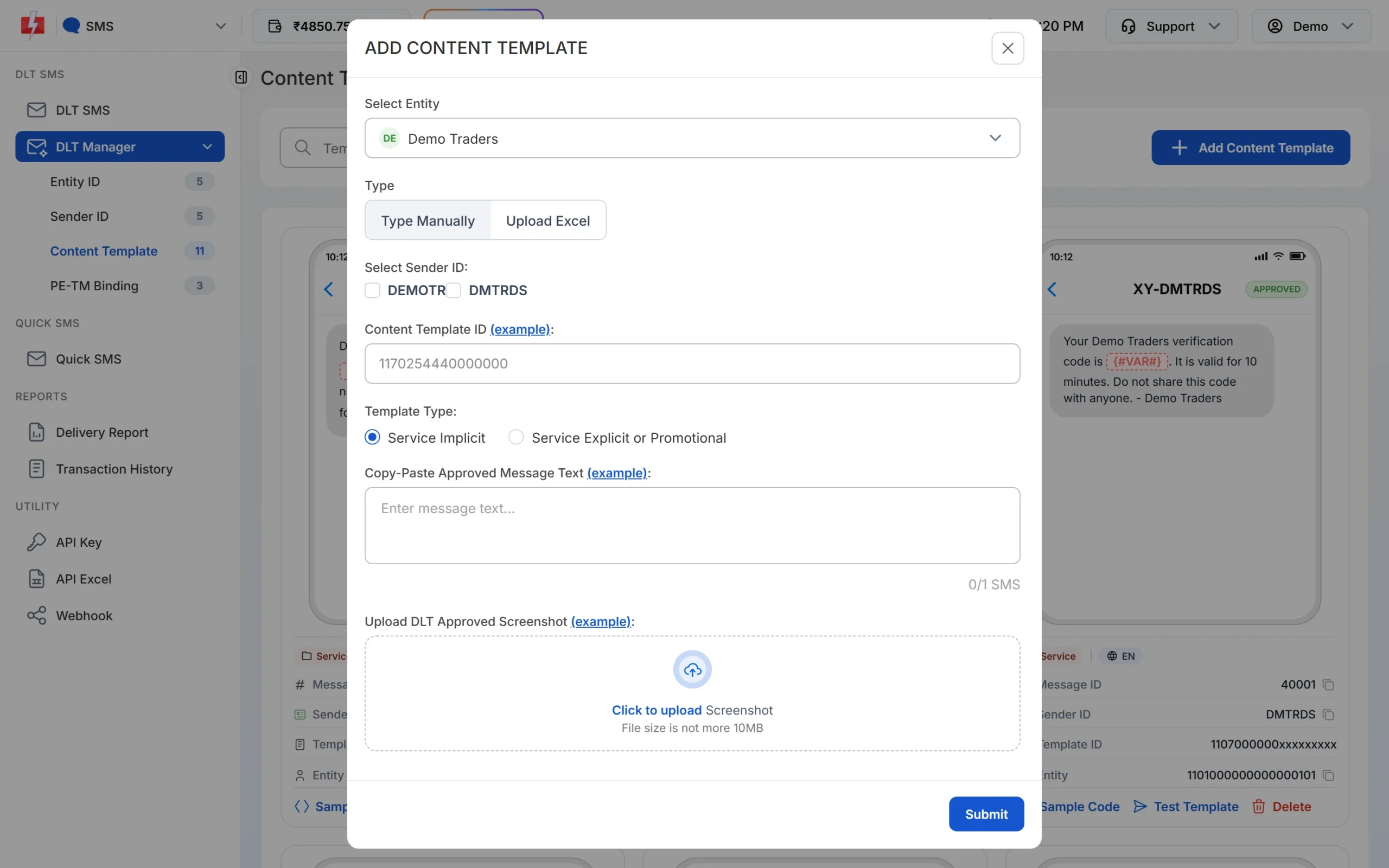
Choose Service Implicit for an OTP template. -
Wait for Approved and test it
The template shows Pending while Fast2SMS checks it against your screenshot. When it shows APPROVED, click Test Template, enter your own mobile number and a sample code, and click Send Test SMS. This sends one real SMS.
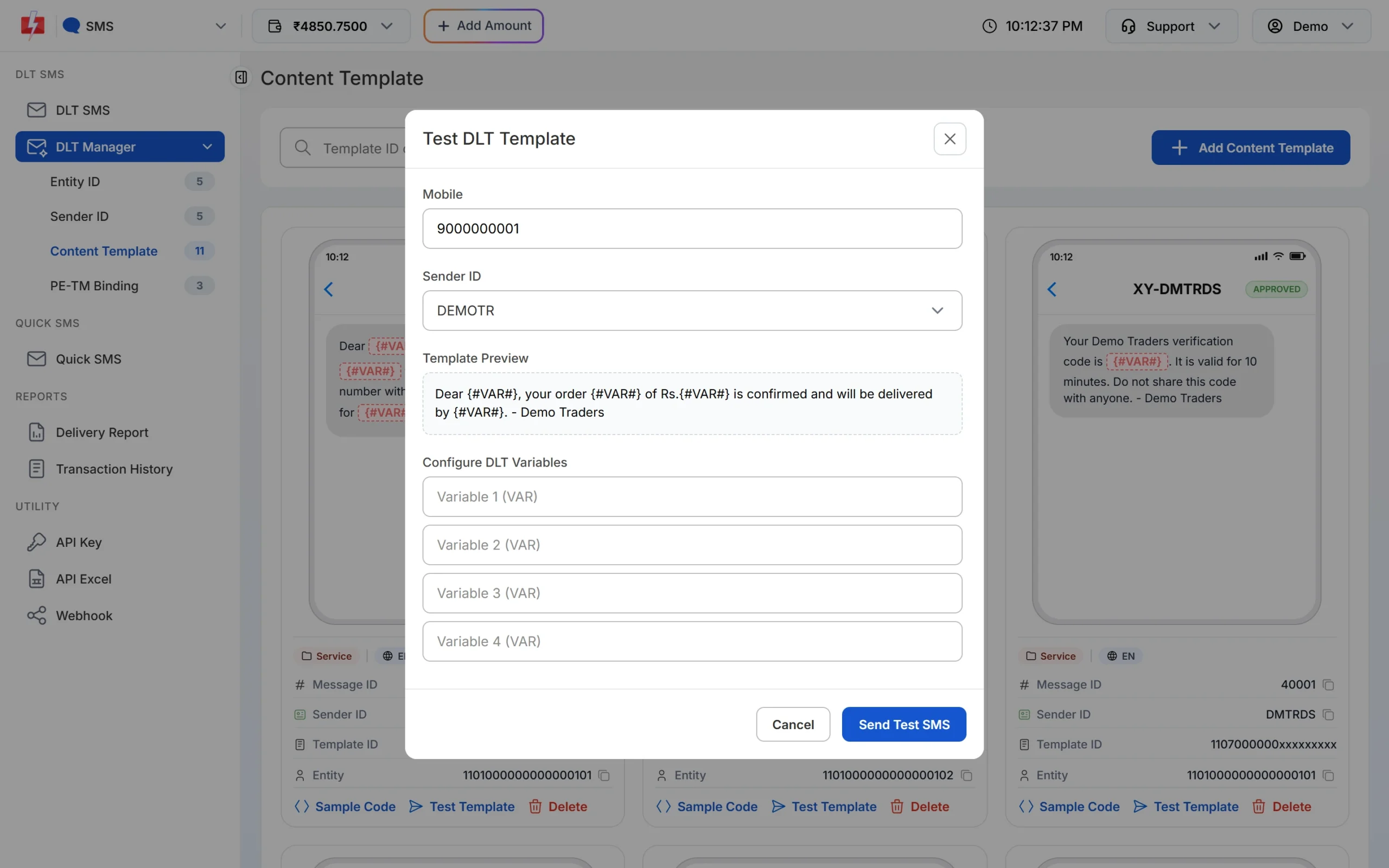
Test Template sends one real SMS to the number you enter. -
Create a Smart OTP template from it
Open Smart OTP > OTP Template List and click Add OTP Template. On the SMS Channel tab, select the entity, the sender and your OTP template, then click the variable button that holds the code. Tick SET FALLBACK TEMPLATE if you want a WhatsApp fallback. Click Assign OTP Template and copy the OTP ID.
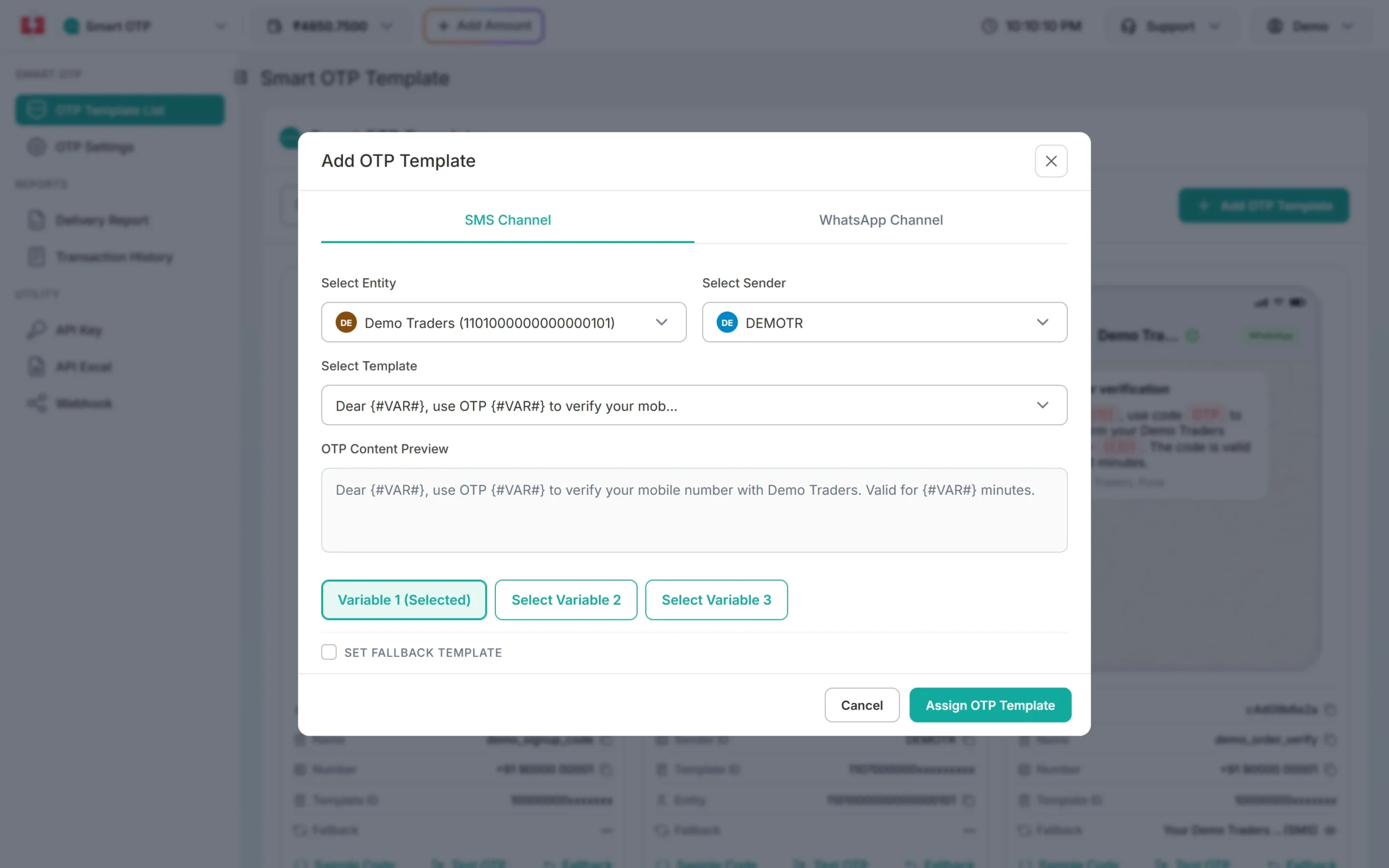
Click the variable that holds the OTP. -
Send OTPs from your app
Your server calls the Send OTP API with the mobile number and the OTP ID. Smart OTP creates the code, puts it in the template and later verifies what the user types.
curl -X POST "https://www.fast2sms.com/dev/otp/send" \
  -H "authorization: YOUR_API_KEY" \
  -H "Content-Type: application/json" \
  -d '{"mobile":"9999999999","otp_id":"YOUR_OTP_ID","otp_expiry":10,"otp_length":6}'
If your app creates and checks codes itself, you can send the same template with the DLT SMS API instead. Use
route=dlt, put the template’s Message ID inmessage(not the 19-digit Template ID) and the code invariables_values.
An OTP that fits in 1 SMS part is charged as one SMS. A 2-part OTP, like the long Hindi sample above, is charged as two. Every resend is charged again. See the current rates on the pricing page.
Sending in bulk? For high OTP volumes our team offers discounted rates. Talk to our team or see OTP pricing.
Common problems with OTP templates
| Problem | Likely cause | Fix |
|---|---|---|
| Template rejected on the portal | Brand missing, offer line added, or wrong category | Put the brand in fixed text, remove anything promotional, register as Transactional |
| OTP not reaching DND numbers or held at night | Template registered as promotional, or a numeric header used | Register a new Transactional template on an alphabetic header |
| SMS fails with “template not matched” | Text in Fast2SMS differs from the portal by a space, word or full stop | Copy the text from the portal and paste it again |
| Template not shown in Smart OTP | Template not approved yet, or has no variable | Wait for Approved. Smart OTP lists only approved templates with a variable. |
| OTP uses 2 SMS parts | Rupee symbol, curly quotes or Hindi text made it Unicode, or the text is over 160 characters | Use Rs instead of the symbol, plain quotes, and shorten the text |
Frequently asked questions
What is the format of an OTP SMS template?
A short fixed text with your brand name, one {#numeric#} variable for the code, the purpose, the validity and a do-not-share line. For example: {#numeric#} is your OTP to log in to Demo Traders. It is valid for 10 minutes. Do not share it with anyone. – Demo Traders
Which DLT category should I choose for an OTP template?
Transactional. TRAI’s amended rules list OTPs from non-bank businesses, such as online stores and app logins, as transactional messages.
Can I still use {#var#} in a new OTP template?
New templates should use the typed tags, such as {#numeric#} for the code. Older approved templates with {#var#} still work in Fast2SMS, but they need to be migrated on your DLT portal.
How many characters can an OTP SMS have?
An English SMS fits 160 characters in 1 part. Hindi and other Unicode SMS fit 70 characters in 1 part. Longer messages are split into parts and each part is charged.
Can I add a link or app download line to an OTP SMS?
Avoid it. A link must be whitelisted as a CTA on your DLT portal, and a “download our app” line can make the template look promotional.
Can one template serve both login and sign-up?
Yes, if the wording fits both, for example “your verification code”. Separate templates read more clearly to the user.
Can OTP SMS be sent at night or to DND numbers?
Yes. Transactional templates are delivered to DND numbers at any hour. Only promotional SMS are limited to 10 AM to 9 PM.
Do I need a DLT template for WhatsApp OTP?
No. WhatsApp OTPs use a WhatsApp template approved by Meta. Smart OTP can send the code on SMS with a WhatsApp fallback, or the other way round.