
College and university SMS templates for admit cards, merit lists, exam schedules, results, fee reminders and placement drives are registered on DLT as Service Implicit, because they go to applicants and students about their own application or course. An application or fee confirmation sent right after the student submits or pays is Transactional, and “admissions open” campaigns are Promotional. Below are 18 copy-paste templates for colleges, universities and institutes, in English and Hindi, each with variable tags, the DLT category, a filled sample, the character count and SMS parts.
Which DLT category for college and university SMS
| Message | DLT category | DND numbers and timing |
|---|---|---|
| Application received or application fee paid, sent right away | Transactional | Reaches DND numbers, any hour |
| Incomplete form, admit card, merit list, counselling slot, admission confirmed | Service Implicit | Reaches DND numbers, any hour |
| Fee due, hall ticket, exam schedule, results, placement drive, shortlist | Service Implicit | Reaches DND numbers, any hour |
| Fee received, sent right after payment; student portal OTP | Transactional | Reaches DND numbers, any hour |
| Admissions open, open day, new course launch | Promotional | Not to DND numbers, 10 AM to 9 PM only |
Replace “Demo College” with your institution’s name as registered on DLT, and keep it as fixed text. Counts are for the sample shown. Links such as https://demo.example/admit are placeholders: any link or callback number in a template must be whitelisted as a CTA on your DLT portal first, or the SMS fails. These templates follow the usual DLT rules, but approval is always the operator’s decision.
Admission templates
1. Application received
DLT category: Transactional. Variables: {#alphanumeric#}, {#url#}. Whitelist first: your link domain as a CTA on your DLT portal.
Your application {#alphanumeric#} for {#alphanumeric#} at Demo College is received. Track its status here: {#url#}Sample message (116 characters, English, 1 SMS): Your application APP26114 for BCom 2027 at Demo College is received. Track its status here: https://demo.example/app
Transactional only when sent right after the applicant submits. A later status update is Service Implicit.
2. Application fee received
DLT category: Transactional. Variables: {#numeric#}, {#alphanumeric#}.
Received Rs {#numeric#} as application fee for {#alphanumeric#}. Reference no {#alphanumeric#}. - Demo CollegeSample message (86 characters, English, 1 SMS): Received Rs 800 as application fee for APP26114. Reference no PAY99120. – Demo College
3. Application incomplete
DLT category: Service Implicit. Variables: {#alphanumeric#}.
Your Demo College application {#alphanumeric#} is incomplete. Please upload the missing documents by {#alphanumeric#}. - Demo CollegeSample message (114 characters, English, 1 SMS): Your Demo College application APP26114 is incomplete. Please upload the missing documents by 5 Dec. – Demo College
4. Entrance test admit card
DLT category: Service Implicit. Variables: {#alphanumeric#}, {#url#}. Whitelist first: your link domain as a CTA on your DLT portal.
Your admit card for the {#alphanumeric#} entrance test at Demo College is ready. Download it here: {#url#}Sample message (117 characters, English, 1 SMS): Your admit card for the MBA 2027 entrance test at Demo College is ready. Download it here: https://demo.example/admit
5. Merit list published
DLT category: Service Implicit. Variables: {#alphanumeric#}, {#numeric#}, {#url#}. Whitelist first: your link domain as a CTA on your DLT portal.
The {#alphanumeric#} merit list is published. Your rank is {#numeric#}. Details: {#url#} - Demo CollegeSample message (107 characters, English, 1 SMS): The BCom 2027 merit list is published. Your rank is 142. Details: https://demo.example/merit – Demo College
6. Counselling or document verification
DLT category: Service Implicit. Variables: {#alphanumeric#}.
Dear {#alphanumeric#}, your document verification at Demo College is on {#alphanumeric#}. Please bring all original documents. - Demo CollegeSample message (126 characters, English, 1 SMS): Dear Karan, your document verification at Demo College is on 18 Jun 10 AM. Please bring all original documents. – Demo College
7. Admission confirmed
DLT category: Service Implicit. Variables: {#alphanumeric#}.
Welcome to Demo College. Your admission to {#alphanumeric#} is confirmed. Your enrolment no is {#alphanumeric#}. - Demo CollegeSample message (113 characters, English, 1 SMS): Welcome to Demo College. Your admission to BCom 2027 is confirmed. Your enrolment no is DC27B0412. – Demo College
Exam, result and fee templates for students
8. Semester fee due
DLT category: Service Implicit. Variables: {#alphanumeric#}, {#numeric#}.
Dear {#alphanumeric#}, your semester fee of Rs {#numeric#} is due on {#alphanumeric#}. Please ignore if already paid. - Demo CollegeSample message (105 characters, English, 1 SMS): Dear Karan, your semester fee of Rs 32500 is due on 10 Dec. Please ignore if already paid. – Demo College
9. Fee received
DLT category: Transactional. Variables: {#numeric#}, {#alphanumeric#}.
Received Rs {#numeric#} towards the fee of enrolment no {#alphanumeric#}. Receipt no {#alphanumeric#}. - Demo CollegeSample message (95 characters, English, 1 SMS): Received Rs 32500 towards the fee of enrolment no DC27B0412. Receipt no FR55021. – Demo College
10. Hall ticket ready
DLT category: Service Implicit. Variables: {#alphanumeric#}, {#url#}. Whitelist first: your link domain as a CTA on your DLT portal.
Dear Student, your hall ticket for the {#alphanumeric#} exams is ready. Download it here: {#url#} - Demo CollegeSample message (122 characters, English, 1 SMS): Dear Student, your hall ticket for the Semester 3 exams is ready. Download it here: https://demo.example/ht – Demo College
11. Exam rescheduled
DLT category: Service Implicit. Variables: {#alphanumeric#}.
Dear Student, the {#alphanumeric#} exam of {#alphanumeric#} is moved to {#alphanumeric#}. Check the portal for details. - Demo CollegeSample message (110 characters, English, 1 SMS): Dear Student, the Accounts exam of Semester 3 is moved to 16 Dec. Check the portal for details. – Demo College
12. Result declared
DLT category: Service Implicit. Variables: {#alphanumeric#}, {#url#}. Whitelist first: your link domain as a CTA on your DLT portal.
Dear Student, the {#alphanumeric#} results are declared. View your result here: {#url#} - Demo CollegeSample message (116 characters, English, 1 SMS): Dear Student, the Semester 3 results are declared. View your result here: https://demo.example/result – Demo College
13. Student portal login OTP
DLT category: Transactional. Variables: {#numeric#}.
{#numeric#} is your OTP to log in to the Demo College student portal. Do not share it with anyone. - Demo CollegeSample message (108 characters, English, 1 SMS): 602418 is your OTP to log in to the Demo College student portal. Do not share it with anyone. – Demo College
Placement templates
14. Placement drive notice
DLT category: Service Implicit. Variables: {#alphanumeric#}.
Placement drive: {#alphanumeric#} visits campus on {#alphanumeric#} for {#alphanumeric#} roles. Register on the placement portal. - Demo CollegeSample message (117 characters, English, 1 SMS): Placement drive: Demo Tech visits campus on 9 Jan for Analyst roles. Register on the placement portal. – Demo College
15. Shortlisted for interview
DLT category: Service Implicit. Variables: {#alphanumeric#}.
Dear {#alphanumeric#}, you are shortlisted by {#alphanumeric#}. Your interview is on {#alphanumeric#}. - Demo College Placement CellSample message (110 characters, English, 1 SMS): Dear Karan, you are shortlisted by Demo Tech. Your interview is on 12 Jan 10 AM. – Demo College Placement Cell
Admissions campaign template (promotional)
An “admissions open” message to people who have not applied is promotional. Register it under Promotional with an opt-out line, send it only between 10 AM and 9 PM, and expect it not to reach numbers on DND.
16. Admissions open
DLT category: Promotional. Variables: {#alphanumeric#}, {#url#}, {#cbn#}. Whitelist first: your link domain and your callback number as a CTA on your DLT portal.
Admissions open at Demo College for {#alphanumeric#}. Apply here: {#url#} To stop such SMS, call {#cbn#}.Sample message (132 characters, English, 1 SMS): Admissions open at Demo College for BCom BBA and BSc 2027. Apply here: https://demo.example/apply To stop such SMS, call 9000000001.
Hindi college SMS templates
Hindi SMS are Unicode: 1 part holds 70 characters and 2 parts hold 133.
17. Result declared (Hindi)
DLT category: Service Implicit. Variables: {#alphanumeric#}, {#url#}. Whitelist first: your link domain as a CTA on your DLT portal.
{#alphanumeric#} का परिणाम घोषित हो गया है। अपना परिणाम यहां देखें: {#url#} - Demo CollegeSample message (104 characters, Unicode, 2 SMS parts): Semester 3 का परिणाम घोषित हो गया है। अपना परिणाम यहां देखें: https://demo.example/result – Demo College
18. Fee due (Hindi)
DLT category: Service Implicit. Variables: {#numeric#}, {#alphanumeric#}.
प्रिय छात्र, आपकी फीस Rs {#numeric#} की अंतिम तिथि {#alphanumeric#} है। - Demo CollegeSample message (70 characters, Unicode, 1 SMS): प्रिय छात्र, आपकी फीस Rs 32500 की अंतिम तिथि 10 Dec है। – Demo College
Category mistakes to avoid
Under TRAI’s 2025 rules, any promotional line in a service or transactional message makes the whole message promotional.
| Mistake | What happens | Do this instead |
|---|---|---|
| Result SMS ending with “scholarship test for PG courses, apply now” | Treated as promotional, so it misses students on DND | Keep the result SMS plain. Send course promotions separately. |
| “Admissions open” sent to last year’s enquiries on a Service Implicit template | Likely rejection | Admission campaigns are Promotional, whoever receives them. |
| Student portal OTP registered as Service Implicit or Promotional | Possible rejection, and Promotional OTPs are held at night | Register OTPs as Transactional. |
| Application received sent hours later on a Transactional template | Does not fit how Transactional is meant to be used | Send it right after submission, or use a Service Implicit status update. |
Tips for college templates
- Roll, enrolment and application numbers in
{#alphanumeric#}, fees and ranks in{#numeric#}, admit card and result links in{#url#}. - Course names without commas. Write “BCom BBA and BSc 2027” so the value stays a clean alphanumeric value within 40 characters.
- Results day traffic. Schedule result SMS for the minute results go live, and keep them to 1 SMS part to control cost.
How to add these templates in Fast2SMS DLT Manager
A template from this page works only after the operator approves it on your DLT portal. Then you add it to Fast2SMS once and send it as often as you need. The full steps are in how to register a DLT content template and DLT Manager in Fast2SMS.
-
Register the template on your DLT portal
Log in to the DLT portal where your business is registered and add a content template. Pick the category shown with the template, link it to one approved header, paste the text with its variable tags and add a sample message with real-looking values. Whitelist any link or callback number as a CTA before you submit. The operator’s reviewer decides whether it is approved. When it is, note the Content Template ID and take a screenshot of the approved row.
-
Add it in DLT Manager
In the Fast2SMS SMS app, open DLT Manager > Content Template and click Add Content Template. Select your entity, tick the Sender ID, enter the Content Template ID and choose Service Implicit for Transactional and Service Implicit templates, or Service Explicit or Promotional for promotional ones under Template Type. Paste the approved text exactly as the portal shows it in Copy-Paste Approved Message Text, upload the screenshot and click Submit. Have many templates? Use Upload Excel with the template file exported from your DLT portal.
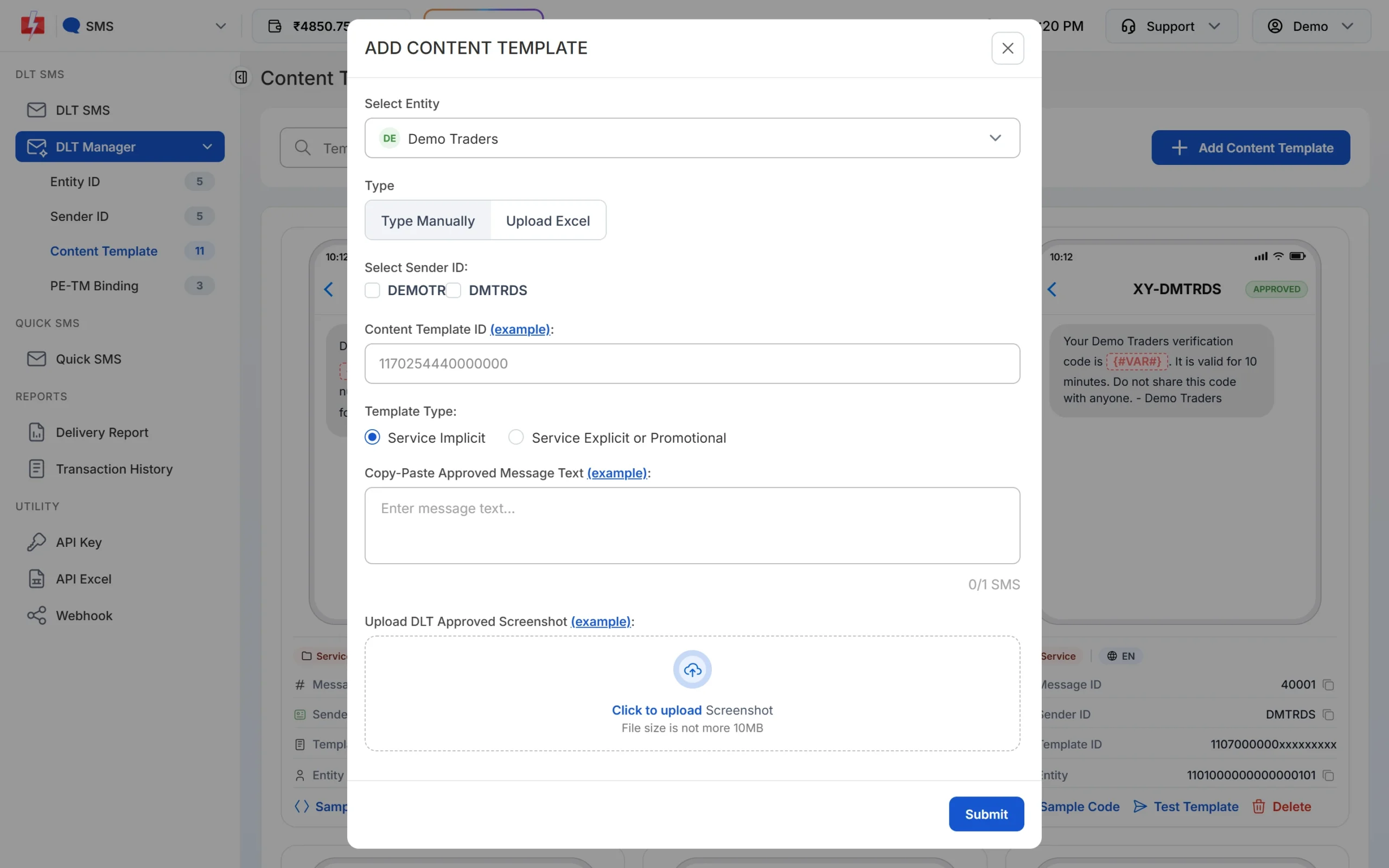
Pick the Template Type that matches the category on your DLT portal. -
Wait for Approved, then test
The template is saved as Pending while Fast2SMS checks it against your screenshot. When the card shows APPROVED, it also shows a Message ID, which is the value you pass as
messagein the API. Click Test Template to send one SMS to your own number and check the text and any link. -
Send or schedule from DLT SMS
Open DLT SMS, choose the Sender ID, add numbers under Send To (List, Address Book or CSV File) and click Select DLT Template. Fill each variable, or map the variables to columns of your CSV so each person gets their own values. The counter under the preview shows characters and SMS parts. Click Send, check the Message Preview & Confirmation popup, then click Confirm & Send, or use Schedule to pick a date and time. Promotional templates go out only between 10 AM and 9 PM. If you send one late in the evening, Fast2SMS holds it and sends it the next morning.
Each SMS part is charged as one SMS for every valid number, so a template that runs into 2 parts costs twice as much per person as a 1-part template. Duplicate and invalid numbers are not charged. See the current rates on the bulk SMS pricing page.
Sending in bulk? For high SMS volumes our team offers discounted rates. Talk to our team or see SMS pricing.
Frequently asked questions
Which DLT category is used for result SMS?
Service Implicit. The student is enrolled, so information about their own result needs no separate consent and reaches DND numbers.
Is an application confirmation transactional?
Yes, when it goes out right after the applicant submits or pays. Later reminders and status updates are Service Implicit.
Can colleges send admissions open SMS?
Yes, on a Promotional template with an opt-out line, between 10 AM and 9 PM. It does not reach numbers on DND.
Can a college or trust register on DLT?
Yes. See DLT registration for trusts, societies and schools for the documents.
How do I send each student their own fee amount?
Upload a CSV with mobile number, name and amount on the DLT SMS page and map each variable to a column. See how to send bulk SMS from Excel.
Can we send notices in Hindi?
Yes. Register a Hindi template as Unicode on your DLT portal. Each Unicode part holds 70 characters.
Will these templates be approved?
The operator’s reviewer decides. These follow the usual DLT rules. If one is rejected, read the remark on your portal and fix that point.