
Yes, you can send a PDF over RCS from Fast2SMS. In Bulk RCS you can attach a PDF to a Rich message or send it with the Media type, and with the RCS API you can send each customer their own invoice or ticket from a public link. This page shows both ways, which bot to use, and how to keep customer documents safe.
It is for shops, travel and event businesses, clinics and service companies that already send invoices, tickets or brochures by email or WhatsApp and want them inside the customer’s messaging app with their brand name on top.
Which way to use
| You want to send | Use | Bot |
|---|---|---|
| The same PDF to many people: brochure, price list, menu, event schedule | Bulk RCS, Rich or Media type | Promotional for offers, transactional for information |
| A different PDF for each customer: invoice, receipt, e-ticket, booking voucher | RCS API, one request per customer | Transactional |
Google lists purchase confirmations, ticket confirmations, boarding passes and account statements as transactional messages. Keep offers out of these messages, because transactional bots are only for informative messages.
Send the same PDF to a list from Bulk RCS
-
Open Bulk RCS and choose the bot
Click Bulk RCS and pick the bot under RCS BOT. Add your numbers under Send To with List, Address Book or CSV File.
-
Option A: Rich message with the PDF
Under RCS Type, choose Rich. Add a Title (Optional), write the Message, and under Media (optional) click Click to upload and choose the PDF. The file can be up to 10 MB. After you add the media you can add buttons, for example Dial a Number “Call us” or Open URL “Book now”. Google notes that a PDF inside a rich card works on Google Messages in India.
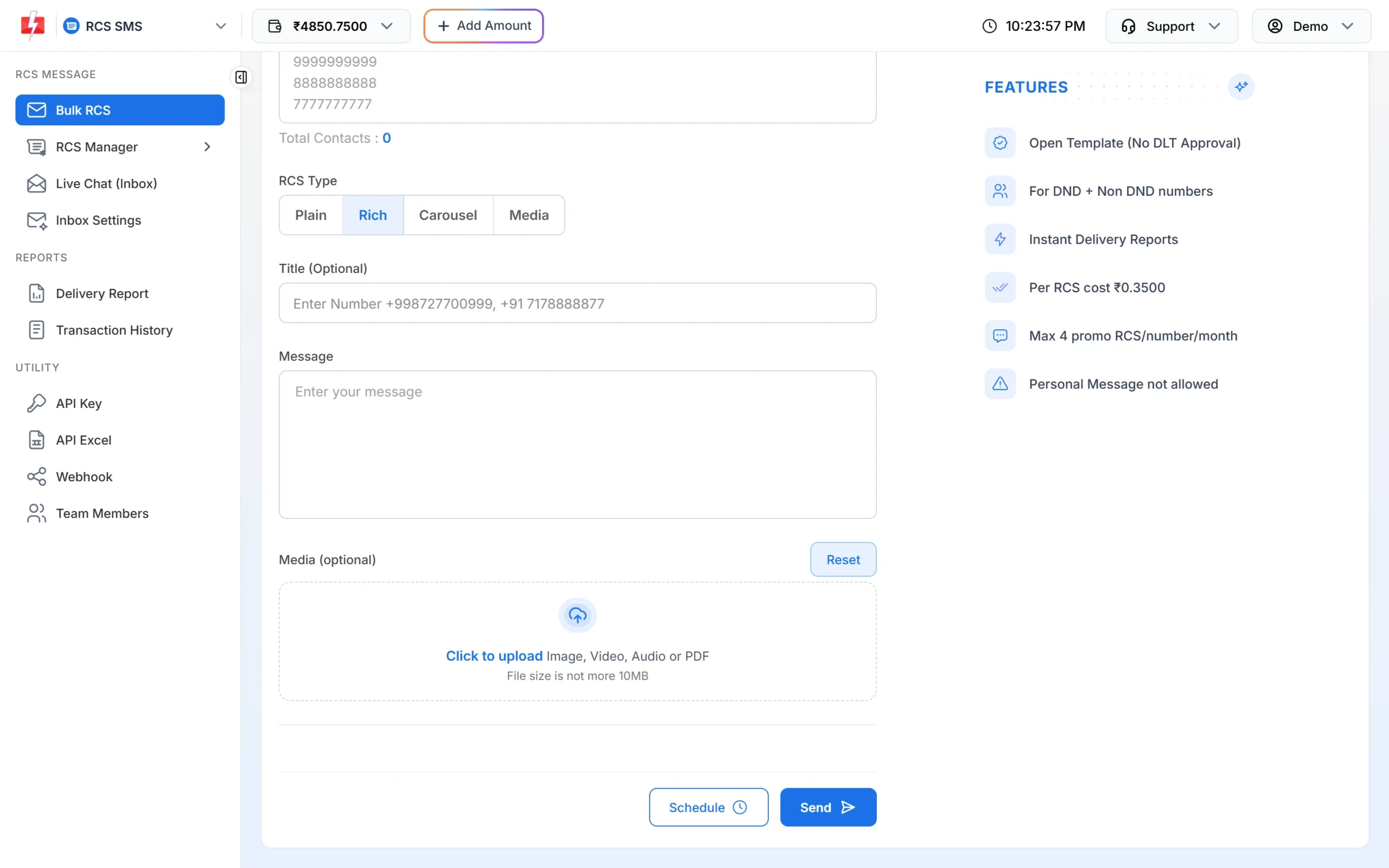
A Rich message can carry one PDF with a title, text and buttons. -
Option B: Media type for files only
Choose Media and upload under Multiple Media. You can add up to 10 files of 10 MB each: images, video, audio or PDF. The Media type has no text box and no buttons, so use it when the file speaks for itself.
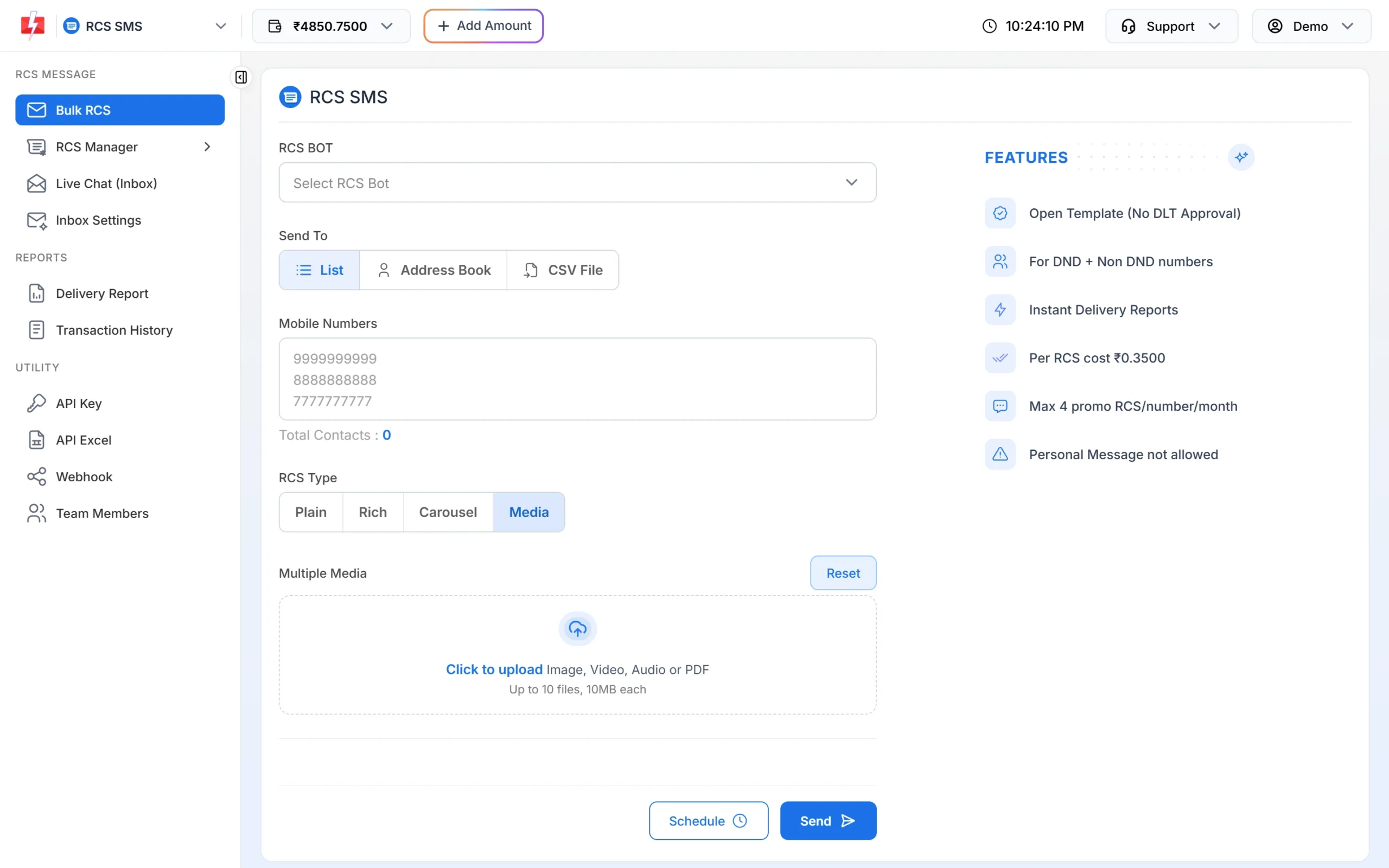
Media sends files without text or buttons. -
Test, then send
Send to your own number first and open the PDF on the phone. Then click Send, check the count and cost in Message Preview & Confirmation, and click Confirm & Send.
Send each customer their own invoice or ticket by API
Bulk RCS sends the same content to every number, so it cannot attach a different invoice per customer. For that, your billing or booking software calls the RCS API once per customer, right after the invoice or ticket is created.
-
Put the PDF at a public link
The file must be reachable on the internet over https, because the RCS platform downloads it from your link before delivery. Use a long, hard-to-guess file name, not just the invoice number.
-
Copy the Bot ID of your transactional bot
Go to RCS Manager > Bots and copy the Bot ID of the transactional bot. Your API key is under API Key.
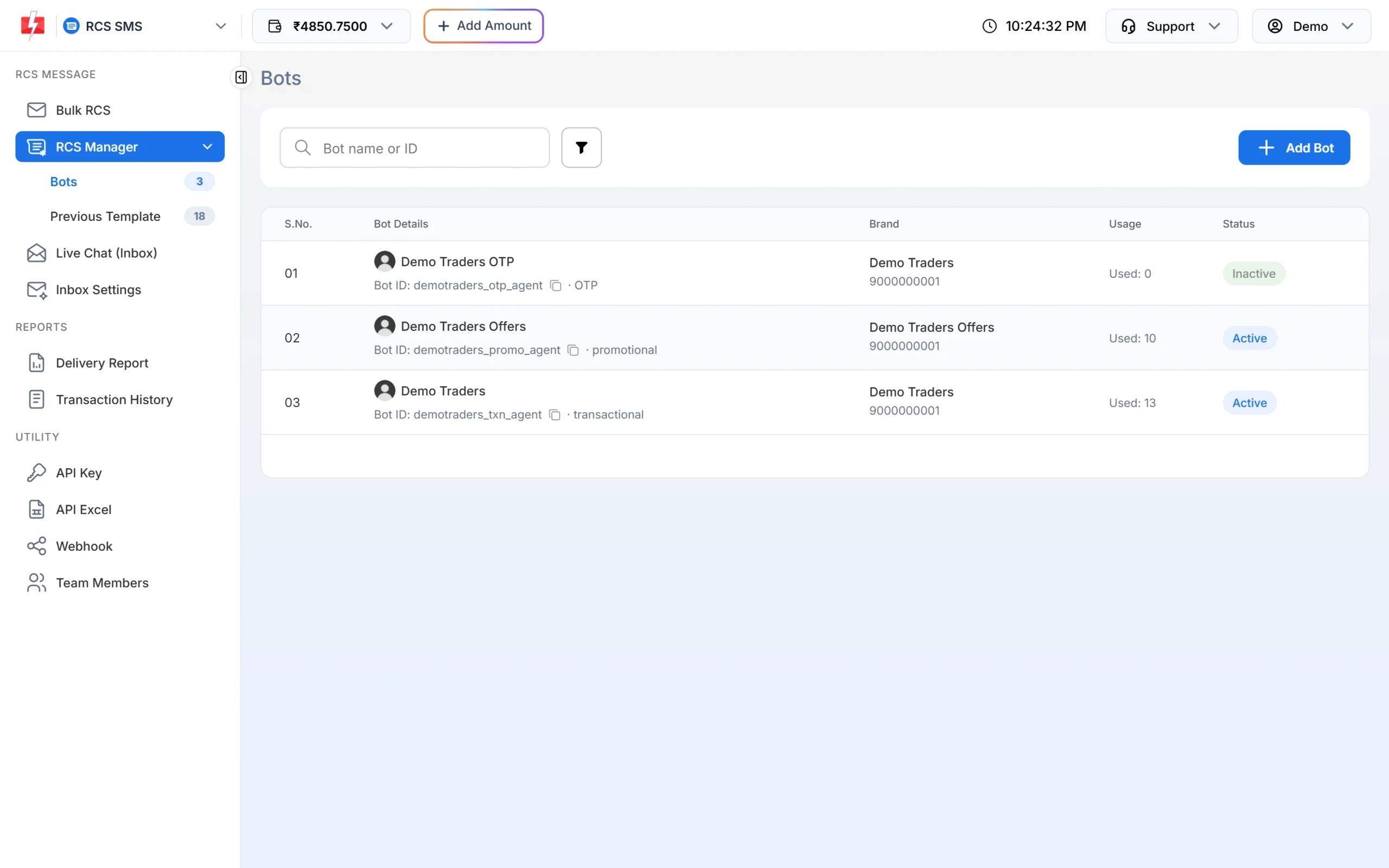
Use the transactional bot’s Bot ID for invoices and tickets. -
Send the request
For the file alone, use
typemedia withmedia_url. For a short note with the file and a button, usetyperich withmessage, an optionaltitleandmedia_url. Put your own invoice or booking number inudf1so you can match the delivery report later.curl -X POST "https://www.fast2sms.com/dev/rcs" \ -H "authorization: YOUR_API_KEY" -H "Content-Type: application/json" \ -d '{"bot_id":"YOUR_TRANSACTIONAL_BOT_ID","to":"9999999999","type":"rich", "title":"Invoice DT-INV-552", "message":"Thank you for shopping with Demo Traders. Your invoice is attached.", "media_url":"https://example.com/docs/inv-7f3k9q2x.pdf", "suggestion_type":"dial","suggestion_text":"Call us","suggestion_phone":"9999999999", "udf1":"DT-INV-552"}'A good request returns
"return":truewith arequest_id. Save it with the invoice. -
Track delivery
Each send appears in Delivery Report > RCS Report with its own number as the recipient. To update your software automatically, add an RCS webhook. It sends the status for API messages with your
udf1value.
Keep customer documents safe
- Send only what the customer needs. Mask account and card numbers in the PDF and the text, for example XXXX1234. Business RCS chats are not end-to-end encrypted.
- Use hard-to-guess links. Anyone who has the link can open a public file.
- Use one link per file. Google advises reusing the same link for the same file, and caches files it has downloaded.
- Never ask for an OTP, PIN or password in reply to a document message.
What it costs
A PDF message is charged like any other RCS message. At the time of writing, Fast2SMS has one rate of ₹0.35 per RCS message for every type. The amount is taken when you send, and Failed or Non-RCS numbers are refunded within 48 hours. Check the cost in the confirmation popup, and the current rate on the RCS pricing page.
Sending in bulk? For high RCS volumes our team offers discounted rates. Talk to our team or see RCS pricing.
Customers who cannot receive RCS
Numbers without RCS show as Non-RCS and get nothing. Fast2SMS does not send an SMS in their place automatically today. For invoices and tickets that every customer must get, send the Non-RCS numbers an SMS with a link to the document, using your DLT template. See RCS fallback to SMS.
Frequently asked questions
Can I send a PDF by RCS in India?
Yes. Fast2SMS accepts PDF in Rich and Media messages and by API. Google notes that a PDF in a rich card works on Google Messages in India.
What is the maximum PDF size?
The Bulk RCS page accepts files of up to 10 MB. Smaller files open faster on mobile data.
Can I send a different invoice to each customer in one bulk campaign?
No. Bulk RCS sends the same content to every number. Send personal documents one by one with the RCS API.
Which bot should send invoices and tickets?
A transactional bot. It is meant for order, payment and booking information, and has no sending-hour window or monthly limit.
Can I add a button to a PDF message?
Yes, on a Rich message: after you add the PDF, add up to 4 buttons. The Media type has no buttons.
Can customers reply after they get the PDF?
Yes. Replies arrive in Live Chat (Inbox), where your team can answer.
Do I need a DLT template to send a PDF over RCS?
No. RCS from Fast2SMS uses open templates. You only need a DLT template if you also send the document link by SMS.