
You can check your Fast2SMS wallet balance in two ways: click the wallet amount at the top of the panel, or call the wallet API (POST https://www.fast2sms.com/dev/wallet) with your API key. The API returns your balance in rupees and how many DLT SMS it can pay for. This guide shows both, gives ready code in cURL, PHP, Python and Node.js, and explains how to get low-balance alerts so your SMS and OTPs never stop by surprise.
Check your balance in the panel
Your balance is always shown on the wallet button at the top of every page, with 4 decimals, for example ₹4850.7500. Click it to open the wallet details:
- Wallet Balance: the money in your wallet.
- SMS (DLT): your rate per SMS, the Volume (how many SMS your balance covers) and DLT SMS Cost Validity.
- WhatsApp: your rates and volume for Utility / Auth, Marketing and Session messages, and calling rates.
- RCS and Voice: your rate and volume for each.
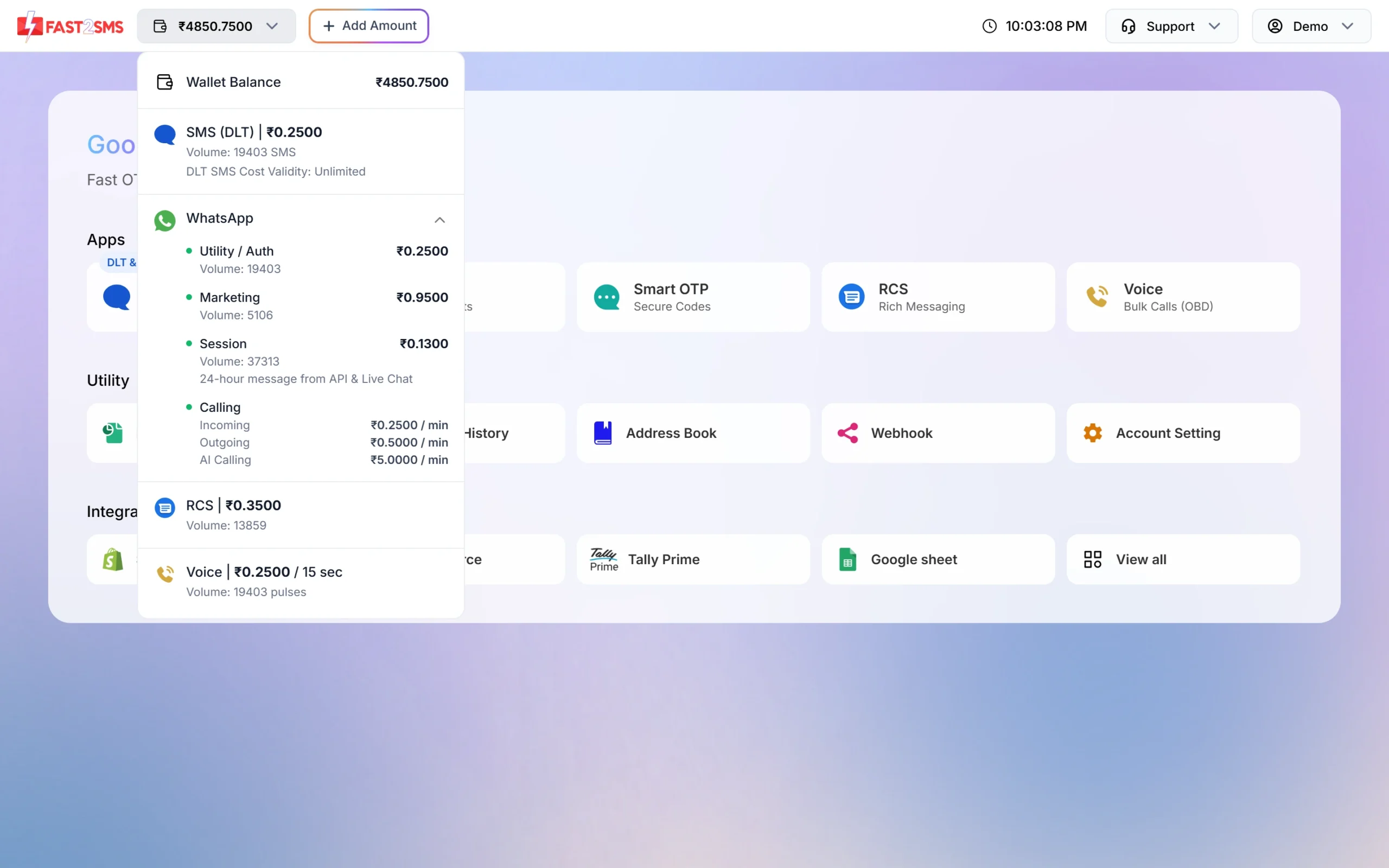
Volume is your balance divided by the rate, rounded down. It changes as your balance changes. To add money, click Add Amount next to the wallet button.
Check your wallet balance by API
The wallet API needs only your API key in the authorization header. It sends no message and costs nothing.
Request
curl -X POST "https://www.fast2sms.com/dev/wallet" \
  -H "authorization: YOUR_API_KEY"
Response
{"return":true,"wallet":"4850.7500","sms_count":19403}| Field | Meaning |
|---|---|
return |
true when the call worked |
wallet |
Your balance in rupees, as text with 4 decimals |
sms_count |
How many DLT SMS your balance covers at your current per-SMS rate |
Convert wallet to a number before you compare it, because it comes as text.
PHP
<?php
$ch = curl_init("https://www.fast2sms.com/dev/wallet");
curl_setopt_array($ch, [
    CURLOPT_POST => true,
    CURLOPT_RETURNTRANSFER => true,
    CURLOPT_HTTPHEADER => ["authorization: YOUR_API_KEY"],
]);
$data = json_decode(curl_exec($ch), true);
curl_close($ch);

if (($data["return"] ?? false) === true) {
    echo "Balance: Rs " . (float)$data["wallet"] . ", SMS left: " . $data["sms_count"];
} else {
    echo "Error: " . ($data["message"] ?? "unknown");
}
Python
import requests

r = requests.post("https://www.fast2sms.com/dev/wallet",
                  headers={"authorization": "YOUR_API_KEY"}, timeout=10)
data = r.json()
if data.get("return"):
    print("Balance:", float(data["wallet"]), "SMS left:", data["sms_count"])
else:
    print("Error:", data.get("message"))
Node.js
const res = await fetch("https://www.fast2sms.com/dev/wallet", {
  method: "POST",
  headers: { authorization: process.env.FAST2SMS_API_KEY },
});
const data = await res.json();
if (data.return) {
  console.log("Balance:", Number(data.wallet), "SMS left:", data.sms_count);
} else {
  console.log("Error:", data.message);
}Check the balance before a big send
A simple habit saves failed campaigns: call the wallet API before you send to a large list. If sms_count is smaller than the number of SMS you plan to send, recharge first. Remember that a long message uses more than one SMS per number: up to 160 English characters is 1 SMS, and Hindi or other Unicode text fits 70 characters in 1 SMS.
The send APIs also check your balance and reply with an error when it is too low:
| API | Low-balance reply |
|---|---|
| SMS (bulkV2) | Code 416 “You don’t have sufficient wallet balance”. This can come with HTTP 200, so check return. |
| Smart OTP | “Insufficient wallet balance. You need at least ₹…” |
| “Insufficient wallet balance, you need at least ₹X to send this Bulk SMS campaign.” |
How to turn on low-balance alerts
-
Open API Security
Go to Account Setting and click API Security under UTILITY.
-
Switch on Low Balance Notification
Turn on Low Balance Notification. Its note reads “SMS and email alerts when wallet balance is too low.” You then get an SMS and an email when your balance runs low, so you can recharge before sending stops.
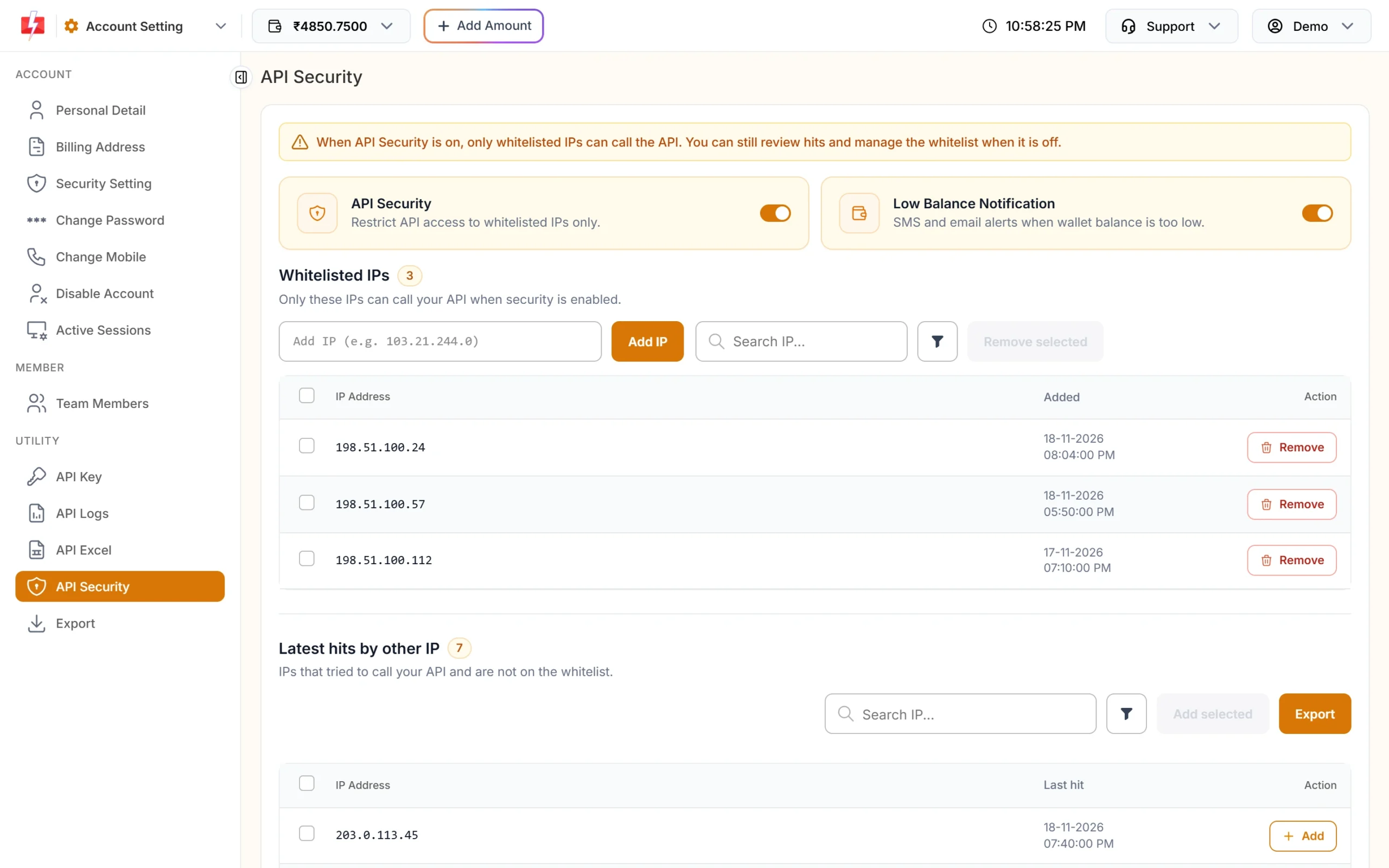
Low Balance Notification is on the API Security page.
The panel has no automatic recharge at the time of writing. When you get the alert, recharge with Add Amount. A bigger recharge can also lower your per-SMS rate.
Common problems and fixes
Error 412 “Invalid Authentication, Check Authorization Key”
The key is missing or wrong. Copy it again from the API Key page and send it in the authorization header.
Error 414 “IP is blacklisted from Dev API section”
API Security is on and the server calling the API is not whitelisted. Add its IP in API Security.
The balance in the API and the panel look different
Charges are taken when each message is processed, so the balance can drop a little between two checks while a campaign is running. Check again after the campaign ends.
My wallet shows a balance but sending says insufficient balance
Your send costs more than the balance: many numbers, long or Unicode messages, or a pricier channel. Check the volume in the wallet dropdown and recharge.
Frequently asked questions
How do I check my Fast2SMS balance?
Click the wallet amount at the top of the panel, or call POST https://www.fast2sms.com/dev/wallet with your API key.
Does the wallet API cost money?
No. It only reads your balance and sends no message.
What is sms_count in the wallet API?
The number of DLT SMS your balance covers at your current per-SMS rate.
Can I get an alert when my balance is low?
Yes. Turn on Low Balance Notification in Account Setting, API Security to get SMS and email alerts.
Is there auto-recharge in Fast2SMS?
Not at the time of writing. Recharge from Add Amount when you get a low-balance alert.