
CPaaS (Communications Platform as a Service) is a cloud platform that lets a business send and receive SMS, WhatsApp messages, RCS messages, OTPs and voice calls from a web panel or an API, and pay only for what it sends. You do not buy SIM cards, phone lines or telecom equipment. This guide explains what CPaaS is in simple words, how it works in India with DLT and Meta rules, how different Indian businesses use it, and how to start with Fast2SMS.
What is CPaaS, in plain words?
Think of electricity. A shop does not build its own power plant. It takes a connection from the grid and pays for the units it uses. CPaaS works the same way for customer messages and calls. The provider has already done the hard part: connections with telecom operators, access to the WhatsApp Business Platform, RCS access, voice lines, and the systems that track every message. You get a ready panel and an API on top of it.
The word “cloud communication” means the same idea. Your messages are sent from servers on the internet, not from a phone in your office. That is why one person can send 10,000 order updates in a few minutes, and why a website can send a login OTP the moment a customer taps “Get OTP”.
A CPaaS platform usually gives you four things:
- Channels: SMS, WhatsApp, RCS, voice calls and OTP verification.
- Two ways to send: a web panel for people, and an API for software (your website, app, CRM or billing system).
- Reports: a delivery status for every number, so you know what reached the customer and what failed.
- Pay-as-you-go billing: a prepaid wallet or a per-message charge, with no telecom contract to sign.
How CPaaS works
Every message follows the same path. You create it in the panel or send it from your software, the platform checks it and sends it to the right network, and the status comes back to you.
In Fast2SMS this looks like this:
- You pick a channel, the numbers and an approved template, or your software calls the API with the same details.
- The platform checks the request: approved sender, approved template, valid numbers, enough wallet balance, sending hours. It removes duplicate and invalid numbers before it charges you.
- The message goes to the operator (SMS, voice), to WhatsApp, or to the RCS network.
- The status of each number comes back: Delivered, Read, Failed, DND and so on. You see it under Delivery Reports, and your own system can receive it on a webhook URL.
The channels in a CPaaS platform and what each is good for
| Channel | Best for | What you need first (India) |
|---|---|---|
| Bulk SMS | Reaching every phone, including basic phones without internet. OTPs, order updates, reminders, offers. | DLT registration: entity, sender ID (header) and approved templates |
| WhatsApp Business API | Images, documents, buttons, two-way chat, chatbots | A WhatsApp number connected through Meta, approved message templates, customer opt-in |
| RCS messages | Branded rich cards, carousels and buttons in the phone’s default messaging app | RCS brand registration and an approved bot |
| Voice calls (OBD) | Recorded announcements, key-press surveys, connecting interested callers to your agents | A voice file approved by the operator |
| OTP verification | Login, sign-up, COD and payment checks | An OTP template on SMS (DLT) or WhatsApp (authentication or utility) |
The real strength of CPaaS is that these channels sit in one place. An OTP can go on WhatsApp and fall back to SMS if it fails. A campaign can go on RCS, and the numbers that cannot receive RCS can get an SMS. A voice call can remind older customers who do not read texts.
CPaaS vs the old ways of sending business messages
| Phone or SIM-based sending | Building your own telecom links | CPaaS | |
|---|---|---|---|
| Setup | Quick, but limited | Months of work and contracts | Sign up and start after DLT or Meta approval |
| Legal in India for business bulk messages | No: business SMS must go through DLT, and bulk WhatsApp from a normal app gets numbers banned | Yes, with heavy compliance work | Yes: DLT checks and Meta rules are built in |
| Volume | A few hundred a day at best | High | High |
| Reports | None | You build them | Per-number delivery report, export and webhooks |
| Cost | SIM plans, phones, staff time | Large fixed cost | Pay per message from a prepaid wallet |
CPaaS, UCaaS and CCaaS: what is the difference?
You may see these three terms together:
- CPaaS gives you building blocks (send SMS, send WhatsApp, place a call, verify an OTP) that you use from a panel or plug into your own software.
- UCaaS (Unified Communications as a Service) is for talking inside a company: office phone lines, video meetings and team chat.
- CCaaS (Contact Center as a Service) is a ready call-centre system for support teams: call queues, agent screens and call recording.
Many platforms now mix parts of each. For example, Fast2SMS is a CPaaS, and it also has a shared WhatsApp and RCS inbox for your team, Call Patch voice campaigns that connect callers to your agents, and AI voice agents that can answer WhatsApp calls.
How Indian businesses use CPaaS
Here is how different kinds of businesses use the same platform:
| Business | Typical messages | Channels they use |
|---|---|---|
| Online store or D2C brand | Login OTP, COD confirmation, order and shipping updates, sale offers, abandoned cart reminders | Smart OTP, SMS, WhatsApp, RCS |
| Clinic, lab or hospital | Appointment reminders, report ready alerts, follow-up reminders | SMS, WhatsApp, voice |
| School, college or coaching centre | Attendance, fee reminders, exam dates, results, holiday notices | SMS, WhatsApp, voice in Hindi or local language |
| Bank, NBFC or fintech | Login and payment OTPs, EMI due reminders, account alerts | SMS, Smart OTP, WhatsApp |
| Courier and logistics | Pickup, out for delivery, delivery OTP, failed delivery | SMS, WhatsApp, API with webhooks |
| SaaS or mobile app | Sign-up verification, two-factor login, usage alerts | Smart OTP and API |
| Real estate | Project launches, site visit reminders, brochures | WhatsApp, RCS, voice with Call Patch |
| Local shop or restaurant | Festival offers, thank-you messages, reservations | SMS, WhatsApp chat and auto replies |
Most of these businesses start with one channel, usually SMS or WhatsApp, and add others when they see where the first one falls short.
Indian rules every CPaaS user must follow
A CPaaS provider in India cannot send whatever you type. These rules apply, and a good platform checks them for you:
- DLT for SMS: every business SMS needs a registered entity (Principal Entity), an approved header (sender ID) and an approved content template. The entity registration fee is ₹5,900 per year including GST (at the time of writing), the same on every DLT portal. One DLT registration works for all operators.
- PE-TM chain: on the DLT portal where you registered, you link your entity to your provider’s telemarketer ID, so operators know who is allowed to send for you.
- Promotional SMS timing: promotional SMS are delivered only in the daytime window and not to DND numbers. Service and transactional SMS such as OTPs and order updates can go any time.
- WhatsApp: business-started messages need a Meta-approved template and the customer’s opt-in. Limits start at the tier Meta gives your business: often 250 unique customers per 24 hours for a new, unverified business and 2,000 (2K) once the business is verified (at the time of writing), and it grows as you send good-quality messages.
- RCS: your brand is verified before you can send, and promotional RCS has a monthly cap per number.
- Voice calls: calls go out only between 10 AM and 9 PM, and the operator approves each voice file first.
How CPaaS pricing works
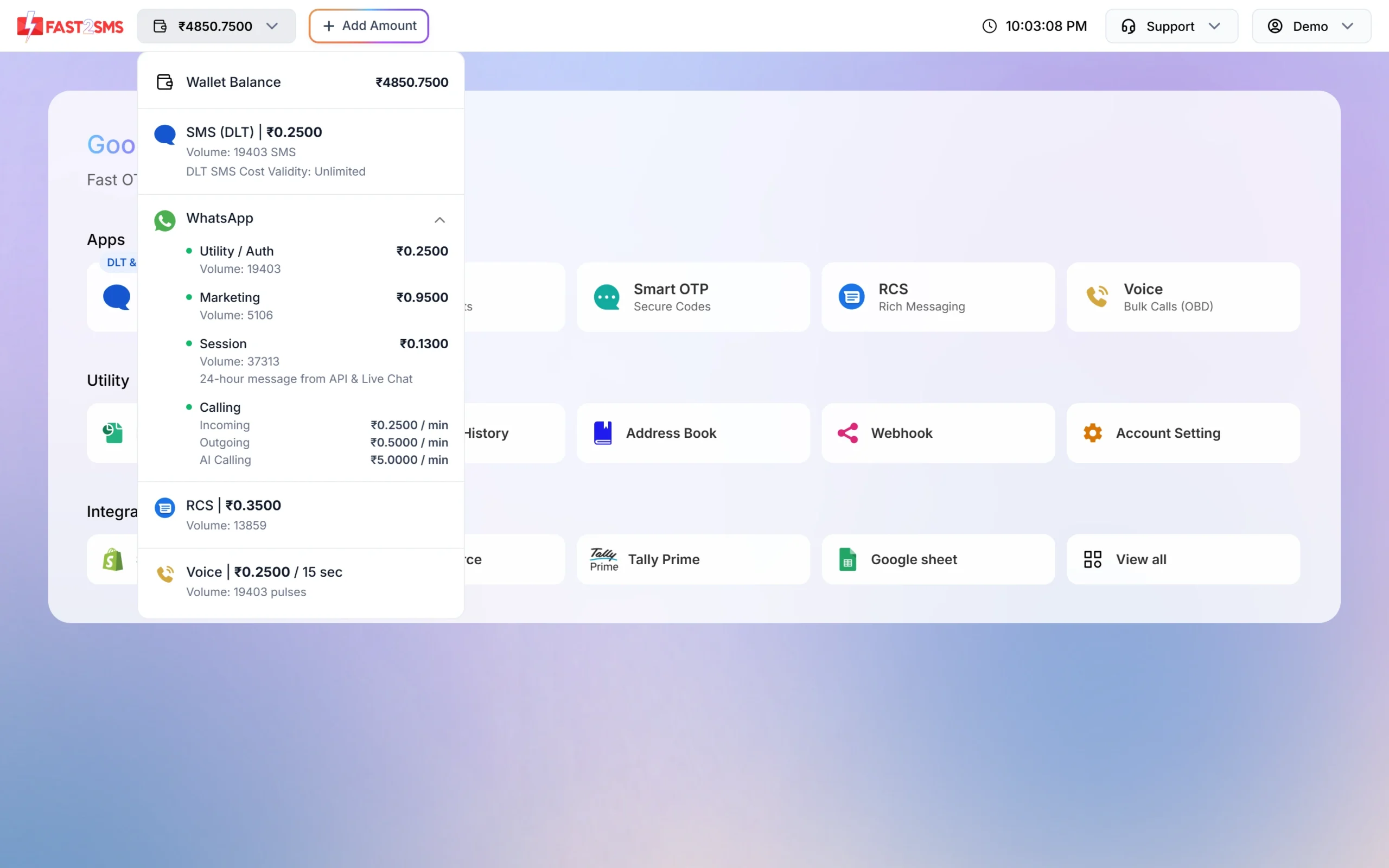
Most CPaaS platforms in India charge per message from a prepaid wallet. In Fast2SMS you add money once and every channel uses the same wallet. The price depends on the channel and the message type: an SMS is charged per SMS part, a WhatsApp message by its template category (marketing, utility, authentication or a session reply), an RCS message by its type, and a voice call per pulse of answered talk time. Click the wallet balance at the top of the panel to see your current rate for each channel and roughly how many messages your balance covers. At the time of writing, the public bulk SMS pricing page lists no setup fee and no monthly fee.
Before a campaign goes out, the panel shows the exact cost (numbers x rate x parts) and lets you cancel. Where a channel refunds failed messages, the refund goes back to the same wallet. For example, unanswered voice calls are refunded automatically about 1 hour after the campaign finishes.
Sending in bulk? For high SMS volumes our team offers discounted rates. Talk to our team or see SMS pricing.
How to start using Fast2SMS as your CPaaS
-
Sign up and open the dashboard
Create an account on fast2sms.com. The dashboard shows every channel as an app: SMS, WhatsApp, Smart OTP, RCS and Voice. Below them are the shared tools (Delivery Reports, Transaction History, Address Book, Webhook, Account Setting) and ready integrations such as Shopify, WooCommerce, Tally Prime and Google Sheets.
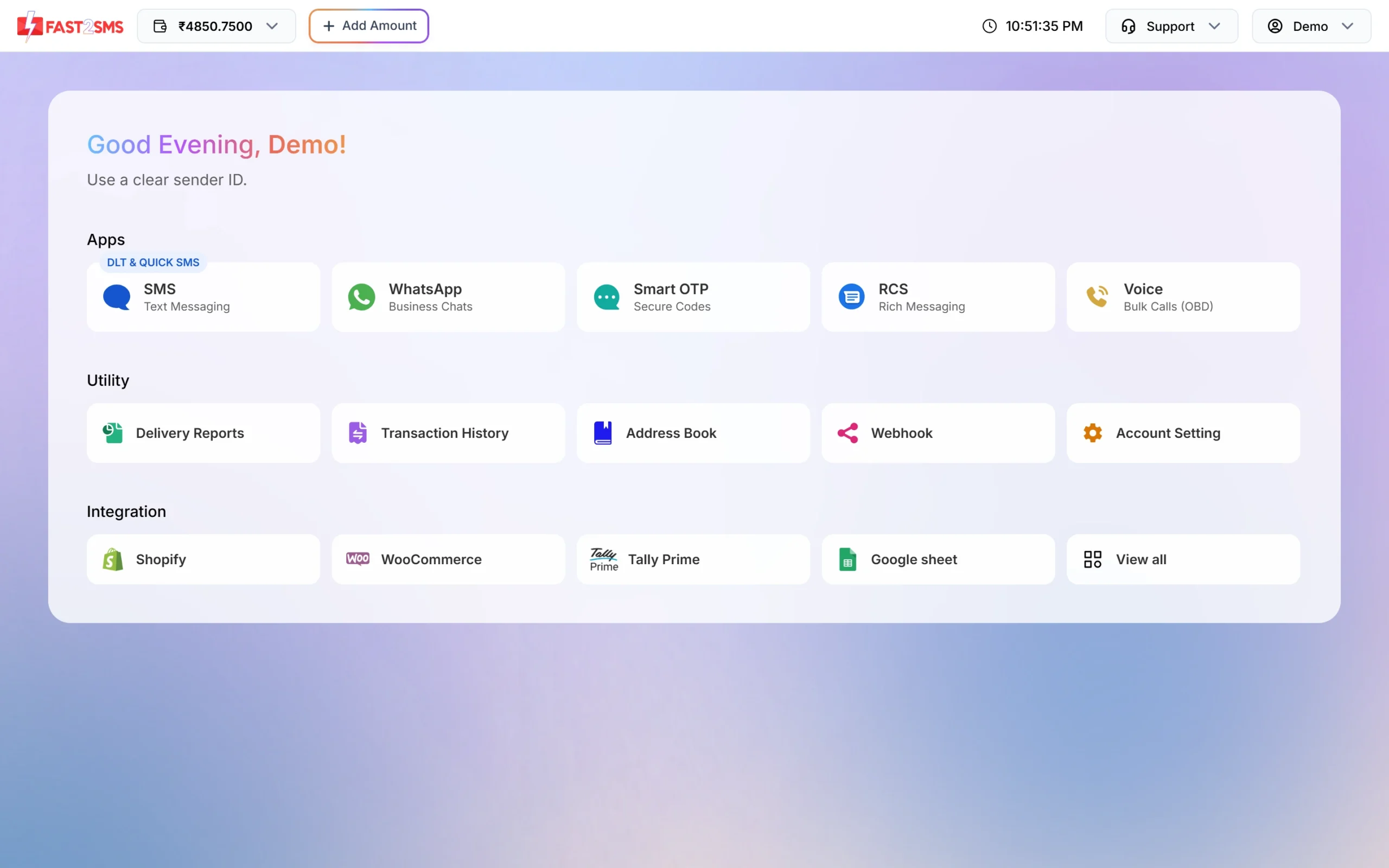
Every channel and tool starts from the dashboard. -
Add money to the wallet
Click Add Amount at the top. The minimum recharge is ₹100, and 18% GST is added on top. You get a GST invoice for every payment.
-
Set up the channel you need first
For SMS, add your Entity ID, sender IDs and templates in DLT Manager. For WhatsApp, connect your number with the Login with Facebook button and get your templates approved. For RCS, fill in the brand registration form. For voice, upload a voice file or use one of the free sample files.
-
Send from the panel or the API
Send a campaign to a pasted list, an Address Book group or a CSV file, or connect your software with your API key. The API covers SMS, WhatsApp, Smart OTP, RCS and voice.
-
Track results and connect your systems
Check each campaign in Delivery Reports. To get status updates in your own CRM or app, add a webhook URL per channel. You can filter webhooks by event, for example only failed SMS.
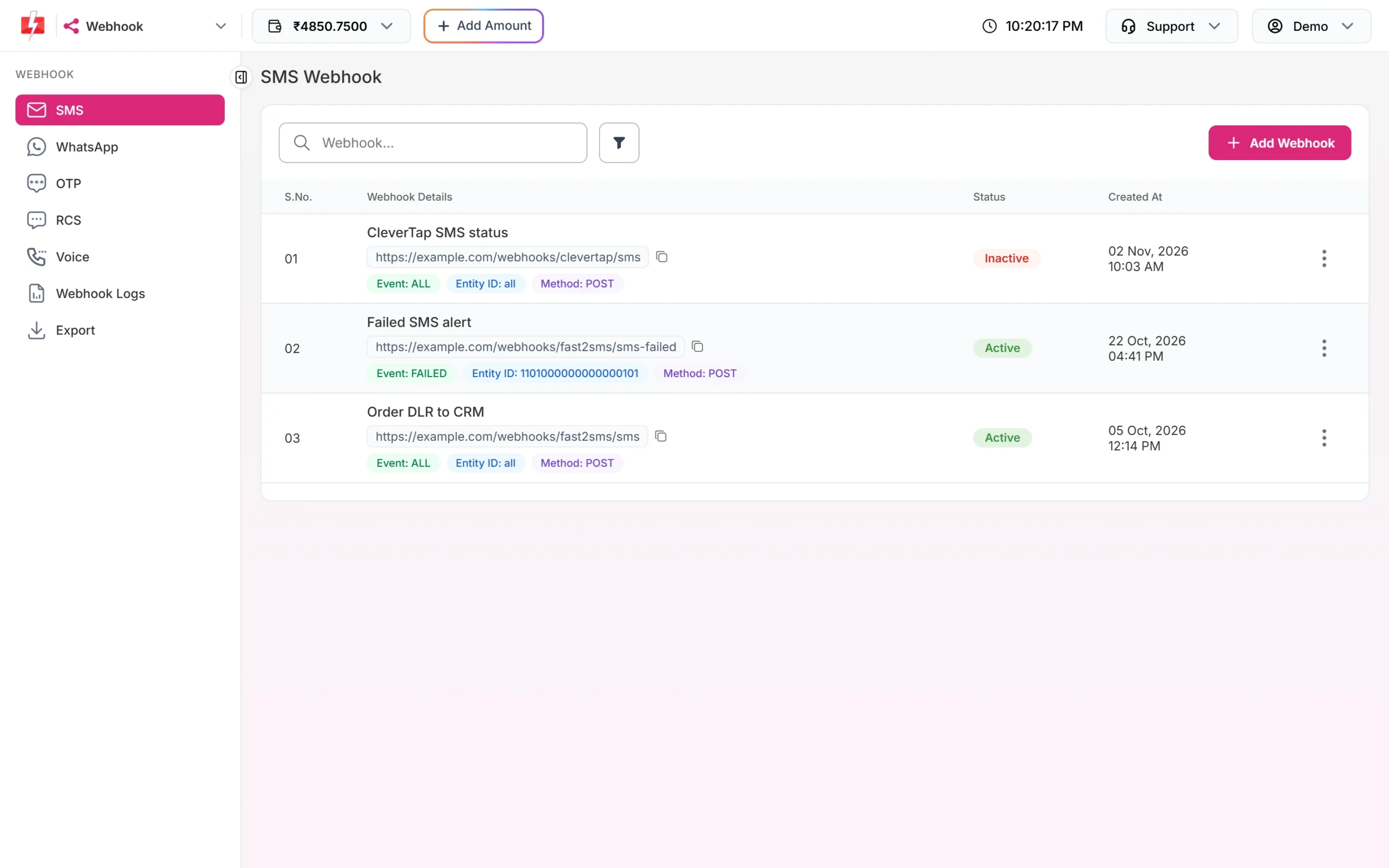
Webhooks send each delivery status to your own URL.
Tip: start small. Send your first campaign to your own numbers and a few staff members, check the delivery report, then send to your full list.
What to check before you pick a CPaaS provider
- Does it help with DLT registration, the PE-TM chain and template approval?
- Does it show a delivery status and failure reason for every single number?
- Does it show the cost before you send, and is the refund rule for failed messages written down?
- Does it have a clear API with sample code, IP whitelisting and API logs?
- Can you reach support by chat, phone or email when a campaign is stuck?
- Does it have the channels you will need next year, not just today?
Frequently asked questions
What is the full form of CPaaS?
CPaaS stands for Communications Platform as a Service. It is a cloud service that lets businesses add SMS, WhatsApp, RCS, voice and OTP to their work without building telecom systems.
Is CPaaS the same as a bulk SMS provider?
A bulk SMS provider is one part of CPaaS. A CPaaS platform usually also gives WhatsApp, RCS, voice and OTP, with APIs and reports for all of them.
Do I need coding knowledge to use CPaaS?
No. You can send every channel from the Fast2SMS panel. The API is there when you want your website, app or CRM to send messages on its own.
Is DLT registration needed for WhatsApp, RCS or voice?
DLT registration is for SMS. WhatsApp follows Meta’s rules and approval, RCS needs a brand registration, and voice files are approved by the operator.
How much does a CPaaS platform cost?
You pay per message or per call from a prepaid wallet. Rates depend on the channel and the message type. See the SMS pricing and WhatsApp pricing pages for the current rates.
Can a small business use CPaaS?
Yes. There is no monthly fee, and the minimum recharge is ₹100, so a shop can start with a small campaign to its own customers.
Can I send messages from my own website or software?
Yes. Use your API key from Settings, or install a ready integration such as the Shopify app, the WooCommerce plugin or the Tally plugin.