
Meta has split the old WhatsApp Business Account (WABA) into two accounts. The WhatsApp account holds your business phone number and profile. The Messaging account holds your message templates, billing and webhooks. Your old WABA ID did not change: it is now your Messaging account ID. Meta moved every business automatically between 23 September and mid-October 2026, and your number, templates and sending keep working.
This guide explains the WhatsApp account vs Messaging account change in simple words, what stays the same, what is new, and what it means if you send WhatsApp through Fast2SMS.
WhatsApp account vs Messaging account in one table
Meta explains the new model on its Updates to WhatsApp Business accounts page and its WhatsApp accounts and Messaging accounts page.
| WhatsApp account (WAAC) | Messaging account | |
|---|---|---|
| What it holds | One business phone number, the business profile, product catalogs and, later, a business username | Message templates, billing and payment methods, webhook subscriptions |
| Who owns it | Always the business (you) | You, or a partner. Each partner you work with gets its own Messaging account |
| Its ID | A new WhatsApp account ID, not available until Meta’s next Graph API phase (planned for the first half of 2027) | Your existing WABA ID, same number as before |
| Can be shared with | Up to five Solution Partners | Up to two partners |
| Name in Meta’s terms | “WhatsApp Business Account” | “Messaging Account” |
Why Meta made the change
Before, one WABA bundled the phone number, templates, billing and partner access together. If a business wanted to use two providers, it needed two phone numbers, so customers saw two different contacts for the same brand. With the new model, one number can be shared with several partners, and each partner keeps its own templates and billing. Customers see a single contact.
Where your assets live now
| Asset | Before | After |
|---|---|---|
| Phone numbers | Under the WABA | Under the WhatsApp account |
| Message templates | Under the WABA | Under the Messaging account (one per partner) |
| Billing and payment method | Under the WABA | Under the Messaging account |
| Conversation history and quality rating | Under the phone number | Unchanged |
| Business verification | Business portfolio | Unchanged |
| Webhook subscriptions | Under the WABA | Under the Messaging account |
What stays the same
- Your WABA ID and your Phone Number IDs. Existing API calls, endpoints and access tokens keep working.
- Creating, editing and submitting templates for review.
- Display names, quality ratings and messaging limits. Limits still sit at the business portfolio level, from 250 to 2K, 10K, 100K and Unlimited customers in 24 hours.
- Business verification, number registration and the Cloud API message format.
- Throughput stays per phone number. If several partners share a number, they share its throughput and its messaging limit.
What is new
- Two tabs in Meta Business Suite. Under Settings > Accounts you now see WhatsApp accounts and Messaging accounts instead of one WABA list. WhatsApp Manager is organised by Messaging account, with a selector at the top right.
- Templates are per partner. A template created in one Messaging account is not visible in another. To use it with a second partner, create it again or copy it with Meta’s Template Migration API. Meta says copied templates start again at baseline quality and messaging tier, and take about 2 to 4 weeks to ramp up.
- Billing is per partner. Each Messaging account has its own payment method. A message is billed to the Messaging account of the partner that sent it.
- No more number migration between Solution Partners. To add a new partner, you share your WhatsApp account with them. The number does not move and chats continue. Removing the old partner is your choice.
- Two-step verification PIN. Meta is removing the 6-digit PIN for eligible Cloud API numbers in stages. If the Two-step verification tab is missing in WhatsApp Manager, the change has reached your number.
Sending in bulk? For high WhatsApp volumes our team offers discounted rates. Talk to our team or see WhatsApp pricing.
What this means for Fast2SMS users
You do not need to reconnect your number. Meta says existing IDs and access tokens keep working, and new numbers connected with Login with Facebook get both accounts created by Meta’s signup flow. Here is how the change shows up in the panel:
-
Check your IDs in WhatsApp Manager
Open WhatsApp Manager and click Numbers. The Business IDs column shows the Business Portfolio ID, the WABA ID and the Phone Number ID of each number, each with a copy button. The value labelled WABA ID is your Messaging account ID under the new names.
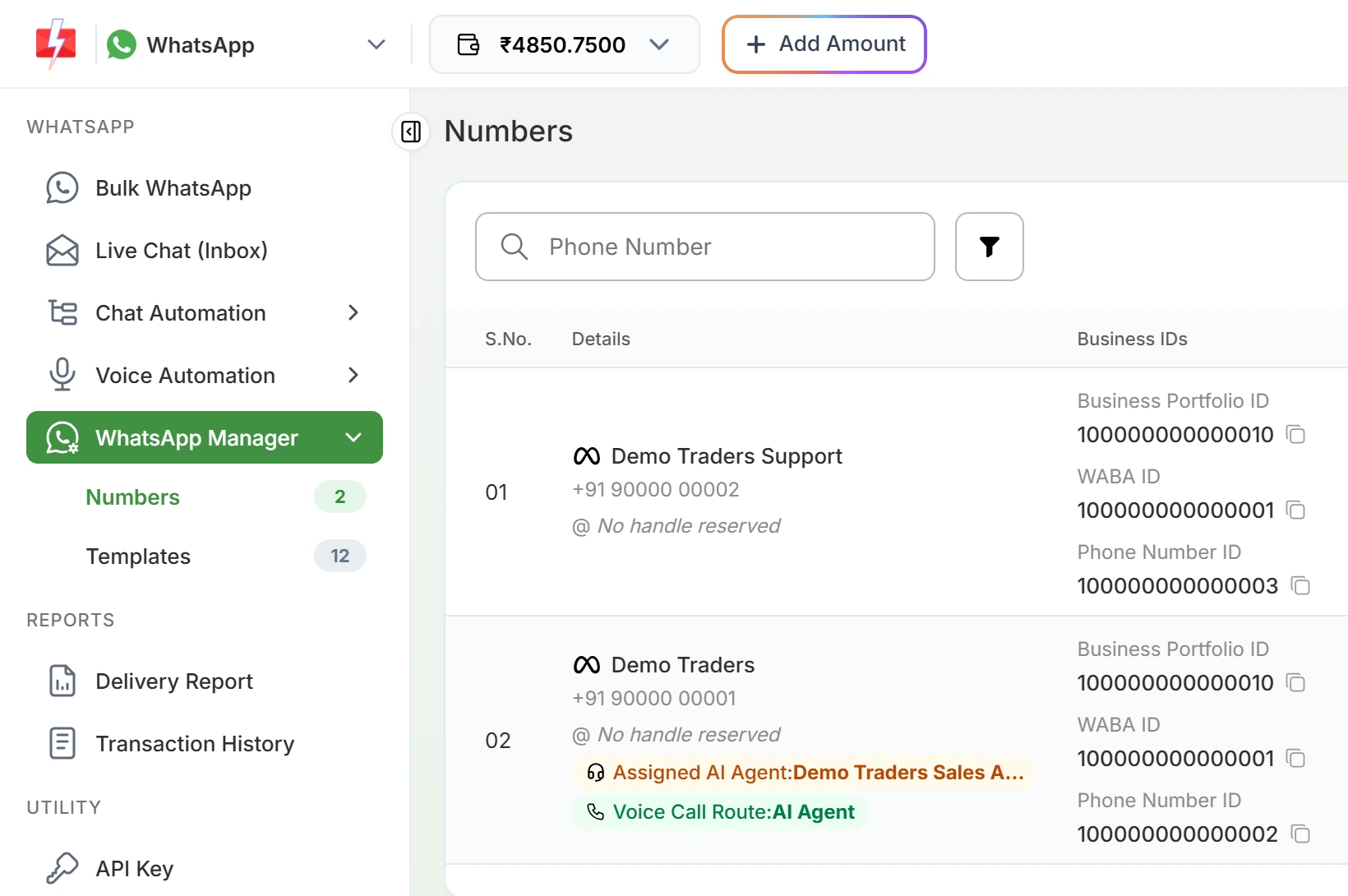
The WABA ID shown here is now your Messaging account ID. -
Keep sending as before
Bulk WhatsApp, Live Chat, chatbots and the Fast2SMS WhatsApp API work the same way. Your API requests use your Fast2SMS key with the template’s Message ID, and the optional Phone Number ID.
-
Using another provider on the same number
Each partner has its own Messaging account, so templates you made with another provider will not appear in Fast2SMS, and the reverse. Create the templates you need in Fast2SMS under WhatsApp Manager > Templates. The daily messaging limit of the number is shared across all partners on it.
Meta’s rollout timeline
| Phase | When | What happens |
|---|---|---|
| Phase 1: general availability | From 23 September 2026, all businesses by mid-October 2026 | Meta splits every WABA automatically. Business Suite shows the two account tabs. Old IDs keep working. |
| Phase 2: new Graph API version | First half of 2027 | WhatsApp account IDs appear. Developers who send through more than one Messaging account on the same number must name the Messaging account in API calls. |
| Phase 3: mandatory transition | First half of 2028 | Meta APIs that use a phone number ID in the URL must use the WhatsApp account ID instead. |
Phases 2 and 3 matter mostly to developers who call Meta’s Graph API directly with their own access tokens. If you only use the Fast2SMS panel or the simple Fast2SMS WhatsApp API, nothing changes in your requests today.
Frequently asked questions
Has my WhatsApp Business Account ID changed?
No. The same number now identifies your Messaging account, and the field is still called waba_id in the API.
Do I need to reconnect my number to Fast2SMS?
No. Meta migrated accounts automatically and says existing IDs and tokens keep working.
Will I lose my templates?
No. Templates moved into your Messaging account. They are just not shared with other partners’ Messaging accounts.
Can I use two WhatsApp providers on one number now?
Yes. You can share your WhatsApp account with up to five Solution Partners. Each partner works from its own Messaging account with its own templates and billing.
Does my messaging limit change?
No. Limits stay at the business portfolio level. If several partners share a number, they share its limit too.
What is a WAAC ID?
It is the ID of the new WhatsApp account that holds one phone number. Meta plans to make it available in the first half of 2027. Until then, keep using the Phone Number ID.
Where do I see the two accounts?
In Meta Business Suite, go to Settings, then Accounts, and open WhatsApp accounts or Messaging accounts.
Did WhatsApp prices change because of this?
No. Meta lists pricing among the things this change does not affect.