
To send a WhatsApp template with an image, video or PDF header through the Fast2SMS API, add media_url to the normal template request: a public link to the file. For a PDF you can also send document_filename, the name the customer sees. This guide covers the file types and sizes the API accepts, how to host the file so the link works, and code in cURL, PHP, Python and Node.js.
Before you start
- An approved template whose header is Image, Video or Document. You choose the header type when you create the template; see how to create a WhatsApp template.
- The template’s Message ID from WhatsApp Manager, Templates.
- The file on a public web address (your website, a CDN or cloud storage with public read).
- Your API key. The basics of the template API are in send WhatsApp template messages by API.
Step by step
-
Find the media template and its Message ID
Open WhatsApp Manager, then Templates. A template with a media header shows the header in the phone preview. Note its Message ID and count the variables in the body.
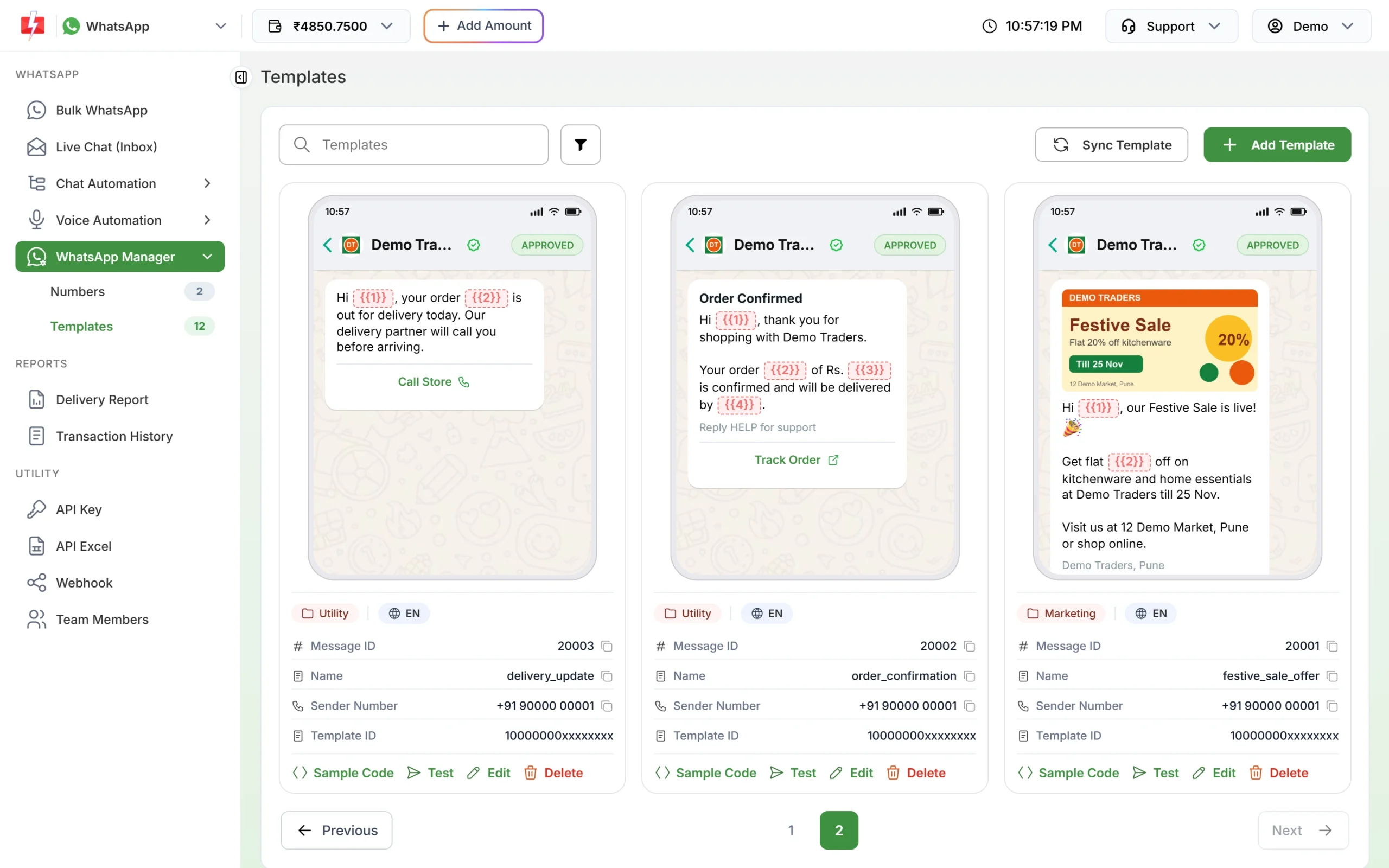
The festive_sale_offer template has an image header and two variables. -
Upload the file and copy a direct link
Put the file where anyone can open it without logging in. Open the link in a private browser window: it must show or download the file itself, not a preview or login page.
-
Send the request with media_url
Send
message_id,numbers,variables_valuesandmedia_url. For a PDF, adddocument_filename. -
Check the delivery report
The reply gives a
request_id. Open Delivery Report to see each number’s status. If WhatsApp could not fetch the file, the message fails with a media error and is refunded like any failed message.
File types and size limits
| Header type | File formats the API checks for | Max size |
|---|---|---|
| Image | JPEG or PNG | 5 MB |
| Video | MP4 | 16 MB |
| Document | 100 MB |
Fast2SMS checks the link before it queues the message. These limits follow WhatsApp’s own media rules at the time of writing. For all formats see WhatsApp media file size limits.
Code examples
These send the image template 20001 with two variables (“Rahul” and “20%”) to 9999999999.
cURL
curl -X POST "https://www.fast2sms.com/dev/whatsapp" \
  -H "authorization: YOUR_API_KEY" \
  -H "Content-Type: application/json" \
  -d '{"message_id":"20001","numbers":"9999999999","variables_values":"Rahul|20%",
       "media_url":"https://example.com/offers/festive-sale.jpg"}'
cURL with a PDF header
curl -X POST "https://www.fast2sms.com/dev/whatsapp" \
  -H "authorization: YOUR_API_KEY" \
  -H "Content-Type: application/json" \
  -d '{"message_id":"20007","numbers":"9999999999","variables_values":"INV-1042",
       "media_url":"https://example.com/invoices/INV-1042.pdf","document_filename":"Invoice INV-1042"}'
PHP
<?php
$payload = [
    "message_id"       => "20001",
    "numbers"          => "9999999999",
    "variables_values" => "Rahul|20%",
    "media_url"        => "https://example.com/offers/festive-sale.jpg",
];
$ch = curl_init("https://www.fast2sms.com/dev/whatsapp");
curl_setopt_array($ch, [
    CURLOPT_POST           => true,
    CURLOPT_RETURNTRANSFER => true,
    CURLOPT_HTTPHEADER     => ["authorization: YOUR_API_KEY", "Content-Type: application/json"],
    CURLOPT_POSTFIELDS     => json_encode($payload),
]);
$data = json_decode(curl_exec($ch), true);
curl_close($ch);
echo ($data["return"] ?? false) === true ? $data["request_id"] : json_encode($data["errors"] ?? $data);
Python
import requests

payload = {
    "message_id": "20001",
    "numbers": "9999999999",
    "variables_values": "Rahul|20%",
    "media_url": "https://example.com/offers/festive-sale.jpg",
}
r = requests.post("https://www.fast2sms.com/dev/whatsapp",
                  headers={"authorization": "YOUR_API_KEY"}, json=payload, timeout=30)
data = r.json()
print(data["request_id"] if data.get("return") else data.get("errors"))
Node.js
const res = await fetch("https://www.fast2sms.com/dev/whatsapp", {
  method: "POST",
  headers: { authorization: process.env.FAST2SMS_API_KEY, "Content-Type": "application/json" },
  body: JSON.stringify({
    message_id: "20001",
    numbers: "9999999999",
    variables_values: "Rahul|20%",
    media_url: "https://example.com/offers/festive-sale.jpg",
  }),
});
const data = await res.json();
console.log(data.return === true ? data.request_id : data.errors);
If you use GET instead of POST, URL-encode media_url and variables_values. With cURL, --data-urlencode does this for you.
How to host the file so the link works
- Use https and a direct file link. The link must start with
http://orhttps://and point at the file itself. Share pages of Google Drive or Dropbox show a preview page, not the file, so they usually fail. - No login, no IP block. Fast2SMS and WhatsApp both fetch the file from the internet. Links on localhost, a private IP or behind a login are refused with “Media URL is not reachable. Please use a public link.”
- Return the right file type. Your server should answer with the correct Content-Type, for example
image/jpegorapplication/pdf. - Keep the file online. WhatsApp downloads the file when it sends the message. A scheduled message needs the link to still work at the scheduled time.
- One file per customer is fine. Each request can carry a different
media_url, for example a separate invoice PDF per order. All numbers in one request get the same file.
Common problems and fixes
“Media URL is not reachable. Please use a public link.”
The link points at a private or local address, or our server could not reach it. Host the file on a public address and test it in a private browser window.
“Media URL must start with http:// or https://”
Send the full address including https://.
“Media file is too large. Maximum allowed size for this type is … MB”
Compress the image or video, or split a large PDF. Limits are 5 MB for images, 16 MB for video and 100 MB for PDF.
The API accepted the request but the message failed
WhatsApp could not download or use the file. Open the message in Delivery Report and read the Description. A media error such as 131053 means the file type, size or link was the problem. See WhatsApp API error codes.
The PDF opens with a strange name
Send document_filename, for example “Invoice INV-1042”. Without it the customer sees a default name.
Frequently asked questions
Can I upload the image to Fast2SMS through the API?
The template send API takes a link, not a file upload. Host the file yourself and pass its public URL in media_url.
Can I send an image with a normal text template?
No. The template must have an image, video or document header approved by Meta. Create a new template with a media header for that.
Is the sample image from template approval sent automatically?
Send media_url with every request for a media template, so you control which file the customer gets.
Does a media template cost more than a text template?
WhatsApp charges by template category (Marketing, Utility, Authentication), not by header type. See the WhatsApp pricing page for current rates.
Can I send a video in a session reply?
Yes, within 24 hours of the customer’s last message, using the session API with type=video. See the session message API.