
When a customer writes to your WhatsApp number, you can reply with any text, image, video, audio, document, location or reaction for the next 24 hours. With Fast2SMS you send these replies by API through https://www.fast2sms.com/dev/whatsapp-session, no template needed. This guide explains the 24-hour rule, every parameter, the file limits and ready code for cURL, PHP, Python and Node.js.
The 24-hour rule in short
WhatsApp opens a 24-hour customer service window each time the customer sends you a message. Inside that window you can send free-form session messages. After 24 hours with no new message from the customer, you can only send an approved template. Read more in how to message a customer after 24 hours.
The API does not stop you from sending outside the window. WhatsApp itself rejects such a message, and it shows as Failed in your report with Meta’s re-engagement error 131047. Failed messages are refunded automatically. Track the customer’s last message time on your side, or use a template when in doubt.
Before you start
- A WhatsApp number with the status Connected, and its Phone Number ID from WhatsApp Manager, Numbers.
- Your API key from API Key.
- Incoming messages reaching your server, so you know who wrote and when. Set this up with a WhatsApp webhook; see receive incoming WhatsApp messages on your server.
Send a session message step by step
-
Download the session API samples
Go to Account Setting, API Excel, and pick WhatsApp. Click Download Session API. The Excel has one row per connected number and message type (text, image, document, audio, video, location, sticker, reaction) with a sample URL and the file rules.
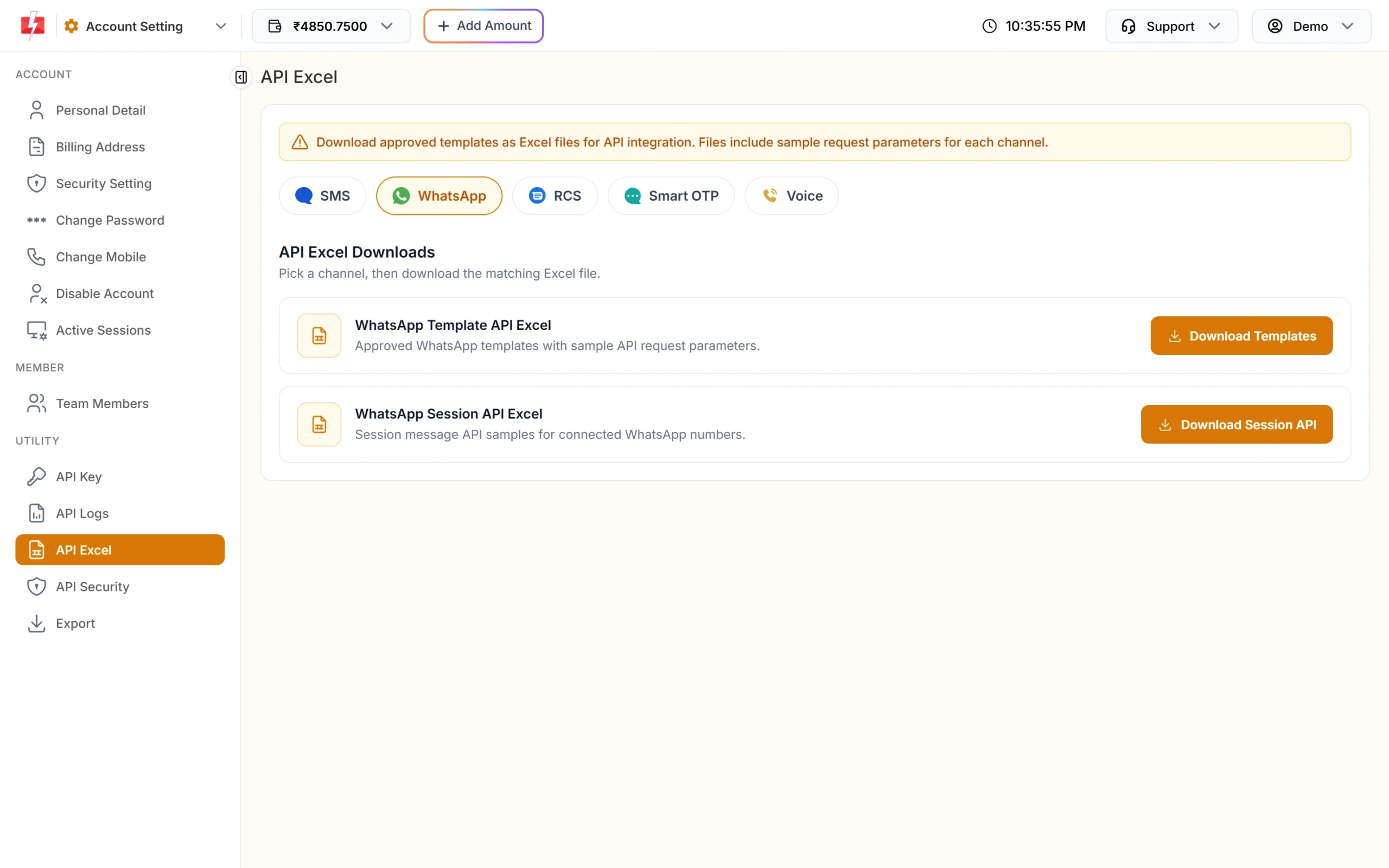
Download Session API gives sample requests for each message type. -
Pick the type and build the request
Send
phone_number_id, the customer’s number into, thetypeand the fields that type needs (table below). Put your key in theauthorizationheader. -
Read the response
Success looks like this. Save the
request_idto look up the status later.{"return":true,"request_id":"Wa1B2c3D4e5F6g7","message":["Whatsapp Message sent successfully."]} -
Watch the status
Sent, delivered, read and failed updates come through the WhatsApp delivery report, the DLR API and your webhook. See WhatsApp delivery and read status by API.
Parameters
| Parameter | When | Rules |
|---|---|---|
phone_number_id |
Always (or display_number) |
The connected number that replies. Phone Number ID is the safer choice |
to |
Always | The customer’s Indian mobile, 10 digits, with or without 91 |
type |
Optional | text (default), image, video, audio, document, sticker, location, reaction |
text |
type=text | Up to 4,096 characters |
url |
image, video, audio, document, sticker | Public link to the file |
caption |
Optional for media | Up to 1,024 characters |
document_filename |
type=document | Required. The file name the customer sees |
latitude, longitude |
type=location | Required. Add name and address if you like |
message_id, emoji |
type=reaction | The WhatsApp message ID of the customer’s message (from the incoming webhook) and the emoji |
udf1 to udf3 |
Optional | Your own tracking values |
File types and sizes for media replies
| type | Formats | Max size |
|---|---|---|
| image | JPEG, PNG | 5 MB |
| video | MP4, 3GP | 16 MB |
| audio | AAC, MP4 audio, MP3, AMR, OGG | 16 MB |
| document | PDF, DOC, DOCX, PPT, PPTX, XLS, XLSX, TXT | 100 MB |
| sticker | WebP | 100 KB |
Fast2SMS checks the link before sending. If the server does not answer, you get “Unable to reach the media URL provided.” A wrong file type or size gets a clear message that names the allowed formats or the limit.
Code examples
Text reply (cURL)
curl -X POST "https://www.fast2sms.com/dev/whatsapp-session" \
  -H "authorization: YOUR_API_KEY" \
  -H "Content-Type: application/json" \
  -d '{"phone_number_id":"100000000000002","to":"9999999999","type":"text",
       "text":"Hi Rahul, your replacement jar will reach you by Friday."}'
Image with caption (cURL)
curl -X POST "https://www.fast2sms.com/dev/whatsapp-session" \
  -H "authorization: YOUR_API_KEY" \
  -H "Content-Type: application/json" \
  -d '{"phone_number_id":"100000000000002","to":"9999999999","type":"image",
       "url":"https://example.com/catalogue/jar.jpg","caption":"This is the new jar we are sending."}'
Document (cURL)
curl -X POST "https://www.fast2sms.com/dev/whatsapp-session" \
  -H "authorization: YOUR_API_KEY" \
  -H "Content-Type: application/json" \
  -d '{"phone_number_id":"100000000000002","to":"9999999999","type":"document",
       "url":"https://example.com/invoices/INV-1042.pdf","document_filename":"Invoice INV-1042.pdf"}'
Location (cURL)
curl -X POST "https://www.fast2sms.com/dev/whatsapp-session" \
  -H "authorization: YOUR_API_KEY" \
  -H "Content-Type: application/json" \
  -d '{"phone_number_id":"100000000000002","to":"9999999999","type":"location",
       "latitude":18.5204,"longitude":73.8567,"name":"Demo Traders","address":"12 Demo Market, Pune"}'
PHP
<?php
function sendSessionReply(array $msg): array {
    $ch = curl_init("https://www.fast2sms.com/dev/whatsapp-session");
    curl_setopt_array($ch, [
        CURLOPT_POST           => true,
        CURLOPT_RETURNTRANSFER => true,
        CURLOPT_HTTPHEADER     => ["authorization: YOUR_API_KEY", "Content-Type: application/json"],
        CURLOPT_POSTFIELDS     => json_encode($msg),
        CURLOPT_TIMEOUT        => 30,
    ]);
    $data = json_decode(curl_exec($ch), true);
    curl_close($ch);
    return $data ?? [];
}

$res = sendSessionReply([
    "phone_number_id" => "100000000000002",
    "to"              => "9999999999",
    "type"            => "text",
    "text"            => "Thanks for writing to Demo Traders. How can we help?",
]);
echo ($res["return"] ?? false) === true ? $res["request_id"] : json_encode($res);
Python
import requests

def send_session_reply(msg):
    r = requests.post("https://www.fast2sms.com/dev/whatsapp-session",
                      headers={"authorization": "YOUR_API_KEY"}, json=msg, timeout=30)
    return r.json()

res = send_session_reply({
    "phone_number_id": "100000000000002",
    "to": "9999999999",
    "type": "text",
    "text": "Thanks for writing to Demo Traders. How can we help?",
})
print(res.get("request_id") if res.get("return") else res.get("errors"))
Node.js
async function sendSessionReply(msg) {
  const res = await fetch("https://www.fast2sms.com/dev/whatsapp-session", {
    method: "POST",
    headers: { authorization: process.env.FAST2SMS_API_KEY, "Content-Type": "application/json" },
    body: JSON.stringify(msg),
  });
  return res.json();
}

const res = await sendSessionReply({
  phone_number_id: "100000000000002",
  to: "9999999999",
  type: "text",
  text: "Thanks for writing to Demo Traders. How can we help?",
});
console.log(res.return === true ? res.request_id : res.errors);Charges
Each session message you send is charged at your WhatsApp session rate. At the time of writing the panel shows ₹0.13 per outgoing session message, and incoming messages are free. Your own rate is shown in the wallet dropdown and on the WhatsApp pricing page. A session message that fails is refunded with the other failed WhatsApp messages; see WhatsApp failed message charges and refunds.
Sending in bulk? For high WhatsApp volumes our team offers discounted rates. Talk to our team or see WhatsApp pricing.
Common problems and fixes
“WhatsApp number not found or not connected.”
The phone_number_id (or display_number) does not match a Connected number in your account. Copy the Phone Number ID again from Numbers.
“Invalid mobile number format.” or “Mobile Number format is invalid.”
Send the customer’s 10-digit Indian mobile number, with or without 91. One number per request.
“The ‘text’ field is required for text messages.”
Type defaults to text. Send text, or set type to the media type you mean.
“The ‘document_filename’ field is required for document messages.”
Add a file name such as “Invoice INV-1042.pdf”.
The API said success but the message failed
Most often the 24-hour window had closed (error 131047). Send an approved template instead. Other reasons are listed in WhatsApp API error codes.
Frequently asked questions
What is a WhatsApp session message?
A free-form message you send within 24 hours of the customer’s last message. It needs no template approval.
Can I start a conversation with a session message?
No. To message someone first, or after 24 hours, you must send an approved template.
Can I send buttons in a session reply?
Not with this simple API at the time of writing. It supports text, image, video, audio, document, sticker, location and reaction.
How do I know when the customer last wrote?
Set up a WhatsApp webhook with the Incoming Messages event. Each incoming message reaches your server with a timestamp, so you can track the 24-hour window.
Can I reply to international numbers?
Not with this API at the time of writing. The to number must be an Indian mobile.