
Car and bike dealers send the same messages every day: test drive confirmations, booking and delivery updates, service due reminders, insurance renewal alerts and new model launches. WhatsApp and SMS together cover all of them. WhatsApp carries photos, brochures and replies; SMS reaches every phone, including customers not on WhatsApp. This guide shows which channel to use for each message, sample templates and how to set them up in Fast2SMS.
Which channel for which message
| Message | WhatsApp category | SMS (DLT) type |
|---|---|---|
| Test drive booked, date and showroom address | Utility | Transactional / service |
| Booking confirmed, payment received | Utility (receipt as PDF) | Transactional / service |
| Vehicle ready for delivery | Utility | Transactional / service |
| Service due, free service reminder | Utility | Service |
| Vehicle ready after service, bill amount | Utility | Service |
| Insurance renewal due | Utility | Service |
| New model launch, festival or exchange offers | Marketing (photo or video) | Promotional |
| Feedback after delivery or service | Utility, if tied to that visit | Service |
A simple rule: send on WhatsApp first where you have the customer’s consent, and use SMS for customers without WhatsApp and for alerts that must reach everyone.
Sample templates for dealers
- Test drive (utility): “Hi {{1}}, your test drive of the {{2}} is booked for {{3}} at our {{4}} showroom. Reply here to change the time.”
- Service reminder (utility): “Dear {{1}}, your {{2}} ({{3}}) is due for its {{4}} service. Book a slot by replying here or call {{5}}.”
- Service done (utility): “Dear {{1}}, your vehicle {{2}} is ready. Bill amount: ₹{{3}}. Pickup open till {{4}} today.”
- Insurance renewal (utility): “Dear {{1}}, the insurance for your vehicle {{2}} expires on {{3}}. Reply here to get a renewal quote.”
- Launch (marketing, image or video header): “The new {{1}} is here. Book a test drive at {{2}} this weekend.” Add a quick reply button “Book test drive” and a website button.
For SMS, register the same messages as DLT content templates with variables in your DLT portal, then add them in Fast2SMS.
How to set it up in Fast2SMS
-
Connect WhatsApp and create templates
Connect your showroom or service number with Login with Facebook. In WhatsApp Manager > Templates, click Add Template and create the utility reminders and marketing launches above. Add a video header for launches (up to 16 MB) or a PDF header for brochures and receipts.
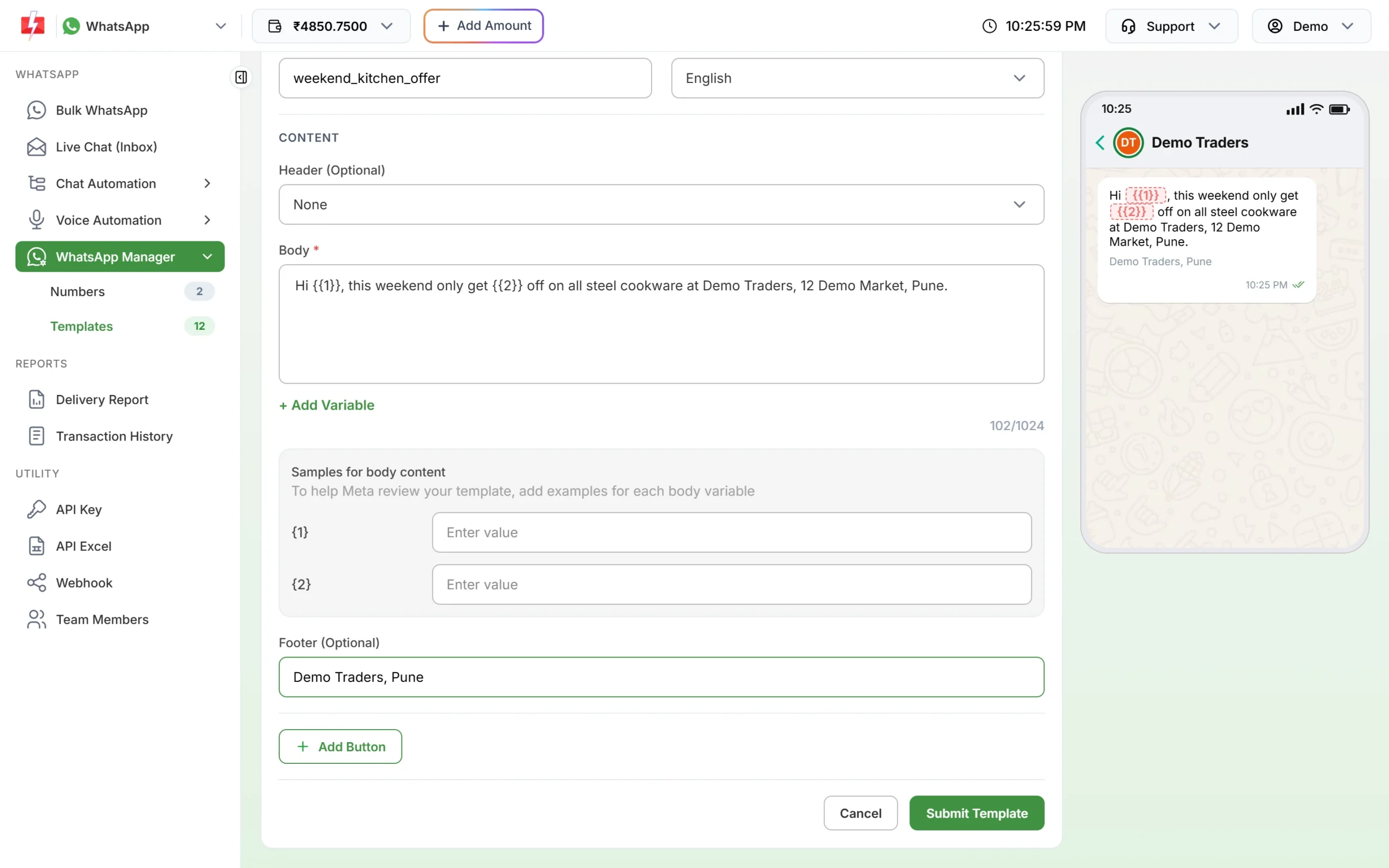
Variables carry the customer’s name, model and date. -
Register DLT for SMS
For SMS you need a DLT entity registration (₹5,900 per year including GST at the time of writing, the same on every operator portal), a 6-character sender ID such as your dealership name, and approved content templates. One DLT registration works for all operators. Then add the templates in DLT Manager in Fast2SMS.
-
Send reminders from your list or your DMS
Export the customers due for service from your dealer management software as Excel or CSV. In Bulk WhatsApp, choose CSV File, upload the sheet, pick the reminder template and map each variable to a column (name, model, registration number, service type). If your software can call an API, send each reminder automatically with the WhatsApp or SMS API instead.
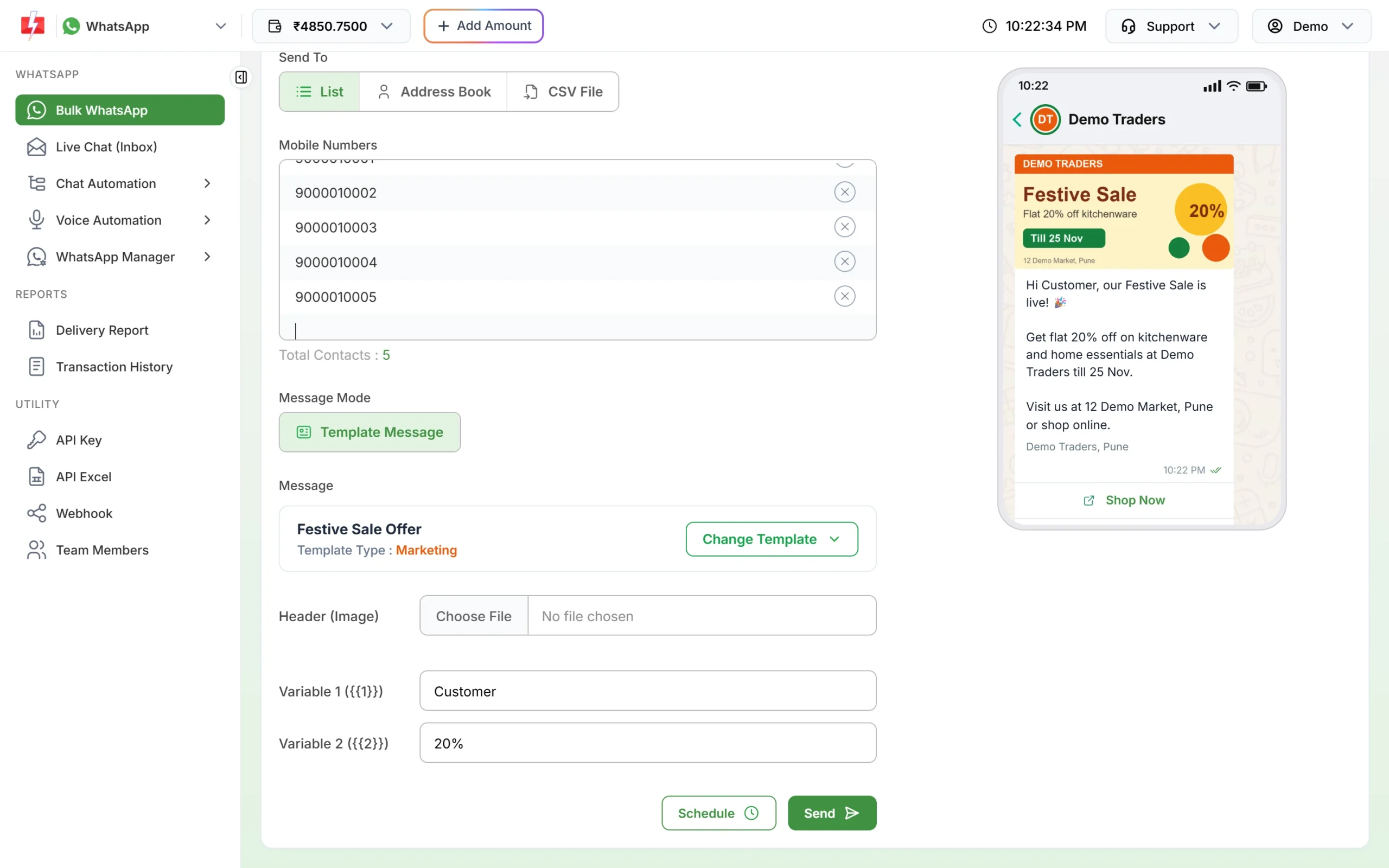
Fill each variable from your sheet’s columns. -
Schedule launches and offers
Click Schedule on the Bulk WhatsApp or DLT SMS page to send a launch on the morning of the event. Promotional SMS can only go out in the daytime under TRAI rules; Fast2SMS holds night-time promotional SMS until the morning.
-
Handle replies and bookings in Live Chat
Customer replies on WhatsApp land in Live Chat (Inbox). Assign sales enquiries to the sales team and service bookings to the service advisor, and label chats such as Test Drive, Service, Insurance. A Flow Builder chatbot can answer “service”, “price” or “test drive” with buttons before a person takes over.
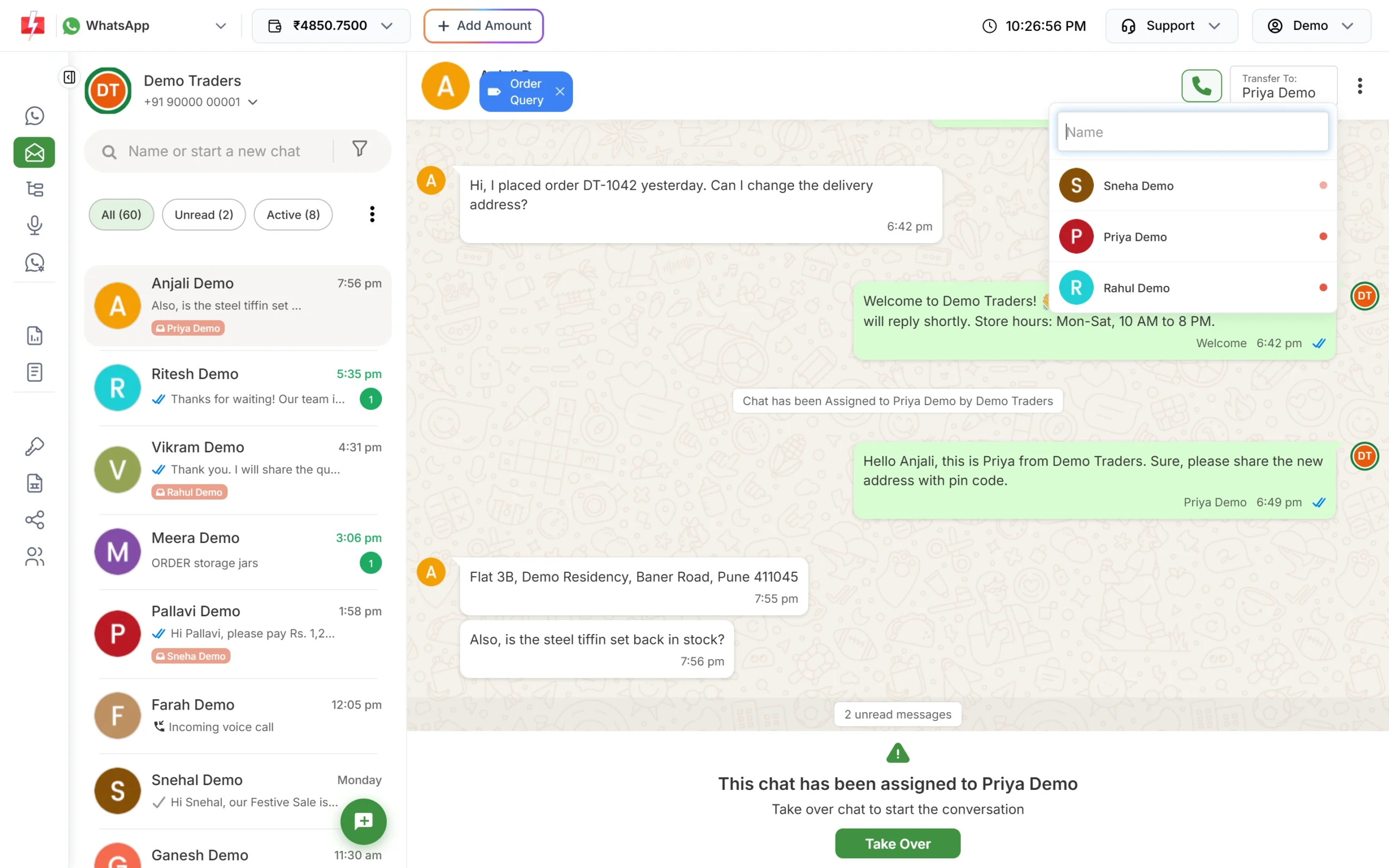
Send each enquiry to the right person in your team.
Rules to follow
- Consent on WhatsApp: collect it in the booking form, job card or test drive form (“I agree to get updates on WhatsApp”).
- Keep offers out of utility templates. A discount line in a service reminder can get it rejected or moved to marketing.
- DND for SMS: promotional SMS do not reach numbers on the DND list; service messages to your own customers use service templates.
- WhatsApp limits: limits start at the tier Meta gives your business: often 250 unique customers per 24 hours for a new, unverified business and 2,000 (2K) once the business is verified (at the time of writing), and Meta raises this as quality stays good.
What it costs
WhatsApp at the time of writing: utility ₹0.25, marketing ₹0.95, and replies within 24 hours of the customer’s message ₹0.13 per message. Failed WhatsApp messages are refunded to your wallet. SMS is priced per SMS part; see the bulk SMS pricing page and the WhatsApp pricing page. There is no setup or monthly fee.
Sending in bulk? For high WhatsApp volumes our team offers discounted rates. Talk to our team or see WhatsApp pricing.
Frequently asked questions
Is a service reminder a utility or marketing message on WhatsApp?
A reminder about the customer’s own vehicle and due service, with no offer, fits utility. Meta decides the final category.
Can I send the car brochure on WhatsApp?
Yes. Use a template with a PDF document header, or send the PDF in Live Chat after the customer writes to you.
Do I need DLT for WhatsApp?
No. DLT is only for SMS. WhatsApp templates are approved by Meta.
Can I connect my dealer management software?
If it can call a web API or a webhook, yes. Your developer uses the Fast2SMS SMS and WhatsApp APIs with your API key.
Can the showroom and the service centre use different numbers?
Yes. Connect both numbers to one Fast2SMS account and give each team access to its own number.
Related guides
- Car and bike dealer SMS templates: test drive, booking, delivery, service and insurance (DLT ready)
- WhatsApp utility templates for car and bike dealers and service centres: 14 examples
- WhatsApp template examples by use case
- How to send bulk SMS from Excel or CSV in Fast2SMS
- Send bulk WhatsApp from Excel with personalised variables
- Bulk SMS and WhatsApp for insurance companies and agents
- DLT registration