
These WhatsApp utility templates for car and bike dealers and service centres cover the sales side (booking, test drive, documents, registration, delivery, insurance policy) and the workshop side (service booking, pickup, estimate approval, vehicle ready, invoice, safety recall and feedback). Each template has variables, sample values, a suggested button and why it fits the utility category. Demo Motors is a made-up name; use your own.
What makes a dealer or workshop message utility
A message is utility when it is about a vehicle the customer booked, bought or gave for service, and it has no promotion in it. “Your vehicle is ready for pickup, the bill is Rs. 4,850” is utility. “Your vehicle is ready. Book an accessory pack at 10% off” is marketing, because Meta treats an update mixed with a promotion as marketing.
Meta names product recalls and warranty alerts among essential utility uses, so a safety recall notice fits utility. Insurance and extended warranty renewal reminders do not: Meta lists renewal reminders as marketing. Meta decides the category during review and can change it after approval, so these examples are wording that fits the rules, not a promise of approval or category. The general rules are in WhatsApp utility vs marketing template examples.
The category also sets the price. At the time of writing, Fast2SMS charges ₹0.25 for each utility message and ₹0.95 for each marketing message, and your own account may have different rates. So a vehicle-ready alert costs the utility rate, while an exchange offer costs the marketing rate. Every template is charged at its category rate, whether or not the customer messaged you in the last 24 hours. The full rate table is in WhatsApp API price in India.
Sending in bulk? For high WhatsApp volumes our team offers discounted rates. Talk to our team or see WhatsApp pricing.
Before you copy these templates
- Connect your WhatsApp number in Fast2SMS and get the customer’s consent for WhatsApp updates at booking or at the service desk. See WhatsApp opt-in rules.
- Each body starts and ends with fixed text and has enough words around the variables. The rules are in WhatsApp template character limits and variable rules.
- Button labels should stay within 25 characters. See the WhatsApp template buttons guide.
- Change workshop hours, document lists and timings in the fixed text to your own.
Sales and delivery templates
From booking to handover. The booking number links each message to one buyer.
| Template name and body | Sample values | Suggested button | Why it is utility |
|---|---|---|---|
vehicle_booking_confirmedHi {{1}}, thank you for booking the {{2}} with Demo Motors. Your booking number is {{3}} and we have received the booking amount of Rs. {{4}}. |
Priya | Demo Hatch ZX | DM-B-2210 | 21,000 | Call Phone Number: “Call Showroom” | Confirms a booking and payment the customer made. |
test_drive_confirmedHi {{1}}, your test drive of the {{2}} is confirmed for {{3}} at {{4}}. Please carry your driving licence. |
Rahul | Demo Rider 150 | 21 Dec, 11 AM | our Baner showroom | Visit website (static): “Get Directions” | Confirms a test drive the customer asked for. |
documents_pendingHi {{1}}, we still need {{2}} to complete the paperwork for booking {{3}}. Please share it by {{4}} so your delivery is not delayed. |
Priya | the signed loan agreement | DM-B-2210 | 26 Dec | None | A step the buyer must finish for their own booking. |
registration_doneHi {{1}}, registration of your vehicle for booking {{2}} is complete. The registration number is {{3}}, and the number plate will be fitted before delivery. |
Priya | DM-B-2210 | MH12AB1234 | None | Status of the customer’s own vehicle. |
delivery_scheduledHi {{1}}, your {{2}} will be ready for delivery on {{3}} at our {{4}} showroom. Please bring your ID proof and the booking receipt. |
Priya | Demo Hatch ZX | 30 Dec, 4 PM | Baner | Call Phone Number: “Call Showroom” | Schedules the handover of a vehicle the customer bought. |
insurance_policy_issuedHeader: Document (PDF) Hi {{1}}, the insurance policy for your vehicle {{2}} has been issued. The policy number is {{3}}, and a copy is attached for your records. |
Priya | MH12AB1234 | POL-88123401 | None | Shares a document for a product the customer bought. |
Service and workshop templates
For the workshop. Estimate approvals are where WhatsApp saves the most phone calls.
| Template name and body | Sample values | Suggested button | Why it is utility |
|---|---|---|---|
service_booking_confirmedHi {{1}}, your service booking {{2}} for vehicle {{3}} is confirmed for {{4}}. Please drop the vehicle at the workshop by 10 AM. |
Anil | SB-5521 | MH12CD5678 | 22 Dec | None | Confirms a booking the customer made. |
pickup_for_serviceHi {{1}}, our driver {{2}} will pick up your vehicle {{3}} for service on {{4}}. Please keep the keys and the service booklet ready. |
Anil | Ganesh | MH12CD5678 | 22 Dec, 9 AM | None | Confirms a pickup the customer asked for. |
service_estimateHi {{1}}, the estimate for job card {{2}} on vehicle {{3}} is Rs. {{4}}. Please tap a button below so we can start the work. |
Neha | JC-30117 | MH14EF9012 | 6,420 | Custom: “Approve”, “Call me” | Asks the customer to approve work on their own vehicle. |
vehicle_readyHi {{1}}, your vehicle {{2}} is ready for pickup. The final bill for job card {{3}} is Rs. {{4}}. Our workshop is open till 7 PM. |
Neha | MH14EF9012 | JC-30117 | 6,180 | Visit website (dynamic): “Pay Now” | Status and bill for the customer’s own service. |
service_invoiceHeader: Document (PDF) Hi {{1}}, the invoice for job card {{2}} on vehicle {{3}} is attached. Thank you for choosing Demo Motors service. |
Neha | JC-30117 | MH14EF9012 | None | The bill for a service that just happened. |
free_service_dueHi {{1}}, the {{2}} free service for your vehicle {{3}} is due by {{4}}. Reply to this message to book a slot. |
Rahul | second | MH12GH3456 | 15 Jan 2027 | None | A service included in what the customer bought. Meta may still see it differently, so keep it factual. |
safety_recall_noticeHi {{1}}, a free safety check has been announced for some {{2}} vehicles, including yours ({{3}}). Please reply to this message to book a time. |
Anil | Demo Rider 150 | MH12CD5678 | Call Phone Number: “Call Workshop” | Meta names product recalls as an essential utility use. |
service_feedbackHi {{1}}, how was your service experience for job card {{2}}? Please tap a button below to rate it. |
Neha | JC-30117 | Custom: “Good”, “Average”, “Poor” | Feedback on one specific service, which Meta lists as a utility use. |
Dealer and workshop messages that would be marketing
Dealers send these often, and they are fine as marketing templates to customers who agreed to get offers. As utility they will be moved to marketing or rejected.
| Message | Why Meta would treat it as marketing | What to do instead |
|---|---|---|
| Hi {{1}}, your vehicle insurance expires on {{2}}. Renew with us and get free roadside assistance. | A renewal reminder with an offer. Meta lists renewal reminders as marketing. | Send insurance and warranty renewal reminders as marketing. |
| Hi {{1}}, exchange your old bike this month and get an extra exchange bonus on the new model. | It sells a new vehicle and is not about any booking. | Create it as a marketing template. |
| Hi {{1}}, your vehicle is ready. Book an accessory pack today at 10% off. | An update mixed with an upsell is marketing. | Send vehicle_ready as utility and the accessory offer separately. |
How to keep dealer and workshop templates utility
- Put the booking, job card or registration number in every template.
- Keep service reminders factual. A paid service reminder with a discount, or a “monsoon check-up camp”, is marketing.
- Leave out accessories, extended warranty, exchange and finance offers from booking and service messages.
- Ask customers for documents by name, but do not ask them to type ID, card or bank numbers in the chat.
- Use service buttons: “Approve”, “Call Workshop”, “Pay Now”, “Get Directions”. Leave “See Offers” for marketing.
If Meta moved one of your service templates to marketing, remove the offer or renewal wording and submit it as a new utility template. Fast2SMS also has a separate help guide on rewriting a marketing template as utility.
How to add WhatsApp utility templates for car and bike dealers in Fast2SMS
-
Open the template form
Go to WhatsApp Manager > Templates and click Add Template. If you have more than one number, pick the sender number at the top right.
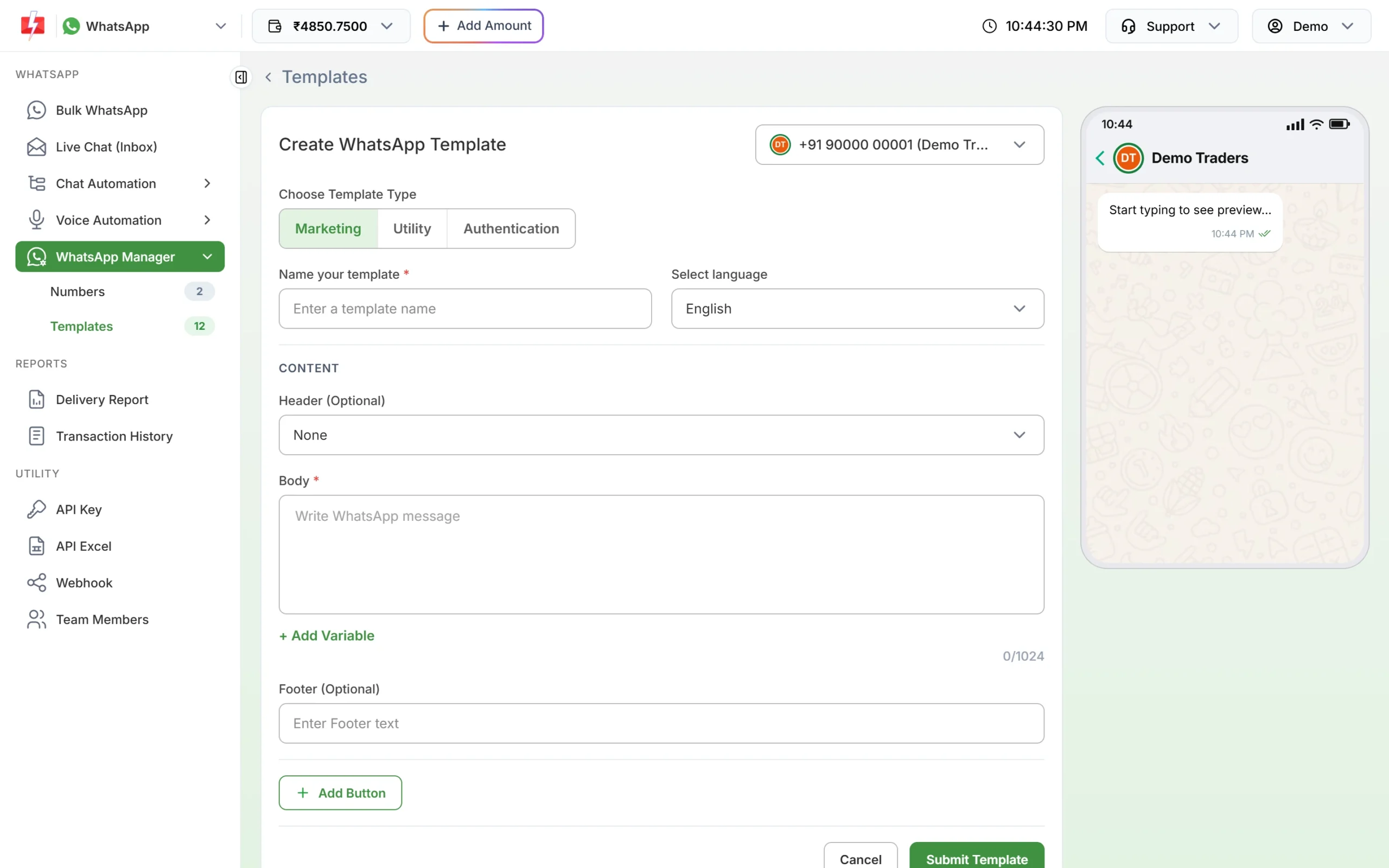
The template form. Choose Utility for booking and service updates. -
Choose Utility, then name the template
Under Choose Template Type, click Utility. Type a name such as
service_estimate(small letters, numbers and underscores only) and choose the language the text is written in: English, Hindi or Gujarati. -
Paste the body and fill the samples
Paste the fixed text. Put the cursor where each {{1}}, {{2}} goes and click + Add Variable so the numbering stays right. Under Samples for body content, type a realistic value for each variable, like the ones in the tables above. Use a believable registration number, job card number and amount as samples.
-
Add the header and button, then submit
For invoices and policy copies, choose Document under Header (Optional) and upload a sample PDF. Click Add Button and add Custom buttons such as “Approve” and “Call me” for estimates. Click Submit Template, check the preview and confirm. Meta’s review can take up to 24 hours.
-
Check the category on the card, then send
When the template is approved, its card shows the category under the preview. If you chose Utility and the card says Marketing, Meta approved it as marketing. Click Test on the approved card to send it to your own phone first, with your own values in each variable box.
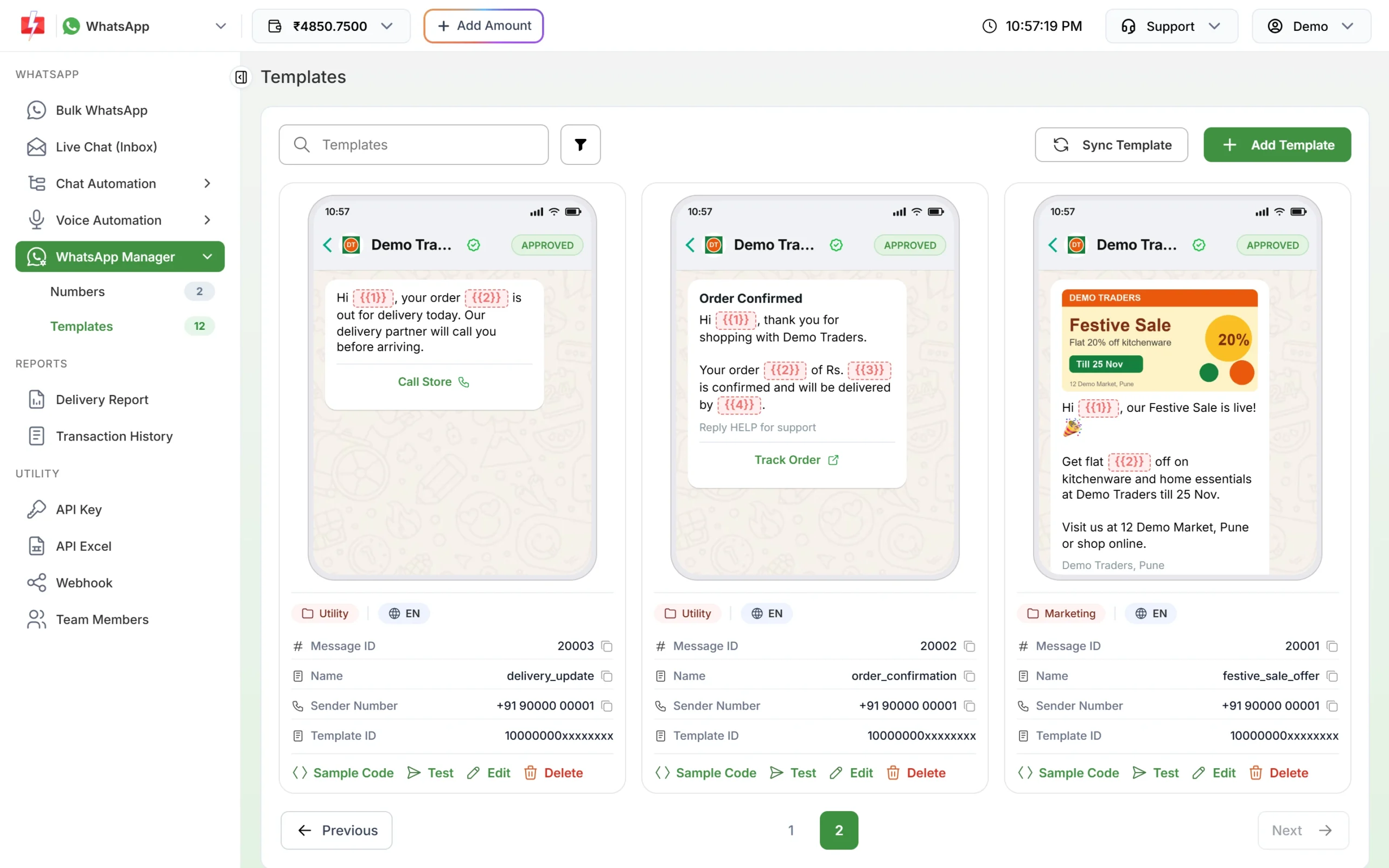
Each approved card shows the category Meta gave it. 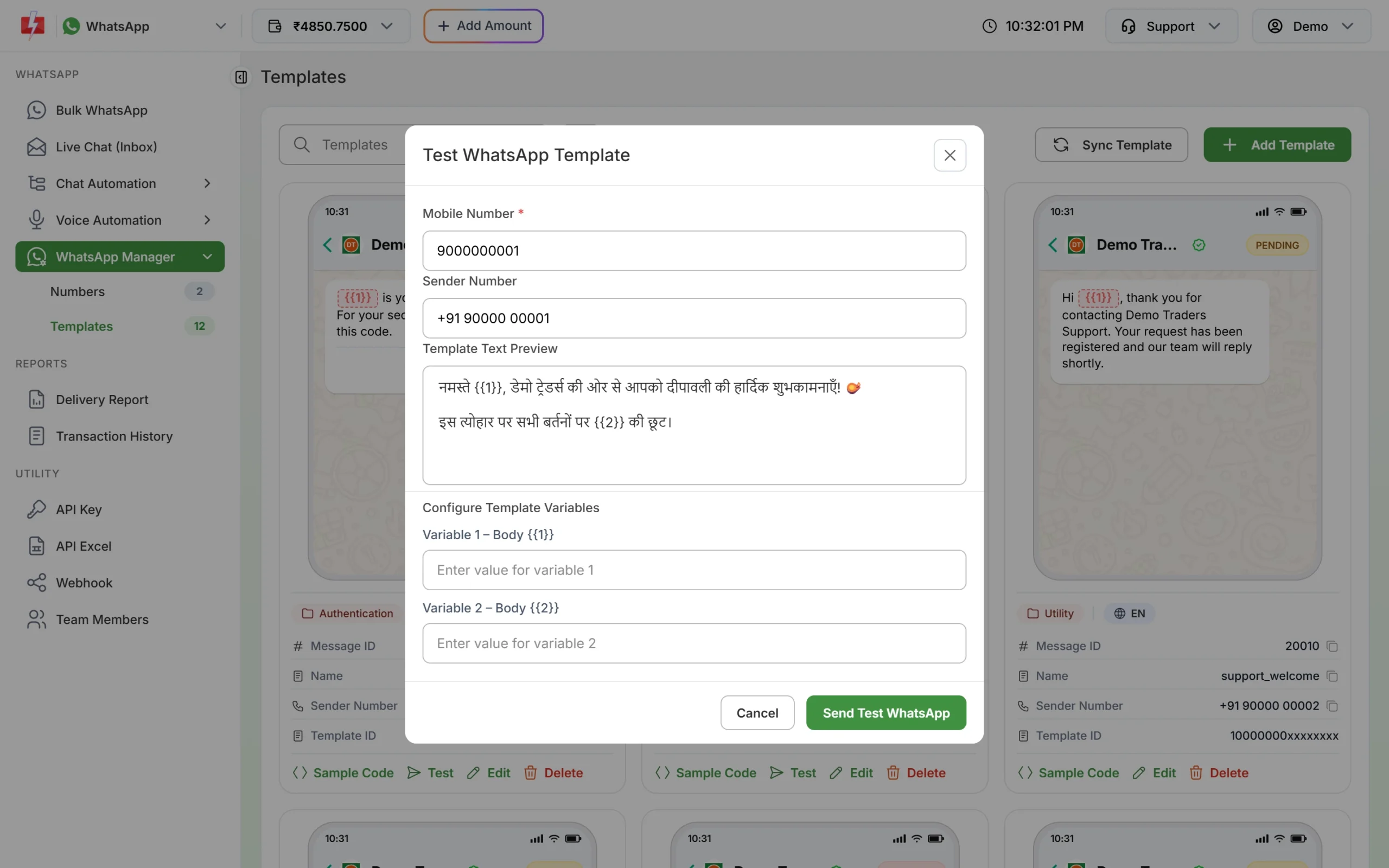
Send a test to your own phone, with your own values in each variable box.
If Meta changes the category
Meta checks the category when it reviews a template, and it keeps checking approved templates later. At the time of writing:
- A template you submit as utility that Meta sees as marketing is usually approved as marketing instead of being rejected. Some are still rejected for the wrong category.
- An approved utility template can be moved to marketing later, normally with one day’s notice. It keeps working, at the marketing rate.
- You have 60 days to ask Meta to review a category change.
- Businesses that keep sending marketing content as utility can have their utility messages limited, or all their utility templates moved to marketing for a period. See WhatsApp error 131064.
To move a template to another category yourself, see editing an approved template or its category.
Frequently asked questions
Is a car service reminder a utility template?
It depends on the wording. A factual notice about a free service included with the vehicle can fit utility. A reminder that pushes a paid service with an offer is marketing. Meta decides during review.
Is an insurance renewal reminder utility?
No. Meta lists renewal reminders as marketing. Create insurance and warranty renewal reminders as marketing templates.
Can I send a recall notice on WhatsApp?
Yes. Meta names product recalls as an essential use of utility templates. Keep it to the vehicle, the issue and how to book the check.
Can customers approve a service estimate on WhatsApp?
Yes. Add Custom buttons like “Approve” and “Call me”. The taps arrive in Live Chat, and at your webhook if you set one.
Can I send the service invoice as a PDF?
Yes, with a Document header. For a different invoice per customer, send by API with each file’s link. See sending a template with a PDF by API.
Is a test drive confirmation utility?
Usually yes, when the customer asked for the test drive. An invitation to test drive a new model, sent without a request, is marketing.