
Bulk SMS for diagnostic labs and pharmacies works best when it tells the customer the next step: the sample collector is on the way, the report is ready, the order is packed, the bill is paid. This guide covers those messages for pathology labs, diagnostic centres, home-collection services and chemists, with sample DLT and WhatsApp templates, voice and OTP use, the WhatsApp rules that apply to medicines, and how to set everything up in Fast2SMS, including sending bills from Tally.
Messages labs and pharmacies send
| Message | Best channel | Why |
|---|---|---|
| Home collection booked | SMS (Service Implicit) and WhatsApp utility | Confirms the date, time slot and address right after booking. |
| Preparation instructions (fasting, timing) | SMS the evening before | Reaches every customer, even without data, at the right time. |
| Collector on the way | SMS or WhatsApp utility | The customer is ready at the door, so the collector does not wait. |
| Report ready | SMS with a portal link, or WhatsApp utility with a link | Tells the customer to log in. The message itself shows no values. |
| Payment received | SMS (Transactional) or WhatsApp utility with PDF bill | Sent right after payment with the amount and receipt number. |
| Pharmacy order ready or out for delivery | SMS (Service Implicit) | Short status update; no medicine names needed. |
| Bill from the billing software | WhatsApp utility via the Tally integration | The bill reaches the customer as soon as it is saved. |
| Refill due | SMS (Service Implicit), worded without medicine names | A neutral reminder to existing customers. |
| Report portal login | Smart OTP | Protects reports with a code on a priority route. |
| Health package offer | Promotional SMS | Promotional rules apply. Avoid health claims. |
What you should not put in a lab or pharmacy message
- No test values or findings. “Your report is ready” is fine. “Your sugar is high” is not.
- No medicine names in broadcasts or reminders. A family member may read the phone.
- No requests for health details over chat. WhatsApp’s Business Messaging Policy says not to send or request health-related information where the applicable rules do not allow it on systems without heightened safeguards.
- No selling medicines on WhatsApp. WhatsApp’s policy lists drugs (prescription or otherwise) and medical and healthcare products among the things businesses may not sell or promote, with limited exceptions for over-the-counter products in some countries. Keep WhatsApp for order status, bills and directions, and read Meta’s current policy before any medicine-related campaign.
Sample DLT SMS templates
These are examples to adapt and register on your DLT portal. Replace the brand name with your own.
| Use | DLT category | Sample template (example) |
|---|---|---|
| Home collection booked | Service Implicit | Dear {#var#}, your home sample collection is booked for {#var#} between {#var#}. Booking ID {#alphanumeric#}. – Demo Diagnostics |
| Preparation reminder | Service Implicit | Dear {#var#}, for tomorrow’s sample collection please do not eat for {#numeric#} hours before {#var#}. Water is allowed. – Demo Diagnostics |
| Collector on the way | Service Implicit | Dear {#var#}, our collector {#var#} will reach you by {#var#}. Contact: {#cbn#} – Demo Diagnostics |
| Report ready | Service Implicit | Dear {#var#}, your report for booking {#alphanumeric#} is ready. View it on {#url#} after logging in. – Demo Diagnostics |
| Payment received | Transactional | Received Rs.{#numeric#} for booking {#alphanumeric#} on {#var#}. Thank you. – Demo Diagnostics |
| Pharmacy order ready | Service Implicit | Dear {#var#}, your order {#alphanumeric#} is ready for pickup at {#var#}. Store open till {#var#}. – Demo Pharmacy |
| Out for delivery | Service Implicit | Dear {#var#}, your order {#alphanumeric#} of Rs.{#numeric#} is out for delivery and will reach you by {#var#}. – Demo Pharmacy |
| Refill reminder | Service Implicit | Dear {#var#}, your regular order from Demo Pharmacy may be due on {#var#}. Reply or call {#cbn#} to reorder. – Demo Pharmacy |
| Health package | Promotional | Full body check-up package at Demo Diagnostics, now Rs.{#numeric#} till {#var#}. Book: {#url#} – Demo Diagnostics |
WhatsApp templates
| Template name | Category | Body (example) | Extras |
|---|---|---|---|
| collection_booked | Utility | Hi {{1}}, your home collection is booked for {{2}}, {{3}}. Booking ID {{4}}. | Quick reply “Change slot” |
| report_ready | Utility | Hi {{1}}, your report for booking {{2}} is ready. Log in to view and download it. | Visit website “View report” (dynamic URL) |
| bill_copy | Utility | Dear {{1}}, thank you for your purchase. Your bill no. {{2}} for Rs. {{3}} is attached. | Document header (PDF) |
| order_status | Utility | Hi {{1}}, your order {{2}} is {{3}}. Expected by {{4}}. | Call Phone Number button |
We have not listed a marketing template here on purpose. Given WhatsApp’s rules on drugs and healthcare products, use promotional SMS for lab package offers, and keep WhatsApp for service updates.
Voice calls
A Key Press call works for home-collection confirmation: “This is Demo Diagnostics. Your home sample collection is tomorrow between 7 and 8 AM. Press 1 to confirm. Press 2 to change the time.” The report shows each key pressed.
Operators reject recordings with medical advice, treatments or health claims, so keep scripts to time, place and confirmation. Calls go only to non-DND numbers between 10 AM and 9 PM. If a customer asks not to be called, add their number to the voice Blacklist; blacklisted numbers are never dialled.
OTP for report portals and apps
Reports should open only after the customer proves who they are. Smart OTP sends the login code on a priority route by SMS or WhatsApp, verifies it, and can fall back to the other channel with the same code if the first message fails. Set the number of wrong tries allowed and the resend wait in OTP Settings.
How to get started on Fast2SMS
Before you start: complete DLT registration (entity, sender ID, templates, PE-TM binding with Fast2SMS) and add them in SMS > DLT Manager. Connect your WhatsApp Business number for WhatsApp messages.
-
Connect your billing or store software
On the home screen, the Integration row has Tally Prime, Shopify, WooCommerce and Google sheet, plus View all. Each opens the plugin or its guide in a new tab. The plugins use your Fast2SMS API key from Account Setting > API Key, and each message is charged at your normal rate.

Integrations open from the home screen. A pharmacy that bills in Tally can send each bill to the customer on WhatsApp; an online store on Shopify or WooCommerce can send order updates automatically.
-
Group customers by branch or collection area
Open Address Book > Groups and click Add Group for each branch or area, then import contacts into the right group. You can then send a “collector delayed in your area” SMS to one group only.
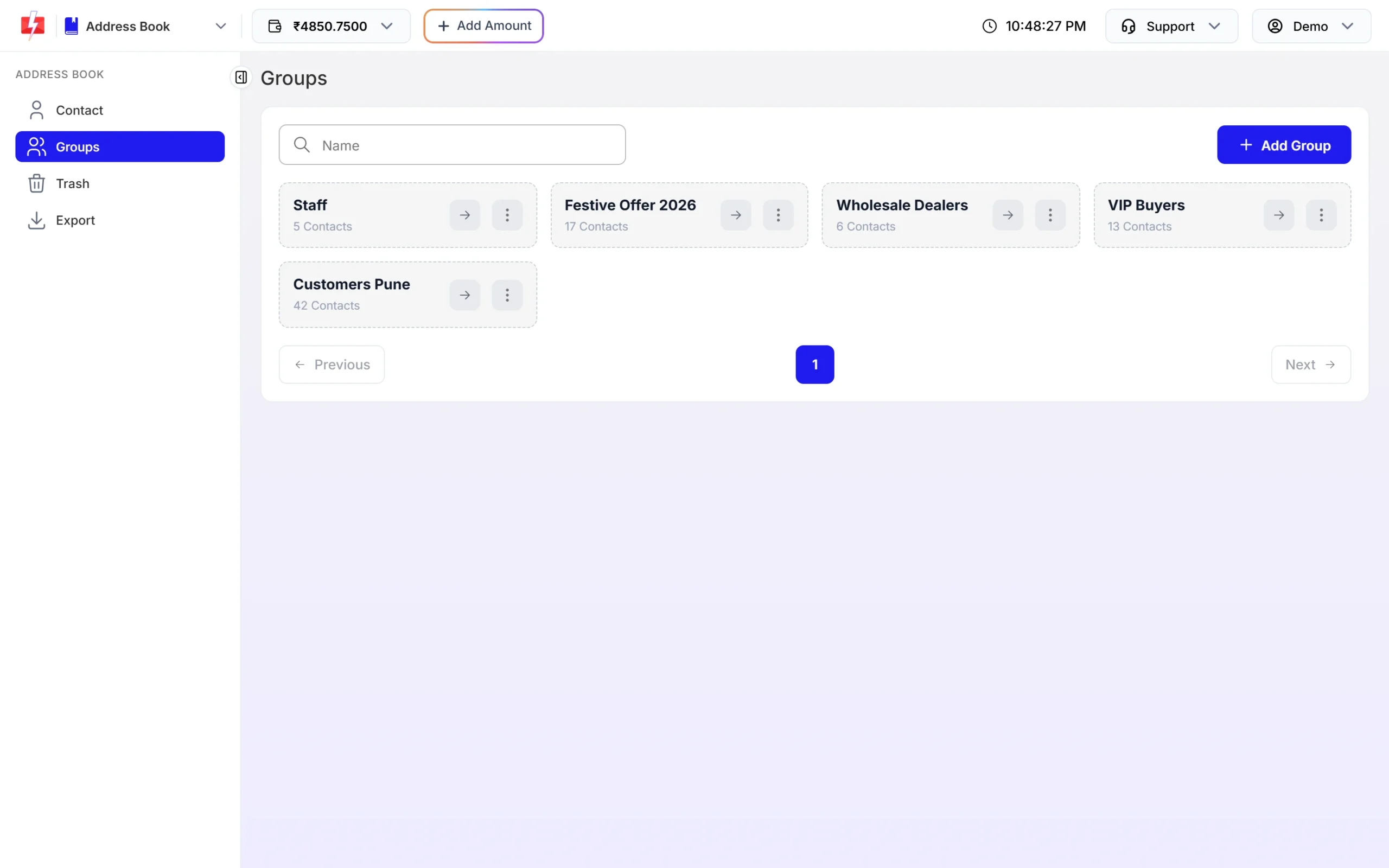
Groups make area-wise messages easy. -
Send an order or booking update by SMS
Open DLT SMS, pick your sender ID and numbers, and select the template. Fill the variables, such as order number, amount and date. The preview shows exactly what the customer will read, and the counter shows the SMS parts.
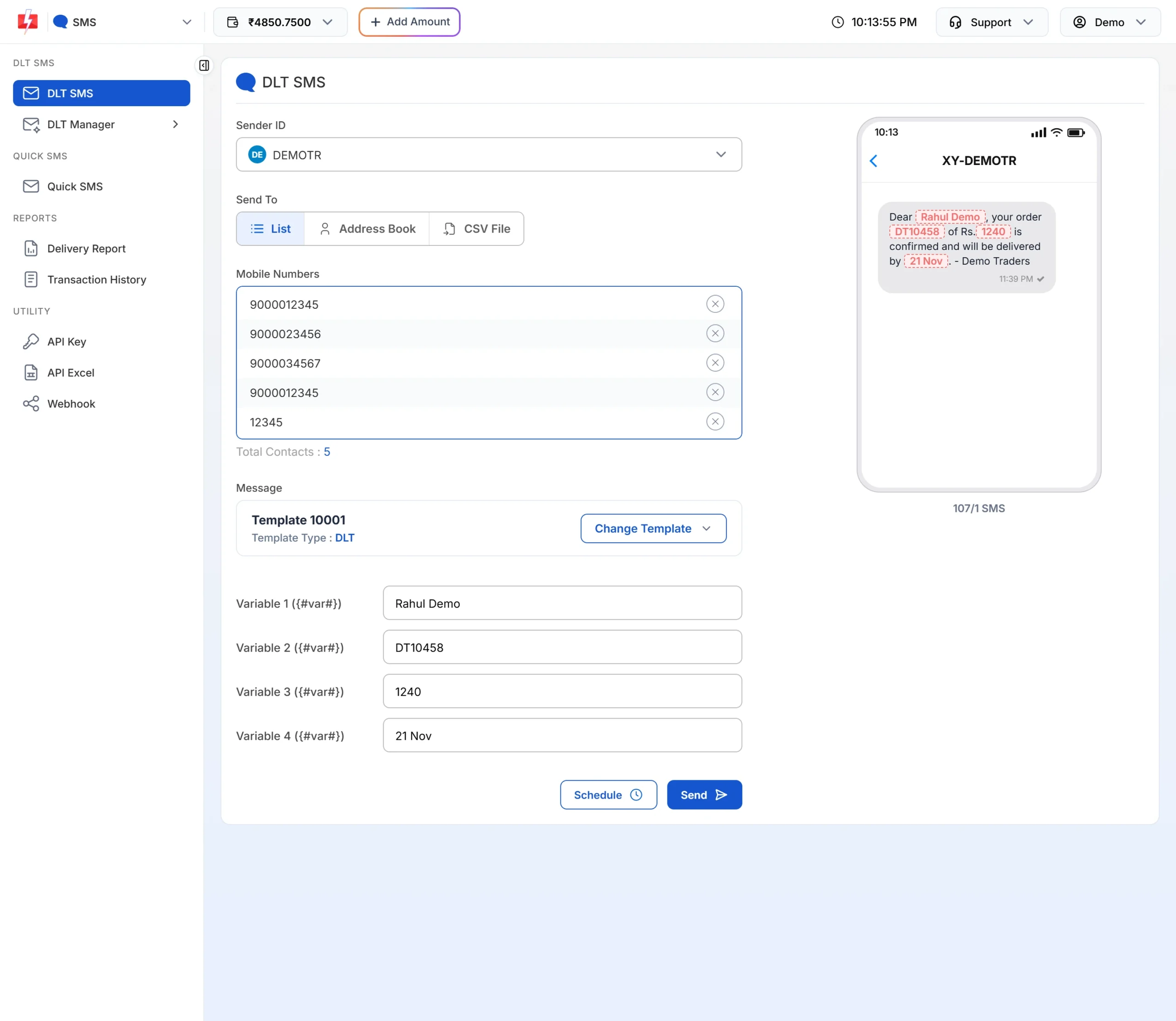
An order update with its variables filled. -
Send a WhatsApp update to many customers
Open WhatsApp > Bulk WhatsApp, choose your sender number, add numbers (List, Address Book or CSV File) and click Select WhatsApp Template. Only approved templates are listed. If the template has a document or image header, upload the file, fill the variables and click Send.
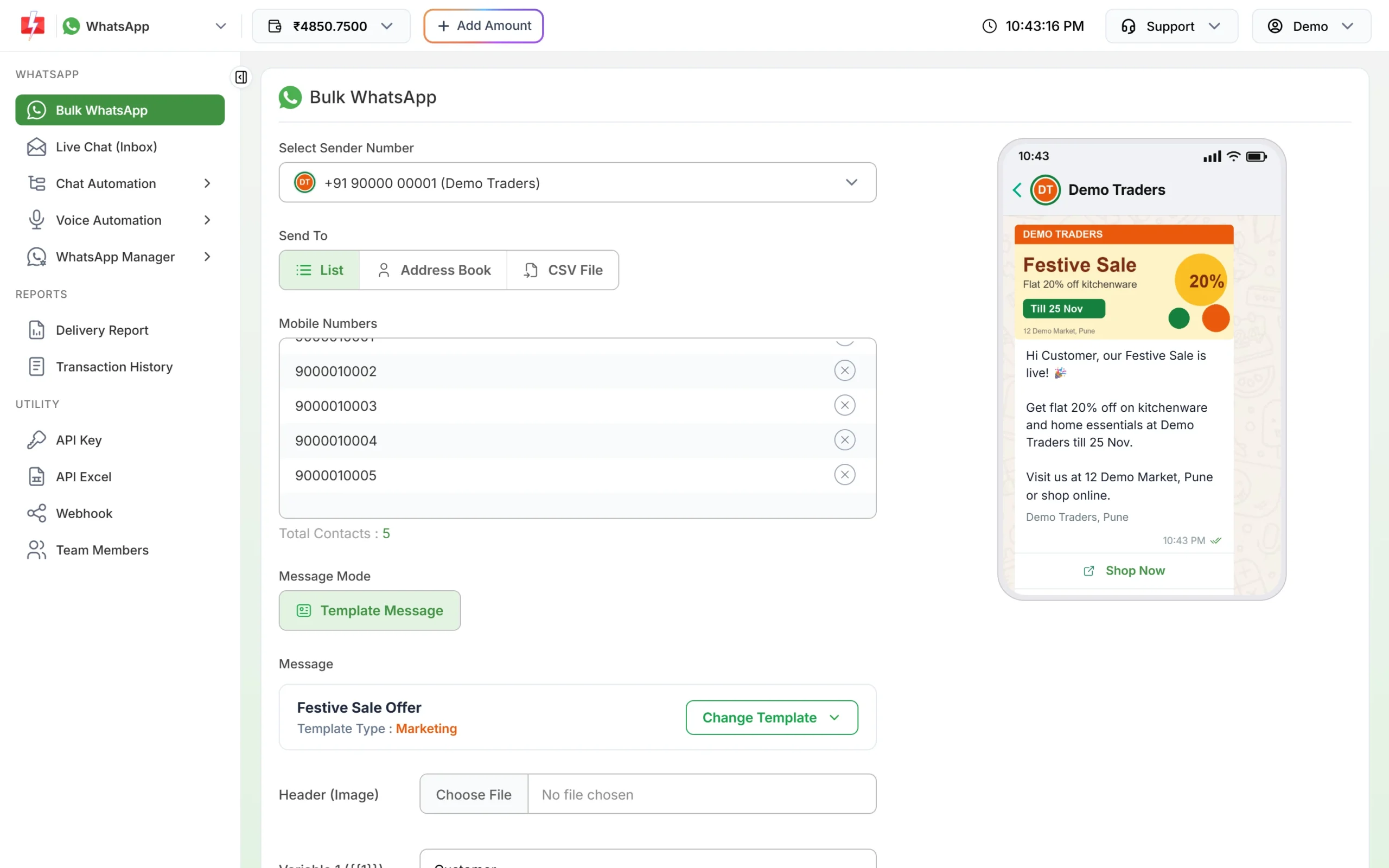
Pick an approved template; the preview updates as you fill it. -
Stop calls to customers who opt out
Open Voice > Blacklist and open the Add to Blacklist drawer. Paste the numbers, or upload a CSV, TXT or Excel file with numbers in the first column, and click Add Numbers. These numbers are skipped in every voice campaign and are not charged.
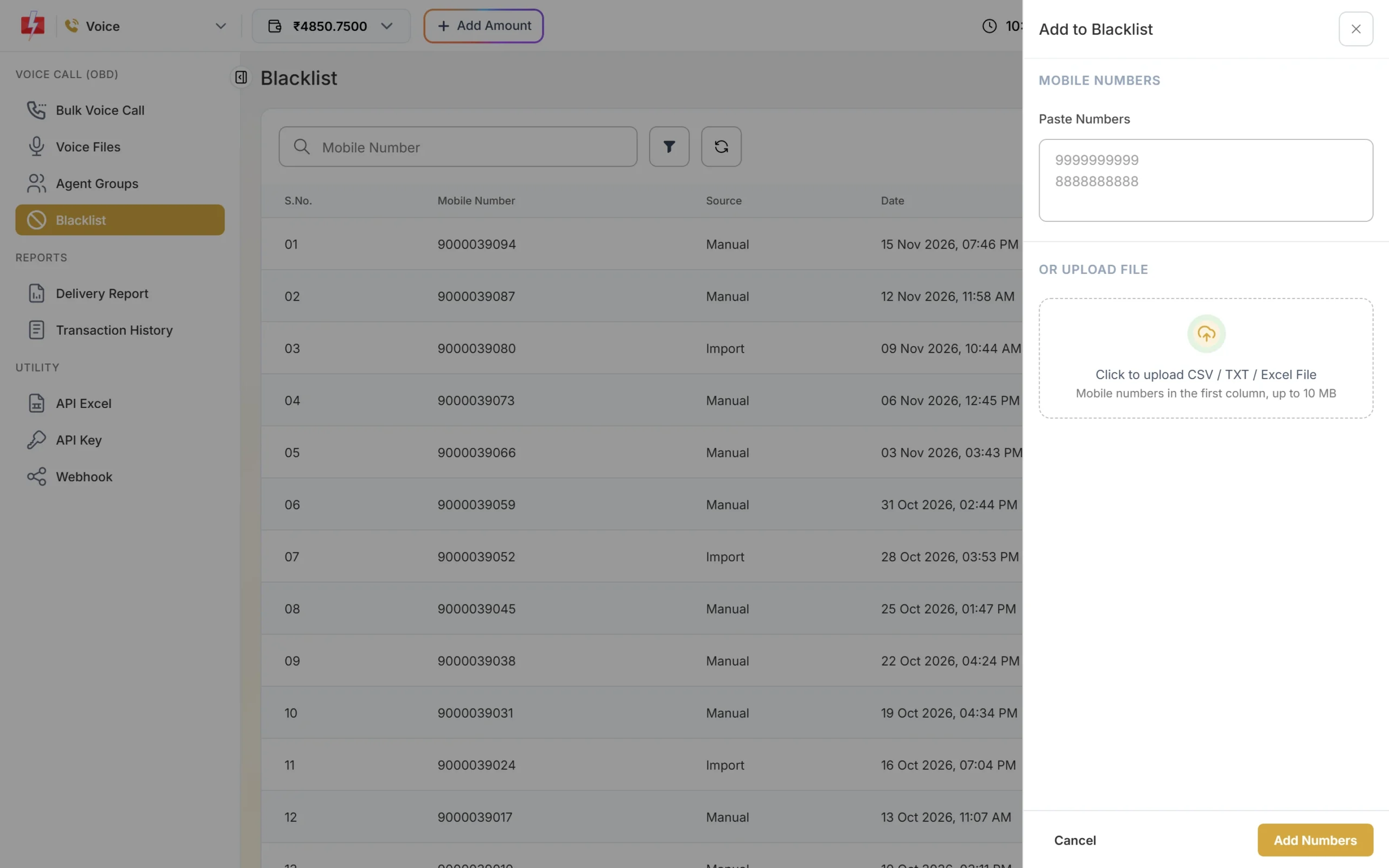
Blacklisted numbers are never called. -
Set up OTP for the report portal
Open Smart OTP > OTP Template List and click Add OTP Template. Link your DLT OTP template or WhatsApp authentication template and add a fallback. Use the OTP ID shown on the card in your portal’s code.
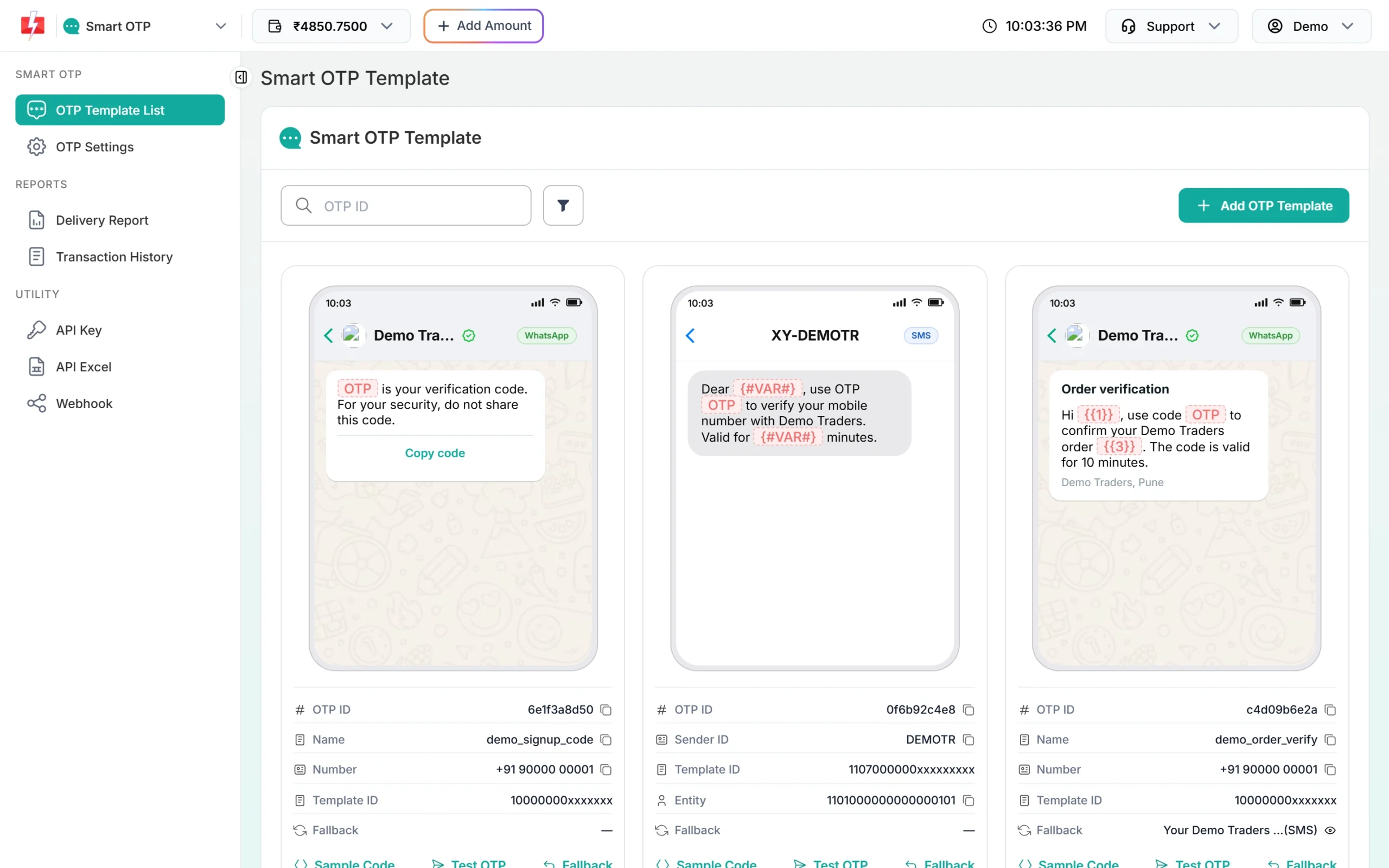
Each card shows the OTP ID your developer needs. -
Work out how much to recharge
Click Add Amount and open the Calculate Credits tab. Enter an amount to see the rate and how many SMS, WhatsApp and RCS messages it covers. GST is added on top when you pay.
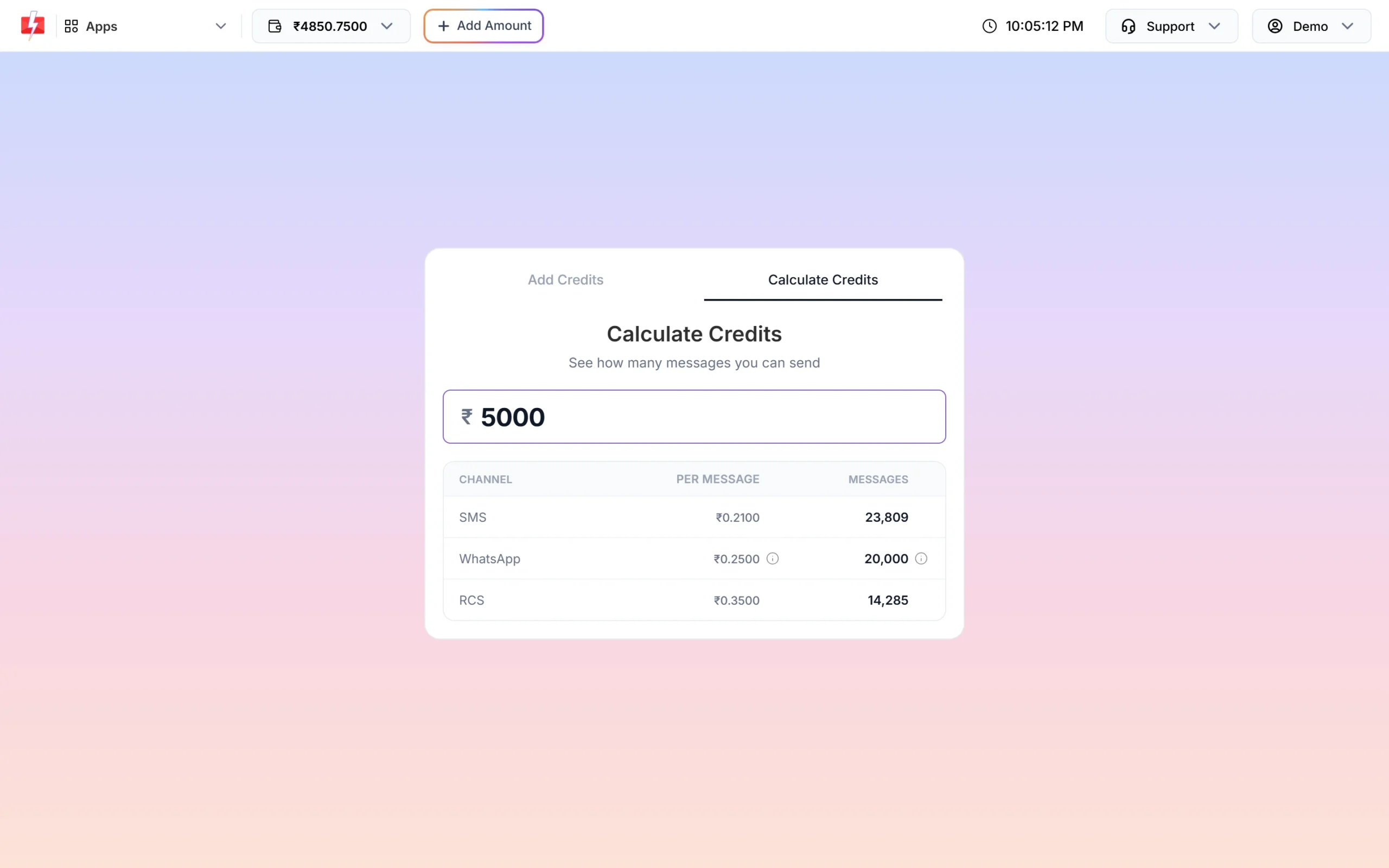
See what a recharge buys before you pay.
Automation options
- Lab software (LIS) or pharmacy software: trigger booking, report-ready and payment messages through the API with your template’s Message ID. Get your templates with sample requests from API Excel.
- Tally, Shopify, WooCommerce, Google Sheets: ready integrations, linked from the home screen.
- Webhooks: receive delivery status in your software, so staff can call customers whose report alert failed.
- Scheduling: send tomorrow’s preparation reminders tonight, or schedule refill reminders.
Compliance notes
- DLT categories: booking, report-ready, order and refill updates to existing customers are Service Implicit; payment confirmations right after payment are Transactional; package offers are Promotional and go only between 10 AM and 9 PM.
- Consent: take consent at the counter, on the booking app or the order form. Keep marketing consent separate from service updates.
- WhatsApp opt-in and content: message only people who opted in, and follow WhatsApp’s rules on health information and drugs described above.
- Voice: recordings must name your business and make no health claims; non-DND numbers only, 10 AM to 9 PM.
- Data: keep reports behind a login. Do not attach reports to bulk campaigns.
How to estimate the cost
Add up your monthly bookings or orders and the messages each one gets. For SMS: numbers x SMS parts x your rate (bulk SMS pricing). For WhatsApp: numbers x the utility rate, with failed messages refunded automatically (WhatsApp pricing). For voice: per pulse for answered calls only (voice call pricing).
Frequently asked questions
Can a lab send report PDFs on WhatsApp?
We advise against attaching reports. Send a “report ready” message with a link to your portal where the customer logs in with an OTP.
Can a pharmacy advertise medicines on WhatsApp?
No. WhatsApp’s policy does not allow selling or promoting drugs and healthcare products, apart from narrow exceptions. Use WhatsApp for order status and bills only.
Which DLT category is a refill reminder?
Service Implicit when it goes to an existing customer and contains no offer. Adding a discount makes it Promotional.
Can I send bills from Tally to customers?
Yes. The Tally Prime integration sends bills through your Fast2SMS account. Each message is charged at your normal rate.
Will the SMS reach customers on DND?
Service Implicit and Transactional SMS reach DND numbers. Promotional SMS does not, unless the customer consented.
Can the collector’s message include their phone number?
Yes. Use a {#cbn#} variable in the template for the contact number.
Related guides
- Diagnostic lab and pharmacy SMS templates for DLT: sample pickup, reports and refill reminders
- WhatsApp utility templates for hospitals, clinics, labs and pharmacies: 14 templates
- Tally WhatsApp for retail shops
- Smart OTP setup guide
- Add money to your wallet
- How pharmacists can use bulk SMS (older overview)
- Bulk SMS for hospitals and healthcare
- Fast2SMS integrations