
These WhatsApp utility templates for healthcare businesses, including hospitals, clinics, diagnostic labs and pharmacies, cover the messages patients expect: appointment bookings and reminders, changes in the doctor’s schedule, admission and discharge papers, home sample collection, report-ready alerts and medicine order updates. Each template has the body text, sample values, buttons and the reason it fits the utility category. None of them carries a diagnosis or a test result, and the notes below explain why.
Before you use these templates
- Your WhatsApp number is connected in Fast2SMS, and your customers agreed to get WhatsApp messages from you. See WhatsApp opt-in and opt-out rules.
- Pick Utility as the template type. Meta still decides the final category and can change it later, so nobody can promise that a template stays utility.
- Every body below starts and ends with fixed words, never a variable, because Meta rejects that. Keep it that way when you edit. See template character limits and variable rules.
- Fast2SMS allows up to 3 quick reply (Custom) buttons, 2 Visit website buttons and 1 Call Phone Number button per template. See WhatsApp template buttons.
- Keep health information out of templates: no diagnosis, test values or treatment details. Meta’s policy restricts sharing health information where the law does not allow it on regular messaging services. Send a link to your secure portal instead.
- Pharmacies can send order updates, but Meta’s policy does not allow selling or promoting prescription medicines on WhatsApp. See what you cannot send on WhatsApp.
Hospitals and clinics
1. Appointment booked
Template name: opd_appointment_booked
Hi {{1}}, your appointment with {{2}} at Demo Hospital is booked for {{3}} at {{4}}. Your token number is {{5}}. Please reach 15 minutes early with your previous reports.- Sample values: {{1}} = Lakshmi, {{2}} = Dr. Demo Sharma, {{3}} = 25 Nov, {{4}} = 11:30 AM, {{5}} = 17
- Header and buttons: Call Phone Number: “Call reception”
- Why it is utility: It confirms a booking the patient made.
2. Reminder the day before
Template name: appointment_reminder_tomorrow
Hi {{1}}, a reminder that you have an appointment with {{2}} tomorrow at {{3}}. Please use a button below to confirm or ask us to change the time.- Sample values: {{1}} = Lakshmi, {{2}} = Dr. Demo Sharma, {{3}} = 11:30 AM
- Header and buttons: Custom (quick reply): “Confirm” and “Reschedule”
- Why it is utility: A reminder about the patient’s own booking.
3. Doctor unavailable, appointment moved
Template name: doctor_unavailable_moved
Hi {{1}}, we are sorry, {{2}} is not available on {{3}}. Your appointment has been moved to {{4}} at {{5}}. Reply to this message if the new time does not suit you.- Sample values: {{1}} = Imran, {{2}} = Dr. Demo Rao, {{3}} = 26 Nov, {{4}} = 27 Nov, {{5}} = 10:00 AM
- Header and buttons: Custom (quick reply): “Okay” and “Need another time”
- Why it is utility: A change to the patient’s own appointment.
4. Follow-up visit due
Template name: follow_up_visit_due
Hi {{1}}, at your last visit {{2}} asked you to come back for a follow-up around {{3}}. Reply to this message or call us to book a time that suits you.- Sample values: {{1}} = Imran, {{2}} = Dr. Demo Rao, {{3}} = 10 Dec
- Header and buttons: Call Phone Number: “Call to book”
- Why it is utility: It repeats an instruction from the patient’s own consultation. Keep it plain: a check-up package or offer makes it marketing.
5. Planned admission
Template name: admission_instructions
Hi {{1}}, the admission for {{2}} at Demo Hospital is planned for {{3}} at {{4}}. Please bring a photo ID, the doctor's admission note and the insurance card to the admission desk.- Sample values: {{1}} = Rakesh, {{2}} = Mrs. Asha Demo, {{3}} = 2 Dec, {{4}} = 8:00 AM
- Header and buttons: Call Phone Number: “Call admission desk”
- Why it is utility: Practical instructions for the patient’s own admission, with no medical details.
6. Payment receipt
Template name: hospital_bill_receipt
Hi {{1}}, we have received Rs {{2}} towards bill {{3}} at Demo Hospital on {{4}}. The receipt is attached for your records.- Sample values: {{1}} = Rakesh, {{2}} = 48,200, {{3}} = IP-77102, {{4}} = 6 Dec
- Header and buttons: Document header (PDF) with the receipt
- Why it is utility: A receipt for a payment the patient’s family made.
7. Discharge summary ready
Template name: discharge_summary_ready
Hi {{1}}, the discharge summary for {{2}} is ready. You can download it securely from the patient portal with the button below.- Sample values: {{1}} = Rakesh, {{2}} = Mrs. Asha Demo
- Header and buttons: Visit website: “Open patient portal”
- Why it is utility: It tells the patient a document about their own stay is ready, without putting health details in the chat.
Diagnostic labs
8. Home sample collection booked
Template name: home_collection_booked
Hi {{1}}, your home sample collection for booking {{2}} is set for {{3}} between {{4}}. Please follow the preparation advice given at the time of booking.- Sample values: {{1}} = Pooja, {{2}} = LB-40551, {{3}} = 24 Nov, {{4}} = 7 and 9 AM
- Header and buttons: Custom (quick reply): “Change slot”
- Why it is utility: It confirms a booking the patient made.
9. Technician on the way
Template name: technician_on_the_way
Hi {{1}}, our technician {{2}} is on the way for your sample collection and should reach you by {{3}}. Please keep your booking ID {{4}} ready.- Sample values: {{1}} = Pooja, {{2}} = Demo Kumar, {{3}} = 7:40 AM, {{4}} = LB-40551
- Header and buttons: Call Phone Number: “Call lab”
- Why it is utility: A live update on the patient’s own booking.
10. Report ready
Template name: lab_report_ready
Hi {{1}}, the test report for booking {{2}} is ready. Please open it securely with the button below and share it with your doctor.- Sample values: {{1}} = Pooja, {{2}} = LB-40551
- Header and buttons: Visit website, Dynamic URL: “View report” (link ending in the booking ID)
- Why it is utility: It says the patient’s report is ready. The result stays behind your secure link, not in the message.
11. Fresh sample needed
Template name: sample_recollection_needed
Hi {{1}}, we need a fresh sample for booking {{2}} because {{3}}. There is no extra charge for this. Please reply with a time that suits you, or call us.- Sample values: {{1}} = Pooja, {{2}} = LB-40551, {{3}} = the first sample could not be processed
- Header and buttons: Call Phone Number: “Call lab”
- Why it is utility: It is about the patient’s own test. No charge is a fact about this booking, not an offer.
Pharmacies
12. Medicine order received
Template name: pharmacy_order_received
Hi {{1}}, we have received your order {{2}} at Demo Pharmacy. Our pharmacist will check it and confirm the total before dispatch.- Sample values: {{1}} = Farhan, {{2}} = PH-1207
- Header and buttons: None
- Why it is utility: It confirms an order the customer placed.
13. Prescription needed
Template name: prescription_photo_needed
Hi {{1}}, your order {{2}} has items that need a valid prescription. Please reply to this message with a clear photo of the prescription so we can process the order.- Sample values: {{1}} = Farhan, {{2}} = PH-1207
- Header and buttons: None. The photo arrives in Live Chat (Inbox). See receiving images and documents.
- Why it is utility: It asks for what the customer’s own order needs, without promoting any medicine.
14. Out for delivery
Template name: pharmacy_out_for_delivery
Hi {{1}}, your Demo Pharmacy order {{2}} is out for delivery and should reach you by {{3}}. Please keep Rs {{4}} ready if you chose cash on delivery.- Sample values: {{1}} = Farhan, {{2}} = PH-1207, {{3}} = 6:30 PM, {{4}} = 612
- Header and buttons: Call Phone Number: “Call pharmacy”
- Why it is utility: A delivery update on the customer’s own order.
These would be marketing
Healthcare offers are still offers. Send these as marketing templates, only to people who agreed to get them, and never promote prescription medicines.
| Message | Why Meta treats it as marketing | What to do instead |
|---|---|---|
| Hi {{1}}, get a full body check-up at 40% off this month. Book your slot today. | A discount and an invitation to book. | Marketing template, to opted-in patients only. |
| Hi {{1}}, time to reorder your medicines. Get 15% off on your next order. | It promotes a purchase. Promoting prescription medicines is also against Meta’s policy. | Do not send it. Use the order templates above for orders the customer places. |
| Hi {{1}}, your report is ready. Add a vitamin panel to your next test for just Rs {{2}}. | An upsell added to a report alert makes the whole template marketing. | Send the report template above without the add-on. |
What these templates cost
At the time of writing, Fast2SMS charges ₹0.25 per utility message and ₹0.95 per marketing message, and your account may have its own rates. A clinic that sends a booking confirmation and a reminder for 1,500 appointments a month sends 3,000 messages: ₹750 as utility, or ₹2,850 if an offer turned those templates into marketing. See WhatsApp API price in India.
Sending in bulk? For high WhatsApp volumes our team offers discounted rates. Talk to our team or see WhatsApp pricing.
How to add these healthcare templates in Fast2SMS
-
Open the template form
Go to WhatsApp Manager > Templates and click Add Template. If you have more than one WhatsApp number, pick the sender number at the top right.
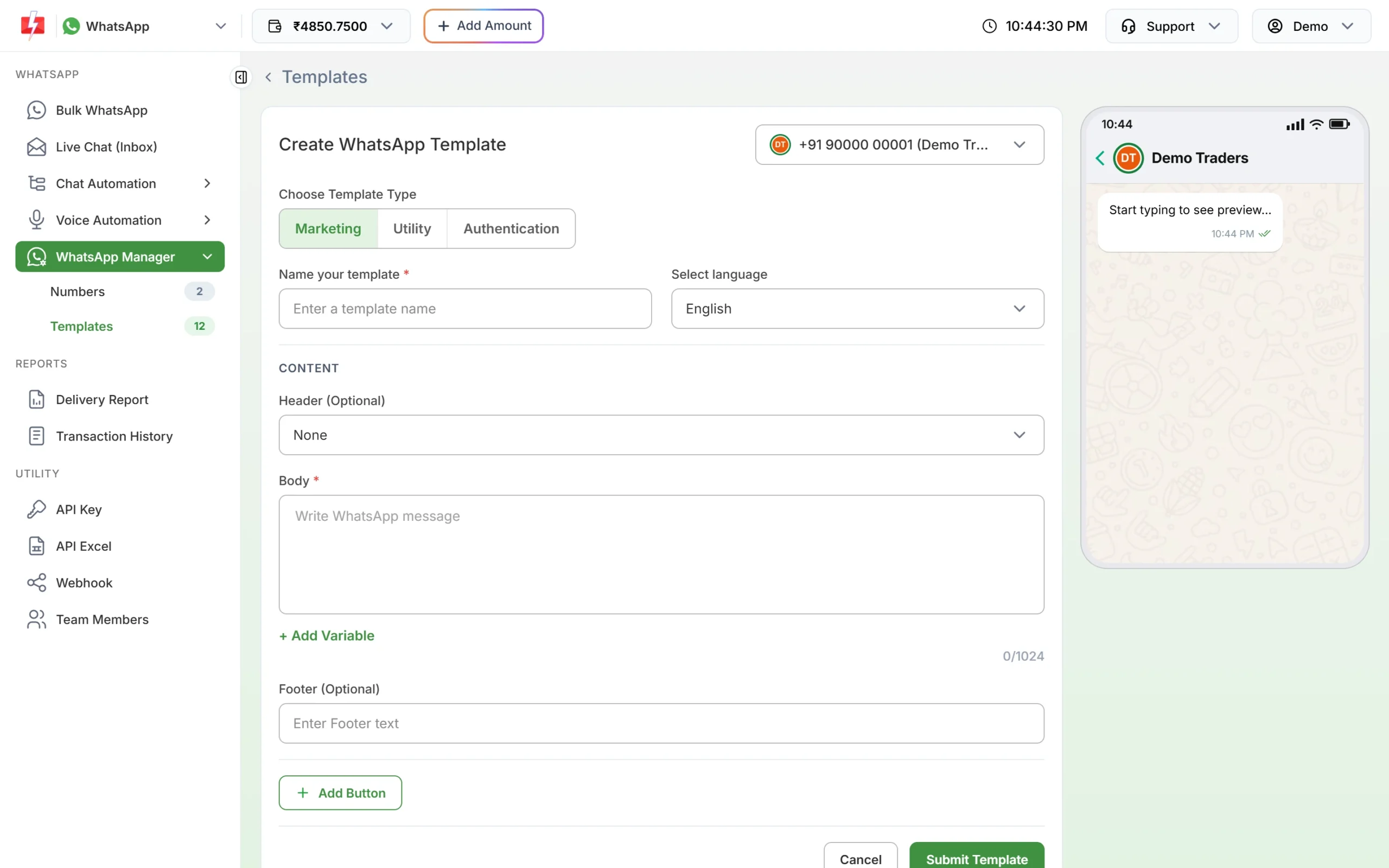
Click Utility under Choose Template Type. -
Choose Utility and paste the text
Under Choose Template Type, click Utility. Type the template name, for example appointment_reminder_tomorrow, and pick the language. Paste the body, put each value in with + Add Variable, and fill the boxes under Samples for body content with the sample values from this page.
-
Add the header and buttons, then submit
For receipts, set Header to Document and upload a sample PDF (up to 100MB). Click Add Button for the buttons listed with each template, then Submit Template. Meta reviews it, usually within 24 hours.
-
Check the category after approval
Click Sync Template to fetch the latest status. The badge under each approved card shows the category Meta gave it. If a template you submitted as Utility shows Marketing, Meta approved it as marketing; read the template again for any promotional line.
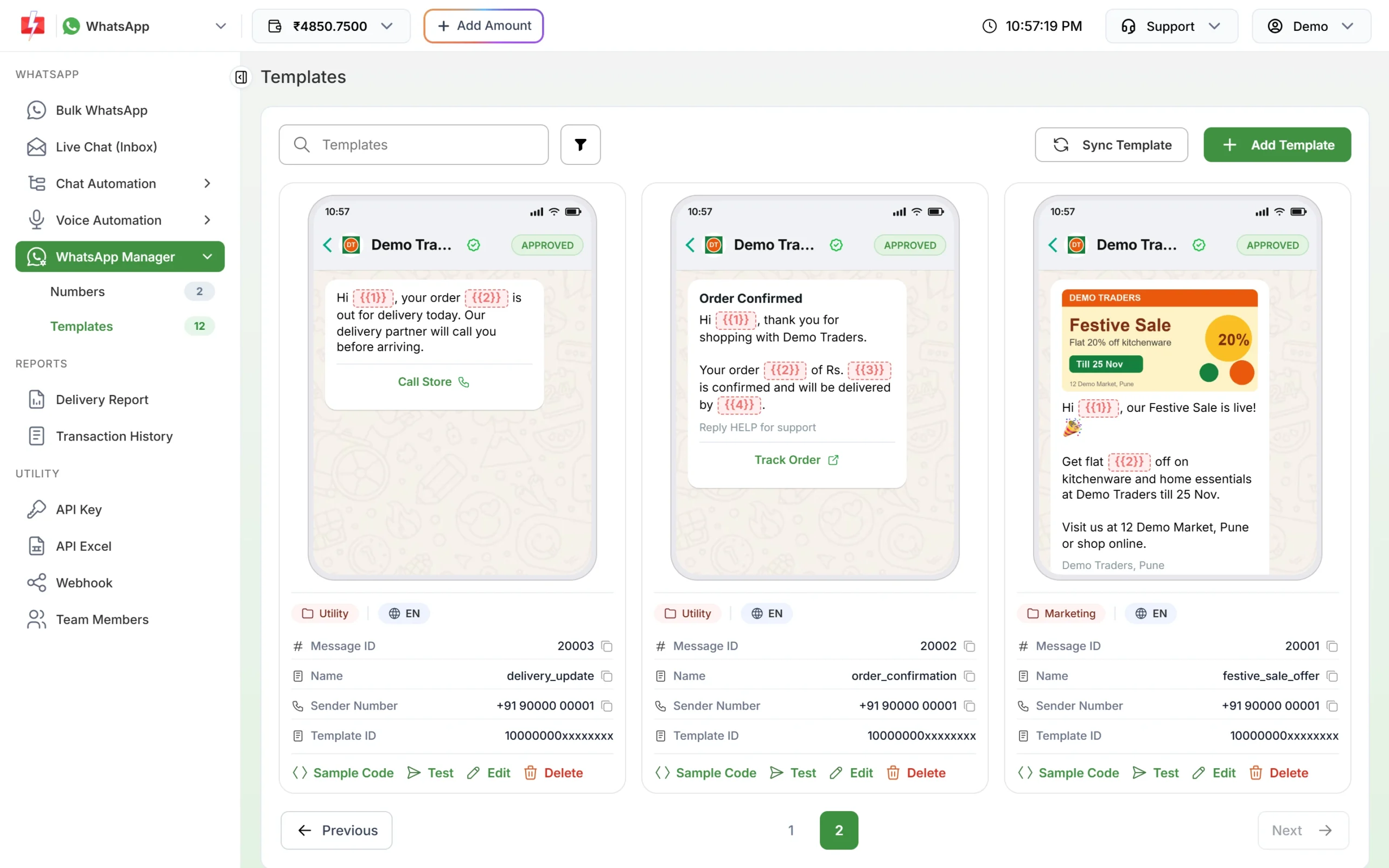
Approved utility templates show the Utility badge. -
Send it
For tomorrow’s appointment list, upload a CSV with one column per variable in Bulk WhatsApp and schedule it for the evening before; the template picker has a Utility tab. For bookings from your hospital or lab software, use the WhatsApp template API.
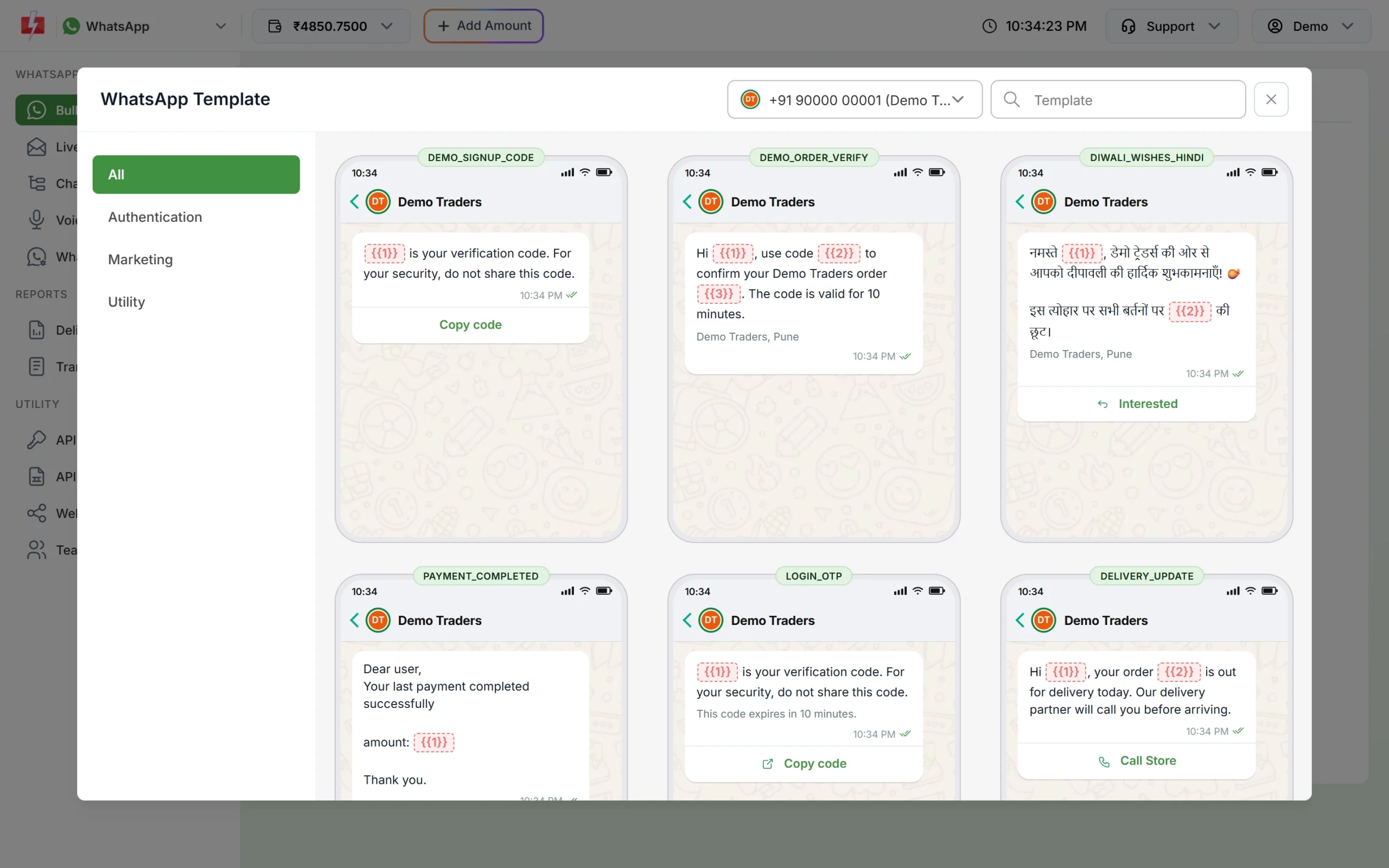
Choose an approved template from the Utility tab.
Frequently asked questions
Can I send lab results on WhatsApp?
Send a report-ready alert with a link to your secure portal, as in the lab template above. Keep test values and diagnoses out of the template.
Is an appointment reminder a utility message?
Yes, when it is about the patient’s own booking and has no offer in it.
Is a health check-up package message utility?
No. A package or discount invites a new purchase, so it is marketing.
Can a pharmacy use WhatsApp templates?
Yes, for order updates such as received, prescription needed and out for delivery. Meta’s policy does not allow selling or promoting prescription medicines on WhatsApp.
Can patients send prescriptions or reports back to us?
Yes. Replies with photos or PDFs arrive in Live Chat (Inbox). Media files there are available for 30 days.
Can I remind patients about a follow-up visit?
Yes, when the doctor asked for it and the message only states the date. Meta decides the category, so keep it free of offers.