
Bulk SMS for government departments and municipal bodies is the simplest way to reach every citizen on any phone: tax and bill reminders, certificate and application updates, water supply notices and grievance updates. WhatsApp adds two-way service, where citizens can ask questions and get answers from a chatbot or an officer, and Smart OTP secures citizen portal logins. This guide shows which public message suits which channel, gives sample templates, lists the rules that apply to government senders, and walks through the setup in Fast2SMS.
It is written for municipal corporations and councils, gram panchayats, district offices, public utilities such as water and electricity boards, and other public bodies that message citizens directly.
Which channel for which citizen message
Most government messages are about a citizen’s own bill, application or complaint, or about a public service in their area. Send them as service messages. Anything that publicises achievements or schemes in a promotional way is treated differently, and needs extra care during elections.
| Message | Best channel | Why |
|---|---|---|
| Property tax or water bill due | SMS (Service Implicit), WhatsApp utility with a pay link | SMS reaches every phone. WhatsApp lets the citizen pay from the message. |
| Payment received | SMS (Service Implicit) | A delivered SMS is a simple receipt the citizen can show later. |
| Application received / approved (certificates, licences, permissions) | SMS and WhatsApp utility | WhatsApp can carry the certificate as a PDF or a download button. |
| Grievance registered / resolved | SMS plus WhatsApp Live Chat | The complaint number on SMS, and a two-way chat for follow-up questions. |
| Water supply or power disruption in an area | SMS (Service Implicit), plus a recorded voice call | Fast, and the call reaches people who do not read texts. |
| Special camps and service drives | SMS and a recorded voice call | Reaches every ward on the list in the local language. |
| Citizen portal or app login | Smart OTP | Priority route with fallback to the other channel. |
| Common questions (office timings, documents needed) | WhatsApp auto replies and chatbot | Answers 24×7 and reduces calls and counter visits. |
Sample DLT SMS templates for government bodies
These are examples to adapt and register on your DLT portal under your department’s entity. They are not pre-approved. Keep the department name as fixed text, keep to three variables or fewer, and whitelist every link and helpline number first. Operators show a suffix after the header that tells citizens the category, and -G marks government messages.
| Use | Example template to register | Category |
|---|---|---|
| Tax due | Property tax of Rs {#numeric#} for property ID {#alphanumeric#} is due by {#alphanumeric#}. Pay online at the YourCity Municipal Corporation portal. | Service Implicit |
| Payment received | YourCity Municipal Corporation has received Rs {#numeric#} for {#alphanumeric#}. Receipt no. {#alphanumeric#}. | Service Implicit |
| Application received | Your application {#alphanumeric#} for {#alphanumeric#} has been received by YourCity Municipal Corporation. Track it at {#url#} | Service Implicit |
| Certificate ready | Your {#alphanumeric#} certificate for application {#alphanumeric#} is ready. Download it at {#url#} | Service Implicit |
| Grievance registered | Your complaint {#alphanumeric#} is registered with YourCity Municipal Corporation. Helpline: {#cbn#} | Service Implicit |
| Grievance resolved | Your complaint {#alphanumeric#} has been resolved by YourCity Municipal Corporation. Not satisfied? Reply on {#url#} | Service Implicit |
| Water supply notice | Water supply in {#alphanumeric#} will be off on {#alphanumeric#} for repair work. Please store water. YourCity Municipal Corporation | Service Implicit |
| Camp notice | YourCity Municipal Corporation special camp for {#alphanumeric#} at {#alphanumeric#} on {#alphanumeric#}. Bring your documents. | Service Implicit |
| Portal OTP | {#numeric#} is your OTP to log in to the YourCity citizen portal. Do not share it with anyone. | Service Implicit |
WhatsApp for citizen services
Meta’s WhatsApp Business Messaging Policy permits government entities to use the WhatsApp Business Platform when they access it through a solution provider. Templates you send first must be approved, and citizens must have opted in, for example by sending a message to your number or ticking a box on your portal.
| Template | Category | Example body | Extras |
|---|---|---|---|
| tax_due | Utility | Dear citizen, property tax of Rs {{1}} for property {{2}} is due on {{3}}. | Visit website (dynamic URL): Pay now |
| certificate_ready | Utility | Your certificate for application {{1}} is ready and attached. | Document header (PDF) |
| complaint_update | Utility | Your complaint {{1}} is now: {{2}}. | Custom buttons: Resolved, Still pending |
| service_disruption | Utility | Water supply in {{1}} will be off on {{2}} from {{3}} for repair work. | Call Phone Number: Helpline |
| portal_login | Authentication | Fixed by Meta: “{{1}} is your verification code.” | Copy code button |
Meta lists severe weather alerts, system outages and fraud awareness among essential messages that can be utility. Keep every utility message to facts about the citizen’s own matter or a service in their area, with no publicity. The panel offers English, Hindi and Gujarati as template languages.
Voice calls for public announcements
A recorded call in the local language reaches citizens who do not read SMS, such as elderly residents. A Simple campaign plays one message to everyone on the list, and a Key Press campaign can record a reply, for example “press 1 if you will attend the camp”.
Sample script (Simple): “Namaste, this is an announcement from YourCity Municipal Corporation. Water supply in your area will be off this Thursday from 10 AM to 4 PM for pipeline repair. Please store water in advance. Thank you.”
- Every voice file is approved by the operator. Fast2SMS rules do not allow files that pretend to be a government body, so a genuine department should say its full name clearly and talk to our support team before its first campaign.
- Calls go to non-DND Indian mobiles only, between 10 AM and 9 PM. A message for all residents should also go on SMS, which reaches DND numbers on a service template.
- TRAI has said government entities use the 1600 series for government-to-citizen calls. The Bulk Voice Call form has no caller ID setting, so ask our support team how your calls will appear.
Smart OTP for citizen portals
Use Smart OTP to log citizens in to a portal or app, to verify the mobile number on an online application, and to confirm a grievance came from the complainant’s own number. The code goes on SMS or WhatsApp on a priority route, and a failed send is re-sent on the other channel within 120 seconds. Set wrong-try limits and resend waiting time in OTP Settings.
How to get started on Fast2SMS (step by step)
-
Add your department’s sender IDs
Register the department as an entity on a DLT portal, with its headers and templates. In Fast2SMS, add the entity, then open DLT Manager > Sender ID > Add New Sender ID. Type each approved header with a screenshot, or upload the Excel exported from your DLT portal. Each header shows Approved, Pending or Rejected with a reason.
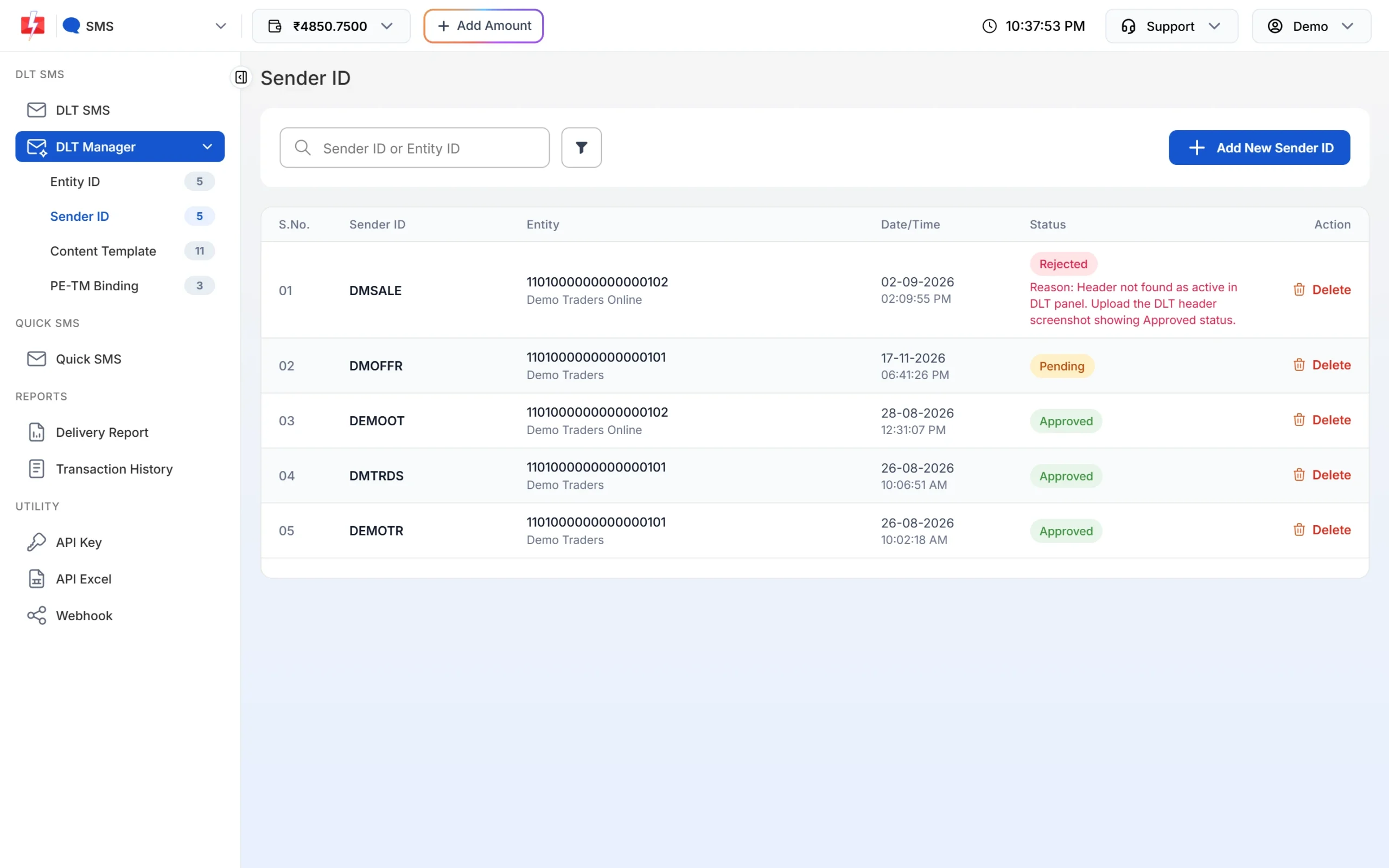
A rejected header shows the reason and what to upload. -
Send a ward-wise notice by SMS
Keep one Address Book group per ward or zone, or upload a CSV with property ID and amount columns. In DLT SMS, pick the sender ID, the group or file, and the template, fill or map the variables and click Send or Schedule.
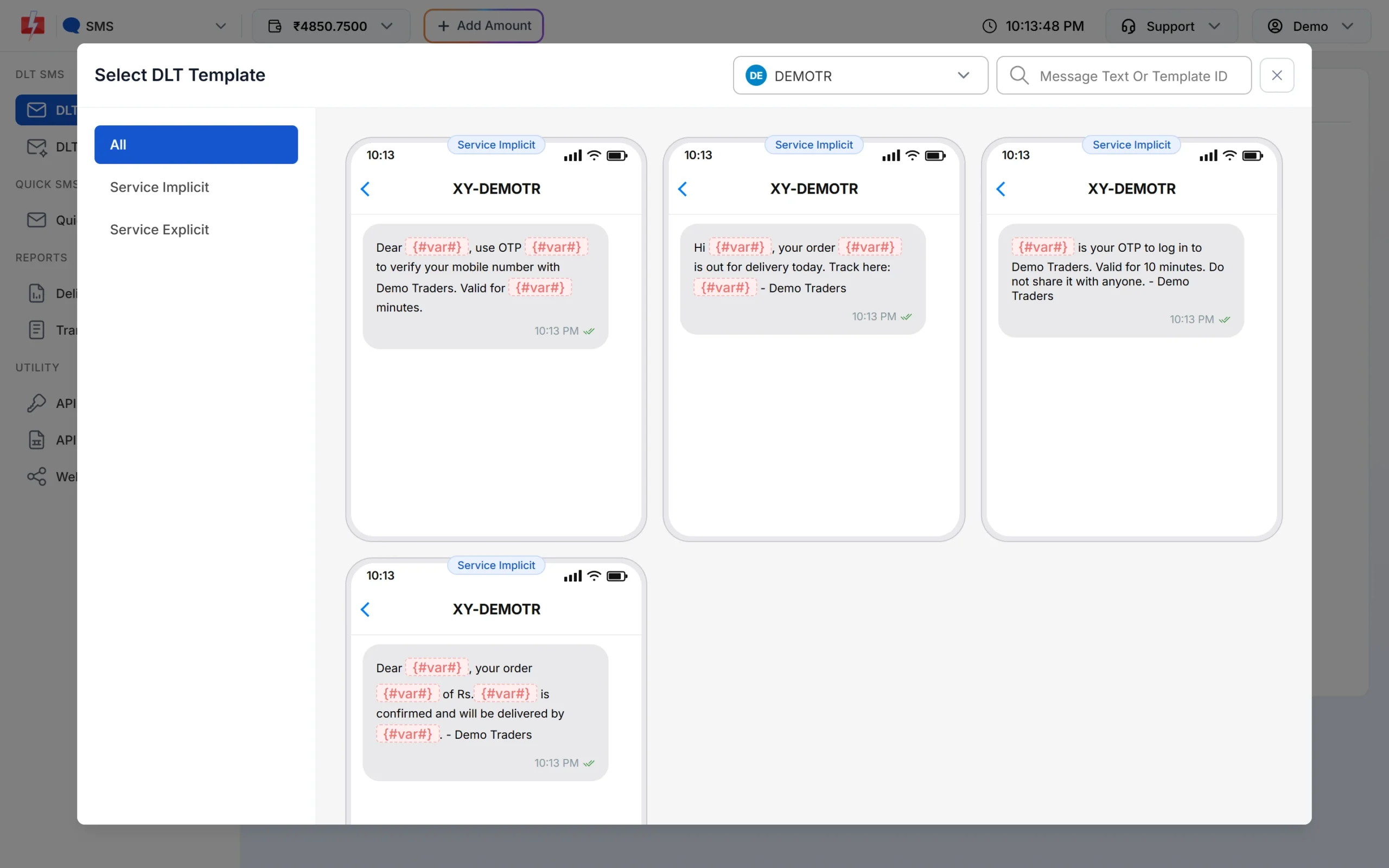
Only approved templates of the chosen sender are listed. -
Check how many citizens were reached
Open Delivery Report > SMS Report. The cards show Total, Delivered, Failed, Sent and Pending for the date range, and each campaign row has a Download button for the per-number report.
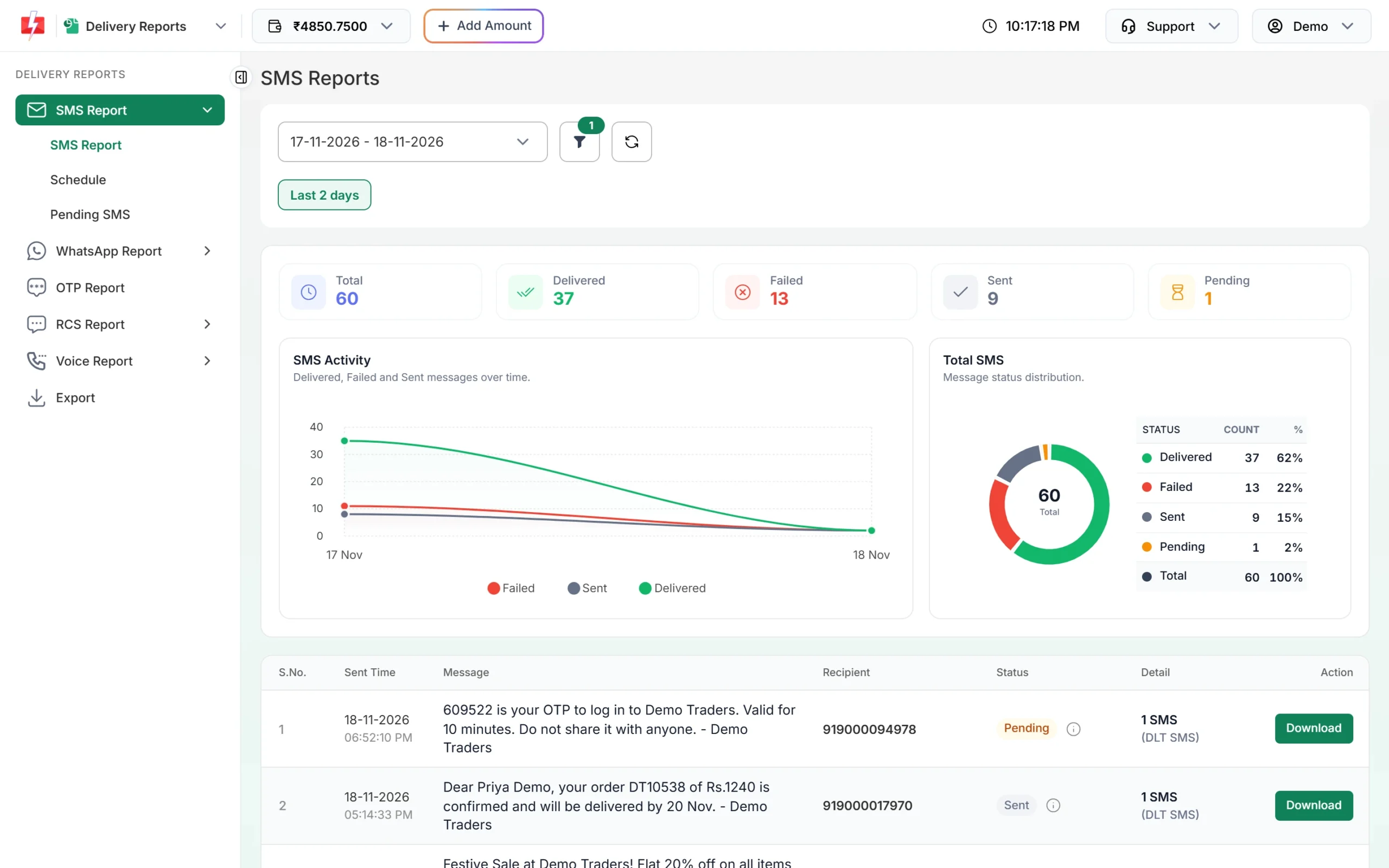
Download per-number reports for your records. -
Answer citizens on WhatsApp
After connecting your number, citizens’ messages arrive in Live Chat (Inbox). Transfer each chat to the right officer, and use labels, tags, notes and attributes in the contact panel to track the complaint number and status.
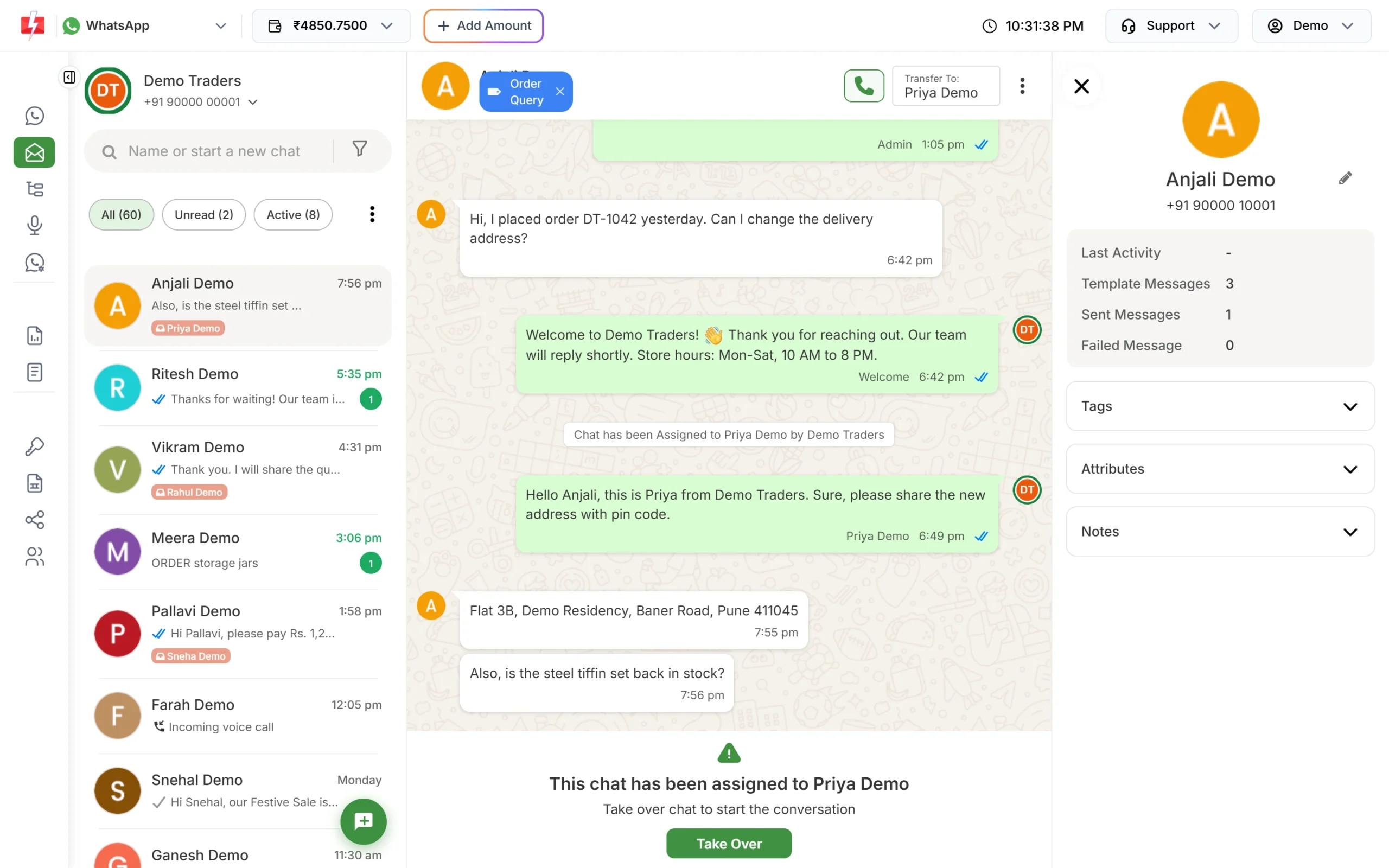
Every chat can be assigned and labelled. -
Record an announcement call
Upload your recorded announcement under Voice Files and wait for approval. Then open Bulk Voice Call, name the campaign, keep Simple, add the ward’s numbers and pick the file. Check the cost in the confirmation popup and send or schedule.
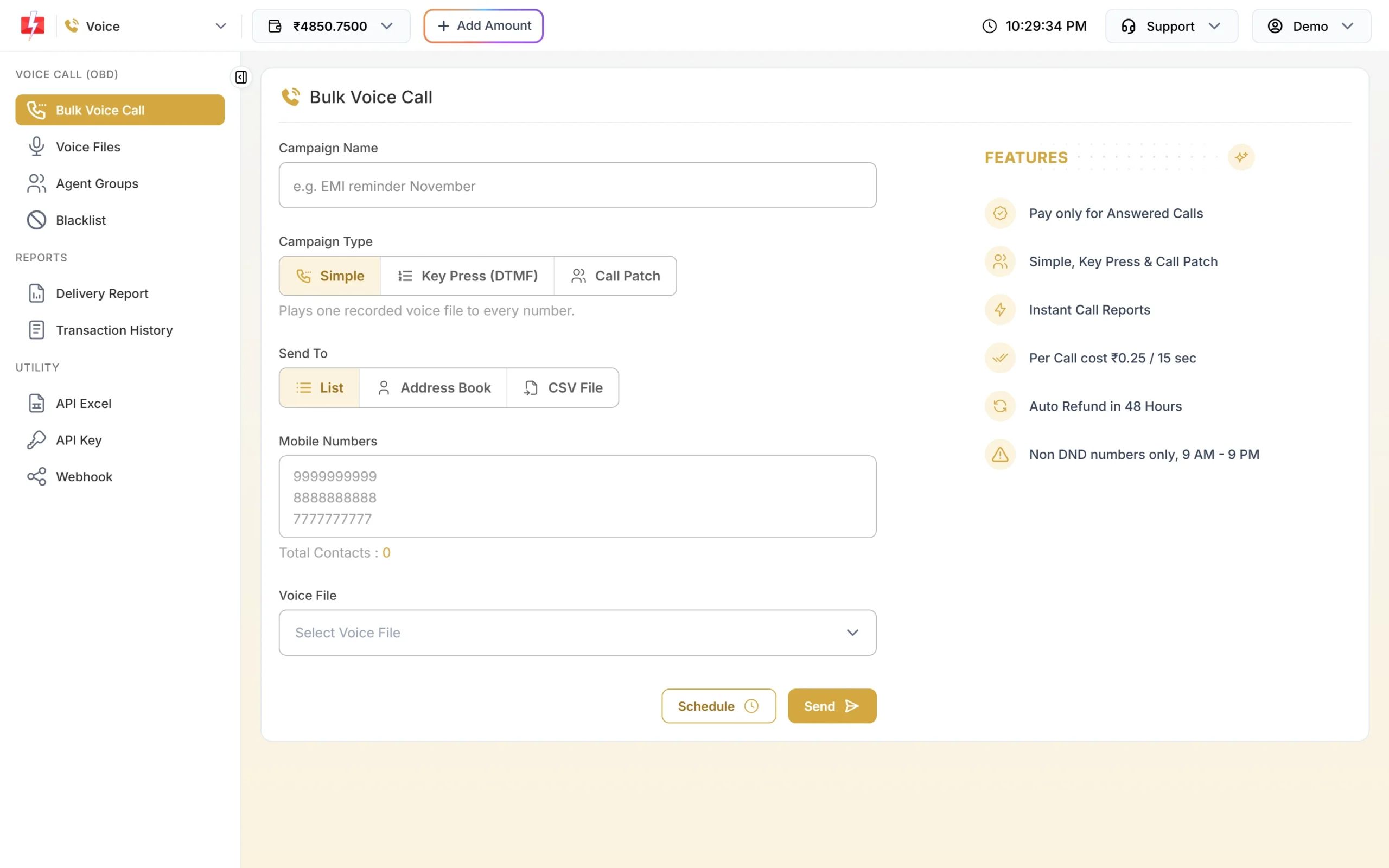
One recording, played to every number.
Automation options
- API from your e-governance software: send the receipt, application and grievance messages the moment the record changes. API Excel gives a ready sheet of your templates with sample requests.
- Webhooks: receive delivery reports of API sends and incoming WhatsApp messages on your own server.
- Chatbot and auto replies: a Flow Builder menu for “Pay tax”, “Certificate status” and “Register complaint”, with an API Request node that can look up status in your system, and an out-of-office message with office hours.
- Scheduling: schedule due-date reminders in advance, or repeat a notice daily across a date range.
- API Security: allow API calls only from your servers’ IP addresses.
Compliance notes for government senders
- Model Code of Conduct: ECI’s code says advertisement at the cost of the public exchequer and publicity regarding achievements during the election period must be avoided. While the code is in force, keep messages to services, bills and notices, with no names or photos of political functionaries.
- No sensitive data: never send Aadhaar numbers, bank details or full personal records in a message. Send a link to your secure portal.
- Never ask for OTPs: say in your templates that the department never asks for an OTP or PIN on a call.
- Right category: service notices on service templates, and nothing promotional inside them.
- Calls: 10 AM to 9 PM, non-DND numbers only, department name in every file.
How to estimate the cost
SMS are charged per number and per part, and regional-language messages use more parts. WhatsApp is charged per message by category, and citizens’ incoming messages are free. Voice is charged per 15-second pulse for answered calls only. See the current rates on the SMS pricing, WhatsApp pricing and voice call pricing pages. Every recharge has a GST invoice under Transaction History > Invoices for your accounts.
Frequently asked questions
Do government departments need DLT registration for SMS?
Yes. Every sender of commercial SMS, including government bodies, registers its entity, headers and templates on a DLT portal.
What does -G after a sender ID mean?
It shows that the message comes from a government sender. Operators add the suffix based on the registration.
Can a municipal corporation use the WhatsApp Business API?
Yes. Meta permits government entities on the WhatsApp Business Platform when they access it through a solution provider.
Will service notices reach citizens on DND?
Yes, on a Service Implicit template. DND blocks promotional messages only.
Can we send notices in Hindi or the local language?
Yes. Register the template in that language. It is sent as Unicode, with 70 characters per SMS part.
Can citizens reply to our messages?
Yes, on WhatsApp. Replies arrive in Live Chat, and you can answer for 24 hours after the citizen’s last message.