
SMS for hospitals and clinics is mostly about one thing: getting patients to the right place at the right time. Appointment reminders, OPD changes, bill receipts and report-ready alerts cut no-shows and front-desk calls. This guide shows which messages to send on SMS, WhatsApp and voice, gives sample DLT and WhatsApp templates, explains what you must never put in a message, and walks through the setup in Fast2SMS. It is for hospitals, nursing homes, clinics and doctors’ chambers.
The first rule: keep medical details out of messages
An SMS can be read on a lock screen, by a family member or by whoever picks up the phone. A WhatsApp broadcast can be forwarded. So hospital messages should say when and where, not what is wrong.
- Do not send diagnoses, test values, medicine names, pregnancy or HIV status, or anything about a condition.
- Do say the date, time, doctor or department, and give a link to your patient portal or ask the patient to visit or call.
- WhatsApp’s Business Messaging Policy says not to use WhatsApp for telemedicine or to send or request health-related information where the applicable rules do not allow such information on systems that lack heightened safeguards. Keep WhatsApp for appointments, timings, bills and directions.
Hospital and clinic messages, and the best channel
| Message | Best channel | Why |
|---|---|---|
| Appointment booked | SMS (Service Implicit) or WhatsApp utility | Confirms the slot, doctor and address right away. |
| Reminder the day before | WhatsApp utility with Confirm and Reschedule buttons, SMS as backup | Patients answer with one tap, and the front desk knows who is coming. |
| Reminder for elderly patients | Key Press voice call | A spoken reminder in the local language, with “press 1 to confirm”. |
| Doctor delayed, OPD cancelled | SMS (Service Implicit) | Reaches every patient in minutes, with or without data. |
| Bill paid, deposit received | SMS (Transactional) or WhatsApp utility with PDF receipt | Sent right after the payment, with the amount and receipt number. |
| Report ready for collection | SMS with a portal link | Tells the patient the report is ready without showing any result. |
| Follow-up visit due | SMS and WhatsApp utility | Brings patients back on the date the doctor advised. |
| Patient app or portal login | Smart OTP | Priority route, with fallback to the other channel. |
| “Timings?” “Which floor?” “Is Dr. X in today?” | WhatsApp chatbot and Live Chat | Fewer calls to the reception desk. |
| Free health check-up camp | Promotional SMS or WhatsApp marketing | Promotional, so only to people who opted in, within allowed hours. |
Sample DLT SMS templates for hospitals and clinics
These are examples to adapt and register on your DLT portal under your hospital’s name. None of them carries medical information.
| Use | DLT category | Sample template (example) |
|---|---|---|
| Appointment booked | Service Implicit | Dear {#var#}, your appointment with {#var#} is booked for {#var#} at {#var#}. Token {#alphanumeric#}. – Demo Care Hospital |
| Appointment reminder | Service Implicit | Reminder: your appointment with {#var#} is tomorrow, {#var#} at {#var#}. Please arrive 15 minutes early. Call {#cbn#} to reschedule. – Demo Care Hospital |
| Doctor delayed | Service Implicit | Dear Patient, {#var#} is delayed today. Your appointment is moved to {#var#}. We regret the inconvenience. – Demo Care Hospital |
| Payment received | Transactional | Received Rs.{#numeric#} from {#var#} on {#var#}. Receipt no. {#alphanumeric#}. – Demo Care Hospital |
| Report ready | Service Implicit | Dear {#var#}, your report for visit {#alphanumeric#} is ready. Collect it from the counter or view it on {#url#} – Demo Care Hospital |
| Follow-up due | Service Implicit | Dear {#var#}, your follow-up visit with {#var#} is due on {#var#}. Book your slot: {#url#} – Demo Care Hospital |
| Portal OTP | Transactional | {#numeric#} is your OTP to log in to the Demo Care Hospital patient portal. Do not share it with anyone. – Demo Care Hospital |
| Health camp | Promotional | Free health check-up camp at Demo Care Hospital on {#var#}, {#var#}. Register: {#url#} – Demo Care Hospital |
The {#cbn#} variable is meant for a callback number, so patients see your reception number clearly. Register a separate template per purpose; one reminder template stuffed with many variables is more likely to be rejected.
WhatsApp templates for hospitals
| Template name | Category | Body (example) | Extras |
|---|---|---|---|
| appointment_reminder | Utility | Hi {{1}}, this is a reminder of your appointment with {{2}} on {{3}} at {{4}}. Please confirm. | Quick replies “Confirm” and “Reschedule” |
| payment_receipt | Utility | Dear {{1}}, we have received Rs. {{2}} on {{3}}. Your receipt is attached. | Document header (PDF) |
| followup_due | Utility | Hi {{1}}, your follow-up visit with {{2}} is due on {{3}}. Tap below to book a time. | Visit website “Book slot” |
| health_camp_invite | Marketing | A free check-up camp is on {{1}} at Demo Care Hospital, {{2}}. Registration is free. | Image header, “Register” button, “Stop promotions” quick reply |
WhatsApp’s policy lists drugs and medical and healthcare products among things businesses may not sell on WhatsApp, so do not use marketing templates to promote medicines or treatments.
Voice calls for hospitals and clinics
Many older patients answer a call but never open an SMS. Fast2SMS voice campaigns help here:
- Key Press appointment confirmation: “Namaste, this is Demo Care Hospital. You have an appointment tomorrow at 11 AM with the orthopaedics department. Press 1 to confirm. Press 2 if you want to change the time.” The report shows which key each patient pressed.
- Call Patch to the front desk: “Press 1 to speak to our appointment desk.” The patient is connected to a group of your staff numbers, and if nobody picks up, a recording you choose plays.
OTP for patient apps and portals
Patient portals that show reports must protect the login. Smart OTP sends the code by SMS or WhatsApp on a priority route, verifies it, limits wrong tries, and can send a fallback on the other channel if the first fails. Set the allowed attempts and resend wait in OTP Settings. This is safer than sending a report link that anyone holding the phone can open.
How to get started on Fast2SMS
Before you start, register your hospital as an entity on a DLT portal, get your sender ID and templates approved, complete PE-TM binding with Fast2SMS, and add them in SMS > DLT Manager. For WhatsApp, connect your hospital’s number in the WhatsApp app.
-
Create the appointment reminder template
Open WhatsApp > WhatsApp Manager > Templates and add a template. Choose Utility, name it (for example appointment_reminder), write the body with variables and give sample values, then add two Custom buttons, “Confirm” and “Reschedule”. Click Submit Template and wait for Meta’s approval.
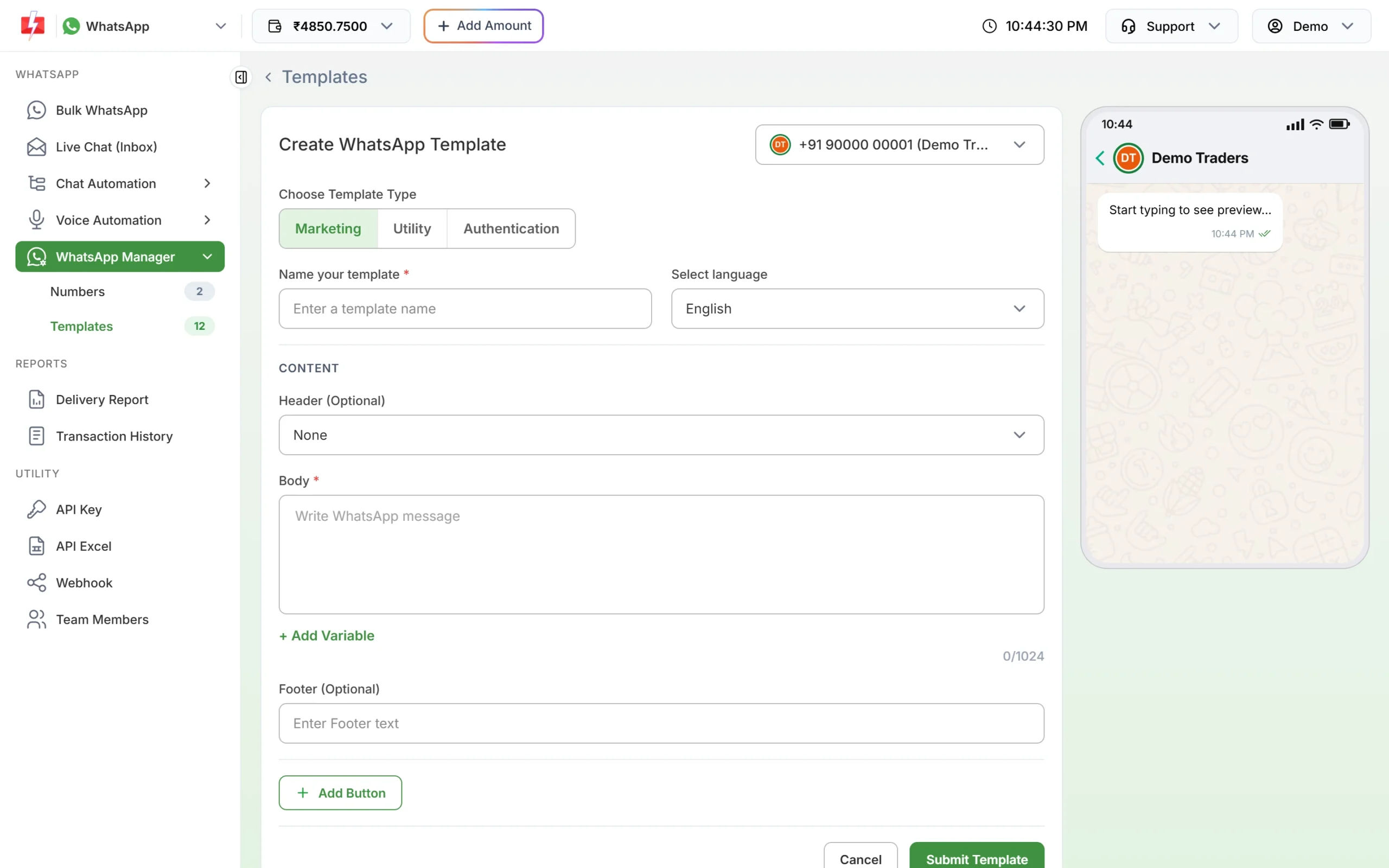
Write the template once; reuse it for every reminder. -
Set up a WhatsApp menu for patient questions
In Chat Automation > Flow Builder (Chatbot), create a flow that starts on “hi” or “menu” and shows options such as “OPD timings”, “Find a doctor”, “Directions” and “Talk to reception”. The last option can use Assign Conversation to pass the chat to your staff in Live Chat (Inbox).
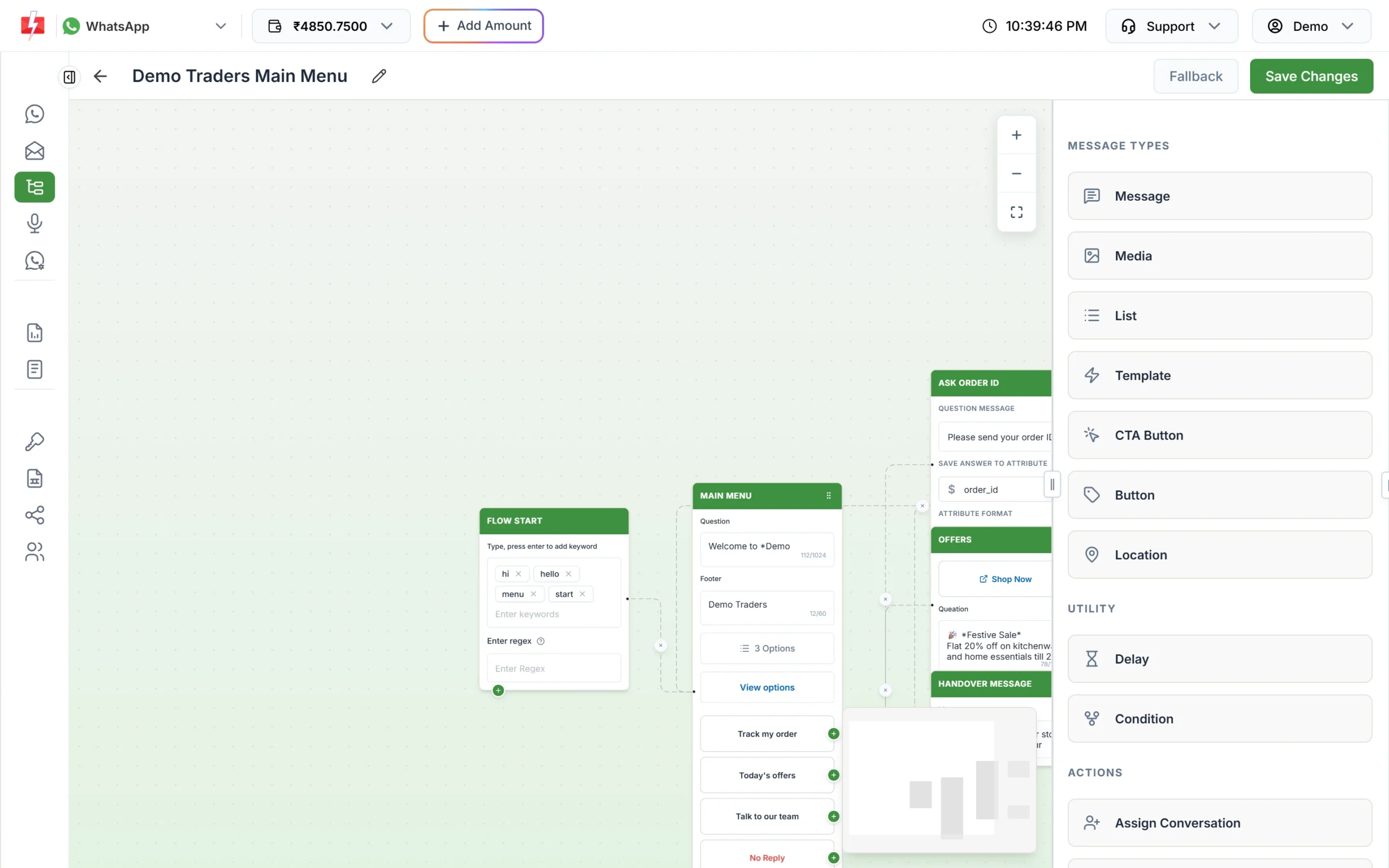
A simple menu answers the questions reception gets all day. -
Send tomorrow’s reminders as a Key Press call
Open Voice > Bulk Voice Call, name the campaign, choose Key Press (DTMF) and add the numbers from a CSV export of tomorrow’s appointments. Under “How the call works”, pick the approved recording the patient hears, tap keys 1 and 2, and optionally a thank-you file. Schedule it for a time inside calling hours.
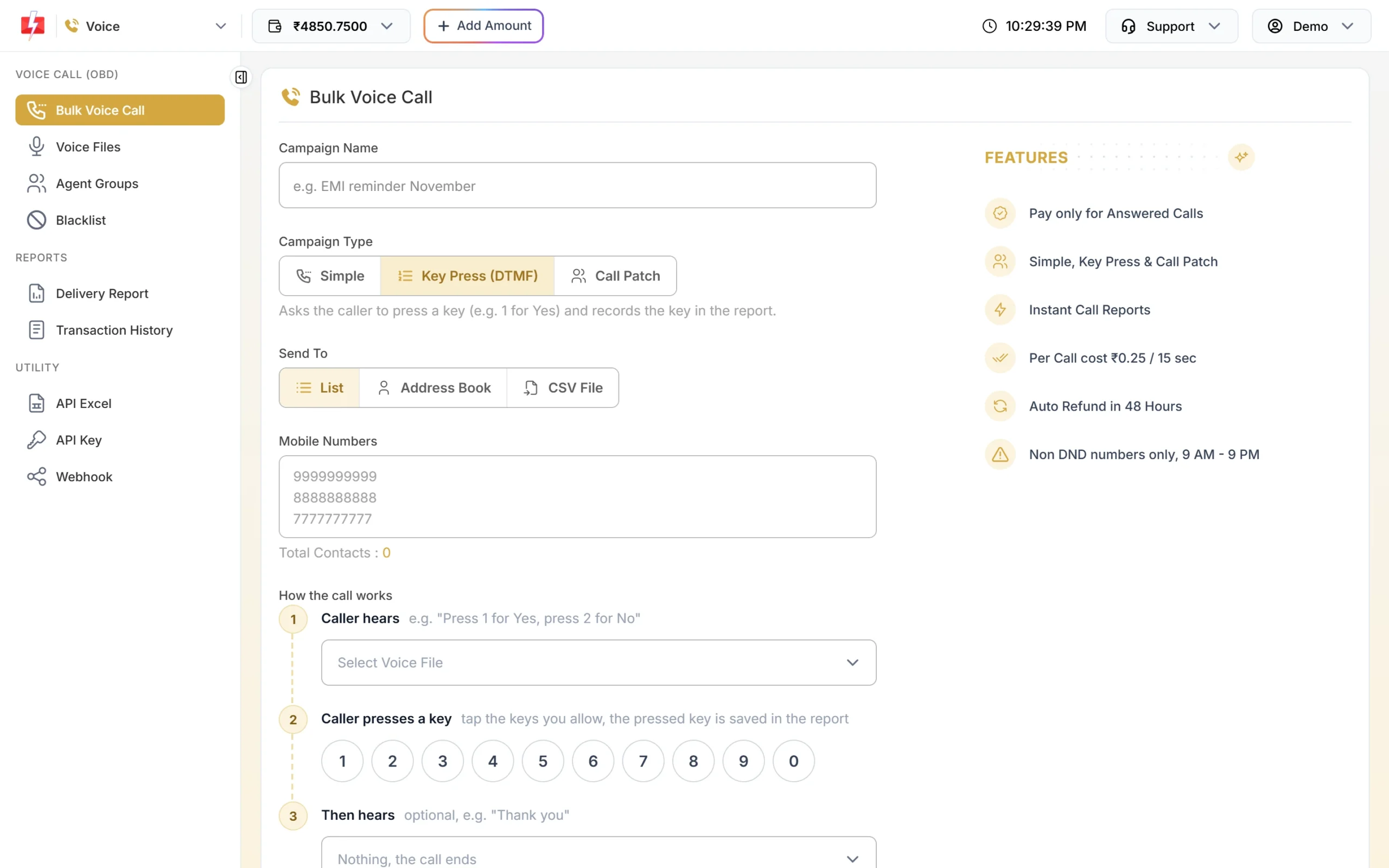
Choose the recording and the keys patients can press. -
See who confirmed
Open Delivery Reports > Voice Report and click the campaign. You see answered, no answer, busy, failed and DND counts, the pulses charged and refunded, and a Key column showing what each patient pressed. Call the patients who pressed 2 or did not answer.
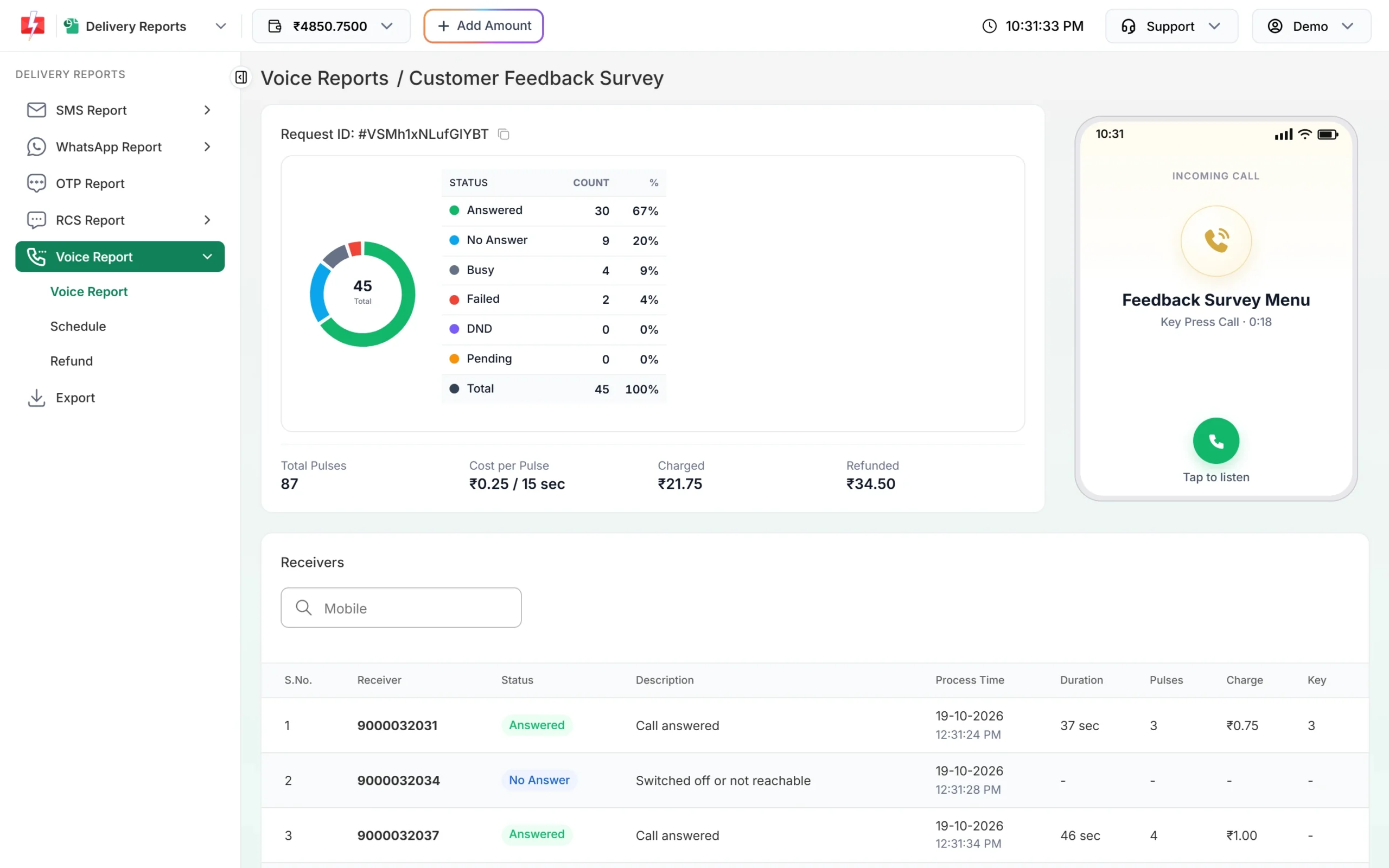
The Key column shows each patient’s answer. -
Connect patients to the front desk
Create an agent group under Agent Groups with your reception numbers. Then in Bulk Voice Call choose Call Patch, pick the menu recording, set “Press 1 connect to” your group, and choose the recording that plays if no agent picks up.
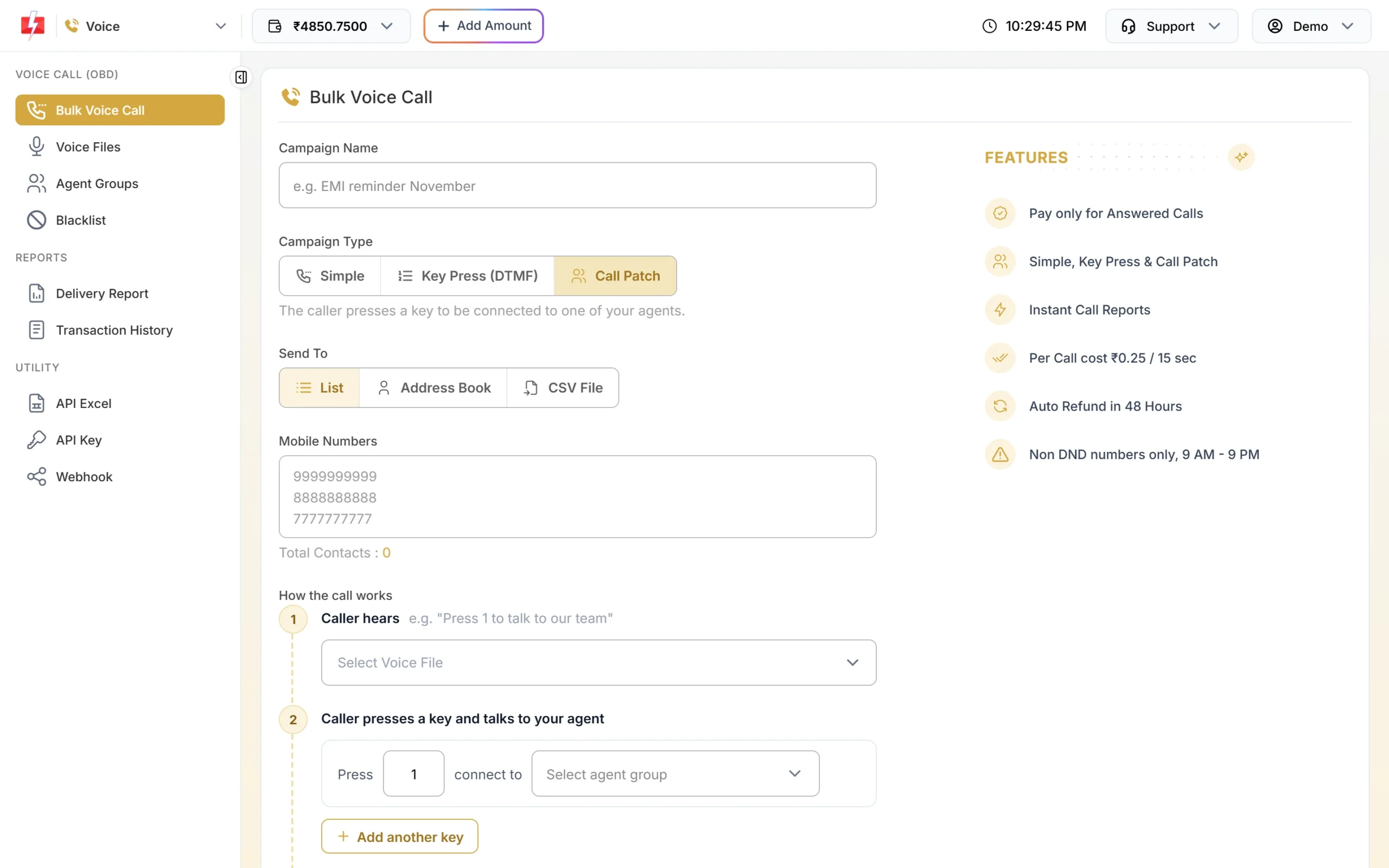
Patients press a key to reach your desk. -
Add Smart OTP to the patient portal
In Smart OTP, click Add OTP Template, select your approved DLT OTP template, mark the OTP variable, and tick SET FALLBACK TEMPLATE to add a WhatsApp authentication template as backup. Your developer uses the OTP ID with the send and verify APIs.
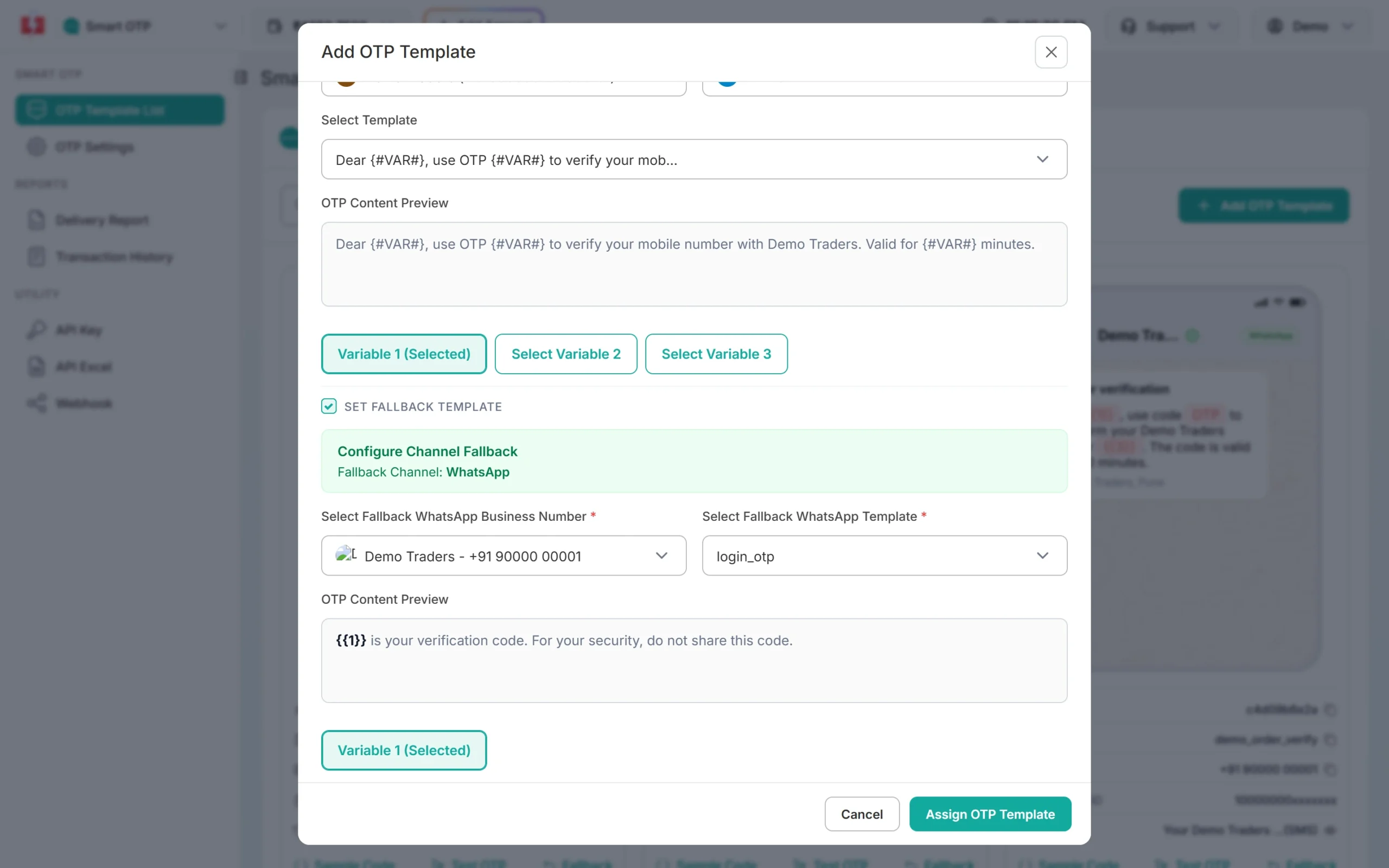
SMS OTP with a WhatsApp fallback. -
Check delivery every morning
Open Delivery Reports > SMS Report. The cards show Total, Delivered, Failed, Sent and Pending for the chosen dates, and each row opens per-number details with the reason for any failure, such as a switched-off phone or a DND number.
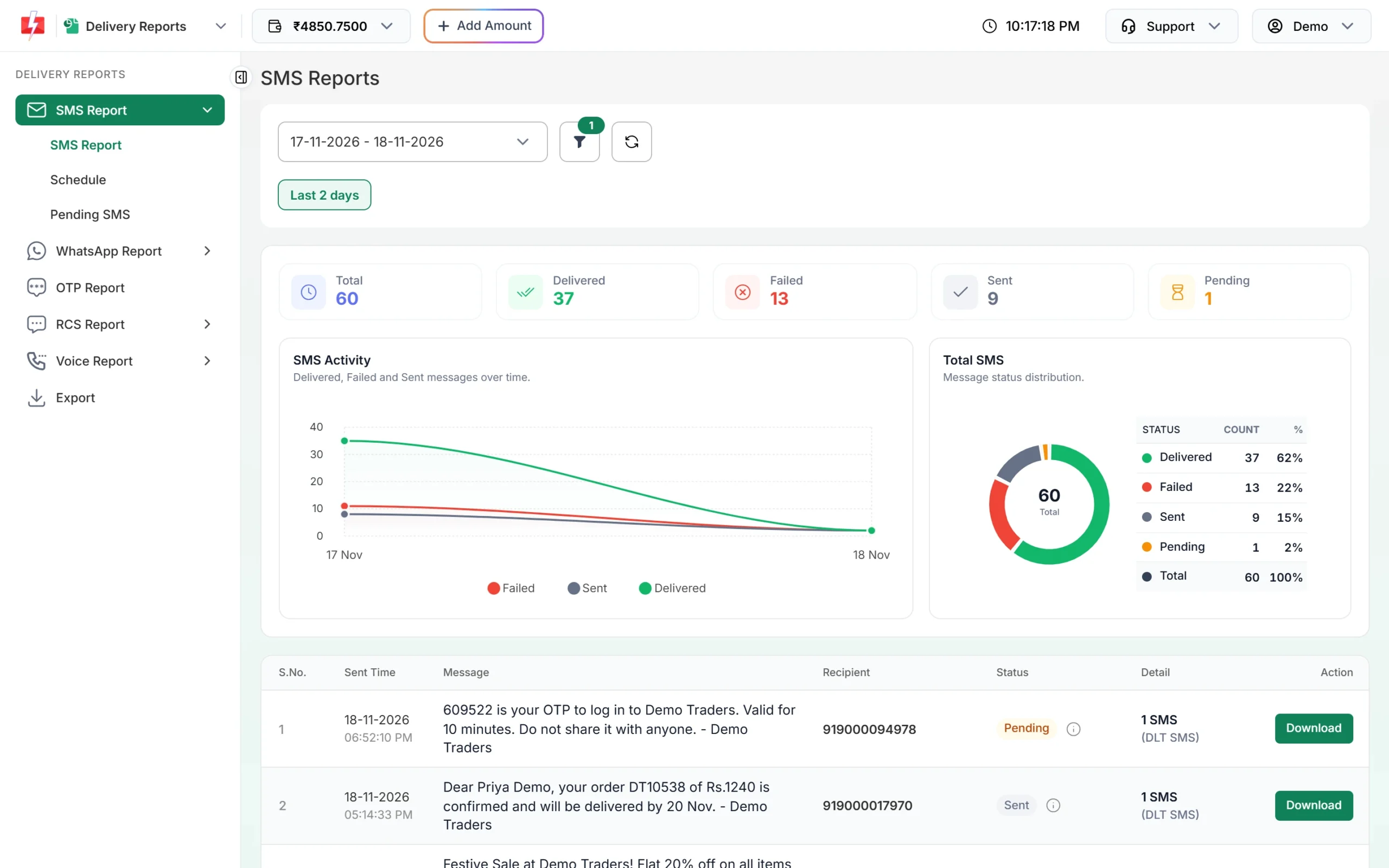
Delivery status for your reminders.
Automation options
- Hospital software (HMS) or appointment app: send confirmations and reminders through the API as soon as a booking is made, using your template’s Message ID. Download your templates with sample requests from API Excel.
- Webhooks: get delivery status and incoming WhatsApp replies (like “Reschedule”) back into your system.
- Scheduling: upload tomorrow’s list in the evening and schedule the reminders; scheduled campaigns can be cancelled with a refund to the wallet.
- Google Sheets: small clinics that keep appointments in a sheet can use the Fast2SMS add-on for Google Sheets.
Compliance notes
- DLT: reminders, delays and report-ready alerts are Service Implicit; payment receipts sent right after payment are Transactional; camps are Promotional and go only between 10 AM and 9 PM.
- Consent: take a consent line at registration, for example “I agree to receive appointment and billing updates from Demo Care Hospital by SMS, WhatsApp and calls”. Keep marketing consent separate.
- Privacy: India’s Digital Personal Data Protection Act, 2023 also applies to how you use patients’ personal data. Health details are sensitive, so keep them in your portal, not in messages.
- Voice: no medical advice or health claims, operator-approved recordings that name your hospital, non-DND numbers only, 10 AM to 9 PM.
- Staff access: give reception and call-centre staff team member logins with the Chat Agent role so they only see the chats assigned to them.
How to estimate the cost
Count your monthly appointments and multiply by the messages per appointment (for example one confirmation and one reminder). SMS cost is numbers x SMS parts x your rate, see bulk SMS pricing. WhatsApp utility templates are charged per message by category, with automatic refunds for failed messages, see WhatsApp pricing. Voice calls are charged per pulse for answered calls only, see voice call pricing. Every campaign shows the exact total before you confirm it.
Frequently asked questions
Can I send lab results or prescriptions by SMS or WhatsApp?
Do not put results or medicine details in the message. Send a “report ready” alert with a link to your patient portal, where the patient logs in with an OTP.
Which DLT category should appointment reminders use?
Service Implicit, because the patient has a relationship with you. These reach DND numbers and can be sent at any hour.
Can patients confirm or cancel from the reminder?
Yes. Use WhatsApp quick reply buttons or a Key Press voice call. Replies show in Live Chat or the voice report, and can also be sent to your system by webhook.
Can a clinic without software use Fast2SMS?
Yes. Type or paste numbers, pick contacts from Address Book or upload a CSV, then send or schedule from the panel.
Can we promote a health check-up camp?
Yes, with a promotional SMS template or a WhatsApp marketing template sent to people who opted in. Do not make health claims, and avoid promoting medicines.
Do voice reminders reach every patient?
No. Calls go only to non-DND numbers. Patients on DND still get your Service Implicit SMS.