
Bulk SMS and WhatsApp for internet, cable and utility providers handle the messages subscribers care about most: the bill, the payment receipt, the renewal date and the outage notice. DLT SMS reaches every subscriber even when their own internet is down, WhatsApp takes complaints and sends bill links, and a voice call can tell a whole area about a fault in minutes. This guide maps each message to a channel, gives templates and shows the setup in Fast2SMS.
It is written for broadband and local internet service providers, cable TV and DTH operators, and private utilities such as piped gas, water and electricity distribution companies.
Which channel for which subscriber message
When the internet is down, a WhatsApp message on home Wi-Fi does not arrive, so outage notices must go by SMS or voice. Bills and receipts are service messages and can go out at any hour. Plan upgrades and offers are promotional.
| Message | Best channel | Why |
|---|---|---|
| Bill generated | SMS (Service Implicit) and WhatsApp utility with a “View bill” link | Each subscriber gets their own amount and due date. |
| Payment received | SMS (Service Implicit) | Instant proof that stops repeat calls to your office. |
| Due or renewal reminder | SMS and WhatsApp utility | Linked to the subscriber’s account. Not allowed on voice calls. |
| Planned maintenance or area outage | SMS plus a Simple voice call | Works when the subscriber’s broadband is down, because it travels on the mobile network. |
| Service restored | SMS (Service Implicit) | Short and fast. Saves your support line a wave of calls. |
| Technician visit scheduled | WhatsApp utility, SMS backup | Shows the time slot and the technician’s contact. |
| Job completion check | Smart OTP | The subscriber gives the technician a code to close the job. |
| Complaint registration | WhatsApp chatbot and Live Chat | The subscriber picks a problem type and the ticket reaches the right person. |
| Faster plan or channel pack offers | WhatsApp marketing or promotional SMS | Selling, so promotional rules apply. |
Sample DLT SMS templates
Register these examples under your company name. Keep three variables or fewer, each tagged for its type, and whitelist your payment and bill links and call-back numbers on your DLT portal.
| Use | Example template to register | Category |
|---|---|---|
| Bill generated | Your YourNet bill for account {#alphanumeric#} is Rs {#numeric#}, due on {#alphanumeric#}. | Service Implicit |
| Payment received | YourNet has received Rs {#numeric#} for account {#alphanumeric#}. Your plan is active till {#alphanumeric#}. | Service Implicit |
| Renewal reminder | Your YourNet plan for account {#alphanumeric#} expires on {#alphanumeric#}. Renew here to avoid a break: {#url#} | Service Implicit |
| Planned maintenance | YourNet notice: service in {#alphanumeric#} will be down on {#alphanumeric#} for network upgrade work. | Service Implicit |
| Outage | YourNet: we are aware of a fault in {#alphanumeric#}. Our team is working on it. Expected fix by {#alphanumeric#}. | Service Implicit |
| Service restored | YourNet service in {#alphanumeric#} is restored. If you still face trouble, please restart your router or call {#cbn#}. | Service Implicit |
| Technician OTP | {#numeric#} is your YourNet job completion code. Share it with the technician only after the work is done. | Service Implicit |
| Plan upgrade offer | Upgrade to YourNet {#alphanumeric#} plan and get {#alphanumeric#}. See plans: {#url#} | Promotional |
WhatsApp templates: utility vs marketing
Bills, receipts, outage updates for the subscriber’s area and technician visits are Utility. Plan upgrades, OTT add-ons and referral offers are Marketing. For a separate bill per subscriber, use a “View bill” button with a dynamic link, or send through the API with each subscriber’s own PDF link.
| Template | Category | Example body | Header / button |
|---|---|---|---|
| bill_ready | Utility | Hi {{1}}, your bill for account {{2}} is Rs {{3}}, due on {{4}}. | Visit website (dynamic URL): View and pay |
| payment_done | Utility | Hi {{1}}, we received Rs {{2}}. Your plan is active till {{3}}. | None |
| technician_visit | Utility | Hi {{1}}, our technician {{2}} will visit on {{3}} between {{4}}. | Custom: Confirm, Reschedule |
| outage_update | Utility | Hi {{1}}, there is a network fault in {{2}}. We expect to restore service by {{3}}. | Call Phone Number: Support |
| plan_upgrade | Marketing | Hi {{1}}, get faster speeds with our {{2}} plan at a special price this month. | Image header, Visit website: See plans |
Voice calls for outages
A Simple voice call reads out an outage or maintenance notice to every subscriber in the affected area. A Key Press call can ask “If your service is still down, press 1”, and the report gives you a list of homes that need a technician.
Sample script (Key Press): “Hello, this is YourNet. The network fault in Sector 12 was fixed at 4 PM. If your internet is still not working after restarting your router, press 1 and our team will call you back. Thank you.”
- Say your company name clearly in every voice file, and never present the call as coming from a telecom operator or the government.
- Calls go to non-DND numbers only, between 10 AM and 9 PM. Outage notices outside those hours should go by SMS.
- You pay only for answered calls. Add subscribers who ask not to be called to the voice Blacklist.
Smart OTP for field visits and logins
Smart OTP is our recommended way to send OTPs. Your field app or customer portal calls the send and verify API with an OTP ID made from a DLT OTP template or a WhatsApp authentication template. Codes go on a priority route, and a failed code is re-sent on the other channel within 120 seconds. Providers use it to close technician jobs, to log subscribers in to the self-care app, and to confirm plan changes or a new registered number.
How to get started on Fast2SMS (step by step)
-
Send bill alerts from your billing export
After adding your DLT entity, sender IDs and templates under DLT Manager, open DLT SMS and choose CSV File. Upload the export from your billing software with account, amount, due date and mobile columns. Pick the bill template and map each variable to a column.
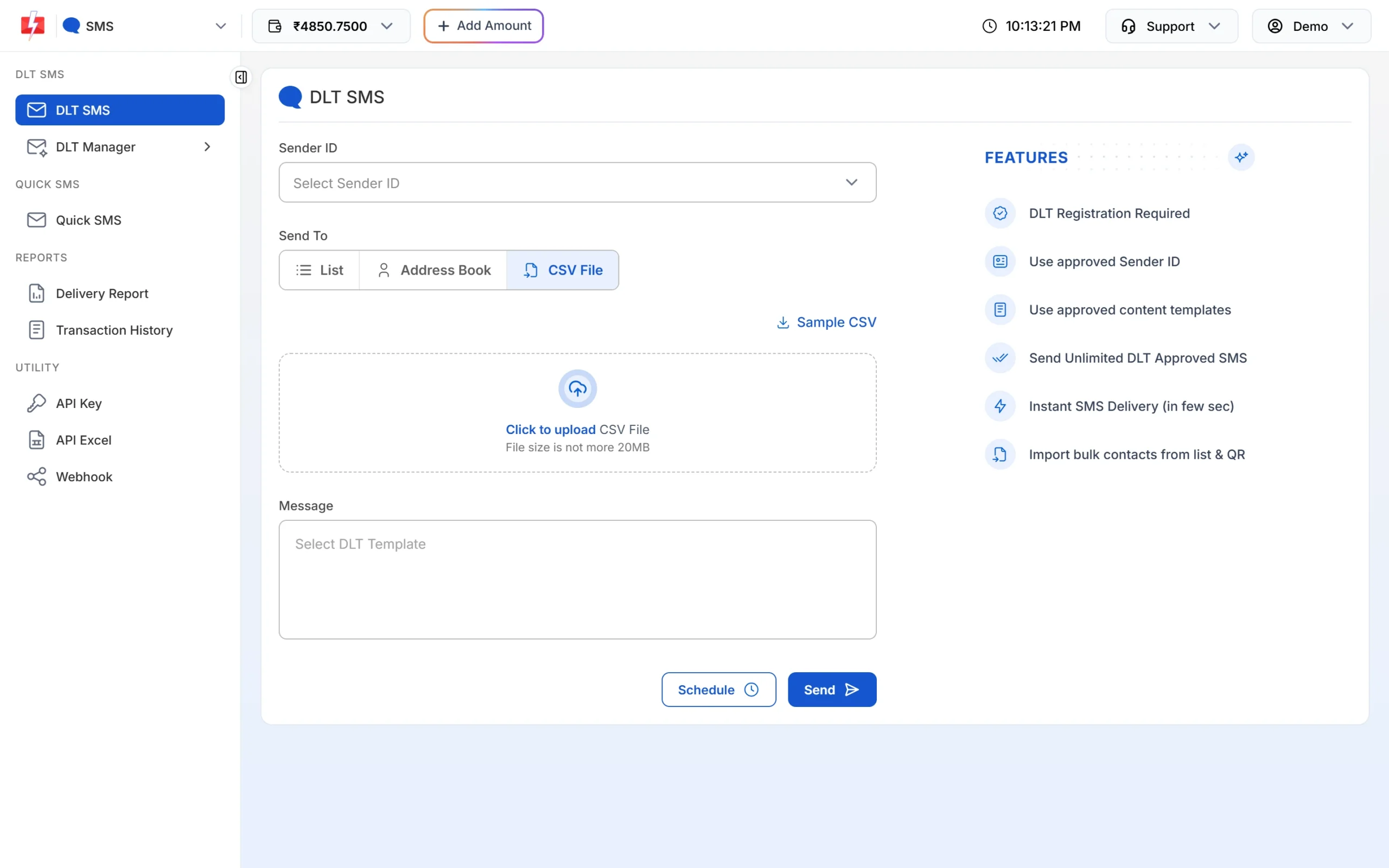
One row per subscriber, each with their own amount. -
Schedule renewal reminders
Fill the form, then click Schedule. Pick a single date, or a date range to send the same reminder once a day until the due date. Scheduled sends appear under Delivery Report > Schedule, where you can cancel them and get the amount back.
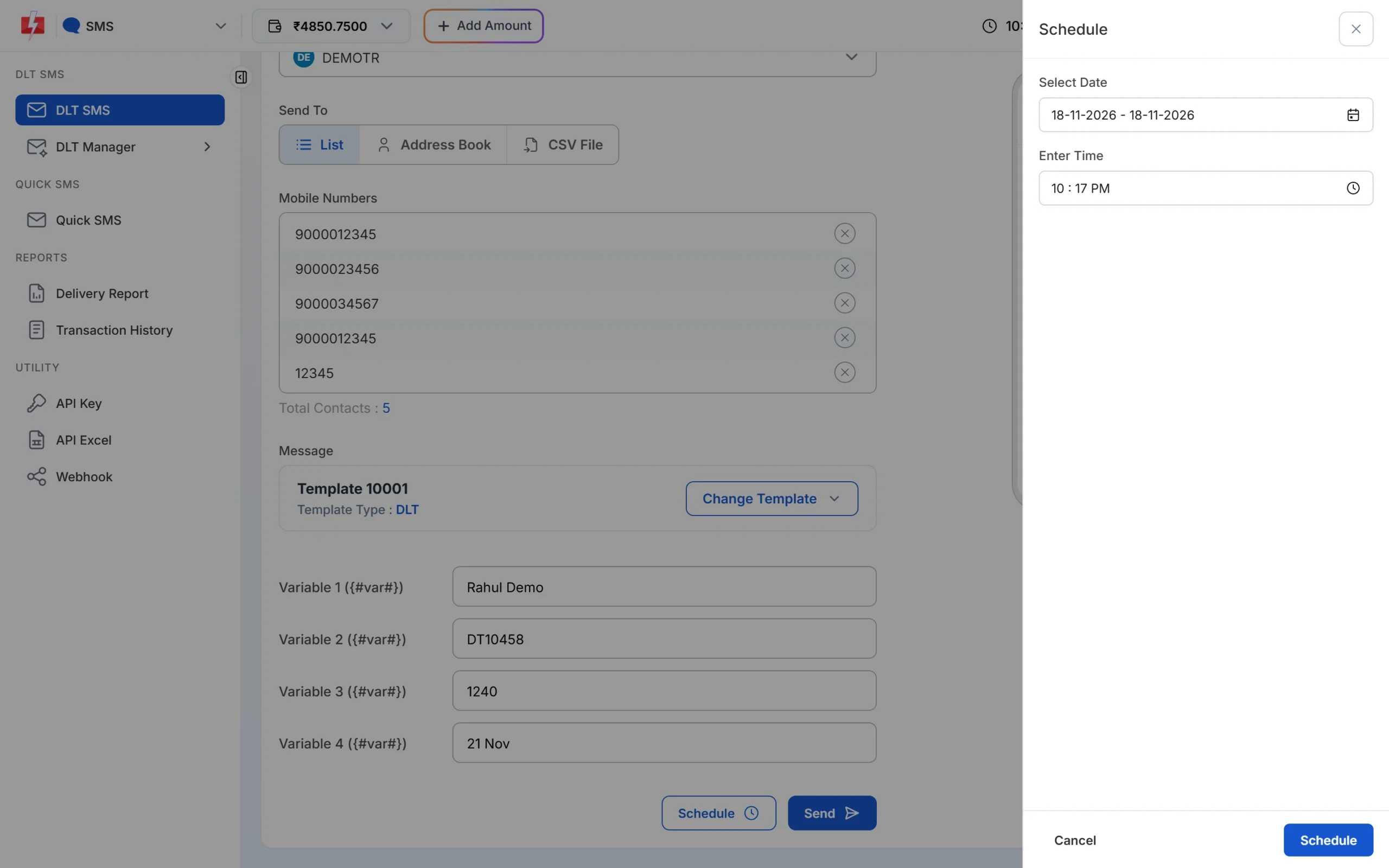
Schedule reminders days before the due date. -
Run an outage check call
Upload the recorded message under Voice Files and wait for approval. Open Bulk Voice Call, choose Key Press (DTMF), paste or upload the numbers in the affected area, select the file and tap the keys you allow. Click Send.
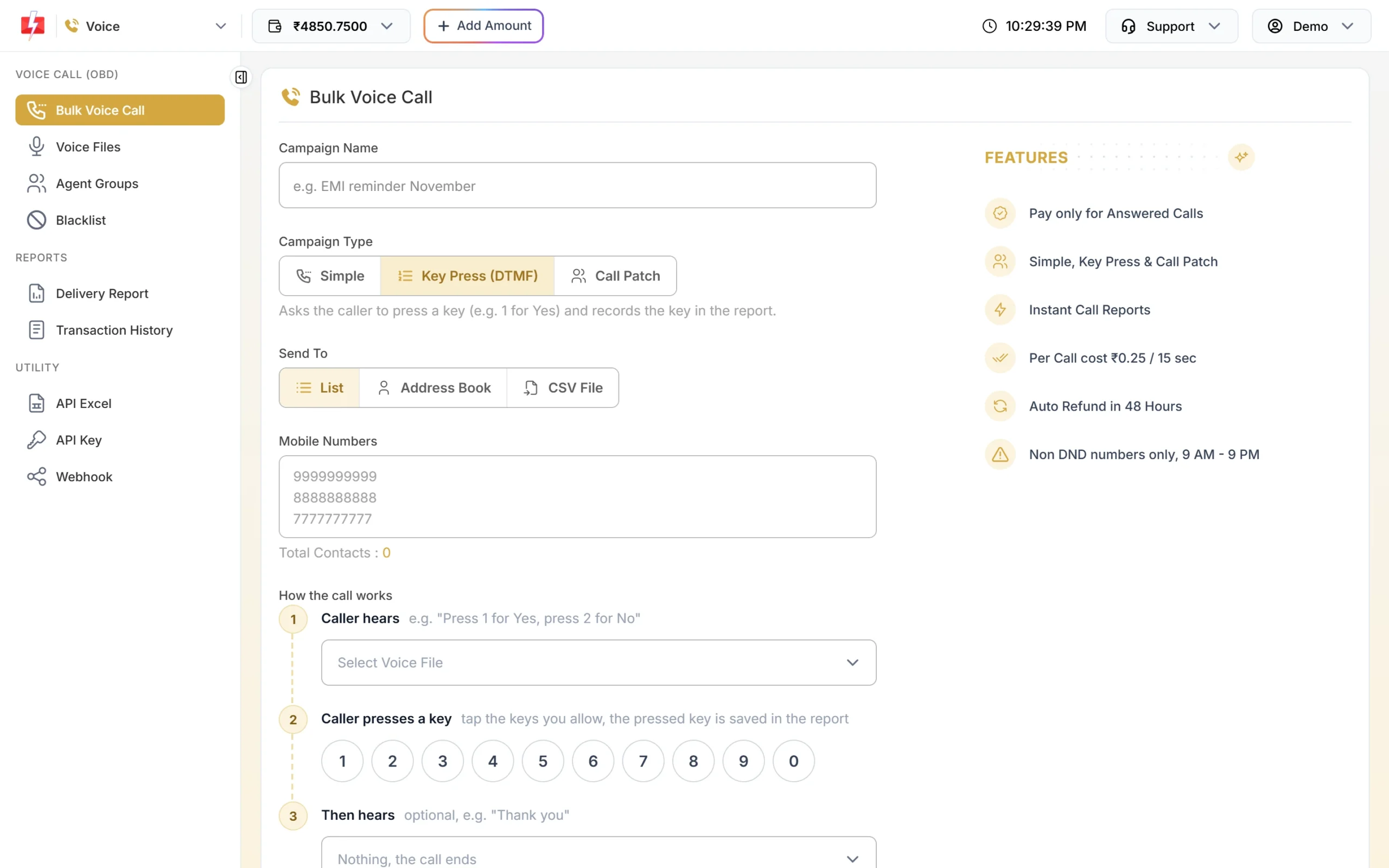
The key each subscriber presses is saved in the report. -
Keep a do-not-call list
Open Voice > Blacklist and click Add Numbers. Paste numbers or upload a file. Blacklisted numbers are never called and never charged.
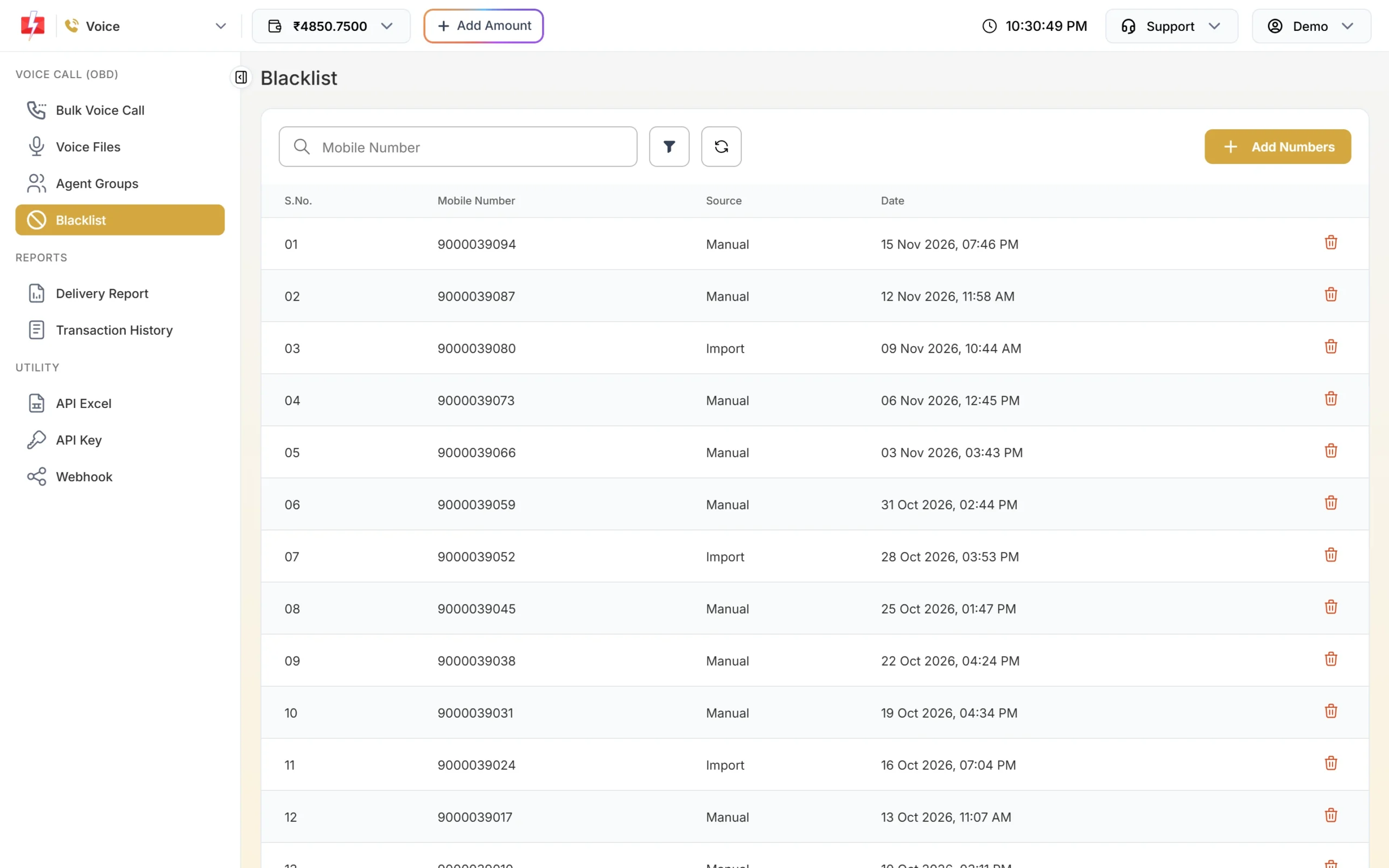
Numbers on the blacklist are skipped in every campaign. -
Build a complaint bot on WhatsApp
Open Chat Automation > Flow Builder (Chatbot) and create a workflow on your number. Add keywords such as “hi” or “complaint” and a menu like “No internet”, “Slow speed”, “Billing” and “Talk to us”. An API Request step can look up the subscriber’s account in your system, and Assign Conversation hands the chat to an agent.
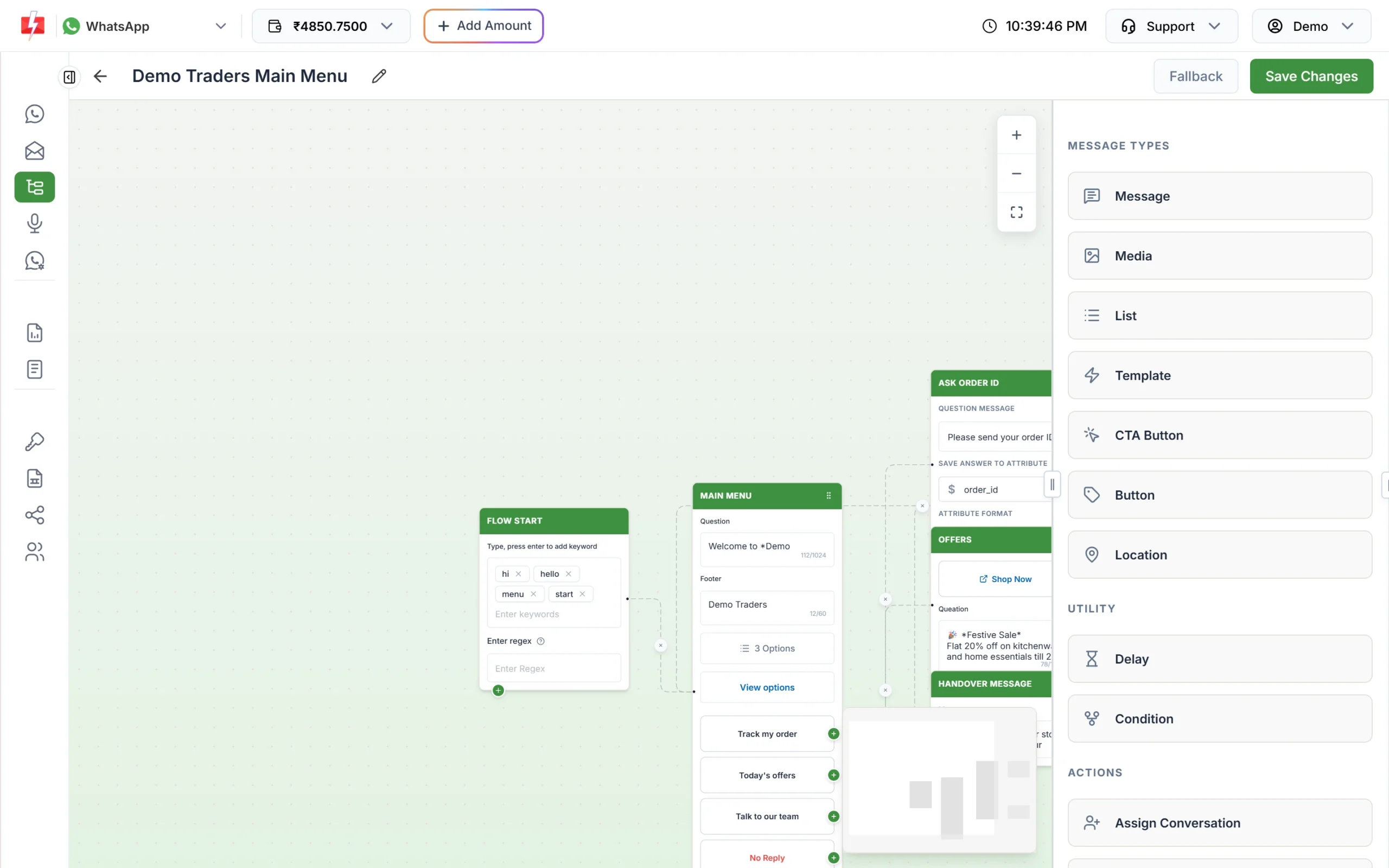
A menu bot that collects the problem before a person takes over. -
Check delivery in the report
Open Delivery Report > SMS Report. The cards show Delivered, Failed, Sent and Pending numbers. Click a campaign to see each subscriber’s status, or download the Excel file.
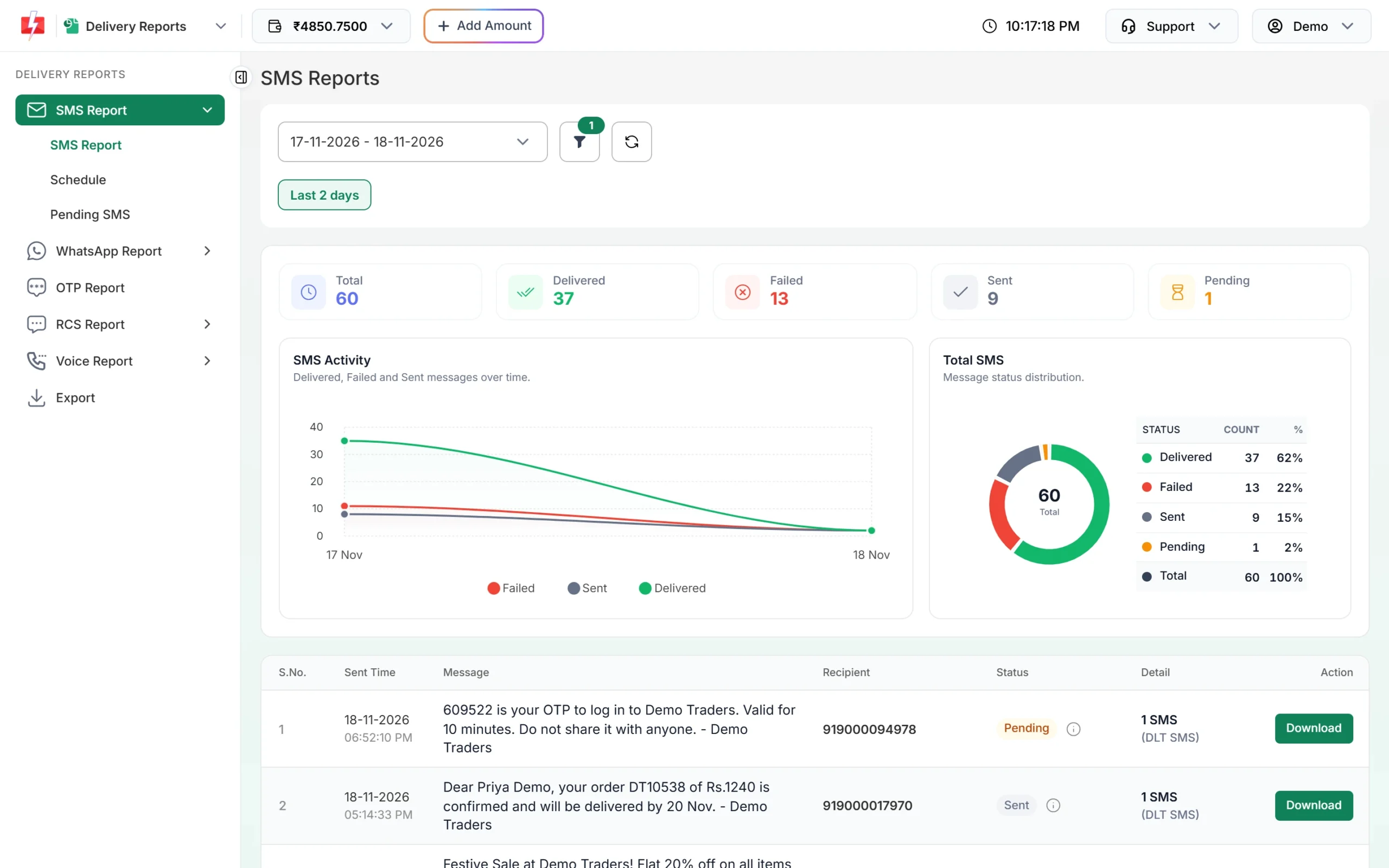
Delivered, failed and pending counts for every campaign.
Automation that already exists
- API from your billing system: send DLT SMS with the template’s Message ID and WhatsApp templates with their Message ID whenever a bill is raised or a payment is posted. API Excel gives ready sample requests for your approved templates.
- Webhooks: receive delivery reports, WhatsApp replies and voice call results (including the key pressed) on your own URL.
- Voice API: start a Key Press or Simple call from your own software for an outage area.
- Auto replies and Live Chat: keyword answers for “plan”, “speed” or “office timing”, and team members to handle complaints.
- Google Sheets and Pabbly Connect: send from a sheet or a form tool without code. See the integrations page.
Compliance notes
- No payment reminders on voice: use SMS or WhatsApp for bills, dues and renewals.
- Consent for offers: send plan upgrades only to subscribers who agreed to offers, and honour opt-outs.
- Sending hours: promotional SMS go out between 10 AM and 9 PM. Service Implicit bills and outage notices are not time-limited.
- Links: whitelist your bill, payment and self-care links on your DLT portal, or SMS that contain them will fail.
How to estimate the cost
DLT SMS are charged per number and per SMS part (160 English characters or 70 Hindi characters per part), so keep bill alerts short. WhatsApp is charged per message by category, and utility costs less than marketing. Failed and pending WhatsApp messages are refunded automatically about two days later. Voice is charged per 15-second pulse for answered calls only, and unanswered calls are refunded about an hour after the campaign ends. DLT entity registration costs ₹5,900 per year including GST (at the time of writing).
See current rates on the SMS pricing, WhatsApp pricing and voice call pricing pages. A bigger recharge moves your account to a lower SMS rate.
Sending in bulk? For high SMS volumes our team offers discounted rates. Talk to our team or see SMS pricing.
Frequently asked questions
Is a bill alert SMS transactional or promotional?
Register it as Service Implicit. It is about the subscriber’s own account, so it reaches DND numbers and can go out at any hour.
Can I send renewal reminders by voice call?
No. Payment and renewal reminders on voice are allowed only for banks, NBFCs and their collection partners. Use SMS or WhatsApp.
How do I tell only one area about an outage?
Keep a group per area in the Address Book, or filter your subscriber export by area, and send the outage template to that list.
Can subscribers raise a complaint on WhatsApp?
Yes. Set up a Flow Builder menu or keyword auto replies, and assign chats to support staff in Live Chat.
Can my billing software send SMS automatically?
Yes. Use the Dev API with the Message ID of each approved template, and add a webhook to get delivery reports back.
Why does a failed bill SMS still show a charge?
DLT SMS are charged per number when sent, and failed SMS are not refunded automatically. Clean your number list before a bill run. WhatsApp failures are refunded automatically.