
Bulk SMS and WhatsApp for NGOs and religious trusts cover two jobs: thanking donors with a receipt the moment money arrives, and telling members, volunteers and devotees about events, camps and timings. DLT SMS works for short receipts and alerts in any Indian language, WhatsApp carries receipts as PDFs and event posters, and a voice call reaches people who do not read messages. This guide shows the templates, rules and setup in Fast2SMS.
It is written for NGOs, charitable and religious trusts, temples, gurudwaras, churches and mosques with a registered trust or society, community associations and foundations that run camps, drives and festivals.
Can a trust or society register on DLT?
Yes. DLT portals accept trusts, associations, societies and clubs as Principal Entities, not only companies. GST is not the only proof they accept, so check which documents your chosen portal asks for. One registration on any portal works with all operators. After your entity is approved, you add sender IDs (headers such as your trust’s short name) and content templates, then link them in the Fast2SMS panel.
Which channel for which message
| Message | Best channel | Why |
|---|---|---|
| Donation received with receipt number | SMS (Service Implicit) and WhatsApp utility with a PDF receipt | The donor gets instant proof. WhatsApp carries the receipt file. |
| Darshan, pooja, hall or room booking confirmed | WhatsApp utility, SMS as backup | Linked to a booking the person made, with date and time. |
| Festival, satsang or event timings | WhatsApp marketing or promotional SMS, voice for elders | An announcement to followers, best with a poster image. |
| Health camp or blood donation drive | SMS, WhatsApp and a Simple voice call | Reaches people in the area on every kind of phone. |
| Volunteer shift reminder | SMS (Service Implicit) or WhatsApp utility | A reminder about a shift the volunteer signed up for. |
| Donation appeal | WhatsApp marketing or promotional SMS | Asks people to give, so it follows promotional rules and needs consent. |
| Donor portal login | Smart OTP | Lets donors see past receipts without a password. |
| Questions about timings and location | WhatsApp auto replies and a menu bot | Answers at any hour without staff. |
Sample DLT SMS templates
Adapt these and register them under your trust’s name. Hindi and other regional-language templates are allowed, and they count 70 characters per SMS part instead of 160. Use no more than three variables, each tagged for its type, and whitelist your donation and website links on the DLT portal.
| Use | Example template to register | Category |
|---|---|---|
| Donation receipt | Thank you for your donation of Rs {#numeric#} to YourTrust. Receipt no {#alphanumeric#}. Download it here: {#url#} | Service Implicit |
| Donation receipt (Hindi) | YourTrust को आपके Rs {#numeric#} के दान के लिए धन्यवाद। रसीद संख्या {#alphanumeric#}। | Service Implicit |
| Booking confirmed | Your {#alphanumeric#} booking at YourTrust on {#alphanumeric#} is confirmed. Please carry this SMS. | Service Implicit |
| Volunteer reminder | Reminder from YourTrust: your volunteer shift is on {#alphanumeric#} at {#alphanumeric#}. Thank you for your time. | Service Implicit |
| Donor login OTP | {#numeric#} is your OTP to log in to the YourTrust donor portal. Do not share it with anyone. | Service Implicit |
| Event alert | YourTrust invites you to {#alphanumeric#} on {#alphanumeric#}. Details: {#url#} | Promotional |
| Camp announcement | Free {#alphanumeric#} camp by YourTrust on {#alphanumeric#} at {#alphanumeric#}. All are welcome. | Promotional |
| Appeal | Help YourTrust {#alphanumeric#}. Every contribution counts. Donate securely at {#url#} | Promotional |
WhatsApp templates: utility vs marketing
A receipt or booking confirmation is Utility because it is about something the person did. An appeal, a festival greeting or an event announcement to all followers is Marketing. The template form offers English, Hindi and Gujarati.
| Template | Category | Example body | Header / button |
|---|---|---|---|
| donation_receipt | Utility | Dear {{1}}, thank you for your donation of Rs {{2}} on {{3}}. Your receipt {{4}} is attached. | Document header (PDF) |
| booking_confirmed | Utility | Dear {{1}}, your {{2}} booking on {{3}} is confirmed. Please reach 30 minutes early. | Visit website: Location |
| volunteer_shift | Utility | Hi {{1}}, your volunteer shift at {{2}} is on {{3}}. Reply if you cannot come. | Custom: I will come, Cannot come |
| festival_invite | Marketing | Namaste {{1}}, you are invited to {{2}} celebrations on {{3}}. Please join with your family. | Image header |
| appeal | Marketing | Dear {{1}}, this month we are raising funds for {{2}}. Your support will help. | Image header, Visit website: Donate |
Voice calls for event alerts
A Simple voice call works well for elderly members and rural communities. Use it for festival timings, camps and special events. A Key Press call can ask “Press 1 if you will volunteer this Sunday” and save each answer in the report.
Sample script (Simple): “Namaste, this is YourTrust. A free eye check-up camp will be held this Sunday from 9 AM to 2 PM at the community hall, Station Road. Please bring your family members. Thank you.”
- Say your trust’s name clearly in every voice file. The operator checks each file.
- Medical advice, treatment and health claims are not allowed. A camp announcement with place and time is fine; promises of cures are not.
- Asking for OTP, PIN, Aadhaar, PAN or bank details is not allowed.
- Calls reach non-DND numbers only, between 10 AM and 9 PM. You pay only for answered calls.
Smart OTP for donor portals and bookings
Smart OTP is our recommended way to send OTPs. Your website calls the send and verify API with an OTP ID made from your DLT OTP template or WhatsApp authentication template. If one channel fails, the same code goes on the other within 120 seconds. Trusts use it for donor logins, online darshan or room bookings, and volunteer sign-ups.
How to get started on Fast2SMS (step by step)
-
Add your approved DLT templates
After DLT approval, open SMS > DLT Manager. Add the Entity ID, your sender IDs and each template under Content Template, then finish PE-TM Binding. Approved templates show a green badge, the type (Service or Promo) and EN or UN for English or Unicode.
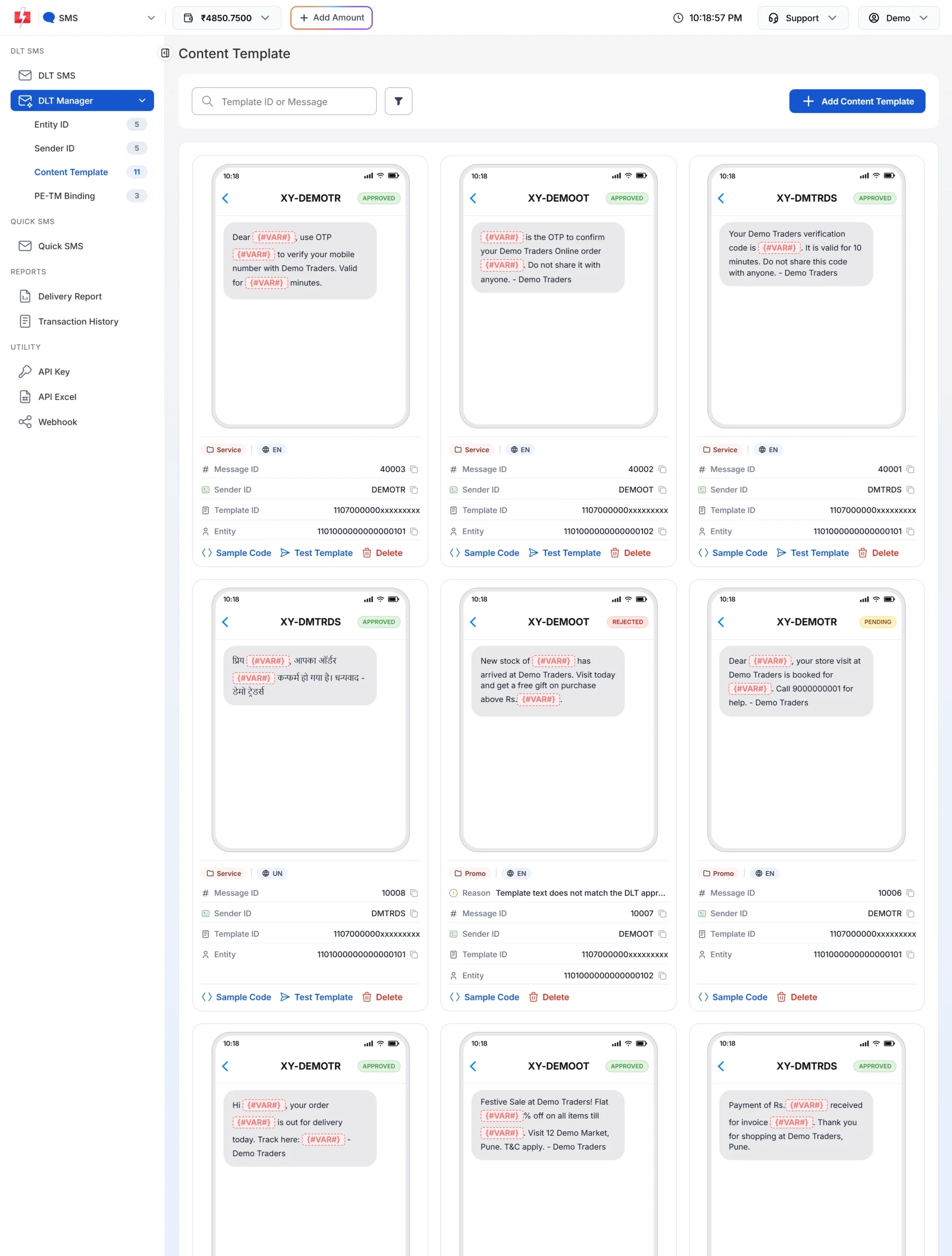
English and Hindi templates side by side, each with its Message ID. -
Make groups for donors, volunteers and members
Open Address Book > Groups and click Add Group. Import each list from CSV or Excel into its group. A number can sit in more than one group.
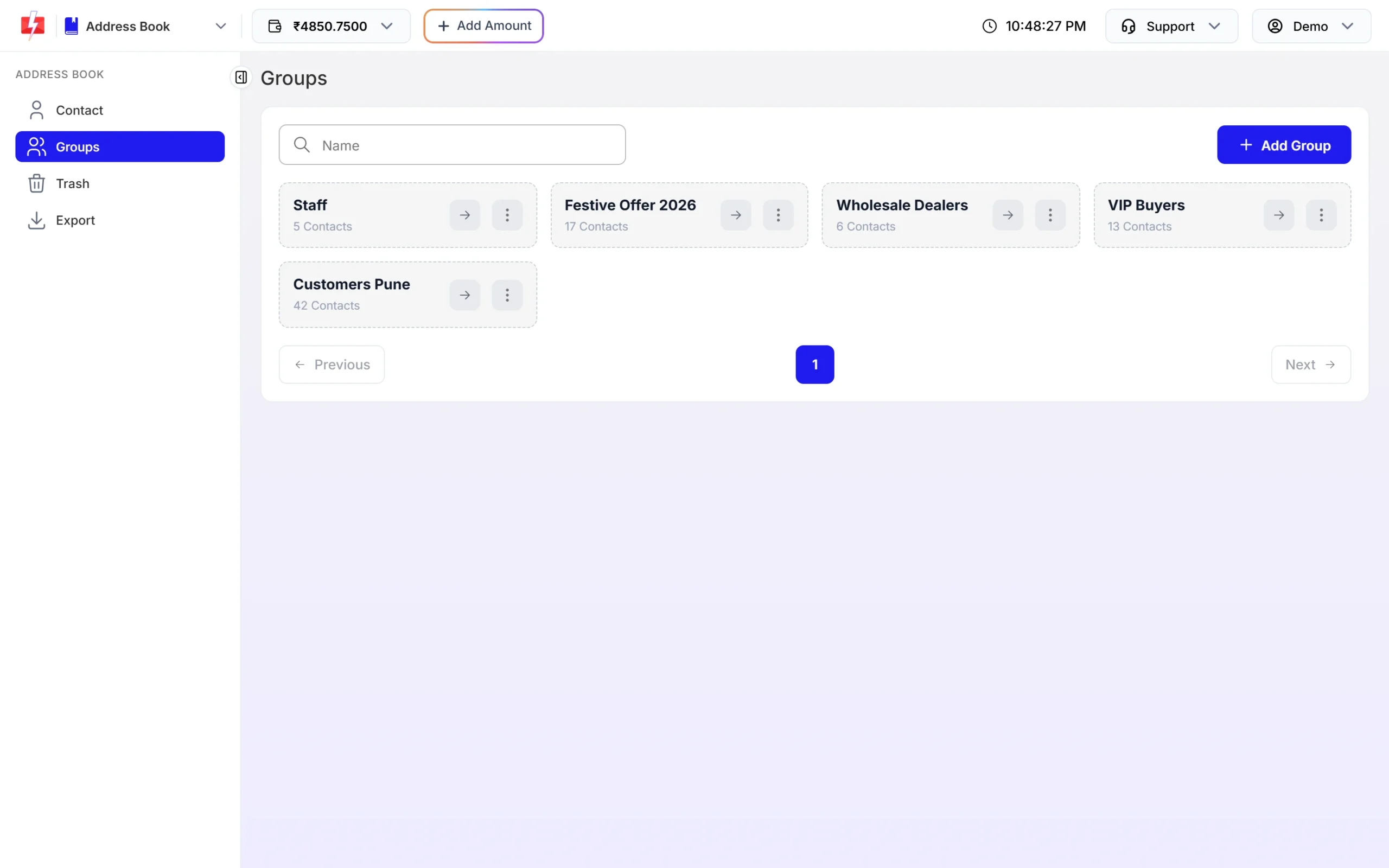
Separate groups keep appeals away from people who only want event news. -
Send receipts with each donor’s details
Open DLT SMS, choose your sender ID and click CSV File. Upload a sheet with number, amount and receipt number columns, pick the receipt template and map each variable to its column. Every donor gets their own amount and receipt number.
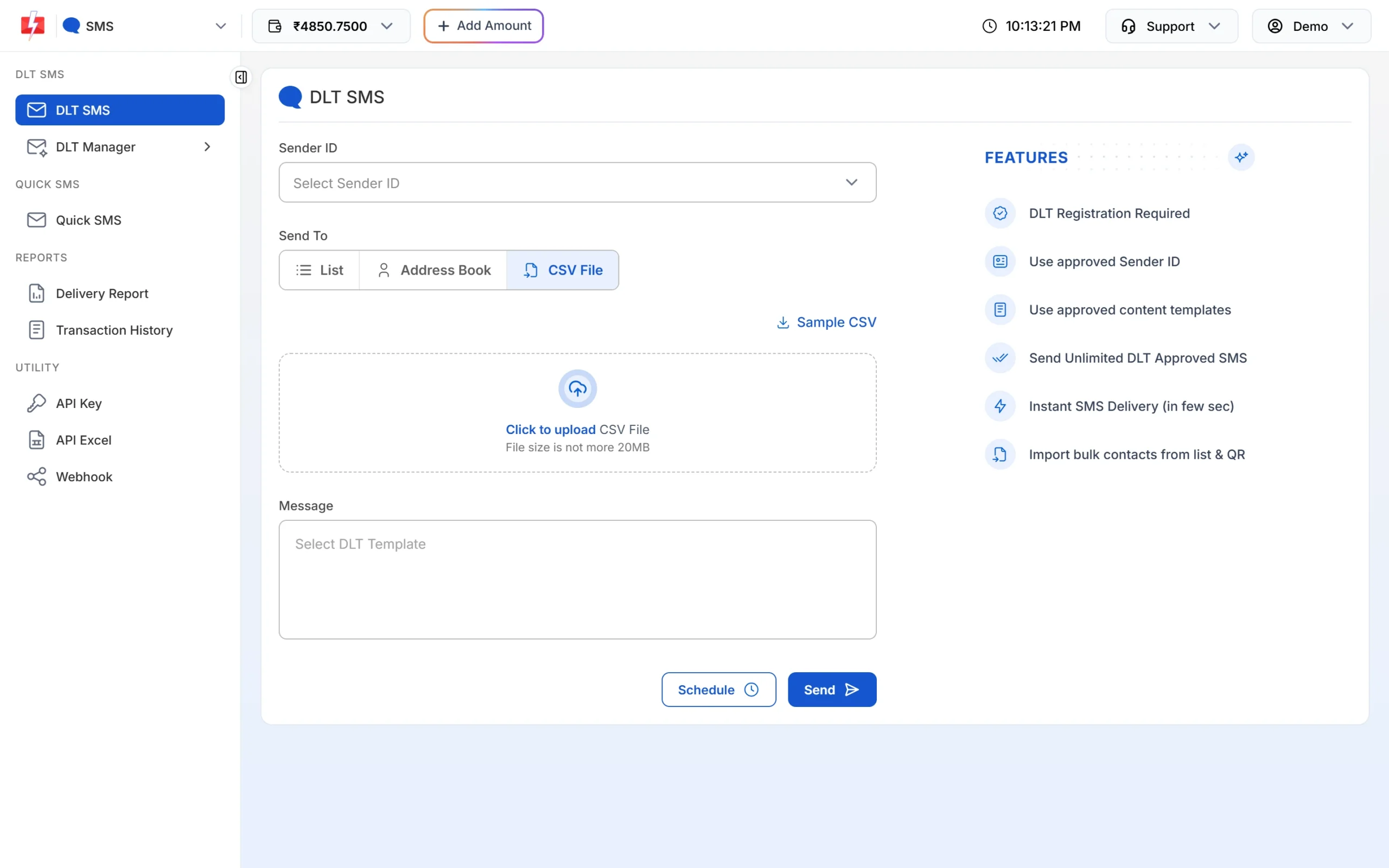
One CSV row per donor, one SMS per row. -
Create a WhatsApp receipt template
Connect your WhatsApp number, then go to WhatsApp Manager > Templates. Choose Utility, set the header to Document, write the body with variables and add sample values. Click Submit Template and wait for Meta’s review.
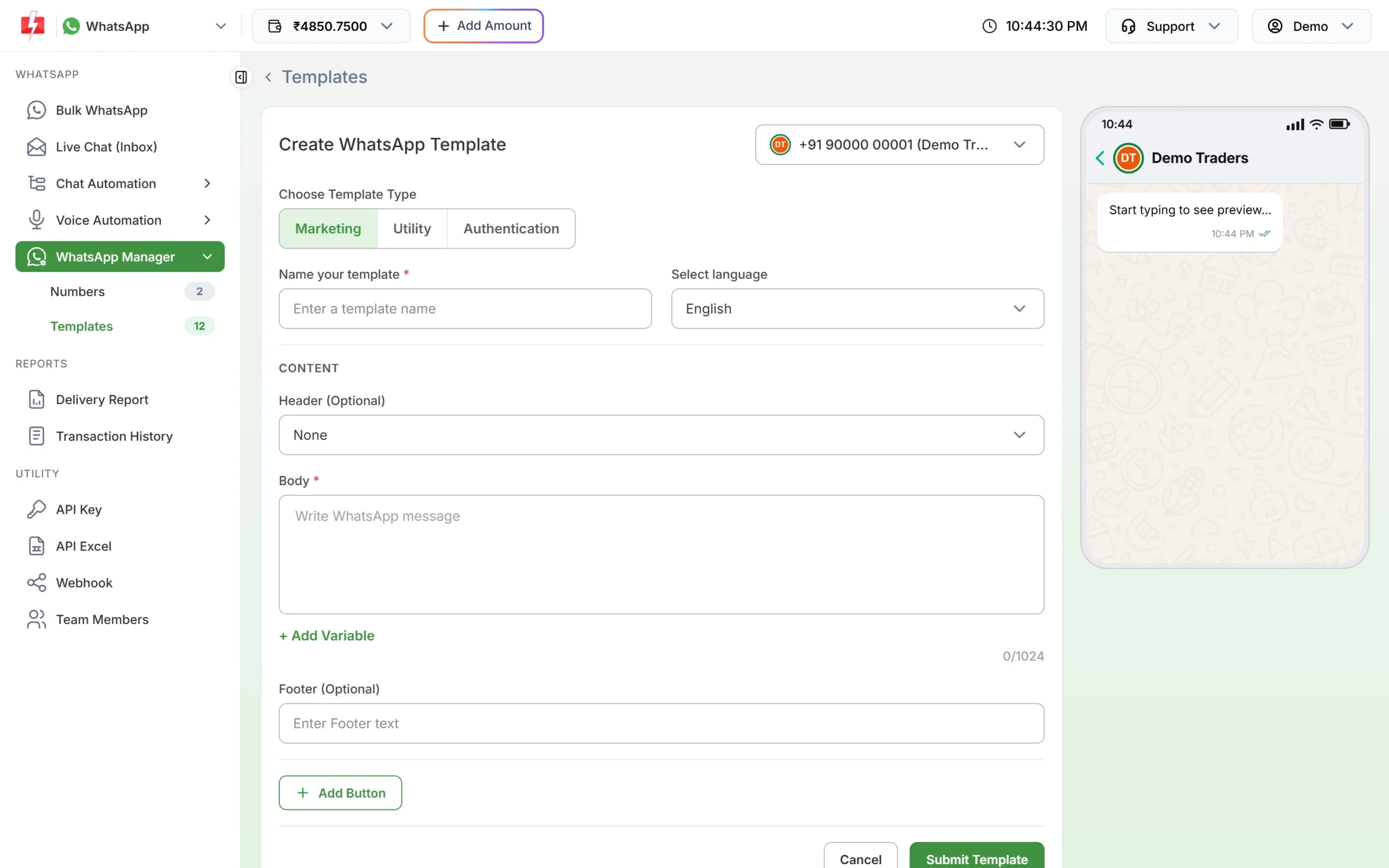
Set the header to Document to attach a PDF receipt. -
Read the voice file rules, then upload
Open Voice Files and click Upload Voice File. A rules popup lists what the operator rejects. Click I Accept, upload an MP3 or WAV file up to 5 MB or record in the browser, and wait for approval. Then send it from Bulk Voice Call.
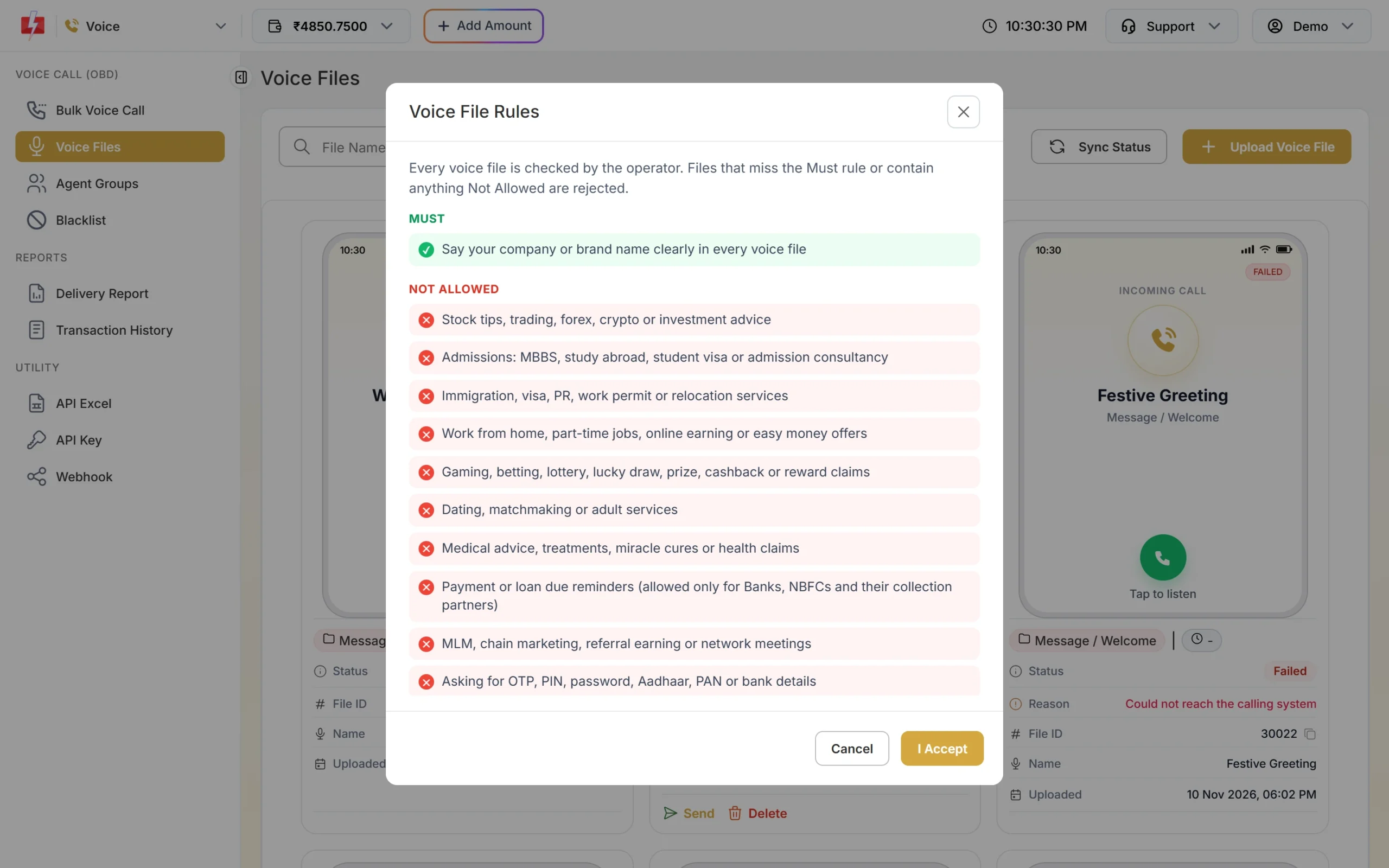
Check the rules before recording to avoid a rejection. -
Check delivery and refunds
Open Delivery Report for each channel to see delivered and failed numbers. For WhatsApp, the Refund tab shows each campaign’s debit, the refund for failed messages and the net amount for the month.
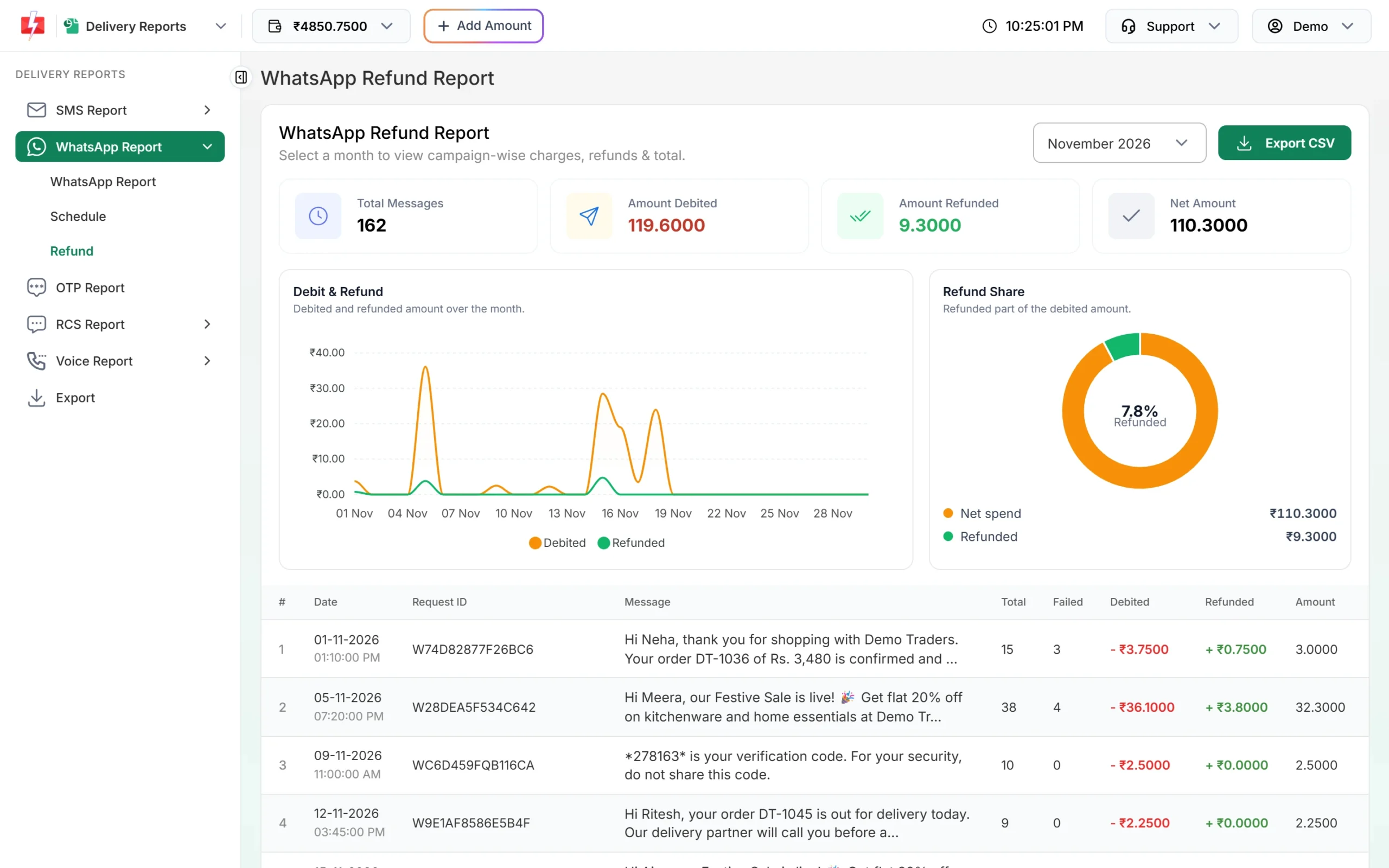
Failed WhatsApp messages are refunded to your wallet automatically.
Automation that already exists
- API and webhooks: your donation page or accounting software can send the receipt SMS or WhatsApp by API as soon as a payment is recorded, and get the delivery report back.
- Tally Prime and Google Sheets: send from the tools many trusts already use. See the integrations page.
- Auto replies and Flow Builder: answer “timing”, “aarti”, “location” or “donate” with an automatic reply, or a menu bot that hands over to a volunteer.
- Scheduling: schedule festival alerts in advance, or repeat a daily timings SMS across a festival week.
- Team Members: give volunteers a login to reply to WhatsApp chats without sharing your main account.
Compliance notes
- Consent: send appeals and event news only to people who agreed, and remove anyone who opts out. Add people who ask not to be called to the voice Blacklist.
- Sending hours: promotional SMS go out between 10 AM and 9 PM. Receipts on Service Implicit templates go out at any hour.
- No political content: keep election messages and party names out of trust communication.
- Data: do not put PAN, Aadhaar or bank details of donors in any message.
How to estimate the cost
DLT SMS are charged per number and per SMS part. A Hindi or regional-language SMS fits 70 characters per part, so a long Hindi receipt may use two parts. WhatsApp is charged per message by category, and a utility receipt costs less than a marketing appeal. Failed and pending WhatsApp messages are refunded automatically about two days later. Voice is charged per 15-second pulse for answered calls only, with unanswered calls refunded about an hour after the campaign ends. DLT entity registration costs ₹5,900 per year including GST (at the time of writing).
See current rates on the SMS pricing, WhatsApp pricing and voice call pricing pages.
Sending in bulk? For high SMS volumes our team offers discounted rates. Talk to our team or see SMS pricing.
Frequently asked questions
Can a trust without GST register on DLT?
Yes. DLT portals accept trusts and societies, and GST is not the only proof they take. See DLT registration without GST.
Is a donation receipt SMS transactional?
Register it as Service Implicit. It confirms something the donor did, so it reaches DND numbers and can be sent at any hour.
Is a donation appeal promotional?
Yes. It asks people to give, so use a promotional SMS template or a WhatsApp marketing template, and send it only to people who agreed.
Can I send messages in Hindi, Marathi or Tamil?
SMS templates can be in any Indian language. WhatsApp templates in the panel can be English, Hindi or Gujarati. Voice files can be recorded in the language your members speak.
Can I send a PDF receipt on WhatsApp?
Yes. Use a utility template with a Document header. In the panel you upload one PDF per send, so for many donors send through the API, where each message can carry its own PDF link.
Can volunteers reply to WhatsApp messages for us?
Yes. Add them under Team Members with WhatsApp access. A Chat Agent sees only the chats assigned to them.