
Bulk SMS for recruitment and staffing agencies is mostly about speed: candidates need interview times, document lists and joining dates on the same day, and temporary staff need shift changes before the shift starts. This guide shows which channel to use for each message, gives DLT and WhatsApp templates you can adapt, and explains how to confirm interviews with a key-press call and verify candidates with Smart OTP in Fast2SMS.
It is written for placement consultancies, staffing and manpower agencies, campus hiring teams and in-house HR teams that run walk-in drives.
Which channel for which hiring message
Most hiring messages are service messages linked to a candidate’s application, so they can go out at any hour and reach DND numbers. Job opening alerts sent to a database are promotional and need the candidate’s consent.
| Message | Best channel | Why |
|---|---|---|
| Application received | SMS (Service Implicit) | Short and expected. It reaches candidates on basic phones too. |
| Interview scheduled with time and address | WhatsApp utility, SMS as backup | WhatsApp has room for the full address and a map link button. |
| Interview confirmation | Key Press voice call or WhatsApp reply buttons | The candidate presses 1 or taps “I will attend”, so you know who is coming. |
| Documents to bring | WhatsApp utility | A full checklist fits better in WhatsApp than in an SMS. |
| Offer letter | WhatsApp utility with a PDF document header | The letter arrives with the message, and you get a read status. |
| Joining date and reporting time | SMS and WhatsApp utility | A missed joining is costly. Two channels make sure it is seen. |
| Shift allocation or change for temporary staff | SMS (Service Implicit) | Fast and reliable for workers on the move. |
| Candidate registration on your job portal | Smart OTP | Confirms the number is real before you store the profile. |
| New job openings | WhatsApp marketing or promotional SMS | Only to candidates who agreed to get job alerts. |
Sample DLT SMS templates for recruiters
Register these as examples under your own agency name. Every SMS must match an approved template exactly, with no more than three variables, each tagged for its type. Whitelist your website links and call-back numbers on your DLT portal.
| Use | Example template to register | Category |
|---|---|---|
| Application received | Thank you for applying to YourAgency for the {#alphanumeric#} role. Our team will contact you within {#numeric#} working days. | Service Implicit |
| Interview scheduled | Your YourAgency interview for {#alphanumeric#} is on {#alphanumeric#}. Venue and details: {#url#} | Service Implicit |
| Interview reminder | Reminder from YourAgency: your interview is today at {#alphanumeric#}. Please carry your ID proof and resume. | Service Implicit |
| Offer sent | Congratulations. Your offer letter for {#alphanumeric#} has been sent by YourAgency. View it here: {#url#} | Service Implicit |
| Joining reminder | Your joining date is {#alphanumeric#}. Report at {#alphanumeric#}. For help call YourAgency on {#cbn#}. | Service Implicit |
| Shift update | YourAgency shift update: your shift on {#alphanumeric#} is {#alphanumeric#}. Call {#cbn#} if you cannot attend. | Service Implicit |
| Portal OTP | {#numeric#} is your OTP to verify your mobile number on YourAgency. Do not share it with anyone. | Service Implicit |
| Job alert | New openings for {#alphanumeric#} in {#alphanumeric#} at YourAgency. See details and apply: {#url#} | Promotional |
WhatsApp templates for hiring: utility vs marketing
A message about one candidate’s own application is Utility. A message that advertises openings to many candidates is Marketing, even if it is useful to them. Keep the two apart so your interview updates are charged at the lower utility rate.
| Template | Category | Example body | Header / button |
|---|---|---|---|
| interview_details | Utility | Hi {{1}}, your interview for {{2}} is on {{3}} at {{4}}. Please reach 15 minutes early. | Custom: I will attend, Reschedule |
| documents_list | Utility | Hi {{1}}, please bring these for your interview: resume, photo ID, last salary slip and {{2}}. | None |
| offer_letter | Utility | Hi {{1}}, your offer letter for {{2}} is attached. Please reply to confirm your joining date. | Document header (PDF) |
| joining_reminder | Utility | Hi {{1}}, your first day is {{2}}. Report to {{3}} at {{4}}. | Call Phone Number: Call HR |
| job_openings | Marketing | Hi {{1}}, we have new {{2}} openings in {{3}}. Tap below to see the roles. | Visit website: View jobs |
Voice calls for interviews and walk-in drives
A Key Press (DTMF) call is a quick way to confirm attendance before a drive. The key each candidate presses is saved in the report, so you can download the list of confirmed candidates.
Sample script (Key Press): “Hello, this is YourAgency calling about your interview tomorrow at 11 AM for the store executive role. To confirm you will attend, press 1. To ask for another date, press 2. Thank you.”
A Call Patch call connects the candidate to a recruiter when they press a key, for example “Press 1 to speak to our hiring team about this role”. The recruiters’ numbers are kept in an Agent Group.
- The operator checks every voice file. Your agency name must be said clearly.
- Work-from-home, part-time job, online earning and easy money offers are not allowed in voice files. Immigration, visa, PR and work permit services are not allowed either, so overseas placement agencies should use SMS or WhatsApp.
- Calls go only to non-DND numbers between 10 AM and 9 PM. Only answered calls are charged.
Smart OTP for candidate verification
Smart OTP is our recommended way to send OTPs. You create an OTP ID from an approved DLT OTP template or a WhatsApp authentication template, then your job portal calls the send and verify API. If one channel fails, the same code is re-sent on the other channel within 120 seconds. Recruiters use it to:
- Verify a candidate’s mobile number when they register, so your database holds real numbers.
- Let candidates log in to your portal without a password.
- Confirm that the person booking an interview slot owns the number.
How to get started on Fast2SMS (step by step)
-
Finish DLT and the PE-TM binding
Register your agency on a DLT portal and add the Entity ID, sender IDs and approved templates under SMS > DLT Manager. Then open PE-TM Binding, copy the TM ID, send the binding request from your DLT portal and upload the screenshot. Both TM Approval and Final PE Confirmation must show Approved.
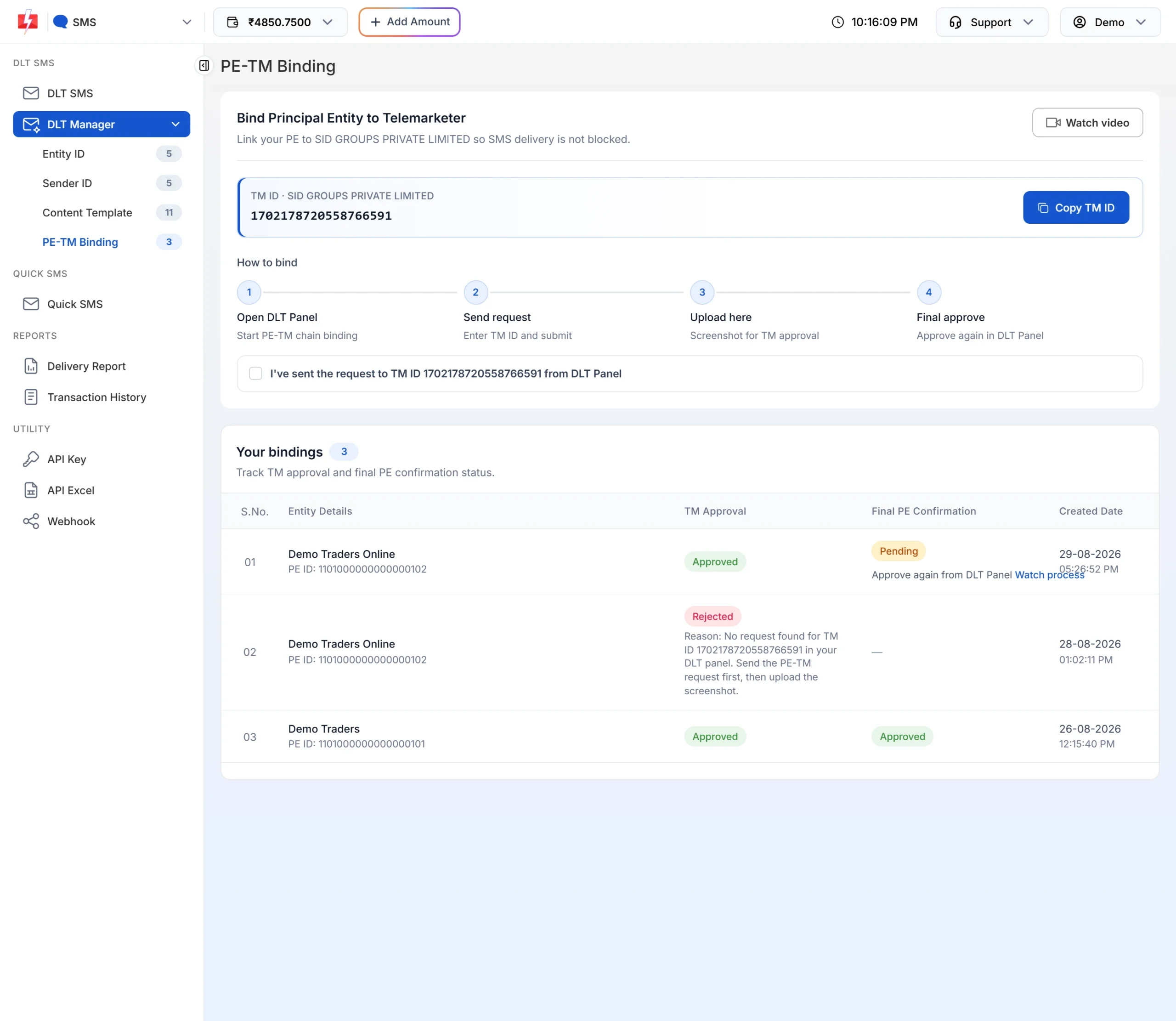
Your SMS are blocked until the PE-TM chain is approved. -
Import candidates from your sheet
Open Address Book > Add Contact > Upload CSV. Choose the file, map the Name and Number columns and pick a group such as one per drive or per client. Click Extract Contact. Duplicates and invalid numbers are skipped.
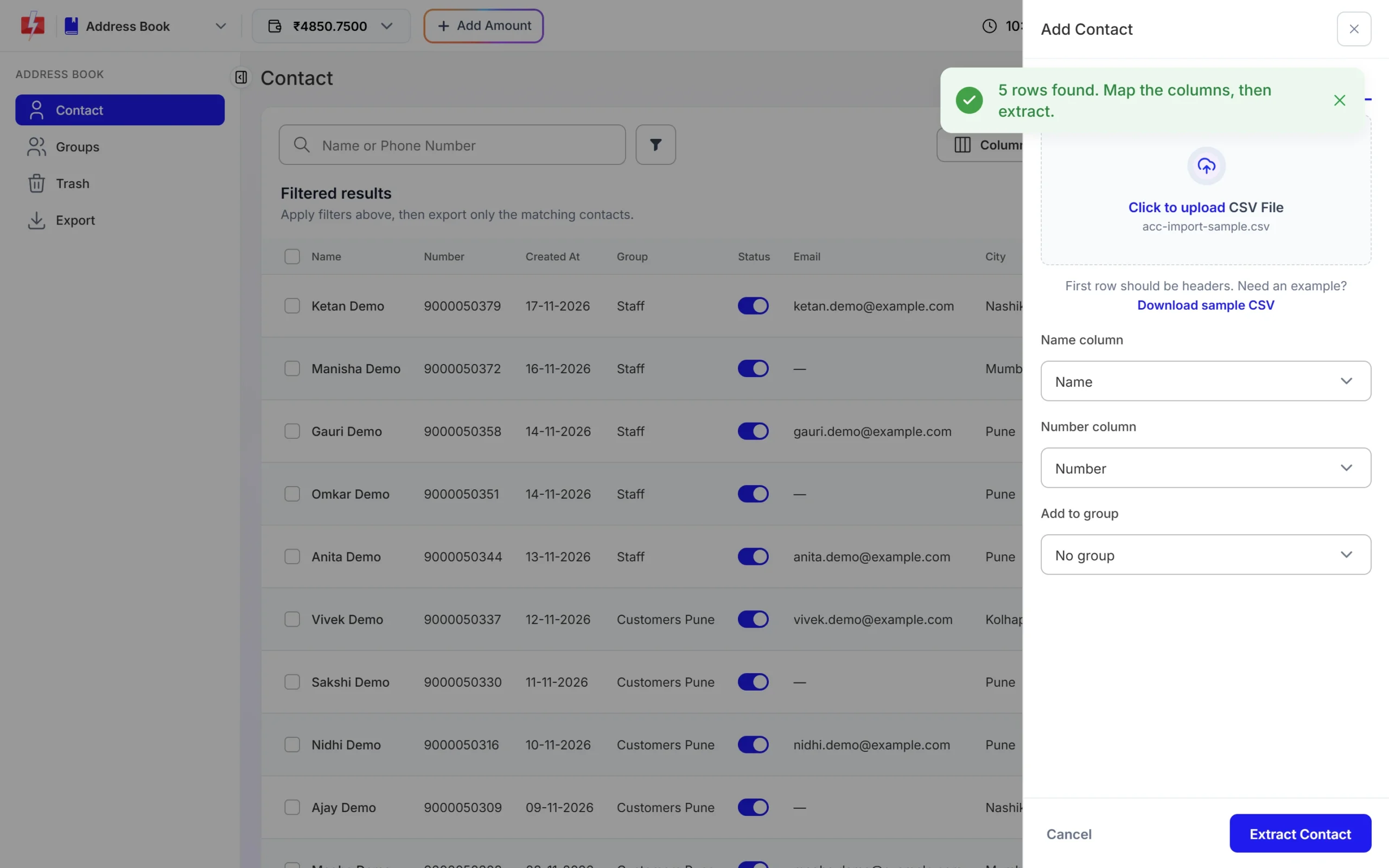
Map the columns once and add everyone to a group. -
Set up an interview confirmation call
Upload your recorded message under Voice Files and wait for the operator to approve it. Then open Bulk Voice Call, choose Key Press (DTMF), add the candidates, select the voice file and tap the keys you allow, for example 1 and 2. Click Send and check the cost in the confirmation popup.
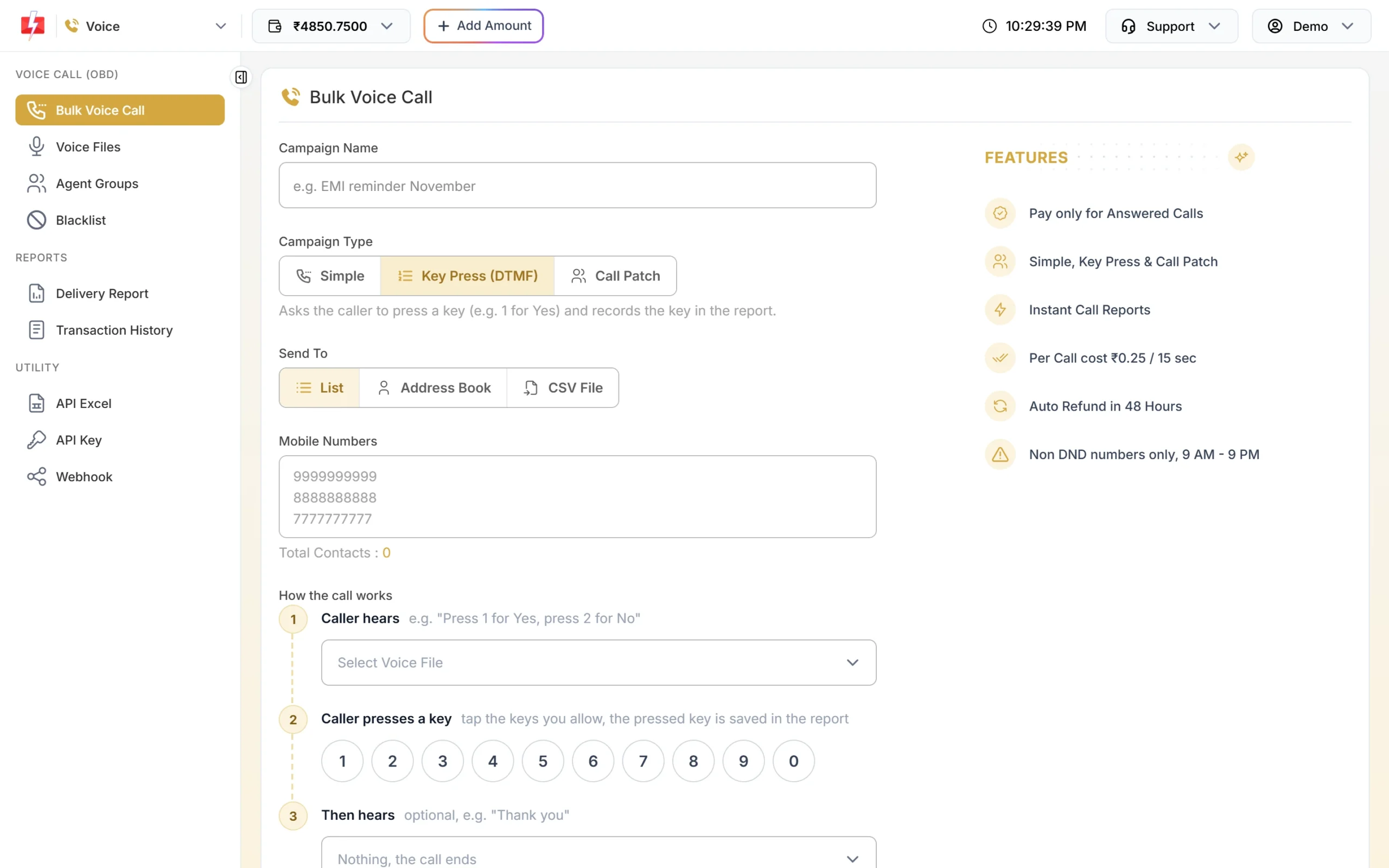
A Key Press call records which key each candidate pressed. -
See who confirmed
Open Delivery Report > Voice Report and click the campaign. The Key column shows what each candidate pressed. Download the Excel file to share the confirmed list with your client.
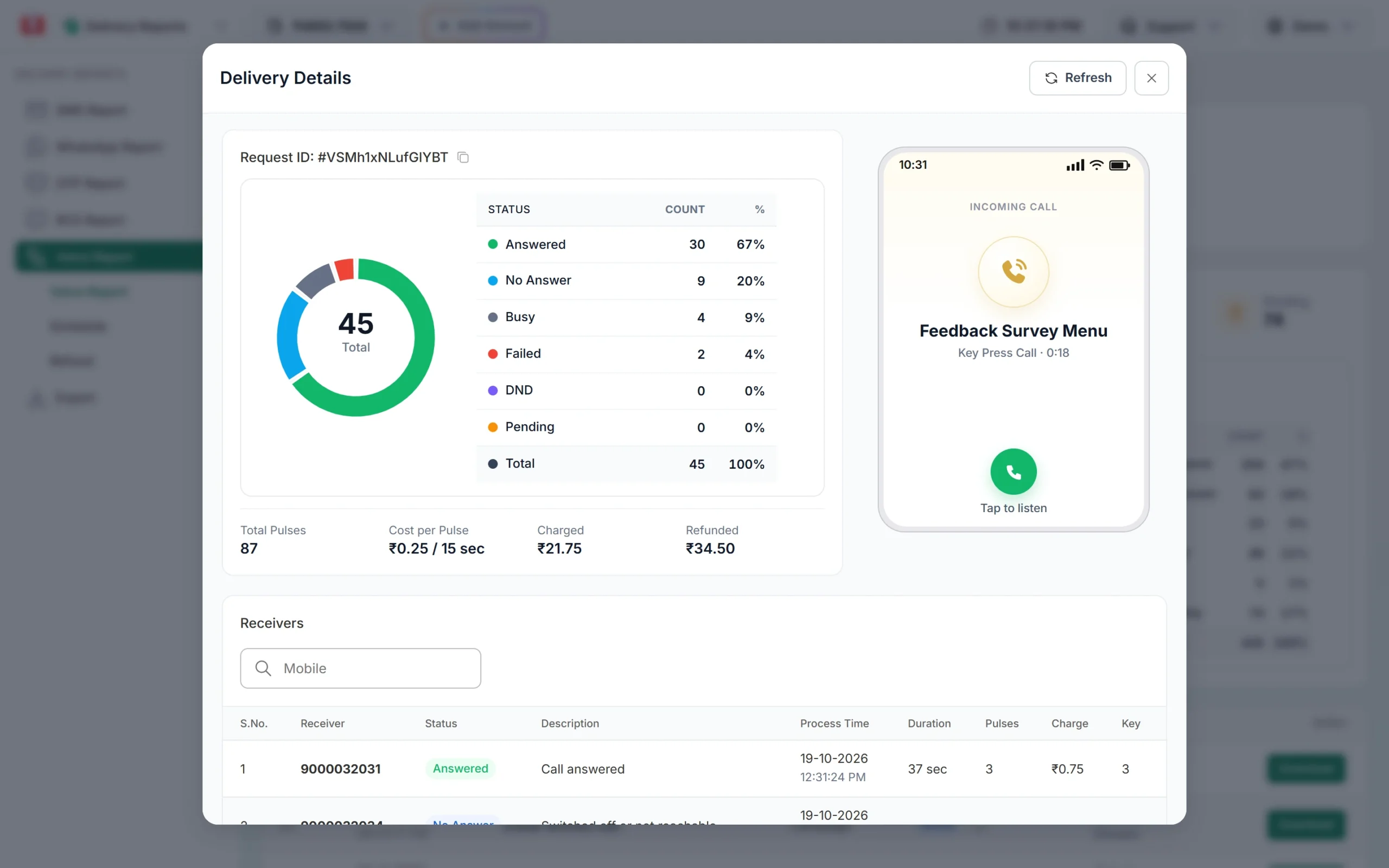
Answered calls, charges, refunds and the key pressed by each candidate. -
Give each recruiter a WhatsApp login
Connect your WhatsApp number, then go to Account Setting > Team Members and click Add Agent. Give WhatsApp access and assign the number. A Chat Agent sees only the chats assigned to them, so each recruiter handles their own candidates.
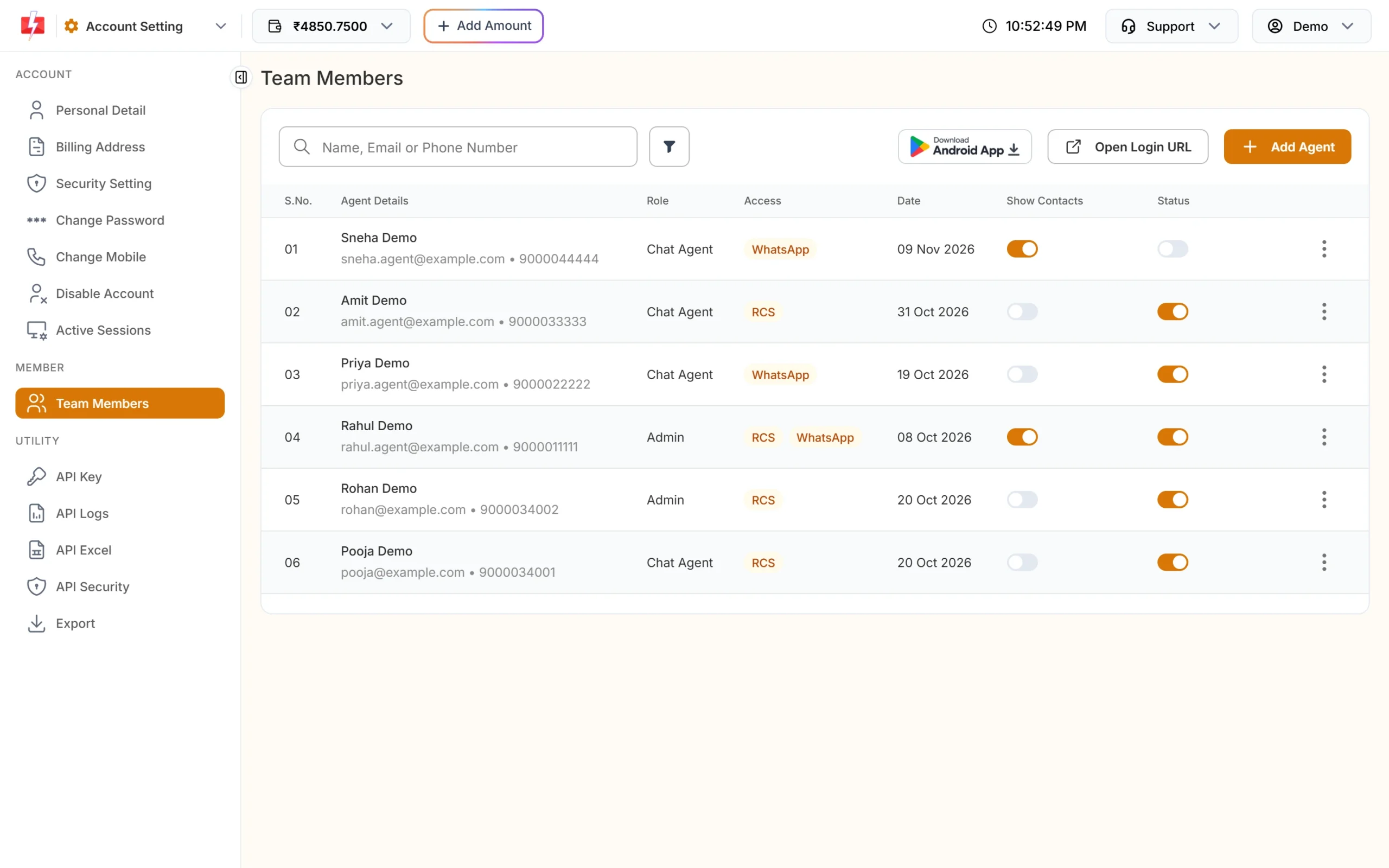
Recruiters reply to candidates from one shared number. -
Add Smart OTP to your job portal
Open Smart OTP > Add OTP Template. Pick your WhatsApp authentication template or DLT OTP template, mark the variable that holds the code and tick SET FALLBACK TEMPLATE to add the other channel. Click Assign OTP Template and use the OTP ID in your portal’s API calls.
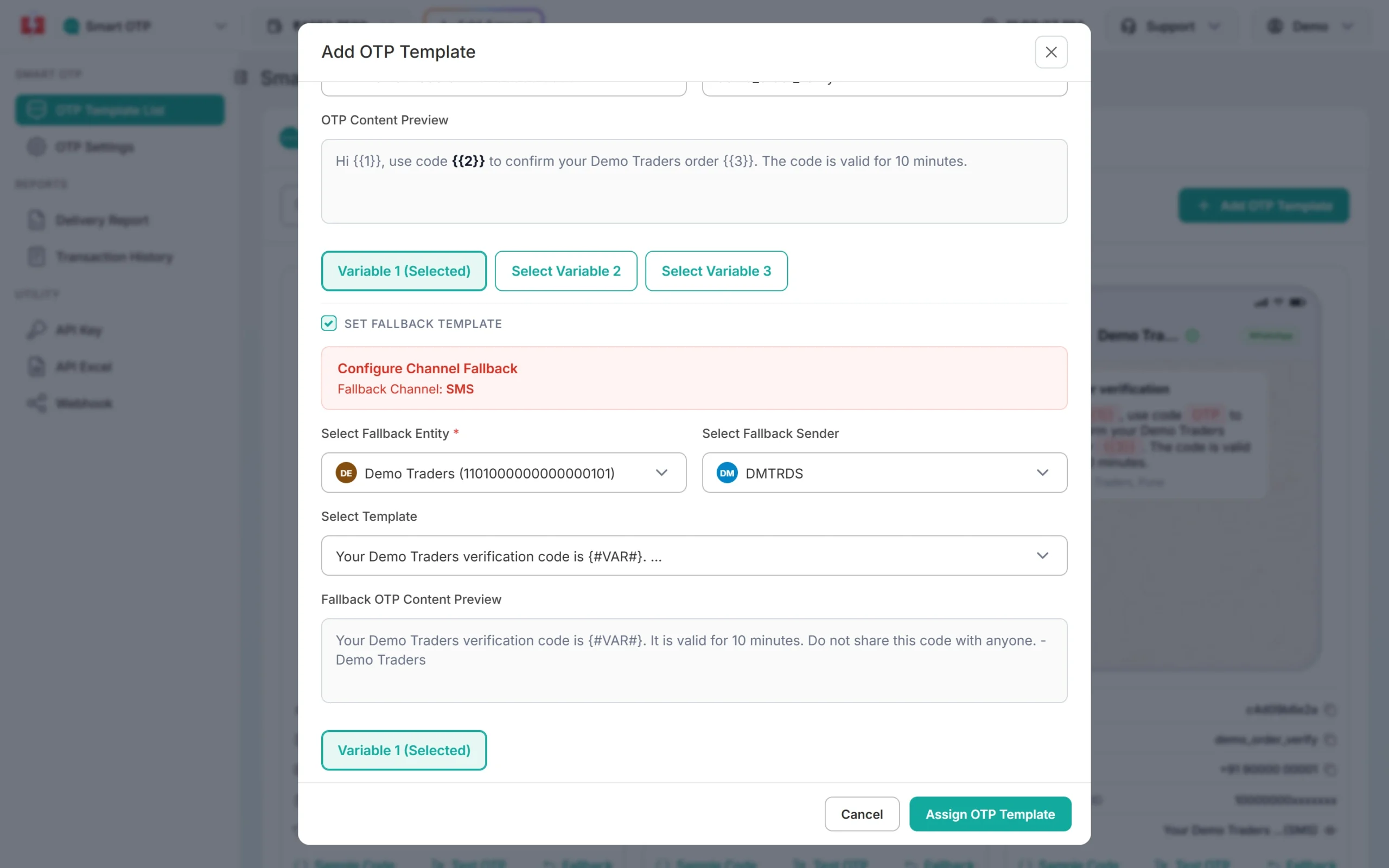
A WhatsApp OTP with an SMS fallback.
Automation that already exists
- CSV with variables: upload one sheet with name, role and interview time columns and map each column to a template variable. Each candidate gets their own details.
- Scheduling: schedule reminders for the morning of the interview, or repeat a shift message every day across a date range.
- WhatsApp Flow Builder: a menu bot that answers “Openings”, “My interview” or “Talk to recruiter” and hands the chat to a person with Assign Conversation.
- Auto replies: keyword answers for “documents”, “address” or “salary date”, plus a welcome and out-of-office message.
- API and webhooks: your ATS or job portal can send DLT SMS and WhatsApp templates by Message ID and receive delivery reports and candidate replies on your own URL.
- Google Sheets and Pabbly Connect: send from a sheet or from form tools without writing code. See the integrations page.
Compliance notes for recruiters
- Consent: send job alerts only to candidates who agreed, for example on your registration form, and remove anyone who asks.
- Data care: never send Aadhaar, PAN or bank details in a message, and never ask candidates to share an OTP on a call.
- Sending hours: promotional SMS go out between 10 AM and 9 PM. Interview and shift messages on Service Implicit templates are not time-limited.
- Voice blacklist: add candidates who ask not to be called to Voice > Blacklist. They are skipped in every future campaign.
How to estimate the cost
DLT SMS are charged per number and per SMS part (160 English characters or 70 Hindi characters per part). WhatsApp is charged per message by category, and utility costs less than marketing. Failed and pending WhatsApp messages are refunded automatically about two days later. Voice is charged per 15-second pulse for answered calls only, and the amount held for unanswered calls is refunded about an hour after the campaign finishes. DLT entity registration costs ₹5,900 per year including GST (at the time of writing).
See current rates on the SMS pricing, WhatsApp pricing and voice call pricing pages.
Sending in bulk? For high SMS volumes our team offers discounted rates. Talk to our team or see SMS pricing.
Frequently asked questions
Is an interview reminder SMS transactional or promotional?
It is a service message linked to the candidate’s application, so register it as Service Implicit. It can be sent at any hour and reaches DND numbers.
Can I send job openings to my whole candidate database?
Only to candidates who agreed to get job alerts. Register the message as promotional on DLT, or use a WhatsApp marketing template.
Can I send an offer letter on WhatsApp?
Yes. Create a utility template with a Document header and upload the PDF when you send it.
Can I use voice calls for part-time or work-from-home jobs?
No. The operator does not allow work-from-home, part-time job or online earning offers in voice files. Use SMS or WhatsApp for those roles and keep the wording clear and honest.
How do I know which candidates confirmed the interview?
Use a Key Press call. The report shows the key each candidate pressed, and you can download it as an Excel file.
Can candidates reply to my bulk SMS?
No, a DLT sender ID cannot receive replies. Use WhatsApp if you want candidates to reply.