
Bulk SMS for retail shops and supermarkets works best when you split messages by job: DLT SMS for bills, loyalty points and home delivery alerts, WhatsApp for offers with photos and for customers who message you, and Smart OTP for loyalty redemptions and app logins. This guide lists the messages a store sends, gives sample templates to register, and shows how to set everything up in Fast2SMS.
It is for kirana stores, supermarkets, fashion, footwear and electronics shops, and small retail chains.
Which channel for which retail message
A store sends two kinds of messages. Service messages follow a purchase or an account, such as a bill, points earned or a delivery update. Promotional messages try to bring the customer back, such as a weekend sale. The two kinds follow different rules, so plan them separately.
| Message | Best channel | Why |
|---|---|---|
| Bill or invoice after purchase | SMS (Service Implicit) or WhatsApp utility with a PDF | The customer expects it. WhatsApp can carry the bill as a PDF document header. |
| Loyalty points earned or balance | SMS (Service Implicit) | Short, account-related and reaches every phone, including DND numbers. |
| Points redemption at the counter | Smart OTP | The code proves the customer owns the number before points are used. |
| Home delivery order confirmed / out for delivery | WhatsApp utility, SMS as backup | WhatsApp shows the item list. SMS reaches customers without data. |
| Price list, store timings, location | WhatsApp auto reply | The customer types “price list” or “timing” and gets an instant answer. |
| Weekend sale, festive offer, new arrivals | WhatsApp marketing, promotional SMS or RCS | Photos sell better. Promotional rules apply: consent, DND and sending hours. |
| Store opening or big sale announcement | Simple voice call | A short recorded call in the local language gets attention in a busy week. |
| Feedback after a visit | WhatsApp utility | A request linked to a specific purchase can be utility. A general survey cannot. |
Sample DLT SMS templates for shops and supermarkets
Every business SMS in India must match a content template approved on a DLT portal. Use the samples below as a starting point and register them under your own store name. Keep the store name as fixed text and use three variables or fewer, each tagged for what it holds. Links and call-back numbers must be whitelisted on your DLT portal.
| Use | Example template to register | Category |
|---|---|---|
| Bill sent | Thank you for shopping at YourStore. Your bill {#alphanumeric#} of Rs {#numeric#} is ready. View it here: {#url#} | Service Implicit |
| Points earned | You earned {#numeric#} points on your YourStore bill today. Your total balance is {#numeric#} points. | Service Implicit |
| Redemption OTP | {#numeric#} is your OTP to redeem YourStore loyalty points. Share it only at the billing counter. | Service Implicit |
| Home delivery confirmed | Your YourStore home delivery order {#alphanumeric#} is confirmed and will reach you by {#alphanumeric#}. | Service Implicit |
| Out for delivery | Your YourStore order {#alphanumeric#} is out for delivery. For help call {#cbn#}. | Service Implicit |
| Weekend sale | YourStore Weekend Sale: up to {#numeric#}% off on groceries and home needs this Saturday and Sunday. Visit us or order at {#url#} | Promotional |
| New arrivals | New {#alphanumeric#} collection is now in store at YourStore. See the range: {#url#} | Promotional |
| Offer for members | As a YourStore member you get an extra {#numeric#}% off till {#alphanumeric#}. Show this SMS at billing. | Service Explicit |
WhatsApp templates for retail: utility vs marketing
Meta files every WhatsApp template under one category. Utility is for messages about a specific purchase, order or account. Marketing is for offers, launches and anything that asks the customer to buy. Authentication is only for one-time codes. If you add a discount line to a bill message, Meta treats it as marketing, which costs more, so keep them separate.
| Template | Category | Example body | Header / button |
|---|---|---|---|
| bill_copy | Utility | Hi {{1}}, thank you for shopping at YourStore. Your bill {{2}} of Rs {{3}} is attached. | Document header (PDF) |
| delivery_update | Utility | Your YourStore order {{1}} is out for delivery and should reach you in {{2}}. | Call Phone Number: Call store |
| points_balance | Utility | Hi {{1}}, your YourStore loyalty balance is {{2}} points after today’s bill. | None |
| weekend_sale | Marketing | Hi {{1}}, our Weekend Sale is on. Get up to {{2}} off on daily needs till Sunday. | Image header, Visit website: See offers |
| new_stock | Marketing | Fresh stock of {{1}} has arrived at YourStore. Reply to reserve yours. | Image header, Custom: Reserve |
Send marketing templates only to customers who agreed to get them, for example with a WhatsApp opt-in box at billing or on your loyalty form. Limits start at the tier Meta gives your business: often 250 unique customers per 24 hours for a new, unverified business and 2,000 (2K) once the business is verified (at the time of writing). Meta raises the limit to 10K, 100K and then Unlimited as your number builds a good record.
Voice calls for stores
A Simple voice call plays one recorded message to every number. Stores use it for a store opening, a festival sale weekend or a change in timings. A Call Patch call lets the customer press a key to talk to your order desk, which suits home delivery orders from regular buyers.
Sample script (Simple): “Namaste, this is YourStore, Main Road. Our Diwali sale starts this Friday with offers on groceries, kitchenware and clothing. The store is open from 9 AM to 10 PM. Thank you.”
- Say your store or brand name clearly in every voice file. The operator checks each file and rejects files without it.
- Lucky draw, prize, cashback and reward claims are not allowed in voice files. Keep contests on WhatsApp or SMS.
- Calls go only to non-DND numbers, between 10 AM and 9 PM. You pay only for answered calls, and the amount held for unanswered calls comes back to your wallet about an hour after the campaign finishes.
Smart OTP for loyalty and logins
Smart OTP is our recommended way to send OTPs. You link an approved DLT OTP template or a WhatsApp authentication template to an OTP ID, and your billing software or app calls the send and verify API with that ID. Codes go on a priority route, and if the first channel fails, the same code is re-sent on the other channel within 120 seconds. Stores use it for:
- Loyalty points redemption at the billing counter.
- Login to your shopping app or website with a mobile number.
- Cash on delivery checks for home delivery orders.
RCS for sale catalogues
RCS shows your store name and logo in the phone’s normal messages app. A Carousel message can show 2 to 10 product cards, each with an image and buttons. Brand approval needs a website, a same-domain email, GST and an opt-in form. Promotional RCS can reach a number at most 4 times a month, between 7 AM and 10 PM.
How to get started on Fast2SMS (step by step)
-
Add your DLT templates
Register your store on a DLT portal first. Then open SMS > DLT Manager, add your Entity ID and sender IDs, and add each approved template under Content Template. Choose the sender IDs, paste the Content Template ID and the approved text, pick the template type and upload the DLT screenshot. Finish PE-TM Binding on the same menu so your SMS are not blocked.
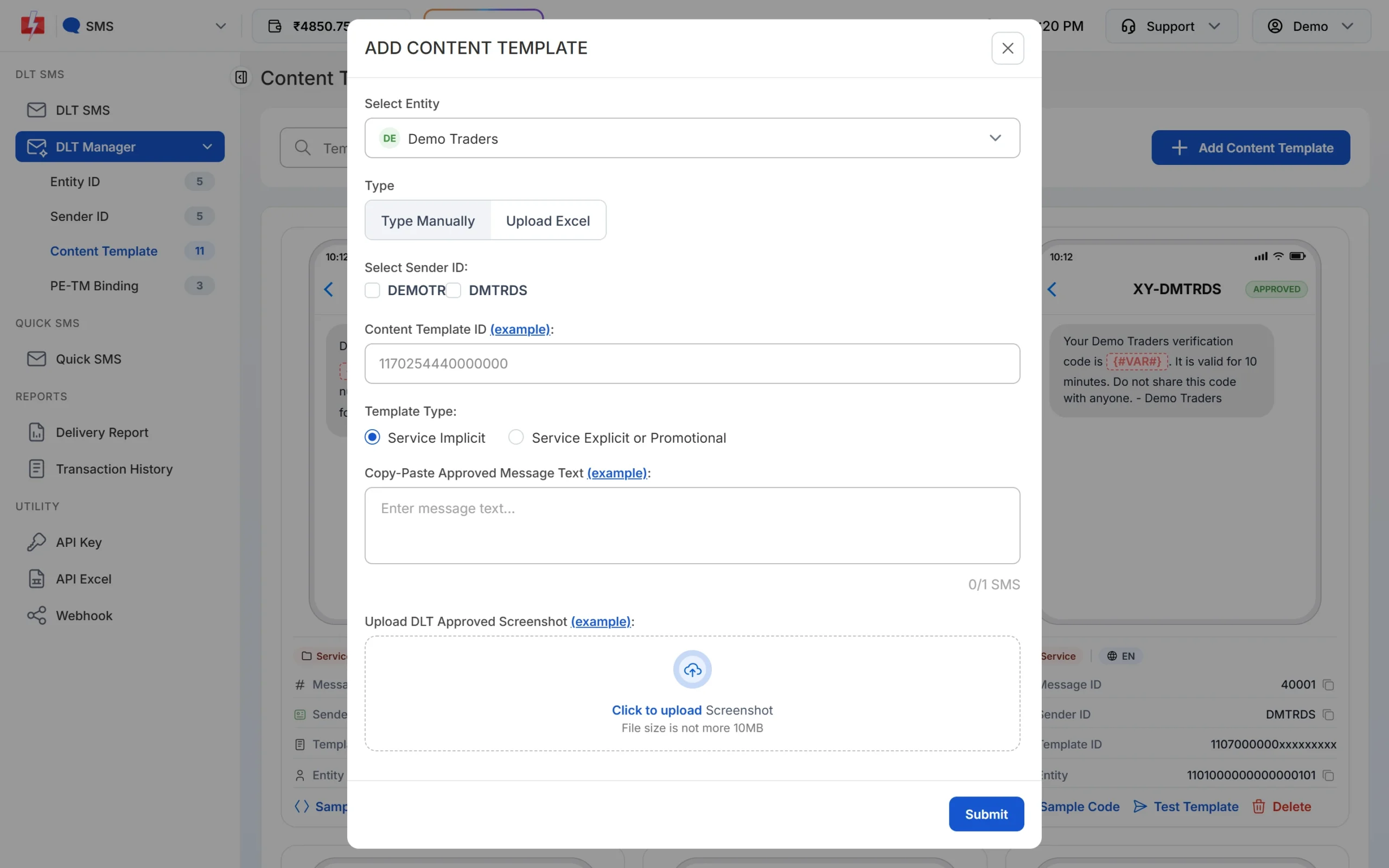
Add each approved DLT template once. It is then ready to send. -
Put your customers into groups
Open Address Book and import your customer list from a CSV or Excel file with a Name and a Number column. Create groups such as regular buyers, members or one group per branch, so each campaign goes to the right people.
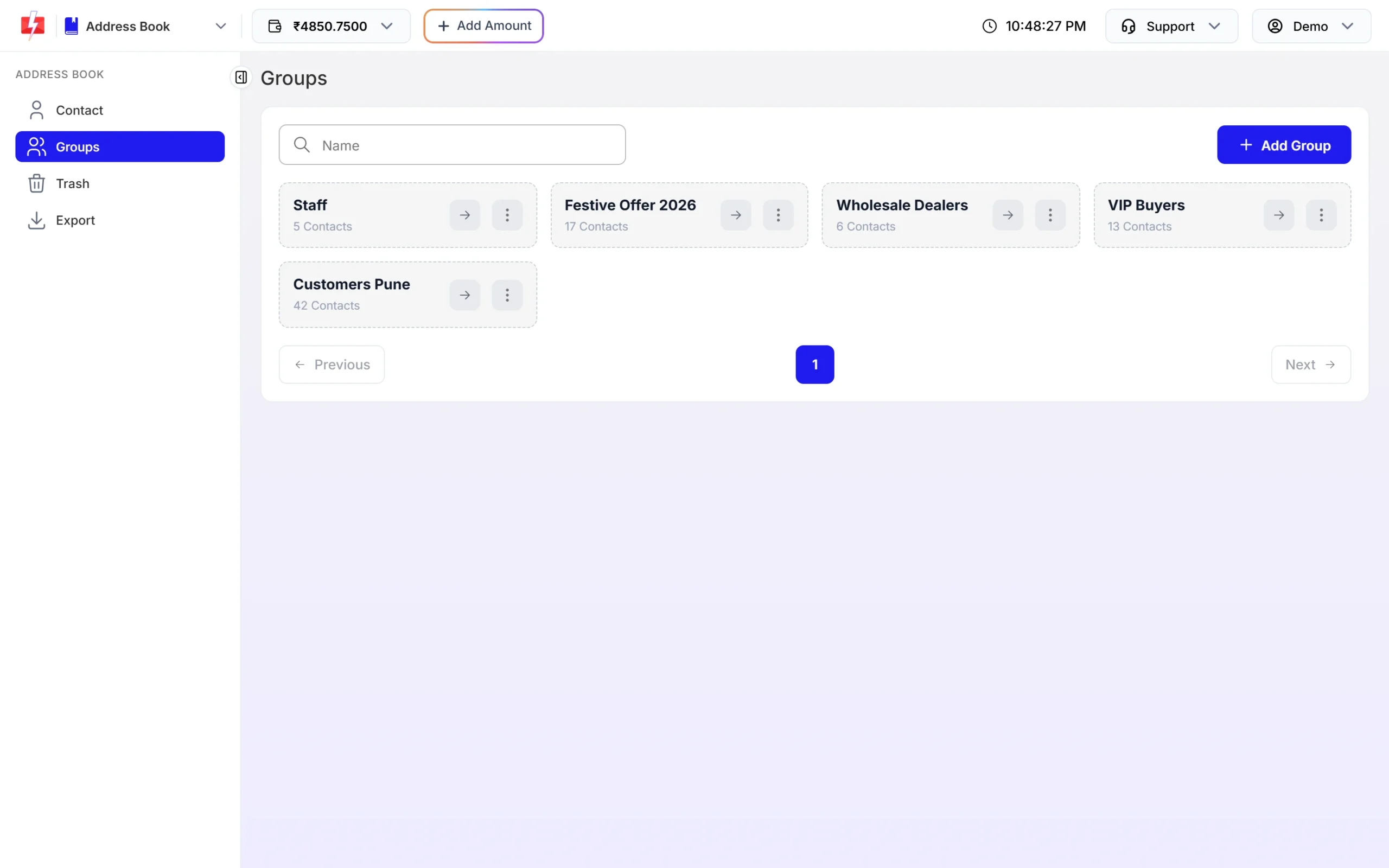
Groups let you send a sale only to the customers who should get it. -
Send bill or delivery SMS
Open DLT SMS, pick the Sender ID, add numbers and click Select DLT Template. Fill each variable and check the phone preview and the SMS count below it. Click Send, review the cost in the confirmation popup, then confirm.
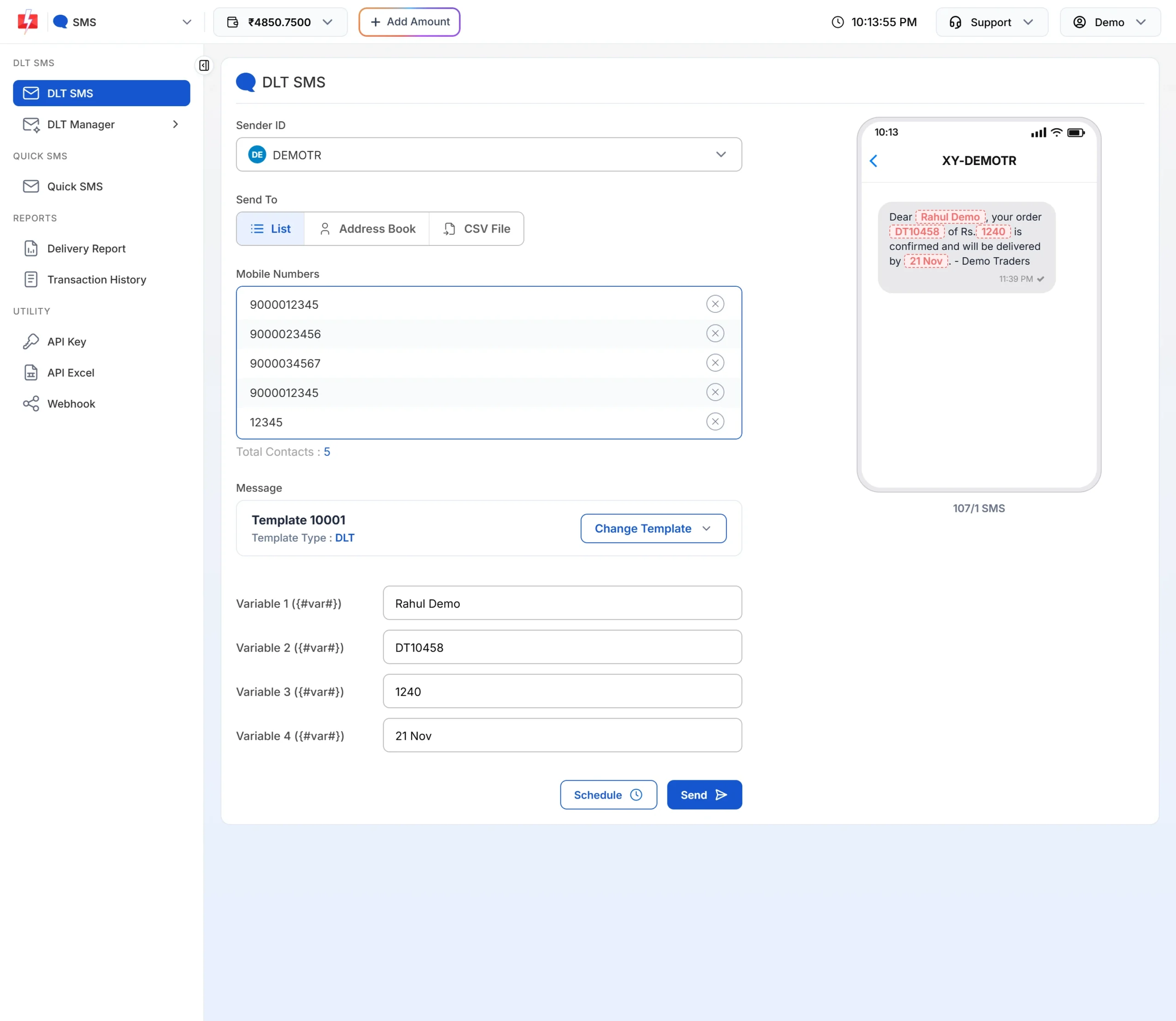
The preview shows the exact SMS and how many parts it uses. -
Connect WhatsApp and create templates
Open WhatsApp, click Login with Facebook and connect your store number. Then go to WhatsApp Manager > Templates and add your bill, delivery and offer templates. Pick Utility or Marketing, write the body, add a header image or PDF if needed and click Submit Template. Meta reviews each template.
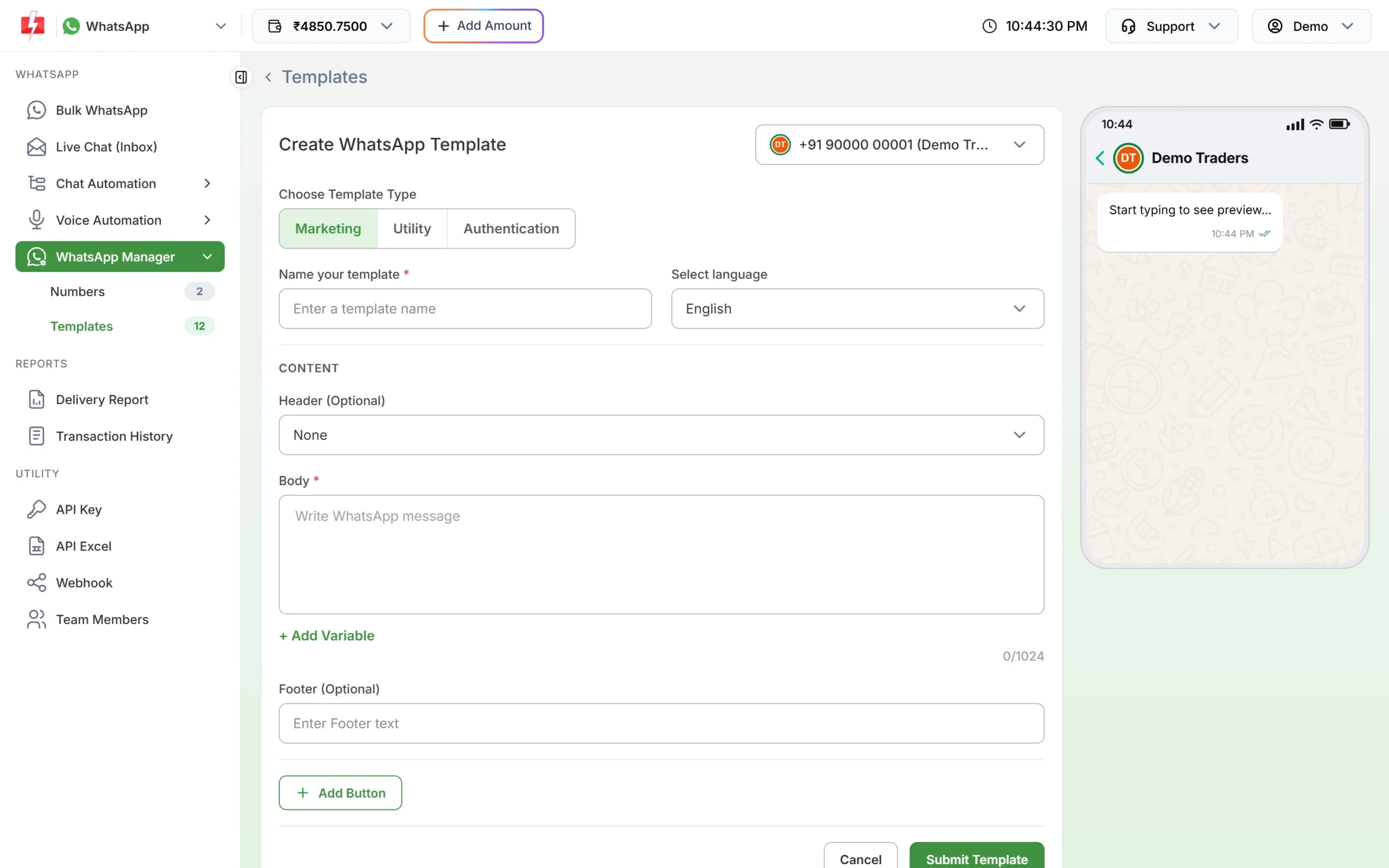
Choose the category first, then write the template. -
Answer common questions automatically
Go to Chat Automation > Inbox Settings and click Create Auto Reply. Add keywords such as “price list”, “timing” or “location” and the reply to send. Customers get an answer even when the counter is busy.
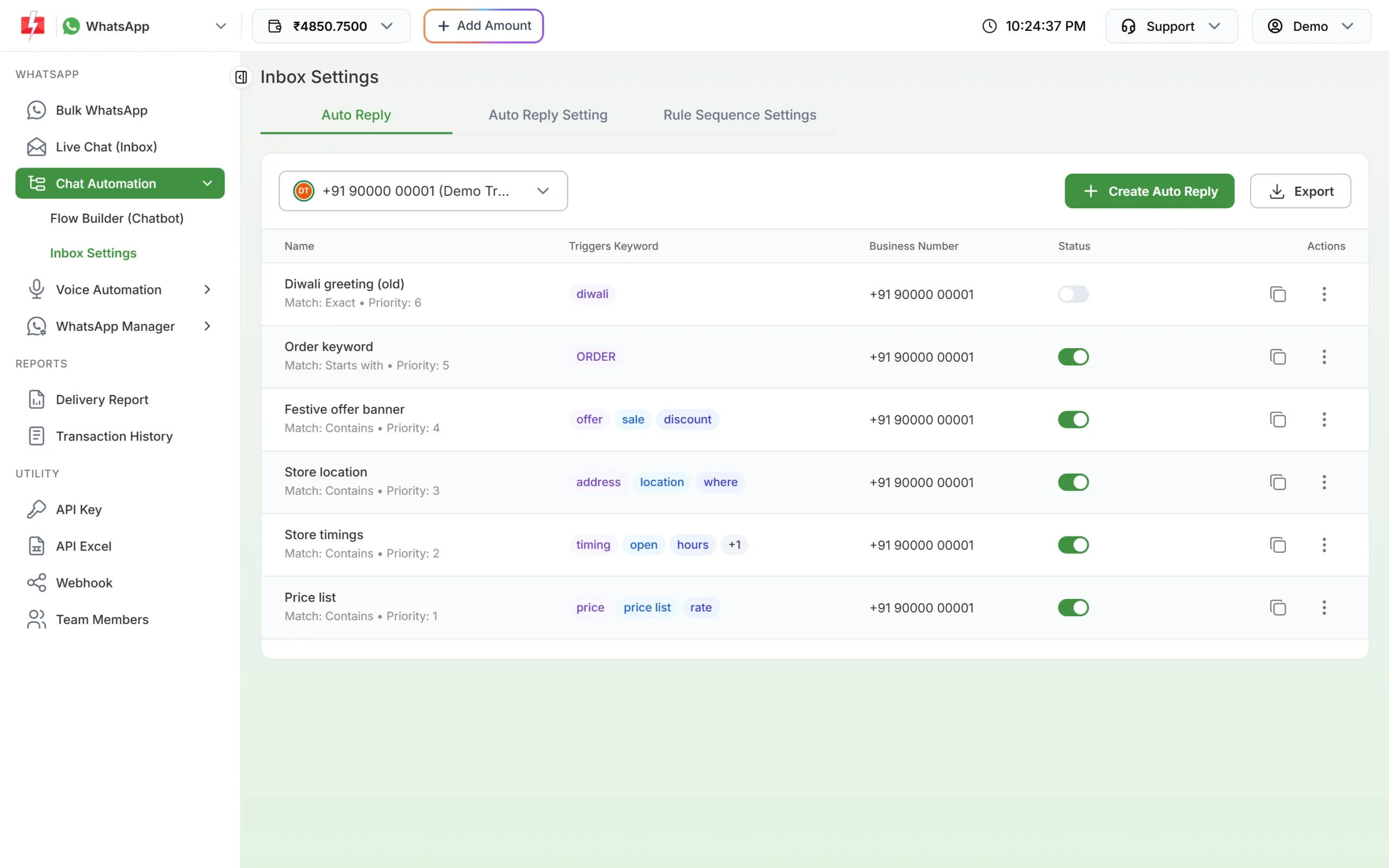
Keyword auto replies for store location, timings and price list. -
Send your sale on WhatsApp
Open Bulk WhatsApp, select your number, add customers by list, Address Book group or CSV, and pick the approved marketing template. Upload the offer image, fill the variables and click Send or Schedule. The confirmation popup shows valid, duplicate and invalid numbers and the total cost before anything goes out.
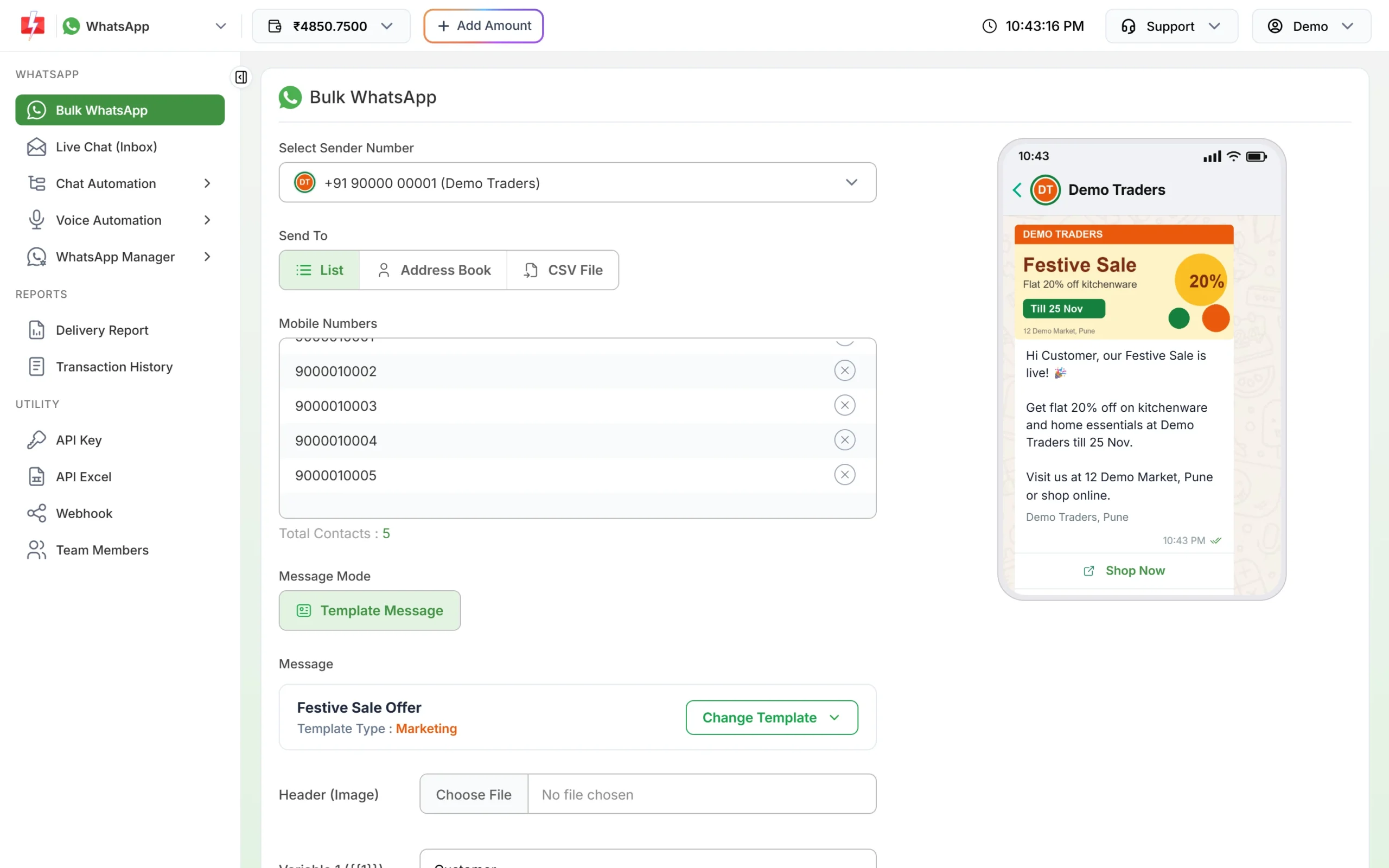
A marketing template with an image header, ready to send.
Automation that already exists
- Tally Prime: stores that bill in Tally can send bill messages from it. See the Tally WhatsApp and SMS plugin guide.
- WhatsApp auto replies and Flow Builder: keyword replies, a welcome message, out-of-office hours and a menu chatbot for “Today’s offers” or “Talk to our team”.
- Live Chat with team members: add staff as chat agents so several people answer WhatsApp orders from one number.
- Scheduling: pick a date range and time to repeat the same message once a day, for example a daily deals SMS during a sale week.
- API and webhooks: your billing software can send DLT SMS and WhatsApp templates by Message ID and receive delivery reports on your own URL.
Compliance notes for retailers
- Consent: collect the customer’s agreement before sending offers on SMS or WhatsApp, and stop when they ask.
- Sending hours: Fast2SMS sends promotional SMS between 10 AM and 9 PM. An offer sent later is held until the next morning. Bills and delivery updates on Service Implicit templates go out at any hour.
- DLT match: the SMS text must match the approved template word for word, with your values only in the variable places.
- No OTP sharing: tell customers to share the redemption OTP only at the billing counter, never on a call.
How to estimate the cost
Each channel is charged in its own way. DLT SMS are charged per number and per SMS part: one part holds 160 English characters or 70 Hindi or other regional-language characters. WhatsApp is charged per message by template category, and marketing costs more than utility. Failed and pending WhatsApp messages are refunded automatically about two days later. Voice is charged per 15-second pulse, for answered calls only. RCS is charged for every number when the campaign is sent, and numbers that fail or cannot receive RCS are refunded within 48 hours. Duplicate and invalid numbers are removed before you pay.
DLT entity registration costs ₹5,900 per year including GST (at the time of writing), paid on the DLT portal. See the current message rates on the SMS pricing, WhatsApp pricing, RCS pricing and voice call pricing pages. A bigger recharge moves your account to a lower SMS rate.
Sending in bulk? For high SMS volumes our team offers discounted rates. Talk to our team or see SMS pricing.
Frequently asked questions
Do I need DLT registration to send bill SMS from my shop?
Yes. Every business SMS in India needs a DLT entity, a sender ID and an approved template. WhatsApp, RCS and voice calls do not use DLT.
Which DLT category should a bill or points SMS use?
Service Implicit. It covers messages the customer expects after a purchase. Sale and new-arrival messages are promotional.
Can I send the bill as a PDF on WhatsApp?
Yes. Create a utility template with a Document header. In the panel you upload one PDF per send. To send each customer their own bill automatically, use the API, where every message can carry its own PDF link.
Can I run a lucky draw announcement on a voice call?
No. Lucky draw, prize, cashback and reward claims are not allowed in voice files. Announce contests on WhatsApp or SMS instead.
Why did my sale SMS go out the next morning?
Promotional SMS sent after 9 PM are held and sent from 10 AM the next day. Schedule “today only” offers well before 9 PM.
Can several staff members reply to WhatsApp orders?
Yes. Add them under Team Members with WhatsApp access. Each one logs in with their own email and password. A Chat Agent sees only the chats assigned to them, and an Admin sees all chats.