
Bulk SMS for colleges and universities covers two very different jobs: answering thousands of admission enquiries in a few weeks, and keeping enrolled students informed about exams, results and placements all year. This guide shows which messages fit SMS, WhatsApp, RCS, voice and OTP, gives sample DLT and WhatsApp templates, and explains how to run an admission help desk on WhatsApp with Fast2SMS. It is for admission offices, exam cells, placement cells and the IT team.
Messages a college sends, and where each one fits
College students are adults with smartphones, so WhatsApp carries more of the load than it does for schools. SMS stays the safe choice for anything time-bound, like an exam change, because it does not depend on mobile data.
| Message | Best channel | Why |
|---|---|---|
| Application form login and payment OTP | Smart OTP | Priority route, with a WhatsApp or SMS fallback if the first message fails. |
| Application received / fee paid | SMS (Transactional) or WhatsApp utility | Sent right after the applicant’s own action, with the application number. |
| Admission enquiries (“fees?”, “hostel?”, “last date?”) | WhatsApp chatbot and Live Chat | A menu answers common questions at any hour, and a counsellor takes over the rest. |
| Course brochure to people who enquired | WhatsApp marketing (PDF) or RCS carousel | The brochure opens in the chat; a carousel shows several programmes side by side. |
| Merit list, counselling round | SMS (Service Implicit) and WhatsApp utility | Applicants must not miss a date, so send on both. |
| Hall ticket, exam timetable | WhatsApp utility with document or link | The file reaches the student directly. |
| Exam postponed, campus closed | SMS, then a voice call if needed | Fast and does not need data. |
| Results declared | SMS with a portal link | Short, and marks stay inside the logged-in portal. |
| Placement drive registration | WhatsApp utility with reply buttons | Students register with one tap and you get the list. |
| Alumni meet, new programme launch | WhatsApp marketing or promotional SMS | Promotional content, so consent and timing rules apply. |
Sample DLT SMS templates for colleges
These are examples to adapt and register on your DLT portal in your institution’s name. Use the category shown; it decides whether the SMS reaches DND numbers and at what time it can go out.
| Use | DLT category | Sample template (example) |
|---|---|---|
| Application received | Transactional | Your application {#alphanumeric#} for {#var#} at Demo Institute of Technology has been received on {#var#}. Track status: {#url#} – Demo Institute of Technology |
| Merit list | Service Implicit | Dear {#var#}, the merit list for {#var#} is published. Your rank is {#numeric#}. Details: {#url#} – Demo Institute of Technology |
| Counselling slot | Service Implicit | Dear {#var#}, your counselling for {#var#} is on {#var#} at {#var#}. Bring original documents. – Demo Institute of Technology |
| Hall ticket | Service Implicit | Dear Student, your hall ticket for {#var#} exams is available. Download: {#url#} – Demo Institute of Technology |
| Exam change | Service Implicit | Dear Student, the {#var#} exam of {#var#} is rescheduled to {#var#}. Check the portal for details. – Demo Institute of Technology |
| Results | Service Implicit | Dear Student, results of {#var#} are declared. Log in to the student portal to view your result: {#url#} – Demo Institute of Technology |
| Library due | Service Implicit | Dear {#var#}, the library book {#var#} is due on {#var#}. Please return or renew it. – Demo Institute of Technology |
| Admissions open | Promotional | Admissions open for {#var#} programmes at Demo Institute of Technology. Scholarships available. Apply: {#url#} – Demo Institute of Technology |
An application confirmation counts as Transactional only when it goes out right after the applicant submits or pays. A reminder sent later, such as “your form is incomplete”, is a service message. Do not mix a scholarship offer into an exam or result template, because promotional content makes the whole message promotional.
WhatsApp templates for colleges
When you start a WhatsApp conversation, you use a Meta-approved template. When a student messages you first, you can reply freely for 24 hours from their last message, which is how the admission help desk works.
| Template name | Category | Body (example) | Extras |
|---|---|---|---|
| application_status | Utility | Hi {{1}}, your application {{2}} for {{3}} is now {{4}}. Tap below to see the next step. | Visit website button |
| hall_ticket | Utility | Dear {{1}}, your hall ticket for the {{2}} exams is attached. Carry a printed copy and your ID card. | Document header (PDF) |
| placement_drive | Utility | Dear {{1}}, {{2}} is visiting campus on {{3}} for {{4}} roles. Eligible students can register below. | Quick replies “Register” and “Not interested” |
| course_brochure | Marketing | Hi {{1}}, thanks for your interest in {{2}}. Our brochure with fees, hostel and placement details is attached. | Document header, “Talk to a counsellor” button, “Stop promotions” quick reply |
| login_otp | Authentication | Fixed by Meta: the code, an optional security line and expiry. | Copy code or auto-fill button |
Meta reviews the category you choose. A “utility” template with offer or promotional wording can be treated as marketing, which also changes the price.
Voice calls and RCS for colleges
Voice: recorded calls suit urgent campus notices, such as a closure or an exam reschedule, and hostel announcements. A Key Press call can ask “Press 1 to confirm you will attend the convocation”. The operator approves every recording, and the not-allowed list includes admission calls, so keep voice for enrolled students. Calls go only to non-DND numbers between 10 AM and 9 PM.
Sample script: “This is Demo Institute of Technology. The semester exam scheduled for 12 December is postponed to 15 December. Please check the student portal for the new timetable. Thank you.”
RCS: RCS shows your logo and verified name in the phone’s messages app, with images, buttons and carousels. A carousel of 2 to 10 cards works well for “B.Tech, MBA, BCA” with a photo and an “Apply” button on each card. To get an RCS brand approved you need a working website, an email on the same domain, a GST certificate, Terms and Privacy Policy pages and an opt-in form on your website. Promotional RCS bots send between 7 AM and 10 PM, with a limit of 4 promotional RCS per number per month at the time of writing.
OTP for application forms and student portals
Application forms, fee payment pages and exam portals all need OTPs, often in large bursts on the last date. Smart OTP sends the code on a priority route by SMS or WhatsApp, and can send a fallback on the other channel with the same code if the first one fails. Your developer uses one API to send and another to verify. You can also send OTPs with your own DLT OTP template through the DLT SMS API and verify them in your own code, but Smart OTP saves that work.
How to get started on Fast2SMS
-
Send exam and result notices from a CSV
After your DLT entity, sender ID and templates are approved and added in DLT Manager, open SMS > DLT SMS. Pick the sender ID and click the CSV File tab. Upload your student list (CSV, up to 20 MB), choose the mobile number column, then select your template and map variables such as name or roll number to columns.
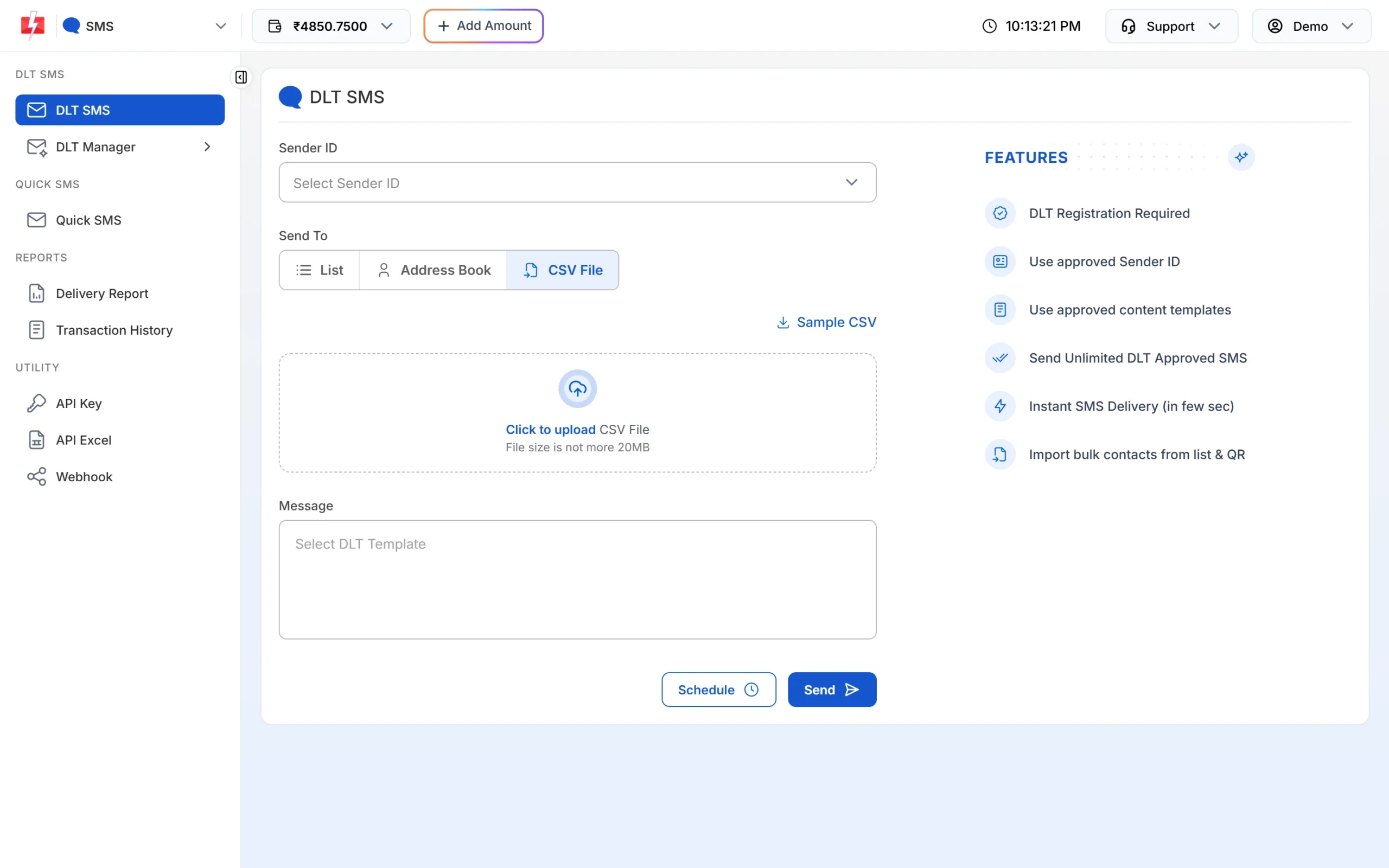
Upload the student list and map template variables to columns. -
Connect your WhatsApp number and create templates
Open WhatsApp and connect your college’s number with Login with Facebook. Then go to WhatsApp Manager > Templates > Add Template. Choose Utility for hall tickets and status updates, or Marketing for brochures. Add a header, the body with variables, a footer and buttons, and submit for Meta’s review.
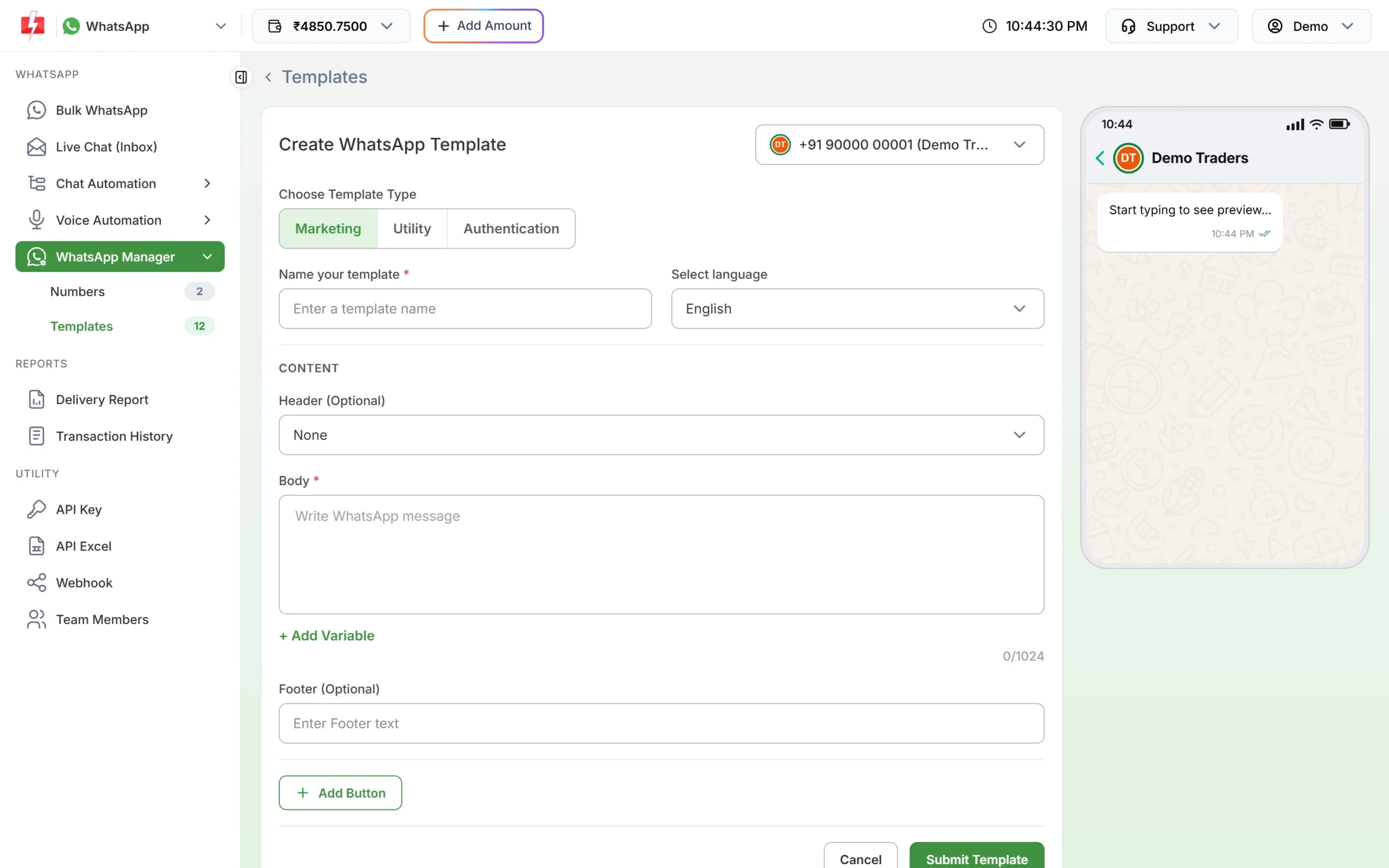
Pick the template type, then write the content. -
Build an admission chatbot
Go to Chat Automation > Flow Builder (Chatbot) and create a workflow. The start step listens for keywords such as “hi” or “admission”. Add a list menu with options like “Courses and fees”, “Hostel”, “Last date” and “Talk to a counsellor”, and use Assign Conversation to hand the chat to a person when needed.
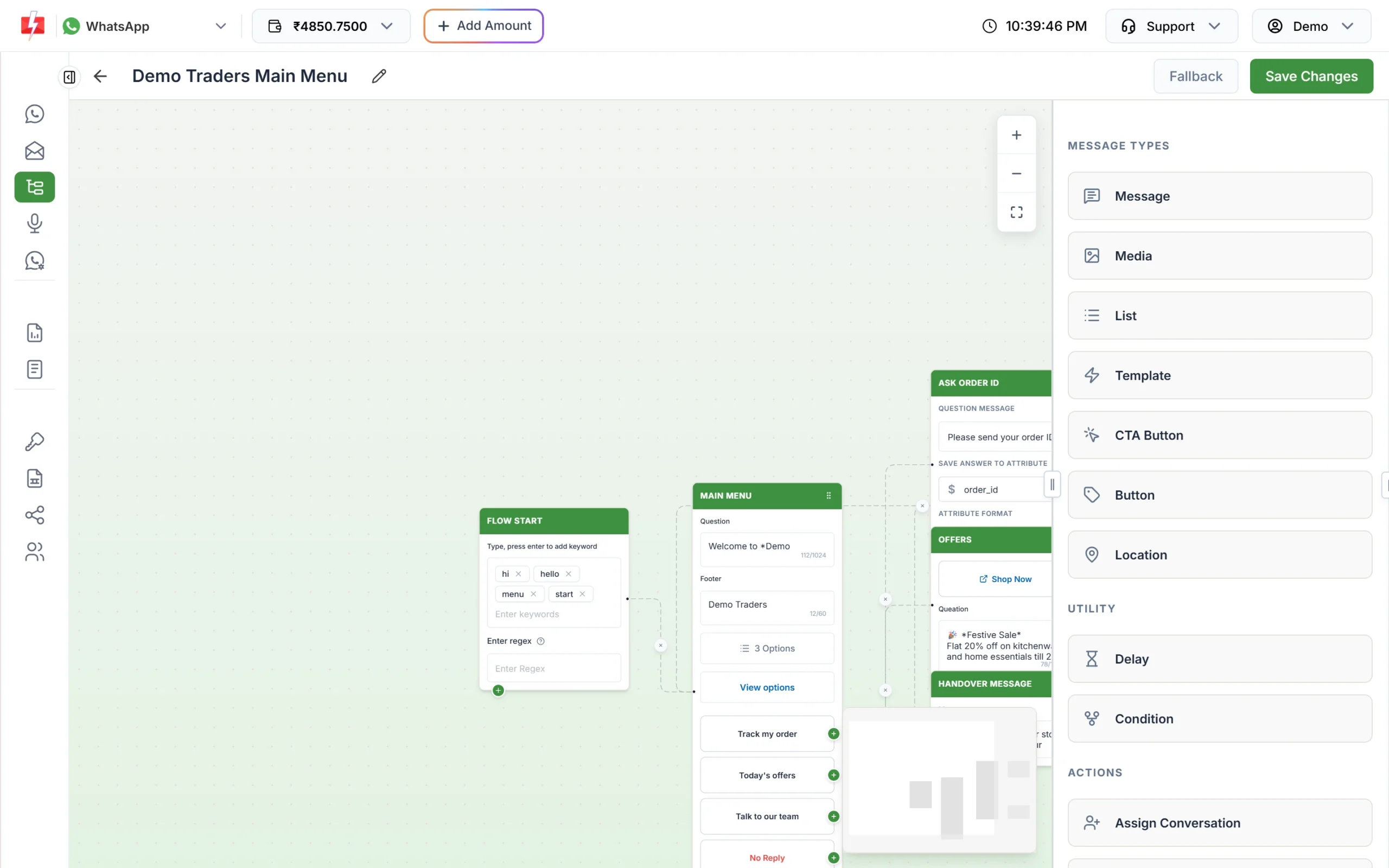
Keywords start the flow; menu options lead to answers or a counsellor. -
Add counsellors as team members
Open Account Setting > Team Members and click Add Agent. Enter the counsellor’s name, mobile, email and password, choose the role and tick WhatsApp under access. With the Chat Agent role, a counsellor sees only the chats assigned to them; the Admin role sees all chats.
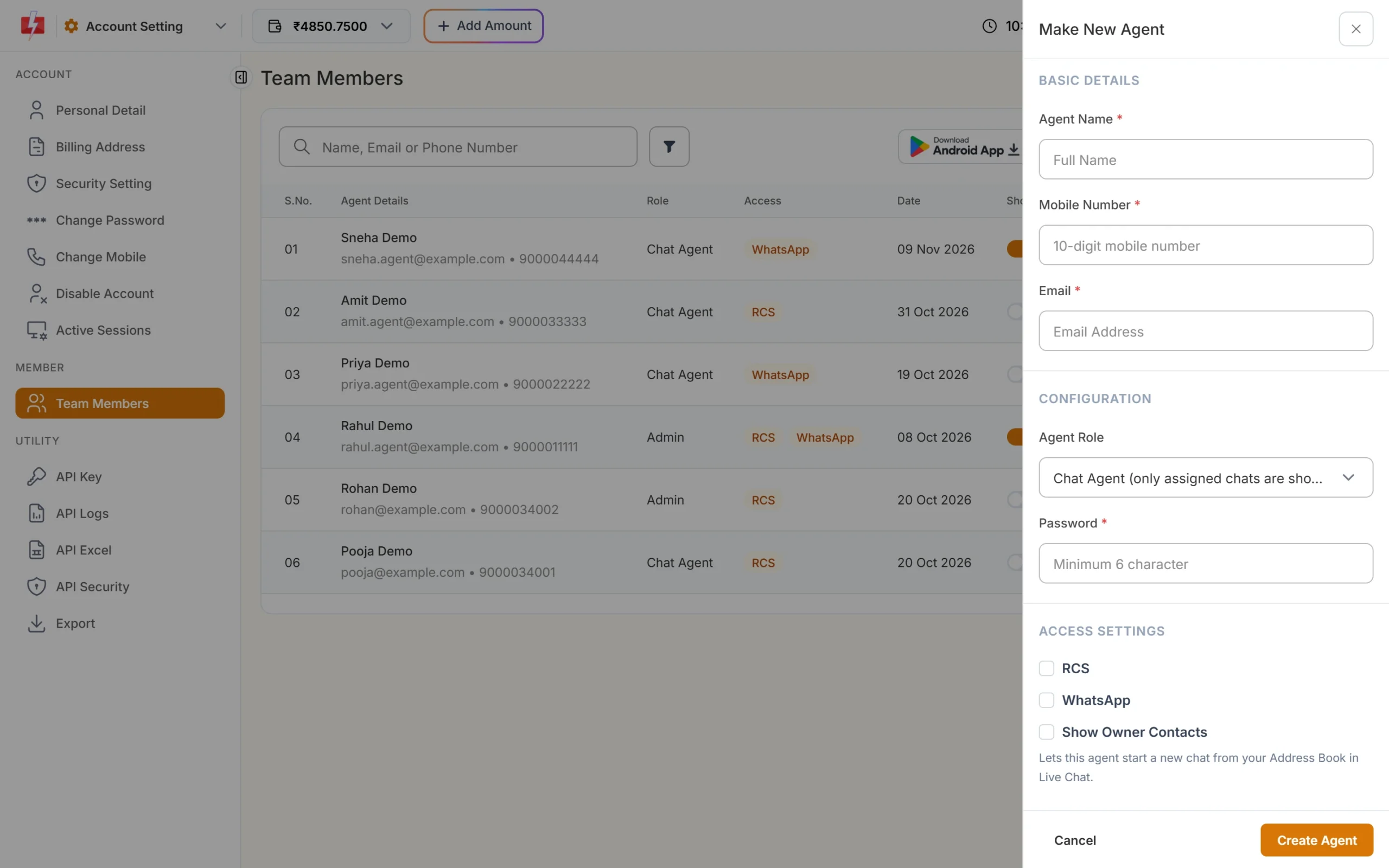
Each counsellor gets their own login. -
Answer enquiries in Live Chat
Counsellors reply in Live Chat (Inbox). They can label chats, transfer them, and use saved quick replies for common answers. If an applicant last wrote more than 24 hours ago, only an approved template can be sent.
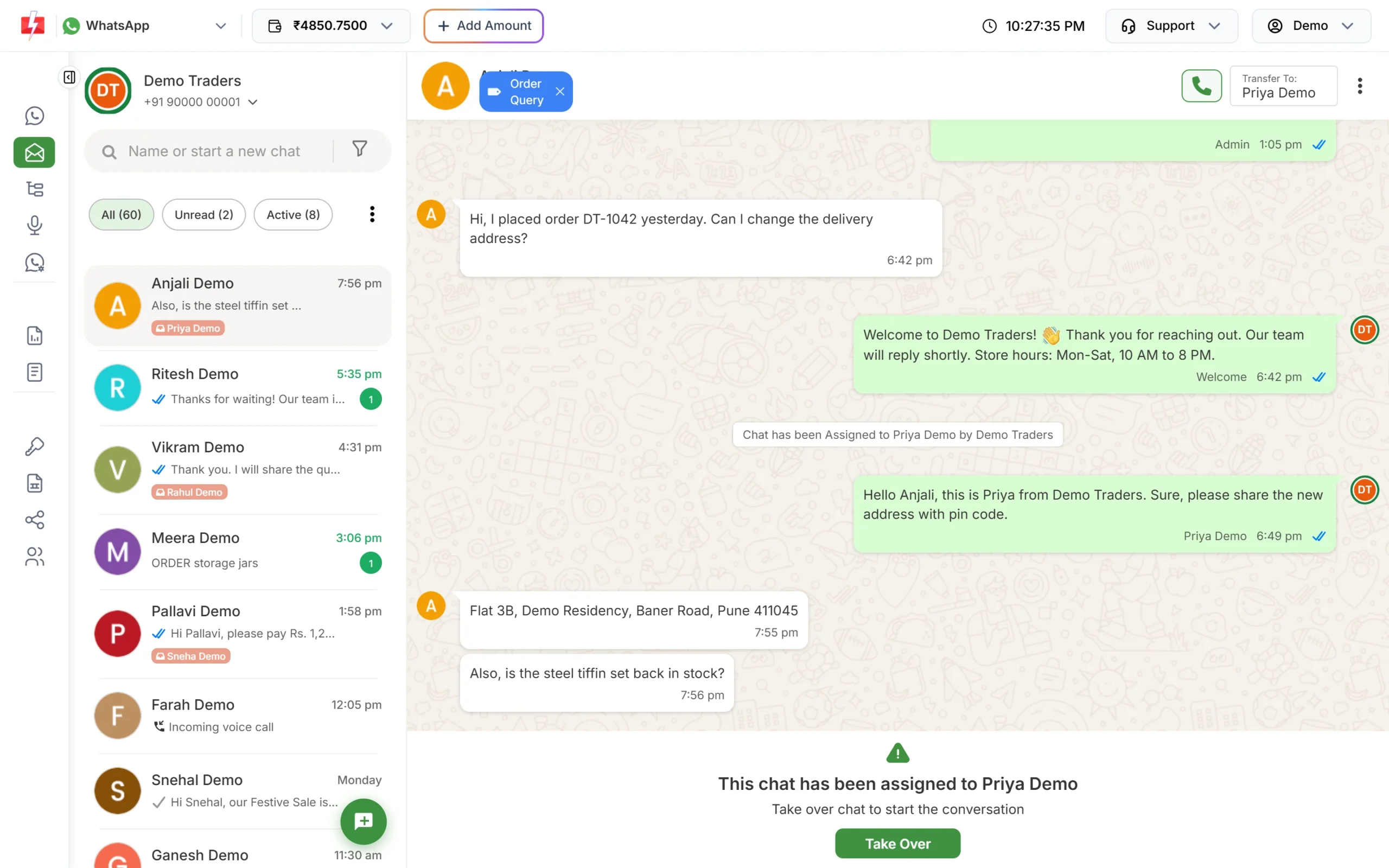
Auto replies and counsellor replies in one conversation. -
Send a course carousel on RCS
Once your RCS brand is approved and a bot is created, open RCS > Bulk RCS, choose the bot and Carousel as the RCS type. Fill each card’s title, description, image and buttons.
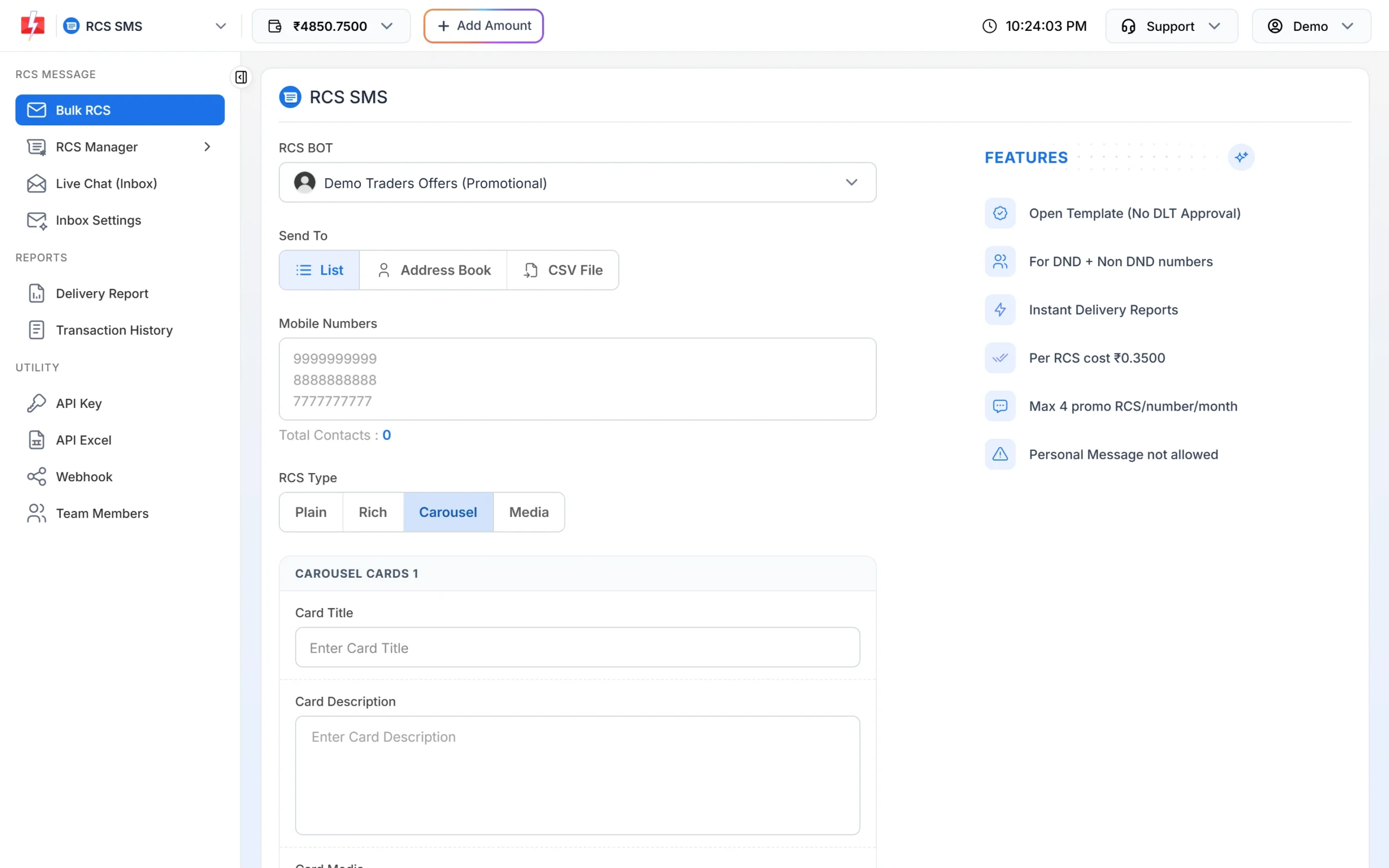
One card per programme, each with its own button. -
Protect the application form with Smart OTP
In Smart OTP click Add OTP Template, pick your DLT OTP template, mark which variable holds the code, and tick SET FALLBACK TEMPLATE to add a WhatsApp fallback. Click Assign OTP Template and give the OTP ID to your developer.
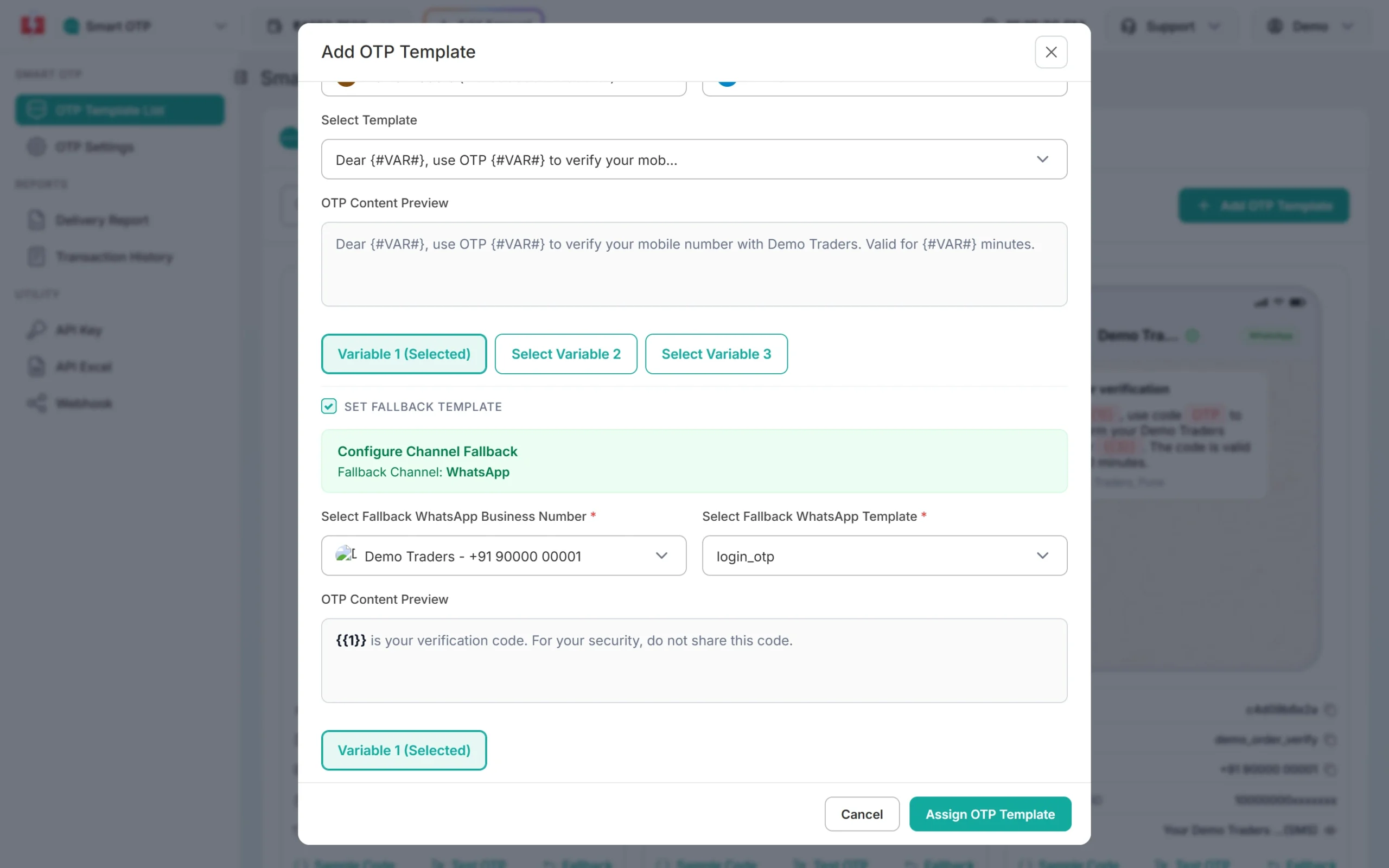
An SMS OTP with a WhatsApp fallback.
Automation options
- API from your ERP, LMS or admission portal: send DLT SMS, WhatsApp templates, RCS, voice and Smart OTP with your API key. API Excel in settings lists your approved templates with sample requests.
- CRM integrations: the Integrations page lists connections such as HubSpot, Zoho Campaigns, Pipedrive, Freshworks and Pabbly Connect, useful if your admission team works in a CRM.
- Bulk upload and scheduling: upload CSV or Excel lists and schedule campaigns for a date and time.
- Webhooks: receive delivery status and incoming WhatsApp replies in your own system.
Compliance notes
- DLT: register your institution as the entity, get headers and templates approved, and complete PE-TM binding with Fast2SMS before sending SMS.
- Promotional SMS: admission campaigns go only to non-DND numbers or people who consented, between 10 AM and 9 PM, and TRAI requires an opt-out option in promotional messages.
- WhatsApp opt-in: add a clear consent line to enquiry forms, for example “I agree to receive admission updates from Demo Institute of Technology on WhatsApp”. Do not upload bought lead lists; blocks and reports lower your quality rating.
- Voice: no admission calls, operator-approved recordings only, 10 AM to 9 PM, non-DND numbers only.
- Student data: do not send marks, attendance shortages, fee defaults or ID numbers in broadcasts. Send a link to the logged-in portal instead.
Estimating the cost
Each channel is charged from your prepaid wallet:
- SMS: recipients x SMS parts x your rate. See bulk SMS pricing.
- WhatsApp: recipients x the rate for the template category. Replies inside the 24-hour window are charged at the session rate, and incoming messages are free. See WhatsApp pricing.
- RCS: per message by type (plain, rich, carousel, media); failed and non-RCS numbers are refunded. See RCS pricing.
- Voice: per pulse for answered calls only. See voice call pricing.
Every campaign shows the total in the confirmation popup before it goes out, so you can check the cost of a 20,000-student result notice before you confirm.
Frequently asked questions
Can a college send admission SMS to students on DND?
Not with a promotional template, unless the student gave consent. Service messages to applicants and students, like counselling dates, reach DND numbers.
Can we reply to thousands of admission enquiries on WhatsApp without more staff?
Yes, partly. A Flow Builder chatbot and keyword auto replies answer common questions any time, and counsellors handle the chats the bot hands over.
Can several counsellors use one WhatsApp number?
Yes. Add each counsellor as a team member with WhatsApp access. Chats can be assigned and transferred between them.
How do we send hall tickets to each student?
Use a utility template with a document header. From the panel, one file is attached per campaign. For a different file per student, send one WhatsApp API request per student with that student’s file.
Is DLT needed for WhatsApp or RCS?
No. WhatsApp uses Meta-approved templates and RCS needs an approved brand. DLT applies to SMS.
Which OTP option is best for an application portal?
Smart OTP. It sends on a priority route, verifies the code for you and can fall back to the other channel.
Related guides
- College and university SMS templates: applications, admit cards, results, fees and placements (DLT ready)
- WhatsApp utility templates for schools, colleges and coaching: 15 templates
- Using the WhatsApp Live Chat inbox
- How to create a WhatsApp template
- Smart OTP setup guide
- How colleges can use bulk SMS (older overview)
- Bulk SMS for colleges
- RCS messaging