
A DLT OTP template is registered as Transactional, keeps all text fixed except one {#numeric#} variable for the code, and carries your brand name in the fixed text. Once your DLT portal approves it, you add it in Fast2SMS as a Service Implicit template and use it with Smart OTP or the DLT SMS API.
This page covers the DLT rules for OTP templates: which category to pick, how to write the text, how to tag the variable, and what happens after approval. It is for anyone setting up login, sign-up or payment OTPs for an Indian business.
DLT OTP template rules at a glance
| Rule | What to do |
|---|---|
| Category on the DLT portal | Transactional. OTPs from shops, apps, schools and other non-bank businesses also go here. |
| Type in Fast2SMS | Service Implicit (this is the option for transactional and service templates) |
| Header (Sender ID) | An approved alphabetic header. A numeric header makes the template promotional in Fast2SMS. |
| OTP variable | One {#numeric#} variable where the code goes |
| Other variables | Optional, for example minutes of validity. Keep the total at three or fewer. |
| Brand name | In the fixed text, never inside a variable |
| Links or phone numbers | Avoid them. If you must add one, it has to be whitelisted on your DLT portal. |
| Content | Nothing promotional: no offers, discounts or “shop now” lines |
Which DLT category should an OTP template use?
Use Transactional. Under TRAI’s commercial communication rules, as amended in 2025, a transactional message goes to your own customer in response to something the customer did, such as logging in, signing up or paying. OTPs are listed as an example, and the rule now covers OTPs from non-bank businesses like online stores and apps, not only banks.
Transactional templates reach numbers on DND and can be sent at any hour. That is why an OTP must never be registered as promotional: promotional SMS do not reach DND numbers and are held at night.
How to write an OTP template that gets approved
Keep the message short and clear. A good OTP template says what the code is for, how long it is valid, and that it should not be shared. Some examples you can adapt:
{#numeric#} is your OTP to log in to Demo Traders. Valid for 10 minutes. Do not share it with anyone. - Demo TradersYour Demo Traders verification code is {#numeric#}. It is valid for {#numeric#} minutes. Do not share this code with anyone.{#numeric#} is the OTP to confirm your Demo Traders order. Do not share it with anyone. - Demo Traders
Points the DLT reviewers often check:
- Brand name in fixed text. The message must show who is sending it. Do not put the business name in a variable.
- The right tag for the code. Use
{#numeric#}for a number-only OTP. If your codes have letters, use{#alphanumeric#}. - Fixed text between variables. Two variables cannot sit side by side, except two alphanumeric ones.
- Three variables or fewer. More are allowed only with written reasons and a separate approval.
- No promotional words. A line like “Get 10% off on your next order” turns the message into a promotion and the template is rejected as transactional.
Older templates that use the plain {#var#} tag still work in Fast2SMS, but new templates on the DLT portals use typed tags. See DLT template variable limits for the length of each tag.
Add your approved OTP template to Fast2SMS
After the DLT portal approves the template, add it to your Fast2SMS account so you can send with it.
-
Open Content Template in DLT Manager
In the SMS app, go to DLT Manager > Content Template and click Add Content Template. Your entity and the header used for OTPs must already be added and approved in Fast2SMS.
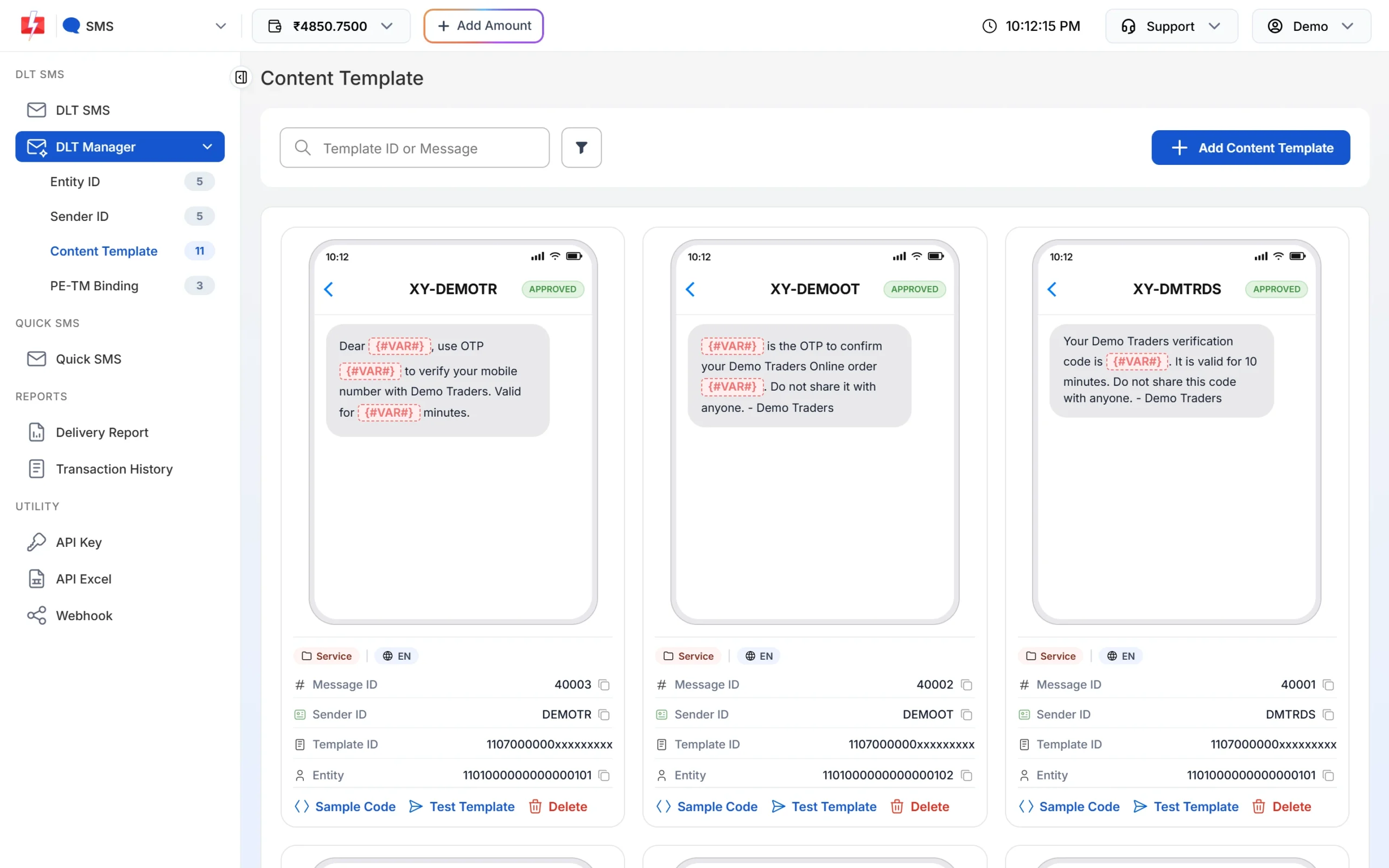
Approved OTP templates show the Service badge and a Message ID. -
Fill in the template details
Select the entity, tick the sender ID, enter the 19-digit Content Template ID from your DLT portal, choose Service Implicit as the Template Type, and paste the approved text exactly as it appears on the portal. Upload a screenshot of the approved template and click Submit.
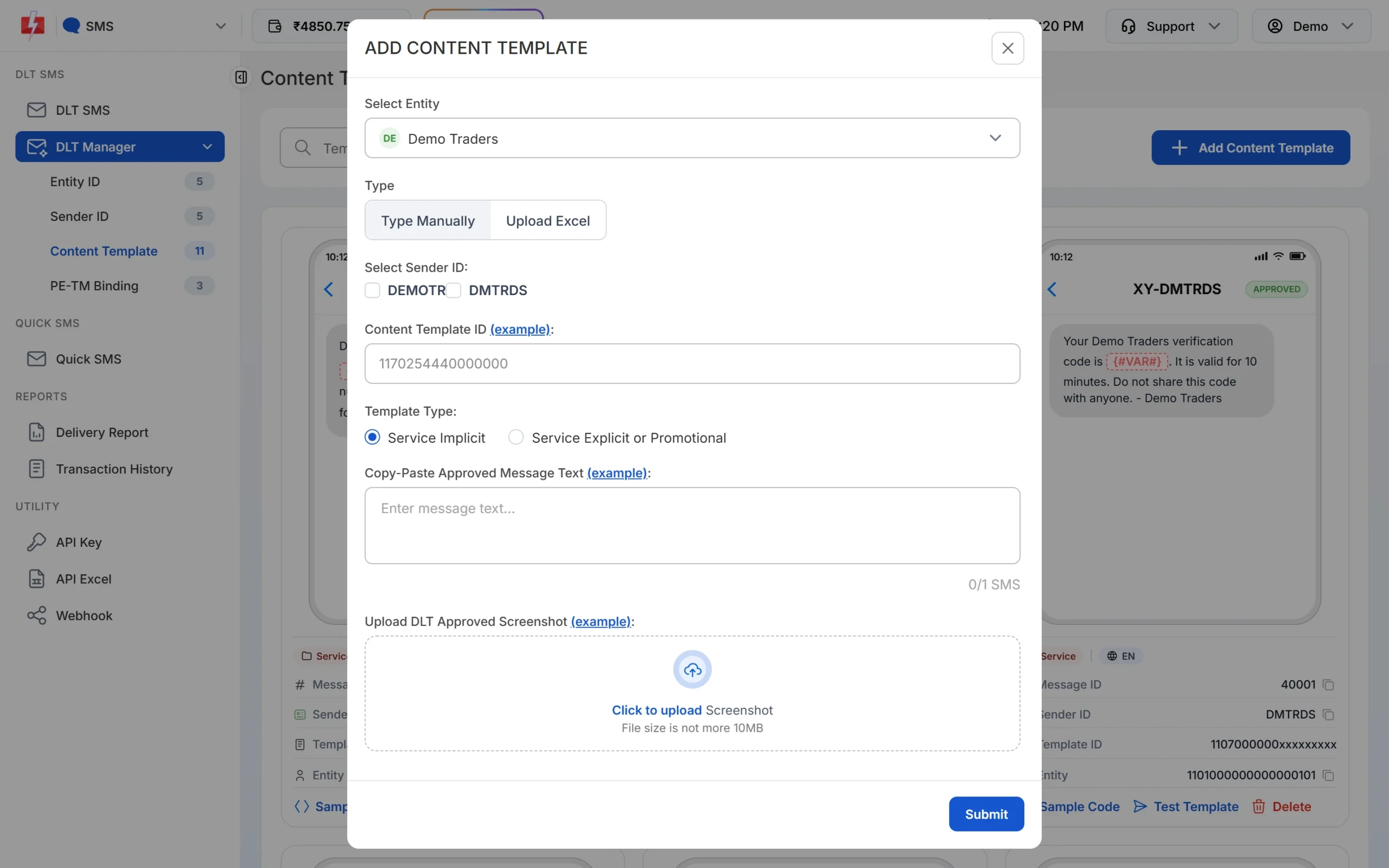
Choose Service Implicit for an OTP template. The template is saved as Pending while Fast2SMS checks it against the screenshot. Once it is Approved you can send with it.
-
Create a Smart OTP template from it
Smart OTP is our recommended way to send OTPs. It sends on a priority route, can fall back to WhatsApp, and verifies the code for you. Open Smart OTP > OTP Template List, click Add OTP Template, pick the entity and sender, then pick your OTP template. Only approved templates with at least one variable appear in this list.
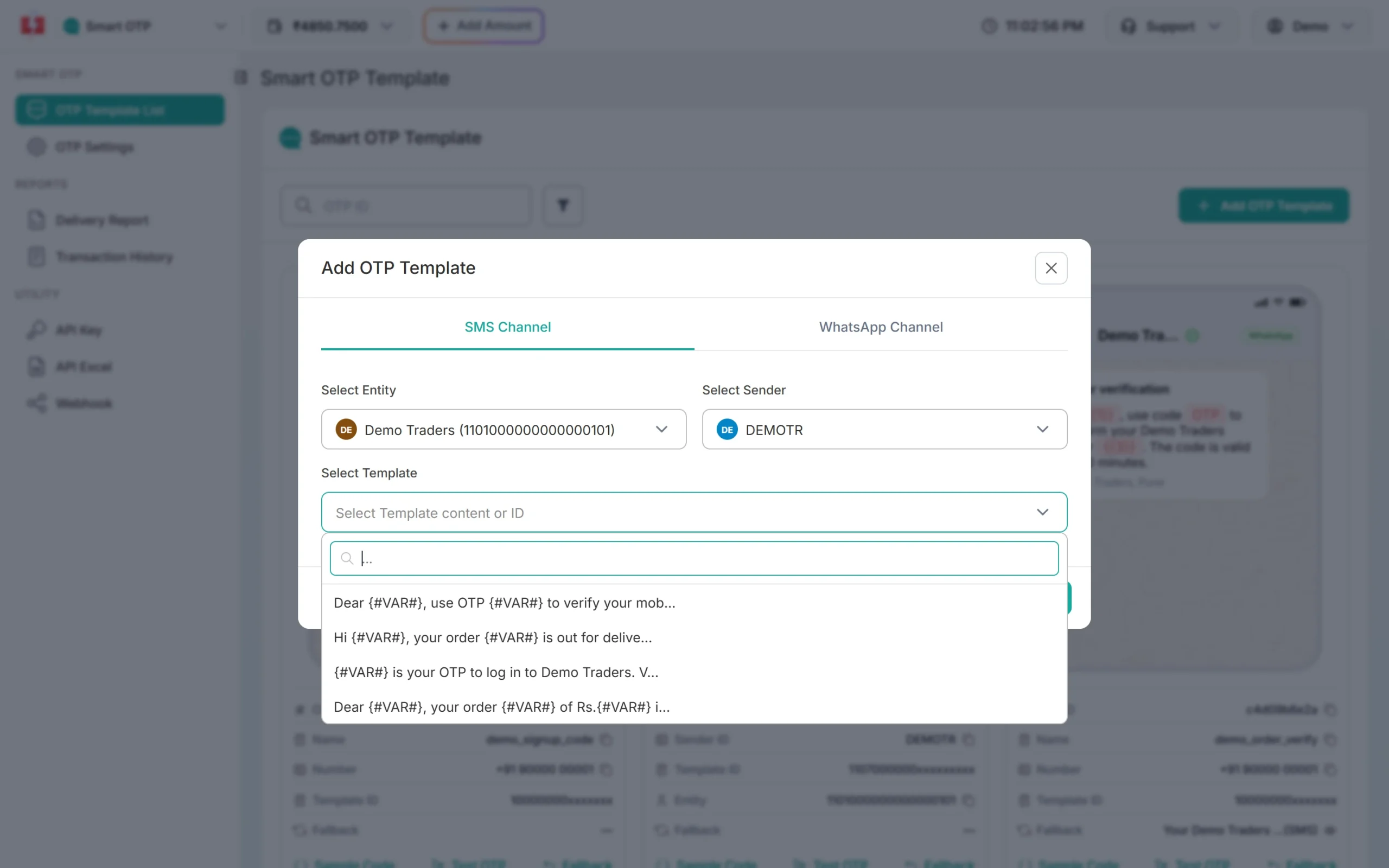
Smart OTP lists only approved DLT templates that have a variable. Then click the variable that holds the code and save. You get an OTP ID to use in the API. The full steps are in Create a Smart OTP template for SMS.
Other ways to send with your OTP template
You can also send the OTP with the DLT SMS API (route=dlt). Pass the template’s Message ID from the Content Template card, not the 19-digit Template ID, and put the code in variables_values. In this case your own app creates and checks the code. See the DLT SMS API guide.
Common reasons OTP templates fail or get rejected
- Registered as promotional. The OTP does not reach DND numbers and is held at night. Register a new Transactional template.
- Brand name missing or placed in a variable.
- Promotional line added at the end of the OTP text.
- Text in Fast2SMS does not match the portal. An extra space, a changed word or a different full stop causes “template not matched” at the operator. Copy and paste the text from the portal.
- Template not linked to the sender ID you send with. Link the header to the template on the DLT portal and tick the same sender in Fast2SMS.
- Code longer than the tag allows or letters sent in a
{#numeric#}variable.
Frequently asked questions
Which DLT template type is used for OTP?
Transactional on the DLT portal. In Fast2SMS, choose Service Implicit when you add it.
Can a non-bank business register an OTP template as transactional?
Yes. TRAI’s amended rules list OTPs from non-bank businesses, such as online stores and app logins, as transactional messages.
Can I send OTPs to DND numbers?
Yes, when the template is Transactional. DND blocks promotional SMS, not OTPs.
Can I use one template for login and sign-up OTPs?
Yes, if the text fits both, for example “your verification code”. Many businesses keep separate templates so the message is clearer for the user.
Can I write the OTP template in Hindi?
Yes. Register it in Hindi on the DLT portal. A Hindi SMS fits 70 characters per part, so keep it short. See DLT templates in Hindi.
Do I need a separate header for OTP SMS?
No, any approved alphabetic header linked to the template works. Do not use a numeric header, as Fast2SMS treats it as promotional.
How long does DLT approval take for an OTP template?
It depends on your DLT portal. After that, Fast2SMS checks the template you add in DLT Manager before it shows as Approved.