
Payment due and EMI reminders work best as a short sequence: an SMS a few days before the due date, another on the day, and a voice call for customers who still have not paid. This guide shows how to automate that with the Fast2SMS DLT SMS API and the Voice Call API, for lenders, NBFCs, finance shops, subscription businesses, schools collecting fees and anyone who sends bills. It covers templates, the API calls, a key press “press 1 for a payment link” call, timing rules and reports.
A reminder sequence that works
| When | Channel | Example (your DLT template / voice file) |
|---|---|---|
| 3 days before due | SMS | Dear {#var#}, your EMI of Rs.{#var#} for loan {#var#} is due on {#var#}. Please keep your account funded. – Demo Finance |
| On the due date | SMS | Dear {#var#}, your payment of Rs.{#var#} is due today. Pay at {#var#} – Demo Finance |
| 1 to 3 days after due, unpaid | Voice call (key press) | Recorded message: “Your payment is overdue. Press 1 to get a payment link by SMS, press 2 to talk to us.” |
| After payment | SMS | Dear {#var#}, we have received Rs.{#var#} for {#var#} on {#var#}. Thank you. – Demo Finance |
Register your own wording on your DLT portal as transactional / Service Implicit templates. A payment link must be allowed in the template and, as most DLT portals require, whitelisted.
Before you start
- DLT: approved entity, sender ID and reminder templates, added in DLT Manager.
- Voice: an approved voice file for the overdue call. A key press call needs a file that asks the caller to press a key.
- API key with API Access on, kept on your server.
- Wallet balance for SMS and for the amount held when a voice campaign starts.
- Your billing data: customer name, mobile, amount, due date and paid status, with a daily job that can read it.
Set up
-
Note the SMS Message IDs
Open DLT Manager, Content Template, and note the Message ID and Sender ID of each reminder template. Click Sample Code to see a ready request.
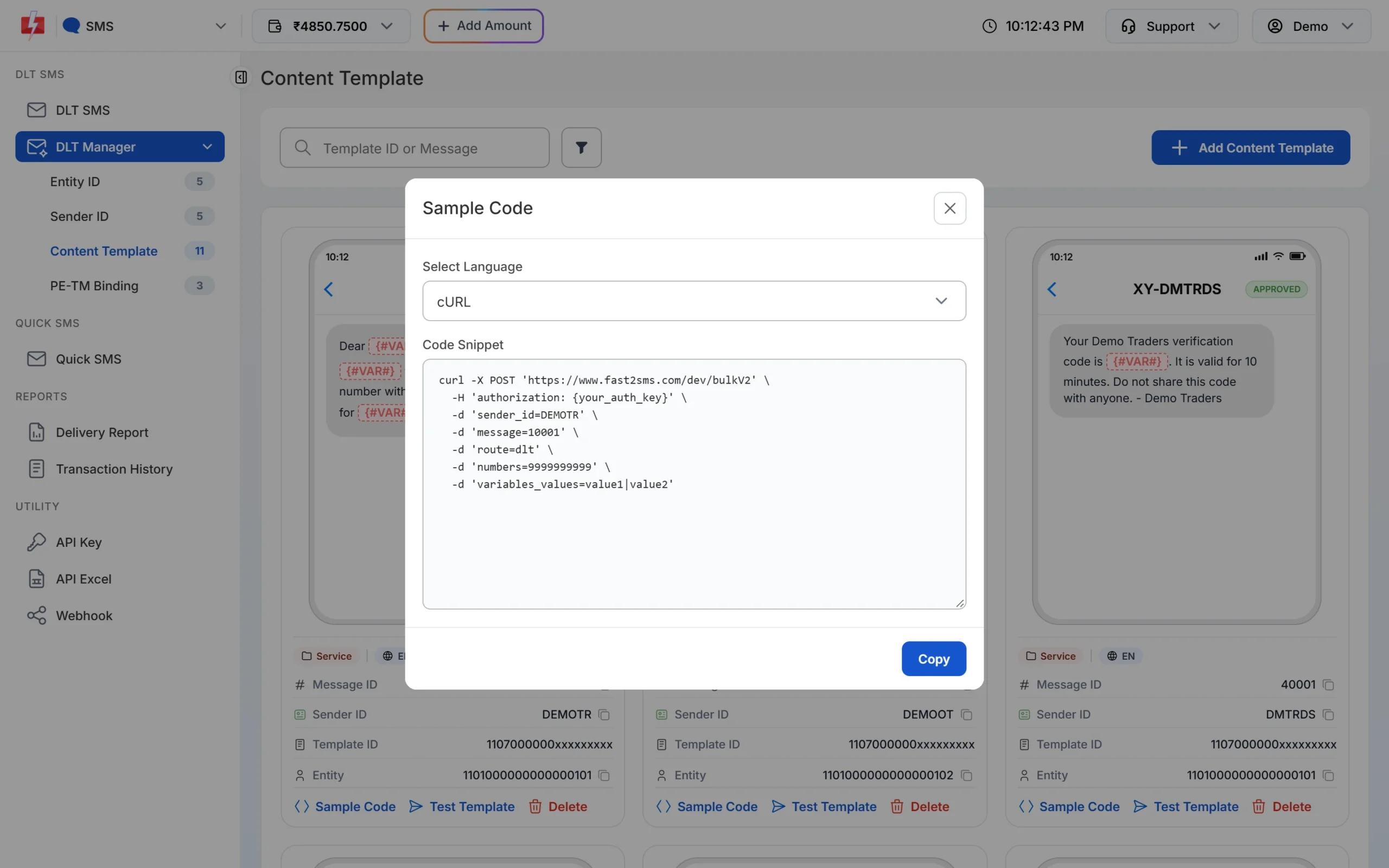
The sample already has your sender and Message ID. -
Upload and approve the voice file
In the Voice app, open Voice Files and upload your recording. It can be used once the operator approves it. The file’s ID is the
file_idfor the API, andGET /dev/voice/fileslists your files with their status.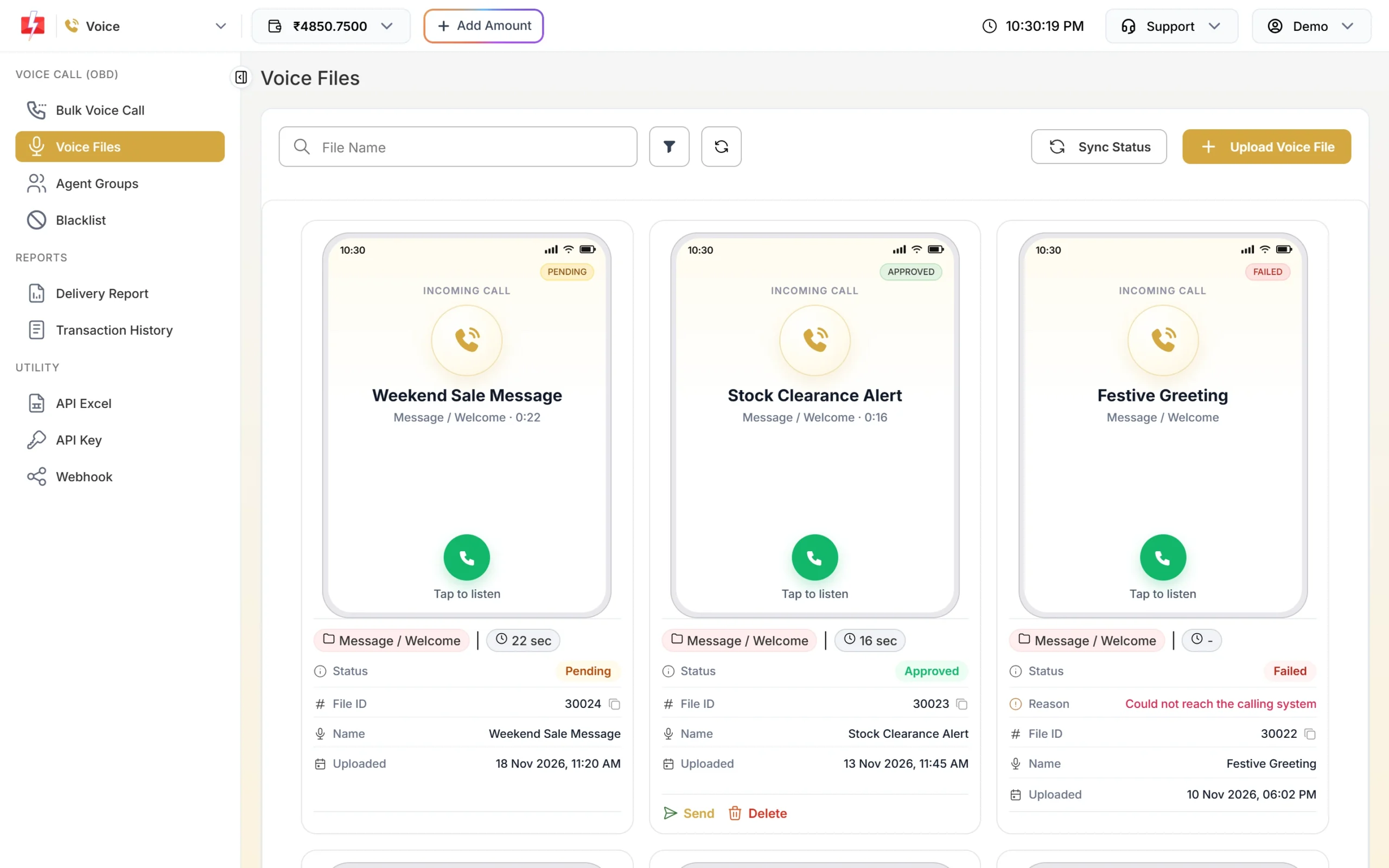
Only approved voice files can be used in calls.
Send the SMS reminders
Run a daily job that picks customers due in 3 days, or due today and unpaid, and sends them the right template. Different customers have different names and amounts, so send one DLT SMS per customer, or many at once with /dev/custom.
import os, requests

API = "https://www.fast2sms.com"
HEAD = {"authorization": os.environ["FAST2SMS_API_KEY"]}

def send_dlt(message_id, variables, mobile, ref):
    r = requests.post(f"{API}/dev/bulkV2", headers=HEAD, timeout=(5, 15), json={
        "route": "dlt",
        "sender_id": "DEMOFN",
        "message": message_id,
        "variables_values": "|".join(str(v).replace("|", " ")[:40] for v in variables),
        "numbers": mobile,
        "udf1": ref,                      # e.g. loan number + due date
    })
    data = r.json()
    return data["request_id"] if data.get("return") is True else None

# 3 days before
for c in db.customers_due_in(days=3):
    rid = send_dlt("10041", [c.name, c.emi, c.loan_no, c.due_text], c.mobile, f"{c.loan_no}-{c.due_iso}-d3")
db.save_reminder(c.id, "d3", rid) # never send the same reminder twice- Check
returnon every reply. A low balance can come back as HTTP 200 with"return": false. - Do not retry a send automatically after a timeout. The SMS may already be on its way.
- Each variable value is cut to 40 characters.
Follow up with a voice call
For customers still unpaid after the due date, send one voice campaign with all their numbers. A Simple call plays your recording. A Key Press call also records which key each person pressed.
curl -X POST "https://www.fast2sms.com/dev/voice/bulk" \
  -H "authorization: YOUR_API_KEY" \
  -H "Content-Type: application/json" \
  -d '{"numbers":"9999999999,8888888888","file_id":"YOUR_FILE_ID","dtmf_keys":"1,2","campaign_name":"Overdue 21 Nov"}'
A good reply looks like {"return":true,"request_id":"V...","message":["Voice campaign accepted. Calls start within a minute."],"numbers":2,"removed":0,"dnd":0,"amount_held":1}. Save the request ID.
- Calling hours: voice calls go out only between 10 AM and 9 PM IST. A campaign sent outside these hours is scheduled for the next allowed time, and the reply says so.
- Schedule: add
schedule_timeasYYYY-MM-DD HH:MM:SS(IST) to call later. - Charges: the cost is held from the wallet when the campaign is accepted. Only answered calls are charged; the rest is refunded after the campaign completes. DND numbers are not called and not charged.
- Limits: up to 1,00,000 numbers per request, and up to 20 voice requests per minute per account.
Act on key presses: send the payment link
Add a Voice webhook under Webhook in the panel. After the campaign is settled, Fast2SMS posts one request per number with fields such as request_id, mobile, status (answered, no_answer, busy, failed), duration, dtmf and amount_debited. When dtmf is 1, send the payment-link SMS; when it is 2, create a call-back task for your team.
from flask import Flask, request

app = Flask(__name__)

@app.post("/fast2sms/voice-webhook")
def voice_webhook():
    e = request.get_json(silent=True) or request.form.to_dict()
    mobile, status, key = e.get("mobile"), e.get("status"), str(e.get("dtmf") or "")
    c = db.customer_by_mobile(mobile)
    if c and status == "answered":
        if key == "1":
            send_dlt("10042", [c.name, c.amount_due, c.pay_link], mobile, f"{c.loan_no}-link")
        elif key == "2":
            db.create_callback_task(c.id)
    return "OK", 200
Match the webhook’s content type in the panel to what your code reads (JSON or form). You can also pull results with GET /dev/voice/report?request_id=V...&numbers=1, which returns each number’s status, 1,000 rows per page.
Check results
The Voice Report shows each campaign with Answered, No Answer, Busy, Failed, DND and Pending counts, pulses, the amount charged and refunded, and a Key column for key press calls.
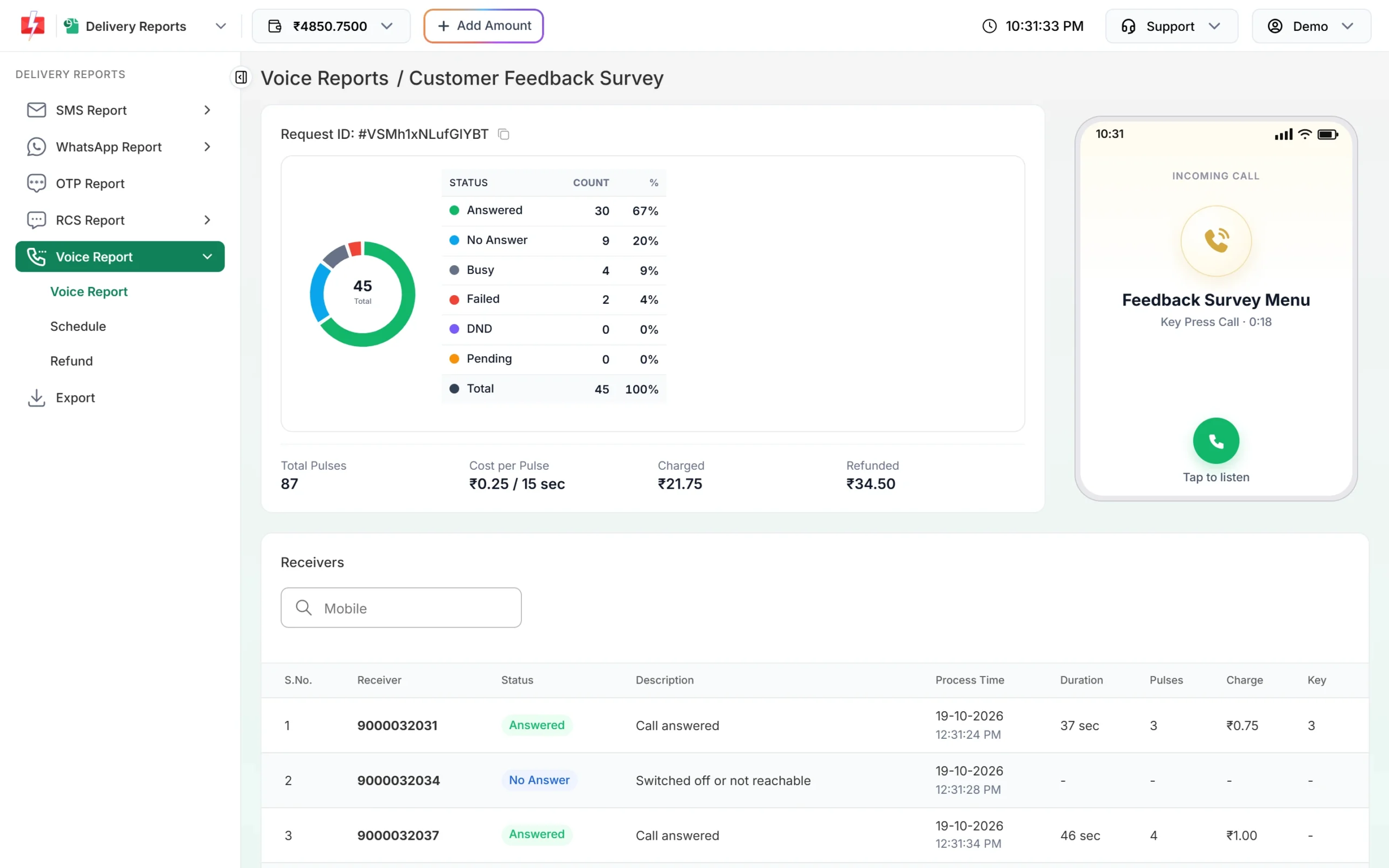
For SMS, use Delivery Report, an SMS webhook, or GET /dev/dlr/{request_id}. Pick webhook or DLR polling, not both, for the same messages.
Good practice for collection reminders
- Keep the tone factual: amount, due date, how to pay, a helpline. No threats.
- Stop reminders as soon as the payment is recorded. Run your job after your payment data is updated.
- Do not call the same customer many times a day. Space voice follow-ups over days.
- Use the voice Blacklist for customers who asked not to be called.
- Follow the rules your regulator sets for your business on recovery communication.
Common problems and fixes
- Voice error about the file: the voice file is not approved yet, or was removed by the operator. Check Voice Files.
- “Too many requests. Try again in N seconds.”: you sent more than 20 voice requests in a minute. Put all numbers for a campaign in one request.
- Campaign did not start at night: calls are only made 10 AM to 9 PM; it was scheduled for the morning.
- SMS error 424: use the Message ID linked to your sender, not the 19-digit Template ID.
- Customer got a reminder after paying: your job ran before the payment was recorded. Run it later, or check paid status just before sending.
Frequently asked questions
Are EMI reminder SMS transactional?
Reminders to existing customers about their own dues are service messages. Register them as Service Implicit and keep offers out of them.
Is DLT needed for voice calls?
Voice calls follow their own TRAI rules and number series. See the TRAI voice call rules guide linked below.
Am I charged for unanswered calls?
No. The amount is held first, only answered calls are charged, and the rest is refunded after the campaign completes.
Can I put the payment link in the SMS?
Yes, if your DLT template allows a link in that place and the link is whitelisted as your DLT portal requires.
Can I send reminders on WhatsApp as well?
Yes, with an approved WhatsApp utility template and the WhatsApp API.
What times are voice calls allowed?
Between 10 AM and 9 PM IST. Requests outside that window are scheduled for the next allowed time.