
The Fast2SMS Quick SMS API (route=q) sends your own free text to Indian mobile numbers without DLT registration. The SMS goes from a random sender ID at your account’s Quick SMS rate. This guide explains how to switch the route on, the parameters, code in cURL, PHP, Python, Node.js, Java, C# and Go, why some requests reply “After approval, SMS will be sent.”, and the errors 428, 998 and 999 that block new accounts.
When to use Quick SMS
Quick SMS is for business messages when you do not have DLT approval yet, or for a message that has no approved template. The panel lists what to expect: an open template (no DLT approval), DND and non-DND numbers, 24×7 sending and instant delivery reports. Personal or spam messages are not allowed, and messages may be reviewed before they go out.
If you send the same kind of message often (OTPs, order updates, reminders), the DLT SMS route is the better long-term choice: your own sender ID and your approved text, with no manual review. Compare rates on the pricing page.
Before you start
- One recharge of ₹100 or more in total. Until your total recharges reach ₹100, the API replies with error 999. This rule applies only to Quick SMS. DLT routes do not have it.
- API Access on in API Key.
- Quick API Access on in API Key. It is a separate switch.
- Wallet balance for the SMS you send.
Switch on Quick API Access
-
Open API Key
Go to Account Setting, then API Key under UTILITY. You see the API Access switch and below it the Quick API Access switch. The Quick API Access line shows your per-SMS rate for Quick SMS.
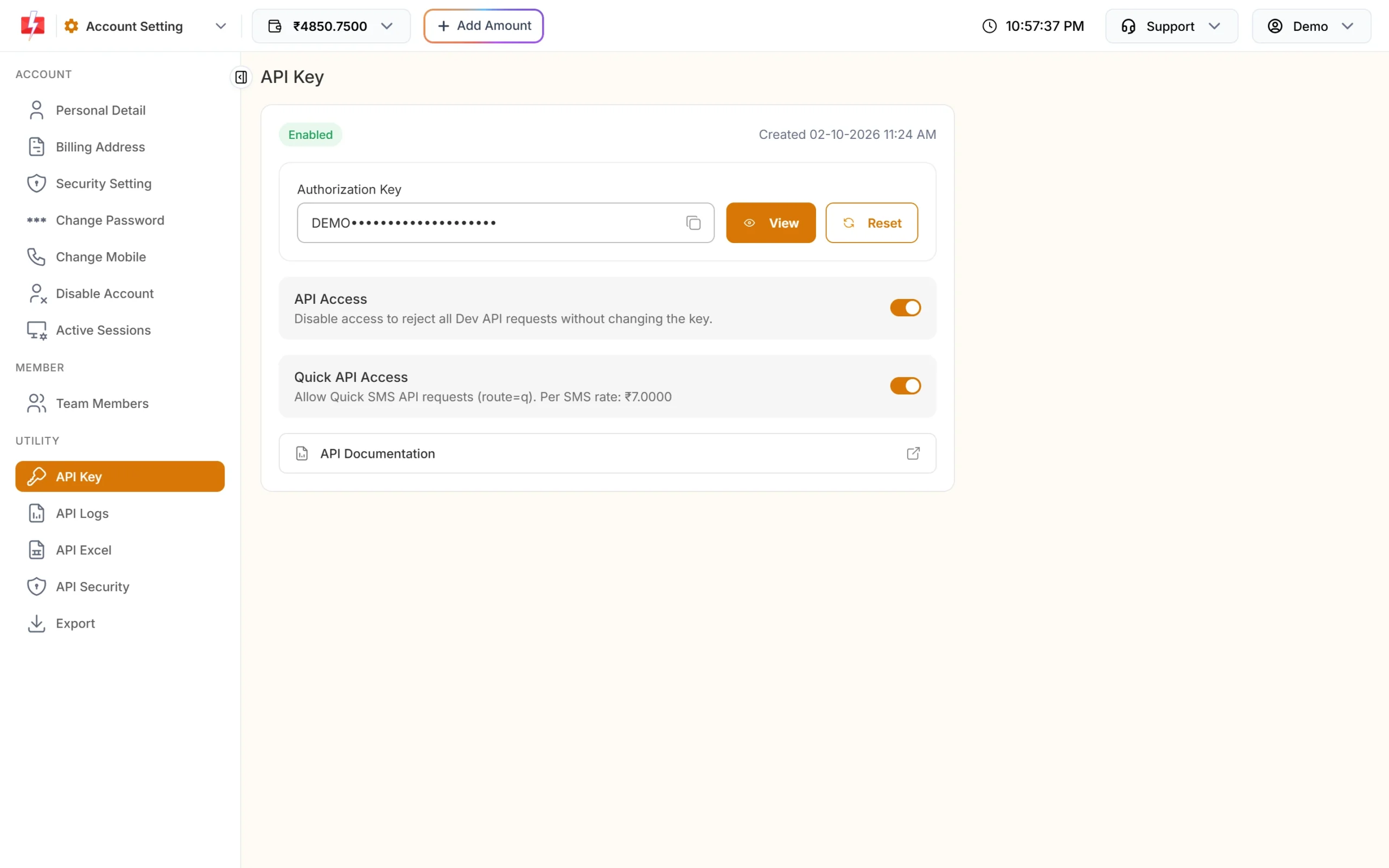
Quick API Access must be on for route=q. -
Turn on API Access first
If API Access is off, turn it on first. Quick API Access cannot be turned on while API Access is off. Turning API Access off later also turns Quick API Access off.
-
Turn on Quick API Access
Click the Quick API Access switch and enter the OTP sent to your account mobile. Without this, every
route=qcall fails with status_code 428 “Quick API Access is disabled.” -
Copy your API key
Click View, enter the OTP and copy the key. Keep it on your server only.
Endpoint and parameters
| URL | https://www.fast2sms.com/dev/bulkV2 |
| Method | POST (JSON or form) or GET |
| Header | authorization: YOUR_API_KEY |
| Parameter | Required | Rules |
|---|---|---|
route |
Yes | q |
message |
Yes | Your SMS text. English or Unicode (Hindi and others), detected automatically. Text longer than 10 SMS parts is cut. |
numbers |
Yes | 10-digit Indian mobile numbers, separated by commas. |
schedule_time |
No | A future time as DD-MM-YYYY-HH-MM (IST) or a Unix timestamp. |
sms_details |
No | 1 adds character count, parts, rate and numbers to the reply. |
udf1, udf2, udf3 |
No | Your own reference text. |
There is no sender_id on this route. The sender is random and shows as RANDOM in your reports.
Code examples
cURL (POST JSON)
curl -X POST "https://www.fast2sms.com/dev/bulkV2" \
  -H "authorization: YOUR_API_KEY" \
  -H "Content-Type: application/json" \
  -d '{"route":"q","message":"Demo Traders: your repair item is ready for pickup.","numbers":"9999999999"}'
cURL (GET)
curl -G "https://www.fast2sms.com/dev/bulkV2" \
  -H "authorization: YOUR_API_KEY" \
  --data-urlencode "route=q" \
  --data-urlencode "message=Demo Traders: your repair item is ready for pickup." \
  --data-urlencode "numbers=9999999999"
PHP
<?php
$ch = curl_init('https://www.fast2sms.com/dev/bulkV2');
curl_setopt_array($ch, [
    CURLOPT_POST           => true,
    CURLOPT_RETURNTRANSFER => true,
    CURLOPT_TIMEOUT        => 20,
    CURLOPT_HTTPHEADER     => ['authorization: YOUR_API_KEY', 'Content-Type: application/json'],
    CURLOPT_POSTFIELDS     => json_encode([
        'route'   => 'q',
        'message' => 'Demo Traders: your repair item is ready for pickup.',
        'numbers' => '9999999999',
    ]),
]);
$res = json_decode(curl_exec($ch), true);
curl_close($ch);

if (!empty($res['return'])) {
    echo $res['request_id'] . ' ' . implode(' ', $res['message']);
} else {
    echo 'Failed: ' . ($res['status_code'] ?? '') . ' ' . json_encode($res['message'] ?? '');
}
Python
import requests

r = requests.post(
    "https://www.fast2sms.com/dev/bulkV2",
    headers={"authorization": "YOUR_API_KEY"},
    json={"route": "q",
          "message": "Demo Traders: your repair item is ready for pickup.",
          "numbers": "9999999999"},
    timeout=20,
)
data = r.json()
if data.get("return"):
    print(data["request_id"], data["message"])
else:
    print("Failed:", data)
Node.js
const res = await fetch("https://www.fast2sms.com/dev/bulkV2", {
  method: "POST",
  headers: { authorization: "YOUR_API_KEY", "Content-Type": "application/json" },
  body: JSON.stringify({
    route: "q",
    message: "Demo Traders: your repair item is ready for pickup.",
    numbers: "9999999999",
  }),
});
const data = await res.json();
console.log(data.return ? `${data.request_id} ${data.message}` : data);
Java
import java.net.URI;
import java.net.http.HttpClient;
import java.net.http.HttpRequest;
import java.net.http.HttpResponse;

public class QuickSms {
    public static void main(String[] args) throws Exception {
        String json = "{\"route\":\"q\",\"message\":\"Demo Traders: your repair item is ready for pickup.\","
                    + "\"numbers\":\"9999999999\"}";
        HttpRequest request = HttpRequest.newBuilder()
                .uri(URI.create("https://www.fast2sms.com/dev/bulkV2"))
                .header("authorization", "YOUR_API_KEY")
                .header("Content-Type", "application/json")
                .POST(HttpRequest.BodyPublishers.ofString(json))
                .build();
        HttpResponse<String> response = HttpClient.newHttpClient()
                .send(request, HttpResponse.BodyHandlers.ofString());
        System.out.println(response.body());
    }
}
C# (.NET)
using System;
using System.Net.Http;
using System.Net.Http.Json;

var client = new HttpClient();
var request = new HttpRequestMessage(HttpMethod.Post, "https://www.fast2sms.com/dev/bulkV2");
request.Headers.TryAddWithoutValidation("authorization", "YOUR_API_KEY");
request.Content = JsonContent.Create(new {
    route = "q",
    message = "Demo Traders: your repair item is ready for pickup.",
    numbers = "9999999999"
});
var response = await client.SendAsync(request);
Console.WriteLine(await response.Content.ReadAsStringAsync());
Go
package main

import (
	"bytes"
	"encoding/json"
	"fmt"
	"io"
	"net/http"
)

func main() {
	payload, _ := json.Marshal(map[string]string{
		"route":   "q",
		"message": "Demo Traders: your repair item is ready for pickup.",
		"numbers": "9999999999",
	})
	req, _ := http.NewRequest("POST", "https://www.fast2sms.com/dev/bulkV2", bytes.NewReader(payload))
	req.Header.Set("authorization", "YOUR_API_KEY")
	req.Header.Set("Content-Type", "application/json")

	resp, err := http.DefaultClient.Do(req)
	if err != nil {
		panic(err)
	}
	defer resp.Body.Close()
	body, _ := io.ReadAll(resp.Body)
	fmt.Println(string(body))
}Replies you can get
| message | What it means |
|---|---|
["SMS sent successfully."] |
Accepted and queued for sending. |
["SMS scheduled successfully."] |
Accepted for the schedule_time you gave. |
["After approval, SMS will be sent."] |
Held for a manual check. It goes out after it is approved. |
All three come with "return": true and a request_id starting with S.
Why “After approval, SMS will be sent.”
Quick SMS has open text, so Fast2SMS checks some messages by hand before sending:
- A request with 10 or more valid numbers is held for approval.
- Fast2SMS can set an account, or all Quick SMS, for review. Then every Quick SMS waits for approval, whatever the number count.
- Personal or spam content is rejected at review.
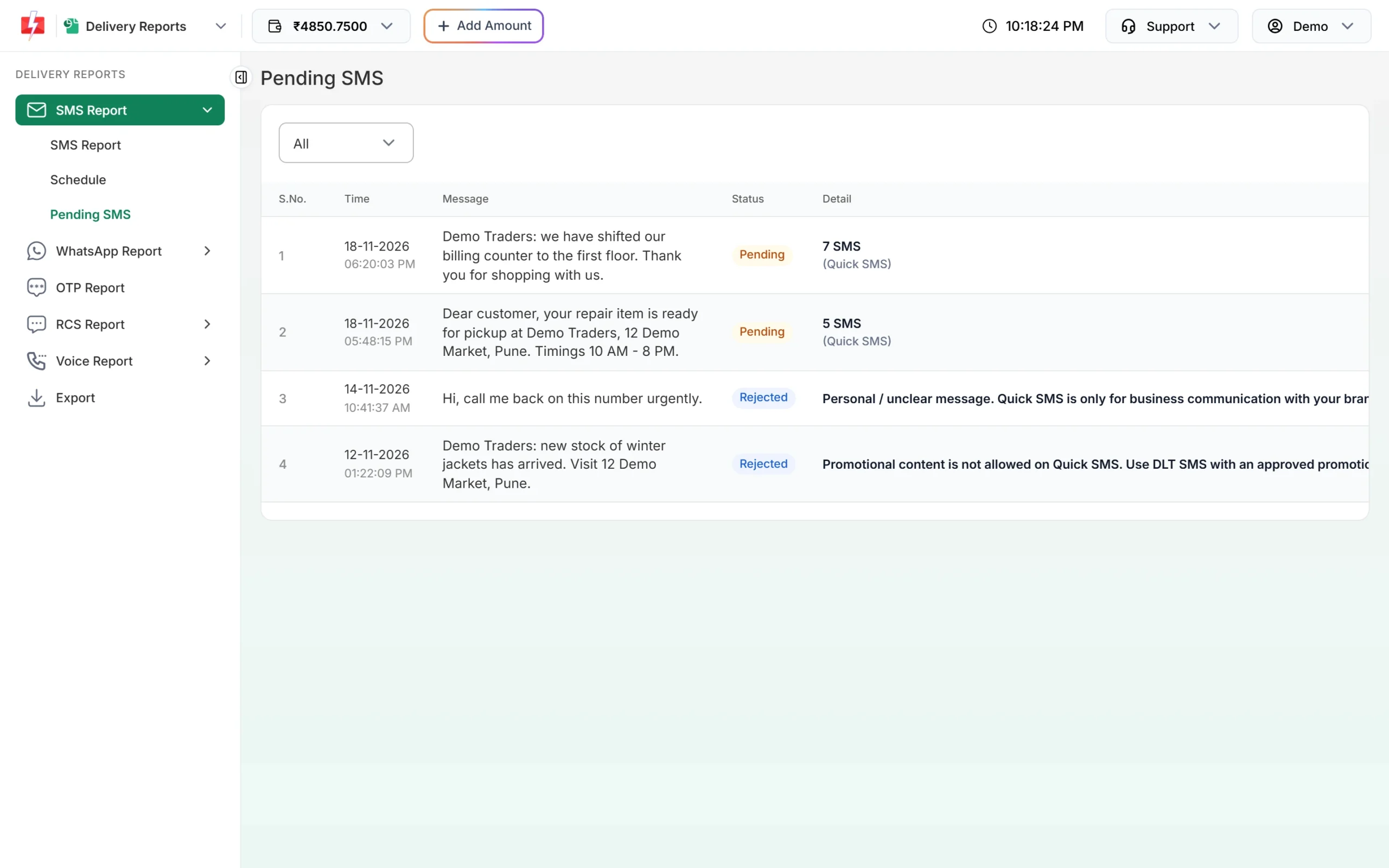
You can follow held messages in Delivery Report > SMS Report > Pending SMS. Rejected ones show the reason in the Detail column.
Errors and fixes
| status_code | message | Fix |
|---|---|---|
| 428 (HTTP 401) | Quick API Access is disabled. | Turn on Quick API Access in API Key (API Access first). |
| 999 | You need to complete one transaction of 100 INR or more before using API route. | Recharge ₹100 or more once. Then try again. |
| 998 | Route is blocked in your account, use DLT SMS route. | Your account is set to DLT only. Use the DLT SMS route. |
| 412 / 413 / 414 (HTTP 401) | Key wrong, API Access off, or IP not whitelisted | Check the key, the API Access switch and API Security. |
| 411 | Invalid Numbers | Every number was invalid. Send 10-digit Indian mobiles. |
| 416 | You don’t have sufficient wallet balance | Add money. Check return, as this can come with HTTP 200. |
| 427 | Number blocked in Fast2SMS DND list | All the numbers are on the Fast2SMS block list. Remove them. |
| 424 (HTTP 401) | Invalid Schedule Date & Time… | Use a future time in the right format. |
| 429 | Invalid characters in … not valid UTF-8 | Send UTF-8 and URL-encode GET values. |
Charges
Each SMS part to each valid number is charged at your Quick SMS rate, shown on the API Key page next to Quick API Access. English text is 1 part up to 160 characters and 2 parts up to 306. Unicode text is 1 part up to 70 characters and 2 parts up to 133. Invalid numbers are not charged.
Frequently asked questions
Do I need DLT registration for the Quick SMS API?
No. Quick SMS uses an open template and a random sender, so you do not need your own entity, sender ID or template.
Can I choose my own sender ID on Quick SMS?
No. The sender is random. For your own sender ID, use the DLT SMS route.
Why does every request say “After approval, SMS will be sent.”?
Requests with 10 or more numbers are held for review, and some accounts have all Quick SMS reviewed. Check Pending SMS for the status.
I recharged but still get error 999. Why?
The rule counts your total recharges. Make sure the total is ₹100 or more and the payment was completed.
Can I send OTP with Quick SMS?
For OTPs, use Smart OTP or your own DLT OTP template. Quick SMS may be held for review, which is too slow for a login code.
Can I send different messages to different numbers in one call?
Yes, with POST /dev/custom and route=q, one item per message.
Can Quick SMS go to DND numbers?
The Quick SMS page says it is for DND and non-DND numbers. Numbers on the Fast2SMS block list are not sent.