
Schools and coaching institutes can send absent alerts to parents automatically from their attendance software with the Fast2SMS API. Once a teacher marks attendance, your system sends each absent student’s parent an SMS with the child’s name and the date, from your school’s own sender ID. This guide covers the DLT template, the API call that sends a different message to each parent in one request, siblings, Hindi messages and delivery checks.
The template
Register an attendance template on your DLT portal as transactional / Service Implicit. Examples:
- Dear Parent, your ward {#var#} of class {#var#} is absent today, {#var#}. Please contact the class teacher. – Demo Public School
- Dear Parent, {#var#} reached school late today at {#var#}. – Demo Public School
- प्रिय अभिभावक, आपका बच्चा {#var#} आज {#var#} को स्कूल में अनुपस्थित है। – Demo Public School
Register your own wording. Hindi templates are counted as Unicode: 70 characters per SMS part instead of 160, so keep them short.
Before you start
- DLT: approved entity, sender ID (for example a short school name) and the attendance template.
- DLT Manager: the same added in Fast2SMS, showing Approved and linked to the sender. Note the Message ID.
- API key with API Access on, saved on the server that runs your attendance software.
- Wallet balance for the daily absent count.
- Parent mobile numbers stored in 10-digit format with each student.
Set up
-
Copy the Message ID and Sender ID
Open DLT Manager, Content Template, and copy the Message ID and Sender ID from the attendance template’s card.
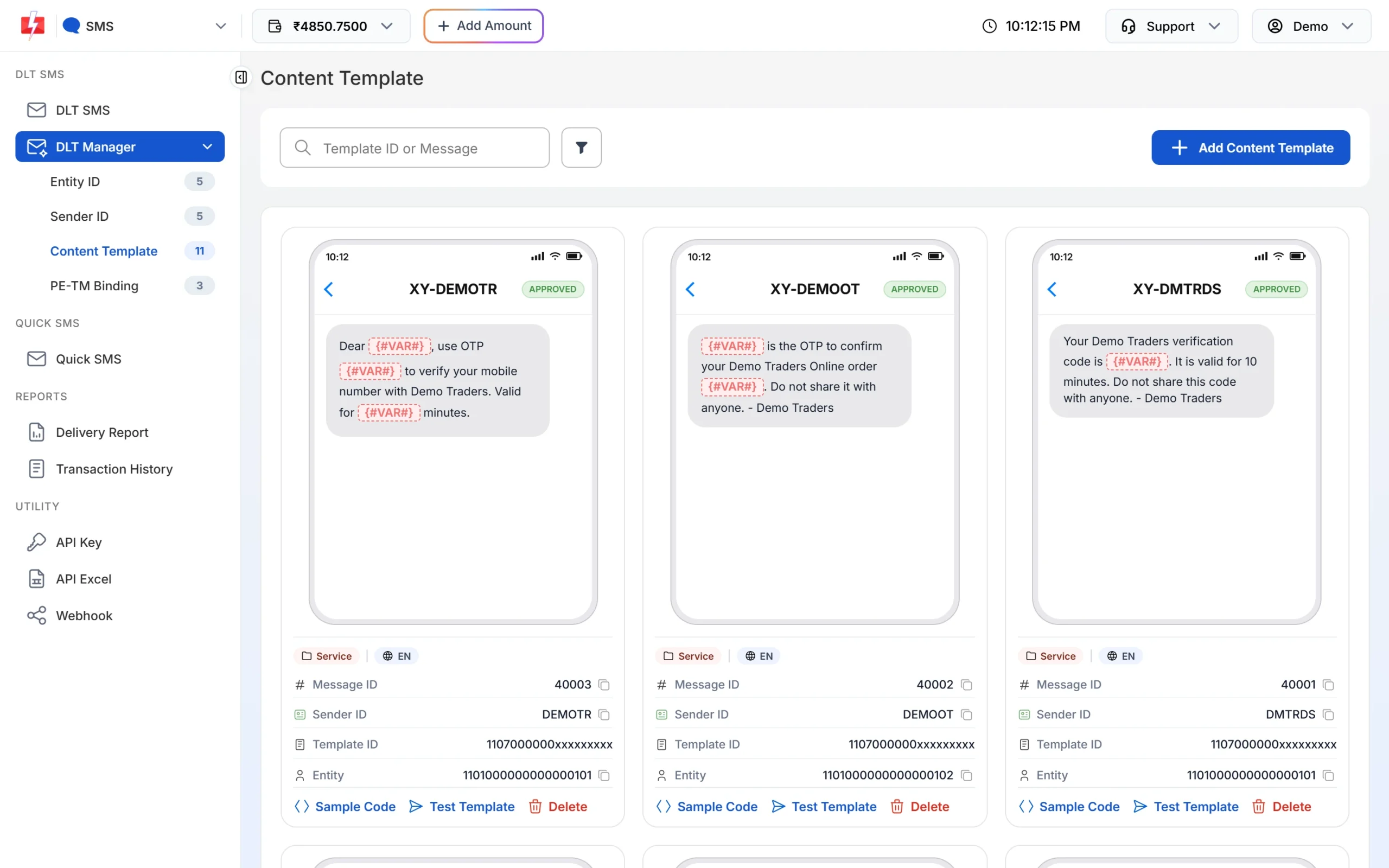
The API uses the Message ID, not the 19-digit Template ID. -
Check your API calls in API Logs
After your first test, open API Logs under Account Setting. Each call shows the endpoint, HTTP code, response and your server IP for 7 days.
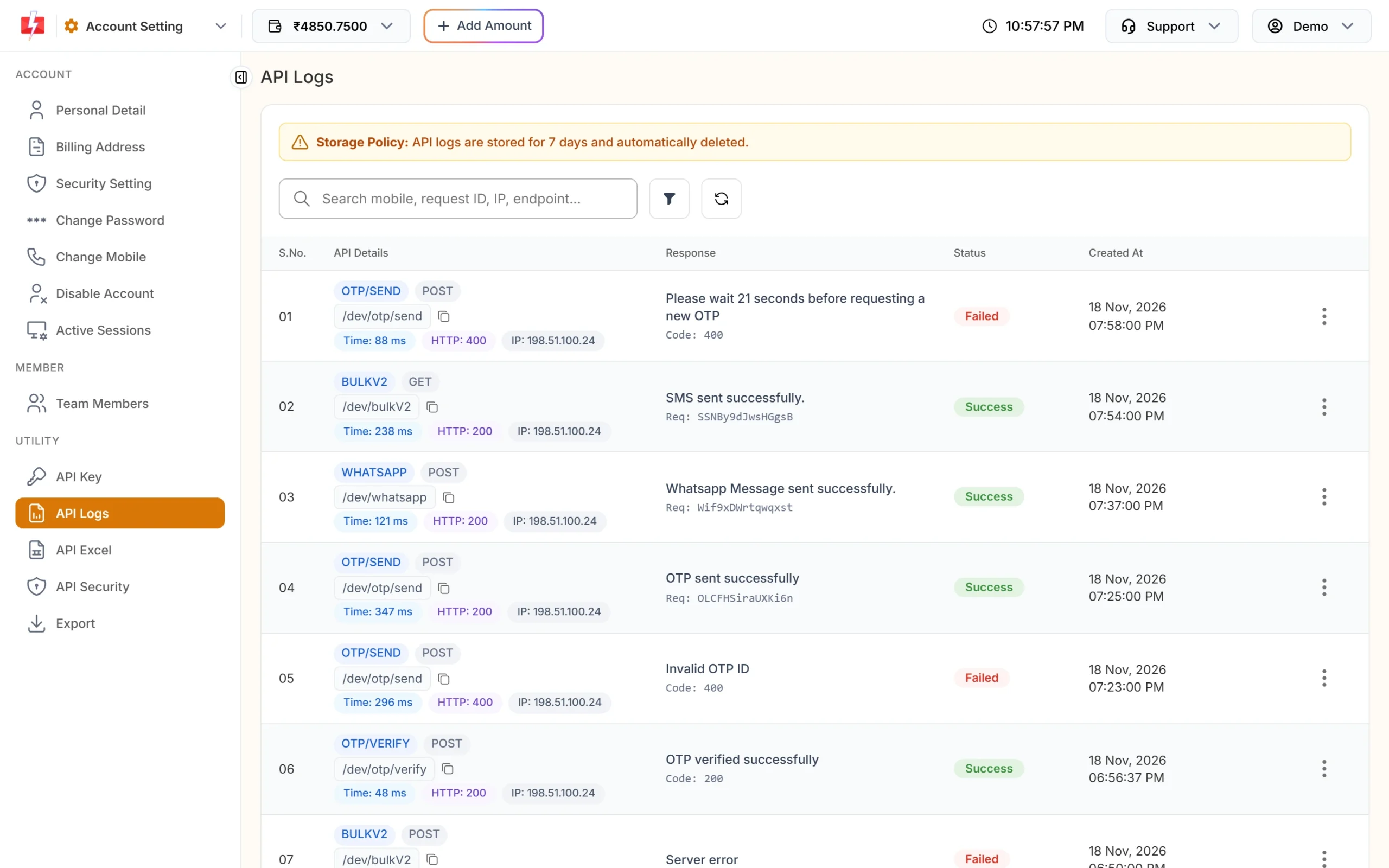
API Logs help you check what your software sent.
Send a different SMS to each parent in one call
Each parent gets a different name, so use POST /dev/custom with route=dlt. Every item in requests has its own variables and number. All items use the same sender and Message ID.
curl -X POST "https://www.fast2sms.com/dev/custom" \
  -H "authorization: YOUR_API_KEY" \
  -H "Content-Type: application/json" \
  -d '{"route":"dlt","requests":[
        {"sender_id":"DEMOSC","message":"10031","variables_values":"Aarav|5-B|18-11-2026","numbers":"9999999999"},
        {"sender_id":"DEMOSC","message":"10031","variables_values":"Diya|7-A|18-11-2026","numbers":"8888888888"}]}'
A good reply is {"return":true,"request_id":"S...","message":["SMS sent successfully."]}, with one request ID for the whole batch.
Here is the same in PHP, reading today’s absentees from your database:
<?php
// $absent = [['name' => 'Aarav', 'class' => '5-B', 'parent_mobile' => '9999999999'], ...]
function sendAbsentAlerts(array $absent, string $date): array
{
    // Siblings share a parent number: one SMS per number, names joined
    $byMobile = [];
    foreach ($absent as $s) {
        $m = substr(preg_replace('/\D/', '', $s['parent_mobile']), -10);
        if (!preg_match('/^[6-9]\d{9}$/', $m)) {
            continue;                                   // log bad numbers for the office
        }
        $byMobile[$m]['names'][]   = $s['name'];
        $byMobile[$m]['classes'][] = $s['class'];
    }

    $requests = [];
    foreach ($byMobile as $mobile => $p) {
        $vars = [
            mb_substr(implode(' & ', $p['names']), 0, 40),
            mb_substr(implode(', ', array_unique($p['classes'])), 0, 40),
            $date,
        ];
        $requests[] = [
            'sender_id'        => 'DEMOSC',
            'message'          => '10031',
            'variables_values' => implode('|', $vars),
            'numbers'          => (string) $mobile,
        ];
    }

    $results = [];
    foreach (array_chunk($requests, 200) as $batch) {   // keep batches moderate
        $ch = curl_init('https://www.fast2sms.com/dev/custom');
        curl_setopt_array($ch, [
            CURLOPT_POST           => true,
            CURLOPT_RETURNTRANSFER => true,
            CURLOPT_TIMEOUT        => 30,
            CURLOPT_HTTPHEADER     => ['authorization: ' . getenv('FAST2SMS_API_KEY'), 'Content-Type: application/json'],
            CURLOPT_POSTFIELDS     => json_encode(['route' => 'dlt', 'requests' => $batch, 'udf1' => 'absent-' . $date]),
        ]);
        $results[] = json_decode((string) curl_exec($ch), true);
        curl_close($ch);
    }
    return $results;   // save each request_id with the date
}
Things to know about /dev/custom
- Duplicate numbers: the same number in two items is refused with “Duplicate numbers are not allowed in requests.” That is why the code above merges siblings into one SMS per parent.
- Error format: validation errors come back as
{"status":"error","message":[...]}, not withreturn. Check both. - Same template for all: only the first item’s sender and Message ID are checked before sending. Keep every item on the same approved template to avoid surprises.
- No scheduling on
/dev/custom. Run your job at the time you want the SMS to go. - Batches: no fixed maximum per request is published. Batches of a few hundred keep a network problem from affecting the whole list.
- Same text for everyone (holiday notice, PTM date)? Use one
/dev/bulkV2call with all numbers comma-separated instead.
When to send
- Run the job once attendance is locked for the day, for example 30 to 60 minutes after the first period, so late arrivals are not marked absent.
- Transactional (Service Implicit) templates are delivered at any hour. Promotional templates sent late at night wait until the next morning, so keep attendance alerts on a Service Implicit template.
- Do not send the job twice. Store the date and request ID after a successful send and skip if it already exists. Do not retry automatically after a timeout without checking API Logs first.
Check delivery
Open Delivery Report and click the batch to see Delivery Details: the request ID, a status count (Delivered, Failed, Sent, Pending) and every receiver with its status.
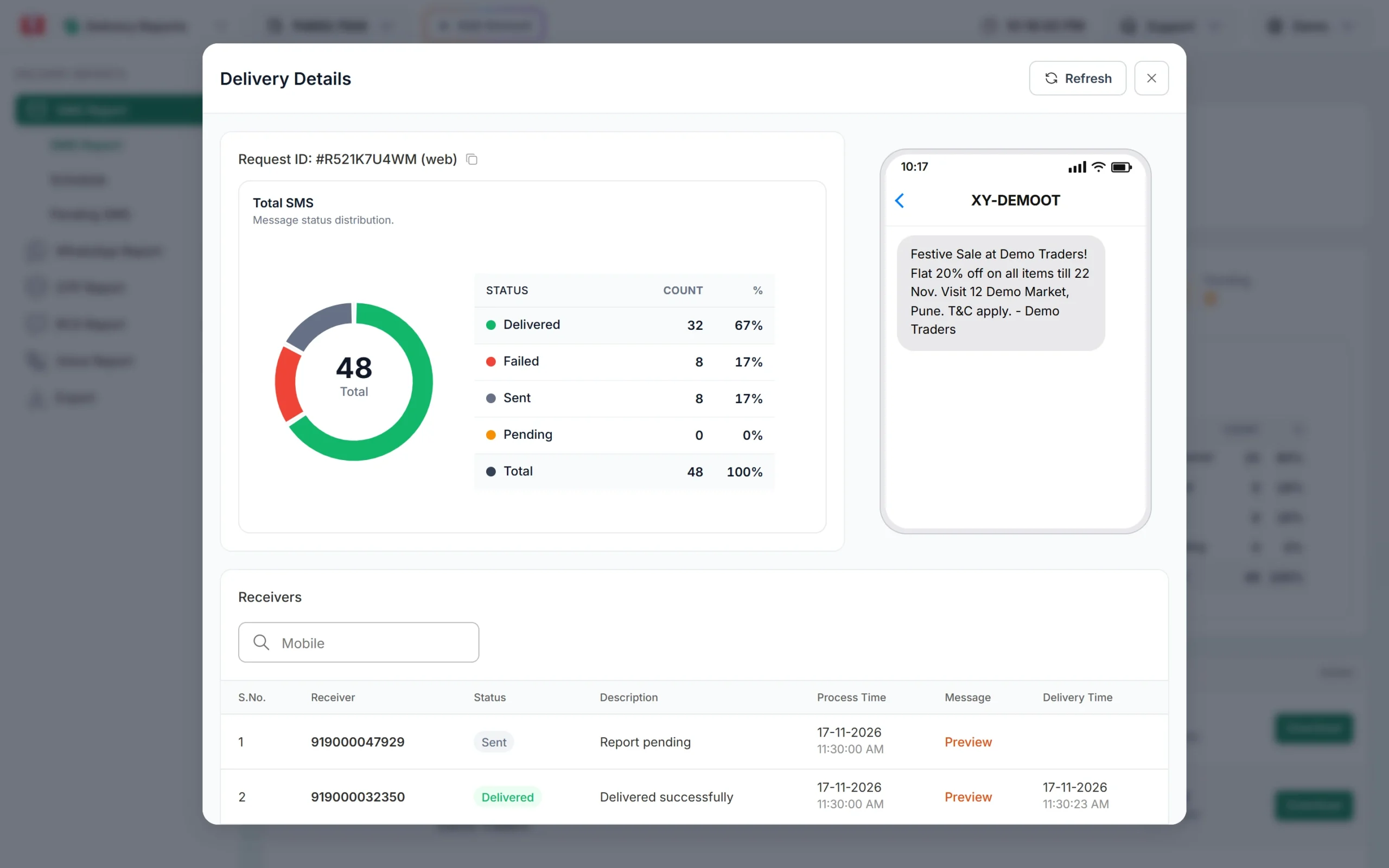
For automatic updates in your software, add an SMS webhook under Webhook, SMS. It posts the mobile, status (delivered or failed) and your udf1 tag for API sends. Parents whose SMS failed (for example a switched-off or wrong number) can then get a call from the office.
Common problems and fixes
- “Duplicate numbers are not allowed in requests.”: two students share a parent number. Merge them as shown above.
- “Sender ID is not valid.” / “Message is not valid.”: the first item’s sender or Message ID is not approved or not linked. Copy both from the same card in DLT Manager.
- Error 416: wallet balance is too low for the batch. Recharge.
- Some parents never get SMS: wrong number format in your records, or the number is not a valid Indian mobile. Clean the data once.
- Hindi SMS cost more than expected: Unicode parts hold 70 characters. Shorten the template or use English.
Frequently asked questions
Is DLT registration needed for school SMS?
Yes. Schools sending SMS from their own sender ID in India need DLT registration for the entity, sender ID and templates.
Are attendance alerts transactional?
They are service messages to existing parents. Register them as Service Implicit, without any promotional lines.
Can I include the student’s name and class?
Yes, as template variables. Each variable value can be up to 40 characters.
Can I send the alert on WhatsApp too?
Yes, with an approved WhatsApp utility template and the WhatsApp API, for parents who use WhatsApp.
Can I send a voice call to parents who cannot read SMS?
Yes. Fast2SMS voice calls can play a recorded message to a list of numbers.
What does each SMS cost?
Your plan rate times the SMS parts. See the bulk SMS pricing page for current rates.