
Bulk SMS for schools is still the surest way to reach every parent: it lands on basic phones, needs no app and arrives within seconds. This guide shows what a school should send on SMS, what works better on WhatsApp or a voice call, gives sample DLT and WhatsApp templates you can adapt, and walks you through setting it all up in Fast2SMS. It is written for school owners, principals and the office staff who send the daily notices.
What a school sends, and the best channel for each
Most school messages are updates for parents of current students. Under TRAI rules these are service messages, so they can go to every parent, at any hour, including numbers on DND. Only messages that try to sell something, like admission campaigns to new families, count as promotional.
| Message | Best channel | Why |
|---|---|---|
| Student absent today | SMS (Service Implicit) | Reaches every parent within minutes, including basic phones, and goes to DND numbers. |
| Fee due reminder | SMS, plus WhatsApp utility with a pay link | SMS for reach. WhatsApp adds a “Pay fees” button so parents can pay from the message. |
| Fee received / receipt | SMS (Transactional) or WhatsApp utility with PDF | Sent right after the parent pays. WhatsApp can carry the receipt as a PDF. |
| School closed (rain, election, emergency) | SMS first, then a voice call | SMS is fast. A recorded call in the local language reaches parents who do not read texts. |
| Parent-teacher meeting | WhatsApp utility with reply buttons, or a Key Press voice call | Parents confirm with one tap or one key press, and you see who is coming. |
| Report card, timetable, circular | WhatsApp utility with a document header | The PDF opens inside the chat. No printing, no lost papers. |
| Bus running late | SMS (Service Implicit) | Short, urgent, and parents may be on the road without data. |
| Parent app or portal login | Smart OTP (SMS with WhatsApp fallback) | Codes go on a priority route, and a failed SMS can be re-sent on WhatsApp. |
| Admissions open (new families) | WhatsApp marketing, promotional SMS or RCS | Promotional rules apply: consent, DND and sending hours. |
Sample DLT SMS templates for schools
Every business SMS in India must match a content template registered on a DLT portal. The samples below are examples to adapt and register on your DLT portal under your own school name. If you are new to the categories, read how DLT template categories changed first.
| Use | DLT category | Sample template (example) |
|---|---|---|
| Absent alert | Service Implicit | Dear Parent, {#var#} of class {#var#} is absent today, {#var#}. Please inform the class teacher if this is not correct. – Demo Public School |
| Fee due | Service Implicit | Dear Parent, fee of Rs.{#numeric#} for {#var#} for the period {#var#} is due on {#var#}. Pay online: {#url#} Please ignore if already paid. – Demo Public School |
| Fee received | Transactional | Received Rs.{#numeric#} towards the fees of {#var#} on {#var#}. Receipt no. {#alphanumeric#}. Thank you. – Demo Public School |
| Holiday or closure | Service Implicit | Dear Parent, the school will remain closed on {#var#} due to {#var#}. Classes resume on {#var#}. – Demo Public School |
| Holiday (Hindi) | Service Implicit | प्रिय अभिभावक, विद्यालय {#var#} को {#var#} के कारण बंद रहेगा। – Demo Public School |
| PTM notice | Service Implicit | Dear Parent, the Parent-Teacher Meeting for class {#var#} is on {#var#} from {#var#}. Please attend. – Demo Public School |
| Report card ready | Service Implicit | Dear Parent, the {#var#} report card of {#var#} is ready. View it here: {#url#} – Demo Public School |
| Parent app OTP | Transactional | {#numeric#} is your OTP to log in to the Demo Public School parent app. Do not share it with anyone. – Demo Public School |
| Admissions open | Promotional | Admissions are open at Demo Public School for the session {#var#}. Visit the campus or apply online at {#url#} – Demo Public School |
Keep fee, attendance and result messages free of offers. If you add a line such as “admissions open for siblings” to a fee reminder, the whole message is treated as promotional and can be rejected or held at night. Send the offer separately. For more wording ideas, see the sample SMS templates library.
WhatsApp templates for schools: utility vs marketing
On WhatsApp, a message you start must use a template approved by Meta. Meta has three categories. Utility is for updates about something the parent already has with you, like fees, attendance or a report card. Marketing is for anything that promotes. Authentication is only for one-time codes.
| Template name | Category | Body (example) | Extras |
|---|---|---|---|
| fee_due_reminder | Utility | Dear Parent, the fee of Rs. {{1}} for {{2}} for {{3}} is due on {{4}}. Tap below to pay online. | Visit website button “Pay fees” |
| report_card_ready | Utility | Dear Parent, the {{1}} report card of {{2}} is attached. Please contact the class teacher for any questions. | Document header (PDF) |
| ptm_invite | Utility | Dear Parent, the Parent-Teacher Meeting for class {{1}} is on {{2}} at {{3}}. Please confirm below. | Quick reply buttons “I will attend” and “Need another time” |
| admission_open | Marketing | Admissions for {{1}} are open at Demo Public School. Book a campus visit to meet our teachers and see the labs. | Image header, “Book a visit” button and a “Stop promotions” quick reply |
Fast2SMS offers English, Hindi and Gujarati when you create a template. Utility messages usually cost less than marketing ones, so keep notices free of promotional lines.
Voice calls for schools: what works and what to avoid
A recorded call helps when many parents do not read SMS, or when you want to speak in the local language. Fast2SMS has three call types: Simple (plays one recording), Key Press (DTMF) (the parent presses a key and you see it in the report) and Call Patch (the parent presses a key and is connected to your staff).
Good uses for a school:
- Sudden closure: “Namaste, this is Demo Public School. Because of heavy rain, the school will remain closed tomorrow. Classes resume on Monday. Thank you.”
- PTM confirmation with Key Press: “This is Demo Public School. The Parent-Teacher Meeting is on Saturday at 10 AM. Press 1 if you will attend. Press 2 if you need another time.”
OTP for parent apps and portals
If your school has a parent app, a fee portal or an online admission form, use Smart OTP for login and payment codes. It sends the OTP by SMS (using your own approved DLT OTP template) or by WhatsApp (using an authentication template), on a priority route. If the first message fails, a fallback on the other channel can be sent automatically with the same code. Your developer calls one API to send the code and another to verify it, and you can set the allowed wrong tries and the resend wait in OTP Settings. The Smart OTP setup guide has the full steps.
How to get started on Fast2SMS (step by step)
-
Create your account and open the apps
Sign up at fast2sms.com and log in. The home screen shows the apps: SMS, WhatsApp, Smart OTP, RCS and Voice, plus Address Book and Delivery Reports. Add money to the wallet with Add Amount at the top.
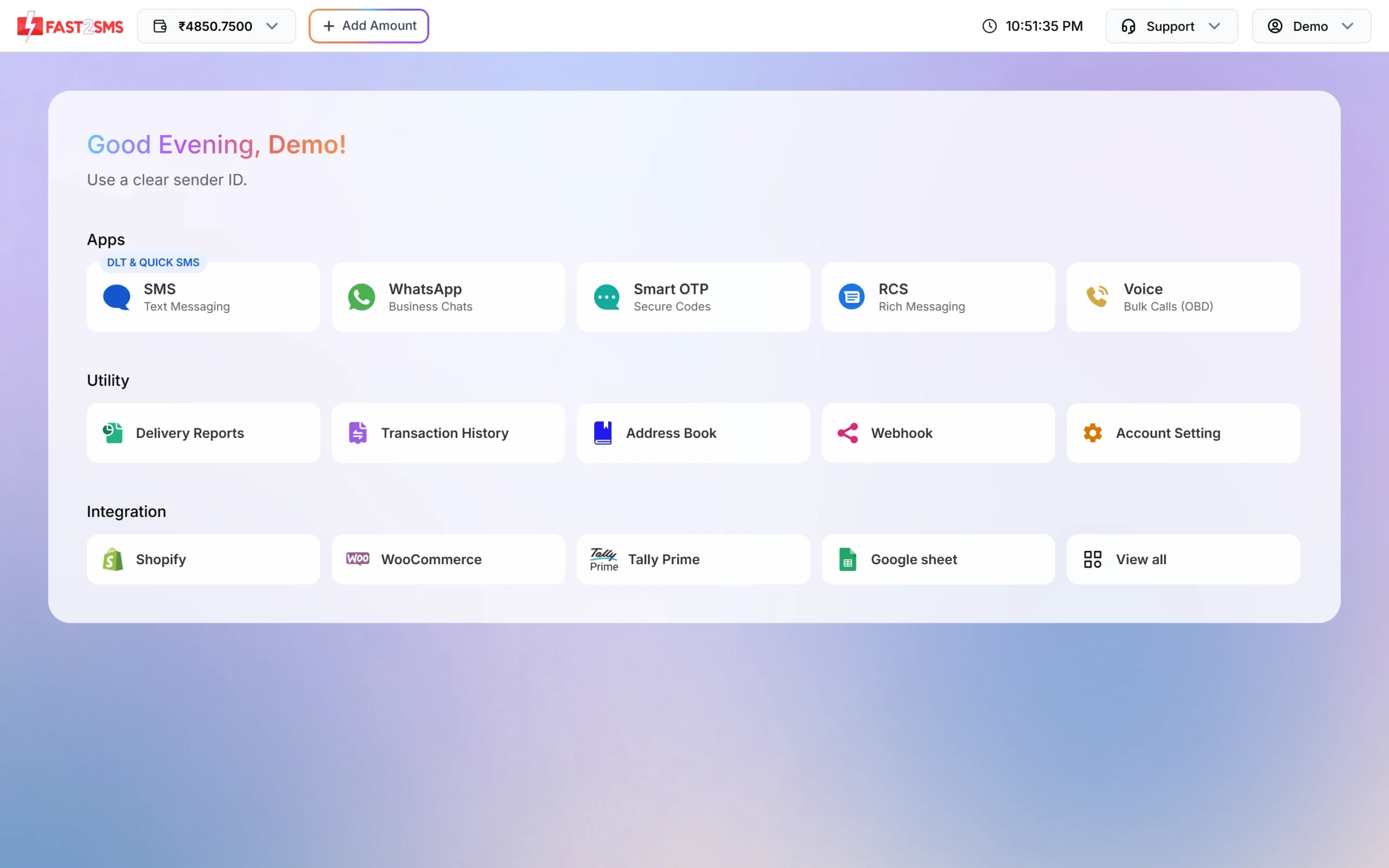
All channels open from the same home screen. -
Register on DLT and add your approved templates
Register your school as an entity on any DLT portal, get your sender ID (header) and templates approved there, and complete the PE-TM binding with Fast2SMS. Then open SMS > DLT Manager and add your Entity ID, Sender ID and each template with Add Content Template. Choose Service Implicit for attendance, fee and notice templates, and Service Explicit or Promotional for admission campaigns.
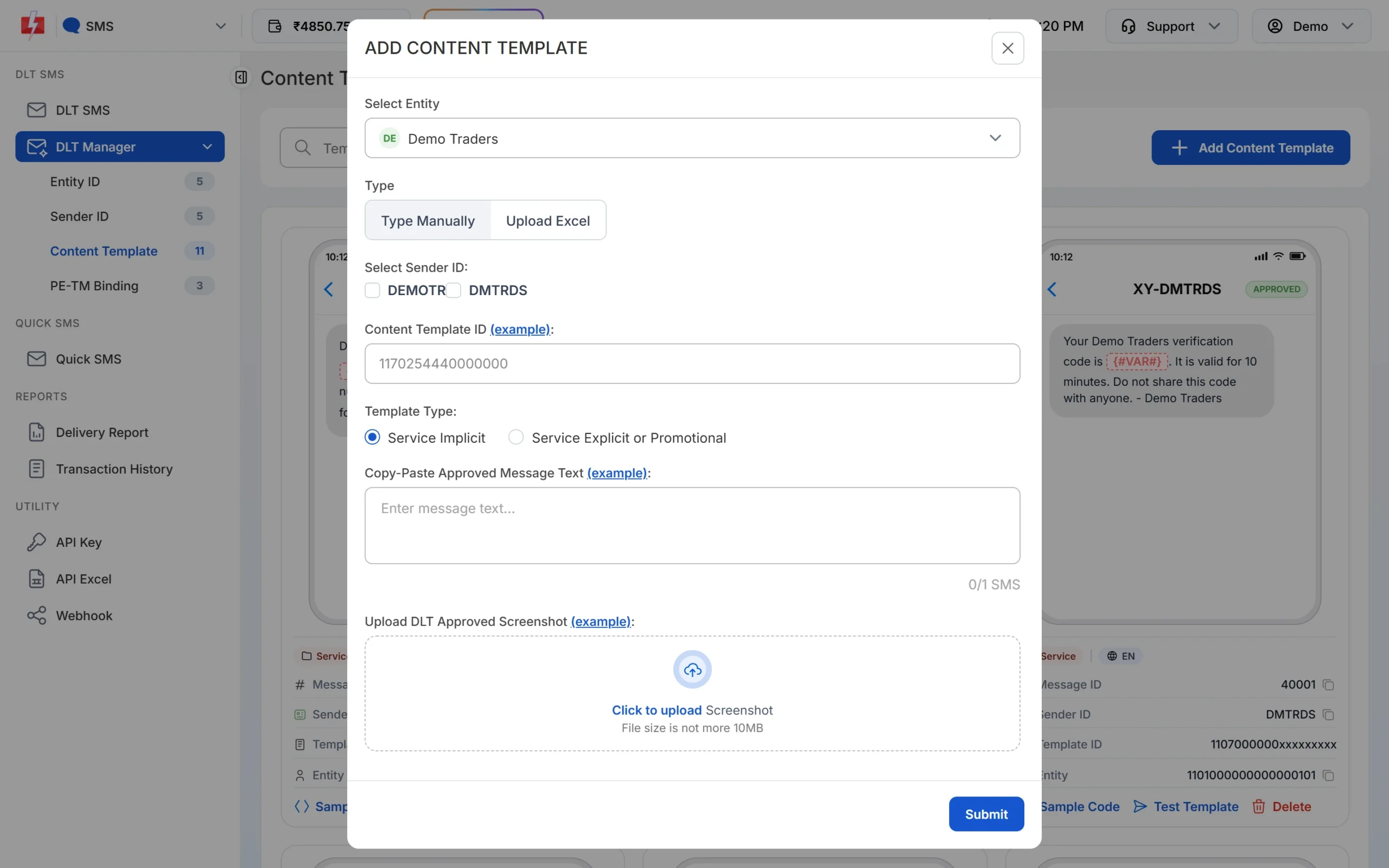
Add each approved school template with its correct type. -
Upload parents into Address Book groups
Open Address Book and upload a CSV or Excel file of parents. Map the Name and Number columns and pick a group, for example “Class 5A Parents”. Number prefixes like 91 or 0 are handled, and repeated numbers are skipped. Make one group per class or section so you can send to just that class later.
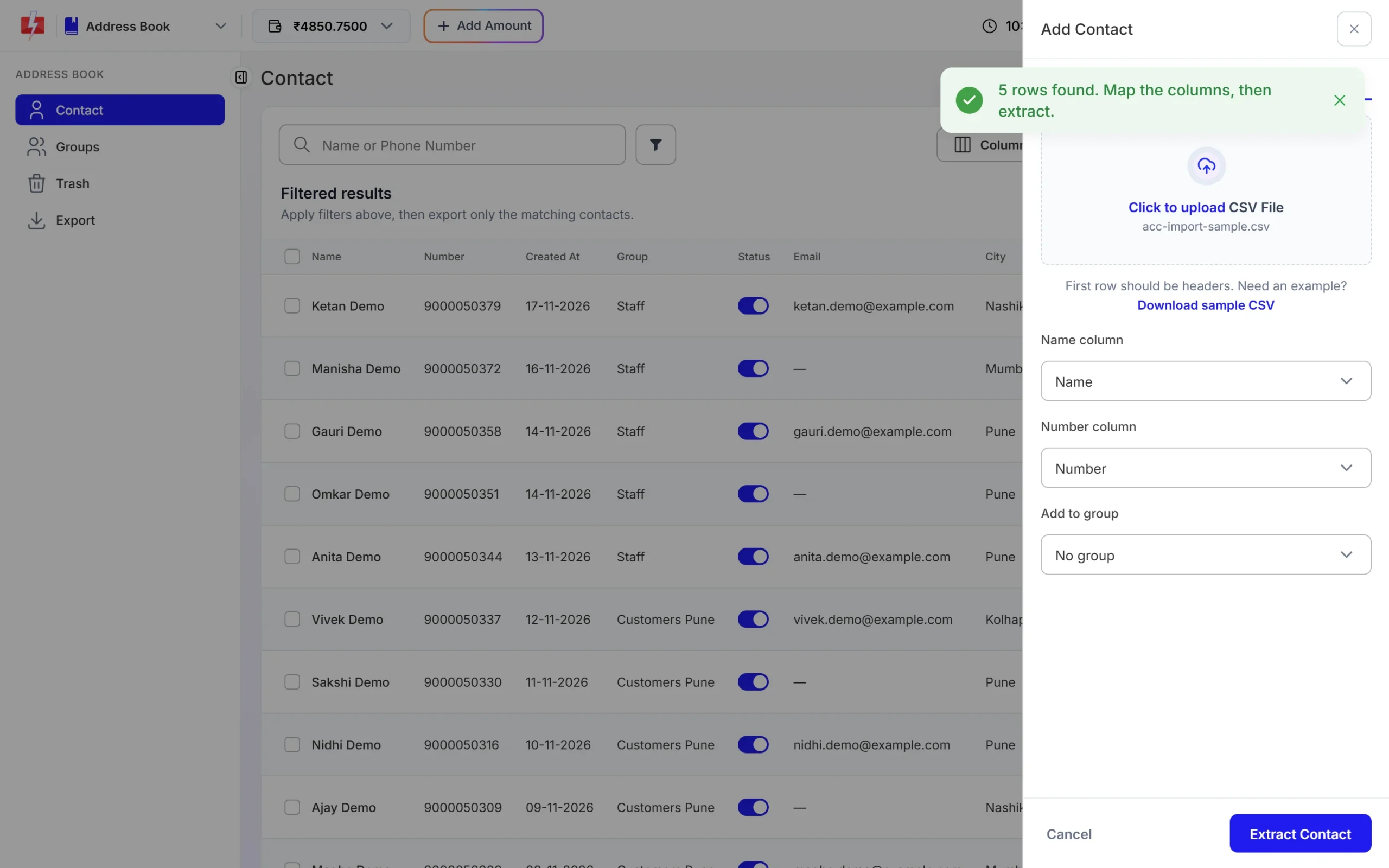
Map the columns and choose a group, then click Extract Contact. -
Send a notice with your template
Open DLT SMS, pick your Sender ID, choose the parents under Send To (List, Address Book or CSV File) and select the template. Fill the variables, for example the date and reason for a closure. The phone preview shows the final message and the SMS count. For absent alerts, use the CSV File tab and map each variable to a column of your attendance sheet.
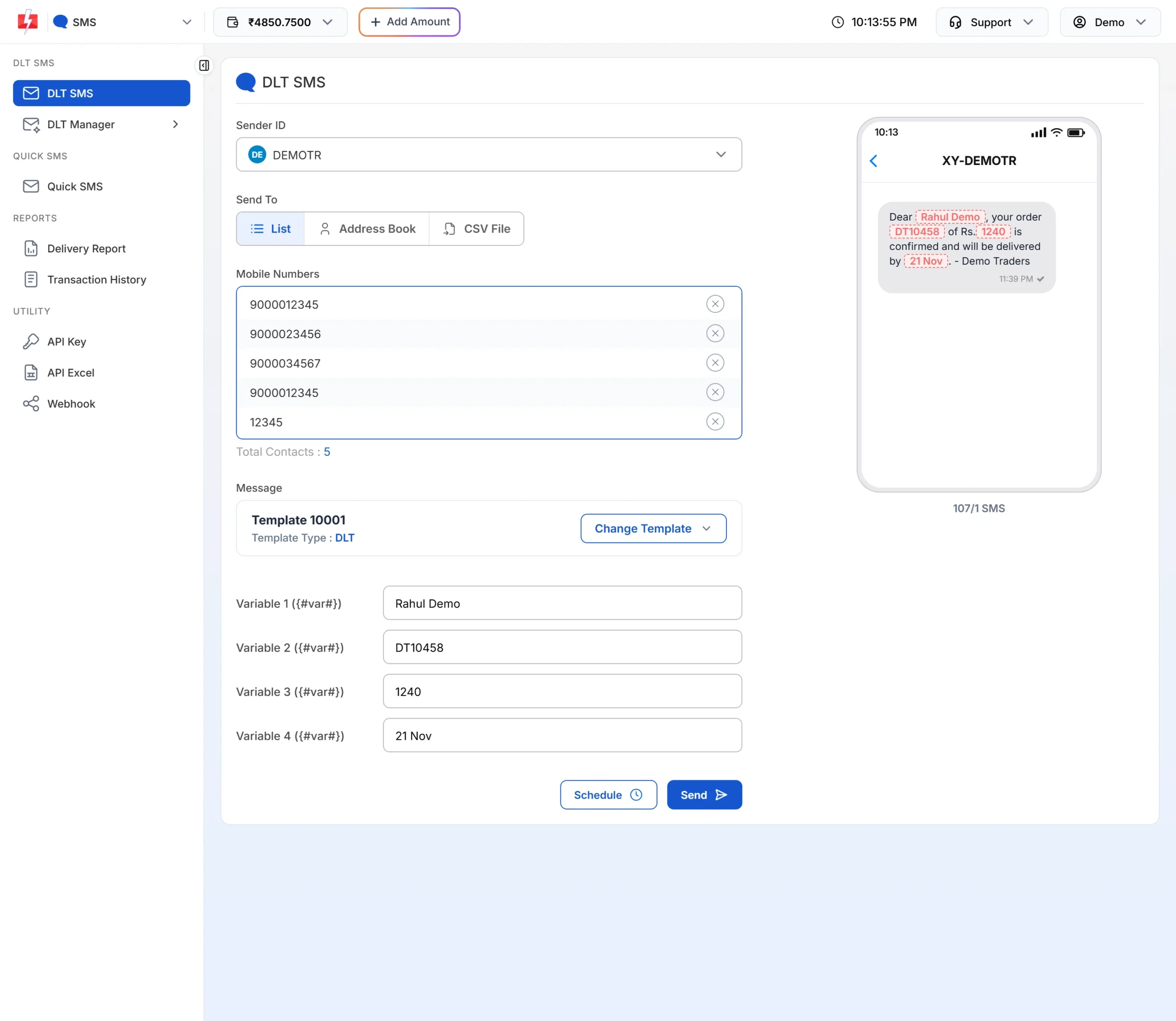
Fill the variables and check the preview before sending. -
Schedule tomorrow’s reminders tonight
Click Schedule instead of Send, choose the date and time, and confirm. You can pick a date range to send the same reminder once a day, for example for three days before a fee due date. Scheduled sends can be cancelled from Delivery Report > Schedule, and the amount comes back to your wallet.
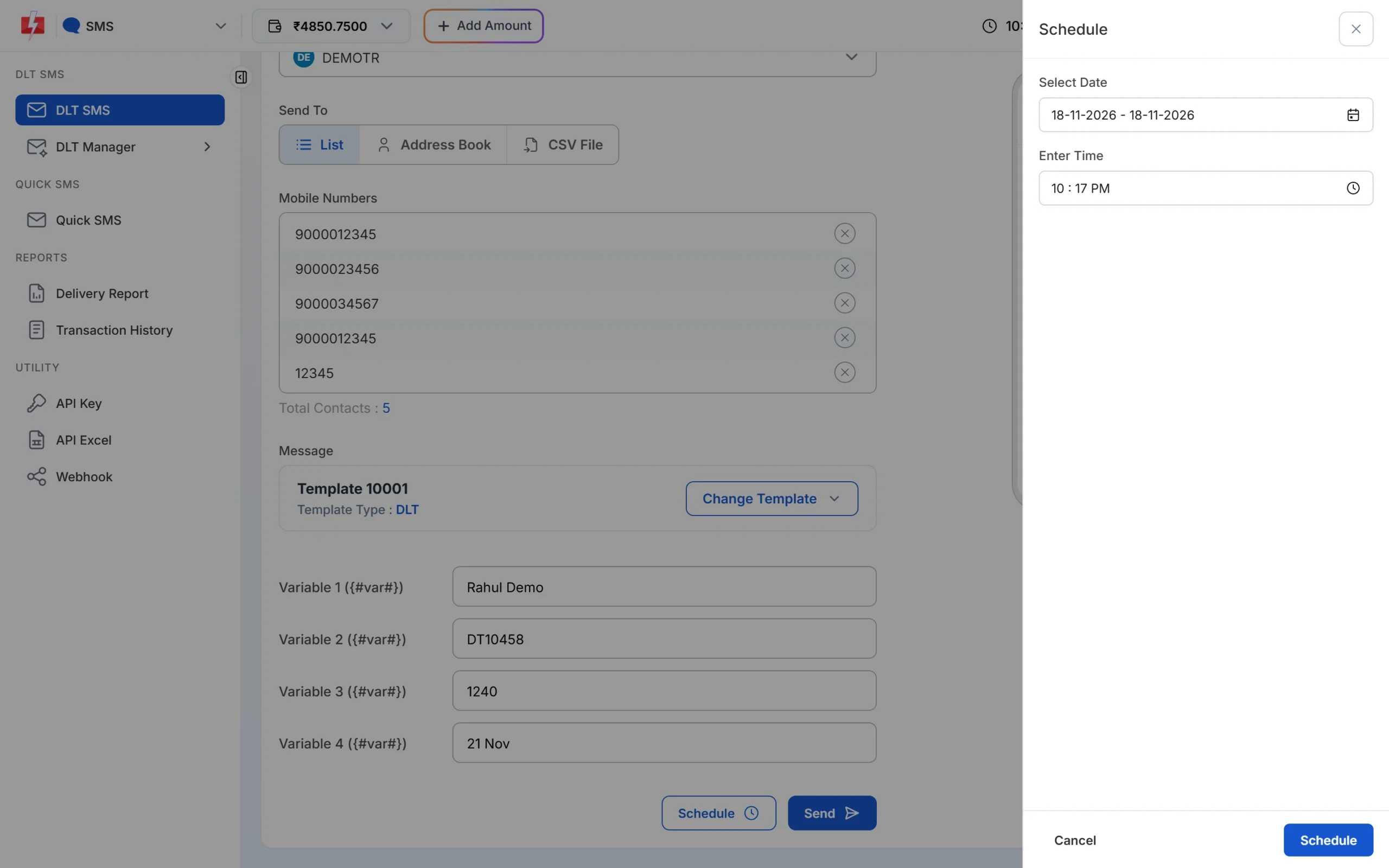
Schedule fee and PTM reminders in advance. -
Add a voice call for urgent notices
Open Voice > Bulk Voice Call. Upload your recording in Voice Files first and wait for the operator’s approval. For a PTM, choose Key Press (DTMF), pick the recording the parent hears, and tap the keys you allow, such as 1 and 2. The report shows which key each parent pressed.
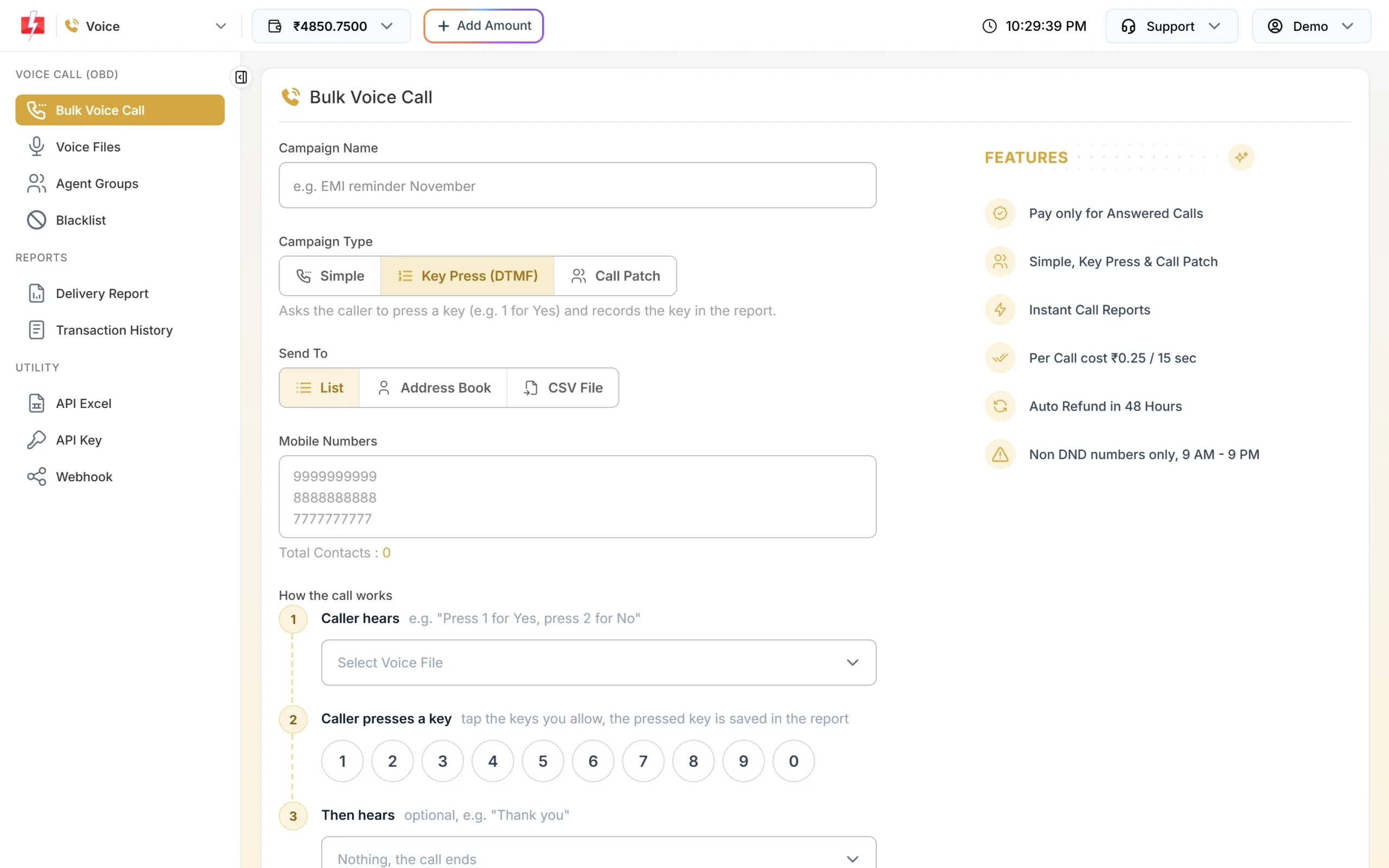
A Key Press call lets parents confirm with one key. -
Set up OTP for your parent app
Open Smart OTP and click Add OTP Template. Link your approved DLT OTP template (or a WhatsApp authentication template), choose which variable carries the code and add a fallback if you want one. Each template gets an OTP ID that your developer uses in the API.
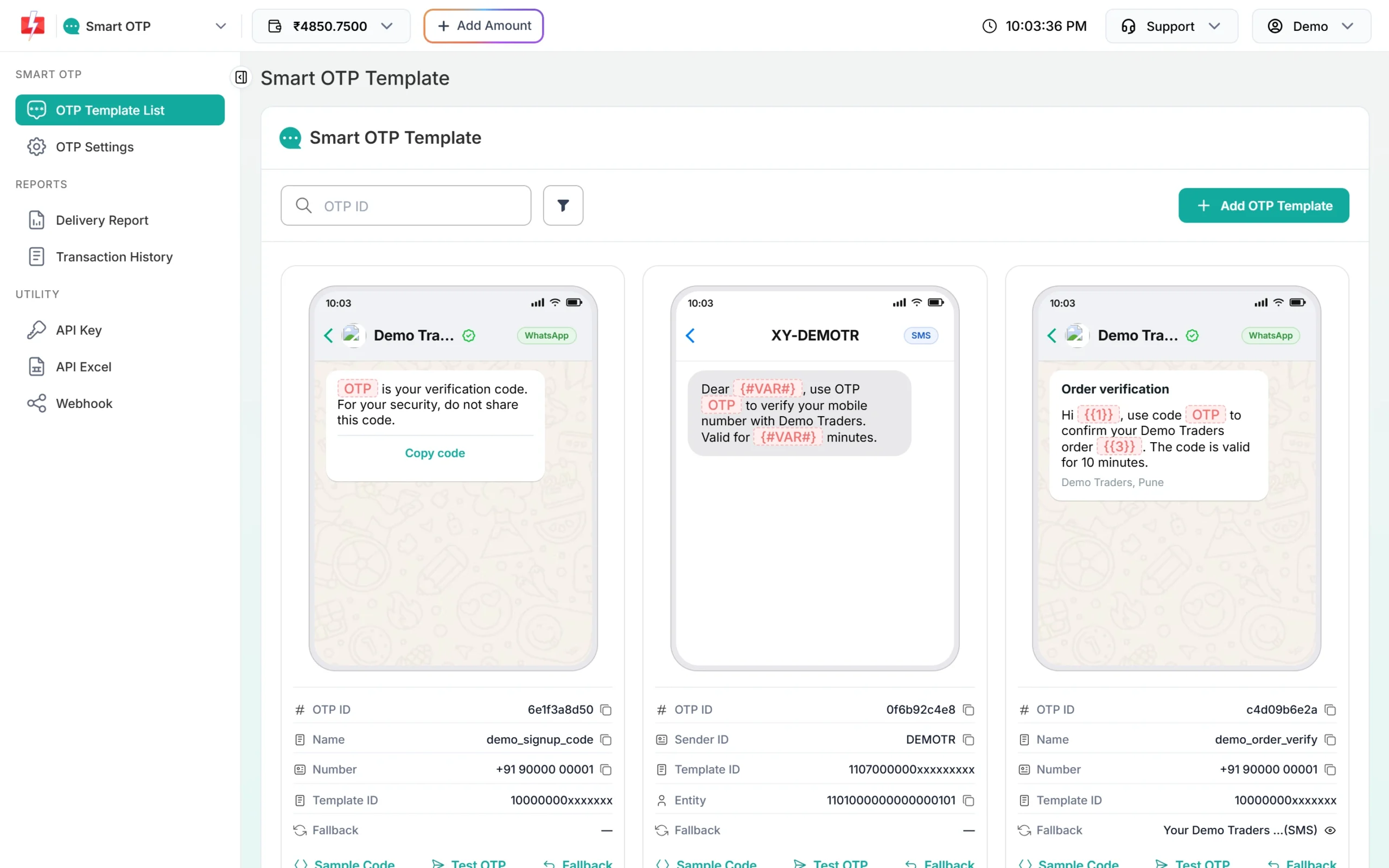
Each OTP template has its own OTP ID for the API.
Automation options for schools
- School ERP or fee software: your software can send attendance and fee messages through the Fast2SMS API using your API key and the template’s Message ID. Settings > API Excel lets you download your approved templates with sample API requests, which makes your developer’s job easier.
- Excel or CSV upload: no developer needed. Export the day’s absentee list from your system and upload it in the CSV File tab.
- Google Sheets: the Fast2SMS add-on for Google Sheets is listed under Integrations on the home screen.
- Scheduling: SMS, WhatsApp and voice campaigns can all be scheduled.
- Webhooks: your software can receive the delivery status of each message automatically.
Compliance notes for schools
- DLT: every SMS must match an approved template and sender ID, and your PE-TM chain must be complete. Pick the same category in Fast2SMS that the template has on DLT.
- Promotional timing: admission campaigns on promotional templates go out only between 10 AM and 9 PM. Fast2SMS holds late-night promotional sends until the next morning. Service templates go any time.
- Consent: parents of enrolled students have a relationship with you, so service updates are fine. For admission campaigns, message only people who enquired or opted in. TRAI rules also require promotional messages to give the recipient a way to opt out.
- WhatsApp opt-in: collect clear permission on the admission form or the school app, for example “I agree to receive school updates from Demo Public School on WhatsApp on this number”. Read the utility message guide for what counts as utility.
- Voice: calls only to non-DND numbers, 10 AM to 9 PM, with an operator-approved recording that names your school.
- Student privacy: do not put marks, health details, disciplinary matters or Aadhaar numbers in an SMS or WhatsApp broadcast. Send a link to the parent portal instead, where the parent logs in to see the details.
How to estimate the cost
Fast2SMS is prepaid: you add money to the wallet and each message is charged from it. To estimate a month:
- SMS: number of parents x SMS parts per message x your per-SMS rate. A plain English notice is usually one part. Your rate depends on your recharge slab; see the bulk SMS pricing page.
- WhatsApp: number of parents x the rate for the template category (utility, marketing or authentication). See WhatsApp pricing. Failed WhatsApp messages are refunded automatically.
- Voice: charged per pulse, only for answered calls. Unanswered and DND calls are refunded. See voice call pricing.
Before any campaign goes out, the Message Preview & Confirmation popup shows the cost per message, valid numbers, duplicates and the total. In Add Amount, the Calculate Credits tab tells you how many messages a recharge amount buys.
Frequently asked questions
Is DLT registration required to send SMS to parents?
Yes. Every school that sends business SMS in India must register as an entity on a DLT portal and get its sender ID and templates approved. WhatsApp and voice calls do not need DLT templates.
Which DLT category should a school use for attendance and fee messages?
Service Implicit, because they are updates to parents of current students. A fee payment confirmation sent right after the parent pays can be Transactional. Admission campaigns are Promotional.
Will school SMS reach parents who have DND activated?
Service Implicit and Transactional templates reach DND numbers. Promotional templates do not, unless the parent gave consent.
Can I send a different message to each parent, like the child’s name?
Yes. Upload a CSV with one row per parent and map each template variable to a column, such as student name and class.
Can I send report cards on WhatsApp?
Yes. Create a utility template with a document header and attach the PDF for each campaign, or send it through the WhatsApp API with a file per parent.
Can teachers reply to parents’ WhatsApp messages?
Yes. Add staff as team members with WhatsApp access. They answer parents in Live Chat (Inbox) and see only the chats assigned to them if you choose the Chat Agent role.
Can I use voice calls for fee reminders?
No. Payment due reminders on voice are allowed only for banks, NBFCs and their collection partners. Use SMS and WhatsApp for fee reminders.