
If an SMS report says a number is blacklisted or blocked, first check what is blocked. It can be the customer’s mobile number, which affects only that one number. Or it can be your own DLT entity, header (sender ID) or template, which stops every SMS sent with it. This page explains each case, where you see it in Fast2SMS and what you can do.
It is for anyone sending DLT SMS who sees “Blocked”, “Number blocked” or a “blacklisted” reason in the delivery report or an API reply.
Number blacklisted or blocked: the four cases
| What you see | What is blocked | Effect | Who can fix it |
|---|---|---|---|
| Status Blocked, description “Number blocked” in Delivery Details | That one mobile number | Only that number did not get the SMS | Not you. Remove it from future lists, or ask support if the customer wants your SMS |
| Failure reason such as “Subscriber MSISDN Blacklisted” or “EC_DEST_ADDRESS_BLACKLISTED” | The number, at the operator | Only that number failed | The operator. Remove it from future lists |
| Failure reason such as “Entity is blacklisted”, “Header blacklisted on DLT”, “Template_id Inactive/Blacklisted”, “PE_TM_CHAIN_BLACKLISTED” or “CTA_URL_BLACKLISTED” | Your entity, header, template, PE-TM chain or link at DLT | Every SMS that uses it fails | You, on your DLT portal or with the operator |
| Error “Entity blocked”, “Sender ID blocked” or “Content template blocked” when you send | Your entity, sender or template on the Fast2SMS DLT block list | Nothing is sent with it | Fast2SMS support, after you check the item at DLT |
The first two cases are about the person you are sending to. The last two are about your own DLT setup, and they are the ones to fix quickly because they stop whole campaigns.
A mobile number shows Blocked in your report
In the Fast2SMS SMS report, Blocked is its own status, next to Delivered, Sent, Pending, Failed, DND and Invalid. In Delivery Details the description is “Number blocked”. It means that number did not receive this SMS. The rest of the campaign is not affected.
The report does not say who blocked the number or why. It is not the same as DND: a DND number shows the status DND with the description “DND activated”. See DND numbers and SMS for that case.
A blocked number is counted in the Failed card at the top of the report, together with failed, DND and invalid numbers. Like other numbers that fail after sending, it is charged and not refunded automatically. Only duplicate and invalid numbers are removed before you pay. The full rules are in Am I charged for failed SMS?, and current rates are on the bulk SMS pricing page.
Sending in bulk? For high SMS volumes our team offers discounted rates. Talk to our team or see SMS pricing.
How to find the blocked numbers in a campaign
-
Open the SMS report and filter by status
Go to Delivery Report in the SMS menu, click the filter button and open Delivery Status. Tick Blocked (and Failed, DND and Invalid if you want to clean all of them at once), then click Apply Filters.
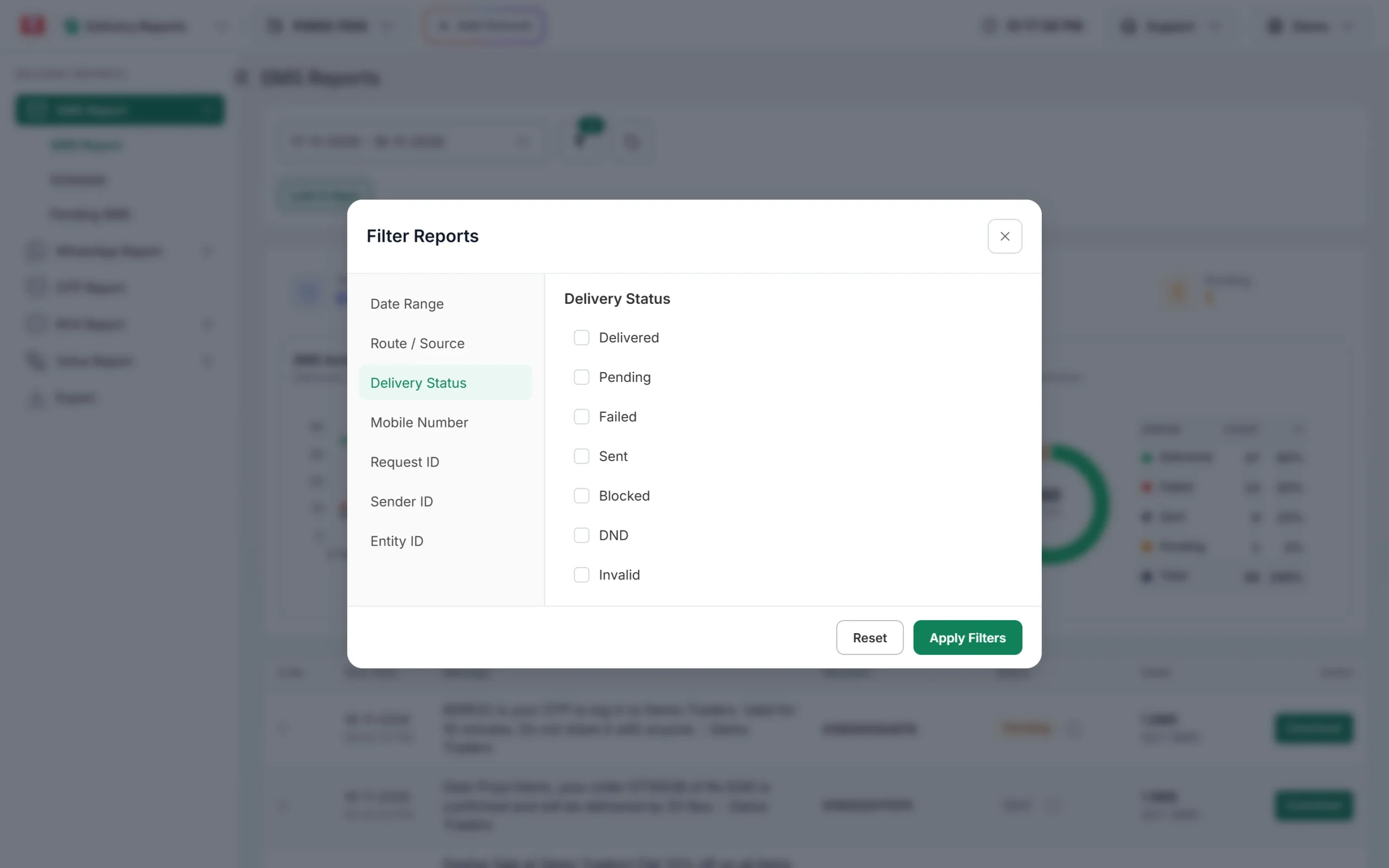
Blocked has its own checkbox in the Delivery Status filter. -
Check the counts for one campaign
Hover over the small info icon next to a campaign’s status. It shows how many numbers were delivered, failed, blocked, DND or invalid in that send. Click the message text to open Delivery Details and see each number with its status and description.
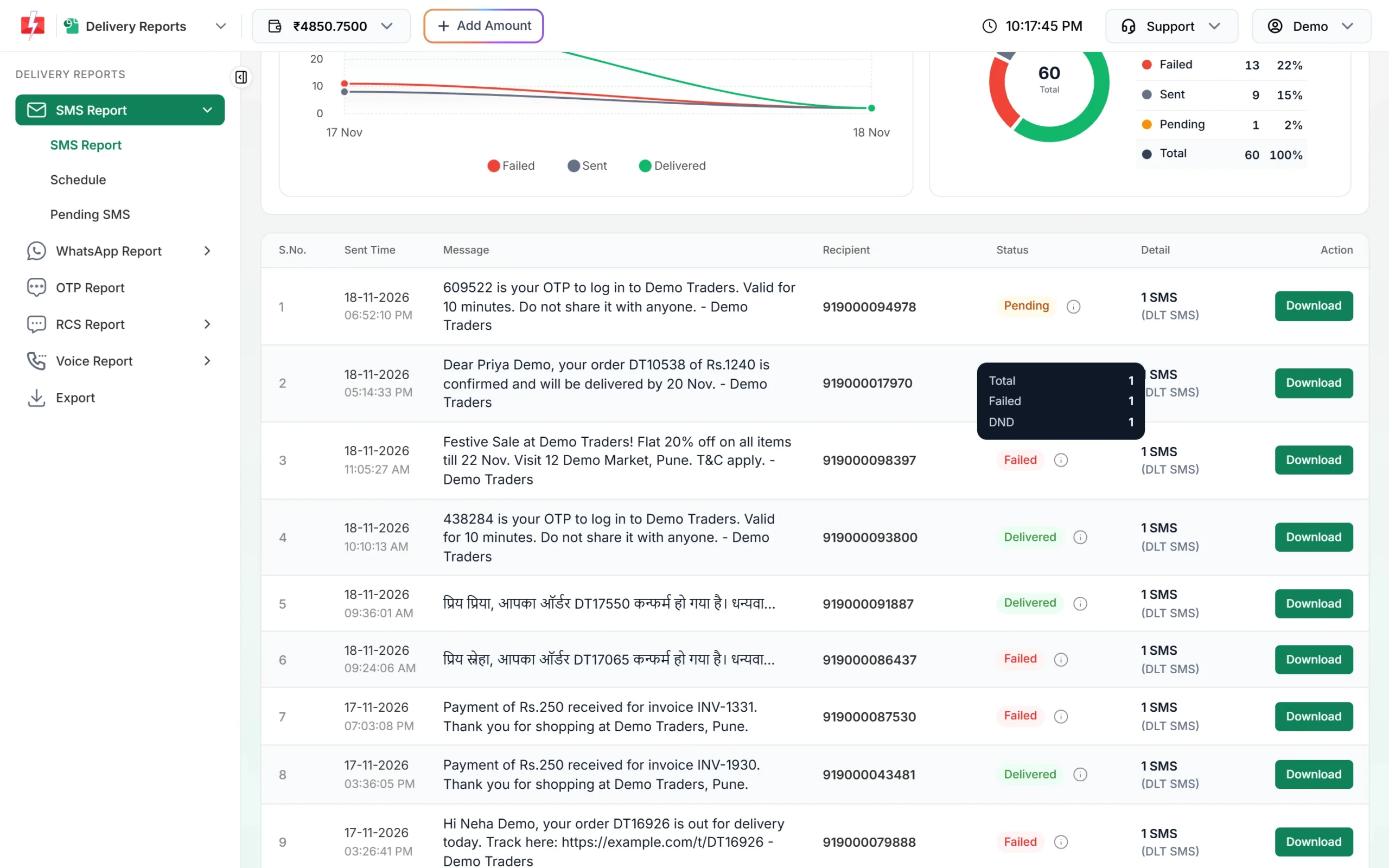
The info icon shows the status counts for that send. -
Download and clean your list
Click Download on the campaign row to get the report with the status of every number. Remove the blocked and failed numbers from your contact list before the next campaign. See how to download your SMS delivery report.
If a customer tells you they want your SMS but their number keeps showing Blocked, contact Fast2SMS support with the Request ID from Delivery Details and the number.
Your header, template or entity is blacklisted at DLT
This is the serious case. Operators check every commercial SMS against DLT records (called DLT scrubbing). If your entity, header, template, telemarketer chain or a link in the message is blacklisted there, every SMS that uses it fails. The failure reason in the report then names the part that is blacklisted, for example:
- Entity: “Entity is blacklisted” (Airtel 801) or “ENTITY_BLACKLISTED” (Jio 603).
- Header: “Header is blacklisted” (Airtel 803) or “HEADER_BLACKLISTED” (Jio 622).
- Template: “Template_id Inactive/Blacklisted” (Airtel 805) or “TEMPLATE_BLACKLISTED” (Jio 632).
- Chain or link: “PE_TM_CHAIN_BLACKLISTED” (SmartPing 617) or “CTA_URL_BLACKLISTED” (SmartPing 5902).
The full lists are in SMS operator error codes explained.
What to do:
- Log in to the DLT portal where your business registered and check the status of the header and template.
- If it is blacklisted or suspended, follow the portal’s steps or raise a ticket with that operator to find out why. Our guide to inactive or suspended headers and templates covers reactivation.
- If you need to keep sending, register a new header or template, get it approved, and add it in DLT Manager. This does not help if the whole entity is blacklisted.
- If misuse of your DLT details is suspected, read header and template blacklisting by DLT (ILDO traffic).
“Entity blocked”, “Sender ID blocked” or “Content template blocked”
These messages come from Fast2SMS, not the operator. They mean the entity, sender ID or template is on the Fast2SMS DLT block list, so the SMS is not sent at all. You see them in the API reply, or in the panel when you send. When you add a blocked sender in DLT Manager, the message is “Sender ID blocked, contact Fast2SMS support.” Sometimes the blacklist reason is shown instead.
Check the item at your DLT portal first. If it is active there, contact support with the sender ID and template ID. Details are in Fast2SMS error 500: Entity, Content template or Sender ID blocked.
How to keep your own header and templates off a blacklist
- Send each message only on the template type it is registered for. Offers go on promotional (Service Explicit) templates, not on transactional or service ones.
- Send promotional SMS only between 10 AM and 9 PM.
- Send only to people who agreed to hear from you, and respect opt-outs. Under TRAI’s 2025 amendment you must not ask for consent again within 90 days after a customer opts out.
- Do not share your DLT entity, headers or templates with anyone else to send their traffic.
- Use only links that are whitelisted in your DLT template.
TRAI’s 2025 amendment made the complaint rules stricter. Customers can now complain about spam within 7 days. A sender who keeps breaking the rules can lose its telecom resources with every operator for one year and be blacklisted. See TRAI TCCCPR rules explained.
Frequently asked questions
What does “Number blocked” mean in the SMS report?
That mobile number did not receive this SMS because it was blocked. Only that number is affected. The report does not say who blocked it or why.
Is Blocked the same as DND?
No. They are separate statuses. DND shows “DND activated” and happens when a promotional SMS goes to a number on the Do Not Disturb list.
Can I unblock a customer’s number from my account?
No, the block is not set in your account. If the customer wants your messages and the number keeps showing Blocked, share the Request ID and number with Fast2SMS support.
How do I know if my sender ID is blacklisted?
All or most numbers in your campaigns fail with a reason that mentions the header, for example “Header blacklisted on DLT”. Check the header’s status on your DLT portal.
Can I keep sending if my header is blacklisted?
Yes, with a different approved header and template under the same entity, while you sort out the blacklisted one. If the entity itself is blacklisted, every header under it is affected.
Are blocked numbers counted as failed?
Yes. The Failed card in the report adds up failed, blocked, DND and invalid numbers. Use the Delivery Status filter to see blocked numbers on their own.
Why did my whole campaign fail with a blacklisted reason?
Because the blacklisted part is your entity, header, template, PE-TM chain or link, which every SMS in the campaign used. Fix it at DLT or switch to another approved header and template.