
You can create, list, update and delete Fast2SMS webhooks from your own code with the webhook API at https://www.fast2sms.com/dev/webhook/v2/{service}, where {service} is sms, otp, whatsapp, rcs or voice. This is handy when you set up many accounts, deploy to new servers or change URLs often. This guide lists every field, shows how to build the body with placeholders, and gives working examples in cURL, PHP, Python and Node.js.
Endpoints
| Action | Method and path |
|---|---|
| List webhooks of a service | GET /dev/webhook/v2/{service} |
| Create a webhook | POST /dev/webhook/v2/{service} |
| Update a webhook | PUT /dev/webhook/v2/{service}/{id} |
| Delete a webhook | DELETE /dev/webhook/v2/{service}/{id} |
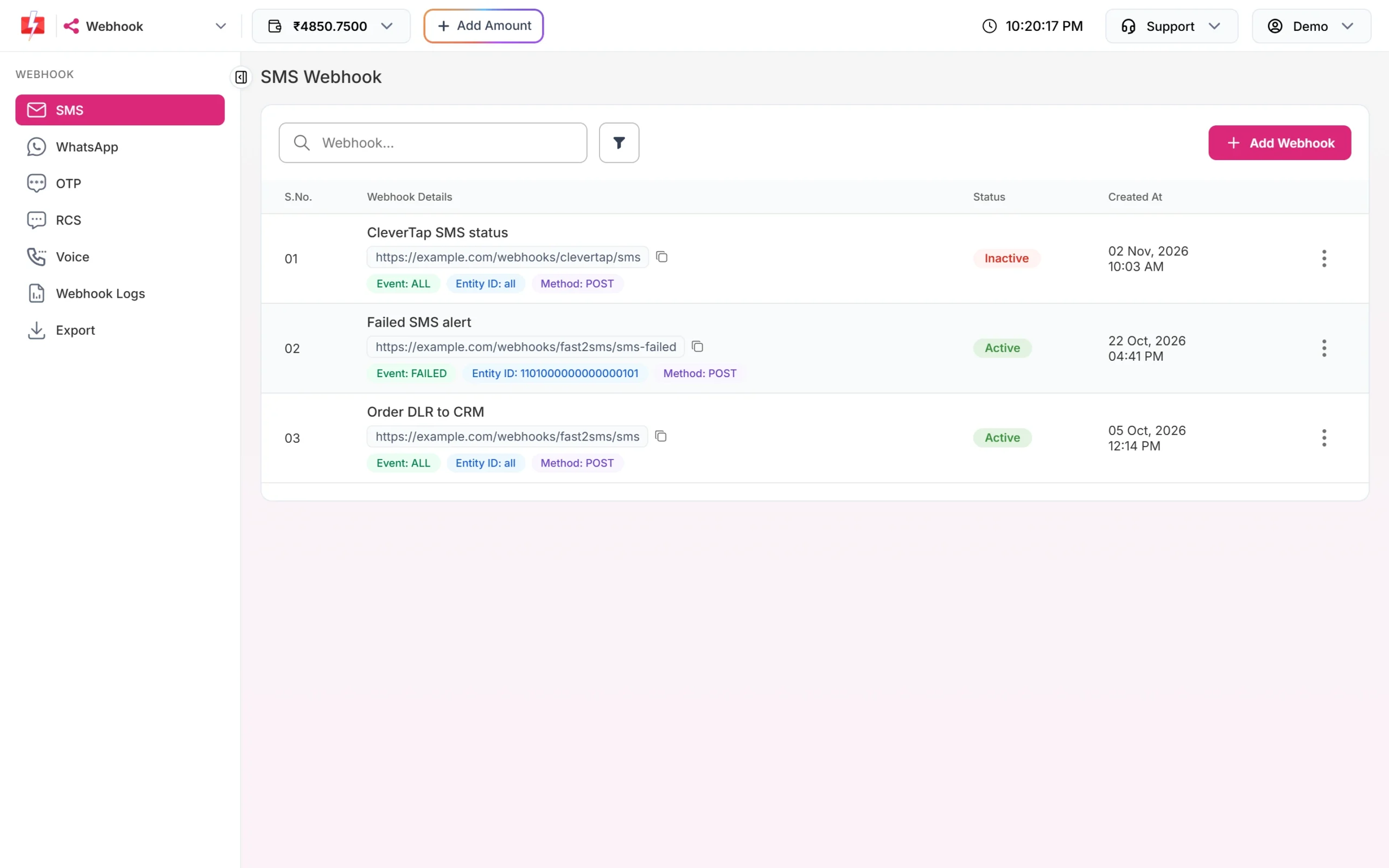
Send your API key in the authorization header, as with the other Fast2SMS APIs. {id} is the wh_... ID from the list or create reply. Webhooks created by API appear in the panel under Webhook, and panel webhooks appear in the API list.
Create a webhook step by step
-
Decide the service, event and identity
Pick the service (for example
sms), the event you want (all, delivered or failed for SMS) and, if needed, the identity: an Entity ID for SMS, a WhatsApp number, or a Bot ID for RCS. Leave the identity out to cover all. -
Write the body template
The
payloadis what we send to your URL. Use{{field}}placeholders; they are filled in for each report. The field lists are below. -
POST the webhook
curl -X POST "https://www.fast2sms.com/dev/webhook/v2/sms" \ -H "authorization: YOUR_API_KEY" \ -H "Content-Type: application/json" \ -d '{"name":"Order DLR to CRM", "url":"https://example.com/webhooks/fast2sms/sms", "method":"POST","content_type":"application/json","event":"all", "payload":{"request_id":"{{request_id}}","mobile":"{{mobile}}","status":"{{status}}", "reason":"{{status_description}}","udf1":"{{udf1}}","delivered_at":"{{delivery_time}}"}, "header_key":["X-Webhook-Token"],"header_value":["change-this-long-random-value"]}' -
Save the webhook ID
{"return":true,"message":"Webhook created successfully","data":{
 "id":"wh_...","name":"Order DLR to CRM","service":"sms","url":"https://example.com/webhooks/fast2sms/sms",
 "method":"POST","content_type":"application/json",
 "status":"active","event":"all","payload_type":"SIMPLIFIED","identity_id":null}}
Keep
data.id. You need it to update or delete this webhook. -
Test it
In the panel, open the webhook’s row menu and click Test Webhook to send one request with sample values, then check Webhook Logs.
Fields
| Field | Required | Values |
|---|---|---|
name |
Yes | Up to 191 characters |
url |
Yes | A public http or https URL. Localhost, internal and file URLs are refused |
method |
No (POST) | POST, GET or PUT |
content_type |
No (JSON) | application/json, application/x-www-form-urlencoded or application/xml |
event |
No (all) | sms and otp: all, delivered, failed. whatsapp and rcs: also sent, read, received (incoming messages). voice: all, answered, no_answer, busy, failed |
identity_id |
No (all) | sms: a DLT Entity ID. whatsapp: one of your numbers. rcs: a Bot ID |
template |
No (custom) | custom (Standard). clevertap for sms and otp, clevertap_whatsapp or meta_direct for whatsapp, clevertap_rcs for rcs. Voice: custom only |
payload |
Send it for custom | The body template, as a JSON object or a string |
header_key, header_value |
No | Two lists of the same length with your custom headers |
status |
No (active) | active or inactive |
Send custom headers as header_key and header_value lists. A headers object, as shown in some older examples, is not used. And always include a payload for a custom webhook: the request body is built only from your template.
Placeholders you can use
| Service | Placeholders |
|---|---|
| SMS | request_id, route, sender_id, delivery_attempt, character_count, mobile, status, status_description, description, failure_reason, udf1, udf2, udf3, sms_language, sms_count, amount_debited, sent_timestamp, sent_time, delivery_timestamp, delivery_time |
| OTP | All SMS fields, plus channel (sms or whatsapp), type, phone_number_id, recipient_id, category |
| request_id, mobile, status, status_description, udf1 to udf3, phone_number_id, display_phone_number, waba_id, recipient_id, category, webhook_type, message_id, from, message_type, body, media_url, mime_type, caption, context_message_id, timestamp, amount_debited, sent_time, delivery_time | |
| RCS | request_id, mobile, status, status_description, udf1 to udf3, error_message, failure_reason, description, webhook_type, message_id, from, message_type, body, media_url, mime_type, caption, timestamp |
| Voice | request_id, campaign_name, mobile, status, description, duration, agent_duration, pulses, amount_debited, dtmf, agent_number, start_time, end_time, reason, timestamp |
Write placeholders as {{status}} or @{{status}}; the panel uses the second form. Values are escaped for JSON automatically. For incoming WhatsApp messages and button replies, see receive incoming WhatsApp messages.
List, update and delete
List
curl "https://www.fast2sms.com/dev/webhook/v2/sms" -H "authorization: YOUR_API_KEY"The reply is {"return":true,"data":[...]} with the same fields as the create reply for each webhook.
Update
An update replaces the whole webhook. Send every setting you want to keep: fields you leave out go back to their defaults (POST, JSON, all events, active, no identity, no headers).
curl -X PUT "https://www.fast2sms.com/dev/webhook/v2/sms/wh_YOUR_WEBHOOK_ID" \
  -H "authorization: YOUR_API_KEY" \
  -H "Content-Type: application/json" \
  -d '{"name":"Order DLR to CRM","url":"https://new.example.com/webhooks/fast2sms/sms",
       "method":"POST","content_type":"application/json","event":"failed",
       "payload":{"request_id":"{{request_id}}","mobile":"{{mobile}}","status":"{{status}}","reason":"{{status_description}}"},
       "header_key":["X-Webhook-Token"],"header_value":["change-this-long-random-value"]}'
Success: “Webhook updated successfully”. To pause a webhook without deleting it, send the same settings with "status":"inactive".
Delete
curl -X DELETE "https://www.fast2sms.com/dev/webhook/v2/sms/wh_YOUR_WEBHOOK_ID" \
  -H "authorization: YOUR_API_KEY"
Success: “Webhook deleted successfully”.
Code examples (create)
PHP
<?php
$webhook = [
    "name"         => "Order DLR to CRM",
    "url"          => "https://example.com/webhooks/fast2sms/sms",
    "event"        => "all",
    "payload"      => ["request_id" => "{{request_id}}", "mobile" => "{{mobile}}", "status" => "{{status}}"],
    "header_key"   => ["X-Webhook-Token"],
    "header_value" => ["change-this-long-random-value"],
];
$ch = curl_init("https://www.fast2sms.com/dev/webhook/v2/sms");
curl_setopt_array($ch, [
    CURLOPT_POST           => true,
    CURLOPT_RETURNTRANSFER => true,
    CURLOPT_HTTPHEADER     => ["authorization: YOUR_API_KEY", "Content-Type: application/json"],
    CURLOPT_POSTFIELDS     => json_encode($webhook),
]);
$data = json_decode(curl_exec($ch), true);
curl_close($ch);
echo ($data["return"] ?? false) === true ? $data["data"]["id"] : json_encode($data);
Python
import requests

webhook = {
    "name": "Order DLR to CRM",
    "url": "https://example.com/webhooks/fast2sms/sms",
    "event": "all",
    "payload": {"request_id": "{{request_id}}", "mobile": "{{mobile}}", "status": "{{status}}"},
    "header_key": ["X-Webhook-Token"],
    "header_value": ["change-this-long-random-value"],
}
r = requests.post("https://www.fast2sms.com/dev/webhook/v2/sms",
                  headers={"authorization": "YOUR_API_KEY"}, json=webhook, timeout=30)
data = r.json()
print(data["data"]["id"] if data.get("return") else data)
Node.js
const res = await fetch("https://www.fast2sms.com/dev/webhook/v2/sms", {
  method: "POST",
  headers: { authorization: process.env.FAST2SMS_API_KEY, "Content-Type": "application/json" },
  body: JSON.stringify({
    name: "Order DLR to CRM",
    url: "https://example.com/webhooks/fast2sms/sms",
    event: "all",
    payload: { request_id: "{{request_id}}", mobile: "{{mobile}}", status: "{{status}}" },
    header_key: ["X-Webhook-Token"],
    header_value: ["change-this-long-random-value"],
  }),
});
const data = await res.json();
console.log(data.return === true ? data.data.id : data);
When webhooks fire
- Delivery webhooks fire for messages sent through the API, for reports that arrive within 24 hours. Panel campaigns do not trigger them.
- The webhook must be active, and its event and identity must match the report.
- We wait up to 10 seconds for your answer. Network errors, timeouts, HTTP 408, 429 and 5xx are retried up to 3 times, 60 seconds apart.
- Every attempt is in Webhook Logs for 7 days, and each log row can be resent once.
- If the signature setting is on for your account, each request also has the header
webhook_secret_key, a plain shared secret (not an HMAC).
Full details are in webhooks in Fast2SMS.
Common problems and fixes
“Limit reached: Maximum 10 webhooks allowed for SMS”
Each service allows 10 webhooks. Delete old ones or reuse one with a broader event.
“Webhook URL must be a public http(s) endpoint…”
Use a public URL. Localhost, private IPs and non-http links are not allowed.
“Webhook not found or does not belong to you.” (HTTP 404)
The {id} is wrong, belongs to another account, or is for a different service than the one in the path.
Validation errors such as a missing name
Send both name and url, on create and on every update.
My custom headers are missing
Use the header_key and header_value lists, not a headers object.
Error 412 or 414 (HTTP 401)
Check the API key, and whitelist your server IP if API Security is on. See API Security.
Frequently asked questions
Can I create Fast2SMS webhooks by API?
Yes. POST to /dev/webhook/v2/{service} with at least name and url.
Which services support webhooks?
SMS, OTP, WhatsApp, RCS and Voice.
Does an update change only the fields I send?
No. An update replaces the webhook, so send the full set of settings each time.
Can I send form data instead of JSON?
Yes. Set content_type to application/x-www-form-urlencoded and send the payload as an object; its keys become form fields.
Can I use the CleverTap format by API?
Yes. Set template to clevertap for SMS and OTP, clevertap_whatsapp for WhatsApp or clevertap_rcs for RCS. See CleverTap webhook integration.