
To check whether a WhatsApp message sent through the Fast2SMS API was delivered or read, call GET https://www.fast2sms.com/dev/whatsapp/{request_id} with the request_id you got when you sent it. For many messages at once, use the WhatsApp logs API (up to 3 days per call) or the summary API (up to 30 days). This guide shows all three, what each status means and how to read a failure reason.
Three ways to get WhatsApp status by API
| API | Use it for | Range |
|---|---|---|
GET /dev/whatsapp/{request_id} |
Status of every number in one send | Sends from the last 90 days |
GET /dev/whatsapp_logs?from=&to= |
All message statuses in a date range | Up to 3 days per call, within the last year |
GET /dev/whatsapp_summary?from=&to= |
Counts per status for a report or dashboard | Up to 30 days per call, within the last year |
If you need status as it happens, a webhook is better than calling these APIs again and again. See WhatsApp webhooks for status and incoming messages.
Get the status of one send
-
Save the request_id when you send
The send API replies with a
request_idthat starts with W, for exampleWa1B2c3D4e5F6g7. Store it with your order or customer record. -
Call the DLR API
curl "https://www.fast2sms.com/dev/whatsapp/Wa1B2c3D4e5F6g7" \ -H "authorization: YOUR_API_KEY" -
Read one row per number
The reply has a
datalist with one row for each number in that send:{"success":true,"message":"DLR found successfully.","data":[{ "type":"status_update", "fast2sms_request_id":"Wa1B2c3D4e5F6g7", "request_id":"wamid.HBgM...", "phone_number_id":"100000000000002", "recipient_id":"919999999999", "mobile":919999999999, "status":"read", "status_description":"Read successfully", "errors":null, "category":"UTILITY", "amount_debited":"0.25", "sent_time":"18-11-2026 01:05:02 PM", "delivery_time":"18-11-2026 01:05:22 PM"}]}Here
fast2sms_request_idis your Fast2SMS ID andrequest_idis WhatsApp’s own message ID. The delivery time fields appear only when the status is delivered or read. -
Compare with the panel if needed
The same send appears in Delivery Report under WhatsApp. Click it to open Delivery Details. API sends show “(api)” after the Request ID.
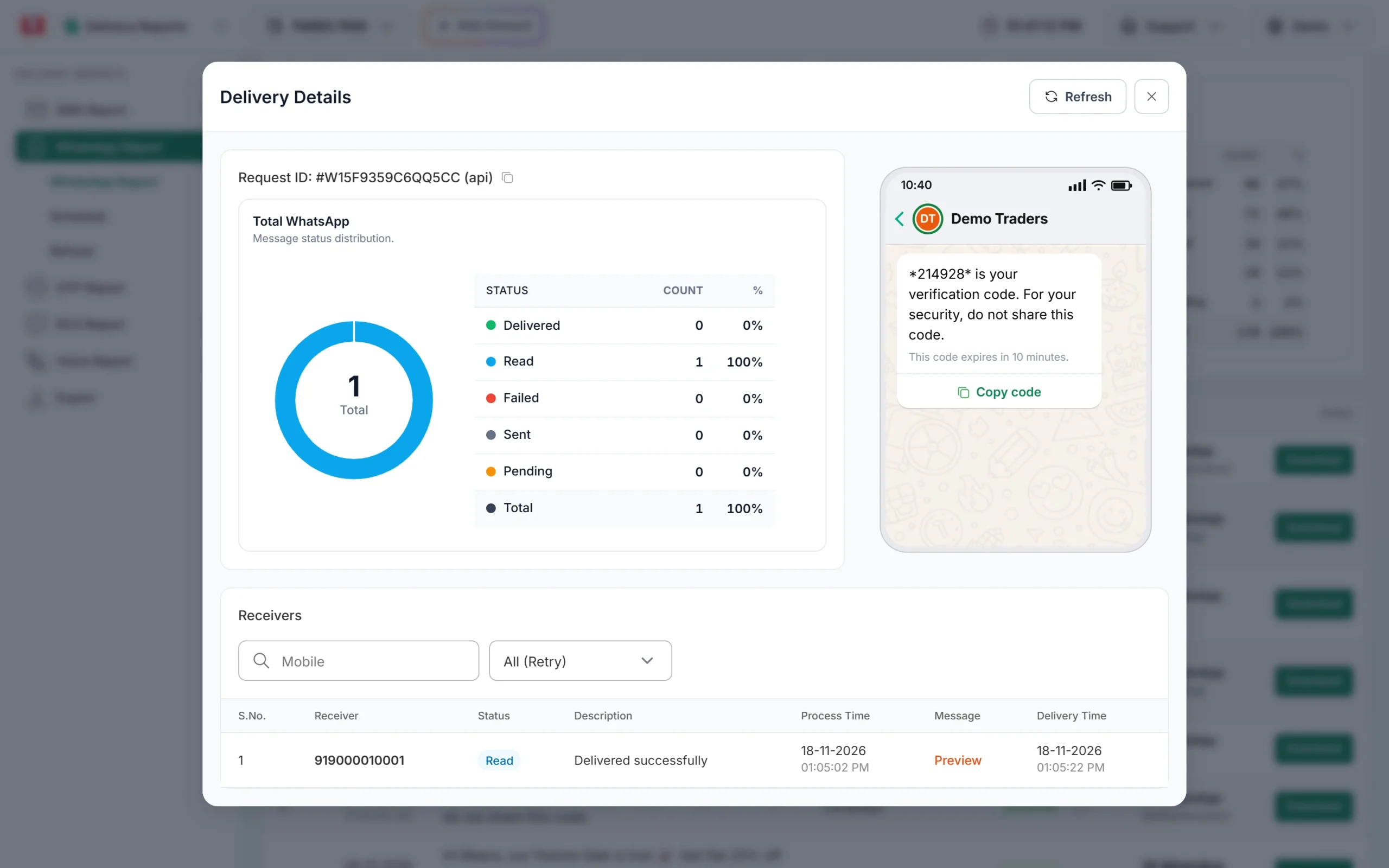
Delivery Details shows the same status per number.
What each status means
| status | status_description | Meaning |
|---|---|---|
pending |
Pending | Queued with Fast2SMS, not yet handed to WhatsApp |
accepted |
Sent successfully | WhatsApp accepted the message and is sending it |
sent |
Sent successfully | WhatsApp sent it; the phone has not confirmed yet |
delivered |
Delivered successfully | It reached the customer’s phone |
read |
Read successfully | The customer opened it (only if read receipts are on) |
failed |
The error text | WhatsApp could not deliver it. errors has the details |
A delivered or read message never goes back to failed. Read status depends on the customer’s privacy settings, so delivered and not read does not always mean the message was ignored.
Code examples
PHP
<?php
$requestId = "Wa1B2c3D4e5F6g7";
$ch = curl_init("https://www.fast2sms.com/dev/whatsapp/" . urlencode($requestId));
curl_setopt_array($ch, [
    CURLOPT_RETURNTRANSFER => true,
    CURLOPT_HTTPHEADER     => ["authorization: YOUR_API_KEY"],
    CURLOPT_TIMEOUT        => 30,
]);
$data = json_decode(curl_exec($ch), true);
curl_close($ch);

foreach (($data["data"] ?? []) as $row) {
    echo $row["mobile"] . " " . $row["status"] . " " . $row["status_description"] . PHP_EOL;
}
Python
import requests

request_id = "Wa1B2c3D4e5F6g7"
r = requests.get(f"https://www.fast2sms.com/dev/whatsapp/{request_id}",
                 headers={"authorization": "YOUR_API_KEY"}, timeout=30)
data = r.json()
if data.get("success"):
    for row in data["data"]:
        print(row["mobile"], row["status"], row["status_description"])
else:
    print(data.get("message"))
Node.js
const requestId = "Wa1B2c3D4e5F6g7";
const res = await fetch(`https://www.fast2sms.com/dev/whatsapp/${requestId}`, {
  headers: { authorization: process.env.FAST2SMS_API_KEY },
});
const data = await res.json();
if (data.success === true) {
  for (const row of data.data) console.log(row.mobile, row.status, row.status_description);
} else {
  console.log(data.message);
}Get logs for a date range
Use dates as YYYY-MM-DD. The range can be at most 3 days and must start within the last year.
curl -G "https://www.fast2sms.com/dev/whatsapp_logs" \
  -H "authorization: YOUR_API_KEY" \
  --data-urlencode "from=2026-11-16" --data-urlencode "to=2026-11-18"
The reply is {"success":true,"message":"Whatsapp Logs generated successfully.","data":[...]}. Each row has the same fields as the DLR API. Customer replies in that range can appear as rows with "type":"incoming_message", so check type before you read status. To cover a longer period, call it once for each 3-day block.
Get a summary for up to 30 days
curl -G "https://www.fast2sms.com/dev/whatsapp_summary" \
  -H "authorization: YOUR_API_KEY" \
  --data-urlencode "from=2026-11-01" --data-urlencode "to=2026-11-18"
{"success":true,"message":"WhatsApp Summary fetched successfully.",
"data":{"sent":120,"accepted":4,"delivered":1630,"read":980,"failed":41,"rejected":0,"pending":0}}Common problems and fixes
“No DLR found for the given request_id.” (HTTP 404)
The ID is wrong, belongs to another account, or the send is older than 90 days. Use the W ID from the send reply, with the API key of the same account. A message that is still being queued may also have no row yet; try again after a minute.
“You can fetch only 3 days of analytics at a time.” (HTTP 422)
Shorten the logs range to 3 days. For the summary the limit is 30 days.
“Start date must be within the last 1 year.”
Data older than one year cannot be fetched by API.
Status stays at sent
The phone has not confirmed delivery yet, often because it is off or offline. The status changes when WhatsApp reports delivery.
Status is failed
Read status_description and errors. They carry WhatsApp’s reason and error code. Look the code up in WhatsApp API error codes. Failed messages are refunded automatically.
Frequently asked questions
How long can I fetch WhatsApp delivery reports by request ID?
Up to 90 days after the send.
Does the DLR API cost anything?
No. It only reads the status of messages you already sent.
Can I see if a customer read my WhatsApp message?
Yes, the status becomes read when WhatsApp reports it. If the customer has turned off read receipts, it stays at delivered.
Should I poll the API or use a webhook?
Use a webhook for real-time updates and the DLR API to check single sends or fill gaps. Calling the DLR API every few seconds for every message is slow and not needed.
Is this the same as the SMS delivery report API?
No. SMS uses /dev/dlr/{request_id} and keeps 7 days. See SMS delivery report API.