
WhatsApp usernames let people chat with businesses without showing their phone number. Meta gives each such user a business-scoped user ID (BSUID) instead. But WhatsApp OTPs still need the phone number: Meta says copy code, one-tap and zero-tap authentication templates cannot be sent to a BSUID. So your login and sign-up OTPs keep working as long as you ask the user for their mobile number and send the OTP to it.
This page explains the username change in simple words, what it means for OTP flows, and how Smart OTP handles it. The rules below are Meta’s at the time of writing and may change.
What are WhatsApp usernames and BSUIDs?
- Usernames: WhatsApp users can pick a username. When they use one, a business they chat with may not see their phone number.
- BSUID: a business-scoped user ID. Meta describes it as an ID that identifies a WhatsApp user and is tied to one business portfolio. It starts with a two-letter country code and a dot, for example
US.13491208655302741918. The same person has a different BSUID for each business. - Business usernames are a separate thing. Your business can reserve a handle such as @yourbusiness for its WhatsApp number. See WhatsApp business profile and username.
Timeline from Meta
| When | What Meta announced |
|---|---|
| April 2026 | BSUIDs start appearing in webhooks |
| 29 June 2026 | Businesses can start reserving usernames |
| July 2026 | Meta’s APIs start supporting messages sent to BSUIDs |
| 2026, gradually | Usernames roll out to WhatsApp users country by country |
Meta says these dates and rules can change. Check the latest on Meta’s developer documentation before you change your systems.
When does a business stop seeing the phone number?
According to Meta, if a user turns on a username, their phone number is generally left out of the webhooks a business receives. It is still included when:
- your business number messaged or called that phone number in the last 30 days,
- you received a message or call from that number in the last 30 days, or
- the user is in your Meta contact book, which Meta fills from your past chats with that number.
The 30-day check is per business phone number, not per business account.
Why OTPs must still go to the phone number
Meta’s documentation says BSUIDs work for most message types, except copy code, one-tap and zero-tap authentication templates, which need the user’s phone number. Those are the templates businesses use for WhatsApp OTPs.
It also makes sense for security. An OTP proves that the person owns a phone number. Sending the code to the number they typed is what makes the check meaningful.
In practice:
- Ask for the mobile number on your login or sign-up page, as you do today.
- Send the OTP to that number. Do not try to send an OTP to a chat where you only have a BSUID.
- If a customer chats with you using a username and needs to verify, ask them to enter their mobile number on your website or app to get the OTP there.
- Keep an SMS fallback. SMS always goes to the phone number, so it covers users who are not on WhatsApp or whose WhatsApp delivery fails.
How Smart OTP works with this change
Smart OTP always sends to a mobile number. The send API takes one 10-digit Indian mobile number per request, and the code goes to that number on WhatsApp or SMS. If a fallback is set and the first message fails, the same code goes to the same number on the other channel.
-
Create a WhatsApp OTP template with an SMS fallback
In Smart OTP > OTP Template List, click Add OTP Template and open the WhatsApp Channel tab. Pick your approved Authentication or Utility template, click the variable that holds the code, then tick SET FALLBACK TEMPLATE and choose your DLT entity, sender and template for SMS.
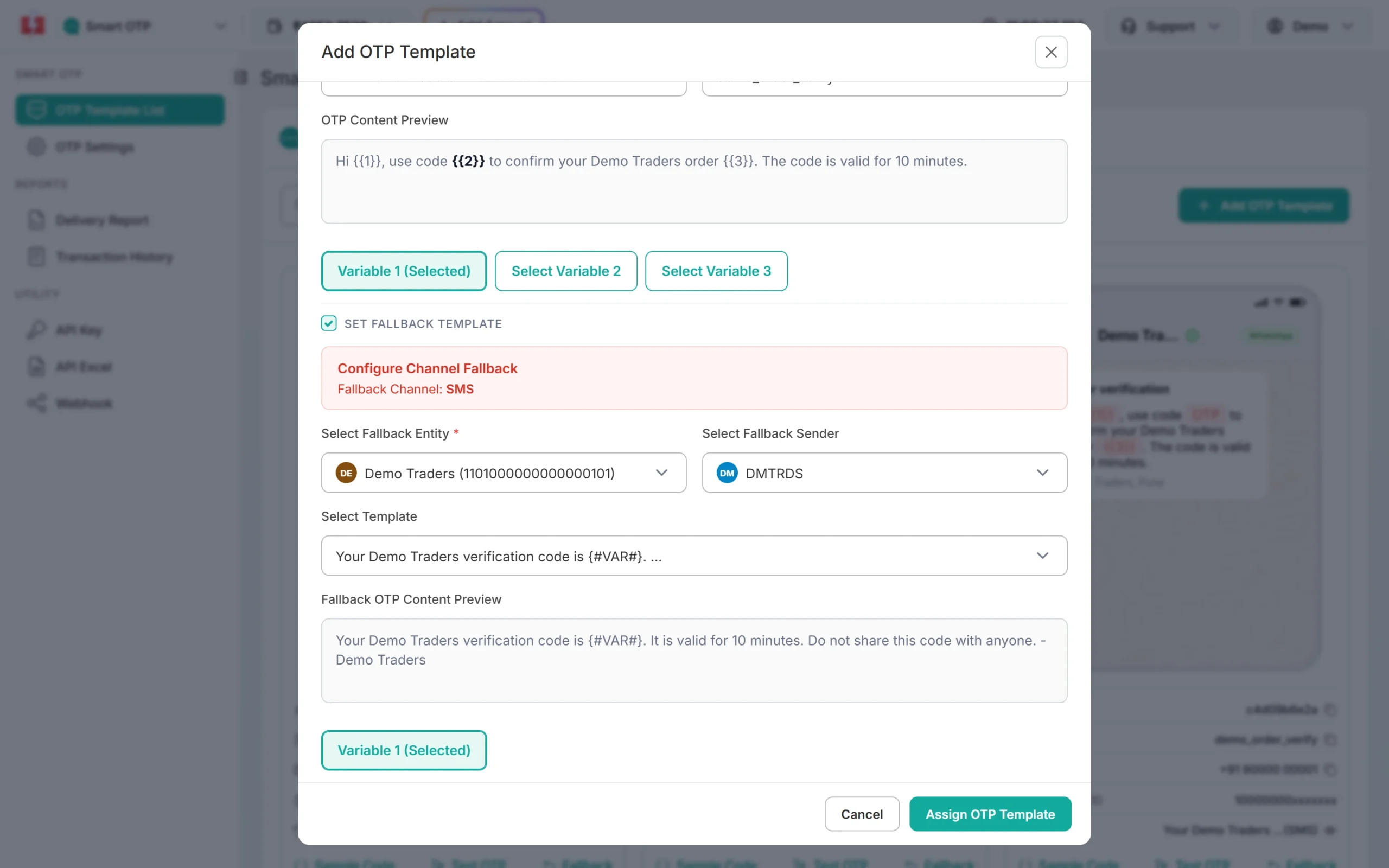
A WhatsApp OTP template with an SMS fallback. -
Send the OTP to the number the user typed
Call the Smart OTP send API with the user’s mobile number and your OTP ID. Verify it later with the same mobile number and the code the user entered. See Smart OTP send API.
-
Check delivery in the OTP report
The OTP report shows each OTP with the receiver number, channel and status. WhatsApp OTPs can also show Read.
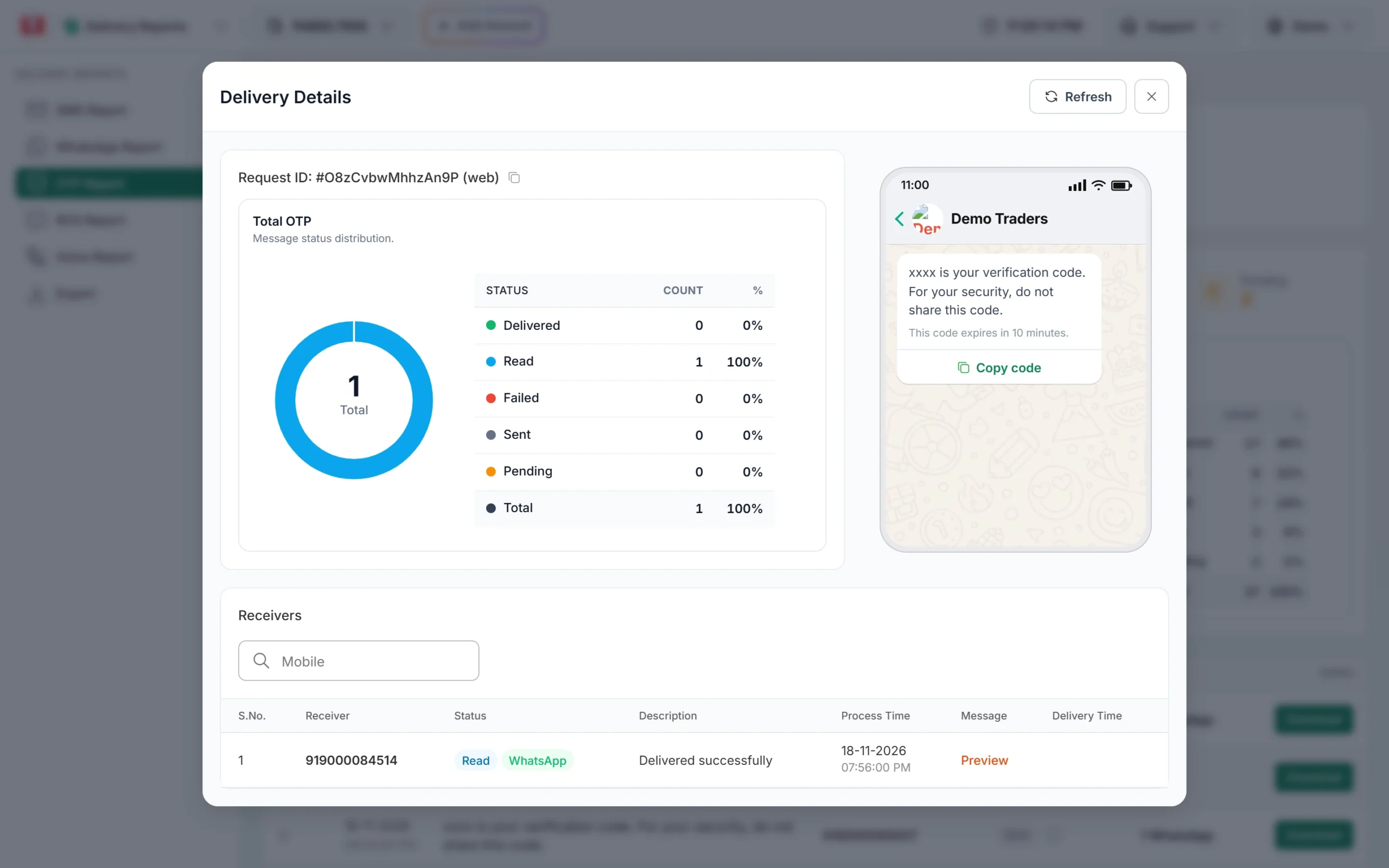
A WhatsApp OTP with a Copy code button, shown as Read.
Frequently asked questions
What is a BSUID in WhatsApp?
A business-scoped user ID. Meta uses it to identify a WhatsApp user for one business when the user’s phone number is hidden behind a username.
Can I send a WhatsApp OTP to a username or BSUID?
Not with authentication templates. Meta says copy code, one-tap and zero-tap authentication templates need the user’s phone number.
Will my WhatsApp OTP login stop working because of usernames?
No, if you collect the mobile number and send the OTP to it. Usernames change what you see in chats, not the number the user types into your app.
Do usernames affect SMS OTPs?
No. SMS always goes to the phone number. That is why an SMS fallback is a good backup for WhatsApp OTPs.
Does my business need a username to send OTPs?
No. A business username only changes the sender name shown in WhatsApp. OTPs are sent from your WhatsApp number as before.
Can a user with a username still get my marketing messages?
Meta allows most message types to be sent to a BSUID. Your opt-in rules still apply. See WhatsApp opt-in and opt-out rules.